The world generated 62 million metric tonnes of electronic waste in 2022, but only 22.3% was documented as formally collected and recycled, according to the Global E-waste Monitor. For an IT manager, that gap reframes retirement: getting equipment out of the building isn't the same as recovering its value or proving it was handled responsibly.
IT asset recovery starts with a different question: what useful life, financial value, or community benefit can you preserve without carrying data risk forward? The answer requires more than a pickup. It requires an inventory, an appropriate sanitization decision, a destination for each device, and evidence that the work was completed.
What IT Asset Recovery Covers and Where It Starts
IT asset recovery is the managed process of getting value and responsibility back from retired technology. It covers laptops, desktops, servers, networking gear, phones, monitors, and the storage media inside them.
A hospital discharge offers a useful comparison. Each asset needs a record, an authorized next destination, and confirmation that the risks tied to its departure have been addressed. Moving equipment into a warehouse without those controls only changes where the problem is stored.
Recovery begins before removal
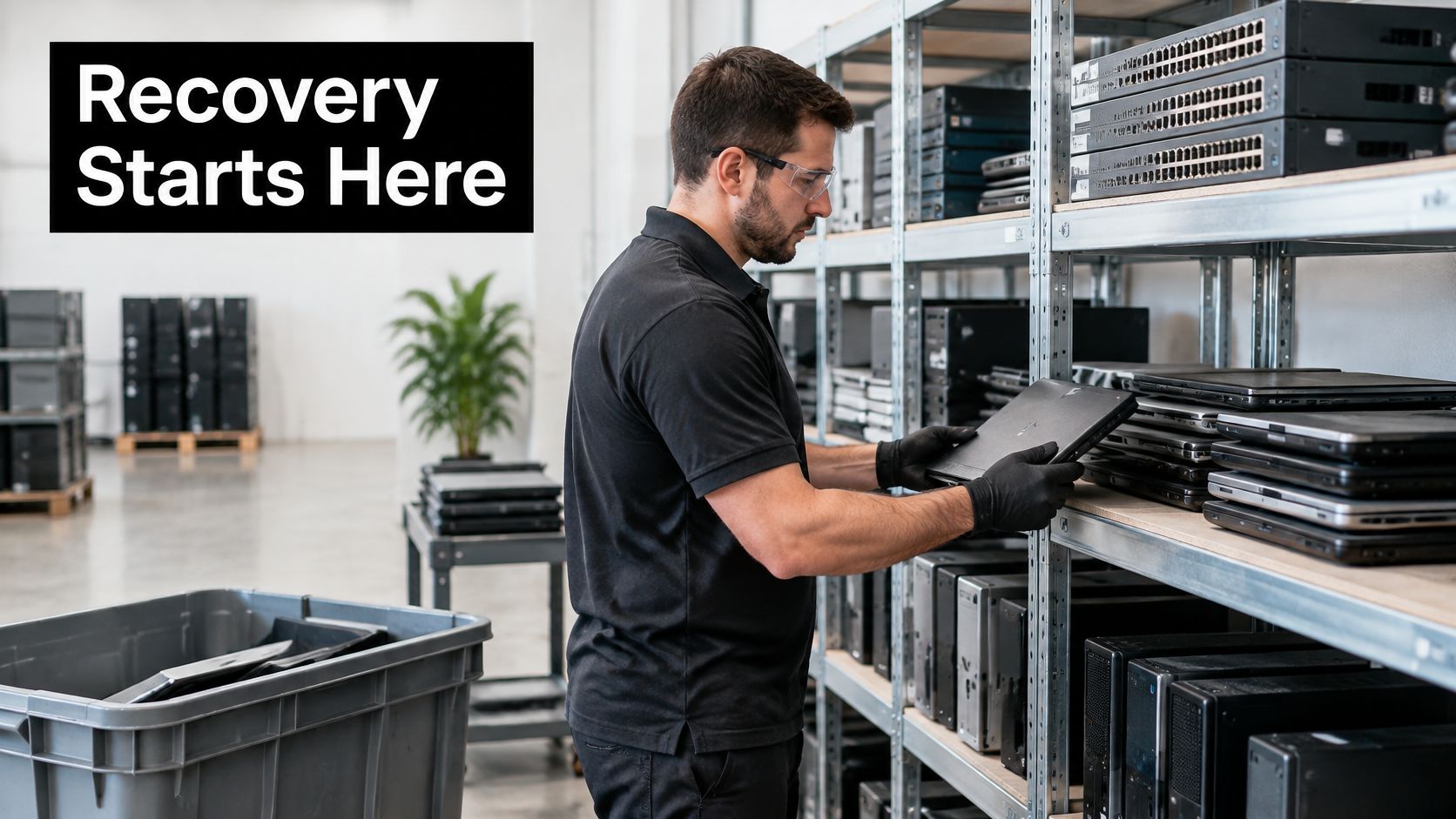
Start when the organization approves equipment for retirement, not when the truck arrives. Confirm ownership, identify data-bearing components, and separate equipment that's genuinely obsolete from equipment that another department could still use.
An IT equipment audit helps establish that baseline. A useful register includes the asset tag, manufacturer serial number, model, assigned department, physical location, and retirement authorization.
Data handling belongs in that decision from the beginning. NIST's media-sanitization guidance addresses storage media becoming obsolete, transferring between users, or leaving organizational control, making sanitization a lifecycle responsibility rather than an afterthought.
Five possible outcomes for a retired IT asset
| Outcome | Typical condition | Value retained | Data step required |
|---|---|---|---|
| Reuse in place | Working, still supported | Full remaining service life | Sanitize appropriately and keep the device in service |
| Refurbish and resell | Working, saleable, recent model | Resale or buyback revenue | Verify purge and document the grade |
| Donate | Working, older but functional | Community use and digital inclusion | Verify purge and file donation paperwork |
| Parts harvesting | Failed or damaged, valuable components | Memory, boards, drives, and other parts | Destroy storage media whose sanitization cannot be verified |
| Material recycling | End of life, non-functional | Recovered metals and plastics | Destroy storage media before downstream handling under the approved recycling route |
The table separates physical condition from data status. A laptop can be mechanically sound but blocked from reuse because its storage hasn't passed sanitization. Conversely, a broken laptop may contain reusable memory and a drive that can be sanitized successfully.
Disposal closes an asset's record. Recovery assigns an outcome and documents it. That distinction turns a room full of unwanted hardware into a controlled set of decisions.
Why Recovery Beats Disposal for Businesses and Agencies
Informal disposal carries costs even before anything leaves the premises. Staff spend time searching through closets, facilities teams store idle hardware, and procurement buys replacements without knowing that usable spares already exist.
The scale isn't new: the U.S. Environmental Protection Agency estimated that 438 million electronic products were sold in the United States in 2009, while 2.4 million tons of electronics were ready for end-of-life management that year. Those historical figures illustrate why planned channels matter more than occasional cleanups.

Financial value and risk reduction
Recovery gives finance and IT a shared way to evaluate retirement. Instead of treating every device as a removal expense, compare its remaining usefulness with the cost of preparing it for another user.
- Financial benefit: Redeploy a supported desktop to a training room rather than purchasing another machine. Sell eligible surplus equipment rather than paying to store it indefinitely.
- Risk control: Keep retired servers in an access-controlled holding area with named custodians. A server doesn't become harmless because someone disconnected its network cable.
- Community benefit: Route usable computers into corporate donation programs with documented recipients and appropriate preparation, rather than sending functional equipment directly to scrap.
For Smyrna, Georgia, and nearby Atlanta workplaces, an office cleanout or facility cleanout can become a practical opportunity to establish these controls. Coordinate IT, facilities, procurement, and security before desks are cleared or building access changes.
Match the policy to the information
A school should assess student records under FERPA. Clinics and laboratories should assess protected health information under HIPAA, where applicable. Organizations holding personal information also need counsel to evaluate relevant state breach-notification laws and the evidence needed to establish how data was handled.
These obligations aren't interchangeable, and there's no universal certificate that proves compliance with every rule. Ask legal counsel to confirm which requirements apply before approving the disposal policy.
Practical rule: Keep enough evidence to explain who authorized retirement, who held the equipment, what happened to its data, and where it ultimately went.
Donation paperwork may support tax treatment, but eligibility and valuation belong with your accountant. Sustainability teams should likewise distinguish a documented donation from an unsupported claim about social impact.
Donation-based recycling provides an operational route for combining equipment retirement with community use. The objective is a planned system of reuse, electronics recycling, and necessary disposal, not merely an empty storage room.
Choosing Clear, Purge, Cryptographic Erase or Destruction
Shredding every drive isn't automatically the right security decision. It prevents that storage device from returning to service, even when an approved, validated sanitization method could have preserved its usefulness.
NIST's September 2025 revision announcement emphasizes enterprise sanitization programs, sensitivity-based decisions, validation, and alignment with current standards. The important question isn't how dramatic the process looks. It's whether the chosen process makes recovery of the information infeasible at the required assurance level.
Sanitization methods and when each one applies
Cryptographic erase is a technique that may support a sanitization outcome, not a separate assurance category equivalent to clear, purge, and destroy. Keep that distinction in mind when reviewing a vendor's terminology.
| Method | What it does | Best for | Reuse possible | Evidence to keep |
|---|---|---|---|---|
| Clear | Logical overwrite that blocks basic, non-invasive recovery | Suitable low-sensitivity media retained in-house | Yes | Overwrite log tied to serial number |
| Purge | Uses an appropriate firmware sanitization command or another approved technique to resist laboratory-level recovery | Reusable laptops, servers, and drives leaving your control | Yes with suitable logical methods; degaussing generally prevents drive reuse | Tool result and verification record |
| Cryptographic erase | Sanitizes encryption keys so encrypted data becomes inaccessible | Encrypted media with suitable implementation and verified key destruction | Yes, when the process is validated | Key-destruction record per device |
| Destroy | Uses approved physical destruction, such as shredding, pulverizing, incineration, or melting | Failed, unverifiable, or highly sensitive media requiring destruction | No | Certificate of destruction listing serials |
| Exception handling | Applies a separate procedure to damaged devices, removable media, and virtual or cloud storage | Items outside the normal approved workflow | Only after an approved method succeeds | Case-specific sign-off by the data owner |
Don't treat a command named Secure Erase as proof that purge occurred. Confirm that the specific command, drive technology, implementation, and result meet your approved requirements. Likewise, degaussing is for suitable magnetic media, not solid-state storage.
Make the decision from evidence
Use these rules when sorting the fleet:
- Known encryption and verified key sanitization: Consider reuse when the encryption implementation and key-handling evidence support the required sanitization outcome.
- Failed drive that cannot complete a verifiable approved process: Route it to destruction rather than assuming inaccessible data is erased.
- Unknown encryption status: Hold it for investigation. A login password or encrypted operating-system screen isn't evidence that every relevant data area was protected.
The NIST media-sanitization FAQ explains that multi-pass overwriting is unnecessary under the revised approach and that federal cryptographic sanitization requires appropriately validated FIPS 140 cryptographic modules. Repeating an unsuitable operation doesn't make it suitable.
Damaged devices need safe handling before testing. Removable media need their own identifiers, while virtual and cloud-connected storage require attention to snapshots, replicas, provider controls, and retained keys.
Review data sanitization methods before writing a destruction-only purchase order. Sort equipment into reuse candidates, verification holds, and destruction candidates, then ask vendors to explain the method and evidence for each group.
How to Run a Recovery Program From Pickup to Final Disposition
A recovery program needs a continuous record, not disconnected spreadsheets from the IT team, carrier, and processor. The asset identifier should survive every handoff, including removal of the drive from its original chassis.
NIST SP 800-88 Revision 2 distinguishes checking sanitization results from authorizing acceptance of those results. Verification examines whether the process completed appropriately; validation determines whether the evidence supports accepting the residual confidentiality risk.
Keep the asset record connected
For each data-bearing device, link serial number, media type, sanitization method, process result, operator, date, and disposition decision. Where a laptop contains removable storage, record both the laptop serial and the drive serial so their outcomes can be reconciled separately.
For broader lifecycle planning, Peak Transport's asset management guide provides useful context for treating equipment records as ongoing management tools rather than end-of-life paperwork.
Put the workflow into practice
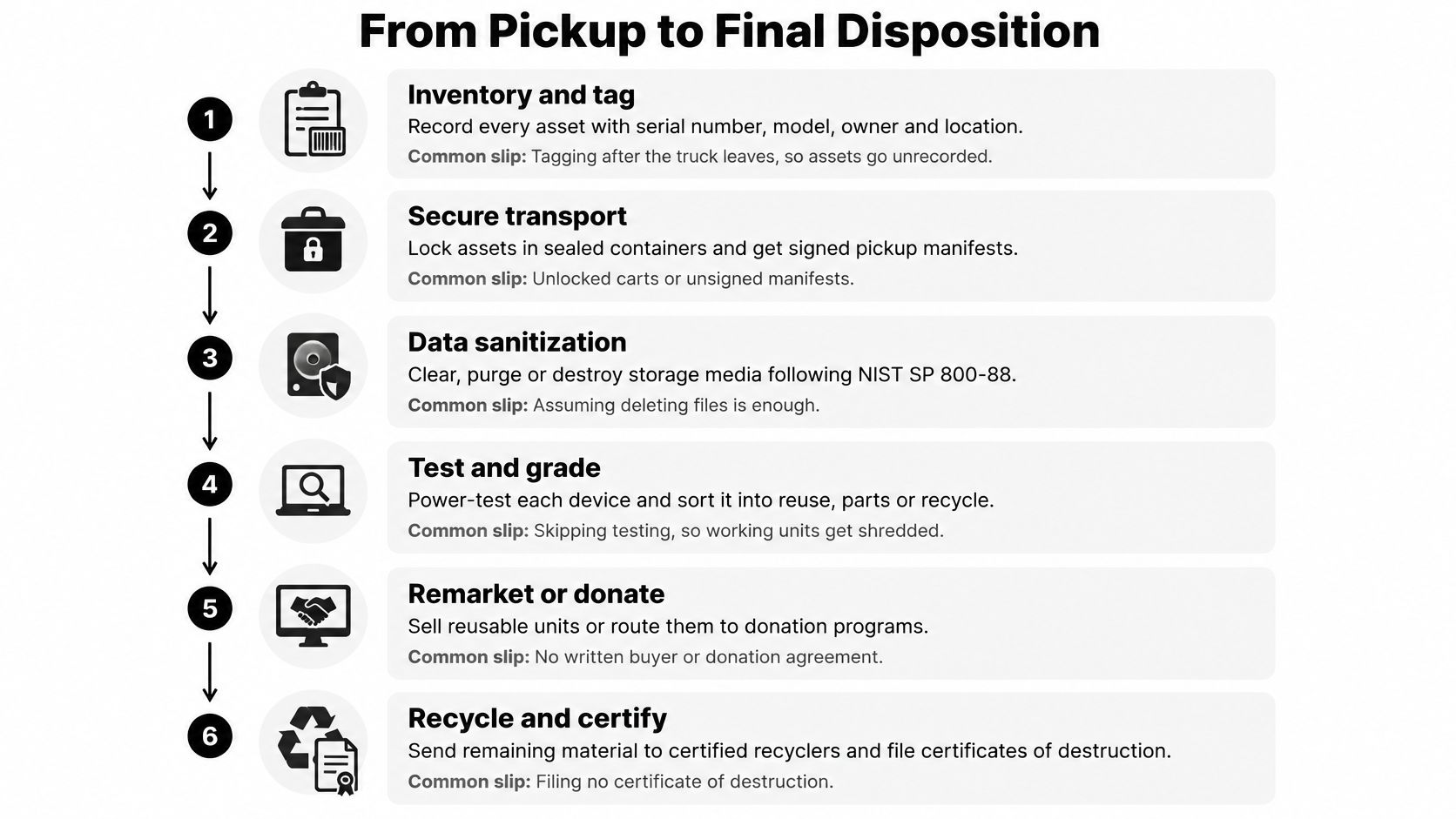
Inventory and tag before movement. Record the serial number, model, owner, and location, then attach an asset identifier that will remain readable during handling. The common slip is tagging after collection, when nobody can reliably reconcile what left.
Triage by condition and sensitivity. Identify likely reuse, resale, donation, parts, and recycling candidates, while flagging regulated information and restricted equipment. Don't let a promising resale price override a security hold or legal retention requirement.
Plan packing and collection. Arrange pickup or drop-off, label containers, and use locked or tamper-evident handling appropriate to the risk; record counts and weights on the manifest. Loose drives in an unlabeled box are easy to misroute and difficult to reconcile.
Document custody at every handoff. Obtain signatures, transfer times, receiving-party details, and the intended processing facility. A carrier receipt alone doesn't establish what happened after delivery.
Sanitize and evaluate the evidence. Apply the approved method, review errors and anomalies, and obtain authorized acceptance before releasing media into another channel. Don't convert a failed tool result into a successful record simply because the device no longer boots.
Test, grade, and refurbish. Check the display, ports, battery condition, memory, storage, and required accessories, then compare repair cost with the intended destination. Cosmetic grading without functional testing can send unreliable computers to buyers or donation recipients.
Route to the approved destination. Release accepted assets for resale, donation, redeployment, parts recovery, or material recycling, with batteries and hazardous components segregated. Confirm who owns rejected units and who pays for returns or additional processing.
Reconcile and close every record. Collect certificates, destination records, sale or donation documentation, and exceptions, then compare them with the original manifest. A batch-level completion email isn't enough if individual assets remain unaccounted for.
Don't close a collection project while an asset is still marked “received” without an accepted final outcome.
Use reverse logistics planning to define packaging, collection responsibilities, transfer controls, and exception escalation before equipment moves. That's especially useful when branch offices, remote staff, and central IT all contribute equipment to the same project.
Assign a project owner who can resolve discrepancies across departments. Finance may approve a write-off, but IT or security must still determine whether a missing drive represents an unresolved information risk.
Where Recovery Value Sits in Reuse, Resale and Recycling
Retired electronics contain recoverable metals, but material value is only part of the equation. A functioning computer can retain its usefulness as a computer, its components can retain value as parts, and only the remaining material needs to enter a recycling process.
The practical mistake is committing equipment to scrap before anyone evaluates those alternatives. Once a processor shreds a working motherboard or display, you can't recover its former service value.
Routing devices by condition
| Device condition | Recommended route | Value retained | Requirement before moving |
|---|---|---|---|
| Working and recent | Refurbish and resell | Strongest resale potential among comparable assets | Verified purge and documented grade |
| Working, older, still useful | Donate to schools or nonprofits | Community use and digital inclusion | Verified purge and donation paperwork |
| Working but obsolete for your needs | Internal redeployment or buyback | Residual value and avoided purchases | Clear or purge matched to sensitivity |
| Failed or damaged | Parts harvesting, then recycling | Memory, boards, and recovered metals | Destroy failed or unverifiable storage media first |
| Non-functional, no resale value | Certified material recycling | Recovered metals and plastics | Destroy storage media and confirm downstream handling |
| Batteries and hazardous components | Segregated recycling | Safe handling and support for compliance | Separate from the general stream at pickup |
“Recent” isn't a sufficient grading criterion on its own. Check operating-system support, repairability, activation locks, firmware restrictions, charger availability, and the expectations of the receiving user.
A donation recipient needs usable technology, not your repair backlog. Confirm that the machine can support its intended workload and that the receiving organization has a practical way to maintain it.
Compare cash recovery with avoided purchasing
Resale converts surplus equipment into cash. Internal redeployment can be more useful when another department would otherwise buy a similar device, but only if that department actually needs it.
Say an engineering team retires laptops that still meet the requirements of an administrative training program. Keeping appropriate units for that program may avoid a purchase, while sending the remaining saleable units to remarketing prevents another surplus pile.
Evaluate the full route:
- Preparation cost: Include testing, repair, sanitization, accessories, and staff handling.
- Logistics impact: Compare transport needs and avoid unsupported claims about emissions savings.
- Reliability exposure: Consider battery condition, warranty arrangements, support effort, and likely returns.
- Recipient readiness: Confirm that donation recipients can deploy and maintain the equipment.
Cost recovery strategies should account for donation-based recycling and equipment buyback as distinct options, not interchangeable promises. One emphasizes continued community use; the other establishes a commercial return under agreed grading and payment terms.
Grade each asset by function, age, repair cost, and market demand before choosing its route. That gives procurement a defensible financial decision and sustainability managers a meaningful explanation of what was preserved.
Measuring Recovery Results Without Vanity Metrics
Total pounds collected tells you how much material moved. It doesn't tell you whether usable laptops were destroyed, whether drives passed sanitization, or whether a downstream processor recovered useful materials.
The Manufacturer's coverage of e-waste recycling highlights why the label “recycled” needs scrutiny: processing can include shredding or burning rather than high-value recovery. Landfill diversion and circularity aren't the same measure.
Recovery program KPIs and how to calculate them
| KPI | How to calculate | What it tells you |
|---|---|---|
| Units recovered | Count assets retired and logged with serial numbers | Program scope and coverage |
| Percent reused or resold | Reused or resold units divided by total units, expressed as a percentage | Value retention |
| Percent materially recycled | Materially recycled units or weight divided by the corresponding total | Material-routing share, supported by downstream evidence |
| Sanitization validation rate | Accepted, validated sanitizations divided by media sanitized | Data-risk control |
| Hazardous fraction | Battery and hazardous-item weight divided by total weight | Handling requirements and stream composition |
| Net recovery value | Resale and buyback revenue minus service and sanitization fees | Net financial recovery, not a percentage ROI |
| Time to disposition | Elapsed days from pickup to documented final outcome | Process speed and accountability |
Use consistent denominators. Don't divide recycled weight by total device count, or count a drive and its parent laptop as separate recovered computers.
Add a final-disposition completeness check to the scorecard. Every serialized asset should have an accepted outcome, and every residual material stream should have a documented destination.
An illustrative recovery calculation
Consider a hypothetical firm retiring 400 laptops. It sells 240 at a net selling value of USD 120 each, generating USD 28,800, donates 100 with documentation, and sends 60 to recycling.
If the combined service and sanitization fee is USD 6,000, net recovery before internal labor is USD 22,800. These are illustrative inputs, not market prices or a forecast for a particular equipment lot.
The accounting rule is:
Net recovery = resale and buyback revenue − service and sanitization fees + substantiated avoided purchase costs from redeployment.
Don't count an avoided purchase unless a real, planned purchase was displaced. Don't include fees twice if the reported resale amount already deducts them, and keep donation benefits separate from cash revenue.
Begin with sanitization validation rate, reuse share, and time to disposition. Report those measures by destination and investigate exceptions, rather than allowing a large collection weight to hide incomplete work.
Recovery in Practice Across Organization Types
The physical equipment may look similar across organizations, but ownership, information sensitivity, and operating constraints change the retirement decision. The following scenarios are illustrative, not accounts of actual customer projects.
Match the method to the operating context
Small business. A hypothetical 30-person firm retires 35 laptops, and nobody can establish whether staff erased local files properly. Keep the machines controlled, obtain a signed pickup manifest, and require a suitable verified purge for each reusable drive.
School district. A hypothetical district has 1,200 Chromebooks and lab PCs approaching lease end. Confirm ownership and return obligations first; only owned equipment approved for transfer can enter donation, following purge verification, while failed storage goes to destruction with authorization.
Enterprise data center. A hypothetical enterprise retires 60 servers containing customer information. Its data center decommissioning checklist should cover storage arrays, management controllers, configuration exports, and removable media, using cryptographic erase where key sanitization is validated and destruction for failed, unverifiable storage.
| Organization | Primary retirement risk | Operational priority |
|---|---|---|
| Small business | Unmanaged local data and incomplete inventories | Identify every drive and establish a controlled handoff |
| School district | Student information, lease restrictions, and device-management locks | Resolve ownership and release approved devices from management |
| Enterprise data center | Distributed storage, replicas, and complex dependencies | Map data locations before disconnecting systems |
| Government agency | Sensitive taxpayer information and retention obligations | Apply the applicable agency-specific sanitization requirements |
| Medical or laboratory site | Embedded storage and patient or research information | Identify storage and resolve contamination or handling hazards |
Apply sector-specific requirements carefully
For a government agency handling sensitive federal tax information, the IRS media-sanitization guidelines state that simple deletion is insufficient, media leaving organizational control or being repurposed for non-sensitive use should be purged, and media not intended for reuse should be destroyed. That is specific guidance for the information and organizations within its scope, not a universal rule for every government device.
At a medical or laboratory site, an instrument may contain an embedded computer, internal drive, removable card, or exported research dataset. Medical equipment disposal and laboratory equipment disposal therefore require more investigation than collecting an obvious desktop computer.
Separate contamination clearance from information-security clearance. A device can be physically safe to handle while still containing protected information, or properly sanitized while remaining unsuitable for ordinary electronics recycling.
Leased hardware requires another distinction: the organization may own the data without owning the device. Confirm return terms, permission for any physical destruction, and who signs the sanitization evidence before the return truck arrives.
For regulated equipment, ask for the method and result per device, not a blanket promise of secure data destruction. Product destruction may be appropriate for restricted items, but it shouldn't replace an approved reuse route without notice.
Choosing a Recovery Partner and Scheduling Your First Pickup
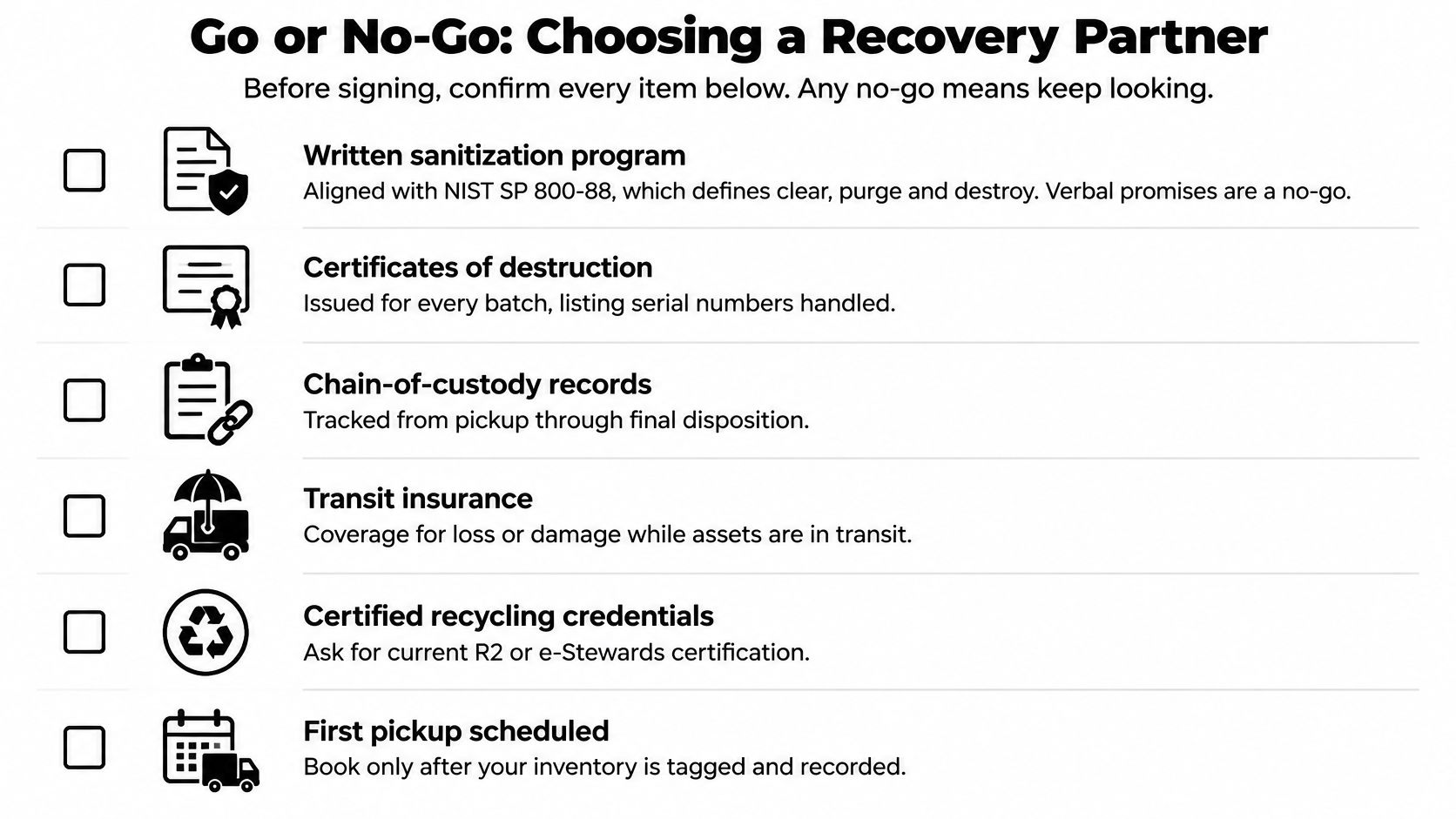
Use a clear go-or-no-go test: will the partner provide a written sanitization program, explain its approved methods, and supply evidence you can reconcile to your inventory? If the answer is only a verbal assurance, don't release equipment.
The NIST Guidelines for Media Sanitization, Revision 1, organized decisions around clear, purge, and destroy according to information confidentiality and media technology. It is a historical reference, not the edition to specify for a new program; request alignment with the current revision and applicable supporting standards.
Confirm the evidence before the pickup
Use these vendor selection criteria to structure the conversation:
- Device-level methods: Ask how the partner selects, verifies, and validates sanitization.
- Serial-level reports: Request a sample report and check how removed drives are linked to their original equipment.
- Custody records: Require signed manifests and documented transfers.
- Certificates: Confirm that sanitization and destruction records identify the relevant serial numbers.
- Downstream visibility: Obtain processor names, facility locations, and evidence supporting claimed recycling credentials.
- Insurance: Review liability, transit coverage, exclusions, and subcontractor responsibilities.
- Outcome reporting: Separate resale, donation, parts recovery, material recycling, and residual disposal.
- Collection arrangements: Confirm packing responsibilities, business pickup terms, and whether free customer drop-off applies.
- Relevant experience: Ask for references from organizations with comparable equipment and information risks.
- Commercial terms: Establish grading, rejected-item charges, buyback deductions, payment timing, and dispute procedures.
Red flags include automatic destruction without grading, unnamed downstream destinations, missing certificates, and reports limited to collection weight. A low collection price can become expensive if your team must reconstruct the evidence afterward.
Prepare a controlled first collection
For organizations in Smyrna and the Atlanta area, Reworx Recycling is one option for electronics recycling and IT asset disposition (ITAD), offering business pickups, free customer drop-off, equipment decommissioning, secure hard drive shredding, buyback options, and donation-based recycling. Its social enterprise recycling model connects responsible IT equipment disposal with technology donations, digital inclusion, and workforce development.
Start with an inventory containing serials, models, locations, and known storage details. Use it to discuss pickup arrangements, laptop disposal, computer recycling, and data-destruction requirements before authorizing release.
Sustainable recycling is easier to manage when every device has an intended route and someone is responsible for confirming completion. Ask how usable equipment enters community programs, how outcomes are documented, and how exceptions are resolved.
Reworx Recycling offers pickup, secure data destruction, equipment buyback, and donation-based recovery to help businesses retire technology responsibly while supporting communities through technology donations, digital inclusion, and workforce development. Visit Reworx Recycling to plan your next equipment donation, discuss a business pickup, or explore a recovery partnership, starting with your inventory of serial numbers, models, and locations.