IBM's 2025 research puts the global average cost of a data breach at $4.44 million. A retired hard drive can still hold the same sensitive information as an active computer, so visible damage alone does not show that its data is unrecoverable. Treat destruction as a security decision, not just an equipment-cleanout step.
Why Retired Drives Still Create Breach Risk
A drive can look empty and still hold recoverable information. During an office cleanout, laptop refresh, or data center decommissioning, equipment may leave desks and server racks before asset records are updated. A retired drive can sit in storage, travel with surplus equipment, or enter a recycling stream before anyone checks its status.
Deleting files or formatting a drive removes ordinary access through its interface. It does not necessarily erase the underlying data. Customer and employee records, credentials, financial files, or intellectual property may remain, much like writing over a label without emptying the box beneath it.
A breach can disrupt work well beyond the IT team. Customer service, production, sales, and routine operations may all be affected while an organization investigates and responds. The exposure begins with uncertainty: teams may not know what data remains, where the drive went, or whether it was sanitized before leaving their control.
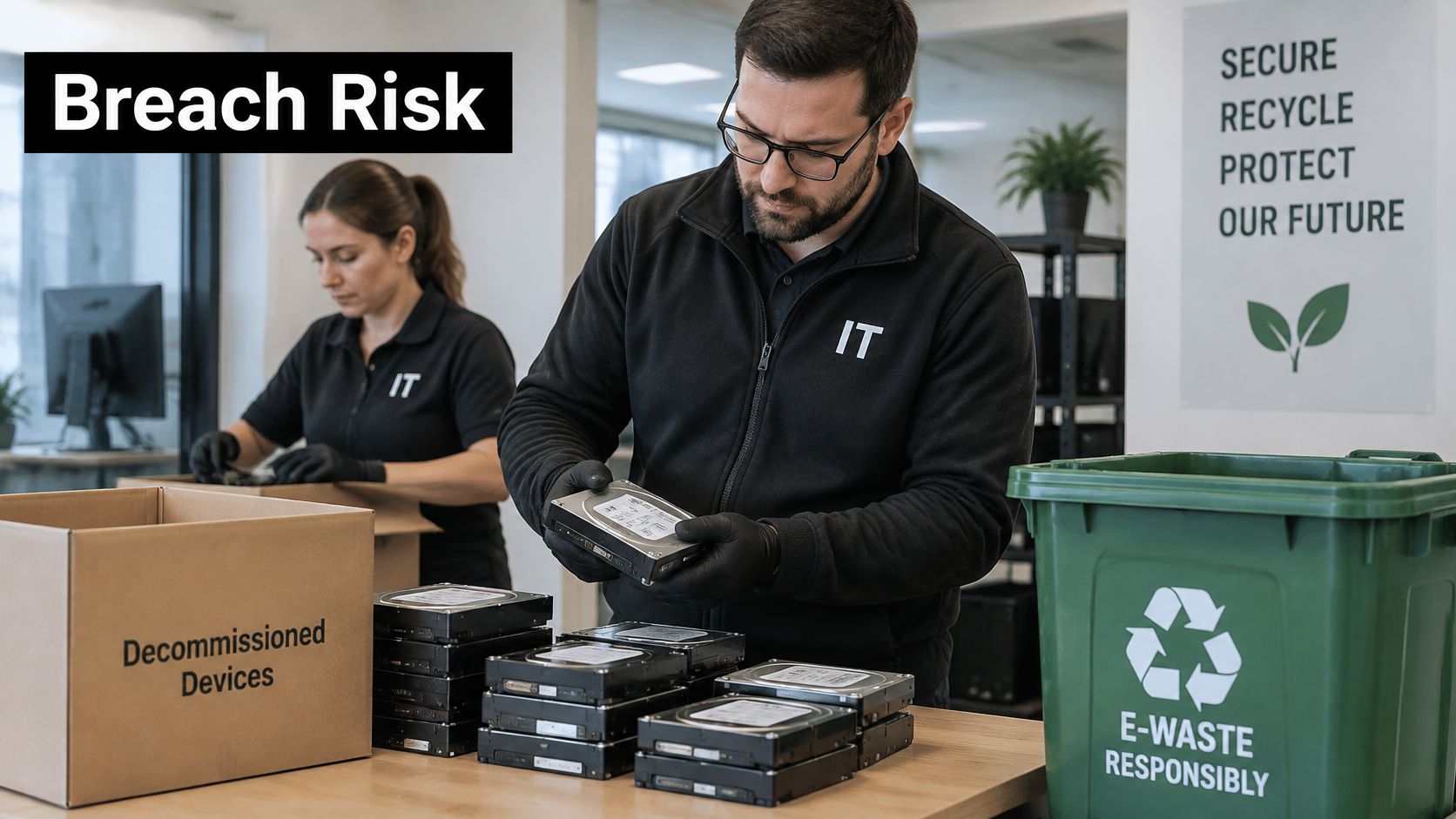
Visible damage is not proof of sanitization. A bent casing or a drive that no longer starts may still contain intact storage components. HDDs store data on magnetic platters, while SSDs use flash memory chips. Hybrid drives combine both, so a method that affects one component may leave another untouched. Match the process to the media and the intended outcome: reuse calls for a validated sanitization method, while a drive that cannot or should not be reused may be destroyed.
For a retired drive, physical destruction can remove the storage medium as a future source of recoverable data, but it also rules out reuse. The decision should account for security, audit evidence, and material recovery, not just whether the device looks damaged. Understanding why data destruction matters can help organizations make that decision part of equipment disposal rather than an afterthought.
How Clear Purge and Destroy Differ
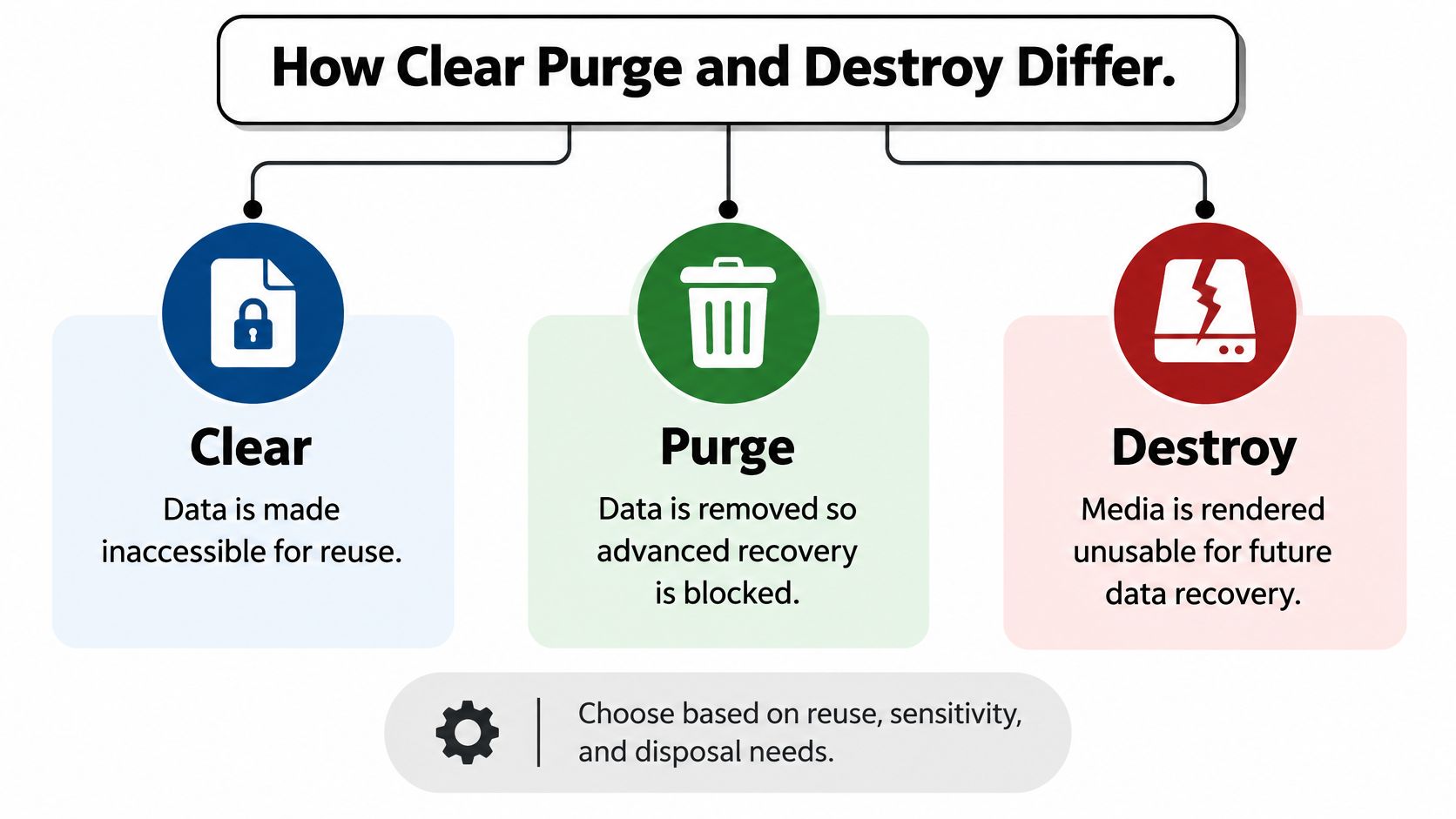
A drive can look damaged and still retain recoverable data. To choose what happens to a retired device, separate the sanitization outcome from its appearance: clear supports ordinary reuse, purge is designed to resist advanced recovery, and destroy makes the storage medium unusable.
Deleting a file is like hiding a key. Someone using the usual interface may not see the contents, but the data can remain on the drive. Clear makes data inaccessible through normal use, which may suit a device intended for reuse. It does not necessarily prevent recovery with more advanced techniques.
Purge is closer to replacing the lock through a verified process. It aims to make data recovery infeasible using state-of-the-art laboratory techniques while keeping the device potentially reusable. A working laptop approved for redeployment, resale, or donation may fit this path, if the method is appropriate and validated.
Destroy breaks the storage medium's ability to hold data again. The goal is to make recovery infeasible using state-of-the-art laboratory techniques and render the medium unusable for storage. Methods include disintegration, incineration, melting, pulverization, and shredding.
Match the outcome to the asset
Choose based on the device's condition, the sensitivity of its data, and whether it needs to remain usable. A functional laptop approved for reuse may be suited to purge, which addresses data risk while preserving equipment value. A drive that must leave service may be better suited to destruction.
Visible damage alone does not establish that data has been sanitized. The goal is to match the method to the media and the intended outcome, rather than treating destruction as the default for every asset. A clear overview of data sanitization can help teams apply the distinction consistently.
Shredding Degaussing and Crypto-Erase Compared
Visible damage and data sanitization are different things. Choosing a method starts with the storage media and ends with the intended outcome: destroy the drive, or remove data while keeping the device available for reuse. The distinction matters because HDDs store data magnetically, while SSDs use flash memory.
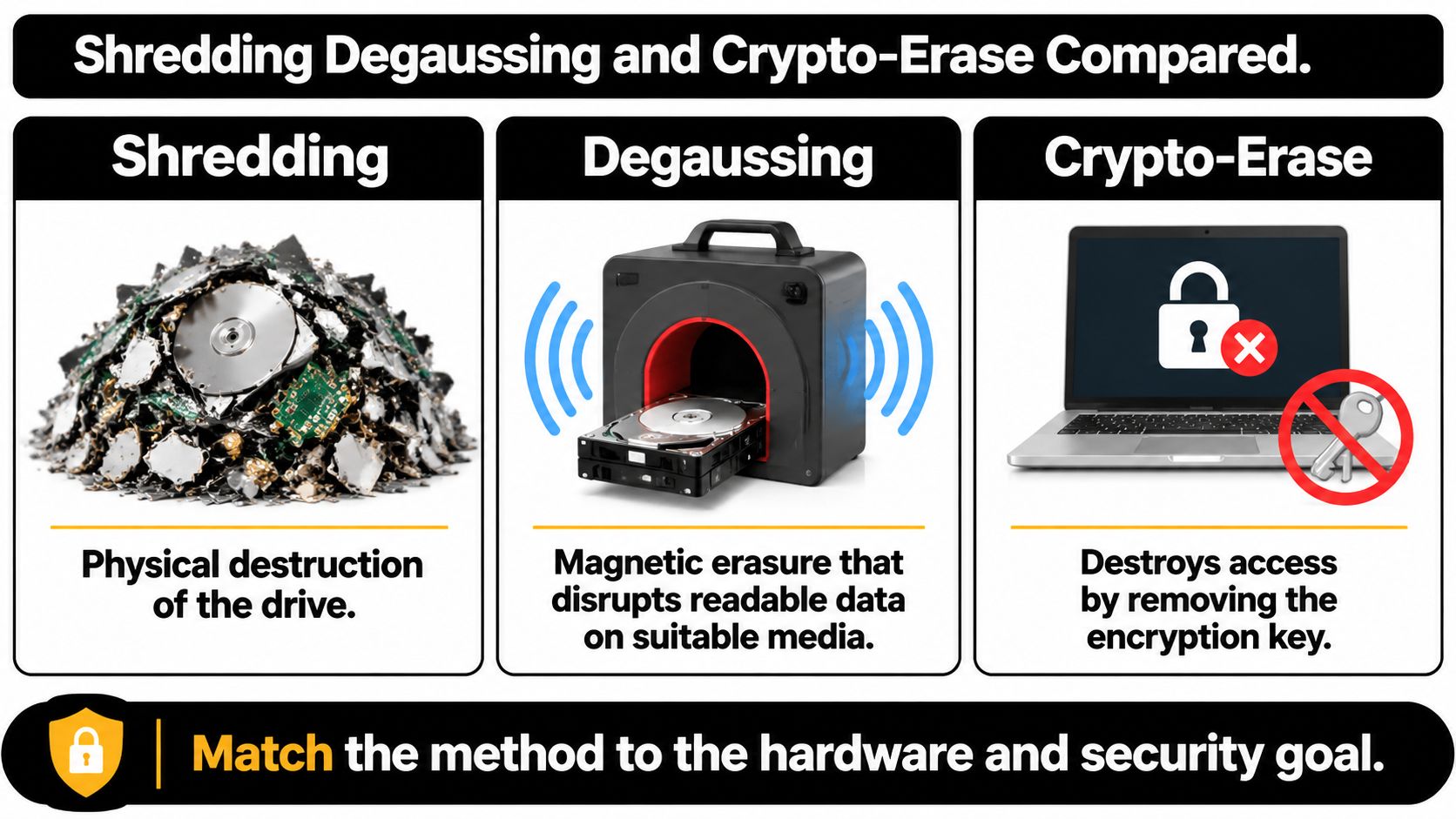
Shredding physically reduces media to fragments. The machine's name does not establish whether the fragments are small enough. NSA/CSS guidance specifies that magnetic disks or memory chips must be reduced to particles no larger than 2 mm under the applicable manual for shredding to sanitize them (NSA/CSS hard drive destruction requirements). Shredding is a destroy method, so it rules out reusing the drive.
Degaussing uses a magnetic field to disrupt data on compatible magnetic media, such as HDD platters. It does not sanitize SSDs, which store data in flash memory. NSA/CSS guidance also calls for physical damage to HDD platters after degaussing before release. That added step is part of the specified process, rather than proof that degaussing applies to every drive.
Crypto-erase makes encrypted data inaccessible by removing the encryption key. Unlike shredding or degaussing, it may allow a suitable drive to remain in service. That depends on confirming that encryption was properly in place and that the erase process addressed the relevant key material. If those details cannot be established, the organization has less evidence that the data is inaccessible.
For a conventional HDD, the data-bearing platters are enclosed inside the case. Bending the case or removing the circuit board does not show that the recording surfaces were treated. NSA/CSS specifications for approved deformer devices require platters to be bent, punched, or waffled within 30 seconds. The equipment must also demonstrate continuous operation for one hour while processing at least 100 drives from different manufacturers. These figures describe equipment testing and processing requirements, not a general rule that visible damage proves sanitization.
SSDs need a different check. Wear-leveling and overprovisioned cells can spread data across flash packages and storage areas. A damaged controller or visibly broken chip may therefore leave other data-bearing areas untreated.
| Method | Best fit | Reuse possible | What must be verified |
|---|---|---|---|
| Shredding | Media designated for physical destruction | No | Media type and final particle size |
| Degaussing | Compatible magnetic media | Generally no | Device compatibility and any required physical damage |
| Crypto-erase | Encrypted media intended for reuse | Potentially | Encryption status and successful key removal |
Practical rule: Match the method to the media and the end state. A reuse candidate needs a verifiable sanitization process; a drive designated for destruction needs treatment of its data-bearing components, not just a damaged-looking case.
When a Bent Drive Is Not Really Sanitized
A drive can look destroyed while its data-bearing parts remain untreated. Bending or punching the case is like denting a locked box: the outside shows damage, but it does not prove what happened to the contents.
For magnetic HDDs, NSA/CSS guidance says deformers used alone don't sanitize the drive. Its routine approach pairs degaussing with deformation. Where disintegration is used, the applicable manual sets a maximum particle edge size of 2 mm. A photograph of a crushed case cannot verify the method or the result.
Media type changes the decision. A hybrid drive contains magnetic and flash-based components, so those parts may require different treatment. HAMR and MAMR drives have additional requirements. The NSA/CSS evaluated hard-drive destruction products list approaches that can include incineration at 670°C, and state that no listed hard-drive shredder is approved to sanitize HAMR media. For SSDs, visible damage to a controller or chip still does not establish that all flash storage areas were addressed. If reuse is permitted, choose a sanitization method suited to the media rather than assuming physical damage is the only option.
Ask what happened to the data-bearing parts
Before accepting a destruction claim, ask the vendor to identify the drive type and explain how the chosen method treats its data-bearing components. Check that the evidence matches the intended outcome: destruction rules out reuse, while validated sanitization may allow it.
- Drive type: Was the asset an HDD, SSD, hybrid, or another storage type?
- Method: Was the method appropriate for that media, including any required combination of treatments?
- Result: What particle-size or deformation outcome was achieved?
- Records: Does the certificate identify the operator and date?
A bent casing is visible evidence of damage. The method and records must show whether the actual data-bearing parts were treated appropriately.
Standards Records and Chain of Custody
A drive's appearance cannot show whether its data is unrecoverable. Records connect the chosen treatment to the information handled and the drive's final disposition.
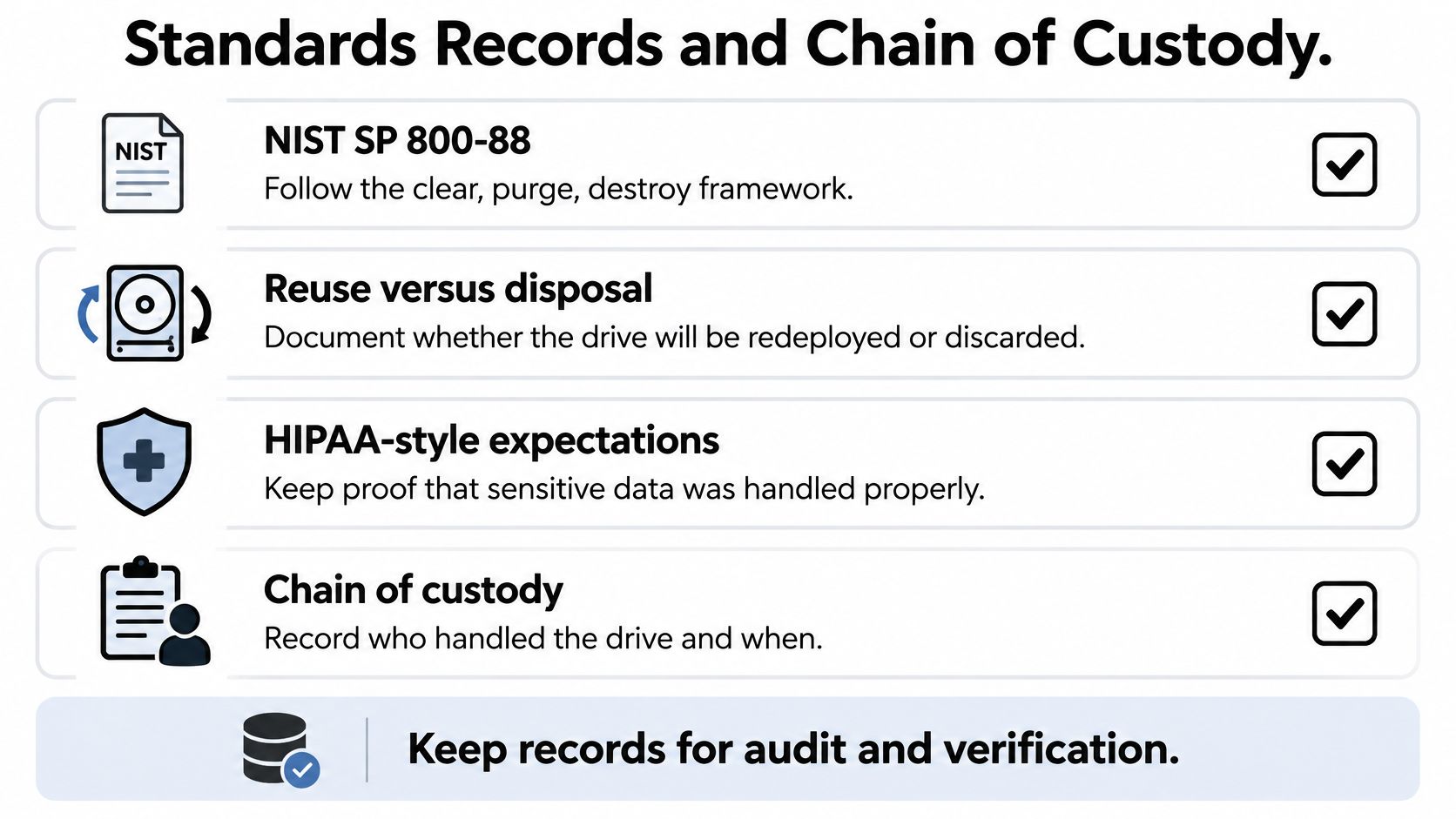
Start with a written program that classifies information by sensitivity, identifies who can authorize sanitization or destruction, and sets out what to do if a wipe fails. NIST distinguishes clearing and purging, which can prepare media for reuse, from destruction, which prevents the medium from being reused (NIST media sanitization guidance). Decide the path before devices leave desks, server racks, or secure storage.
For protected health information, include applicable HIPAA expectations, organizational policies, and relevant state or local requirements. A working laptop approved for reuse may need a different process from a damaged drive containing sensitive records. Match the method to the media, too: visible damage alone does not prove that an HDD, SSD, or hybrid drive has been sanitized.
Make the certificate describe the result
A useful chain-of-custody record links inventory to final treatment. Reconcile serial numbers and record each drive's media type, method used, equipment model, and any particle-size or deformation result. Identify the authorized operator and date. If drives leave the organization, document their controlled transport.
The certificate should name what happened to the data-bearing medium. “Recycled” describes a destination, not whether data was sanitized or destroyed. That distinction matters during an audit after laptop disposal, server retirement, or a facility cleanout. Asset-level records let a reviewer trace each drive from collection to treatment.
Use chain-of-custody documentation to help define which details to retain. NIST also advises that trained, authorized personnel address safety, hazardous materials, and disposition requirements before destruction. Clear records support both audit evidence and responsible material recovery, while keeping reuse available for media that has been properly sanitized.
Choosing Destruction or a Certified Vendor
A drive can look ruined and still hold recoverable data. Choose its end-of-life path by considering the media type, its condition, and whether secure reuse is appropriate. NIST's 2025 media sanitization revision recommends choosing sanitization methods based on information sensitivity, reuse or disposal plans, and applicable standards. A validated purge or cryptographic erase may retain value when reuse is approved. Destruction is a better fit for drives that must not return to service, are damaged, or cannot be reliably purged. HDDs, SSDs, and hybrid drives can respond differently to sanitization methods, so a process that works for one type should not be assumed to work for another.
The work location affects what you can verify. On-site destruction lets staff witness processing before drives leave the premises. Off-site processing can suit larger projects, provided the provider maintains controlled transport, custody records, and serial-level reconciliation. The method matters more than the appearance of a drive: bending or breaking a casing alone does not establish that its data is unrecoverable.
Keep reusable equipment on a reuse or donation path, and make a separate, documented disposition decision for each data-bearing drive.
Environmental requirements belong in the decision too. The EPA's electronics basics and research page offers public information on end-of-life management. For international programs, the Basel Convention e-waste amendments FAQ explains that covered transboundary movements require prior informed consent, including written notification and consent from relevant states. Electronic scrap exports may therefore require more than routine shipping arrangements.
Reworx Recycling, a Smyrna, Georgia social enterprise, handles hard drive shredding and data destruction, business pickups, drop-off, equipment decommissioning, IT asset management, buyback, and donation-based electronics recycling. Its donation work connects reusable equipment with community technology access and digital inclusion. Compare providers using vendor selection criteria for data destruction and ITAD, including whether their methods suit your media and whether they provide traceable records. For a separate perspective on organizational risk planning, see ThriveXDNA affordable cyber coverage.
Start a Responsible Destruction Plan
Start with an inventory of surplus laptops, servers, external drives, and loose media. Record each device type and serial number, then choose its intended path: reuse, resale, donation, or disposal. A drive's visible condition is not proof that its data is unrecoverable. Match clear, purge, or destroy to the media, data sensitivity, and planned outcome.
For destruction, ask the vendor how it will handle the parts that store data and what evidence the certificate will include. Document custody from pickup through final disposition. For equipment intended for reuse, verify that the sanitization method fits the drive type before it leaves your control. HDDs, SSDs, and hybrid drives may need different methods, much like different locks need different keys.
Reworx Recycling supports organizations with equipment disposal, secure data destruction, pickups, and donation-based electronics recycling. Use its data destruction policy to help define your process. Directing suitable equipment to reuse can support community access to technology and workforce development, while documented destruction helps protect business information.
Take one practical step this week: inventory a surplus equipment area, classify its data-bearing devices, and assign each a destruction, reuse, or donation path.
Visit Reworx Recycling to discuss a pickup or plan an ITAD project that protects data while supporting community technology access.