A branch office is closing, the moving crew needs access, and a box of drives from retired servers and laptops is still sitting in the storage room. You search for hard drive shredding near me, hoping to get it collected before the keys change hands. The immediate problem is space, but the decision also involves sensitive records, asset value, and proof that nothing went missing.
For a business in Smyrna, Georgia, the right local provider isn't necessarily the closest recycler or the lowest quote. It's the provider that can explain which drives need destruction, which could be sanitized for reuse, and how you'll verify the outcome.
Find a Local Shredder and Check It Fast
A low quote tells you nothing about what happens to your drives after the truck pulls away. Before comparing prices, build a shortlist you can interrogate.
Search with both a service term and a location: secure hard drive destruction Smyrna Georgia, hard drive shredding Cobb County, or IT asset disposition (ITAD) with business pickup. Add secure data destruction when you need a provider equipped for data-bearing media rather than general scrap collection.
Check Google Business Profile photos for actual processing equipment and a working facility. Read review text for references to pickups, inventory handling, and certificates, not just friendly service. Industry directories can surface candidates, but neither a listing nor a photograph proves a particular machine meets your requirements.
Put the same questions in writing
Send each provider on your shortlist the identical set of questions. Written answers compare cleanly, and they become part of your purchasing record if a dispute comes up later.
Vetting questions and what a sound answer sounds like
| Question to ask | Strong answer | Red flag |
|---|---|---|
| What method do you use for hard drives? | Named physical destruction process with a stated output particle size | Crushing offered without an output specification |
| Do you handle SSDs and flash media differently? | Separate process or a stated, media-appropriate sanitization method | Same process for every device type |
| Can I watch the destruction or send a witness? | On-site or facility witnessing available with advance notice | Witnessing refused, or charged without explanation |
| How do you reconcile serial numbers? | Intake manifest matched to a destruction list, with exceptions logged | Only a total count or weight recorded |
| What does the certificate contain? | Asset IDs, method, date, personnel, verification step, and signature | Generic recycling receipt |
| What is your liability if media goes missing? | Written chain-of-custody obligations and insurance terms | No contract or verbal assurance only |
Ask the provider to identify its equipment and explain how it validates particle output. A flat per-pound price isn't a problem in itself, but a weight-only quote without a written destruction process or certificate isn't enough for a data-bearing load.
One more question worth asking: whether every drive in your batch needs shredding. Functional drives with resale value may be better candidates for verified wiping and reuse. A provider that can explain the trade-off, media type by media type, is giving you advice. One that routes everything to the shredder is moving volume.
NIST's media-sanitization guidance states that destruction should be performed by trained, authorized personnel. Ask who operates the equipment, who may access unprocessed drives, and who signs off on completed work.
Check credentials without assuming coverage
If a vendor claims NAID AAA or R2 certification, request its certificate number and confirm the current status, location, and scope with the issuing body. A logo on a website doesn't confirm that the credential covers the service, subcontractor, or processing site handling your media.
For local comparison, Reworx Recycling in Smyrna offers secure hard drive shredding with data destruction, free customer drop-off, and business pickups. Treat those service basics as a benchmark while reviewing local electronics recycling options, then assess the documentation on its own merits.
Practical rule: A provider should be able to describe what happens to your drives before asking you to hand them over.
Which Fits Your Team
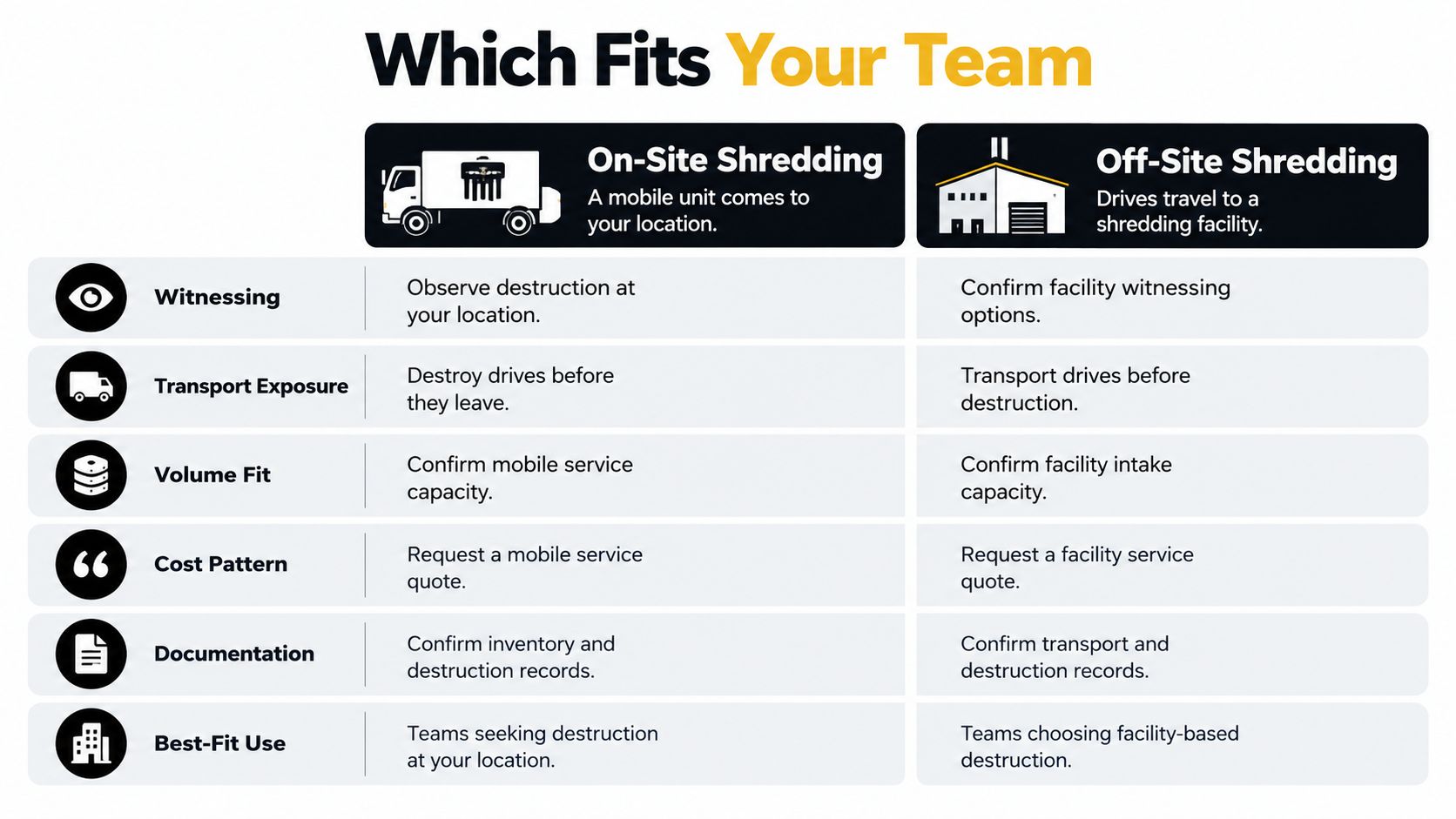
On-site and off-site shredding compared
| Criterion | On-site shredding | Off-site drop-off or pickup |
|---|---|---|
| Witnessing | Usually straightforward to observe each drive | Depends on the facility; confirm before booking |
| Transport exposure | Drives remain at your location until destruction | Drives travel before destruction; require a manifest and sealed containers |
| Volume fit | Consider for large, known batches within mobile capacity | Consider for loose, mixed, or very large loads within facility capacity |
| Cost pattern | Ask about visit minimums and per-drive or hourly charges | Ask about per-drive, per-pound, or per-container pricing |
| Scheduling | Fixed date and work window at your site | Confirm permitted drop-off hours or a pickup window |
| Best fit | Sensitive batches requiring destruction at your location | Cleanouts, distributed offices, and facility-based processing |
| Documentation | Inventory and destruction records | Transport, intake, and destruction records |
On-site shredding means a mobile unit comes to your building. Its main operational advantage is that you can observe destruction before the media leaves your control. That can suit a clinic, finance office, or public agency whose policy requires an employee to witness the work.
Don't assume the truck can process every device in your inventory. Confirm its accepted media, drive-thickness limits, and batch capacity. Ask about access, parking, a controlled work area, power requirements, and what happens if the machine stops during your appointment.
Compare the handling, not just the location
Off-site shredding means you deliver the drives or the provider transports them to its facility. This can be practical when an office cleanout includes loose drives, complete computers, and unidentified storage devices that need controlled sorting.
The trade-off is the additional handling before destruction. Specify who accepts custody, whether containers remain sealed, where unprocessed media is stored, and whether another company transports or processes the load. Use those details as vendor selection criteria, rather than treating pickup as a simple courier service.
Facility-based work doesn't necessarily mean you can't watch. Ask whether an authorized witness may attend and whether observation covers your identified batch rather than an unrelated demonstration.
Watching a machine run isn't the same as proving that every drive on your manifest entered it.
For a regulated clinic or finance office with a known batch and a witnessing requirement, consider on-site work. For a warehouse cleanout with unknown drive types, consider off-site intake with identification before processing. A mixed load may justify splitting the work, with sensitive drives handled at your location and reusable equipment assessed separately.
Which Drives Need Shredding and Which Need Verified Wiping
A working SSD pulled during a refresh and a dead drive removed from a failed RAID array do not belong in the same disposition stream. The first can often be purged, tested, and resold. The second rejects every software tool pointed at it, so physical destruction is the only defensible route.
Shredding a functional drive destroys residual value that a verified purge preserves. Destruction is the right call when your risk policy demands it or when the media cannot be sanitized reliably, and a wasteful one when it is applied by default to every device in the box.
NIST organizes sanitization into Clear, Purge, and Destroy, with method selection tied to data sensitivity, media technology, and what happens to the device afterward. The current media-sanitization guidance also stresses validation, so running a tool is not the same as confirming it worked.
Which media types usually need shredding
| Media type | Usually fits shredding? | What to confirm with the provider |
|---|---|---|
| Magnetic hard disk drive (HDD) | Yes, when sensitivity requires destruction or reuse is unlikely | Output particle size and maximum drive thickness |
| Solid-state drive (SSD) | Often, but only with a flash-appropriate method | Separate process suitable for flash memory |
| Hybrid drive (SSHD) | Yes, when destruction is selected | Both magnetic and flash storage are addressed |
| USB flash drive or memory card | Often, as part of a controlled batch | Small-media tracking so devices aren't missed |
| Failed or unreadable drive | Often, when sanitization can't be validated | Exception handling for unreadable serial numbers |
| Drive intended for reuse or resale | Often no; verified purge may preserve value | Supported purge method and documented validation |
Require an output specification
The NSA's magnetic hard-drive destruction guidance separates device deformation from sanitization and states that shredding counts as sanitization only when particles reach 2 millimeters or smaller under the applicable NSA/CSS procedure. Treat that as a benchmark for magnetic HDDs rather than a universal commercial mandate, and ask the provider what particle size their equipment produces.
Flash changes the problem. Crushing an SSD's casing or snapping its controller can leave the NAND packages intact enough to read, which is why flash media needs a process designed for it.
Whatever method you choose, verify the outcome at the device level. A generic receipt stating "media destroyed" proves a box was accepted, nothing more. Ask for output tied to serial numbers: the method applied to each drive, a pass or fail result, and how exceptions such as unreadable drives were routed. For purged drives, request the tool's validation log instead of a summary certificate.
For functional equipment, a documented purge or cryptographic erase can satisfy policy while keeping resale value. The gap between erasing data and destroying the device sits at the center of what data destruction covers.
Three questions settle most of these calls: how sensitive is the data, could the drive be reused, and does your policy require proof of physical destruction or proof of successful sanitization.
Prep Drives and Prove Chain of Custody
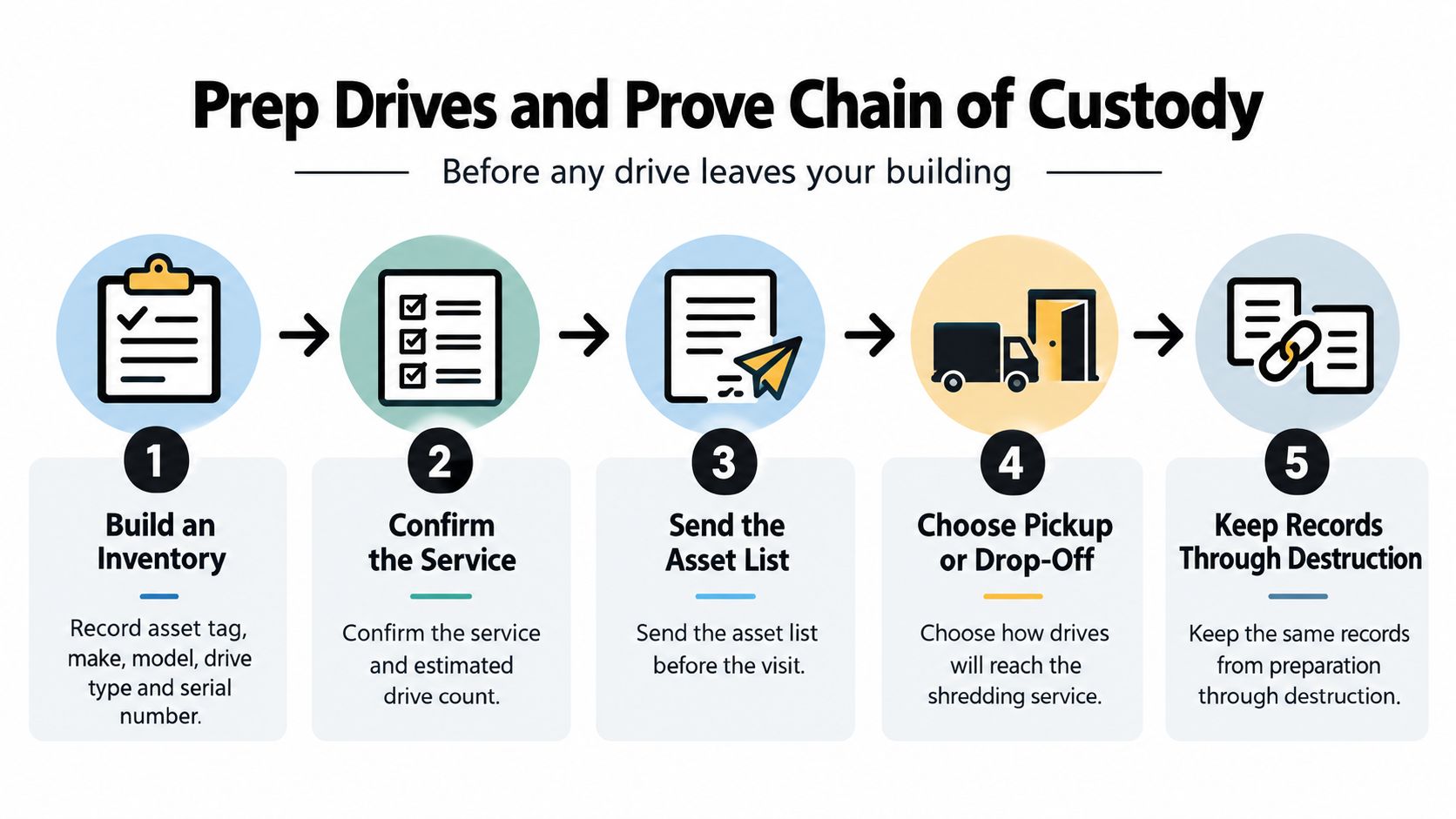
Prepare the inventory before the loading dock becomes busy. The same asset identifiers should follow the drives from internal approval through handoff, processing, and final reconciliation.
NIST's sanitization and verification framework provides a foundation for controlling intake, selecting media-appropriate methods, and checking results. Translate that framework into a procedure your facilities staff, IT team, and vendor can follow.
Prepare the batch before it moves
Build the inventory. Record asset tag, make, model, drive type, and serial number in a spreadsheet or ITAD system. Include the originating device or department when that helps resolve ownership or retention questions.
Assign a disposition route. Mark each drive for destruction, verified purge, or reuse assessment under your data-classification policy. This prevents a reusable device from entering the destruction stream merely because it arrived in the same box.
Confirm retained data. Migrate or back up information the organization must keep, then confirm the backup before removal. Destruction approval should come from the person authorized to decide that the original is no longer needed.
Remove drives through an authorized process. Have qualified staff extract media from laptops, desktops, NAS units, and servers. Keep caddies and trays associated with the correct drive, and agree with the provider whether they should remain attached.
Separate exceptions. Place failed, encrypted, and unreadable drives in clearly labeled containers. Their status needs to remain visible so operators don't assume that an ordinary erasure workflow has succeeded.
Don't power on unknown drives just to test them. Log the condition you can observe and refer diagnostic work to authorized IT staff. Any testing should have a defined purpose and controlled procedure, not happen casually during packing.
Seal and record containers. Apply tamper-evident seals and record the seal identifiers, container contents, count, and weight where required. Use a restricted staging area rather than an open corridor or unattended loading dock.
Sign the handoff against the manifest. Check the actual containers, seal condition, and receiving person's identity before signing. Retain your copy immediately so you aren't relying on a document that may arrive later.
Avoid scanning serials only after containers have been mixed. During data center decommissioning, inspect designated servers, storage shelves, and racks before releasing them for removal. For medical equipment disposal or laboratory equipment disposal, ask the responsible equipment owner to identify embedded storage rather than assuming that only conventional computers contain records.
Make each document prove something
Ask for sample paperwork before signing a recurring service agreement. Review whether its fields support your audit requirements, not whether the certificate looks formal.
Documents to request and what each must prove
| Document | What it must show | When to ask for it |
|---|---|---|
| Chain-of-custody manifest | Who handled each container, when, and in what condition | At pickup or drop-off, before departure |
| Intake serial list | Asset IDs and serials matched to individual drives | At intake, before destruction |
| Destruction certificate | Method, date, personnel, verification step, and signature | Within the agreed contractual timeline |
| Serial reconciliation report | Destroyed serials matched to intake, with exceptions | With the certificate |
| Photo or video record | Evidence of the identified destruction run and output | Agree before booking |
| Weight or recycling report | Material recovery and disposition route | After the job or at an agreed reporting interval |
The certificate should reference the inventory directly or attach a controlled asset list. A batch name alone isn't sufficient if nobody can establish which drives belonged to it.
Require written exception handling for unreadable serials, mixed loads, interrupted runs, and drives discovered after certificate preparation. An unreadable serial should receive a unique asset identifier and supporting description, not disappear into a total count. If the processing run stops, the provider should record what was completed and secure the remaining media.
Documentation test: Could someone who wasn't present determine which assets were processed, how they were processed, and what happened to every exception?
Verification should address the physical result as well as the records. Ask how the operator inspects representative output and confirms that the storage medium, not merely the casing, has been adequately fragmented. A photograph supports the record, but it doesn't replace a matched asset list or a documented verification procedure.
Use chain-of-custody documentation as an acceptance requirement. Keep the job open until the inventory, certificate, and exceptions reconcile, rather than marking it complete when the truck leaves.
What Shredding Costs and Which Rules Apply
A discarded drive holding live customer data belongs in a different budget category than a pallet of dead monitors. Price it as waste removal and every quote looks expensive. Price it against the exposure of an uncontrolled disposal and the comparison flips. Breach costs keep climbing year over year, which is why secure retirement belongs in a risk-management budget rather than a facilities line item.
Two quotes with the same bottom line can cover very different work. A certificate isn't insurance, and an expensive service isn't automatically effective. Compare quotes against the same inventory, handling requirements, and verification standard.
Price drivers and what to request in each quote
| Price driver | How it changes the quote | What to request |
|---|---|---|
| Pricing unit | Per-drive, weight, container, and hourly rates aren't directly comparable | The same pricing basis from each provider |
| Visit minimum | Mobile work may include a minimum regardless of batch size | Minimum charge and included work |
| Drive type | SSDs and special media may require different processing | Line-item pricing by media type |
| Loose versus caddied drives | Logging, extraction, and caddy removal affect handling | Written handling assumptions and fees |
| Witnessing | Attendance may require booking or an additional charge | Whether witnessing is included |
| Certificate and report | Documentation may be bundled or charged separately | Deliverables, fees, and delivery deadline |
| Pickup distance | Travel and vehicle requirements can affect charges | Service zone and any surcharge |
Ask for an itemized total covering pickup, processing, documentation, and minimum charges. If usable equipment is included in the batch, separate purge work, buyback assessment, and any value credit from destruction charges, since mixing them hides what you're paying for each outcome. This pricing-transparency checklist keeps different service scopes from appearing deceptively similar.
Review obligations by information type
Have your compliance lead assess whether health records implicate HIPAA, financial customer information implicates the Gramm-Leach-Bliley Act, or personal information creates obligations under applicable state breach-notification laws. These are review questions, not a claim that any particular shredding process automatically establishes compliance.
Use the NIST sanitization guidelines to structure policy around data classification, responsibilities, training, and evidence. For environmental handling, consult EPA electronics recycling guidance when deciding how reusable equipment and processed materials should move downstream.
- Separate security from recycling. Secure data destruction and responsible material recovery need distinct acceptance criteria.
- Confirm the approved method. Don't let a vendor substitute coarse product destruction for the sanitization outcome your policy requires.
- Review retention first. Ask counsel or your compliance lead to approve the policy before routine destruction begins.
This is general operational guidance, not legal advice. A short review before contracting costs far less than discovering a mismatch after the media has been destroyed.
Schedule Your Pickup or Drop-Off With Confidence
Before booking, confirm the service scope and estimated drive count, then send the asset list through an agreed secure channel. Choose pickup or drop-off based on your custody requirements, dock access, and whether someone from your team will witness the destruction.
Agree on the appointment window, name the person who signs the manifest, and get the certificate delivery date in writing. Ask how inventory changes get approved if staff find additional drives during the visit. An unanswered question here is the kind of thing that stalls a truck at your loading dock.

Keep usable equipment out of the destruction batch
Reworx Recycling is a donation-based electronics recycling and IT equipment disposal social enterprise in Smyrna, Georgia, where retired hardware supports technology donations, digital inclusion, and workforce development. That model only works when reusable equipment reaches the reuse assessment line instead of the shredder.
A functional laptop, or a drive with resale life left in it, is worth more intact than as scrap. Route complete devices to reuse evaluation and reserve destruction for media your policy requires to be sanitized or that holds no residual value. As noted earlier, matching the method to the media matters: verified wiping can preserve donation value that shredding would erase.
Run through a short pre-call checklist:
- Define the batch. Separate loose drives from complete devices needing laptop disposal or computer recycling.
- Confirm acceptance. Flag unusual equipment and ask what preparation is needed before transport.
- State the intended outcome. Mark each asset for donation, reuse assessment, or destruction so nothing lands in the wrong stream.
With the asset list finalized, contact Reworx Recycling directly to book the pickup or reserve a drop-off slot.