You know the week is heading sideways when finance asks why half the laptops in the spreadsheet don't match the people who still work there. The renewal date is close, the offboarding list is incomplete, and the closets have a few mystery devices with no clear owner. That's exactly where an IT equipment audit stops being admin cleanup and starts acting like a control that protects records, security, and end-of-life planning.
The useful way to think about it is simple: an audit reconciles what an organization believes it owns with what's deployed, then turns that gap into action. Modern guidance also pushes teams away from a single annual pass and toward continuous or rolling checks, because monthly micro-audits, quarterly reviews for critical systems, and annual complete evaluations surface trends before they turn into expensive surprises itemit's audit guidance. That same discipline is what keeps inventory accuracy connected to secure disposal, instead of treating recycling and data destruction as a separate cleanup task at the end.
The Audit That Pays for Itself

A finance team usually notices the problem before the audit starts. It surfaces when procurement asks for asset counts, security asks for return status, or a renewal packet arrives with device names nobody can tie back to a real desk. By then, the gap is already sitting inside depreciation, access control, and offboarding records.
That is why the audit habit matters more than the annual event. An IT equipment audit goes beyond a device count, it verifies serial numbers, physical location, condition, operational status, and software-license compliance across the fleet itemit audit guidance. Manual spreadsheets break down as the asset base grows, so organizations with more than a few dozen devices usually need repeatable checks and software support. A concerned woman looks at a laptop screen displaying an inventory reconciliation report with item discrepancies.
A good run does more than protect inventory accuracy. It also creates a defensible handoff for security and disposal, because every disputed machine, missing tag, or damaged unit gets resolved while the trail is still fresh. That is the difference between a clean write-off and a messy year-end scramble.
Practical rule: if the audit cannot produce a clean mismatch list, it was a spreadsheet review, not an audit.
For business owners and IT leaders, the payoff is operational calm. The audit shows what exists, what is at risk, and what is ready for retirement before the next renewal, refresh, or office move forces the issue.
Reworx Recycling's IT asset management best practices fit naturally into that mindset, because the asset record should not end when a device is removed from service. It should follow the device to its final disposition.
Defining Scope, Owners, and Success Criteria
A tight scope beats ambition every time. If you try to cover every laptop, printer, shared peripheral, and IoT sensor in one pass, the audit turns into a moving target, especially when people are still using assets while you're trying to verify them. The better move is to define the smallest meaningful slice that still gives you a real answer.
The first decision is asset scope. Choose one office, one department, one asset class, or one high-risk population such as remote laptops or returned equipment. The second is ownership. Assign one audit owner and one verifier, because the person collecting evidence shouldn't also be the only person approving it. The third is success criteria. Spell out what counts as done, whether that's a complete asset register, license compliance, or a disposition-ready list. The fourth is communication. Decide who gets findings, in what format, and on what timeline.
An IT asset audit should state this clearly before a single device is touched Restore's audit checklist. That sounds obvious, but it's where many teams fail. A 100-person accounting department can usually get through a clean verification cycle quickly if the scope is limited to one floor or one asset class. Multi-site retail and distributed clinics need the same discipline, but they need it site by site, not all at once.
Scope first, scanning second. If the project plan can't answer who, what, where, and success, the discrepancy list won't be trustworthy.
A paste-ready project checklist looks like this:
- Asset scope: Which departments, sites, and hardware classes are included.
- Ownership: Who runs the audit and who signs off the reconciled list.
- Success criteria: What outcome counts as complete and acceptable.
- Communication plan: Who receives exceptions, and how quickly follow-up starts.
Reworx Recycling's IT manager responsibilities align with that structure because audit ownership and disposal ownership usually overlap in real operations. When the same team is responsible for records, security, and end-of-life routing, scope discipline gets easier to enforce.
Choosing the Right Inventory Method
The fastest way to waste audit time is to pick a tool before you pick a method. Manual spreadsheets are cheap to start, barcode and RFID tagging make floor sweeps faster, and automated discovery tools give you wide coverage. None of them is complete on its own.
Manual tracking works when the fleet is small and the process is disciplined. It falls apart when people change desks, swap hardware, or leave the company without updating records. Barcode and RFID are stronger for physical verification, but only if tags are applied consistently and someone scans them. Automated discovery and MDM help with visibility, yet they miss devices that are powered off, off-network, or personally managed.
The best operating model is hybrid. Use discovery data as the continuous baseline, then confirm it with tagged physical sweeps for the assets that matter most. Treat the inventory platform as a system of record, not as a one-time export. That idea lines up with the broader audit guidance that current records should be reconciled against real-world evidence, not just copied from one spreadsheet to another AssetCues audit checklist.
| Fleet Size | Primary Method | Common Pitfall |
|---|---|---|
| Small office | Manual plus selective tagging | Assuming the spreadsheet is the source of truth |
| Mid-sized fleet | Barcode or RFID with discovery support | Inconsistent tagging across teams or sites |
| Enterprise environment | Discovery plus physical verification | Blind spots for offline, loaned, or remote devices |
A hybrid stack also makes it easier to attach audit results to later actions. If a device is verified today and marked for retirement next month, the same record can support secure transfer, data destruction, and downstream reporting.
Reworx Recycling's asset tracking systems fit this model when teams want the inventory and the disposition trail to stay connected. That's useful when the question isn't just “where is the device?”, but “what happens to it next?”
The 60 Minute Verification Loop
The cleanest audits use a short, repeatable loop instead of a sprawling project plan. Export the current inventory, freeze assignment changes, walk the floor, verify each device by serial number plus assignee or exact location, then reconcile mismatches immediately. That rhythm keeps the work from drifting into endless follow-up.
Lock the record before you start
The freeze window matters more than many teams realize. If people keep reassigning assets while verifiers are in the hallway, the mismatch list becomes noise. Freeze edits during the audit window, and tell help desk, facilities, and team leads not to move devices until the pass is done.
Verify in the real world
The physical pass should be specific. Check the asset tag, confirm the serial number, note condition, and capture photo evidence for any damaged or disputed device. The field guidance is consistent on this point, mismatches should be fixed on the spot, missing items should open a return follow-up, and broken assets should move into repair-or-replace decisions Invymate's audit checklist.
Don't carry unresolved exceptions into a later spreadsheet tab. If the verifier can settle it on the floor, settle it there.
A practical 60-minute pass looks like this:
- Export inventory.
- Freeze changes.
- Walk the area with a scanner or checklist.
- Match serial, user, and location.
- Record exceptions with notes or photos.
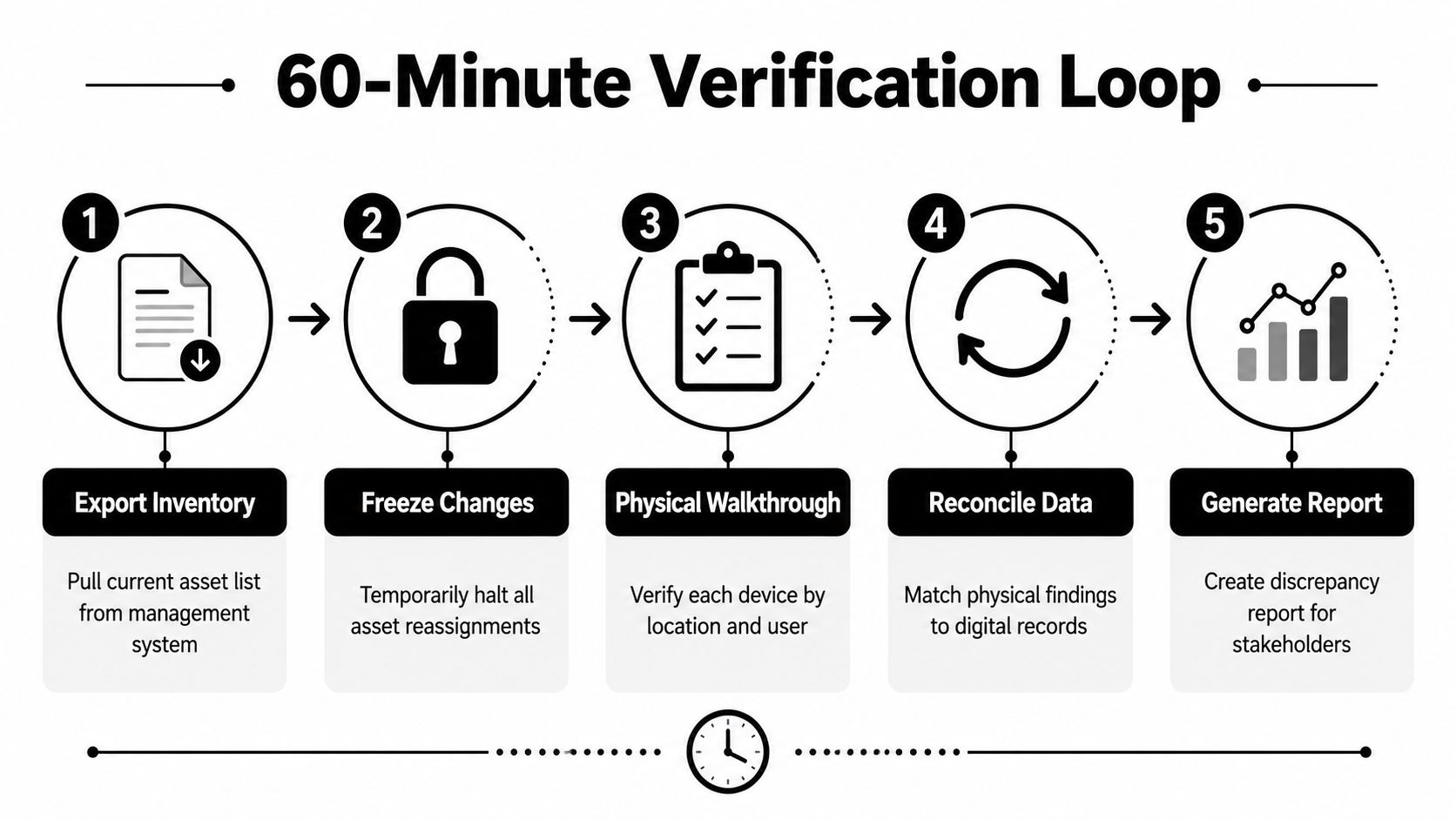
That loop works because it reduces scope creep. One team, one floor, one asset class, one pass. The output is a clean discrepancy report, not a half-corrected inventory nobody trusts.
Auditing Remote, Hybrid, and Shadow IT Assets
Remote devices are where many audits get exposed. A laptop may be assigned in the system, offsite with an employee, missing from MDM, and still active in identity logs. That doesn't automatically mean theft or negligence, but it does mean the asset needs a different verification path.
A strong rule for distributed fleets is the two-of-three signals method. Require any two of these to match before an asset is treated as verified, MDM check-in and compliance status within the last 14 days, identity-provider sign-in from the device within the last 14 days, and a short employee confirmation form with a photo of the serial label Ampthilly's checklist. That gives you enough evidence to verify the device without forcing every check through the same physical workflow.
What to do with the hard cases
Ghost assets are the devices that show up in records but not in reality. Some are old, some were reassigned badly, and some were never enrolled properly. The safer response is to flag them for review, not to trigger a security incident on the spot. A review queue lets IT separate true loss from stale recordkeeping.
The highest-risk populations deserve repeated checks first:
- Remote laptops that travel between home and office.
- Shared peripherals that get moved without formal assignment changes.
- Offboarding returns that can disappear between HR notice and device collection.
Current audit guidance also points out that remote and hybrid inventories need reconciliation across physical scans, source-of-truth records, and intermittent connectivity, not just a walkthrough of one office ITU Online's audit guidance. That's why a repeated verification cycle often beats a once-a-year whole-fleet sweep.
Reworx Recycling's remote work and e-waste strategy article is relevant here because distributed work changes how devices are recovered, verified, and eventually retired. The audit has to follow the device, not the desk.
Adding Power and Sustainability Checks to the Audit
Most audits stop at presence and ownership. That leaves out a question facilities and sustainability teams keep asking, which devices are wasting energy right now, and which ones are configured well enough to justify keeping them in service. The answer starts with a simple three-level review.
Use three levels, not one
Level 1 is visual identification. Confirm the device exists, is plugged in, and is operating. Level 2 is settings review. Check sleep, display timeout, and any vendor power-management controls. Level 3 is energy analysis. Measure actual power draw over time and compare the readings against the device's operating pattern. A classic office-equipment framework uses exactly that structure, from visual confirmation through settings review to direct power measurement office equipment auditing framework.
That matters most for printers, MFDs, always-on endpoints, and lab or medical devices that sit powered for long stretches. The point isn't to turn every audit into an engineering study. The point is to separate devices that are merely present from devices that are configured responsibly.
Capture evidence that supports action
Use vendor dashboards when the device ecosystem already reports power data. Use a plug-in power meter when you need a direct reading at the device level. Review policies for sleep, shutdown, and idle behavior when a device stays on too long between active sessions. Keep the evidence simple enough that another manager can read it later and understand why a device stayed, changed settings, or moved toward retirement.
If you can't show how a device behaves when nobody's using it, you don't really know its operating cost.
That's where the audit becomes a sustainability tool, not just an inventory control. The record can support office energy work, refresh decisions, and broader reporting without forcing the team to rerun the same inspection twice.
Closing the Loop with Secure Disposition and Reporting
An audit only finishes when the retired hardware has a documented path out of the building. Reconcile the final ledger against finance and depreciation records, then split the devices into surplus, damaged, and end-of-life groups. That disposition plan should live beside the inventory record, not in a separate cleanup file.
For teams building a broader carbon and operations view, browse DCPulse's carbon operations guide offers useful context on how IT decisions connect to environmental reporting. That's a natural fit when the audit is also feeding sustainability or scope-related discussions.
What to retain
Keep the documentation that proves the chain of custody stayed intact. That includes certificates of data destruction, certificates of recycling, and the inventory record that ties each asset tag to its final status Reworx Recycling's chain of custody documentation. Contemporary audit checklists also reflect the broader evolution of IT auditing by including inventory assessment, data-security review, compliance verification, and disposition evidence as part of the same control environment information technology audit overview.
For organizations that need secure handoff and community-impact disposal, a partner like Reworx Recycling can handle donation-based recycling, secure hard drive shredding, and IT asset disposition as part of the retirement workflow. That's especially useful when the audit produces mixed outcomes, some devices can be redeployed, some can be wiped and donated, and some need formal recycling or destruction.
The reporting framework can stay simple:
- Inventory outcome: verified, unresolved, or missing.
- Disposition outcome: redeploy, donate, recycle, or destroy.
- Evidence outcome: certificate retained, chain of custody complete, finance updated.
If your devices are ready to leave service, schedule the pickup, retire them cleanly, and keep the record trail intact. A thoughtful IT equipment audit doesn't end with a count, it ends with a documented handoff, lower risk, and a disposal process you can defend in front of finance, security, and sustainability teams.
A CTA for Reworx Recycling. If your office has surplus laptops, decommissioned servers, or end-of-life peripherals ready for pickup, partner with Reworx Recycling to donate what still has value, recycle the rest responsibly, and keep your audit trail complete.