The workloads have moved, the lease deadline is approaching, and someone has asked when the old racks will be gone. Then a technician finds spare drives in a cabinet, facilities flags the UPS batteries, and procurement discovers that the removal quote doesn't include site restoration.
That's the true shape of data center decommissioning. You're closing a set of operational, security, environmental, and financial obligations, not just clearing floor space. For businesses planning a retirement in Smyrna, Georgia, or coordinating facilities elsewhere, the most useful approach is to treat every asset as both a material to route and a record to close.
Decommissioning Timelines and Cost Drivers
For initial budgeting, use three to six months as an illustrative planning allowance for a mid-size facility retirement, not an audited industry benchmark. Multi-hall and hyperscale projects need a schedule built around their dependencies rather than that starting assumption.
The ranges below are planning estimates, not measured performance claims. Phases can overlap, so don't add the rows together mechanically. Counts of drives, batteries, and racks, along with available outage windows, should determine the actual schedule.
Typical decommissioning phases, durations and cost drivers
| Phase | Typical duration | Main cost driver | Output to hold before moving on |
|---|---|---|---|
| Scoping and approvals | 2-6 weeks | Scope size and number of approval steps | Signed scope and shutdown authorization |
| Inventory and dependency mapping | 2-8 weeks | Quality of existing asset records | Reconciled asset register with serials and rack positions |
| Shutdown and disconnection | 1-3 weeks | Outage windows and staffing | Shutdown log and custody handover record |
| Media sanitization or destruction | 1-4 weeks | Drive count and on-site versus off-site choice | Per-drive sanitization or destruction certificates |
| Hazardous stream removal | 1-3 weeks | Battery and refrigerant volume | Manifests and licensed handler records |
| Transport and downstream processing | 1-4 weeks | Distance, load count and pallet configuration | Downstream recycling or destruction certificates |
| Validation and closeout report | 1-3 weeks | Variance investigations | Signed closeout report |
Separate equipment costs from property liabilities
An IT asset disposition (ITAD) quote should identify sanitization, removal labor, packaging, transport, and certified recycling. It shouldn't be mistaken for a complete facility-closure budget.
Building obligations belong in another cost layer: electrical infrastructure, cooling equipment, batteries, fuel systems, environmental investigation, and restoration. Lease and sale documents should establish who pays, what must remain, and what condition the owner expects at handover.
Proposed South Carolina decommissioning requirements address removal procedures, estimated costs, timelines, and possible financial assurance equal to estimated closure costs. They also contemplate contamination cleanup and circumstances in which foundations or utility lines could remain. These are proposals, not a universal rule for operating facilities.
Budget discipline: A truck leaving the loading dock doesn't settle the building owner's restoration claim.
Repurposing may be preferable to demolition, but document the retained infrastructure and obtain the required approvals. Don't assume a buyer automatically accepts every closure obligation.
Open a separate decommissioning reserve. List each cost layer, identify its responsible party, and request quotes with labor, destruction, transport, and hazardous-material handling broken out. Treat residual equipment value as conditional until sanitization, testing, and reconciliation support the recovery amount.
Scoping the Retirement and Building the Asset Inventory
A storage array leaves the hall on a Tuesday. Months later, an auditor asks which drives it contained, who approved their release, and where each one ended up. A retirement that cannot answer those questions was not scoped. It was emptied.
Define what "retired" means before anyone books a pickup. Replacing a storage array inside a live hall is partial decommissioning. Closing a building is a full retirement, with a boundary that reaches into supporting infrastructure, retained plant, and whatever the site owner will ask about at handover.
Partial work needs two lists, not one: the systems leaving and the services that must stay up. A GPU-cluster refresh, network-fabric replacement, or cooling upgrade draws its boundary through shared power, management, storage, and network connections. Every shared dependency is a place where a removal crew can cut something live, so the scope should name those connections explicitly rather than leaving them to the crew's judgment.
Build a register that survives physical removal
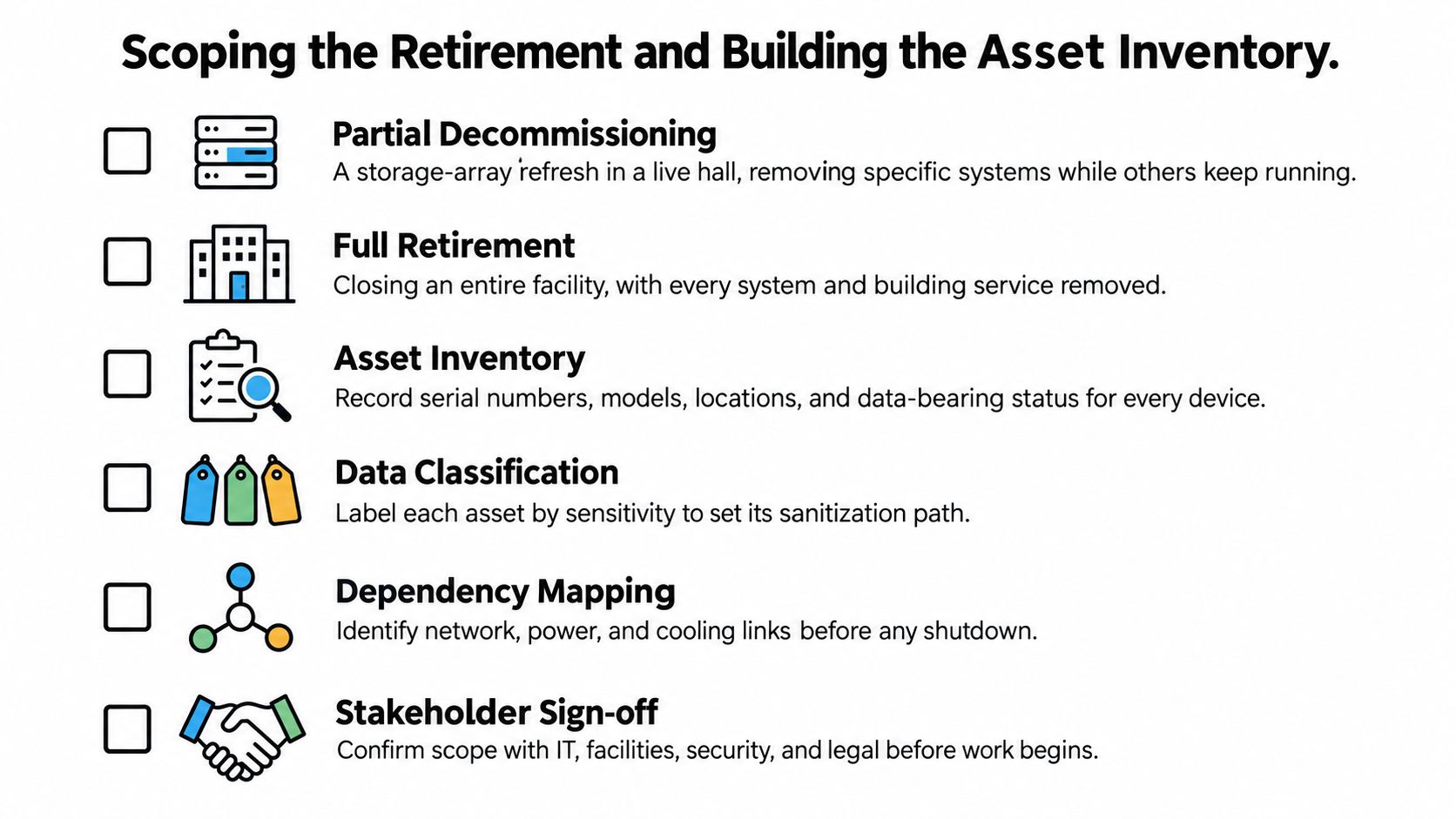
The register is the evidence backbone of the project. Run this routine before anyone disconnects equipment:
- Freeze configuration changes. Take a controlled snapshot of the environment. If an urgent change is unavoidable, assign someone to update the register and approve the exception.
- Export identifying information. Capture serial numbers, asset owners, models, rack and U positions, encryption status, and data-bearing status. Record identifiers for individual drives, not just their chassis.
- Walk the floor. Match physical equipment to records and photograph racks before removal. Investigate anything that appears in only one place, either the database or the room.
- Apply traceable tags. Use unique IDs and barcodes, with tamper-evident tags where appropriate. Tie each tag to a serial number rather than building a separate logistics list.
- Map dependencies. Identify application, network, storage, power, and cooling relationships. Have service owners confirm the shutdown will not interrupt retained workloads.
- Assign a disposition code and classification. Mark each item for reuse, resale, destruction, or recycling. Record media sensitivity separately, because the security decision and the commercial route are different decisions.
An asset inventory management process should preserve those relationships through every handoff. When a drive leaves an array, its record stays attached to the original system and the approved destination.
Check beyond the rack doors
Orphaned media is where scopes fail without anyone noticing. Search spare drives in drawers, backup tapes, management appliances, embedded flash, and hardware staged for earlier projects. On one project, a labeled box of drives surfaced in a cabinet that appeared in no database and no plan; the person who staged it had long since left the company. Include repair benches, cages, and temporary holding areas in the physical walk.
An outdated configuration database cannot define the boundary on its own. Have IT, facilities, security, and the asset owner sign the scope, including the exclusions. Every retained system gets a named owner. "Not on the removal list" is not an ownership model.
Choosing Clear, Purge or Destroy for Every Drive
Information sensitivity determines the sanitization requirement. Convenience on collection day shouldn't decide whether a drive is wiped, purged, or shredded.
NIST SP 800-88 Rev. 2 defines sanitization as making access to target data infeasible for a specified level of effort. Its program approach ties methods and controls to information sensitivity and the intended transfer or disposal route.
Start with an approved classification, such as public, internal, confidential, or regulated. Then select the least costly method that satisfies the applicable requirement and works for the actual medium. These labels are an organizational decision framework, not a replacement for legal or contractual review.
Sanitization methods compared for data center media
| Method | How it works | Keeps reuse value | Best fit | Proof to keep |
|---|---|---|---|---|
| Clear | Overwrites addressable storage with standard write commands | Yes | Internal reuse of low-sensitivity drives | Certificate per serial number |
| Purge | Uses an approved technique, such as suitable cryptographic erase, to make recovery infeasible | Usually | Resale or buyback when the device supports an acceptable purge method | Certificate per serial number |
| Degauss | Applies a magnetic field to magnetic media, not flash storage | No | Compatible magnetic drives headed for destruction, never SSDs | Certificate per serial number |
| Off-site shredding | A processor physically destroys media at its facility | No | Larger batches with controlled transport and custody | Destruction certificate and chain-of-custody log |
| On-site witnessed shredding | Media is destroyed at the facility under observation | No | Sensitive media requiring tighter custody control | Witnessed log listing serial numbers |
Don't accept a command name as proof of a purge. Cryptographic erase and device-native erase functions require assessment against the device, implementation, and approved procedure. A successful response from a utility doesn't establish that every storage area received adequate treatment.
Match the process to the medium
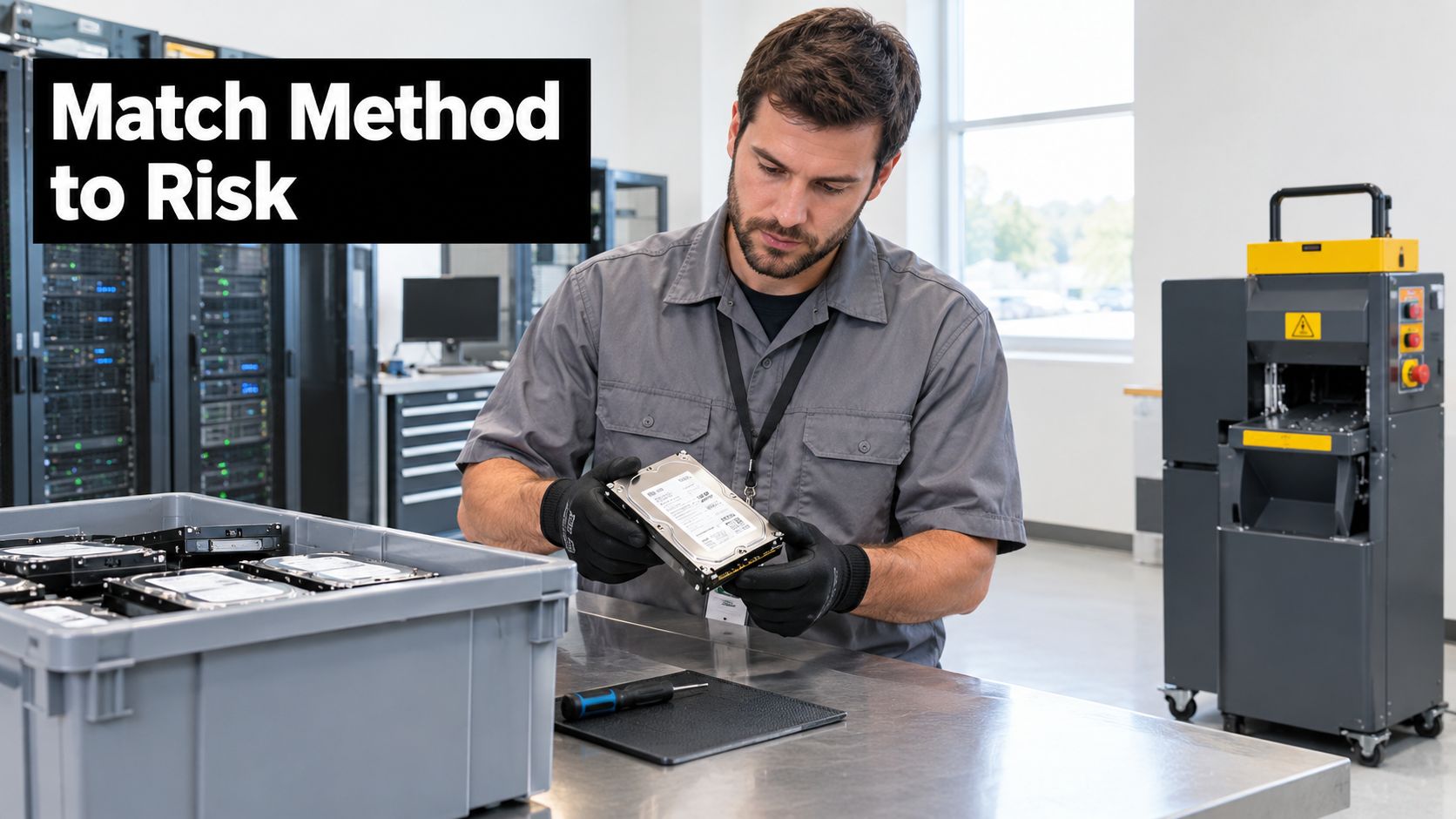
Degaussing isn't an SSD treatment. Flash media needs a suitable supported sanitization process or physical destruction matched to the medium.
On-site witnessed shredding avoids transporting intact media to another facility, but requires space, access coordination, and a controlled witness process. Off-site shredding can fit consolidated volumes, provided sealed containers, documented transfers, and receipt reconciliation cover the journey.
The technical trap is treating a visible logical volume as the entire device. Overprovisioned space, remapped blocks, embedded storage, controller cache, and separately managed backup media need consideration in the sanitization scope.
Review data sanitization methods before approving the disposition schedule. Where shredding is selected, coordinate it with collection rather than leaving destruction arrangements unresolved until equipment is packed.
Conservative decision rule: Destroy regulated-data media when policy requires it or an acceptable purge can't be demonstrated. Purge internal-data drives intended for resale only when the method is approved, validated, and documented by serial number.
That distinction matters. A blanket destruction policy can sacrifice usable equipment without improving a requirement already satisfied by an approved purge, while an unsupported erase can preserve resale value at an unacceptable security risk.
Vendor Selection and Certifications That Hold Up
Does the certificate cover the work you're contracting, at the facility that will perform it? A logo on a website doesn't answer that question.
The EPA recommends certified electronics recyclers for businesses, governments, and large purchasers. Its guidance emphasizes environmental controls, reuse and recycling, safe downstream handling, and data destruction rather than equipment collection alone.
Certifications to recognize and what to request
| Certification | What it signals | What to request |
|---|---|---|
| NAID AAA | Audited secure destruction and media handling | Current certificate and audit scope |
| R2 (R2v3) | Responsible electronics recycling with downstream controls | Certificate and list of covered facilities |
| e-Stewards | Environmental and export controls with downstream accountability | Certificate and downstream processor list |
Ask for the certificate's current status, covered activities, listed facilities, and relevant audit information. Then establish whether subcontracted work falls within those controls or requires separate evidence. Use environmental certification information as a starting point for questions, not a substitute for reviewing the actual documents.
Put the evidence requirements in the contract
The contract should make the following obligations explicit:
- Custody and subcontracting. Define responsibility from collection through final processing, require subcontractor disclosure, and reserve an audit right.
- Records and incident handling. Require serial-level reconciliation, retrievable certificates, and an agreed data-breach notification timeline.
- Environmental accountability. Identify downstream responsibilities and evidence required for each material stream.
- Commercial terms. Set pickup arrangements, damage responsibility, exception charges, and a written buyback pricing formula.
An aggregate certificate is useful only if its supporting records can be reconciled to your register. “Mixed electronics received” doesn't resolve a missing storage device.
Reworx Recycling, based in Smyrna, Georgia, is one option offering IT asset management, equipment decommissioning, business pickups, and secure hard drive shredding with data destruction. Its donation-based social enterprise recycling model connects environmental responsibility with technology donations, digital inclusion, and workforce development.
For corporate donation programs, ask how usable equipment is selected and how community reinvestment is documented alongside compliance. Before awarding work, request a sample certificate and a written downstream processor list from every shortlisted vendor. Compare their proposed records against your asset register, not just against competing prices.
Removal Sequence and Hazardous Material Handling
Set the removal order before workers arrive. An improvised loading operation makes it harder to distinguish reusable equipment, unsanitized media, and regulated materials.
EPA federal-electronics stewardship guidance supports reuse where practical and environmentally responsible recycling for obsolete equipment. It also explains that disposal can trigger RCRA requirements and addresses universal-waste provisions for batteries, mercury-containing equipment, and lamps.
Control the work from segregation to dispatch
- Segregate streams before physical removal. Identify servers, network equipment, batteries, lamps, UPS components, and refrigerant-bearing equipment. Prequalify the processors and transporters that will receive each stream.
- Identify reusable assets. Keep them separate from destructive processing. Preserve configuration evidence only where authorized, with sensitive information excluded from resale or donation records.
- Complete storage-media treatment. Apply the approved sanitization or destruction decision to array disks, spares, backup systems, and other storage-bearing components. Keep untreated media in a controlled holding area.
- Remove regulated components. Place batteries and other applicable materials in compatible, labeled containers. Qualified personnel should control electrical isolation and specialist recovery work.
- Secure the loads. Palletize equipment to prevent movement, loss, and mixing. Record pallet and container identifiers against the items they contain.
- Reconcile before release. Compare pickup manifests with the original inventory and investigate differences before dispatch. Obtain the corresponding final-processing records after receipt.
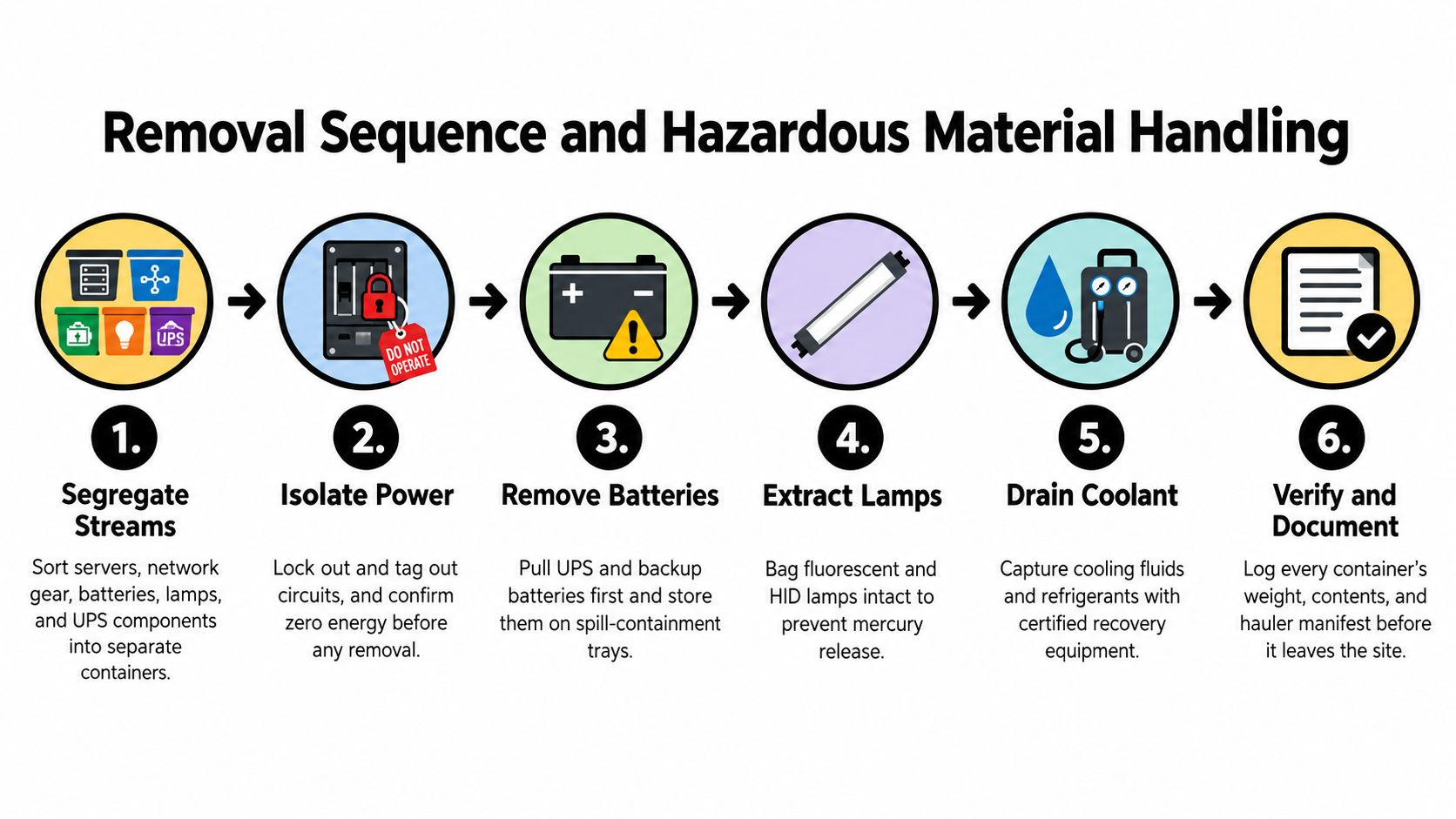
The facilities work plan should sit alongside the asset-control sequence. Electrical isolation, battery removal, lamp handling, and cooling-system recovery need competent personnel and task-specific procedures, not a general electronics-hauling instruction.
Regulated streams found in data center decommissioning
| Stream | Typical data center sources | Handling rule | Destination |
|---|---|---|---|
| Lead-acid batteries | UPS battery strings | Keep sealed, upright, and labeled; segregate from electronics | Licensed battery recycler |
| Lithium-ion batteries | UPS modules, battery backup units, laptops | Protect terminals; use approved packaging for damaged units | Certified battery processor |
| Fluorescent and HID lamps | White-space and plant-room lighting | Avoid breakage; manage under applicable universal-waste rules | Lamp recycler |
| Refrigerants and coolant circuits | Chillers, CRAC units, cooling loops | Arrange recovery by an appropriately licensed technician before removal | Licensed reclaimer |
| Capacitors and transformers | Power distribution and older electrical gear | Screen for PCBs or dielectric fluids before handling | Specialist processor |
| Loose drives and spares | Parts drawers, pulled drives, array disks | Route through the approved media process before disposition | Sanitization stream, then approved downstream route |
Keep mixed cleanouts from expanding the scope silently
A facility cleanout can attract equipment from elsewhere in the building. Don't let an office cleanout, laptop disposal batch, medical equipment disposal request, or laboratory equipment disposal project enter the same shipment without acceptance review.
Those assets may need different preparation, ownership authorization, or specialist processing. Similarly, product destruction should have a defined purpose and evidence requirement rather than becoming a catch-all route for anything difficult to classify.
The sleeper risks are unregistered replacement parts and batteries dropped into general electronics loads. Give workers a clearly marked exception area and someone authorized to resolve unidentified items.
Photograph each completed pallet, seal each controlled bin, and record the seal identifier before transport. A photograph supports the manifest, but doesn't replace an itemized record.
Log quantities and weights using the agreed measurement basis. Keep handler records and shipment documentation connected to their load IDs so a reviewer can follow materials beyond the loading dock.
Reuse, Buyback and Recycling Routes That Recover Value
Every pallet needs a recorded destination, and that record should hold up for a partial retirement as cleanly as a full site closure. The Global E-waste Monitor reports that only 22.3% of the 62 billion kilograms of electronic waste generated in 2022 was documented as formally collected and recycled in an environmentally sound manner.
That global figure is not a recovery benchmark for your project. It explains why an undocumented handoff is inadequate, even when the equipment has left your premises.
The recovery leak I check first is orphaned storage media: pulled array disks, spares that never made it back into the register, tapes in offsite storage, and drives left inside “empty” chassis. If an item can store data, it belongs to the approved media process before any resale, donation, or recycling discussion.

Choose the route asset by asset
- Internal redeployment suits equipment that still meets an identified business need. The trade-off is retaining support and operating obligations, so avoid transferring obsolete hardware merely to postpone disposal.
- Refurbishment and resale fit functioning equipment with a viable buyer and supportable configuration. Testing and preparation take effort, and condition affects whether recovery is worthwhile.
- Vendor buyback can suit consistent batches of commercially useful hardware. Request written offers based on age, configuration, condition, and included components, with payment tied to reconciled serial numbers.
- Donation fits functional equipment accepted by schools, nonprofits, or community technology programs. Recipient suitability matters more than the donor's desire to empty storage, and documented sanitization remains necessary.
- Material recycling fits failed or obsolete hardware that doesn't justify reuse. Choose accountable downstream processors rather than treating any collection service as sustainable recycling.
- Certified destruction fits media that can't meet the required sanitization standard through a value-preserving method. It resolves a security requirement at the expense of reuse value.
Donation-based recycling can connect useful equipment with digital inclusion, while refurbishment work can support workforce development. Confirm the program's acceptance criteria before setting aside equipment, and ask a tax advisor about any proposed tax treatment.
Calculate recovery after preparation costs
Use cost recovery strategies to compare net outcomes after preparation costs. Ask whether testing, missing components, freight, or rejected units change the quoted return.
Age alone misprices assets. Service life varies by workload, lease terms, support contracts, energy draw, and performance needs, so verify any cited research directly before using a service-life range in approval paperwork. Evaluate the retained workload and operating burden before moving retired servers elsewhere.
Start quote preparation with three working columns: reuse, resell, and recycle. Flag donation candidates within reuse and security exceptions separately. That gives suppliers a clearer basis for pricing than an undifferentiated computer recycling request.
For site closures, keep recovery separate from exit liability. Lease return conditions, retained racks and cabling, damage to the space, and unresolved media decide whether the project is finished. A good buyback number does not settle those items.
Validating Closure and Booking Your Pickup
A completed tool run isn't proof that data is gone. Verification checks whether the operation completed without technical errors; validation reviews the evidence against confidentiality requirements and determines whether the remaining risk is acceptable.
That distinction appears in NIST's media sanitization guidance. Keep validation focused on the approved media scope, method, results, and acceptance authority rather than relying on a utility's success message.
Assemble an auditable closeout package
Set the acceptance target at complete inventory reconciliation with no unexplained storage media. Don't substitute a favorable recycling or recovery result for evidence that every item reached its approved destination.
Retain the following package:
- Reconciled asset register showing serial numbers, final disposition, and any approved exceptions.
- Per-drive sanitization or destruction certificates connected to the relevant asset records.
- Hazardous-material manifests and handler records identifying the responsible parties.
- Downstream recycling or destruction certificates covering final processing.
- Chain-of-custody logs showing transfers, receipt, and responsibility.
- Site-condition photographs and a variance log documenting retained infrastructure, damage, discrepancies, and resolutions.
- Signed acceptance from IT, facilities, and sustainability leads, with other responsible approvers included where necessary.
Use chain-of-custody documentation that lets an auditor retrieve the supporting evidence by serial number. A folder of unrelated PDFs makes investigation harder than it needs to be.
Report outcomes without overstating them
For sustainability reporting, record units recycled, the share reused versus recycled, and measured material quantities. State whether results use unit counts or weight, and don't claim landfill diversion without downstream evidence supporting that conclusion.
Keep certificates, manifests, and the closeout package for the period required by applicable contracts and regulators. Assign a records owner and confirm that the files remain accessible after the project team disbands.
Before arranging collection, send the provider your reconciled inventory, approved media decisions, access constraints, and segregated-material list. Discuss usable-equipment donation, potential buyback, and recurring refresh collections so the next retirement starts from records you already trust.
Reworx Recycling offers business pickups, donation-based electronics recycling, equipment decommissioning, and secure hard drive shredding with data destruction. Visit Reworx Recycling to discuss your asset list, schedule a pickup, or partner on technology donations that support digital inclusion and workforce development.