You're staring at a stack of retired laptops in a storage closet, a pickup window on Friday, and no clear record of what's on half the drives. That's where most laptop recycling programs fail. It's not the truck or the recycler. It's the missing serial number, the unclassified drive, or the swollen battery nobody flagged before booking transport.
The scale makes sloppy handling hard to defend. The Global E-waste Monitor 2024 reported 62 million tonnes of electronic waste generated in 2022, with 4.6 million tonnes in the small IT and telecommunication equipment category that includes laptops. Route by data risk and battery hazard first, book logistics second, and treat the certificate as the deliverable. That's how you keep usable machines out of the shredder and sensitive data out of circulation.
The Laptop Recycling Workflow From Desk to Certificate
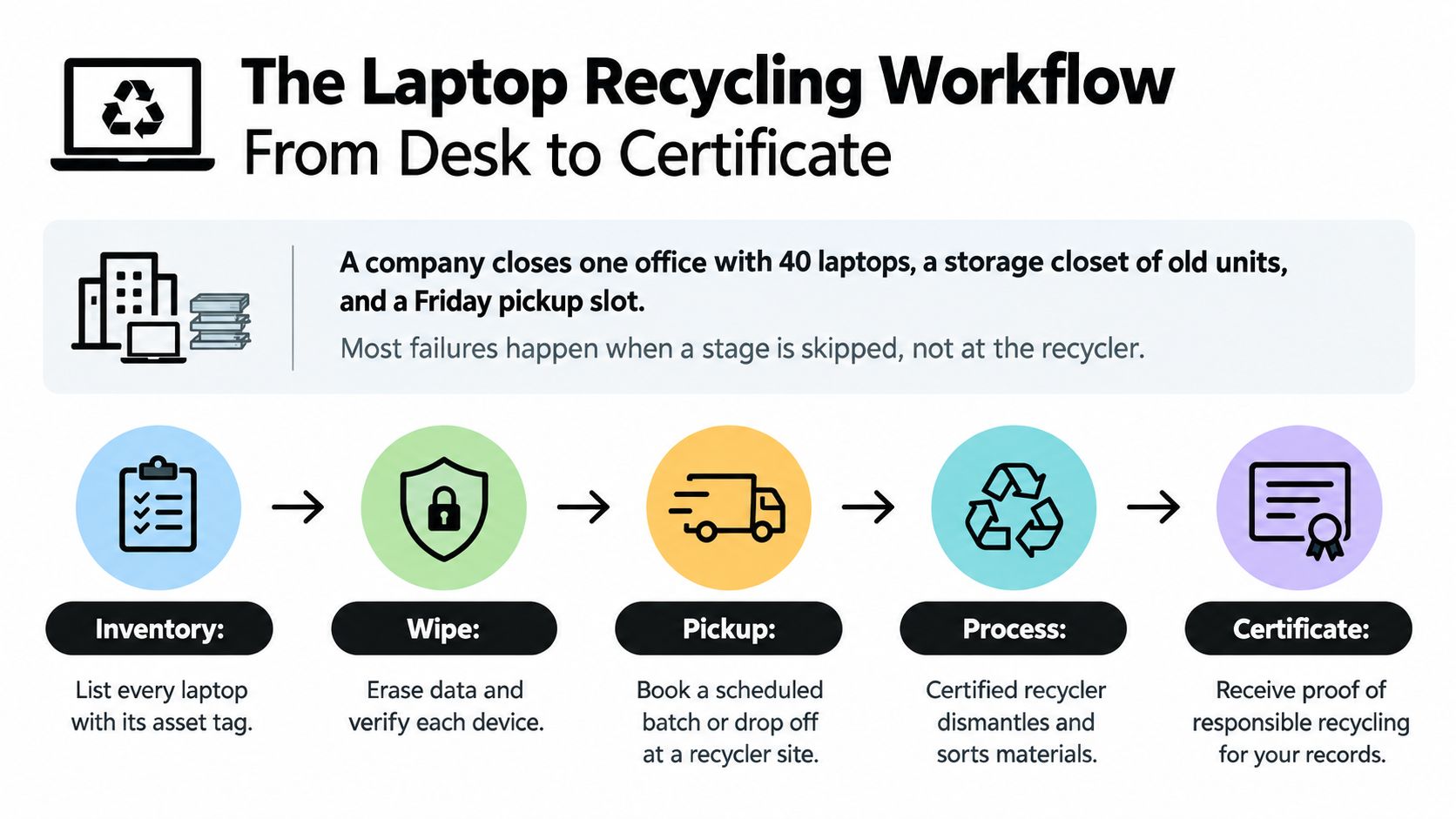
A laptop recycling run fails at handoffs, not at the shredder. Serials get logged but never classified. Drives get wiped but nobody keeps the log. The fix is a chain of stages where each one produces a record the next person can check.
Take an office closure with 40 laptops on the books, plus a closet of older units and a Friday pickup slot. If the truck gets booked before the inventory, someone ends up reconciling serials from memory in the loading dock. I'd build the register first, even if it delays pickup by a day.
Seven stages with an owner for each
| Stage | Core action | Owner | Record produced |
|---|---|---|---|
| 1. Inventory | Log serial, model, asset tag and storage type before pickup | IT or facilities | Asset register |
| 2. Classify | Rate data sensitivity and physical condition | IT and security | Sensitivity tag per device |
| 3. Route | Assign reuse, resale, donation or recycling | IT manager | Disposition decision |
| 4. Sanitize or destroy | Clear, purge, cryptographically erase or shred | Authorized IT or vendor | Sanitization or destruction log |
| 5. Package and transport | Separate batteries, seal cases, label bins | Facilities | Pickup manifest |
| 6. Process downstream | Refurbish, dismantle or recover materials | Recycler | Downstream receipt |
| 7. Verify and report | Reconcile serials, file certificates, log exceptions | Program lead | Certificate of disposition |
The record column is where weak programs show. Inventory without classification leaves security guessing at which drives need cryptographic erase and which need shredding. Sanitization without a log leaves you with a vendor's word. Processing without reconciliation lets missing assets hide inside a shipment total, which is exactly where untracked laptops surface months later.
Governance before anything leaves
NIST SP 800-88r2 helps organizations establish techniques and controls based on information sensitivity, and connects sanitization with NIST SP 800-53 and ISO/IEC 27040. It also recognizes cryptographic erase for encrypted media and recommends other techniques align with IEEE 2883, NSA specifications, or an approved organizational standard.
In practice, that means IT, security, facilities, procurement, and sustainability define responsibilities before equipment leaves the building. The same governance supports computer recycling, data center decommissioning, medical equipment disposal, laboratory equipment disposal, and office cleanout work. It scales from one laptop to a large refresh without changing the logic.
Compare your last cleanout file against the record column above. The empty column is the stage your process is missing.
Reworx Recycling can act as the external disposition partner at the end of this chain, including through its laptop donation program for verified reusable units. The chain of custody stays under your control.
Routing Each Laptop and Choosing Its Erasure Method
Sending every laptop to the shredder feels safe. It's often wasteful, and it doesn't fix weak erasure elsewhere. A 2025 survey of 2,000 IT and sustainability leaders across North America, Europe, and Asia-Pacific found up to 47% of devices destroyed for data-security reasons were still functional, and 25% of laptops were refurbished without certified data erasure. The same survey found 17% of surveyed organizations that had experienced a breach or leak attributed it to redeployed devices or drives retaining sensitive data.
Those three numbers describe the core trade-off. Destroying a working laptop removes immediate data risk, but it also erases residual value and increases environmental impact. Refurbishing without certified erasure preserves value, but it creates breach exposure. I would not choose either default. I'd route each machine through a documented decision sequence.
The decision sequence that makes reuse defensible
- Verify ownership and custody: Match serial and asset tag to your register before anyone opens the case.
- Classify the data: Employee, customer, healthcare, financial, and government data don't carry the same exposure.
- Sanitize to a recognized standard: Use NIST SP 800-88 or IEEE 2883 aligned methods matched to the storage type.
- Validate the result: Don't accept a completion screen as proof without verification records.
- Preserve the audit trail: Keep method, tool, operator, and outcome tied to that serial.
- Destroy when you can't verify: A failed or unverifiable erase ends the reuse discussion.
Clear, purge, and destroy are not interchangeable
NIST SP 800-88r2 defines three distinct methods, clear, purge, and destroy, selected according to confidentiality level and whether the device will be reused or discarded. Destroy is intended to make recovery infeasible using state-of-the-art laboratory techniques and makes the medium unusable for future storage.
Clear is a logical overwrite suited to reusable drives at lower sensitivity. It can miss reserved areas that a user can't normally access. That's acceptable only when your risk policy says so and verification supports it.
Purge uses stronger logical or cryptographic methods designed to resist laboratory recovery while keeping the drive usable. Degaussing falls in this family, but it applies only to magnetic disks, not flash storage. Applying it to an SSD is a category error, not extra caution.
Cryptographic erase suits encrypted SSDs and full-disk encrypted laptops, but only if encryption was enabled from the start. If data was written before encryption was turned on, destroying the key doesn't sanitize what was already on the cells. Confirm the encryption history, or treat the drive as unverified.
Destroy fits damaged, obsolete, non-reusable, or unverifiable drives. A file deletion, quick format, or factory reset isn't any of these methods. An SSD also can't be overwritten the way a spinning hard disk can, because wear leveling moves data to cells an overwrite may never touch.
For method details matched to media type, review Reworx Recycling's guide to data sanitization methods before you write your routing policy. That review should happen at classification, not at the loading dock.
Routing rules by condition and risk
| Condition | Data risk | Route | Notes |
|---|---|---|---|
| Working, storage erased and verified | Low | Resale, buyback or donation | Keep erasure certificate with serial |
| Working, erase failed or history unknown | High | Destroy drive, then recycle chassis | Do not redeploy under any circumstances |
| Working, encrypted SSD or self-encrypting drive | Medium | Cryptographic erase, verify, then reuse | Confirm encryption enabled from start |
| Working, school or nonprofit donation | Low once verified | Donation program | Document recipient and handoff date |
| Damaged or swollen battery | Any | Separate hazardous handling, then battery recycling stream | Never place in general bins |
| Non-functional, no resale value | Any | Dismantle for material recovery, destroy drive | Record drive destruction separately |
Buyback, donation, or recycling
Buyback pays for working devices with market value. Compare that value against the cost of certified erasure, documentation, and handling before choosing it. A small buyback check isn't a win if erasure records cost more than the devices return.
Donation suits schools and nonprofits when laptops still run current software and erasure is certified. Donating machines that can't hold a charge or run a browser just transfers your disposal problem to a recipient with fewer resources.
Recycling takes units that no longer run or have no reuse value. The drive still needs its own disposition record, separate from the chassis. One line saying a pallet was recycled doesn't prove a specific drive was destroyed.
Routing rule: If you can't prove erasure, the drive is destroyed and the laptop doesn't leave as a reusable unit.
That single rule prevents the two failures that cause most ITAD trouble. Usable laptops survive when erasure is verified. Risky drives don't travel because a chassis looked clean.
Preparing a Personal or Small-Office Laptop Before Drop-Off
Individuals and small offices usually skip preparation and hand over a laptop that's still signed in everywhere. Run this checklist before any device reaches a drop-off site. It takes minutes and prevents the next owner from hitting an activation lock.
- Back up first: Copy files you need to an external drive or cloud account, then open a few to confirm they transferred.
- Sign out and unlink: Sign out of Apple ID, Microsoft, and Google accounts, and remove the device from each account so activation locks don't block reuse.
- Check encryption: Look for BitLocker on Windows, FileVault on macOS, or the drive's own encryption. If full-disk encryption was on, a complete erase with the key cleared is your strongest self-service option.
- Remove extras: Take out external media, SIM cards, and accessories. Keep the charger only if the recycler asks for it.
- Record identity: Write down the model and serial number from the underside label or system settings, so you can match the device to a receipt.
- Inspect the battery: Set aside a swollen, hot, or cracked unit for hazardous handling instead of stacking it with intact machines.
Your own reset proves little on its own. When a laptop is headed for a school or nonprofit program, ask for certified erasure and a certificate instead of relying on a home wipe. Reworx Recycling offers free customer drop-off for individuals, and a documented handoff gives a household the same proof a business needs. Don't hand over a signed-in machine and hope for the best.
Pickup, Drop-Off and Onsite Logistics for Laptop Batches
The right logistics option depends on volume, data sensitivity, and battery condition, not just distance. A single household laptop and a pallet from a facility cleanout shouldn't move the same way.

Matching the channel to the batch
- Individual drop-off: Suits households and small offices bringing devices to a recycler site. Remove personal accounts first.
- Business pickup: Scheduled collection for offices and campuses. It should come with a manifest whose serials match your register.
- Onsite destruction: Suits sensitive data and high-value fleets. It needs site access, power, space, and a witness from your team.
- Office cleanout: Laptops get mixed with furniture, cables, and peripherals. Separate electronics and batteries before the truck arrives.
- Mail-in: Works for single devices. Check carrier rules for lithium batteries and damaged units before you seal the box, and follow guidance on packing electronics for shipping.
- Community e-waste drives: Useful for volume, but they need preregistration and a clear data policy published in advance.
Battery triage is a separate problem
A U.S. Department of Energy-linked analysis identifies laptops and tablets as sources of cobalt and lithium from rechargeable batteries, tantalum from capacitors, and platinum-group metals from circuit boards. It also highlights rare earth elements and other critical materials as strategically important.
That value doesn't make a damaged battery safe to ship like a normal device. Isolate swollen, hot, or cracked units in a non-combustible container, tell the carrier before pickup, and never put batteries in general bins. Damaged lithium cells create fire and transportation hazards, while informal dismantling loses recoverable materials.
I'd measure logistics success by highest-value treatment, not by truck count. Reuse or repair first, component recovery second, material recycling last. Reworx Recycling offers free customer drop-off, business pickups, and secure hard-drive shredding from its Smyrna, Georgia base, so you can match the channel to each batch.
Certifications and Paperwork Worth Demanding
A certificate of destruction isn't proof by itself. A one-line PDF with your company name and a date proves a document was generated. It doesn't prove what happened to a specific drive.
Fields that make a certificate worth filing
The NIST SP 800-88r2 FAQ states that a certificate should record the asset barcode, storage type, method, tool and version, verification approach, operator, backup status, and final destination. It also calls for checking pseudorandom locations across the addressable space, including user-accessible and reserved areas, because tools may affect only a subset of storage.
Demand 100% verification for high-risk assets, with documented representative sampling only where your risk policy permits it. Sampling a finance laptop batch because it's faster isn't a policy. It's a gap you'll have to explain after an incident.
The workflow starts before collection. Classify each device by data sensitivity, identify whether storage is magnetic, flash-based, or hybrid, and decide on reuse or destruction. Applying one method to every laptop is the operational pitfall here, because SSDs and encrypted devices need storage-aware procedures.
Physical destruction also isn't unskilled labor. It must be performed by trained, authorized personnel with safety and hazardous-material controls. If a vendor can't name who performed destruction and under what controls, you don't have an auditable chain of custody.
Certifications differ in scope
| Credential | Scope | What to request |
|---|---|---|
| R2 | Responsible electronics recycling, including downstream handling | Current certificate number, audit date and scope statement |
| e-Stewards | Stricter controls on hazardous exports and downstream tracking | Certificate status and facilities covered |
| NAID AAA | Secure destruction, audited on-site and in process | Current accreditation and audit date |
| NIST SP 800-88 alignment | Sanitization methods, not a certification | Method, tool version and verification records per device |
ISO 14001 covers an environmental management system, not a specific laptop's fate. ISO/IEC 27001 covers information security, which matters only if the certified scope includes ITAD work. Always ask for the scope statement, certificate number, and audit date, because a logo on a website tells you none of those.
Review what electronics recycling certification should cover, and check the EPA recycling resources for general guidance on electronics recycling and donation. Then ask your vendor to show records, not badges.
Running an E-Waste Drive or Office Cleanout Step by Step
A cleanout fails when collection day arrives and nobody knows what is in scope, who signs off, or where damaged batteries go. Run it like an asset project, not a trash day. The steps below work for a single office, a campus, or a multi-site refresh.
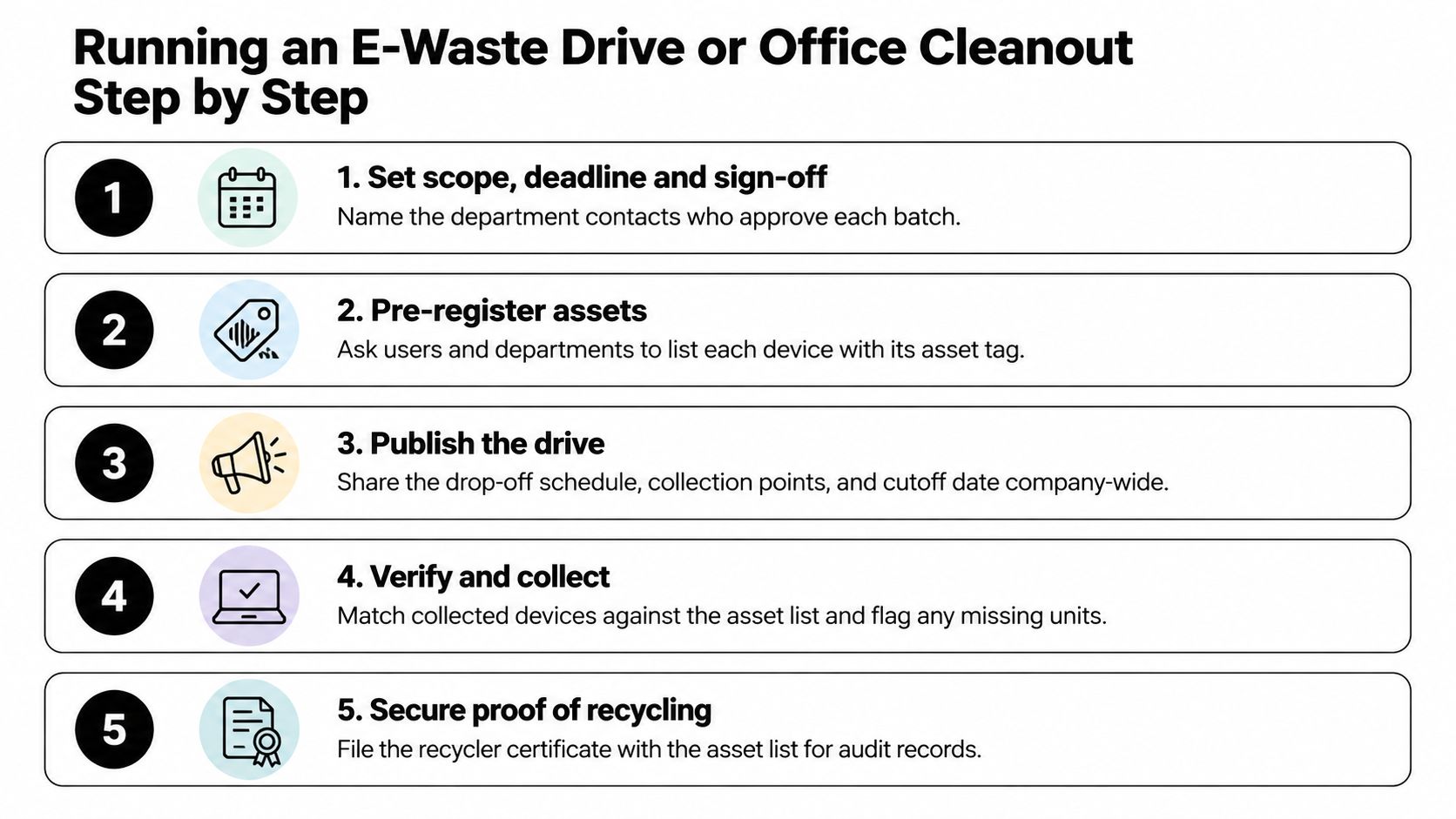
The run in eight steps
- Set scope and sign-off: Name the deadline and the department contacts who approve each batch. Without sign-off, devices keep appearing after pickup.
- Pre-register assets: Ask users and departments to list each device with its asset tag before collection day. This becomes your reconciliation baseline.
- Publish a data rule and rating: Require account sign-out and a sensitivity rating per device at surrender. That rating decides the route: certified erasure for reuse candidates, destruction for failed or high-risk drives. Blanket destruction of working laptops is a routing failure, not a security win.
- Collect with intake scanning: Use a sign-in sheet and scan asset tags as devices arrive. A pile counted later is a pile you can't reconcile.
- Separate damaged batteries at intake: Pull swollen, hot, or cracked units at the collection point, not at the truck. Give them their own labeled container.
- Reconcile at handoff: Match every serial against the register before the load leaves. Flag missing units while staff are still on site.
- Collect certificates on a deadline: Agree on the window for receiving certificates before the drive, not after. The certificate is the deliverable your auditors file, so chase exceptions while the run is still fresh.
- Publish the report: Cover counts, dispositions, and exceptions. Offices that see results participate better in the next drive.
Reworx Recycling's e-waste drive planning tips can help you sequence promotion and collection points. I'd still keep reconciliation in-house, because your asset register is your source of truth.
Measure what proves the outcome
The UN-supported Global E-waste Monitor reports 4.6 million tonnes of small IT and telecommunications equipment generated in a year, including laptops, phones, routers, and GPS devices, and puts the documented collection and recycling rate for all e-waste worldwide at 22%. For a drive organizer, the takeaway is mechanical: a device's fate only exists on paper if someone records it at handoff.
Measure your run at multiple points:
- Collection rate: Devices collected against the asset register, by count and by serial.
- Reuse split: Percentage correctly identified for reuse versus material recovery.
- Sanitization pass rate: Verified erasures against attempted erasures, with failures routed to destruction.
- Documented disposition: Share of devices with a recorded final destination, with exceptions reported separately.
Don't report diversion by shipment weight alone. Mixed loads can conceal missing assets, loose batteries, or undocumented downstream processing. Weight tells you a truck was full. It doesn't tell you a specific laptop was accounted for.
Recycled doesn't mean recovered. A device can enter a truck and still never reach documented material recovery.
Set your baseline by device count and weight, reconcile every serial number, and report exceptions separately. That keeps sustainability claims auditable and comparable across offices, campuses, and government facilities. When verified laptops go to donation instead, they can support digital inclusion and workforce training, but only if the erasure and handoff records travel with them.
Book Your Laptop Pickup With Reworx Recycling
A truck can arrive on schedule and still leave devices sitting on the dock because nobody confirmed elevator access or counted the units. Book the slot only after you can hand the recycler a complete readiness file. It prevents rescheduled pickups, onsite sorting charges, and certificates that do not match your asset register.
Readiness check before you book
- Device list: Serials, asset tags, models, and storage types for every unit.
- Data rating: Sensitivity classification per device, not per pallet.
- Battery condition: Flag swollen or damaged cells so they ship segregated instead of loose in a mixed load.
- Pickup window and access: Dock hours, elevator rules, badging, and a named site contact.
- Erasure preference: Certified erasure for reuse candidates, destruction for failed or high-risk drives.
- Certificate format: Per-device records your auditors can file without rework.
Individuals can use free customer drop-off. Offices, schools, clinics, and public agencies can request business pickups with a manifest. Organizations handling sensitive data can add secure hard-drive shredding and certificates of destruction, and anyone retiring working equipment can ask about buyback or a donation route once erasure is certified.
Reworx Recycling is a full-service electronics recycling and IT asset disposition partner in Smyrna, Georgia, serving offices, schools, and government agencies nationwide. Services cover business pickups, equipment decommissioning, IT asset management, secure hard-drive shredding with data destruction, and buyback options for surplus hardware. If your readiness file is complete, you are ready to schedule. If it is not, finish the inventory first and book second.
Reworx Recycling offers electronics recycling, secure data destruction, business pickups, and free drop-off for laptops and broader IT equipment. Put your next refresh, office cleanout, or surplus batch on a documented path from serial number to certificate. Visit Reworx Recycling to schedule a pickup or plan an office recycling program or e-waste drive.