Shred every drive, no questions asked. That's the advice most IT managers hear, and it's often wrong. It can destroy healthy hardware that could've been wiped, redeployed, or donated, and it can still fail an audit if nobody recorded which serial numbers went into the machine.
Hard drive shredding is a strong control. It's not a cure-all. The work that matters is matching the method to the media, the sensitivity of the data, and the evidence you'll need later. A failed drive from a clinic, a working laptop from a sales team, and a tray of NVMe sticks from a server refresh shouldn't automatically get the same treatment.
What follows is how a real fleet retirement should run. You'll see when physical destruction is the right call, when it wastes value, and why the custody record, not the blades, is what an auditor will test.
What Hard Drive Shredding Actually Destroys
Deleting a file is like erasing a book's table of contents. The pages stay in place until something overwrites them. Shredding is like pulping the book so no page can be read.
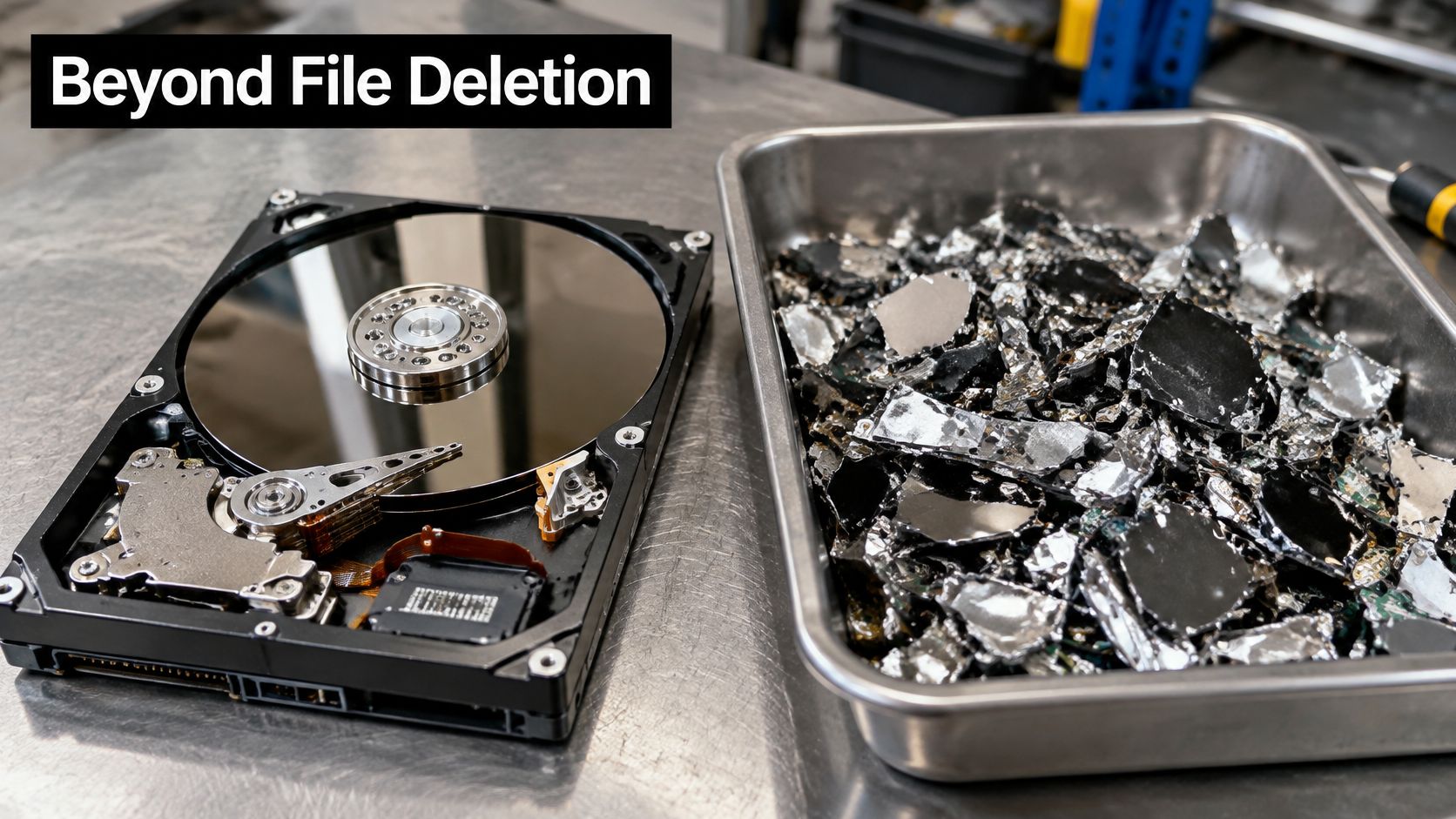
Hard drive shredding is the physical-destruction branch of media sanitization, not a faster form of deletion. NIST defines sanitization as making access to target data infeasible for a defined level of effort, and its Destroy category aims to make recovery infeasible using state-of-the-art laboratory techniques. For magnetic drives, that can mean disintegration, pulverization, melting, or incineration.
Clear, Purge, and Destroy Are Different Promises
Clear uses logical techniques like overwriting. Purge uses stronger methods such as degaussing or cryptographic erase. Destroy makes the medium itself unusable as storage.
Formatting and file deletion don't give you that assurance. Their result depends on the drive's condition, interface, firmware, and whether the overwrite reached every area. A drive that won't spin up or won't connect can't be verified the same way.
Shredding targets the parts that hold or access data. On an HDD, that's the platters, enclosure, and read-write heads. On an SSD, it's the flash chips where data sits.
Shredding earns its cost when the medium itself must become unusable, not merely when files need to disappear from view.
That condition shows up most clearly with regulated health, financial, personnel, or government data. It also shows up with failed drives you can't wipe or verify. In those cases, you're not paying for drama. You're paying to remove doubt about whether the storage surface or chip could be examined later.
Compliance Rules That Shape Destruction Decisions
Destruction isn't just an IT preference when specific data types are involved. It's a legal and policy duty, and the duty follows the hardware through pickup, transport, storage, and final processing.
Consumer Report Data and the FTC Disposal Rule
The Federal Trade Commission's Disposal Rule under FACTA requires businesses holding consumer-report information to take reasonable measures during disposal. The FTC states that electronic media should be destroyed or erased so information cannot practicably be read or reconstructed. Using a qualified destruction contractor and doing due diligence on that contractor are examples of reasonable safeguards.
That matters during laptop disposal, office cleanout, and data center decommissioning work. Deleting files, reformatting, or tossing intact hardware into a recycling bin doesn't meet that test when covered data is present. Your team needs to identify the media, restrict access while it's collected, and prove the final method prevented reconstruction.
Health Data and HIPAA
Healthcare raises the stakes further. HIPAA-covered entities must maintain policies for the final disposition of electronic protected health information and the hardware or media holding it. Before reuse, the PHI must be removed. As an alternative, the media may be destroyed before disposal through disintegration, pulverization, melting, incineration, or shredding.
Hospitals, clinics, labs, and their business associates can't treat a PHI drive as ordinary e-waste. They can contract the work out, but they can't contract away accountability. That's why medical equipment disposal and laboratory equipment disposal programs need custody records that connect each device to its sanitization or destruction event.
HHS doesn't mandate one universal technique. Its guidance recognizes clearing, purging, and destruction, and expects safeguards matched to reasonably anticipated threats. Policies and workforce training are part of that expectation, not paperwork you add afterward.
Turning Duties Into a Documented Program
NIST SP 800-88 gives IT and compliance teams the technical structure to turn those duties into procedures based on sensitivity and media type. Our page on data security and compliance requirements lays out how that structure applies to everyday IT equipment disposal.
Teams operating across jurisdictions also need clarity on who controls and who processes personal data, which is why understanding GDPR roles and responsibilities is a useful companion when you're assigning ownership for disposal decisions.
There's an environmental side, too. EPA electronics donation and recycling guidance points businesses toward keeping working equipment out of landfills where reuse is safe and appropriate. When destruction is required, reputable electronics recycling keeps shredded metals and plastics in recovery streams instead of mixed waste.
A documented process protects you in both directions. It shows you didn't under-protect sensitive media, and it shows you didn't destroy reusable assets without a reason your sustainability and finance teams can defend.
Matching Destruction Methods to Media and Situations
Pick the method per drive, not per vendor. A shop running one machine will sell you one answer for every asset on the pallet.
Destruction methods compared by use, reuse and recovery risk
| Method | Works on | Device reusable afterward | Residual recovery risk | Best fit |
|---|---|---|---|---|
| Shredding to 2 mm or smaller particles | HDDs, SSDs, flash media | No | Very low when particle size is verified | High-sensitivity end-of-life media |
| Degaussing plus destruction | Magnetic HDDs only | No | Low when both steps are approved | Magnetic drives needing routine sanitization |
| Degaussing alone | Magnetic HDDs only | Usually no | Moderate, depends on equipment approval | Quick purge where destruction is not required |
| Software overwrite (clear) | HDDs and SSDs still functioning | Yes | Depends on tool verification and drive health | Redeployment inside the organization |
| Cryptographic erase | Self-encrypting drives | Yes | Low when encryption keys are destroyed | Fleets with full-disk encryption enabled |
| Crushing or deforming alone | Any HDD | No | High for magnetic media | Not recommended as the only method |
| Incineration or melting | Any media | No | Very low | Specialized facilities with permits and emissions controls |
Magnetic HDDs Retiring in Normal Service
For routine HDD retirement, approved degaussing paired with destruction, or verified shredding, gives you a defensible result. Crushing alone looks decisive but sits at the weak end of the table. A deformer can bend platters and break the mechanism while leaving coated surfaces physically intact.
Degaussing alone can be a faster purge when your policy doesn't require destruction. The catch is approval and verification. If you can't show the equipment matched that media type, you've bought speed and kept the doubt.
SSDs, NVMe, and Flash Media
SSDs don't follow HDD logic. Data sits across NAND chips and controller-managed areas, so a bent circuit board proves very little. For end-of-life flash, use shredding designed for solid-state media down to the specified particle size, or a verified cryptographic erase followed by destruction when the risk calls for both.
A healthy SSD that's been encrypted since day one and stays under your control is a candidate for cryptographic erase, which keeps the device usable. Once it leaves your control with a sensitive data history, the evidence bar rises. Proving every controller area was addressed is harder than proving the chips came out as particles, so many teams destroy at that point.
Failed Drives and Healthy Drives Need Opposite Handling
A failed drive that won't connect can't be software wiped. There is no working interface to run the process or verify it afterward. Physical destruction is the practical control there, whatever your sustainability report would prefer.
A healthy drive holding low-sensitivity data is the opposite call. A verified overwrite or cryptographic erase keeps it working for redeployment, resale, or donation through corporate donation programs. Shredding that drive removes recoverable value and adds processing for no security gain.
NIST SP 800-88 Revision 2, published in September 2014, draws this line formally: it separates Clear, Purge, and Destroy, and ties the choice to media type, data sensitivity, and whether the device leaves your control. Physical destruction makes media unusable, so it isn't automatically the most sustainable or economical option.
Mixed Batches Are Where Programs Break
Real pickups arrive mixed. A facility cleanout delivers desktop HDDs, laptop SSDs, loose backup drives, and drives nobody labeled. The method decision has to happen per asset, before anything reaches a shredder or wipe station. One workflow for the whole pallet is how flash media gets degaussed pointlessly and reusable drives get shredded for no reason.
Each drive also needs its own record. When an auditor comes back six months later, the serial-numbered custody log and the certificate of destruction are what prove the outcome. The blades did the work; the paperwork is the evidence.
If you're building the decision logic for your team, our explainer on what data destruction covers beyond shredding helps separate erasure, degaussing, and destruction before you write policy.
Practical rule: Choose the least destructive method that still meets the sensitivity level and the evidence requirement. Anything more wastes assets. Anything less leaves risk.
Incineration and melting sit at the far end of the table for a reason. They need permitted facilities and emissions controls, so most businesses, schools, and agencies won't use them routinely. Shredding, or degaussing with shredding, covers the high-assurance cases in everyday secure data destruction and IT asset disposition (ITAD) work.
How an Industrial Shredder Processes a Drive
A good shredder run looks boring from the dock. That's intentional. Each stage exists to close a specific gap, and skipping the early stages makes the later destruction hard to prove.
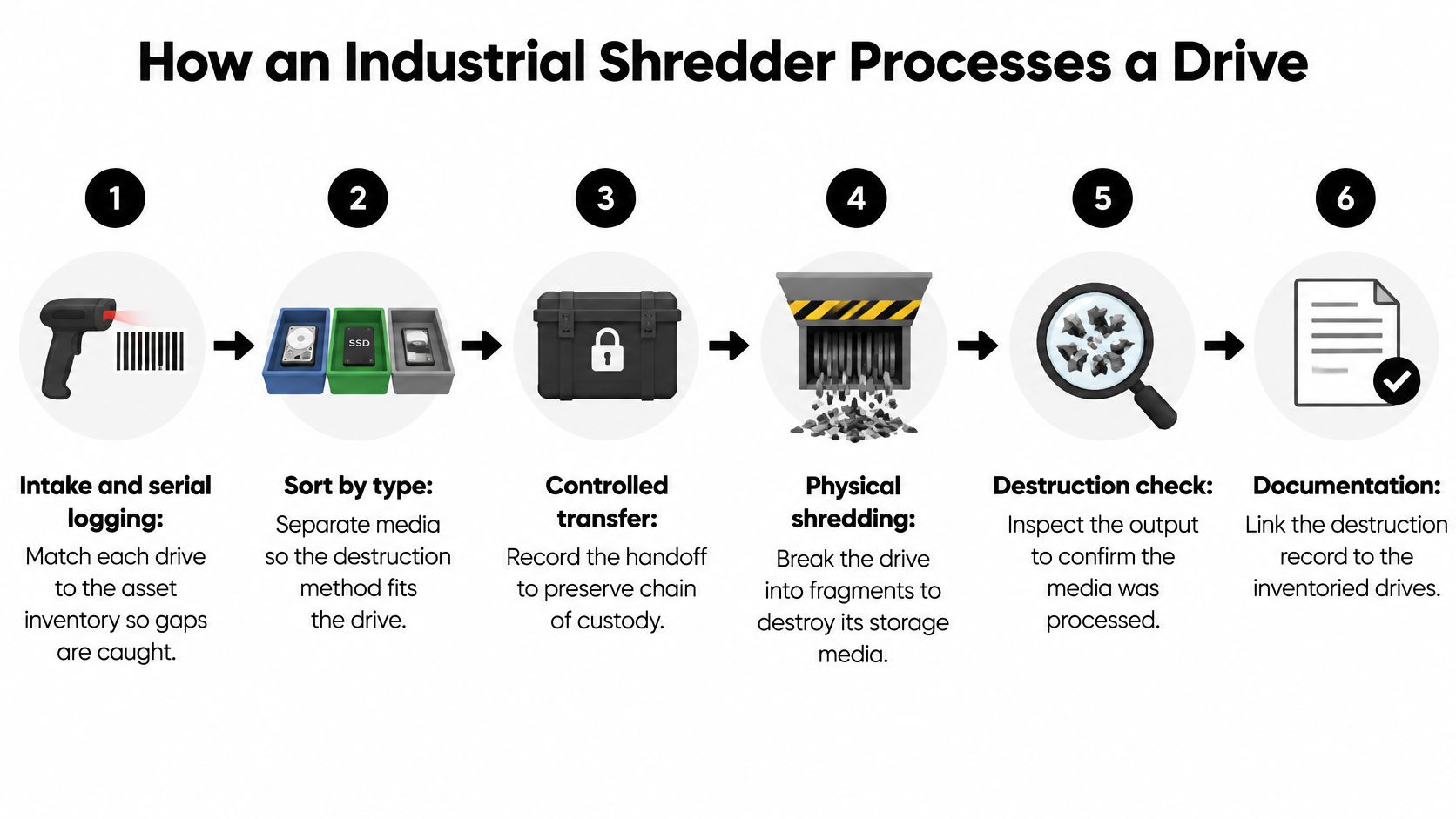
The Six Stages and Why Each One Exists
Intake and serial logging: Match each drive to the asset inventory before it leaves its container. Gaps are cheapest to catch at the dock, while the source location can still check a desk drawer or server bay.
Media sorting: Send HDDs, SSDs, and failed drives to separate lines. Magnetic media, flash chips, and non-functioning drives don't respond to the same treatment, and sorting later means handling the same drive twice under custody.
Degaussing where required: For magnetic media, don't assume deformation equals sanitization. NSA/CSS guidance states a destruction device may deform platters without sanitizing the magnetic media, so routine sanitization generally pairs destruction with approved degaussing unless the device is reduced to particles of 2 mm or smaller.
Deformation: On the HDD line, the deformer has to physically reach the platters. The evaluated-products document linked above is the reference for which devices qualify, so check the equipment on site against it rather than trusting a vendor's description. A machine that bends the enclosure without deforming the platter inside produces scrap metal, not destroyed media.
Size reduction: Disintegrators on the HDD line must meet the 2 mm particle threshold in the requirement above. SSDs don't inherit that figure automatically. Flash destruction runs on the particle size the vendor specifies for that equipment, so get the spec in writing and verify it at stage six.
Separation and verification: Sort ferrous metals, non-ferrous metals, and plastics into recovery streams for sustainable recycling. Measure a particle sample against the specified size for that media type and record the result with the batch, noting which spec applied to which line.
Why Particle Size Beats Marketing Language
The word shredded on an invoice tells you almost nothing. It could mean large bent fragments or verified small particles. Those outcomes carry very different recovery risk.
Ask for the equipment type, the specified output size per media type, and how the operator verifies it. If a vendor can't describe the sample check in stage six, you're buying a promise instead of a process. That distinction matters most for SSDs, where an intact NAND chip inside a crushed shell can still be the whole problem.
Throughput matters, too, but not at the expense of intake. A fast machine fed from an unlogged gaylord box destroys hardware efficiently and creates an audit problem just as efficiently. Serial logging first, destruction second. The blades do the physical work, but the batch record is what an auditor reads. Reversing that order is the most common avoidable failure in computer recycling and bulk product destruction jobs.
Chain of Custody From Pickup to Certificate
A certificate by itself doesn't prove every drive was destroyed. It proves a vendor issued a certificate. The chain of custody is what lets an auditor connect that document to the specific drives that left your building.

Six Recorded Handoffs
Inventory before pickup: List each drive by serial number, asset tag, and location. This is your baseline for reconciliation, not a packing list you rebuild from memory later.
Sealed containers: Use tamper-evident seals and count units at the door. Record seal numbers so a swapped or opened container is visible on arrival.
Controlled transport: Restrict access during collection and transit. Drives in a personal vehicle that is not locked break custody even if they arrive intact.
Signed receipt at each handoff: Capture date, time, and handler names every time custody changes. Gaps between signatures are where missing media hide.
Destruction log: Record the method, equipment used, batch, and exceptions such as unreadable labels. An unreadable serial isn't a reason to omit the drive. It's a reason to document how you identified it.
Reconciliation and certificate: Match certificate serials against the original inventory and flag every mismatch. Don't close the job until each line is accounted for.
NIST Revision 2 emphasizes an organization-wide sanitization program with defined roles, verification, and documentation rather than relying on a disposal event alone. That includes serial reconciliation, custody transfers, container controls, method and equipment evidence, and procedures for missing or mismatched media.
Handling the Mismatch
When a serial is missing, stop and work the exception. Check the source asset for a second drive bay, confirm whether IT pulled the drive earlier, and review container counts and seal records. Document the finding while people still remember the pickup.
Our guide to what a hard drive certificate of destruction should show is useful here because a strong certificate lists the evidence, not just the outcome. An independently verifiable record connects each serial to its destruction event. A batch total with a logo doesn't.
Vendor Criteria and What Drives the Price
Compare vendors on evidence first, price second. A cheap quote that produces a thin certificate can cost you far more during an audit or incident review.
Four Checks Before You Talk Rates
- Documented process: The vendor should state equipment types and particle-size specifications in writing, not just say drives are destroyed securely.
- Third-party audits: Ask about certifications such as NAID AAA and how often the operation is audited.
- Serial-level certificates: Batch certificates hide missing drives. Serial-level records expose them while you can still act.
- Insurance and liability terms: Get coverage and responsibility for lost media in the contract, before the first pickup.
Cost factors and the questions that reveal them
| Cost factor | How it changes the price | Question to ask the vendor |
|---|---|---|
| Pricing unit | Per drive suits small batches; per pound or per container suits bulk | Which unit do you bill, and what is the minimum charge? |
| Mobile versus off-site shredding | A mobile truck adds a mobilization fee; off-site processing is usually cheaper for bulk | Is shredding done at my site or at your facility? |
| Degaussing included | Degaussing is often a separate line item for magnetic drives | Is degaussing included in the per-drive rate? |
| Certificate detail | Serial-level certificates usually cost more than batch certificates | Do certificates list each serial number? |
| Pickup distance and volume | Remote sites and small loads raise the per-unit cost | Is there a fee for pickup distance or low volume? |
| Buyback or credit | Healthy hardware can offset destruction costs | Which items qualify for buyback, and how are they valued? |
Published rates vary widely by region and volume, so headline numbers mislead. Request itemized quotes using the same inventory list for every vendor. Mobile on-site shredding gives you witnessed destruction, but you'll pay a mobilization fee for that visibility. Off-site processing usually wins on bulk price, provided transport custody is tight.
Ask the degaussing question explicitly for magnetic drives. If it's a separate line and you decline it to save money, confirm your chosen particle size still meets your policy. Don't discover that gap from the destruction log.
Certificate detail is worth paying for when regulated data is involved. Serial-level documentation takes more labor at intake, which is exactly why it costs more and exactly why it works. Buyback credits move the math in the other direction. Healthy laptops and servers from the same office cleanout can offset destruction charges for the drives that need shredding.
Use consistent vendor selection criteria for secure destruction partners and compare answers in writing before signing. Reworx Recycling is one example of a provider that pairs secure hard drive shredding with equipment buyback and business pickups, so its quote can be checked against these same criteria like any other vendor's.
Schedule a Secure Destruction Pickup With Reworx
Run this checklist before you book any pickup. These confirmations prevent the disputes that otherwise surface weeks later, when a certificate arrives and the serial counts don't match your inventory.
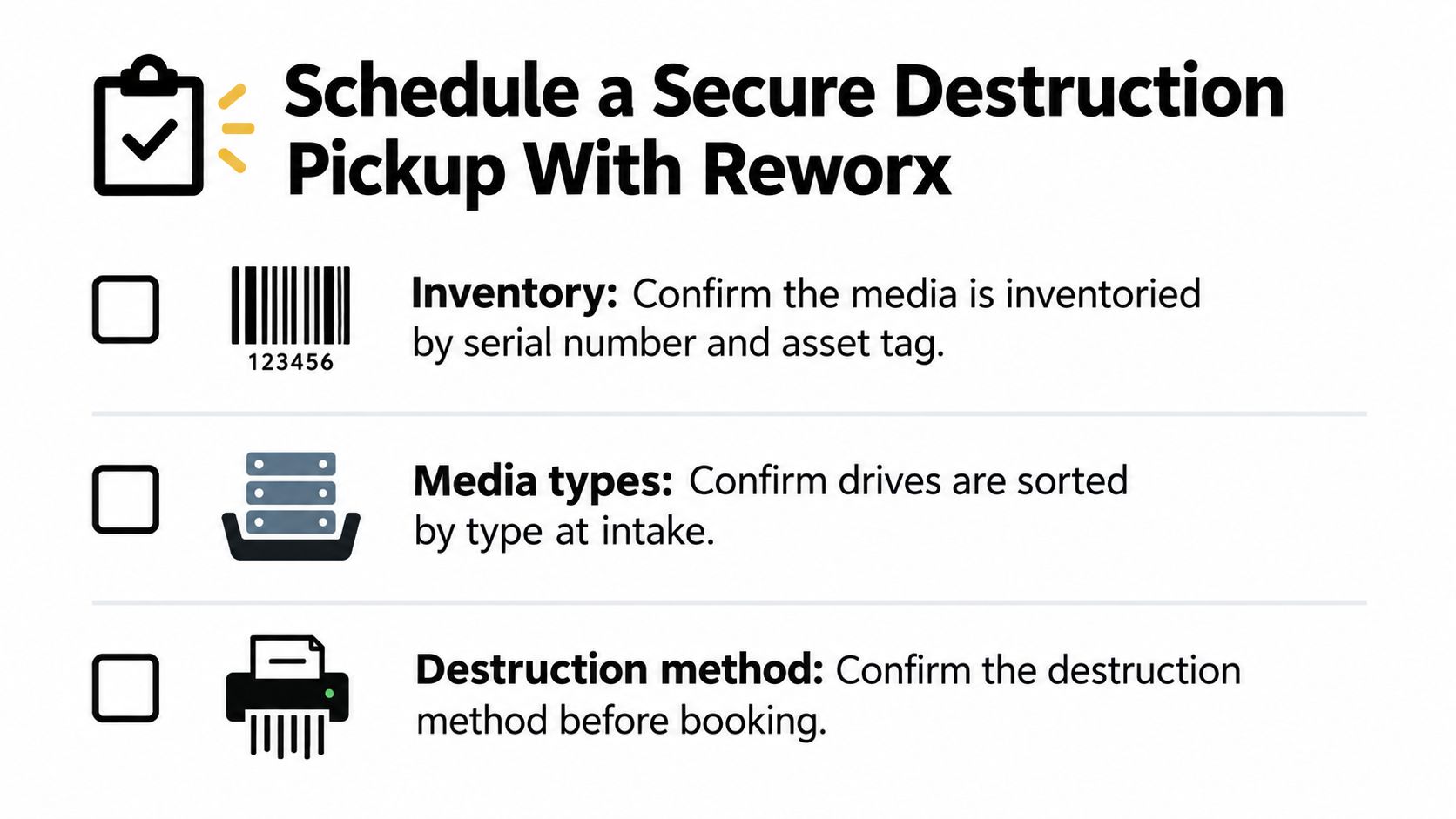
Five Confirmations Before Booking
- Inventory confirmed: Every drive is listed by serial number and asset tag, with location noted.
- Media sorted: HDDs, SSDs, and failed drives are separated at intake so each line gets the right method.
- Method matched: The destruction method fits the data sensitivity and your duty under FTC, HIPAA, or internal policy.
- Standards in writing: Particle-size and certificate standards are documented before the truck arrives.
- Custody records assured: Signed handoffs and a destruction log will be kept and reconciled against the certificate.
Once those five points hold, pick the path that fits the equipment. Shredding is the right control for drives that held regulated data or can't be wiped to your standard. Working hardware that passes testing is better donated, since physical destruction on a healthy laptop destroys recoverable value without adding security. Through donation-based recycling, functional technology keeps serving people instead of shredders.
If you retire equipment continuously through office cleanouts, data center decommissioning, or laboratory equipment disposal, set up a recurring program rather than booking one-off pickups. A standing arrangement keeps inventory habits and custody forms consistent across every refresh cycle, which is what makes the paper trail hold up under audit.
That paper trail is the actual proof of destruction. The blades do the destroying, but the signed handoffs, serialized log, and certificate are what you show an auditor. Any provider you book should reconcile those records against your intake list before the job closes.
Reworx Recycling runs each of these paths as a donation-based electronics recycling and IT asset disposition social enterprise. That is the social enterprise recycling model in practice: secure destruction protects your organization, and reusable equipment routed to donation supports digital inclusion and workforce development in the community.
When your inventory is confirmed and the five points above are in writing, schedule a pickup for secure destruction or donation. One booked pickup covers drives headed for the shredder and working equipment headed for reuse, and the custody process starts before the first container is sealed.