Arizona's 107-day monsoon season, officially running from June 15 through September 30, is a predictable annual hazard window, but its operational impact is anything but predictable. State and federal guidance describes the period as one of sharply increased humidity, thunderstorms, heavy rain, hail, high winds, flash flooding, and dust storms. For IT and operations leaders, that combination creates a continuity problem: water can disable facilities, dust can restrict travel, and power instability can turn retired hardware into a data-security liability.
The 2026 Arizona monsoon outlook leans wetter than normal, with nearly all of the state carrying a 33% to 50% chance of above-normal precipitation, and the strongest signal in northeastern Arizona, according to NOAA and National Weather Service outlook materials. Treat that projection as a planning trigger, not a promise of constant rain. Storm-by-storm intensity matters more than the seasonal total, so facilities teams should harden power, drainage, travel procedures, and IT asset disposition before the first major cell forms.
What the 2026 Arizona Monsoon Outlook Means for Your Business
The central planning message is simple. Arizona should prepare for episodic, high-intensity rainfall during a wetter-leaning 2026 monsoon outlook, even though a probabilistic forecast can't identify the exact facility, road, or county that will take the biggest hit. The state and federal safety guidance identifies June 15 through September 30 as the official monsoon window, giving organizations a defined period for heightened readiness.
Seasonal averages can conceal serious local disruption. Arizona health officials note that the season may deliver 2 to 16 inches of rain depending on the region, while the National Weather Service lists monsoon precipitation averages of 5.69 inches for Tucson, 2.43 inches for Phoenix, 4.48 inches for Albuquerque, and 5.27 inches for El Paso in its safety guidance. The same storm pattern can flood one county and leave another relatively dry, so a quarterly business-continuity review isn't enough. Operations teams need short-range weather monitoring and storm-by-storm decision rules.
Turn probability into operating decisions
Use the outlook to make practical choices before the active window:
- Protect contingency capacity: Reserve budget and staff availability for emergency repairs, replacement hardware, temporary space, and expedited logistics.
- Move vulnerable work earlier: Schedule hardware refreshes, server moves, office cleanouts, and facility cleanouts outside the most disruption-prone summer thunderstorm period whenever possible.
- Pre-stage ITAD logistics: Arrange pickup windows for obsolete laptops, servers, storage media, and other electronics before storm-driven outages or access restrictions trap inventory onsite.
- Review drainage exposure: Ask facilities leaders to inspect loading docks, low-lying storage, parking areas, roof drains, and any basement or ground-floor technology space.
Planning rule: A wetter seasonal outlook doesn't justify waiting for a warning. It justifies removing avoidable exposure before warnings become operational constraints.
A roof leak or drainage failure can quickly affect server rooms, warehouse stock, and electrical systems. Facilities leaders evaluating vulnerable roofs may also benefit from this resource on Arizona Roofers monsoon damage repair. For organizations already planning technology retirement, a documented Arizona ITAD services process can keep obsolete equipment moving before weather interrupts access.
2026 Monsoon Outlook Probability Ranges
| Region | Above Normal Chance | Near Normal Chance | Below Normal Chance |
|---|---|---|---|
| Most of Arizona | 33%–50% | Not specified in the verified outlook data | Not specified in the verified outlook data |
| Northeastern Arizona | Strongest above-normal signal | Not specified in the verified outlook data | Not specified in the verified outlook data |
The outlook is probabilistic. Build a flexible response plan around rapid rainfall, wind, dust, and localized flooding rather than treating the forecast as a guaranteed statewide total.
How Monsoon Storms Actually Form and Where the Rain Falls
Arizona monsoon risk comes from concentrated convective bursts, not from uniform rain spread across the state. Morning heating increases instability over the desert. Moisture then moves into the region through changing circulation patterns, and thunderstorms develop where heat, moisture, terrain, and outflow boundaries align.
That process creates sharp geographic differences. The National Weather Service reports that annual monsoon precipitation varies substantially among Southwest cities, with Tucson averaging 5.69 inches and Phoenix 2.43 inches during the season according to its Arizona monsoon safety guidance. Those averages don't tell a facilities manager whether a particular parking lot, wash, roof drain, or loading dock will be overwhelmed during the next storm.
Why short bursts create outsized damage
A storm cell can remain highly localized. One facility may experience intense runoff while another site a short distance away records little or no rain. Dry, compacted ground often sheds water quickly, and fire-affected terrain can accelerate runoff into channels, roads, and low areas.
That makes several locations especially important in continuity planning:
- Burn scars and canyons: Runoff can arrive from rainfall that occurred upstream or at a distance.
- Arroyos and low-water crossings: Flow can rise suddenly, even when the sky above the road looks manageable.
- Phoenix streets and drainage systems: Brief, concentrated rainfall can create ponding around entrances, docks, and parking areas.
- Tucson washes and river corridors: Facilities and service routes near washes require real-time alert monitoring.
- Rooftops and generator areas: Outflow winds, hail, and blowing dust can damage exposed equipment or restrict air intake.
The Northern Arizona National Weather Service warns that 12 inches of water can sweep a car from the roadway, and that most flood fatalities occur in vehicles, as described in its monsoon information and safety guidance. Central Arizona Fire & Medical provides an even more direct scale for moving water: 6 inches can carry an adult away, 12 inches can sweep most cars away, and 24 inches can carry most trucks and SUVs away.
For IT managers, the practical implication is clear. Don't assess exposure only by looking at the building's address. Map stormwater routes, upstream terrain, utility access, roof equipment, delivery paths, and the locations where end-of-life hardware waits for removal.
Staying Safe on Arizona Roads During Flash Floods and Dust Storms
Fleet managers and field-service supervisors should treat flash flooding and dust storms as separate stop-work hazards. Rain may make a route impassable, while a dust wall can remove visibility before a driver has time to find a safe exit. A delivery van carrying servers, laptops, medical equipment, or storage media isn't worth a risky crossing or a rushed maneuver.
The Arizona Department of Transportation says drivers should never cross a flooded wash, because even a few inches of moving water can be dangerous. Ignoring a Road Closed sign can also lead to citation under Arizona's Stupid Motorist law. The operational policy should be stronger than legal minimums: a barricade, standing water, or visible flow means the route is closed.
Set a hard visibility rule
Chandler city guidance says that if a driver can't see more than 300 feet, it's time to get off the road. Use that threshold in fleet policy, technician training, and remote-worker travel briefings. Drivers shouldn't wait for visibility to reach zero before acting.
For dust storms, ADOT's pull-aside procedure is precise:
- Pull completely off the paved roadway.
- Turn off all lights, including flashers.
- Set the parking brake.
- Keep the seat belt fastened.
- Take the foot off the brake pedal.
- Wait until visibility returns before re-entering traffic.
Turning off vehicle lights matters because other drivers may follow visible lights into the dust. The National Weather Service also recommends reducing speed, using headlights in rain, and seeking shelter from lightning and hail. Apply those instructions through dispatch controls, not informal judgment.
Fleet rule: Suspend non-essential field service during an active haboob warning. Reschedule the visit instead of asking a technician to improvise through a visibility event.
Route planning should identify known low-water crossings and flood-prone corridors, including the Apache Trail and Mill Avenue bridges where applicable to the service territory. Vehicles should carry reflective triangles, drinking water, and N95 masks for dust exposure. Dispatchers should monitor alerts and radar in real time, then document route closures so technicians don't receive conflicting instructions from different managers.
A safe road policy also protects equipment. A wet laptop pallet, damaged server shipment, or vehicle collision creates a disposal and chain-of-custody problem in addition to a safety incident. Keep weather holds in the same workflow as delivery exceptions, inventory control, and emergency communications.
Hardening Facilities, Server Rooms, and Storage Before Storms Hit
Facilities teams should complete physical hardening before a warning appears. Storm preparation is less about buying emergency supplies at the last minute and more about eliminating the points where water, dust, wind, and power instability can reach critical equipment.
Start with electrical resilience. Confirm that each UPS can support the required ride-through period for the site's systems, test generator transfer switches under load, and verify fuel arrangements for a prolonged outage. Don't assume a generator test proves readiness if the transfer sequence, cooling, ventilation, or fuel access remains unverified.
Work from the roof down
Inspect roof drains, scuppers, and retention basins before June 15. Clear debris, check overflow paths, and identify where water could reach rooftop HVAC units, electrical penetrations, or exterior cable routes. Facilities supervisors should also review roof anchor ratings and secure exposed equipment against damaging outflow winds.
Inside the building, focus on the slab and the openings:
- Seal penetrations: Use appropriate fire-rated or intumescent materials around server-room cable entries, then verify that the seal remains compatible with the cable pathway.
- Raise critical systems: Keep UPS units, switchgear, network equipment, and other essential assets above potential slab-level water.
- Move absorbent inventory: Relocate cardboard, foam, pallets, and spare packaging away from loading docks where haboob-driven dust can enter.
- Stage response materials: Place spare HVAC filters, desiccant, tarps, and water barriers where staff can reach them without crossing an affected area.
- Protect records: Keep equipment lists, emergency contacts, vendor details, and asset registers available through resilient off-site storage.
Run the 24-hour pre-cell check
Before a forecast warning reaches the site, the supervisor should confirm roof and drain status, close vulnerable doors, verify UPS and generator alarms, secure outdoor materials, protect dock openings, check water barriers, and confirm that the incident contact list is current. IT should verify backups and system health, while operations should pause non-essential inbound and outbound movement if access roads are threatened.
A documented server decommissioning checklist can support the same discipline for retired systems. Remove obsolete equipment from exposed storage before it becomes mixed with storm-damaged assets, unidentified drives, or wet packaging.
Protecting Data and Electronics When Power and Water Collide
A monsoon outage creates a sequence of technical risks. A sudden power interruption can stop a write operation, disrupt storage arrays, interrupt network equipment, and leave staff working from incomplete system state. Water intrusion adds a separate failure path, especially when electronics remain in humid or contaminated spaces after an incident.
The safest policy separates business continuity, data protection, and asset disposition. Teams shouldn't reconnect wet equipment to see whether it still works. They should preserve evidence, protect people, and make a controlled decision about recovery, wiping, or destruction.
Use a clear wet-device protocol
When a device comes out of a wet server room or storage area:
- Power it down: Don't reconnect or energize equipment exposed to water.
- Preserve identification: Photograph the device, drive position, rack location, and asset tag before movement.
- Contain it properly: Place equipment in suitable static-shielded packaging, separated from dry inventory.
- Record the transfer: Log who removed it, where it went, and which disposition decision is pending.
- Escalate quickly: Route compromised storage media to a qualified destruction partner when recovery isn't authorized.
Encrypting drives at rest reduces exposure if a water-damaged array leaves the facility for emergency handling. Encryption doesn't replace secure data destruction, but it provides an important control when hardware is inaccessible, physically compromised, or no longer suitable for normal wiping.
Data rule: A wet drive isn't a test unit. Treat it as sensitive media until an authorized recovery or destruction process confirms otherwise.
Preserve chain of custody through disruption
Flood conditions can destroy labels, paper records, and local certificates. Maintain serialized asset tags, photograph drive placement, and retain certificates in cloud storage with multi-region replication. Your IT asset disposition policy should define when staff may wipe a functioning device and when they must destroy the media because the device is damaged, inaccessible, or outside approved recovery controls.
Pre-staging pickup windows before the active season keeps end-of-life equipment out of vulnerable basements, docks, and temporary storage. Organizations managing Phoenix-area technology can review data security and electronics recycling in Phoenix while formalizing secure data destruction, computer recycling, laptop disposal, and hardware reconciliation procedures.
A 107-Day Monsoon Preparedness Timeline for IT and Facilities Teams
The official season lasts 107 days, from June 15 through September 30. Use that fixed window to assign ownership, sequence inspections, and create escalation points. The countdown should begin before June 15, not when the first thunderstorm warning arrives.
Days 107 to 80
Audit UPS health, test generator transfer under load, inspect roof drainage, and identify exposed end-of-life assets. Schedule IT asset disposition pickups for obsolete servers, laptops, storage media, and other electronics that shouldn't remain in flood-prone areas. Refresh disaster-recovery runbooks with monsoon-specific scenarios, including facility access loss, dust-related travel suspension, and wet-equipment quarantine.
Days 79 to 50
Complete facility hardening. Seal server-room penetrations, install water barriers, stage spare filters and response materials, and conduct a tabletop exercise for a prolonged facility outage during a dust storm warning. Include IT, facilities, security, logistics, communications, and the disposal partner in the exercise.
Days 49 to 15
Finalize vendor service-level agreements, confirm destruction credentials, reserve secure destruction windows, and brief remote workers on the 300-foot visibility pull-aside protocol described in Chandler guidance. Review emergency contacts, alternate receiving locations, backup-media handling, and approval authority for product destruction or emergency ITAD decisions.
Days 14 to 1
Move to daily weather briefings. Verify fuel, filters, water barriers, contact lists, roof access controls, and equipment staging. A pre-summer AC tune-up can also help facilities teams address cooling reliability before heavy heat and storm humidity put additional pressure on the site.
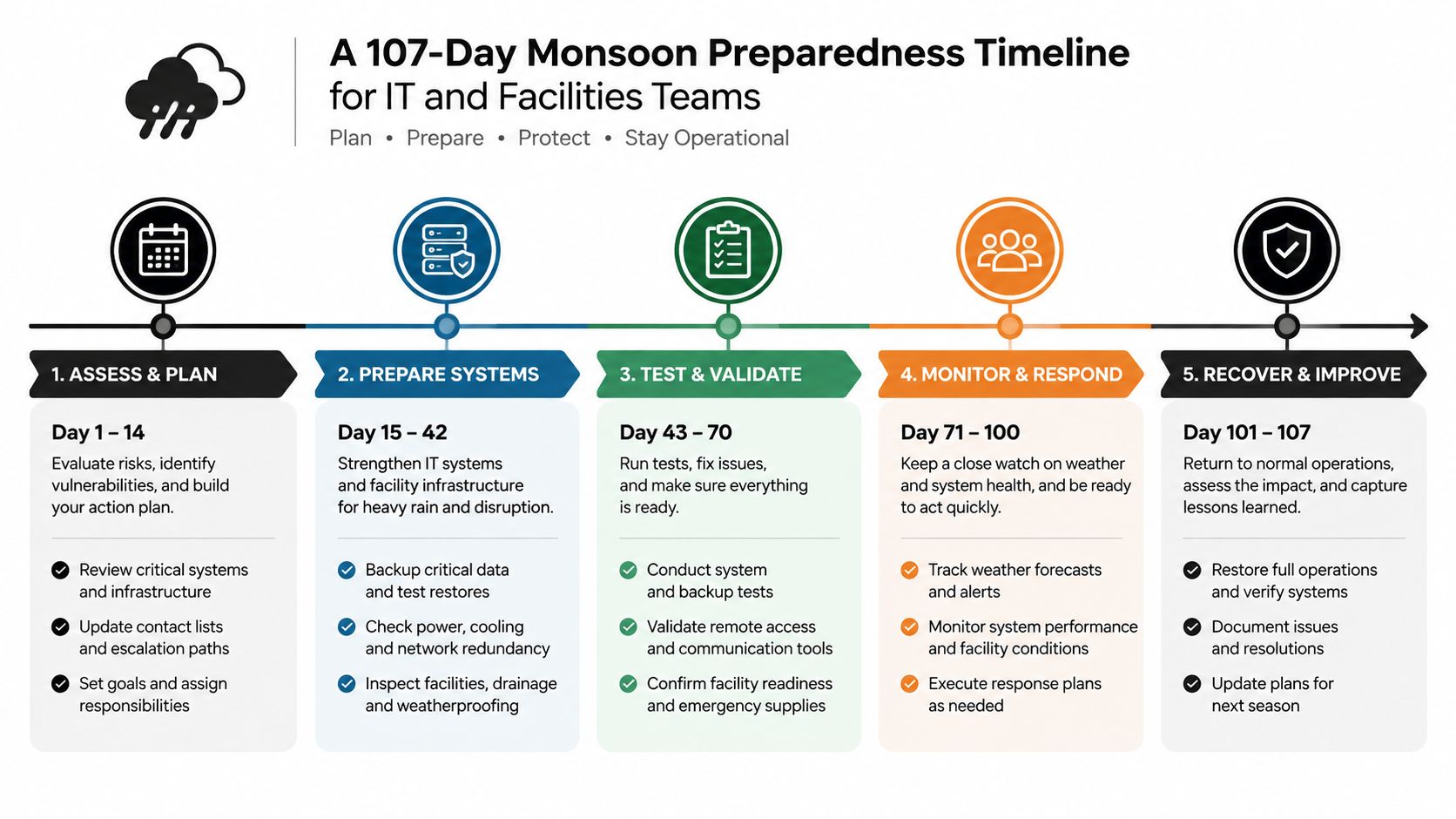
In season and after September 30
During the season, perform weekly post-storm inspections, humidity checks, equipment reviews, and incident logging. Don't wait for visible damage before checking storage rooms, roof areas, generator enclosures, and cable pathways.
After the season, reconcile all assets, triage damaged devices, match certificates to serialized records, and conduct a lessons-learned review. A documented implementation timeline for ITAD work keeps pickup, destruction, recycling, donation, and reporting tasks aligned with broader continuity planning.
Turning Storm Season Into a Smarter Recycling and ITAD Strategy
Monsoon preparation is also an opportunity to improve end-of-life asset governance. Removing obsolete hardware before a storm clears floor space for barriers and staging, reduces the number of devices exposed to water or dust, and gives IT a clean inventory before emergency work begins.
The strongest programs distinguish between usable equipment, recyclable material, and data-bearing media. Functional laptops, monitors, and peripherals may support donation-based recycling and community technology access when they pass the organization's security and condition requirements. Devices containing sensitive data require controlled secure data destruction, documented chain of custody, and certificates that remain available after the weather event.
Build disposition into continuity planning
A mature ITAD plan should capture serial numbers before labels deteriorate, photograph equipment placement, define wipe-versus-destroy decisions, and maintain off-site records. It should also connect facilities work with sustainability reporting. A pre-monsoon office cleanout, facility cleanout, or data center decommissioning project can reduce clutter while supporting sustainable recycling and clearer corporate donation programs.
Recycling planning should cover more than standard computers. Depending on the organization, the same workflow may include medical equipment disposal, laboratory equipment disposal, product destruction, network hardware, backup media, and obsolete mobile devices. Each category needs an approved disposition path, especially when equipment is damaged or data-bearing.
Storm season exposes weak inventory controls quickly. The risks of summertime e-waste management become more serious when heat, humidity, access restrictions, and emergency relocation combine. IT and operations leaders should therefore schedule a pre-monsoon ITAD assessment, remove retired servers and e-waste pallets from vulnerable areas, and confirm secure destruction reporting before the first serious dust storm.
Reworx Recycling operates as a donation-based social enterprise recycling partner, helping organizations manage electronics recycling, IT equipment disposal, computer recycling, secure data destruction, and equipment donations with environmental and community impact in mind. Visit Reworx Recycling to review service options, then schedule a pre-monsoon assessment or pickup for retired laptops, servers, storage media, and other business equipment before storm conditions disrupt your inventory.