An office manager in Fort Smith has a refresh underway: new laptops are arriving, old desktops are coming off desks, and a few retired drives are sitting in a locked cabinet. The easy answer is to take the equipment to a household recycling drop-off. That's also the wrong assumption for a business load. Fort Smith's free municipal e-waste program serves residents and does not accept business electronics, so an organization needs a commercial route and records showing what happened to its equipment (Fort Smith's waste-management guidance).
ITAD services in Fort Smith, AR should do more than move equipment out of a building. A defensible process identifies each asset, controls its transfer, makes and verifies a data-sanitization decision, and records whether equipment was reused, resold, or recycled. “We recycled our old computers” describes a destination. “We retired them responsibly” means the organization can account for the devices and their data.
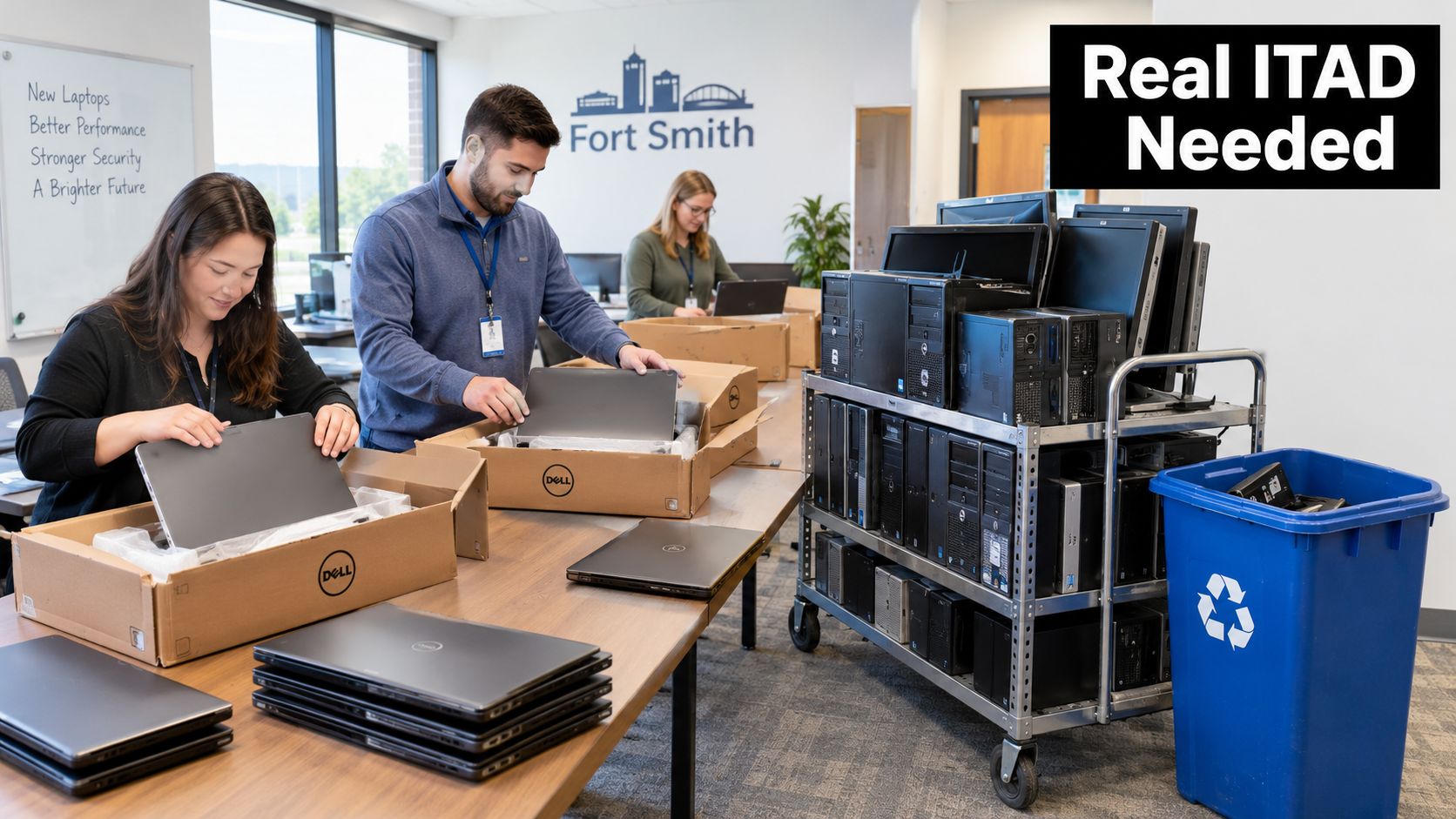
Fort Smith's commercial mix makes this a recurring operational issue, not just an occasional recycling task. The city recorded 89,142 residents in the 2020 U.S. Census and estimated 90,855 residents as of July 1, 2025; it also reports more than 36,000 households and employers across manufacturing, healthcare, education, government, food production, packaging, and logistics (U.S. Census Bureau QuickFacts for Fort Smith). Those organizations may have computers, printers, network gear, and storage media distributed across offices, classrooms, facilities, and shifts.
The stakes aren't limited to recycling paperwork. A customer, auditor, or internal reviewer may ask which drives were sanitized, whether a device left the building, and what happened to failed media. A household drop-off receipt won't answer those questions. For a plain-language overview of why electronics recovery matters, see the benefits of e-waste recycling, but don't confuse general recycling with a controlled business ITAD process.
What ITAD Actually Includes for a Fort Smith Organization
IT asset disposition (ITAD) is the managed process for retiring technology, from the moment an organization identifies equipment for removal through its final reuse, resale, or recycling. It's broader than computer recycling because it includes asset accountability, data handling, logistics, and reporting. A manufacturer retiring shop-floor PCs, for example, needs to know which units are data-bearing, which can be reused, and how every device leaves the site.
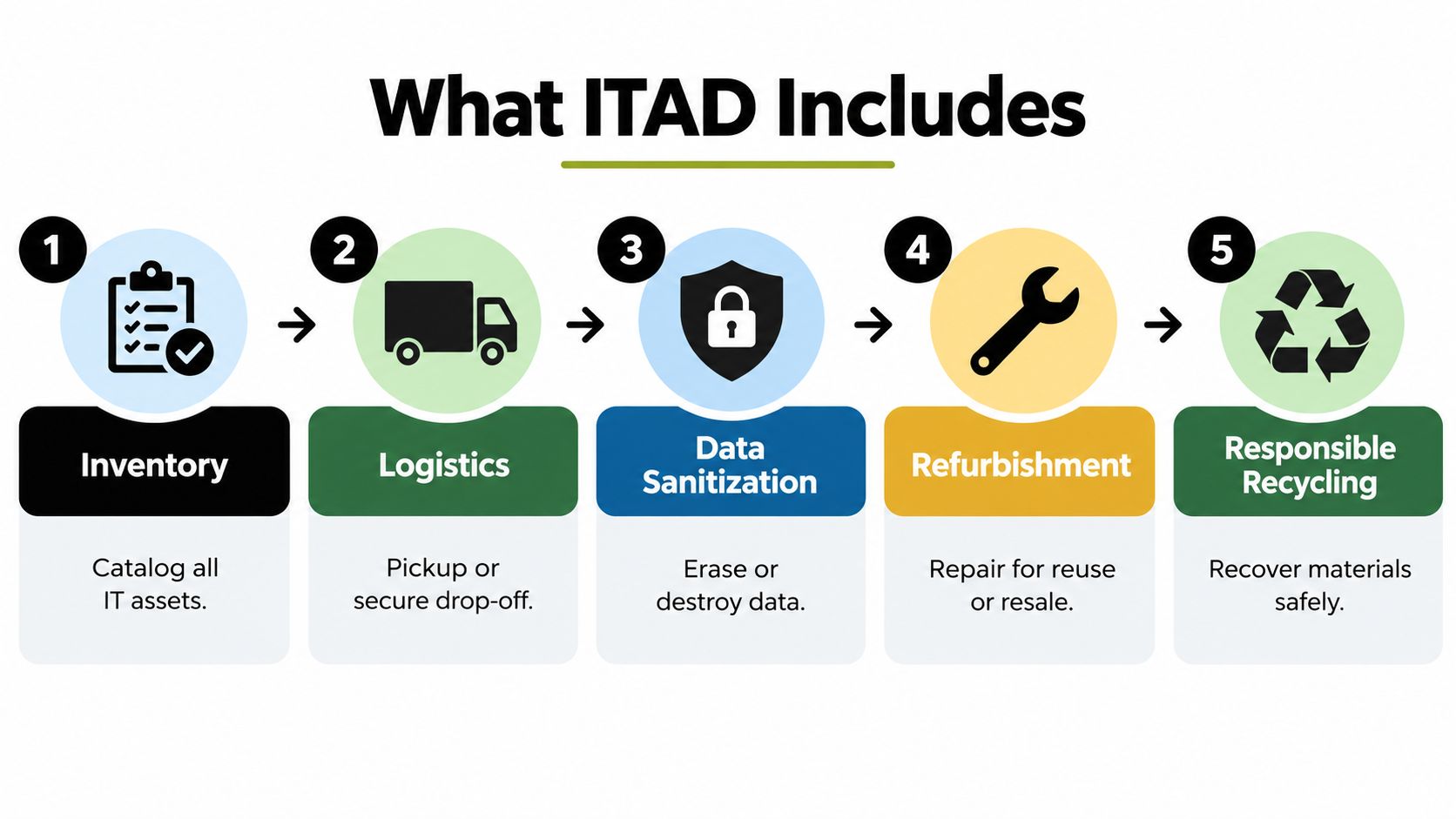
A practical program has several connected stages:
- Inventory: Record asset type, serial number, location, and condition. A school clearing a computer lab should identify data-bearing devices separately from monitors and peripherals.
- Logistics: Arrange a business pickup or approved delivery. Confirm who can access the equipment, how it will be packed, and how the transfer will be recorded.
- Data handling: Assign a sanitization method based on the information stored and the intended next use. Don't treat every laptop, server, or drive as interchangeable.
- Disposition: Determine whether working equipment can be refurbished or resold, whether components need recycling, and whether any media requires physical destruction.
- Reporting: Keep the asset manifest and records of sanitization, exceptions, and final outcomes together. A batch weight alone doesn't identify what happened to an individual drive.
These choices affect both risk and value. Sending functional equipment straight to destruction may discard assets that could be reused after suitable sanitization. Sending everything to a general recycler without an asset-level data process can leave the organization unable to demonstrate what happened to storage media.
Practical rule: Decide how each asset will be handled before it leaves the facility. Sorting out data, reuse, and recycling after pickup makes control harder.
Arkansas Rules Fort Smith Organizations Should Understand
An office refresh in Fort Smith can't be routed by copying a household recycling checklist. Arkansas has a long-standing policy framework for obsolete electronics. The Arkansas Computer and Electronic Solid Waste Management Act was enacted on April 9, 2001. It covered personal computers and components, copy machines, cellular telephones, fax machines, video-game consoles, and devices containing intact or broken cathode-ray tubes (Congressional Research Service report on state e-waste laws). The law authorized the state environmental agency to establish rules to keep covered equipment out of landfills, with an implementation deadline ultimately set for January 1, 2008.
The state authorized a landfill ban on electronic waste beginning in 2010, but says it has not been implemented statewide. Local landfill restrictions may still affect acceptance. Confirm requirements with the actual destination, rather than assuming equipment accepted at a residential site is suitable for commercial disposal (Arkansas DEQ's electronics guidance).
Fort Smith's household program and commercial route are different. Residents can drop off listed household electronics for free, while business e-waste is excluded. Business computers are directed to the Sebastian County Regional Solid Waste Management District's fee-based Fort Chaffee program. The household-computer program is limited to two computers per Sebastian County resident per year. That cap and the fee-based business route make a commercial contract the practical choice for a school refresh or office cleanout.
Before arranging a commercial load, get clear answers:
- Does the receiving program accept business electronics? Residential acceptance does not establish commercial acceptance.
- How should the load be classified? Computers, batteries, printers, monitors, and network equipment may require different handling.
- What records will be returned? Request an asset manifest, transfer documentation, and downstream disposition records.
- Who confirms the destination? Verify acceptance with the city, regional solid-waste district, or contractor before transportation.
A defensible business chain of custody begins with an approved destination and ends with records that match the equipment handed over. For local service context, review Arkansas electronics recycling information.
Secure Data Destruction Choices for Fort Smith Businesses
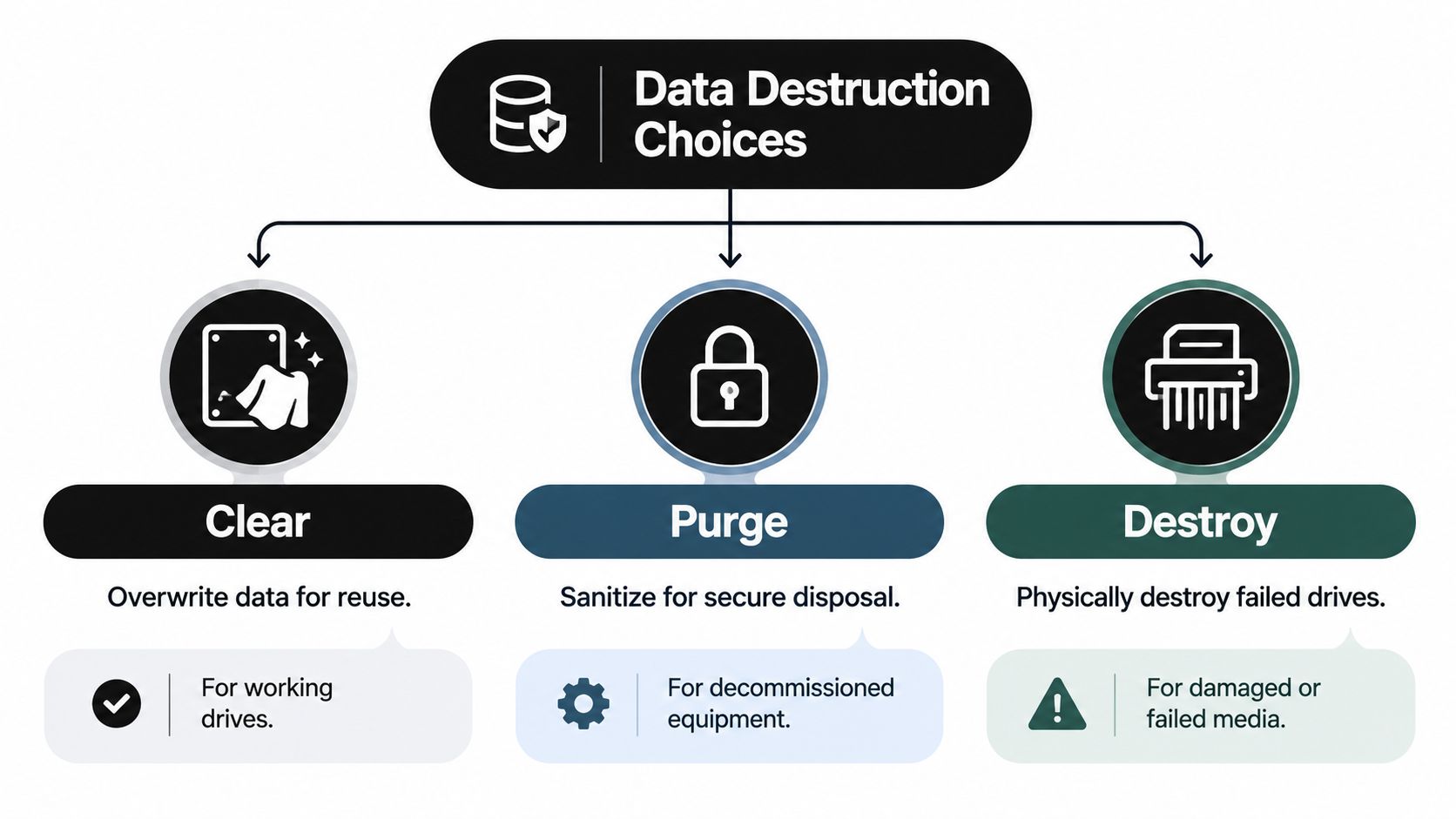
Deleting files isn't proof that organizational data can't be recovered. Nor is shredding every drive automatically the right choice. NIST's media-sanitization framework distinguishes clear, purge, and destroy, and the method should reflect the data's sensitivity, whether the media will be reused, and whether the organization will retain control of it (NIST media-sanitization guidance).
- Clear uses logical techniques to prevent ordinary, non-invasive recovery. It can suit working media intended for reuse when the technique fits the device and the organization's risk requirements.
- Purge uses physical or logical methods intended to make recovery infeasible even with advanced laboratory techniques. It's a stronger choice when equipment is leaving the organization's control but may remain usable.
- Destroy makes recovery infeasible by rendering the medium unusable for data storage. Consider it for failed or inaccessible drives, or where the organization's risk decision rules out reuse.
The equipment type matters. A laptop, server, phone, removable drive, and solid-state drive may not support the same sanitization technique. A failed drive can't be treated as successfully wiped just because it was included in a batch; the exception needs a recorded resolution, which may mean physical destruction.
Verification and records are part of the work. Keep the media identifier, confidentiality category, method and technique, tool and version, verification method, and the personnel responsible for verification and validation. For a larger program, require serialized chain-of-custody records and certificates that identify the assets, not merely a statement that a batch was processed. NIST's guidance also calls for representative secondary verification using a different tool and sampling across user-addressable and reserved areas of media.
For Fort Smith organizations, the decision is not “wipe or shred everything.” It's whether the chosen method is suitable for the information, media, and intended disposition, and whether the result can be verified. Review data-sanitization methods before approving a vendor's process, and ask how it handles devices that fail verification.
Pickup Drop-Off and Logistics for Western Arkansas
Logistics can make a good ITAD plan fail if the team leaves packing, access, and handoff details until pickup day. Fort Smith organizations generally weigh three approaches: a scheduled commercial pickup, delivery to an approved facility, or coordinated removal from several buildings. The right fit depends on the volume, site access, staffing, and whether equipment requires controlled handling.
Pickup reduces the burden on internal staff and can suit a refresh spread across offices or departments. Confirm which assets the provider will collect, how they'll be identified, what happens to batteries, and who signs the transfer record. Don't let an unlabelled cart of mixed equipment become the inventory.
Drop-off may work for a small, consolidated load if the facility confirms it accepts commercial electronics and the organization can transport the equipment securely. It can reduce coordination, but the company remains responsible for preparing the load and preserving a record of what was handed over.
For multi-building moves, appoint one site contact and consolidate asset lists before scheduling. Separate batteries and other components that require special handling, protect screens and loose media, and label containers by location or asset group. Ask about scheduling availability, any minimum-load terms, and whether the provider can accommodate a staged collection; don't assume those details.
Practical rule: The handoff starts when equipment is packed, not when the truck arrives. Label it, reconcile it against the manifest, and retain a signed transfer record.
A reverse-logistics plan should cover collection, transportation, receiving, and exceptions, not just a truck booking. Review reverse logistics services when comparing a facility delivery with a managed pickup.
How to Evaluate ITAD Vendors for Fort Smith Work
A credible ITAD provider can explain what happens to each asset and produce records to support that account. Don't judge a vendor only by whether it collects computers or offers a recycling certificate. Ask how it identifies assets, documents custody, verifies sanitization, handles failures, and tracks downstream processors.
| Criterion | What to Look For | Red Flag |
|---|---|---|
| Chain of custody | Transfer records that track assets from your site through processing | A pickup receipt with no asset-level detail |
| Sanitization | Methods matched to media type and data risk, plus verification steps | A general promise to “wipe everything” |
| Certificates | Records linked to device identifiers and final disposition | A batch certificate that can't be reconciled to your inventory |
| Failed media | A defined exception process and destruction option | Failed drives treated as successfully sanitized |
| Downstream partners | Disclosure of where equipment and materials go | No clear answer about downstream destinations |
| Insurance and references | Appropriate coverage and references from comparable organizations | No documentation or relevant references |
Ask the provider what tool and version it uses, who verifies results, and what happens when a device can't be sanitized. Ask whether working equipment can be refurbished or resold, and what records you'll receive for equipment that is recycled or destroyed. For a broader framework on assessing vendors, see these criteria for choosing a CEF platform, then apply the same discipline to ITAD evidence and controls.
Before you sign, request a sample asset report and certificate, confirm whether commercial electronics are accepted, and make sure the contract names the downstream handling responsibilities. A provider that can't explain its exceptions is not ready to manage your exceptions. Reworx Recycling is one option to assess for documented equipment disposition, data handling, and recycling; review its vendor-selection criteria alongside other providers' written procedures.
Real Fort Smith Scenarios and Use Cases
A Fort Smith school district retiring classroom computers at the end of a grant cycle should start by matching each device to its inventory and identifying its storage media. Decide which computers are suitable for reuse after verified sanitization. Route monitors and peripherals for appropriate recycling, and document any failed drive as an exception instead of assuming it is clean.
A regional hospital decommissioning a server rack needs a clear disposition decision for every asset. Map the storage media and classify the information the systems held. Working servers, removable media, and failed drives may need different handling, so require a serialized handoff and evidence of sanitization or destruction before closing the project record.
For a manufacturer replacing shop-floor PCs and printers, the inventory must cover production areas as well as offices. Include copy machines, phones, and fax equipment alongside computers, then plan collection around site access and track custody as equipment moves. Working PCs may be reused after verified sanitization. Route equipment that cannot be reliably sanitized through a documented exception process.
A small business clearing out an office can keep the process simple without weakening its controls. One contact can assemble laptops, networking equipment, and storage media into a manifest, then arrange commercial pickup or verified delivery. For every scenario, decide custody and data handling before removal, and record each final outcome so the organization can close its inventory cleanly.
Next Steps for Fort Smith Organizations Ready to Act
Start with a current inventory. List the computers, servers, phones, drives, printers, and other equipment planned for retirement, and note serial numbers, locations, condition, and known data-bearing components. Separate assets that can be considered for reuse from failed or inaccessible media that may need destruction.
Next, choose a sanitization method for each category and write down how the result will be verified. Don't approve a vendor's process based on a blanket claim; ask for sample documentation, exception handling, and a clear account of downstream disposition. Then confirm that your pickup or delivery route accepts commercial equipment and that the handoff records will match your inventory.
Fort Smith's household drop-off program isn't a substitute for a business ITAD process. Reworx Recycling supports donation-based recycling, equipment disposal, pickups, equipment decommissioning, and secure data destruction, giving organizations a way to plan documented retirement while keeping suitable technology in reuse and recycling channels. That approach also supports the broader aims of digital inclusion and community-focused social enterprise recycling.
This week, assign an owner, reconcile the equipment list, and request a written plan for collection, data handling, and reporting. A clear process protects your organization and gives reusable equipment a chance to serve another purpose.
Contact Reworx Recycling to discuss a Fort Smith business pickup, equipment decommissioning, donation-based recycling, and secure data destruction for your retired IT assets. Bring your inventory and data-handling requirements, then visit Reworx Recycling to explore responsible ways to retire equipment while supporting community technology access.