Data destruction is the Destroy level of sanitization, and it means the information can't be recovered even with state-of-the-art laboratory techniques, while the media itself is left unusable for future storage. It's different from deleting files, wiping a drive, or degaussing a disk, because those steps don't always end the story for the data.
A lot of businesses discover that too late. An office cleanout starts, an old laptop gets tucked into a closet, and the team assumes the delete button solved the problem. It didn't, because the device still carries risk until the right sanitization method matches the media type and the reuse plan.
Why Deleting Files Does Not Mean Data Is Gone
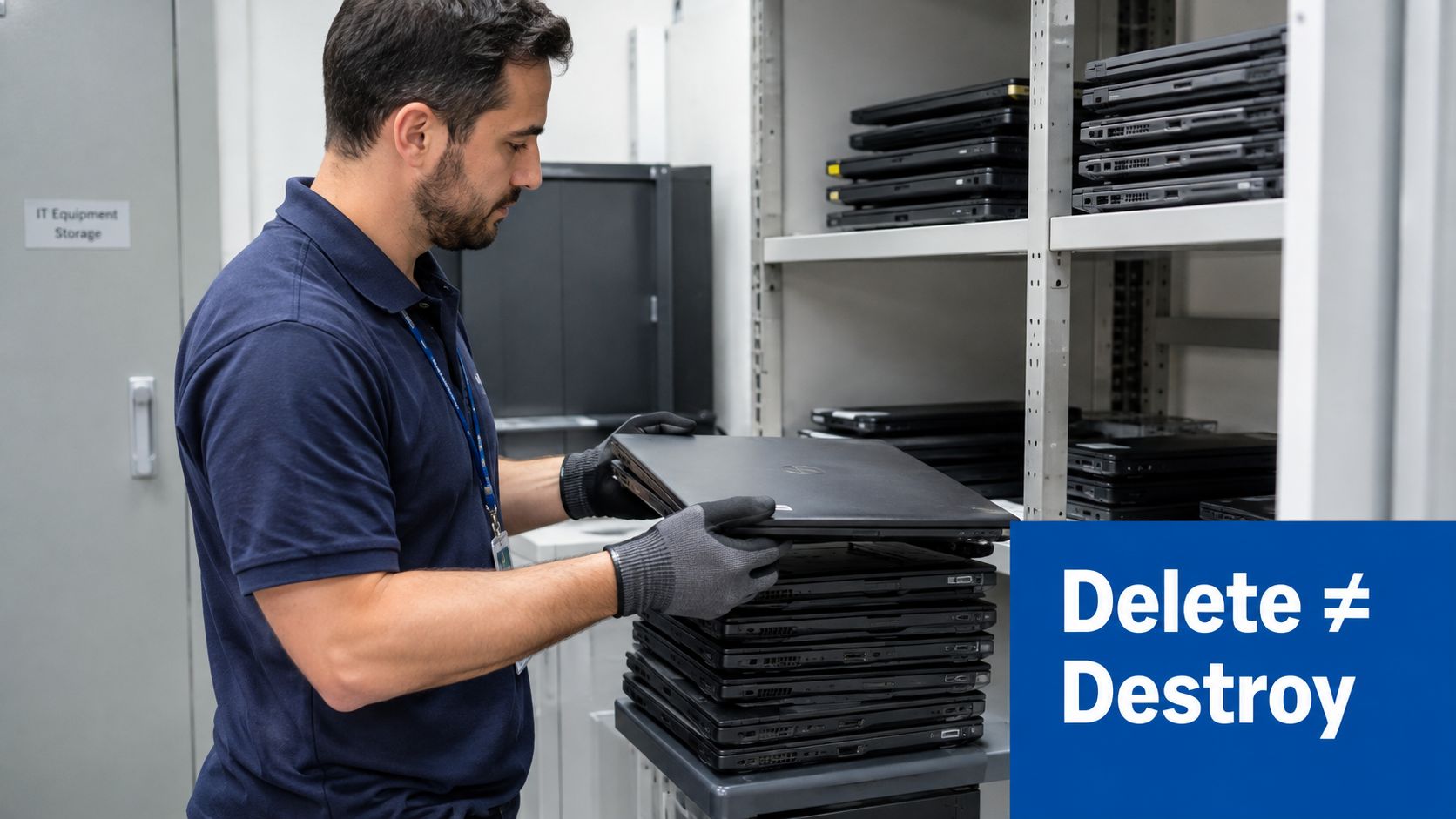
A business manager often runs into this problem during a laptop refresh. The old machines are stacked near the copier, someone has deleted folders from the desktop, and the team wants the equipment gone by Friday. That feels finished, but the storage device may still hold recoverable information.
Deleting a file usually removes the easy path to it, not the underlying data itself. That's why what is data destruction matters as a business question, not just a technical one. If a drive is resold, recycled, or returned to a vendor without the right treatment, the organization may still be exposing customer records, employee files, or internal documents.
A retired device is only safe when the data on it has been handled for the media it actually uses.
The practical issue is risk. A laptop left in storage after a move, a server removed during a cleanout, or a mobile device turned over in a facility swap can all become a weak point if someone later accesses the media. That's why ITAD teams treat device retirement as a controlled process, not a trash run.
For businesses that want a simple checkpoint, the question isn't, “Was it deleted?” The better question is, “Was it cleared, purged, or destroyed based on what's inside and what happens to the asset next?” Reworx Recycling's guide on why unsafe data disposal creates avoidable risk is a useful reminder that disposal and destruction are not the same thing.
What Data Destruction Really Means
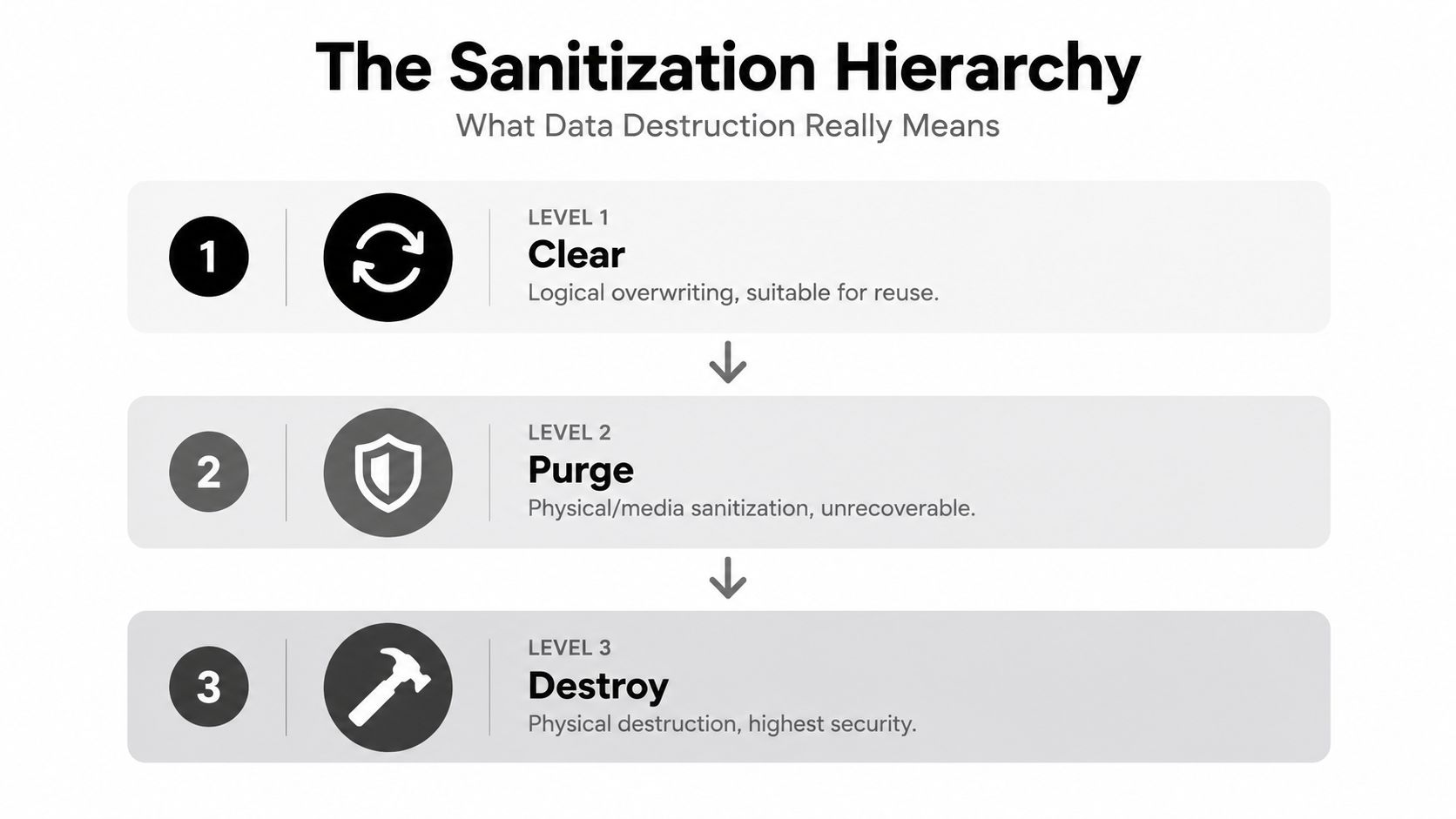
Data destruction sits at the highest end of the sanitization spectrum. NIST SP 800-88 uses three outcomes, Clear, Purge, and Destroy, because different media and different risk levels call for different responses. NIST's original guidance, first released on August 31, 2006, helped turn data removal into a documented security process instead of an informal disposal step, and later revisions kept pace with SSDs, flash devices, mobile hardware, and cloud-based environments (NIST 2006 milestone).
The simplest way to think about it
The three NIST outcomes map to everyday actions. A handwritten note with pencil marks erased can be used again. Clear works the same way for low-risk reuse. Purge goes further, making recovery infeasible for the expected level of effort. Destroy is the point where the media itself is no longer fit to store data.
NIST's current guidance says sanitization should be chosen based on the sensitivity of the information and the intended media use (NIST SP 800-88 Rev. 2 public draft). That is the business rule behind the choice. If a laptop, drive, or tablet will be reused, a lighter method may fit. If the asset is leaving service for good, physical destruction may be the right call. For a plain-language overview, see what data sanitization means.
Practical rule: if the device must never hold data again, choose a method that makes recovery infeasible and the media unusable.
NIST's final Revision 2 reflects how much the field has changed, especially as one-size-fits-all methods stopped working for modern storage systems (NIST SP 800-88 Rev. 2 final). The main point is simple. Data destruction is not just making data hard to find. It is a controlled result that ends with irrecoverability.
A retired device is only safe when the data on it has been handled for the media it uses.
How Common Data Destruction Methods Work
The most common methods fall into three practical buckets. Wiping uses software to overwrite or sanitize data. Degaussing uses a magnetic field to disrupt magnetic media. Physical destruction breaks the media so it can't be used again.
Wiping
Wiping works by writing over data with new information or by using device-level sanitization tools. It can be suitable when the asset will be reused and the storage technology supports it. The limitation is simple, it depends on the media and the tool being able to reach everything that matters.
Degaussing
Degaussing is a strong fit for magnetic media because it disrupts the pattern that stores the data. It's effective on some traditional hard drives and tapes, but it doesn't apply to flash-based storage in the same way. A business that tries to use one method for every device can end up with a false sense of closure.
Physical destruction
Physical destruction includes shredding, pulverizing, incineration, melting, and similar irreversible methods. NIST treats Destroy as the level that renders recovery infeasible even with state-of-the-art lab techniques and leaves the media incapable of storing data afterward (NIST SP 800-88 Rev. 2 final). That's why many ITAD workflows use it for drives that won't be reused.
| Comparing Wiping, Degaussing, and Physical Destruction | How It Works | Media Reusable | Best For |
|---|---|---|---|
| Wiping | Software or firmware removes data | Often yes | Assets planned for reuse |
| Degaussing | Magnetic field disrupts stored data | Usually no | Magnetic media like certain HDDs and tapes |
| Physical Destruction | Media is broken so it can't be used again | No | High-risk assets or end-of-life equipment |
For businesses that want a disposal path tied to hardware retirement, hard drive shredding services fit into the last category, not the first two.
Why Device Type Changes the Right Approach
The wrong method often comes from assuming every device stores data the same way. A hard disk drive, an SSD, a memory stick, a tape cartridge, and a circuit board all behave differently, so “shred it” or “wipe it” isn't a universal answer. That's why modern guidance treats many electronic components as data-bearing devices, not just the drive bay in a server rack.
SSDs and flash memory need a different lens
SSDs use NAND flash and hidden management layers, including wear leveling, which means overwriting doesn't reliably reach every cell. That's why NIST-aligned guidance points to cryptographic erase, zeroization, or device-level secure erase for some SSD purge workflows, with verification still needed to prove the job was effective (NIST SP 800-88 legacy guidance). In plain English, you can't assume a software overwrite touched every place the data may have lived.
Magnetic media and flash media also need different thinking because degaussing only affects magnetic storage. It won't solve the problem on a USB stick or an SD card. Circuit boards and embedded components can also hold data, which is why one-size-fits-all language is so misleading in office cleanouts and device returns.
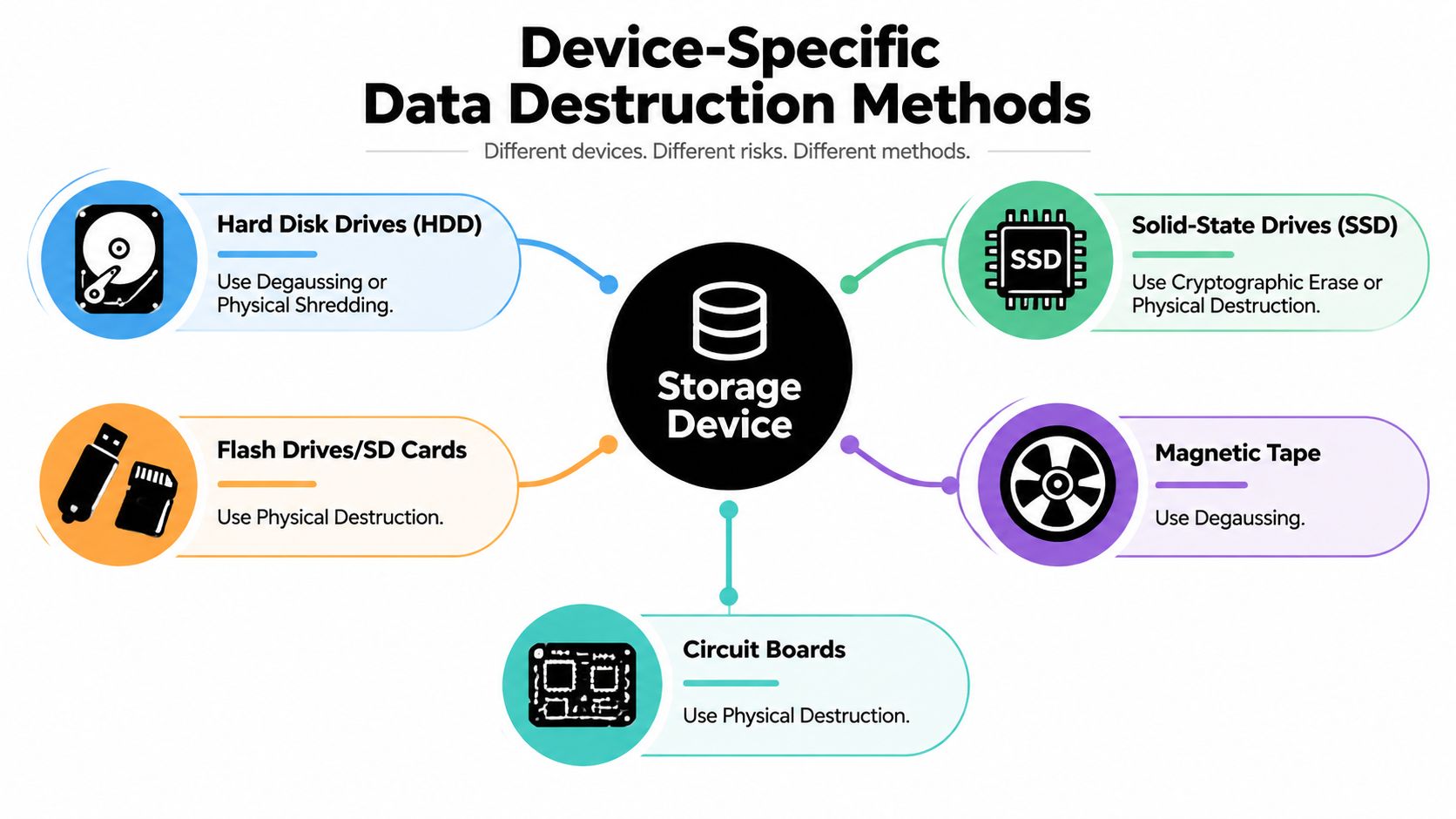
Rule of thumb: identify the storage medium first, then choose the method. The device type decides what “secure” really means.
For a quick reference on how mobile hardware fits into this decision, cell phone disposal guidance can help teams remember that phones are data-bearing assets, not just e-waste.
Choosing the Right Method for Security and Compliance
The decision isn't just technical. It's about sensitivity, reuse intent, and evidence. If a drive will be reused internally, a lighter sanitization outcome may be appropriate. If the asset is leaving your control, or the data is sensitive enough to justify stronger treatment, then purge or destroy becomes the safer path.
What proof should look like
A good process leaves records behind. That usually means inventory details, method documentation, chain-of-custody notes, and a certificate that ties the asset to the final result. For many organizations, that paper trail matters as much as the act of destruction because auditors and reviewers need proof that the process was controlled.
Businesses also need the right partner model. Reworx Recycling offers secure data destruction as part of an ITAD workflow, which matters because destruction rarely happens in isolation. It sits alongside pickup, decommissioning, recycling, and donation decisions, especially when assets are being removed from offices, schools, or public-sector sites.
If your compliance team is also thinking about broader security controls, the framework behind SOC 2 automated vulnerability scanning is a useful reminder that documented, repeatable controls matter across the full lifecycle, not just at the moment a device leaves the building.
A strong workflow usually answers three questions cleanly:
- What is the asset? Record the device type, serial number, and whether it's magnetic, flash-based, or embedded.
- What happens next? Decide if the media will be reused, recycled, or physically destroyed.
- What proves it worked? Keep the certificate, chain-of-custody record, and verification notes.
For teams building a policy, secure data destruction services make sense when the organization wants the process tied to documentation instead of informal handling.
What a Secure Data Destruction Workflow Looks Like
A controlled workflow starts with identification, not a shredder. The team inventories each device, records the serial numbers, and decides whether the media will be cleared, purged, or destroyed based on risk and reuse goals. That's the point where a business stops guessing and starts documenting.
The next step is execution with custody intact. Devices are tracked through pickup or drop-off, and the vendor documents the method used on each asset. After that comes verification, which confirms the job matched the plan and that the media is no longer available for normal use.
The certificate matters because it connects the asset you retired to the method you approved.
Businesses that want a broader reference point for file-handling habits can also look at We Fix PC Laptop privacy checklist, since the same logic applies before any device changes hands. Clean records, clear ownership, and a documented handoff reduce confusion later.
This is also where donation-based recycling can fit. A social enterprise model can separate reusable equipment from end-of-life hardware, which supports both sustainability and community impact without blurring the security line. Reworx Recycling sits in that mix as one option for businesses that want secure handling plus responsible downstream placement of retired technology.
Next Steps for Secure and Sustainable Disposal
The right answer to what is data destruction is not “shred everything.” It's the method that makes sense for the media, the sensitivity level, and the next life of the asset. Clear, Purge, and Destroy are different outcomes, and businesses should choose them on purpose.
That choice also has environmental value. Devices that can be reused, donated, or responsibly recycled keep useful materials in circulation longer, while sensitive media can still be rendered unrecoverable when needed. If you're planning a decommission, office cleanout, or equipment refresh, CloudOrbis Inc. information lifecycle guide is a helpful companion for thinking about where disposal fits in the broader lifecycle.
Work with Reworx Recycling when you need a partner that can handle secure data destruction alongside electronics recycling, donation-based recycling, and IT equipment disposal. If your team is ready to retire old hardware, schedule a pickup, donate equipment, or review the latest guidance at Reworx Recycling.