Your office refresh is done. The new laptops are deployed, the replacement printers are humming, and the old gear is now stacked in a back room next to unused monitors, docking stations, and a few servers nobody wants to touch.
That's where electronics recycling in Johnson City, TN stops being a housekeeping task and becomes a business decision. The questions come fast. Which devices still hold sensitive data? What can go to a public drop-off site? Who documents the chain of custody? What happens if a hard drive leaves your building without being sanitized?
For a Johnson City business manager, the choice usually comes down to two paths. One is basic compliance, where you move eligible items through a public recycling channel. The other is strategic asset management, where you treat retired technology like any other controlled business asset. Both have a place. They are not equal.
Your Johnson City Business Has Old Tech What Now
A typical Johnson City upgrade creates a familiar inventory. Desktop towers from the last workstation cycle. Laptops with cracked hinges but working SSDs. Printers that cost more to maintain than replace. Network gear with old configs still loaded. If you're in healthcare, education, professional services, light manufacturing, or a multi-site office environment, this pile grows faster than is often anticipated.

What businesses usually underestimate
The first mistake is treating old equipment like generic trash. It isn't. A retired laptop can still hold customer files, saved credentials, browser session data, local reports, and cached email. A copier can store scans. A server you powered down last quarter may still contain years of business records.
The second mistake is separating recycling from operations. Old equipment affects storage space, audit readiness, internal controls, and staff time. A back room full of retired assets is a slow-moving liability.
Practical rule: If a device ever connected to your network, handled customer information, or stored internal files, assume it needs controlled disposition.
Johnson City has a real recycling foundation. The city has reached a cumulative recycling milestone of over 131,200 tons of materials through its municipal recycling programs, as noted by Johnson City Public Works and Solid Waste Recycling. That matters because it shows the area already has an established waste diversion culture.
The decision that matters
For very small quantities of low-risk electronics, a public option may be enough. For business devices, especially anything tied to users, records, finance, operations, or regulated data, basic recycling often leaves too many unanswered questions.
Ask these before anything leaves your building:
- What data is still on it: Don't assume deletion solved the problem.
- Who touched it last: If nobody can answer, your chain of custody is already weak.
- What documentation you need: Auditors, leadership teams, and customers care about proof.
- Whether reuse is possible: Functional assets may still have community value or internal redeployment potential.
That's the true starting point. Not “where can I drop this off,” but “what risk does this device create if we dispose of it the wrong way?”
Local Public Recycling Options in Johnson City
A Johnson City office finishes a hardware refresh on Friday. By Monday, the old laptops, monitors, and printers are stacked in a back room, and someone asks the familiar question: can we just take this to the local drop-off site?
Sometimes, yes. Public recycling has a place. For a few low-risk items with no business data concerns, municipal options can work as a basic compliance step. Business managers should also be clear about the limit. Public drop-off is built for access and diversion. It is not built for documented chain of custody, serialized asset tracking, or business-grade data handling.
The main municipal drop-off site
Johnson City maintains a public e-waste drop-off program at the Solid Waste Services Complex on New Street. It accepts common electronics such as computers, monitors, laptops, cell phones, and printers during weekday operating hours, as noted earlier in the article.
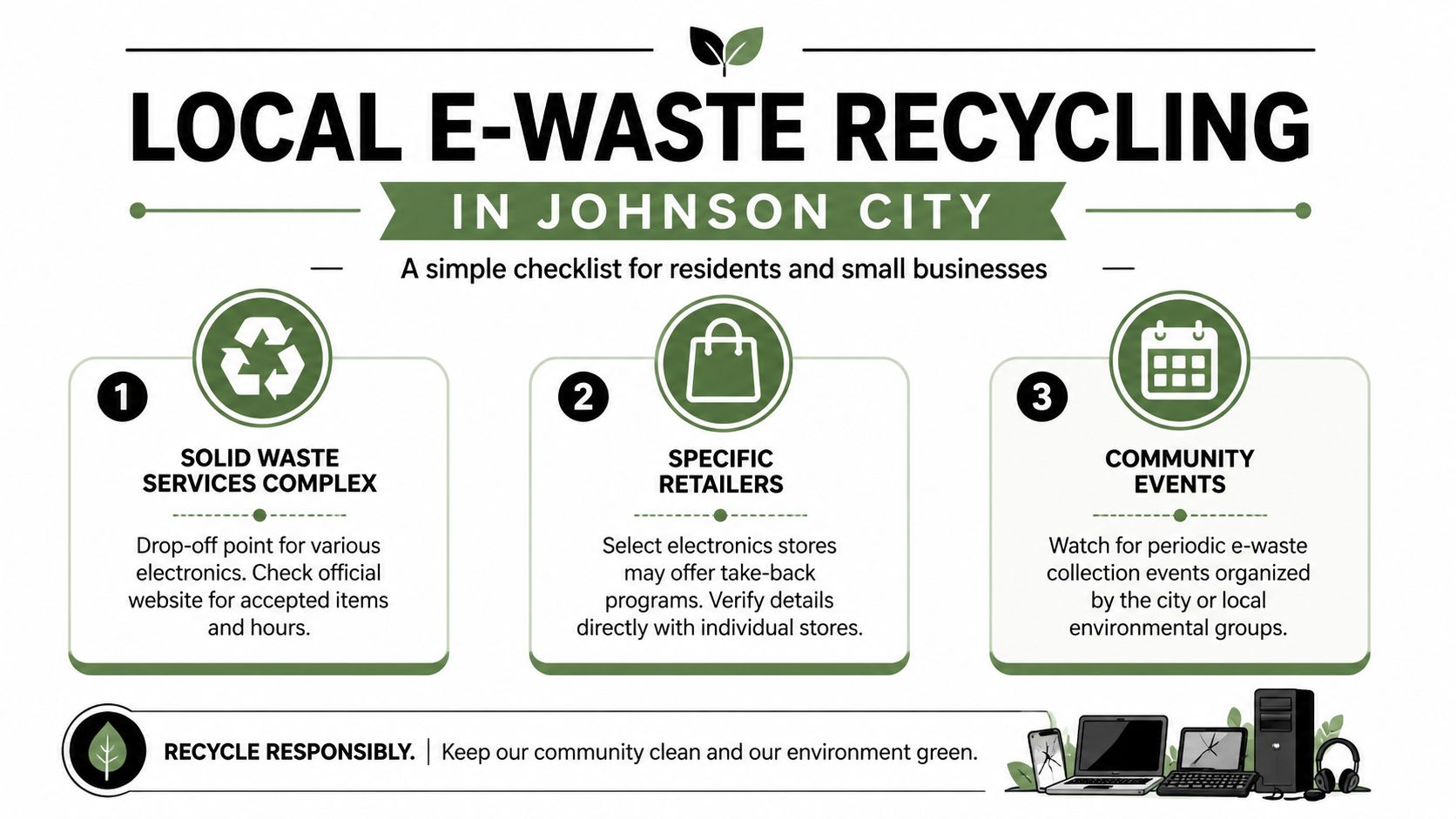
For a resident or a very small office clearing out a few peripheral items, that is a reasonable local outlet. For a business cleanout, use more caution.
A practical screen looks like this:
- Check whether the device ever held company data. A monitor is different from a laptop, copier, firewall, or desktop.
- Separate standard electronics from hazardous materials. Batteries, bulbs, and similar items need the correct handling path.
- Send a staff member who can identify what should not leave the building yet. Convenience creates mistakes when nobody reviews the pile.
Johnson City also provides guidance for other waste streams, including batteries and fluorescent bulbs, through its household hazardous waste and miscellaneous disposal page. That helps with mixed office cleanup projects where electronics are not the only disposal issue.
Other community recycling resources
ETSU is another visible part of the local recycling system. Its public-facing recycling operations reinforce the point that Johnson City already has an established culture of material recovery and responsible disposal. That is good for the region. It also means businesses have a baseline public option if the need is small and the risk is low.
For smaller after-hours needs, some organizations look for more flexible drop-off access than weekday municipal hours allow. An after-hours electronics recycling drop-off box can help with timing when staff cannot leave during the workday.
Where public options stop working
The gap shows up fast once you move from household recycling to business asset disposition.
A municipal site can accept equipment. It usually does not document each serialized asset, confirm data destruction standards, or provide pickup from your office. If your company is retiring user-assigned laptops, phones, servers, network gear, printers, or loose drives, that difference matters in operational terms and in liability.
| Need | Public drop-off | Business reality |
|---|---|---|
| Data documentation | Limited | Often required for internal controls, audits, or client expectations |
| Asset inventory | Usually self-managed | Needed to confirm what left, when, and in what condition |
| Pickup logistics | No | Offices often need scheduled removal |
| Decommissioning support | Minimal | Storage rooms, server closets, and office cleanouts take labor |
That is the split in Johnson City. Public recycling handles basic compliance. Professional ITAD handles asset control, data risk, and accountability. For a handful of low-risk items, drop-off may be enough. For business electronics tied to users, records, or operations, it is usually only the minimum acceptable option.
How to Prepare Electronics for Secure Disposal
A Johnson City office upgrade often ends the same way. The new devices are deployed, the project closes, and the old laptops, printers, phones, and drives end up stacked in a back room waiting for someone to deal with them. That is the point where a routine refresh can turn into a data security problem, an inventory problem, or both.
Deleting files or reformatting a drive does not give a business much protection. Retired devices can still hold browser histories, saved credentials, synced folders, contract files, exported reports, scans, and email attachments. Copiers and printers can retain stored jobs. Loose drives are easy to overlook. Once equipment leaves your control without a documented process, you are relying on assumptions.
For a handful of low-risk consumer items, public recycling may satisfy basic compliance. Business equipment needs tighter handling. Preparation is the line between getting assets out of the building and retiring them under control.
Start with asset control
Before anything is boxed, build a working inventory. Record the serial number, device type, assigned user or department, physical condition, and whether the unit contains storage media. If a machine will not power on, check it anyway. Dead equipment still holds data. If a laptop appears to be missing a hard drive, verify whether it has an internal SSD or embedded storage.
Use a simple staging process that your IT staff, office manager, and facilities team can all follow:
- Create an asset list: Include laptops, desktops, monitors, servers, tablets, phones, printers, copiers, network gear, and loose drives.
- Flag higher-risk devices: Separate anything used by finance, HR, legal, leadership, customer support, or any team handling regulated or confidential records.
- Split redeployable hardware from scrap: A serviceable workstation should not be mixed in with end-of-life units headed straight for recycling.
- Move everything into a controlled holding area: Locked rooms beat hallways, loading docks, and open storage closets.
- Assign one owner for signoff: One person should confirm what is leaving, when it leaves, and who took custody.
That level of discipline is what separates strategic asset management from basic cleanup. Public drop-off solves the disposal question. Businesses also need to answer chain-of-custody, data handling, and internal accountability questions before pickup day arrives.
Prepare for sanitization, not just removal
A disposal plan should match the risk of the equipment. User-assigned laptops, office desktops, servers, multifunction printers, and backup media deserve more scrutiny than an old keyboard or broken monitor. If the item ever stored business data, treat it accordingly.
A practical pre-disposal checklist helps teams avoid the usual mistakes. This guide on preparing your company's electronics for recycling gives a useful operating reference for sorting, staging, and documenting assets before they leave the site.
What usually creates problems:
- Departments managing their own old equipment
- Unlabeled piles of devices with no asset record
- Relying on passwords or basic deletion as data protection
- Letting retired assets sit for months in unsecured rooms
- Sending mixed loads out with no item-level verification
What works is straightforward. Inventory the equipment, isolate higher-risk assets, secure the staging area, and hand off the load through a documented process. Companies that want a clearer view of the transportation side can also review Routelink's reverse logistics guide for context on how controlled returns and pickups reduce avoidable handling risk.
The cheapest path is often municipal drop-off. The better business decision is preparing equipment so it can move through a professional ITAD process with documentation, secure handling, and fewer liability gaps.
Professional ITAD for Johnson City Businesses
When equipment carries data, licensing history, network value, or compliance exposure, IT asset disposition (ITAD) is the better frame. ITAD isn't just recycling with nicer paperwork. It's a business process for retiring technology under control.
Basic recycling versus managed disposition
A municipal drop-off site answers one question. Where can this item go? Professional ITAD answers several others at the same time. What is it, who owned it, what data did it hold, how was it sanitized, what was recovered, and what proof do we have?
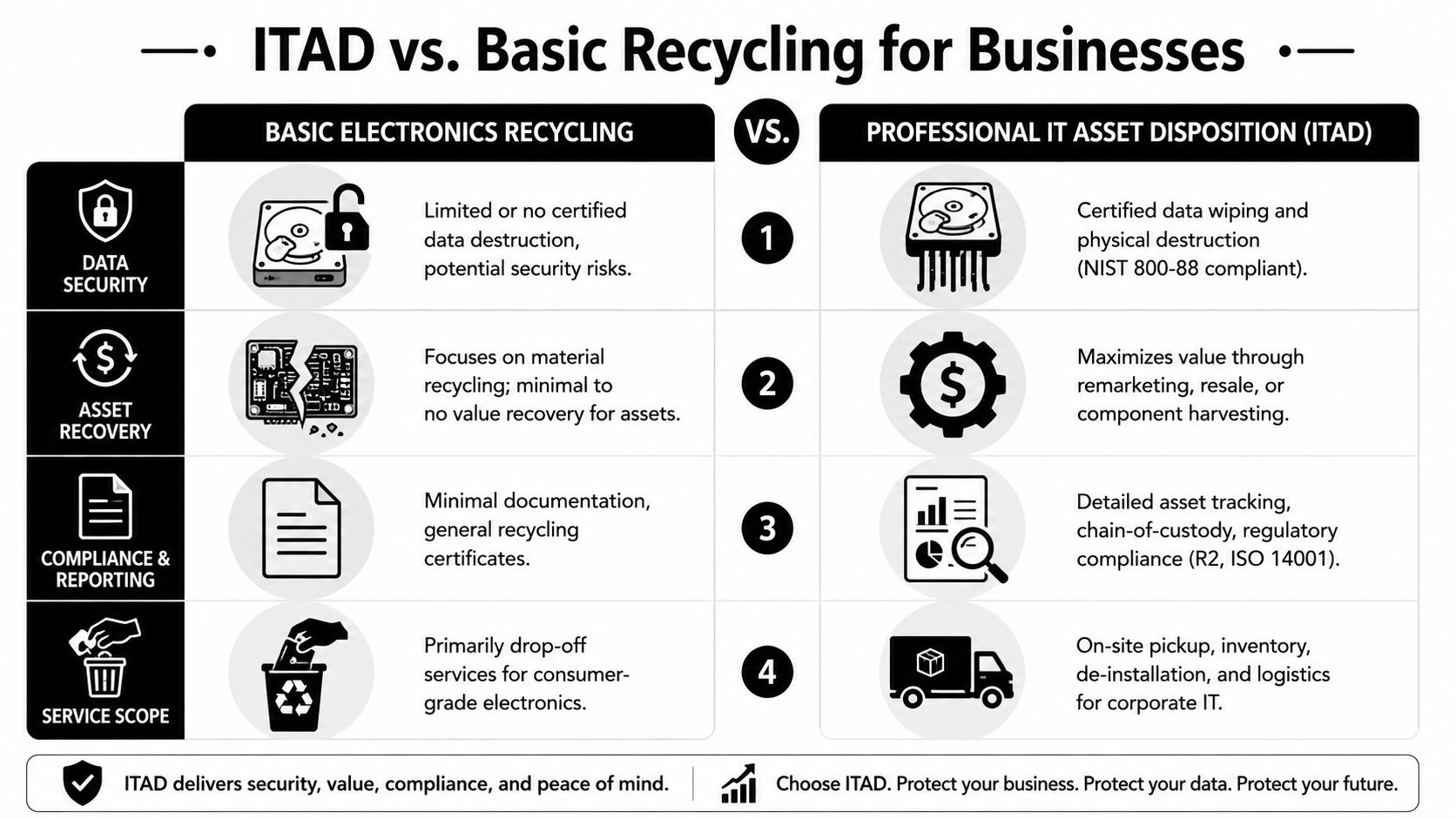
Here's the side-by-side view that matters:
| Category | Basic electronics recycling | Professional ITAD |
|---|---|---|
| Primary goal | Remove waste responsibly | Retire assets securely and document the process |
| Typical fit | Small consumer drop-offs | Offices, labs, schools, agencies, multi-site operations |
| Data handling | Limited or self-managed | Controlled sanitization and destruction workflows |
| Logistics | You transport the equipment | Pickup, consolidation, and managed movement |
| Reporting | Minimal | Audit-friendly records and asset visibility |
Professional ITAD vendors provide R2 or ISO 14001-compliant downstream processing and offer on-site data destruction via hard drive shredding aligned with NIST SP 800-88 Rev. 1 guidelines, while also enabling 95%+ material recovery rates, according to Recycle Technologies in Johnson City Buffalo, Tennessee.
What strategic asset management changes
For a Johnson City business, the difference shows up in daily operations. An office cleanout no longer depends on employees making personal trips to a drop-off point. A facility manager doesn't need to guess which pallets contain data-bearing devices. An IT lead can tie retired assets back to a formal list.
If you manage larger refreshes, remote sites, or phased relocations, reverse logistics becomes part of the job. This overview of Routelink's reverse logistics guide is useful because it explains why pickup planning, consolidation, and controlled returns matter long before assets reach a recycler.
Field note: The strongest ITAD programs start before the first device is unplugged. They map custody, transportation, sanitization, and final reporting as one workflow.
For businesses looking at a more structured process, sustainable IT asset disposition services show what a managed approach typically includes, from pickup through secure downstream handling.
Public drop-off is acceptable when the risk is low. ITAD is the better solution when the assets are tied to your business systems, users, or reputation.
The Reworx Advantage Social Enterprise and Sustainable Impact
A Johnson City office clears out a storage room and finds 40 retired devices. One option is basic compliance. Get the equipment out, document disposal, and move on. The stronger option is strategic asset management that protects data, captures reuse value where appropriate, and turns surplus equipment into a community asset instead of treating every item as scrap.
That difference matters.
Municipal recycling has a place for low-risk items. For a business, though, disposition decisions also affect liability, sustainability reporting, employee trust, and local reputation. A social enterprise model adds another layer of value because usable equipment can be evaluated for donation before non-working material goes to commodity recovery.
Why reuse belongs in the process
Many retired devices are no longer a fit for your environment long before they lose all practical use. A company laptop that fails your refresh standard may still support training, nonprofit operations, or digital access programs after proper data handling, testing, and triage.
That is the key trade-off. If you send everything straight to shred or scrap, you simplify one part of the process but give up potential community benefit and a better stewardship story. If you route assets through a qualified ITAD and social enterprise process, you keep security controls in place while giving viable equipment a second use.
For Johnson City businesses, that is a stronger result than disposal alone.
The business case for social enterprise recycling
Reworx is not just hauling electronics away. It operates as a donation-based recycling and social enterprise recycling partner. For business managers, that changes the conversation from “How do we get rid of this?” to “How do we retire these assets with the least risk and the most value?”
The benefits are practical:
- Community impact: Functional devices can support local organizations and reduce barriers to technology access.
- Stronger reporting: Your team can connect IT disposition to CSR and sustainability goals with a clearer narrative than scrap recovery alone.
- Brand protection: Customers, staff, and leadership notice whether retired assets were handled with care and purpose.
- Better asset outcomes: Equipment that still has use can be directed toward donation, while end-of-life material still goes through responsible recycling channels.
Businesses that want that broader outcome should review how Reworx partners with organizations for community impact.
Secure destruction and material recovery still matter. They are the baseline. The advantage here is that a well-run ITAD program can meet those requirements and produce local social value at the same time.
Schedule Your Johnson City Business Electronics Pickup
Once you know which assets are low-risk and which require tighter controls, the next move should be operationally simple. The best disposal plan is the one your team can execute without confusion, delay, or last-minute improvisation.
A clean process for pickups and office clear-outs
For most Johnson City businesses, this works best as a short internal sequence:
- Identify the project scope. Is this a few laptops, a storage room purge, an office cleanout, or part of a larger facility cleanout?
- Build the device list. Include servers, desktops, laptops, monitors, printers, phones, networking gear, loose drives, and any specialty items such as lab or medical-adjacent electronics.
- Flag anything that needs secure data destruction. Don't bury data-bearing devices inside general scrap.
- Choose a pickup window that won't disrupt staff. Early coordination avoids boxes piling up in shared work areas.
- Request documentation for your records. Compliance isn't just what happened. It's what you can prove happened.
What good pickup coordination looks like
A solid provider should help you think through access points, loading constraints, device segregation, timing, and documentation. That's especially important if your business is managing a move, a hardware refresh, a data center decommissioning project, or a department-by-department replacement cycle.
Use these questions before you book:
- Can they support office and facility cleanouts?
- Do they handle secure data destruction as part of the process?
- Will your team receive clear disposition records?
- Can they separate donation candidates from scrap units?
If you're ready to move from planning to execution, the simplest next step is to schedule a pickup with Reworx Recycling.
Good electronics recycling for businesses doesn't start at the loading dock. It starts with asset visibility, secure handling, and a pickup process your team can repeat every refresh cycle.
Johnson City businesses don't need to choose between doing the minimum and overcomplicating the task. The smart middle ground is a repeatable disposition program that protects data, clears space, supports sustainability goals, and gives leadership confidence that retired equipment was handled the right way.
If your company is sorting through outdated laptops, servers, printers, medical equipment, or surplus office hardware, Reworx Recycling offers a practical path forward. Donate old equipment, schedule a pickup, or build a long-term ITAD partnership that supports secure data destruction, responsible electronics recycling, and stronger community impact through technology reuse.