Cyber incidents are the top global business risk in 2026, cited by 42% of executive responses in a global survey that reached nearly 3,000 leaders across 60 countries, ahead of artificial intelligence and economic slowdowns, according to the risk statistics summary. That matters for IT managers because retired laptops, storage arrays, network gear, lab systems, and backup media often sit outside the daily security spotlight, even though they still hold data.
Most disposal failures don't start with an advanced attack. They start with an untracked device, an incomplete wipe, a rushed office cleanout, or a recycler that can move pallets but can't prove chain of custody. A proper data risk assessment changes that. It ties information governance to physical IT asset disposition, so every outgoing asset gets the right handling, the right destruction method, and the right paperwork.
For organizations planning electronics recycling, computer recycling, data center decommissioning, medical equipment disposal, laptop disposal, laboratory equipment disposal, or a broader facility cleanout, the practical question isn't whether to recycle. It's how to retire assets without creating a fresh exposure event in the process.
Why Data Risk Is Your Biggest IT Disposal Challenge
The mistake I see most often is treating IT asset disposition as a logistics task. It isn't. It's a security process with trucks, pallets, manifests, and hard drives attached to it.
When cyber risk outranks every other business threat, disposal can't sit in the “end of project” bucket. An asset is still risky until you've verified what data it held, how it was handled, and how that data was destroyed or removed. That's why an improvised wipe-and-toss approach fails. It assumes every device is the same, every user behaved the same way, and every storage location is obvious. None of those assumptions hold up in real environments.
Why retired hardware creates blind spots
Production controls are usually strongest while equipment is live. Once devices are marked for refresh, donation-based recycling, or surplus removal, ownership gets fuzzy. Facilities may move equipment. Department leads may stack old laptops in closets. A project team may focus on uptime during a server migration and leave end-of-life validation for later.
That's exactly where exposure grows. A proper process starts before pickup, not after.
Practical rule: If you can't answer who used the device, what data class it likely held, and what proof you'll retain after disposition, the asset shouldn't leave your control yet.
The most useful shift is to frame disposal as a continuation of data governance. You aren't just removing obsolete hardware. You're closing a data lifecycle.
Why assessment beats assumptions
A data risk assessment gives you a repeatable way to decide what happens next. It forces asset visibility, sensitivity review, handling rules, and documentation. That's more defensible than relying on memory or informal labels like “probably safe” or “just old monitors.”
For teams sorting through mixed fleets, it also helps to understand the opposite side of the problem. Some organizations only think about recovery after something goes wrong. If you need a practical reference on when salvage and restoration are appropriate before destruction, this overview of how to find reliable data recovery options is useful context. Recovery has a place. It just has to happen under controlled conditions, before disposal decisions are finalized.
A disciplined ITAD program also needs policy alignment, not just operational effort. This guidance on the growing importance of data security in IT asset disposition is worth reviewing when you're standardizing retirement workflows across departments.
Building Your Foundational IT Asset Inventory
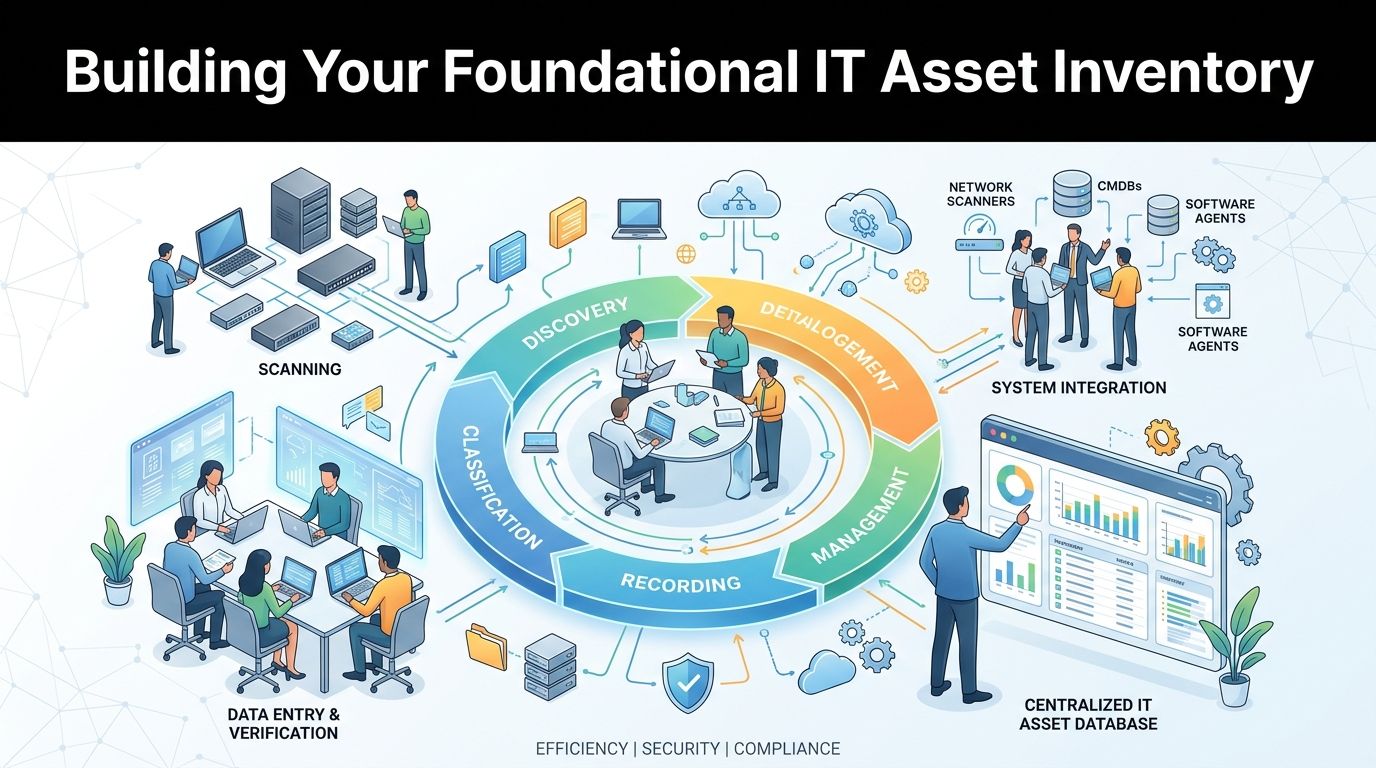
A data risk assessment falls apart if the inventory is weak. You can't classify, score, transport, destroy, donate, or audit equipment you haven't identified.
The good news is that this part doesn't require a complicated governance platform to start. It requires a disciplined manifest and clear field rules.
The U.S. electronic goods recycling industry includes 863 businesses and was forecast to grow at a compound annual growth rate of 8.0% to total $28.1 billion over the five years to 2024, which signals that organizations have a broad field of recycling and ITAD partners to choose from, according to IBISWorld industry data. Choice is helpful, but it also means your internal inventory has to be strong enough to compare vendors and control scope.
What your inventory should capture
At minimum, each asset record should include:
- Asset identity such as device type, manufacturer, model, and serial number
- Business ownership including department, assigned user, or cost center
- Physical location so teams can find the item during an office cleanout or staged pickup
- Operational status such as active, spare, broken, powered off, or already removed from service
- Storage profile noting whether the item contains a hard drive, solid-state storage, removable media, embedded memory, or no storage at all
- Condition and disposition path for reuse, redeployment, resale, donation, recycling, product destruction, or secure data destruction
A keyboard and a firewall appliance don't belong in the same risk bucket. A breakroom display and a radiology workstation don't either. Your inventory is where those differences first become visible.
How to build it without slowing the project
For a smaller refresh, a spreadsheet with controlled fields can work. For a larger facility cleanout or data center decommissioning, barcode scanning and room-by-room manifesting are more reliable.
Use this sequence:
- Sweep by location first. Work room by room, rack by rack, closet by closet.
- Tag uncertain items. If staff can't confirm storage or ownership, isolate the asset for review instead of guessing.
- Separate media-bearing devices early. Laptops, desktops, servers, SAN components, printers, copiers, phones, lab systems, and some medical equipment often need closer scrutiny than teams expect.
- Create exception handling. Damaged devices, locked devices, and unknown assets should trigger a separate workflow.
The inventory isn't accounting paperwork. It's the control point that determines whether your downstream decisions are credible.
A partner can help here, but only if they can support verified manifests and reconciliation. When teams need a reference for structured tracking before transport, this overview of asset inventory management shows what a documented process should look like in practice.
Classifying Data and Scoring Asset Risk
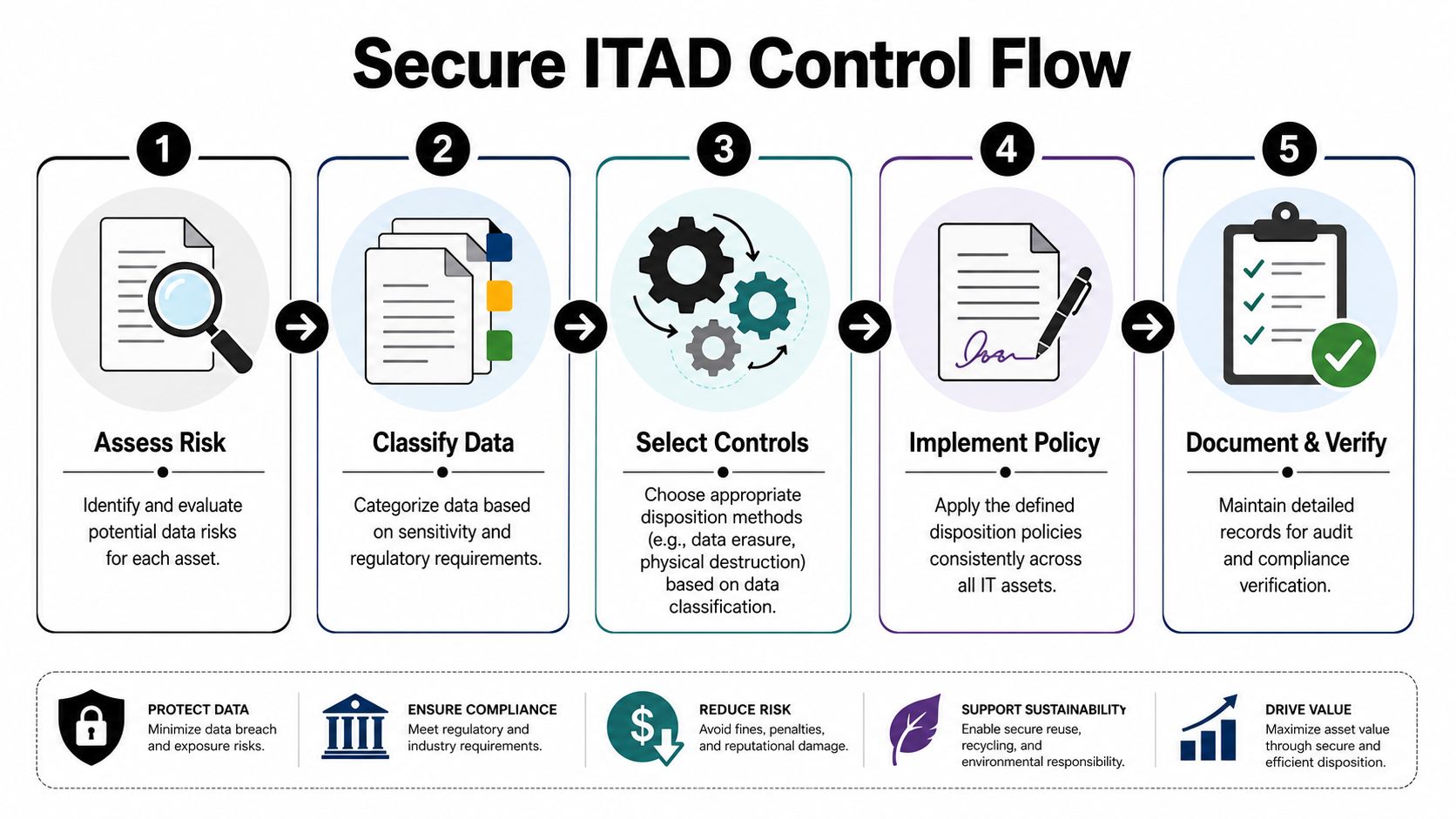
Once the inventory exists, the next question is simple. What kind of data is each asset likely to expose if handling goes wrong?
That answer should drive every downstream ITAD decision. It should also account for the fact that untracked disposal is still common. The United States generates approximately 6.9 million tons of electronic waste annually, and only 15% was formally collected and recycled in North America as of 2019, meaning 85% ends up in unlicensed facilities or landfills, according to these e-waste statistics. For IT managers, that's a reminder that “recycling” by itself doesn't equal controlled disposition.
Use a simple classification model
Start with three categories that your teams can apply:
| Data class | Typical examples | ITAD implication |
|---|---|---|
| Public | Marketing displays, empty peripherals, training hardware with no retained user data | Standard recycling or donation may be acceptable after verification |
| Internal | General business files, internal email caches, collaboration data, non-public operational records | Controlled data erasure and documented handling are usually required |
| Restricted | PII, financial records, credentials, customer datasets, legal files, IP, regulated healthcare or research data | Physical destruction or tightly controlled sanitization with stronger evidence is often required |
This doesn't need to be academically perfect. It needs to be consistent enough that the same type of asset gets the same treatment every time.
Score the asset, not just the device type
A CEO laptop may be high risk. So may a warehouse PC tied to shipping systems. So may a multifunction printer with scanned documents in local memory. Device category alone can mislead you.
Use two dimensions in your matrix:
- Likelihood of sensitive data presence
- Impact if exposed
Then assign a practical result such as low, medium, or high risk.
Here's a workable way to consider this:
- Low risk if the asset likely has no storage or no meaningful data exposure path
- Medium risk if it has storage and routine business data
- High risk if it holds regulated, confidential, credential-heavy, or hard-to-verify datasets
Field note: If your team doesn't know whether a device contains storage, treat uncertainty as a risk factor, not as permission to downgrade it.
For organizations that need a policy model to adapt internally, this guide for regulated SMBs is a useful reference point for turning broad classification concepts into operational rules.
Don't ignore context and re-identification
Static classification misses a common problem. Data that looks anonymized on its own may become identifying when combined with other data later. That matters for organizations disposing of analytics devices, mobile datasets, scientific systems, and exported research archives.
The point isn't to overcomplicate every retirement event. It's to recognize that the risk score should reflect context, not just labels in a spreadsheet.
For teams formalizing those scoring rules, this resource on best practices for risk management can help translate broad risk thinking into operational thresholds.
Selecting Controls for Secure IT Asset Disposition
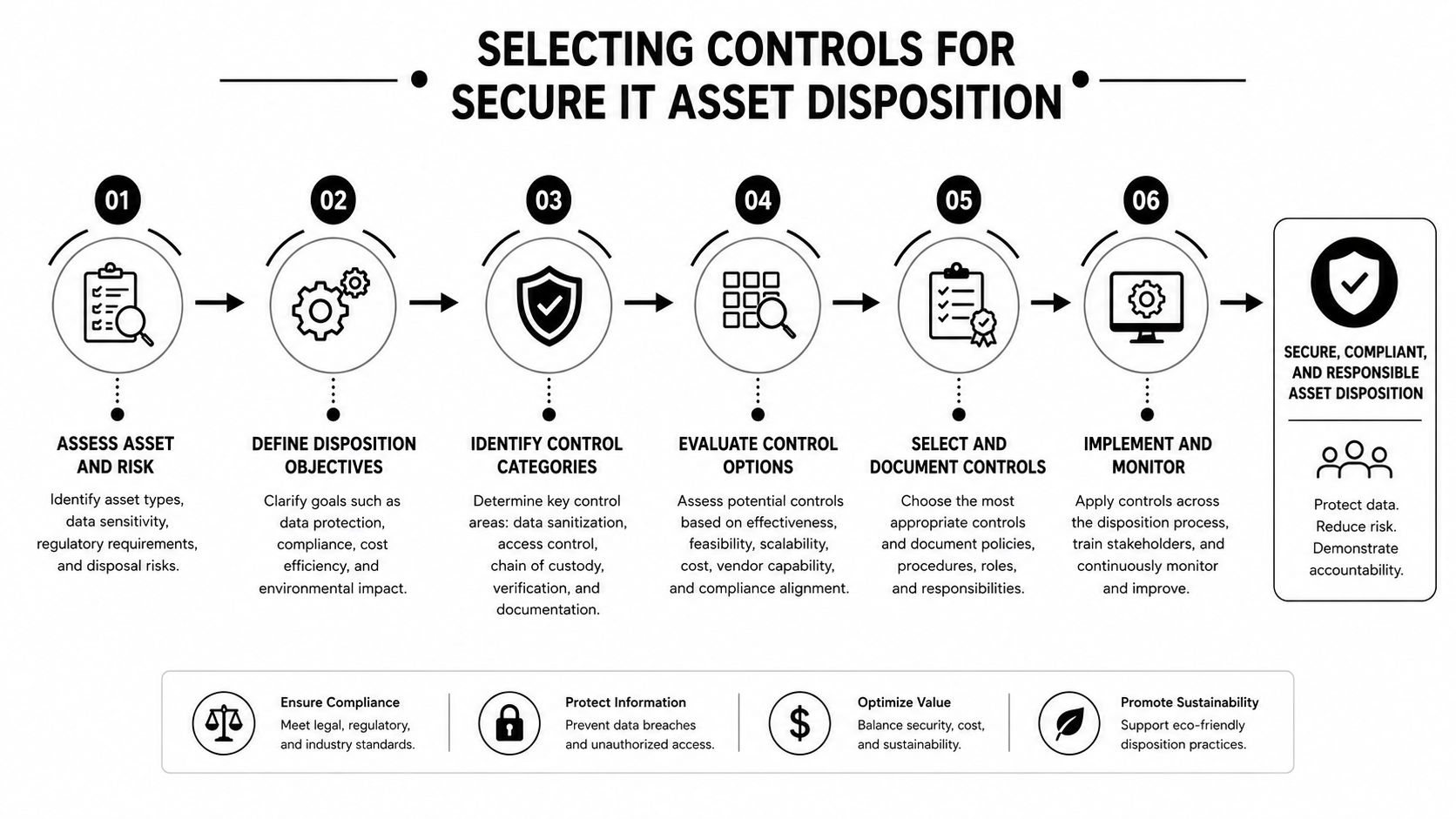
A risk label without a control map is just a spreadsheet exercise. The value comes from connecting score to action so the same asset profile always gets the same treatment.
That need for structure is why this market keeps expanding. The global risk management market, including data risk assessment services, is projected to reach USD 35.9 billion by 2032 with a 13% CAGR from 2024 to 2032, according to this risk management market projection. Organizations are buying process, evidence, and consistency because ad hoc judgment doesn't scale.
Match the control to the risk
Use a simple decision model:
| Risk level | Typical asset examples | Primary control |
|---|---|---|
| Low | Cables, keyboards, mice, verified non-storage peripherals | Responsible electronics recycling, reuse, or donation |
| Medium | Standard user laptops, desktops, office servers with routine business data | Certified data erasure with verification, then recycling or remarketing if policy allows |
| High | Drives from finance, HR, healthcare, legal, R&D, identity systems, failed or inaccessible media | Physical destruction, documented chain of custody, then downstream recycling of residual materials |
What doesn't work is using one default action for every asset. Wiping everything sounds efficient until you hit damaged media, encrypted devices you can't validate, embedded storage you missed, or hardware that policy should never release for reuse.
Understand the main control options
Data erasure
Use erasure when the media is functioning, policy permits reuse, and you can verify the result. This is common for standard fleet refresh projects where remarketing, redeployment, or corporate donation programs are in scope.
Degaussing
Degaussing has a narrower role. It's relevant to magnetic media and can be effective in the right circumstances, but it also affects reuse potential and doesn't replace the need for asset tracking or documented process discipline.
Physical destruction
Shredding or other destruction methods are the right answer when risk is high, media is damaged, verification isn't possible, or policy requires irreversible destruction. That's often the most defensible path for secure data destruction in regulated environments.
Choose the control that matches the evidence you need later, not just the fastest method available on pickup day.
Build a policy your team can actually follow
A good disposition policy should answer these questions without debate:
- Who approves disposition by asset class
- Which risk score requires destruction instead of erasure
- What happens to failed drives and unknown media
- How chain of custody is maintained during pickup and transport
- Which documents must be retained for audit purposes
When organizations need a provider that combines secure pickup, hard drive shredding, recycling, and documentation in one workflow, Reworx Recycling's secure data destruction services are one example of how those controls can be operationalized within an ITAD program.
Mastering Documentation for Regulatory Compliance
Documentation is where many otherwise solid projects fail. The work may have been done correctly, but if your records are incomplete, you'll struggle to prove due diligence to auditors, legal teams, customers, or internal stakeholders.
That matters across common frameworks and obligations because regulators usually care about evidence, not intent. If your policy says media is destroyed, you need records that show which media, when, by whom, under what custody, and by what method.

What belongs in the audit trail
For most ITAD events, the documentation set should include:
- Initial asset manifest with serial numbers, asset descriptions, and locations
- Risk classification record showing why the chosen control fit the asset
- Pickup record with custody transfer details
- Processing log for erasure, destruction, product destruction, or downstream recycling
- Exception log for missing serials, damaged media, unreadable drives, and policy deviations
- Final certificate confirming what happened to each asset or media item
The certificate itself should be detailed enough to stand alone months later. If someone asks what happened to a specific drive, you shouldn't have to reconstruct the story from emails.
What a usable certificate should show
A strong certificate usually contains:
| Required element | Why it matters |
|---|---|
| Asset serial number or media identifier | Ties the certificate to a specific item |
| Date of processing | Establishes timing and retention alignment |
| Method used | Shows whether erasure or destruction matched policy |
| Custody reference | Supports traceability from pickup through final handling |
| Authorized processor details | Identifies who performed the work |
| Disposition outcome | Confirms destruction, recycling, donation, or other final path |
Good documentation reduces friction. It shortens audit prep, speeds legal review, and prevents the same questions from resurfacing every quarter.
This is especially important during office moves, school refreshes, public sector surplus events, or medical and laboratory equipment disposal projects where multiple departments are involved. A weak paper trail creates internal disputes long after the truck has left.
For teams tightening that evidence layer, this reference on chain of custody documentation is useful because it focuses on the records that matter during review.
Common Data Disposal Pitfalls and How to Avoid Them
Most disposal mistakes aren't exotic. They're routine habits that people confuse with adequate control.
Deleting files isn't sanitization. Reformatting a drive isn't proof. Letting staff set aside “old stuff” for a future pickup almost guarantees inventory drift. And choosing a recycler based only on convenience can create a third-party risk problem you won't notice until someone asks for documentation.
The pitfalls that keep showing up
A few examples come up repeatedly in the field:
- Hidden storage gets missed. Teams remember laptops and servers but forget copiers, phones, network gear, external drives, and specialty lab or medical systems.
- Broken devices get downgraded. A failed drive is often treated like scrap, even though failed media can be the strongest case for physical destruction.
- Donation decisions happen too early. Corporate donation programs support digital inclusion and community goals, but only after classification, sanitization, and verification are complete.
- Office cleanout urgency overrides process. Facilities wants space back. IT wants the backlog gone. That's when undocumented exceptions appear.
The advanced risk most teams overlook
Re-identification risk is one of the least discussed issues in disposal planning. Research shows that 15-character mobile device IDs combined with timestamp data can uniquely identify 99% of individuals in a dataset, according to this analysis of quasi-identifiers and re-identification risk.
That finding matters beyond mobile analytics. It's a reminder that “anonymized” doesn't always mean safe, especially when old systems, exported reports, research data, or telemetry logs can be linked with outside information later. Standard disposal checklists rarely account for that. Mature data risk assessment does.
If your policy treats de-identification as a one-time event, your policy is incomplete.
How to avoid turning ITAD into a weak link
A stronger approach looks like this:
- Inventory before movement. Don't let equipment leave rooms, racks, or carts unlogged.
- Classify by likely exposure. Use business context, not only device type.
- Choose controls conservatively when evidence is weak. Unknown storage and failed media should move upward in risk, not downward.
- Vet the downstream chain. Recycling, donation-based recycling, and product destruction all depend on custody discipline after pickup.
- Keep proof in one place. If records are spread across emails, spreadsheets, and vendor PDFs, audits become slower and less reliable.
If you need a plain-language primer on why custody records matter beyond compliance, especially when proving product authenticity or controlled handling, this article on proving product authenticity is a useful parallel.
A strong ITAD program protects more than data. It supports sustainable recycling, keeps electronics out of weaker disposal channels, and gives business owners, IT managers, sustainability leaders, schools, and public agencies a process they can repeat without improvising every quarter.
Businesses that want a cleaner ITAD workflow should build disposal around inventory, classification, control selection, and documentation from the start. If you're planning electronics recycling, computer recycling, data center decommissioning, laptop disposal, secure data destruction, product destruction, medical equipment disposal, laboratory equipment disposal, or a facility cleanout, Reworx Recycling offers resources to help organizations donate old equipment, schedule a pickup, or structure a responsible end-of-life program that supports community donation, digital inclusion, and workforce development.