A failed laptop audit rarely starts with a crisis. It usually starts with a small mismatch, a tag that fell off, a location code that no one trusts anymore, or a returned device that nobody can confidently match to the record. By the time someone in IT is standing in a storage room with a scanner in one hand and a stack of mystery assets in the other, the issue is no longer labeling. It's the connection between the inventory labeling system, the asset record, and whatever happens next, redeployment, secure data destruction, or donation.
That's why labeling has to be treated as operational infrastructure, not stationery. The history behind modern labeling makes that point clear. IBM notes that the Universal Product Code was officially born on April 1, 1973, after retailers and manufacturers called in 1970 for a standard machine-readable symbol for inventory handling, and that barcodes are now scanned about 6 billion times per day worldwide IBM on the UPC. The shift toward durable, practical labels also goes back further, with the self-adhesive label introduced in 1935 by Ray Stanton Avery, a milestone that made modern industrial labeling possible at warehouse and retail scale Mecalux label history.
Why Most Inventory Labeling Programs Fail Before They Scale
A labeling program usually breaks long before anyone notices the root cause. The first sign is an audit where three laptops are in the room, two tags scan, and the third has a faded sticker wrapped over a vent. The failure is deeper. The label was treated as a temporary identifier instead of the bridge between physical hardware and the system of record.
The three failures that show up first
Most rollouts fail for the same reasons. Templates drift across teams, weak materials fail under real handling, and naming conventions wander away from the asset record. Operational guidance from warehouse labeling best practices points to the same problem areas, consistent fields, clear placement rules, and pilot testing before broad rollout, because those controls reduce misreads and manual correction later.
Practical rule: if a label can't survive the same motion, light, and surface conditions it will see in real use, it's not a label standard yet. It's a draft.
The scope is larger than many IT teams plan for. A device arrives, gets tagged, moves between rooms, gets checked out, gets retired, and may then go through refurbishment, secure destruction, or donation. If the asset ID changes meaning at any point in that chain, the record is already weak. That is why IT asset management best practices for disposition and reuse have to be part of the labeling conversation from the start, not added after the hardware leaves the building.

Why the problem gets worse at disposition
The last mile is where labeling failures become expensive in time, not just inconvenience. A damaged asset tag can slow pickup, stall chain-of-custody, or leave a device orphaned between IT and a downstream partner. Finale Inventory's operational guidance emphasizes staged deployment, standardized placement, and random shelf or bin checks until scanned data matches physical items across samples Finale Inventory labeling guide.
That matters for office cleanouts, laptop disposal, and data center decommissioning alike. If the tag survives only while the device sits on a shelf, the system has not solved the actual workflow. It has only postponed the failure.
Choosing Between Barcode, QR, and RFID for IT Assets
The right label technology depends on how the asset moves, who scans it, and how much information needs to travel with it. A laptop on an office floor has very different requirements from a rack in a server room or a cart moving through a refurbishment line. The wrong choice forces staff into workarounds, and workarounds are where records drift.
Match the symbology to the job
For 1D and 2D barcodes, the sweet spot is low-cost scanning on laptops, monitors, printers, and peripherals where line-of-sight reads are acceptable. They're easy to print, easy to train on, and they fit well when the goal is high-volume intake and consistent asset tracking.
QR and Data Matrix make more sense when human-readable context matters and staff may use phone cameras or field devices. They're useful in donation and ITAD workflows where an asset needs more data tied to the label than a simple linear code comfortably carries.
Passive UHF RFID belongs in spaces where bulk reads matter more than visual alignment. Data center racks, carts, and high-value equipment often benefit from hands-free scanning because line-of-sight labels can slow intake or miss partial stacks.
A scanner doesn't care what looks elegant in a procurement spreadsheet. It cares about angle, distance, and whether the payload matches the workflow.
| Criteria | Barcode (1D/2D) | QR / Data Matrix | Passive UHF RFID |
|---|---|---|---|
| Read method | Line of sight | Camera or imager | Radio read, no line of sight |
| Best fit | Laptops, monitors, peripherals | Donation, field service, mixed workflows | Racks, carts, bulk asset movement |
| Human readability | Strong with text below code | Strong, especially with printed context | Usually weak on-label, depends on printed text |
| Data density | Moderate | Higher | Depends on encoding and system design |
| Hardware cost | Lower | Lower to moderate | Higher, especially readers and integration |
| Failure mode | Dirt, glare, misplacement | Print quality, scan angle, clutter | Reader tuning, interference, tag placement |
The decision heuristic that actually holds up
Start with barcode or QR on most IT assets, then add RFID only where scan volume or physical layout justifies it. Use the simplest symbol that your staff can read reliably in the environment, and keep a secondary option for edge cases. For many organizations, that means a barcode as the primary ID and a QR code or printed text block as the fallback.
That approach keeps intake, refurbishment, and donation flows consistent without forcing one standard onto every asset class. It also keeps your labeling program closer to the rest of the ITAM stack, which is where it needs to live Reworx asset tracking systems.
Picking Durable Materials and Placement That Survive Real Use
Durability is where a lot of programs lose credibility. Labels look fine on day one, then they get wiped, scraped, covered with tape, or exposed to cleaning chemicals, and suddenly scan rates drop. That's why material choice has to follow the environment, not the other way around.
Build the label for the room it lives in
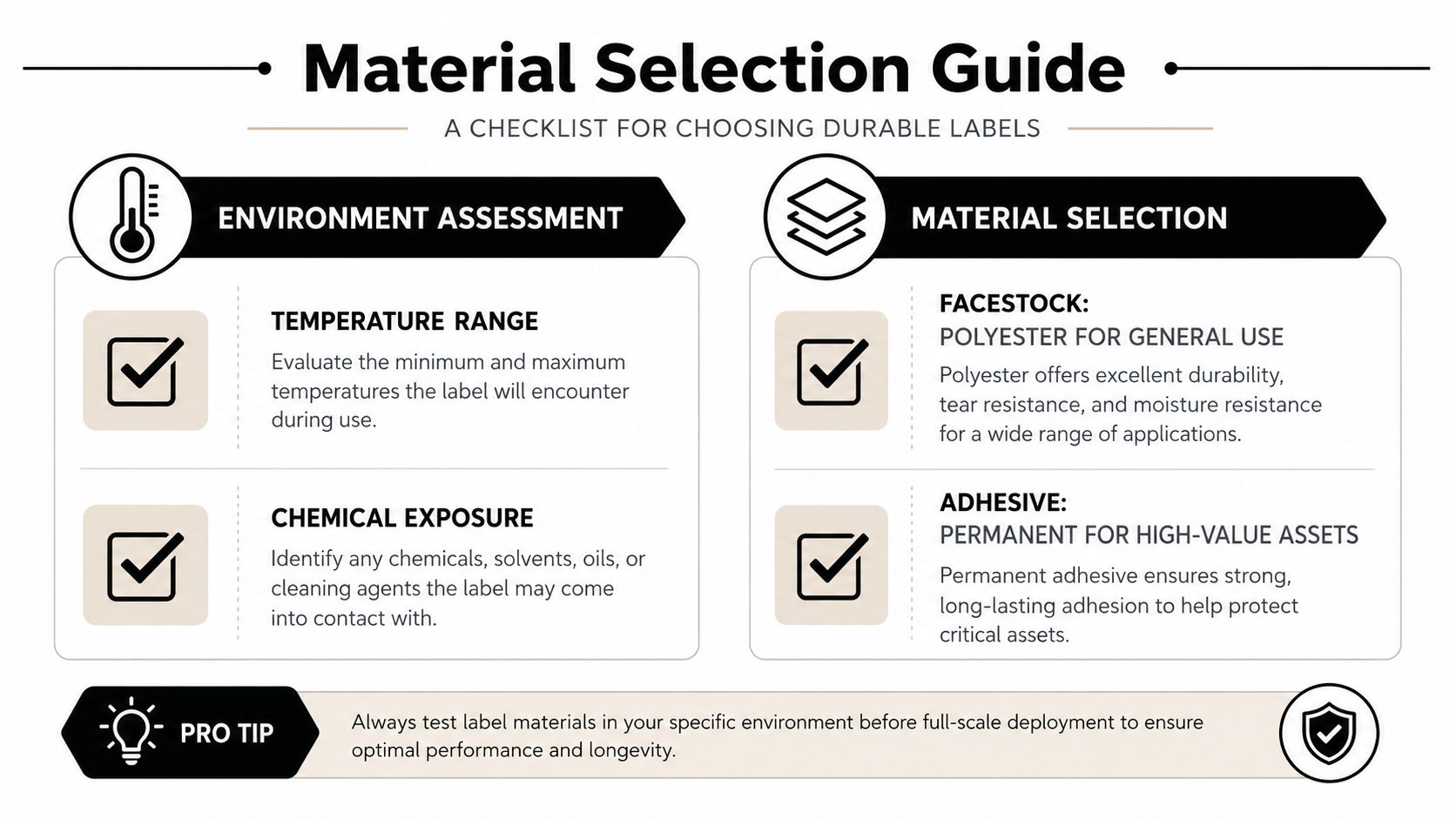
For general office use, polyester is a safe default. For moisture, chemicals, or heavy handling, guidance for small businesses points to polyester or laminated labels, and another operational guide notes that labels may need plastic sleeves to stay readable over time Omega Brand inventory labeling guide. Those choices matter in refurbishment lines, warehouse receiving zones, and storage rooms where labels get touched often.
Adhesive choice is just as important. Permanent adhesive makes sense on high-value assets that shouldn't be retagged casually, while removable and low-tack options are better for temporary staging or assets that are redeployed frequently. High-tack adhesives help on difficult surfaces, but they can be the wrong answer if the asset will later be cleaned or resold.
Placement matters as much as material
Labels belong on flat, visible surfaces that line up with the operator's natural scan path. Curved corners, seams, vents, and occluded areas create read problems that look random in the field but are predictable in practice. Zoho's warehouse guidance specifically warns about label drift, curved surfaces, poor contrast, and glossy finishes that interfere with readability Zoho inventory labeling guide.
A quick sourcing checklist helps keep sample testing honest:
- Surface fit: Will the label sit flat, or does the asset force the code over a seam or curve?
- Environment fit: Will it face moisture, chemicals, dust, or repeated wiping?
- Scan path fit: Can a technician read it without turning the asset into an awkward angle?
- Adhesive fit: Will it hold during storage, transit, and handling, without damaging the asset later?
- Fallback fit: If the code gets scratched, is the human-readable text still usable?
If the label can survive a cleaning pass and still scan after the asset has been moved a few times, you're in the right neighborhood. If not, the label spec is too optimistic for the actual workload.
Designing Naming and Asset ID Standards That Match Your Systems
A label only works if the fields on it mean the same thing in the software. That sounds simple, yet it is where many programs break down across offices, closets, and outside partners. A clean ID structure reduces manual correction later, and it also makes disposition records easier to trust when assets move into wipe, resale, secure destruction, or donation.
Start with a minimum data schema
The label should carry the fields your teams use, not a decorative version of them. A practical minimum is asset tag, SKU or model, location code, acquisition date, owner, and disposition status. Each field should map directly into the WMS, ERP, or ITAM record so a scan updates the right row without someone retyping the data.
For physical locations, use a clear hierarchy such as Zone-Aisle-Bay-Level-Bin. That format scales better than ad hoc room names because everyone can read the same code, even when they do not know the site. It also keeps receiving, storage, and retrieval aligned when different people print, apply, and scan labels over time.
The same discipline helps when you hand assets off to downstream providers. A label that carries a stable ID can travel from intake to refurbishment to secure destruction without forcing a new naming scheme at each step. Reworx describes a practical asset tagging system for recovery and reuse workflows, and that kind of structure only works when the tag text matches the record behind it.
Lock the governance down early
Most articles skip this part, but it is the part that prevents drift. Treat label templates like controlled documents, with versioning, change approval, and audit checks. If one team starts printing old formats while another has moved on, the asset record becomes unreliable very quickly.
A useful external reference point is Quote My Wall's durable labels, which reminds teams that labels are not only about printing a code, they are about surviving the treatment the object will receive.
Operational habit: any time a label format changes, reprint rules, field order, and scan validation should change with it. Otherwise, the code may still scan, but it will not mean the same thing.
That same logic applies to lifecycle movement. A newly imaged laptop can be tagged with a simple human-readable asset ID, then that same tag can stay with it through checkout, redeployment, wipe, and end-of-life donation. If the schema survives the device's full life, the tag becomes a durable reference instead of a disposable sticker.
A detailed guide to global IT asset disposition works best when naming rules stay stable from procurement through ITAD, because the label is what ties chain of custody to the physical device.
Matching Printers and Scanners to Your Environment
Printer and scanner decisions look minor until the labels start failing on the floor. The mistake is buying to the lowest sticker price instead of the actual deployment profile. Small office, distributed sites, and data centers all stress the hardware differently.
Pick printing technology by retention needs
Direct thermal is convenient, but it doesn't belong on assets that will sit for years before disposition. Heat, sunlight, and long retention periods can make it a poor fit for durable IT tags. Thermal transfer is the better default when you need labels to stay legible across storage, transit, and reuse cycles.
Resolution matters too. If you're printing small 2D codes, 300 dpi and above gives you more room for clean bars, tighter modules, and fewer misreads. Label width flexibility also matters because asset tags on laptops, peripherals, and rack gear don't all share the same footprint.
Match the scanner to the worker
Handheld imagers fit field techs and office support staff who move from desk to desk. Fixed-mount scanners make sense at intake stations where assets are passed in one direction and speed matters. Rugged mobile computers belong in warehouse and depot environments where drops, dust, and constant motion are part of the job.
For procurement, total cost of ownership beats unit price. Cheap printers tend to get expensive through reprints, misreads, and downtime, especially when consumables or maintenance don't match the environment.
The right pairing is simple. Print durability should exceed the asset's expected retention period, and the scanner should match the person doing the work, not the most convenient catalog page.
Integrating Labels With ITAM, ITAD, and Secure Disposition
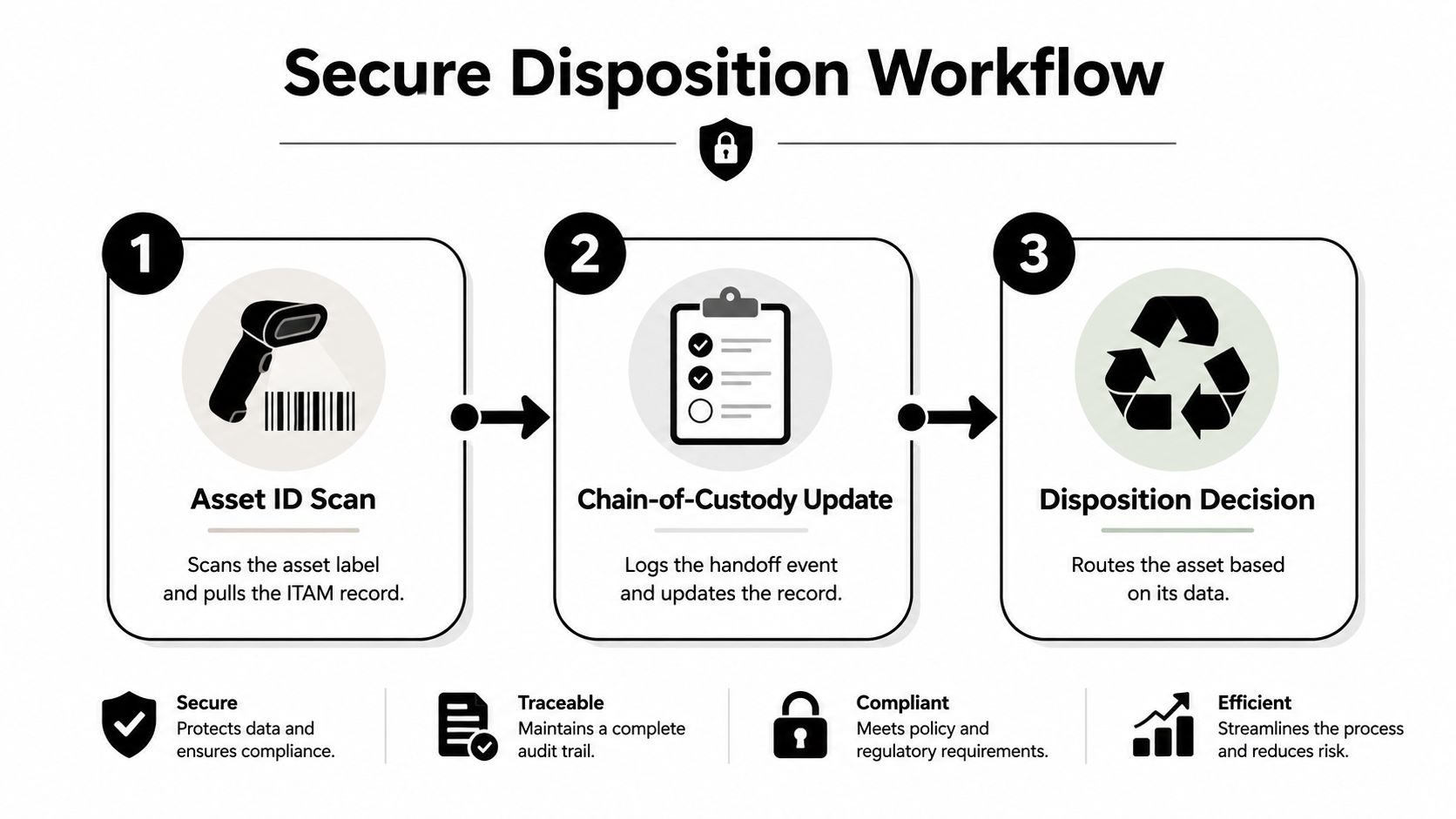
Labeling becomes valuable when it drives the next decision. That's where ITAM, ITAD, and disposition workflows connect. A clean asset ID can trigger chain-of-custody events, pickup scheduling, data destruction records, and the final path, resale, redeployment, recycling, or donation.
Build security into the label itself
A label that falls apart during sanitization is a bad security control. Tamper-evident construction helps with custody, and labels that survive wiping and transport reduce the chance of devices going missing between internal teams and downstream partners. Hidden or encrypted payloads may be appropriate in more controlled environments, but the bigger rule is simpler, the tag has to remain readable long enough to support the secure process.
That becomes important when devices leave the office but still need to be traceable through storage, refurbishment, or donation. Reworx Recycling uses consistent, durable labeling as part of maintaining chain of custody from pickup through redeployment, while keeping data-bearing devices inside a secure destruction process. For teams that also need to boost your hardware efficiency, Sheridan Technologies offers a useful adjacent perspective on operational discipline.
Why donation workflows depend on label discipline
Donation and reuse are easier when the tag still reads after transit and storage. That lets the same device move from IT to a social enterprise, then onward to a school, nonprofit, or internal redeployment queue without the record losing continuity. Reworx Recycling's model fits that handoff because it pairs secure disposition for sensitive devices with downstream reuse where equipment is still viable.
This is also where compliance fields should already exist in the inventory record before the asset moves. The cleaner the handoff data, the less chance you have of orphaned devices, missing certificates, or a donation batch that can't be reconciled against the original list. A comprehensive guide to global IT asset disposition supports that broader ITAD view.
Testing, Rollout, and a Printable Implementation Checklist
A rollout works best when it starts in a narrow slice of the environment. Audit and categorize the inventory first, generate labels from controlled templates, apply them in standardized locations, then verify readability with random shelf or bin checks before training staff and expanding across the full site. That sequence keeps mistakes contained while there is still time to correct them.
Test like the labels will be used
Scan labels from the angles and distances staff use at desks, in closets, and in storage rows. Check quiet zones around barcodes, and reject any pilot where sampled scans do not match the physical item. Use a checklist that mirrors real handling, because labels that scan perfectly on a bench often fail once they are on a dock, in a rack, or on a curved surface. A rollout checklist for compliance reviews helps keep those checks visible before anyone approves a wider release.
A short checklist keeps the rollout honest:
- Standards: Confirm one approved naming scheme, one template version, and one placement rule by asset class.
- Materials: Verify facestock, adhesive, and overlaminate against the environment.
- Hardware: Match printer resolution and scanner type to the code format and site conditions.
- Integration: Confirm every scan updates the correct ITAM or disposition record.
- Testing: Scan from expected angles, distances, and lighting conditions before full deployment.
- Rollout: Train staff, then expand in staged batches instead of swapping the whole site at once.
If you need a reference point for label durability and attachment choices, find durable auto decals here as a reminder that the material decision is usually made long before a label ever lands on an asset.
The final gate before scale
Do not go live until the pilot survives real handling, not just a lab test. A label program has to hold up through move requests, surplus pulls, refurbishment intake, and secure destruction queues, because those are the points where bad labels create custody gaps. When the workflow holds, labels stop being a cleanup task and become a control point for inventory, security, and disposition.
That matters for ITAD and donation too. A label that stays readable through transfer makes it easier to reconcile what was wiped, what was refurbished, and what can be sent to a school, nonprofit, or internal redeployment queue without confusion. A detailed guide to global IT asset disposition can help teams align that handoff with the rest of their process.