You've probably been in this spot already. An office cleanout is moving fast, old laptops are stacked near the loading dock, a few servers are waiting for pickup, and someone asks a simple question that isn't simple at all: “Are we compliant?”
If your only answer is a spreadsheet with boxes checked “yes,” you don't have a defensible process. You have a memory aid.
For IT asset disposition and electronics recycling, a real compliance checklist template has to do more than remind staff what to do. It has to prove what happened, who did it, when it happened, what evidence supports it, and what corrective action was taken if something failed. That matters whether you're managing laptop disposal, data center decommissioning, medical equipment disposal, or a routine office cleanout.
Teams handling IT equipment disposal often learn this the hard way. The operational work gets done, but the documentation is thin. Devices leave the building, a recycler issues a basic receipt, and months later audit questions start. Where is the destruction evidence? Who approved release? What was the chain of custody? Which vendor document closes the control?
That's where the difference between a generic checklist and an audit-ready system shows up.
Why Your ITAD Checklist Needs to Be More Than a To-Do List
A to-do list helps people finish tasks. An audit-ready checklist helps an organization defend decisions.
That distinction matters most during electronics recycling projects because the work crosses departments. IT owns devices, facilities may manage access and staging, procurement may own the vendor relationship, legal may care about record retention, and security may need proof of secure data destruction. If each group only completes its own tasks, gaps appear fast.

What a weak checklist misses
Most weak templates stop at questions like these:
- Asset counted: Yes or no
- Data removed: Yes or no
- Recycler selected: Yes or no
- Pickup completed: Yes or no
That format is easy to fill out and almost useless under scrutiny. It doesn't tell an auditor where the proof lives. It doesn't identify who owns the control. It doesn't show whether a failed step triggered remediation.
Federal audit guidance makes the standard much clearer. Teams should designate a lead, identify supporting staff, document actions taken, retain records of incidents, and create corrective action plans with dates and follow-up monitoring, as outlined in the CMS audit preparation checklist. That's the practical line between a checklist and a control system.
Practical rule: If a checklist item can't be tied to an owner, a record, and a verification step, it probably won't hold up in an audit.
A better way to think about the document is as a control register for retirement activity. Every item should answer five questions: What needs to happen? Who owns it? What evidence proves it? Where is that evidence stored? What happens if the answer is no?
What works in real ITAD programs
The best checklists are boring on purpose. They standardize repeatable work and remove ambiguity.
That's why mature teams usually connect the retirement checklist to inventory review before pickup, not after. A good example is using an IT inventory audit before recycling so the asset list, disposition plan, and downstream evidence all start from the same record set.
Here's what tends to work:
- Named ownership: One lead owns checklist completion, even if several teams contribute evidence.
- Evidence fields: Every control line includes a document reference, file path, or linked record.
- Exception handling: Failed items don't disappear. They move into corrective action with dates and follow-up.
- Retention discipline: Records are kept in one predictable location instead of scattered across email threads.
A checklist that only tracks tasks tells you whether people were busy. A checklist that tracks evidence tells you whether the organization can defend its process.
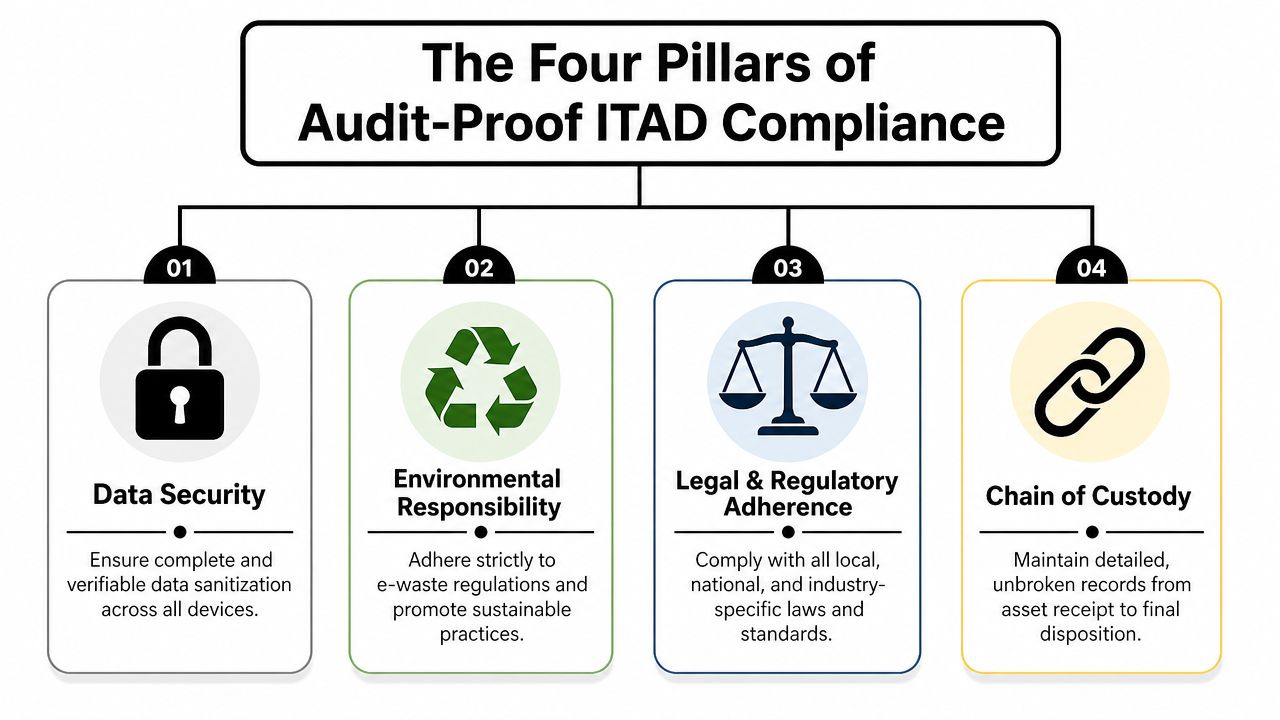
The Four Pillars of an Audit-Proof ITAD Checklist
A strong ITAD checklist should be built around four pillars. Miss one, and the rest become harder to defend.
A useful starting point comes from the way modern compliance templates are structured. They act as control tools with status fields, comments, and evidence tracking. In privacy programs, that includes mapping data categories, recording retention periods, and verifying secure destruction procedures, as described in this compliance checklist template reference. The same logic applies directly to IT asset disposition.
Data security
This pillar covers the most sensitive question in any laptop disposal or server retirement project: can you prove data was handled correctly?
Your checklist should require more than a statement that drives were “wiped” or “destroyed.” It should capture the method used, who authorized it, and what record closes the item.
Include controls such as:
- Sanitization decision: Record whether the asset will be wiped, shredded, or otherwise retired based on device type and policy.
- Evidence attached: Require a destruction certificate, sanitization report, or equivalent supporting record.
- Exception logging: Flag drives that couldn't be processed normally and document the alternate handling path.
If this pillar is weak, the entire checklist is weak.
Environmental responsibility
Many templates mention recycling but don't operationalize it. That's a mistake for sustainable recycling and ITAD alike.
An environmental control shouldn't say only “recycle equipment responsibly.” It should require traceable documentation that the material moved through an approved downstream path and that records are retained.
A practical checklist asks:
| Control area | What to verify | Evidence to store |
|---|---|---|
| Asset segregation | Devices are sorted for reuse, recycling, or destruction | Intake notes, photos, inventory sheet |
| Material handling | Hazardous or regulated components are identified | Processing notes, vendor records |
| Final disposition | The final outcome is documented | Recycling certificate, disposition log |
That structure is what keeps a facility cleanout from becoming a documentation problem later.
Legal and regulatory adherence
This pillar is where many teams get too abstract. “Comply with regulations” isn't a control. It's a goal.
The usable version is narrower. Which rules apply to this asset class, this data type, this location, and this handoff? Then each obligation gets converted into a verification task.
An auditable checklist doesn't just reference rules. It translates each rule into a step a staff member can actually verify.
Examples include confirming retention requirements, validating that contractual obligations are addressed before release, and checking that disposal steps align with internal policy for regulated equipment.
Chain of custody
This is the operational spine of the checklist. Without it, you can't show where assets were from pickup through final disposition.
The minimum standard is an unbroken record of possession and transfer. That usually means documenting internal release, loading, transport, receipt, processing, and final documentation. A useful reference point is this guidance on chain of custody documentation, which shows how timestamps, custodians, and disposition records fit together.
Non-negotiable fields include:
- Custodian identity: Who released and who received the assets
- Transfer details: Date, time, location, and asset reference
- Disposition link: The final record tied back to the original transfer
If you're building a compliance checklist template for electronics recycling, these four pillars should appear as separate sections or tags in the workbook. That makes gaps easier to spot before an auditor does.
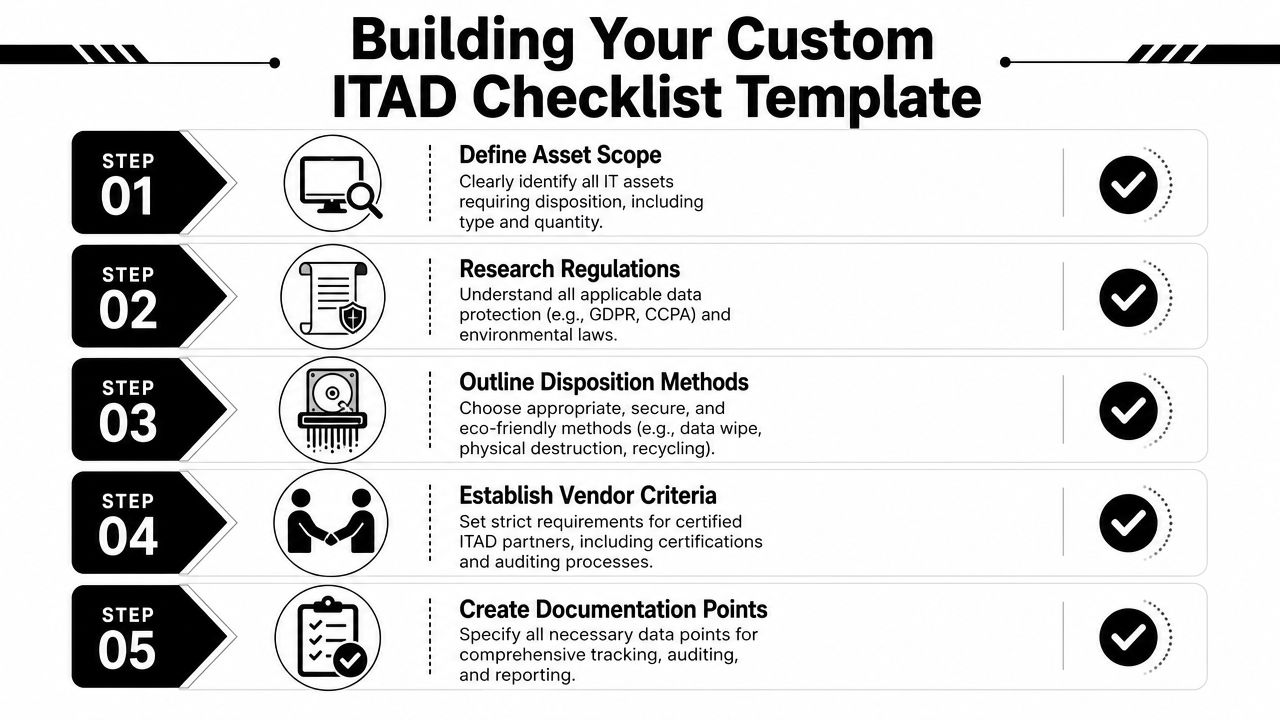
Building Your Custom Checklist Template
Start with a spreadsheet. Not because spreadsheets are elegant, but because they make control design visible.
A high-quality compliance checklist template works best as a repeatable control matrix. You scope the obligation, map it to a verification task, and assign evidence fields such as date, location, pass or fail status, notes, and corrective actions, following the structure described in this control matrix guidance.
The columns that matter
Teams frequently add too few columns. Then they compensate with comments and email threads.
Use a structure like this:
| Column | Why it matters |
|---|---|
| Control ID | Gives each obligation a fixed reference |
| Control item | States the verification task in plain language |
| Applicable rule or policy | Ties the task to a requirement |
| Owner | Assigns accountability |
| Status | Tracks pass, fail, or not applicable |
| Evidence location | Points to the actual supporting file |
| Notes | Captures context that an auditor may ask about |
| Corrective action | Records what happens if the item fails |
| Review date | Supports recurring audit cycles |
The most important field is usually evidence location. If your auditor has to ask you where a document is, the checklist is incomplete.
How to write control items properly
Bad checklist item: “Confirm secure disposal.”
Better checklist item: “Verify asset transfer form is complete and linked to destruction or recycling record.”
Bad checklist item: “Check vendor.”
Better checklist item: “Confirm approved vendor documentation is on file, current, and matched to the asset batch.”
Practical templates from other operational fields can be useful. Even a logistics-focused resource like this Perth removalist checklist template is a good reminder that repeatable moves succeed when every handoff, timing issue, and document point is defined in advance.
Field note: The more specific the control language, the less rework you'll do during audit prep.
Keep the evidence one click away
If you're using cloud storage, link directly from the checklist row to the supporting document. If you're using a document management system, store the record ID in the sheet. Either way, don't rely on staff memory.
For destruction records, a standardized document format helps. A practical example is using a destruction certificate template so the same data points appear every time, including asset type, date, time, and location of destruction.
That's the difference between a template people fill out and a template people can defend.
Tailoring Your Checklist for Your Organization
One checklist format can work across many environments, but the control content shouldn't be identical. A small business retiring a single pallet of laptops doesn't face the same documentation burden as a distributed enterprise or a public school district running community drop-off events.
The template should flex without losing its core logic.
Small and mid-sized businesses
SMBs usually need simplicity more than software. The mistake is trying to copy an enterprise governance model with too many fields and approvals.
A lean SMB checklist should add items such as:
- Single point of accountability: One internal owner for vendor coordination and evidence collection
- Vendor document match: Each pickup batch must be tied to the corresponding destruction or recycling record
In such cases, outside support often matters most. A vendor evaluation process should focus on documentation quality, chain of custody clarity, and whether the partner can support office cleanouts, computer recycling, and secure data destruction without requiring the client to build a large internal compliance function. A practical framework for that review is this guide to vendor selection criteria.
Enterprises and multi-site organizations
Enterprises usually don't struggle with awareness. They struggle with consistency.
A useful enterprise checklist often includes separate controls for site-level release, central approval, and exception escalation. It also needs fields that map assets back to internal inventory systems, service tickets, or decommissioning work orders.
The common failure point is fragmentation. One site tracks serial numbers well, another stores evidence in email, and another closes tickets without attaching final disposition records.
For enterprise teams, add controls that verify:
- System reconciliation: Disposition records align with internal asset inventory
- Location-specific ownership: Every site names a custodian for release and staging
Schools and government agencies
Public sector and education teams need something different again. Public accountability, record retention, and site accessibility all matter more.
Government accessibility guidance shows that checklists are used to verify physical features such as sidewalk access, signage, and clearances in on-site environments, as described in this ADA inspection guidance. That's highly relevant if the organization runs public collection events, e-waste drives, or customer-facing drop-off operations.
For those environments, the checklist should include items like:
- Public access review: Confirm routes, signage, and collection areas are usable and documented
- Exception documentation: Record conditions that need engineering review or can't be corrected immediately
- Records retention path: Identify where event documentation and disposal records are stored for later review
Here's the practical comparison:
| Organization type | Add these checklist items | Why it matters |
|---|---|---|
| SMB | Batch-to-certificate match, single owner | Keeps the process manageable |
| Enterprise | Inventory reconciliation, site custodian fields | Controls variation across locations |
| School or agency | Accessibility checks, public records handling | Supports public accountability |
For donation-based recycling, facility cleanout projects, and public-facing electronics recycling events, the right checklist isn't the longest one. It's the one that matches your operating reality.
Putting Your Checklist into Action as a Living System
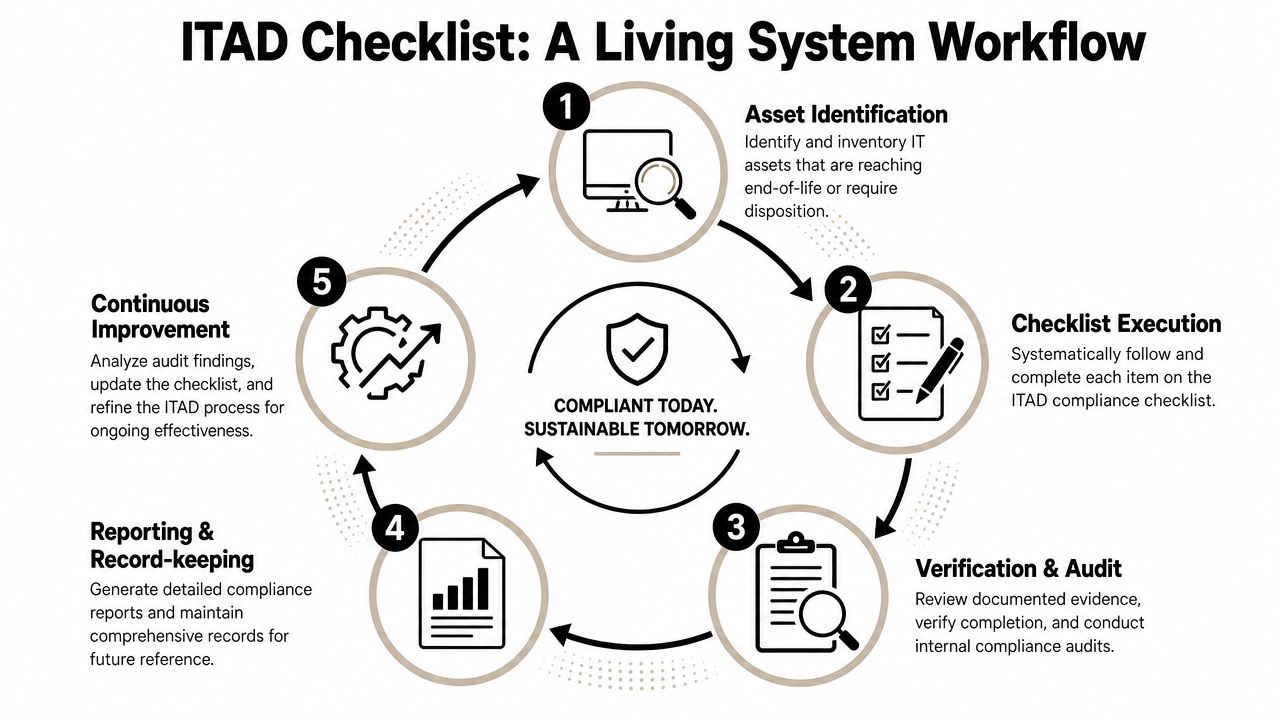
A completed template saved in a folder won't protect you. The checklist has to operate as a cycle.
The strongest templates treat compliance as a closed-loop workflow: identify applicable rules, assess risk, implement controls, set monitoring routines, collect evidence for each control, and update the checklist after each audit cycle, as described in this closed-loop compliance workflow guide.
The operating cycle
A working ITAD checklist usually follows a sequence like this:
Identify retiring assets
Flag laptops, servers, networking gear, and other devices that are leaving service. Match them to inventory records before they move.Execute the checklist
Complete the required controls for data handling, release approval, logistics, and vendor readiness. Don't skip fields just because the project is routine.Verify the evidence
Review pickup manifests, transfer records, destruction documents, and recycling records before closing the file.Report and retain
Store the completed checklist and linked evidence in a defined location with a retention owner.Improve the template
Use failed items and recurring exceptions to revise the checklist for the next cycle.
What breaks the loop
The most common breakdown isn't at pickup. It's after pickup.
Teams often schedule the asset removal correctly, then forget to reconcile what they expected with what happened. A checklist row may say “certificate received,” but the document doesn't match the asset batch. Or the transfer record exists, but there's no internal signoff showing who released the equipment.
That's why review matters. Before closing the project, compare the starting inventory, transfer documents, and final disposition records. If one piece is missing, the control isn't complete.
A checklist becomes reliable when failed items create work, not silence.
For server retirement projects, a specialized workflow helps. A server decommissioning checklist can tie legal research, recordkeeping, and final certificates into one process so the infrastructure team doesn't improvise under deadline pressure.
Make review part of operations
Don't reserve checklist review for annual audit panic. Review completed files during normal operations.
A short internal review can answer questions such as:
- Were all required evidence links present
- Did any control fail repeatedly
- Were corrective actions closed
- Did any vendor record arrive incomplete
- Did staff use the same naming and storage conventions
That feedback loop is what turns a compliance checklist template into a dependable operating tool for IT asset disposition, product destruction, and sustainable recycling programs.
Partner with Reworx to Simplify Your Compliance
Most organizations don't need more theory. They need a process that creates usable records while the work is happening.
That's where the right ITAD partner matters. A vendor should fit into your checklist, not sit outside it. Their documents should close control items, support chain-of-custody records, and make it easier to verify secure data destruction, electronics recycling, and final disposition without stitching together evidence from multiple sources later.
One useful way to think about vendor support is through the broader lens of practical compliance and risk management. The point isn't to collect policies for their own sake. The point is to create a workflow that assigns responsibility, captures proof, and resolves exceptions before they become audit findings.
Reworx Recycling can sit inside that workflow as an operational IT asset disposition option, providing services tied to business pickups, equipment decommissioning, secure data destruction, and documentation that supports audit files. If your checklist requires vendor records to close control items, that kind of fit matters more than marketing language. You can review the service scope through its IT asset disposition services.
The practical trade-off is straightforward:
- If you build the checklist without vendor documentation in mind, your team will spend more time chasing proof after the fact.
- If you build the checklist around real handoffs and required records, audit prep becomes an extension of daily operations.
- If you treat the vendor as part of the control environment, evidence collection gets easier and exceptions become visible earlier.
That approach also works well for donation-based recycling and corporate donation programs. The organization still needs defensible records, but it can also align end-of-life IT handling with sustainability goals, digital inclusion efforts, and community impact.
A compliance checklist template should give your organization an answer to the question “Are we compliant?” that goes beyond confidence or assumption. It should let you open the file, show the control, show the owner, show the record, and show the outcome.
If your organization is planning electronics recycling, IT equipment disposal, secure data destruction, or a facility cleanout, Reworx Recycling offers a practical next step. Donate old equipment, schedule a pickup, or explore a partnership that supports responsible recycling, community impact, and an audit-ready ITAD process.