A lot of organizations realize they need an asset tagging system at the same moment something goes wrong. A laptop can't be located before an employee exit. An office cleanout turns up drawers full of old drives no one owns. Finance asks for an equipment list, and IT has three spreadsheets with different answers.
That kind of confusion isn't just inconvenient. It creates security exposure, weakens audit readiness, and makes responsible end-of-life decisions harder than they should be. If you can't say what you own, where it is, who used it, and whether it still has value, you also can't run a disciplined IT asset disposition process.
An asset tagging system fixes that at the foundation. It gives each physical item a clear identity and ties that item to a record your team can trust throughout its working life and at retirement.
The Foundation of Modern Asset Management
Most companies don't start with chaos on purpose. It usually grows slowly. A few devices get tracked in a spreadsheet. Another department uses a purchasing list. Facilities keeps its own room inventory. Then equipment moves between users, floors, or sites, and the record stops matching reality.
That's why asset tagging became such a basic control practice. It gives each physical item a unique identifier connected to a digital record, which lets teams track location, condition, and maintenance history over time, as explained in this overview of how asset tagging systems capture asset data. The important shift wasn't a single invention. It was the move from informal lists to structured records that support audits, reuse, and end-of-life handling with less room for error.
Why structure matters before disposal
For a sustainability director, this point matters more than it first appears. Responsible disposal starts long before a pickup is scheduled. It starts when an organization can answer simple questions with confidence:
- What is this device: Is it a laptop, switch, monitor, lab device, or server accessory?
- Who owns it internally: Which department is accountable for it today?
- What's its status: In service, spare, awaiting repair, ready for redeployment, or ready for retirement?
- What risks does it carry: Does it store data, require chain of custody, or fall under internal policy?
Without that control layer, electronics recycling and IT equipment disposal become reactive. Teams end up sorting piles of hardware by hand, guessing at ownership, and discovering sensitive devices too late.
Practical rule: If an asset can create security, financial, or environmental risk when it goes missing, it should enter a structured record before it ever reaches the surplus pile.
Facilities teams often frame this as part of broader facility asset management. IT teams may use different software and terms, but the operating principle is the same. One item, one identity, one trusted record.
A good place to align those disciplines is with documented IT asset management best practices, especially when equipment moves through deployment, redeployment, storage, and final retirement.
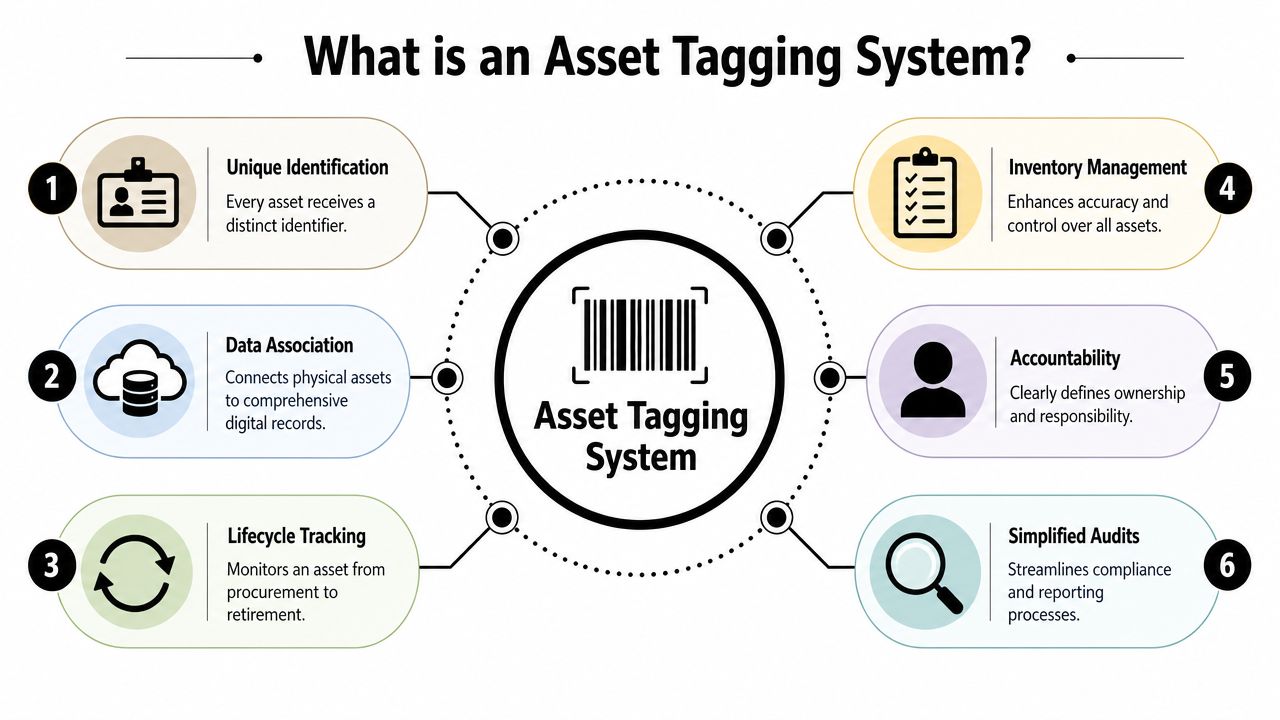
What Exactly Is an Asset Tagging System
Think of a library. Every book has its own barcode, and that barcode connects to a catalog record. The physical book sits on a shelf. The digital record tells you what it is, where it belongs, and what happened to it over time.
An asset tagging system does the same thing for business equipment. A laptop, docking station, printer, server, or lab instrument gets its own identifier. That identifier connects to a record containing the details your team needs to manage the item with confidence.
The easiest way to picture it
The tag itself isn't the system. It's the doorway into the system.
When someone scans a code on a device, they shouldn't just see a number. They should reach a useful record that answers practical questions such as:
| Record field | Why it matters |
|---|---|
| Asset ID | Distinguishes this exact item from every similar item |
| Assigned user or department | Creates accountability |
| Current location | Helps with audits, moves, and retrieval |
| Service notes | Supports maintenance and issue history |
| Retirement status | Tells IT and sustainability teams what happens next |
That record becomes the organization's single source of truth. It reduces arguments over which spreadsheet is current and gives finance, IT, facilities, procurement, and compliance teams a common reference point.
What readers often confuse
People often hear “asset tagging” and picture a sticker project. That's too narrow.
A sticker by itself doesn't solve much. The value comes from linking the physical item to a maintained digital profile and then updating that profile whenever something important changes. If the item moves offices, changes users, goes into storage, or gets approved for laptop disposal, the record has to move with it.
That's why mature teams think in terms of lifecycle management, not just labels. The item enters service with a unique ID, lives inside a controlled record, and exits through a documented process. If you want a practical example of how organizations connect those moving parts, this overview of asset tracking systems is a useful reference.
The Core Components of an Effective System
A working asset tagging system has three parts. Remove any one of them, and the whole process gets unreliable.
According to this detailed guide to asset tagging systems, the core components are the physical tag, the tracking software, and the scanning device. The same guide notes that system integrity depends on 100% unique-item identification, meaning each tag maps to one record only.
The physical tag
The tag is what people see first, but it's only one layer. It may be a barcode, QR code, or RFID label attached to a device, cart, tool, monitor, or server.
The tag has to survive the specific environment where the asset lives. Office laptops face abrasion from bags and desks. Warehouse devices face dust and heavy handling. Mobile equipment may need tamper-evident construction. If the label peels off or becomes unreadable, accountability breaks immediately.
The software record
The software is the memory of the system. It stores what the item is, where it is supposed to be, who uses it, and what happened to it.
Many rollouts succeed or fail at this stage. If software fields are inconsistent, naming rules are loose, or old records stay open after retirement, people stop trusting the data. Once trust is gone, staff keep side notes, and the system degrades back into spreadsheet behavior.
A tag should point to a record that answers a real operational question, not just prove that someone labeled the device.
The scanning device and workflow
The scanner can be a handheld unit, a mobile device, or another supported reader. What matters is that staff can use it easily during receiving, deployment, spot checks, office cleanouts, and retirement events.
The process around that scanner is what turns a label into a management system. In practice, teams usually need a controlled flow like this:
- Selection. Decide which assets belong in scope.
- Tagging. Apply one unique ID per item.
- Data entry. Create or complete the digital record.
- Rules and alerts. Set ownership, status, and review expectations.
- Testing. Verify scans and record accuracy.
- Training. Make sure staff update the system when assets move.
That workflow is why asset tagging helps far beyond the stockroom. Similar principles show up in logistics and operations work such as optimizing asset management in warehouses, where consistency matters more than labeling speed alone.
For data-bearing devices, the final workflow matters just as much as the first one. When an item leaves active service, it should move into documented custody rather than disappear into a closet. That's where processes like chain of custody documentation become essential for security and defensible ITAD operations.
Choosing the Right Tag Technology for Your Assets
Tag choice should follow the environment and the job. It shouldn't start with whatever label type happens to be familiar.
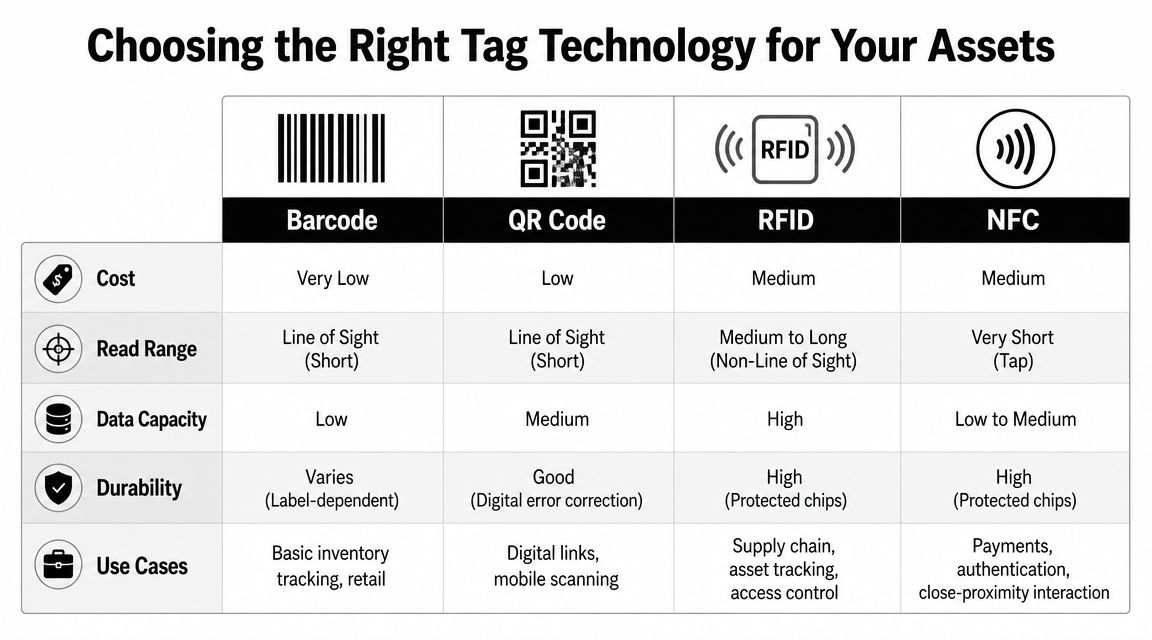
Industry guidance on asset tagging recommends selecting technology by read environment and process requirement. In practical terms, barcodes and QR codes work well when assets are visually accessible, while RFID and NFC make more sense when teams need bulk reads, non-line-of-sight scanning, or high-volume counts.
A practical comparison
Here's the short version most organizations need:
| Technology | Best fit | Main limitation |
|---|---|---|
| Barcode | General office gear with visible labels | Requires line-of-sight scanning |
| QR code | Assets where mobile scanning is useful | Still depends on visible access |
| RFID | Fast counts and non-line-of-sight environments | More setup and integration effort |
| NFC | Close-range interactions and authentication-style use cases | Very short read range |
If you're tagging office laptops, monitors, peripherals, and printers, barcode or QR usually fits the work well. Staff can see the label, scan it quickly, and pull the record.
If you're managing a dense room of equipment where speed matters, such as a storage cage, staging area, or data center rack environment, RFID can reduce manual effort because the reader doesn't need a direct visual path to every item.
Match the tag to the operating reality
Tag material matters almost as much as tag type. A polished solution on paper can fail fast if the label can't tolerate heat, abrasion, cleaning chemicals, or repeated handling.
Use these decision points:
- Visually accessible assets: Barcode and QR are simple and effective when people can see and reach the tag.
- High-movement assets: RFID or tamper-evident options make more sense when devices change hands often.
- Sensitive or high-value equipment: Durable materials and secure placement matter because the tag supports accountability.
- Bulk count environments: Automation becomes more valuable when staff need frequent counts without slowing operations.
Field note: Don't ask which tag is most advanced. Ask which tag your team will still be reading accurately after months of normal use.
For a sustainability director, this has a budget implication too. Not every item deserves the most automated method. High-risk, high-value, or frequently moved assets gain the most from advanced capture. Lower-risk items may be better served by simpler labels and stronger process discipline.
Key Business Benefits Beyond Basic Tracking
The biggest value of an asset tagging system isn't that it helps you find equipment faster. It's that it creates control where risk tends to hide.
When every item has a clear identity and status, teams can spot missing devices sooner, separate reusable assets from waste, and keep data-bearing equipment from falling into informal disposal paths. That matters for security, financial compliance, and sustainable recycling alike.

Security and accountability
If a retired laptop, network appliance, or external drive goes untracked, the risk isn't just replacement cost. It's also exposure. Someone has to know that the device exists, who last held it, and whether it entered secure data destruction or approved product destruction.
Tagged assets support that chain of accountability. A device that reaches retirement can be flagged, segregated, and routed through the right process instead of sitting in a back room during an office cleanout or facility cleanout.
Audit readiness and financial control
Finance and compliance teams care about proof. They need a defensible record that assets were purchased, deployed, reassigned, and retired through documented steps.
That record makes several common problems easier to manage:
- Duplicate purchases: Teams can check whether usable equipment already exists before ordering replacements.
- Unclear ownership: Department assignment is visible instead of informal.
- Retirement confusion: Surplus equipment can be grouped for redeployment, donation-based recycling, or certified disposal.
- Disposal exceptions: Data-bearing devices can be separated from non-data items before pickup.
Sustainability and ITAD start with visibility
A responsible ITAD program doesn't begin at the loading dock. It begins with inventory clarity. If you can identify what is still useful, what can be donated, what needs secure data destruction, and what belongs in electronics recycling, you make better environmental decisions and reduce avoidable waste.
A service partner integrates into the lifecycle. In the retirement phase, organizations may use options such as asset recovery to evaluate equipment for reuse, value recovery, or downstream handling. Reworx Recycling provides services in that area, including electronics recycling, IT equipment disposal, secure hard drive shredding, and pickup support for retired business hardware.
For sustainability leaders, that connection is the strategic point. Better tracking upstream creates cleaner, safer, more responsible outcomes downstream.
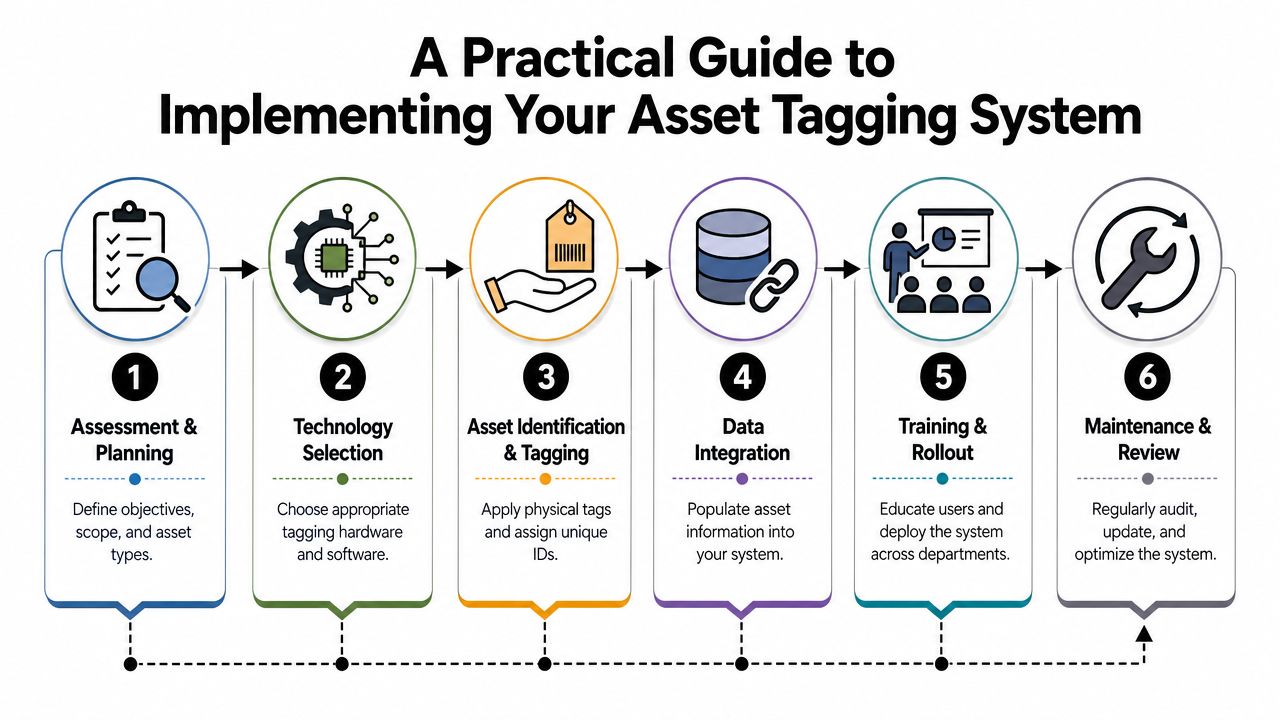
A Practical Guide to Implementing Your System
Rolling out an asset tagging system feels big when you look at the whole estate at once. It becomes manageable when you treat it as an operating process, not a labeling event.
The easiest mistake is trying to tag everything immediately without agreeing on scope, naming rules, status labels, and retirement procedures first. If you skip that planning work, the system fills with inconsistent records from day one.
Start with policy before labels
Decide what belongs in scope. Most organizations begin with assets that are expensive, mobile, data-bearing, regulated, or operationally important.
Ask practical questions:
- Would this item create a problem if it disappeared
- Does it store or transmit sensitive information
- Will it move between users, rooms, or sites
- Will someone need a disposal or donation decision later
Those answers help you define the first rollout group. In many businesses, that means laptops, desktops, monitors, network gear, servers, tablets, phones, storage media, specialized medical equipment, or laboratory devices.
Use a rollout sequence people can follow
A simple implementation path works best:
Assessment and planning
Define goals, owners, and asset categories. Decide what success looks like for IT, facilities, finance, and sustainability.Technology selection
Choose barcode, QR, RFID, or NFC based on environment and workflow.Asset identification and tagging
Assign one unique ID to each item and place the tag where staff can scan it reliably.Data integration
Build the record with the fields your teams will maintain, such as location, owner, status, and retirement path.Training and rollout
Teach receiving, IT support, facilities, and surplus-handling staff what to update and when.Maintenance and review
Run regular checks so records stay aligned with physical reality.
Build end-of-life into the system on day one
Many programs fall short. They track procurement and deployment carefully, then improvise at retirement.
A stronger approach is to create retirement statuses in advance. For example, an item can move from in use to spare, then to evaluation, then to approved disposition. That makes later workflows far cleaner for computer recycling, laptop disposal, office cleanout projects, and data center decommissioning events.
Build the disposition pathway into the record before the asset ever needs to be disposed of.
It also helps to define what evidence must exist before an item leaves your control. That may include owner approval, data destruction requirement, chain of custody, transport documentation, or resale and donation review. When those rules are built in early, large refreshes stop feeling chaotic.
From Asset Tracking to Community Impact
An asset tagging system does more than improve operations. It gives your organization a disciplined way to manage technology from acquisition to retirement without losing sight of compliance, security, or environmental responsibility.
That full-lifecycle view matters because old equipment still has consequences after it leaves daily use. Some devices can be redeployed. Some belong in corporate donation programs. Some require secure data destruction before any next step. Others need careful electronics recycling because they no longer serve a practical purpose.
When the record is clear, those decisions get easier and safer. IT knows what must be wiped or shredded. Sustainability teams can separate reusable equipment from scrap. Finance can close records with confidence. Facilities can move surplus hardware out of the building without creating a blind spot.
Corporate responsibility becomes much more concrete when asset data is reliable. A tracked device is easier to route into a documented, environmentally sound end-of-life process instead of an informal closet pile or rushed cleanout.
If your organization treats sustainability as part of governance rather than a side project, it helps to connect retirement workflows to a broader framework for electronics recycling in corporate social responsibility. That's where operational discipline and community impact meet.
If your business is preparing for electronics recycling, secure data destruction, laptop disposal, office cleanout work, or a larger ITAD program, Reworx Recycling is a practical resource to explore. The company supports responsible retirement of business technology through donation-based recycling, equipment pickup, data destruction, and end-of-life guidance that helps organizations protect data, reduce landfill waste, and put usable devices back into community-serving channels when appropriate.