
Your team has probably typed telecommunications company near me into search more than once already. Usually that happens when the current setup has started getting in the way of normal work. Video calls break up. A cloud app stalls during peak hours. A new floor, clinic, branch office, or warehouse comes online, and the old circuit plan no longer fits how the business operates.
The mistake is treating this as a shopping exercise for faster internet alone. A telecom upgrade changes how your staff works, how your security stack connects, and what happens to the hardware you’re replacing. Routers, switches, phones, firewalls, wireless access points, UPS units, rack gear, and cabling don’t disappear once the new provider turns up service.
That’s where a lot of upgrade projects get sloppy. The provider handles activation. Internal IT handles the cutover. Then old gear sits in a closet for months with saved configurations, labels, and sometimes sensitive data still on the device.
Your Business Needs a Telecom Upgrade What Comes Next
A common scenario looks like this. A growing company signs another lease, adds more staff, moves more workloads into Microsoft 365, cloud ERP, VoIP, security cameras, and remote support tools, then realizes the existing carrier and hardware stack were sized for a much smaller operation. Search results for local providers look promising, but the decision gets messy fast because service availability, installation timelines, and handoff responsibilities vary by address.

In Pennsylvania, broadband conditions show why this search isn’t as simple as comparing advertised speeds. The state reported 155,785 locations without minimum 100/20 Mbps service by 2025, even as availability improved over prior years, and in Philadelphia fiber and 5G home internet providers such as Xfinity, EarthLink, and Verizon reach roughly 91 to 99 percent of locations according to the Pennsylvania Broadband Development Authority map data. Urban choice can be broad, but site-by-site reality still matters.
Two projects are happening at once
When businesses look for a telecommunications company near me, they’re usually managing two separate projects whether they realize it or not:
- Service replacement: selecting the right carrier, access method, contract, and support model.
- Asset retirement: removing old telecom and network equipment without creating a security, compliance, or sustainability problem.
If you only manage the first piece, the second becomes a pile of unmanaged equipment in a back room.
Practical rule: If the upgrade touches your circuit, firewall, switches, phones, or wireless stack, plan the retirement path before installation day.
That matters even more during moves, expansions, and consolidations. In those moments, old gear gets disconnected quickly and documented poorly. That’s how labeled devices, backup units, and retired endpoints get missed during an office relocation and technology transition.
What works and what doesn’t
What works is a joined-up process. Facilities knows what’s being removed. IT knows what has to be wiped, boxed, or held for fallback. Procurement knows which provider owns which demarcation equipment. Finance knows which assets are leased, owned, or fully depreciated.
What doesn’t work is assuming the installer will “take the old stuff.” Sometimes they won’t. Sometimes they only remove their own equipment. Sometimes they leave everything customer-owned in place, including obsolete switches and wall-mounted telecom gear no one wants to claim.
A good upgrade starts with requirements, not provider ads.
Assess Your Current and Future Connectivity Requirements
Most companies overfocus on bandwidth and under-document everything else. Speed matters, but it’s only one part of a usable telecom environment. If your voice platform is choppy, your VPN is unstable, or your cameras drop during congestion, buying a bigger pipe without understanding traffic patterns won’t fix the root issue.
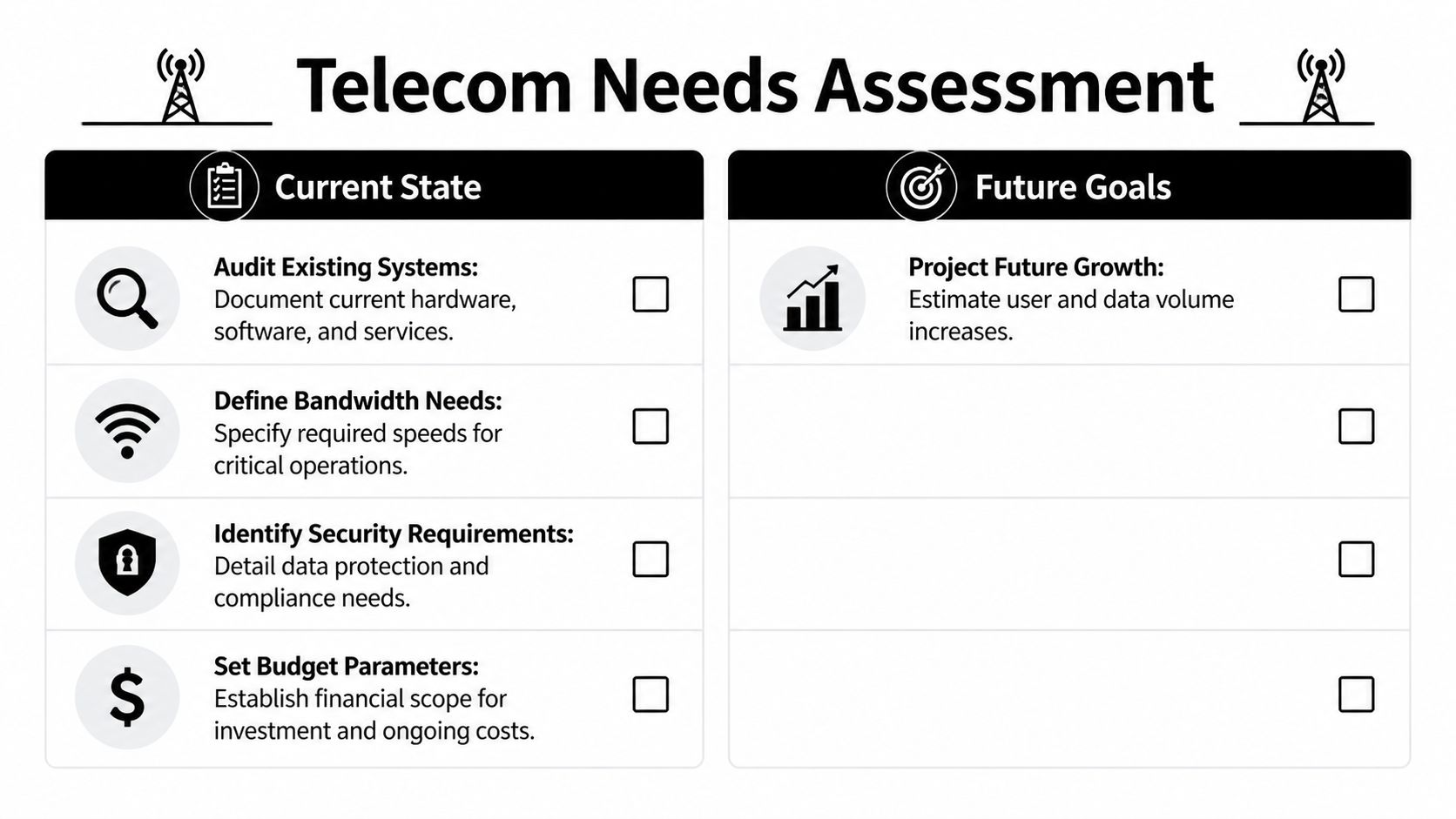
Audit the environment you already have
Start with the network you’re running today. Pull together invoices, circuit IDs, hardware models, support contracts, firewall policies, voice services, and wireless layouts. Then talk to the people who feel the pain first: IT support, operations, front desk, call center staff, and department heads.
Use this short audit framework:
Map critical services
List the systems that can’t tolerate disruption. VoIP, payment terminals, EHR platforms, guest Wi-Fi, cloud file access, VPN, security cameras, badge readers, and warehouse scanners usually belong here.Separate business traffic from nuisance traffic
Streaming, guest usage, software updates, backups, and large sync jobs can distort what looks like “not enough bandwidth.” In many offices, traffic shaping and policy cleanup solve problems that were wrongly blamed on the carrier.Identify single points of failure
One aging firewall, one ISP, one unmanaged switch in a closet, or one hand-built voice configuration can bring down more than expected.Check physical realities
Don’t skip risers, conduits, rack space, power, cooling, and cable pathways. These details drive installation difficulty more than most procurement teams expect.
Define future state, not just today’s pain
A proper requirement set should reflect where the business is headed. If you’re opening a second location, adding hybrid work support, moving from PRI or analog lines to SIP or hosted voice, or increasing cloud application use, the telecom design should anticipate that.
A simple planning table helps keep the discussion grounded:
| Area | Current question | Future question |
|---|---|---|
| Voice | Do calls drop or lag? | Will more users move to softphones or mobile integration? |
| Data | Where does congestion happen? | Will cloud usage or file sync grow? |
| Remote access | Is VPN stable? | Will more contractors, field staff, or remote employees connect? |
| Resilience | What fails first today? | Do you need diverse circuits or backup connectivity? |
| Security | Which devices hold configs or logs? | Which retired devices will require documented handling? |
Buy enough headroom for planned growth. Don’t buy complexity you won’t manage.
Build a provider-ready requirements list
Before speaking with sales teams, write a brief internal document that includes:
- Locations and use cases: office, clinic, warehouse, retail, campus, or mixed-use.
- Application priorities: voice, cloud apps, file transfer, video, security systems.
- Support expectations: response time, escalation path, after-hours availability.
- Security needs: segmentation, managed firewall support, secure cutover procedures.
- Transition scope: which legacy circuits and devices will be shut down.
This gives you a fair way to compare bids and keeps the discussion from sliding into generic speed packages.
Key Questions to Ask Prospective Telecom Partners
The strongest telecom buyers don’t ask, “What’s your best rate?” first. They ask how the provider delivers service, supports outages, and handles implementation under pressure. That’s how you separate polished sales language from operational reality.

Large carrier or regional provider
The market is concentrated. In the United States, the three largest national mobile operators are Verizon with about 146.8 million subscribers, T-Mobile US with about 142.6 million, and AT&T Mobility with roughly 109.3 million as of Q1 2026, based on the U.S. mobile operator listing. Scale brings wide coverage and deep infrastructure. It doesn’t automatically bring responsive support for a midsize business location.
That's the trade-off.
| Provider type | Often works well for | Watch for |
|---|---|---|
| National carrier | Multi-site rollouts, broad footprint, bundled mobility | Slower escalation, less flexibility, account handoffs |
| Regional business provider | Local knowledge, tighter support, direct access to engineers | Limited footprint, fewer product layers, less redundancy in some markets |
A similar principle applies in other trades. If your project requires power work, conduit coordination, or service upgrades during installation, it helps to think like you would when hiring a reliable electrician company. Coverage area matters, but accountability on the ground matters more.
Questions that expose operational quality
Ask these before you sign anything:
Who owns the local loop and who supports the handoff?
Resold service can work fine, but you need clarity on who fixes faults.What does the SLA guarantee in plain language?
Don’t stop at uptime language. Ask how outages are measured, how credits are applied, and who initiates the claim.What’s the escalation path during a site outage?
Ask for named roles or at least role-based contacts. You want to know whether you’ll be routed through a generic support queue or a business support desk.What does the site survey include?
Good providers inspect access paths, equipment space, demarc location, and installation constraints before making promises.What equipment is provider-managed and what remains customer-owned?
This question matters at the end of the project as much as the beginning.
If a provider can’t explain support boundaries clearly, the problem will show up during an outage.
Questions that affect your transition risk
Many buyers skip the transition details and regret it later. Ask directly:
- Will you support a staged cutover?
- Can existing services stay live during testing?
- What gets removed on install day?
- What documentation will you provide for installed and decommissioned equipment?
- If we change providers later, what dependencies remain on your managed hardware?
For local evaluation work, a neutral review of telecom service options and business transition factors can help frame those questions before you enter procurement.
Navigating Contracts Site Surveys and Installation
The contract stage is where a solid telecom decision can still go sideways. Many service problems start long before the first packet crosses the circuit. They start in renewal language, construction assumptions, and vague responsibilities for customer premises equipment.
Read the contract like an operations document
Don’t let legal review happen in isolation. IT, facilities, procurement, and whoever owns day-to-day vendor management should all review the order form and service terms.
Focus on these clauses:
- Auto-renewal language: Know when notice must be given and how it must be delivered.
- Price adjustment terms: Some agreements leave room for increases after promotional periods or initial terms.
- Construction contingencies: If the install depends on third-party access, building approval, or pathway work, document who absorbs delay and added cost.
- Early termination provisions: These become important during relocation, acquisition, or provider consolidation.
- Equipment ownership terms: Clarify what is leased, managed, customer-owned, or expected to be returned.
Treat the site survey as mandatory
The site survey is not a box-checking exercise. It tells you whether the provider can install what sales promised. A proper walk-through should verify entrance facilities, telecom closets, rack conditions, cable pathways, grounding considerations, power availability, and any building access restrictions.
If the provider wants to skip this step for a business-critical site, push back.
A bad survey leads to rushed change orders, delayed installs, and ugly cutovers.
A useful pre-survey checklist includes:
Building access details
Loading dock rules, elevator reservations, after-hours access, badging, and property management contacts.Telecom room readiness
Open rack units, patch panel capacity, clean power, labeling expectations, and cable management.Cutover dependencies
Firewall changes, voice vendor coordination, ISP failover testing, and internal change windows.
Run installation day like a project, not a vendor visit
Successful cutovers have one person in charge. That person doesn’t have to do every task, but they need authority to make decisions in real time. Installation day usually involves more than the carrier technician. Internal IT, a firewall vendor, voice platform support, building management, and department leads may all need to coordinate.
Keep this sequence tight:
| Stage | What to confirm |
|---|---|
| Before arrival | Access approved, contacts available, rack space clear |
| During install | Demarc placement, labeling, circuit test results, managed device handoff |
| Before cutover | Rollback plan, voice testing, VPN testing, application checks |
| After cutover | Asset inventory updates, old device isolation, decommission schedule |
Once the new service is stable, move retired hardware into a documented equipment decommissioning process. That prevents the all-too-common outcome where disconnected telecom gear lingers untracked for months.
A Sustainable Plan for Your Old Technology
This is the part most telecom projects ignore. A successful install creates a second job immediately: dealing with what just got replaced. That can include branch routers, edge firewalls, old wireless controllers, PoE switches, desk phones, conference units, backup appliances, obsolete modems, copper handoff gear, and racks of mixed cabling that no one wants to claim.
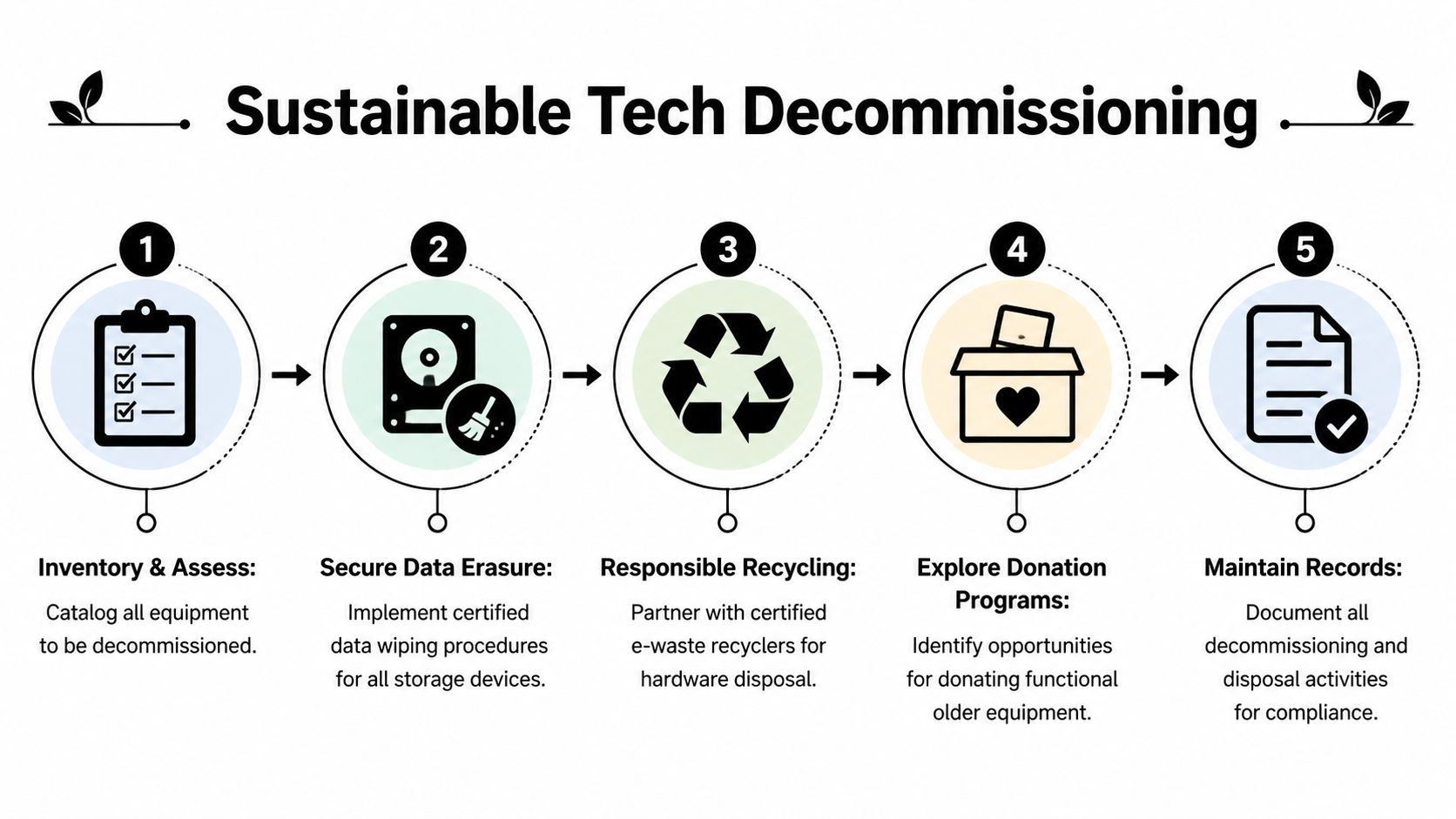
The hidden risk most provider searches miss
There’s a real information gap in the market. Telecom providers heavily market upgrades, but public guidance rarely addresses what happens to retired hardware. As noted in reporting on this content gap, there is significant missing guidance around lifecycle management of decommissioned telecom equipment, creating compliance and security risk for businesses and government agencies, especially when smaller regional providers merge or sunset services, according to discussion captured around telecom equipment transition blind spots.
That problem shows up in the field in predictable ways. A branch closes. A rural or regional provider changes service models. A business moves from legacy connectivity to fiber or fixed wireless. Old customer-premises equipment is unplugged, boxed loosely, and forgotten.
Why old telecom gear needs ITAD discipline
Businesses sometimes assume telecom hardware is harmless because it isn’t a laptop fleet. That’s a risky assumption. Network gear can retain configurations, credentials, logs, call routing details, SSIDs, VPN parameters, and asset tags that reveal how your environment is built.
A disciplined IT asset disposition (ITAD) plan should cover:
- Inventory control: identify every removed device, accessory, module, and power unit
- Chain of custody: document who handled the equipment from disconnect to final disposition
- Secure data destruction: wipe or destroy storage-bearing devices and document the method
- Separation of reusable and non-reusable gear: some hardware can be redeployed, donated, or harvested for parts
- Environmental handling: keep e-waste and mixed material streams out of general trash
Old network equipment may not look sensitive. Your configurations, labels, and stored credentials say otherwise.
What responsible retirement looks like
The practical sequence is straightforward when someone owns it:
Quarantine first
Pull retired devices out of active closets and label them as decommissioned. Don’t leave them connected “just in case” without a timeline.Review data-bearing components
Firewalls, appliances, some switches, and telecom systems can store more than is commonly understood.Decide reuse, donation, or recycling
Functional assets may fit internal redeployment or donation-based recycling programs. Broken or obsolete assets should move into certified electronics recycling streams.Document the outcome
Keep records for audits, internal controls, sustainability reporting, and vendor accountability.
For organizations that need a broader framework, a practical guide to IT asset disposition during technology refresh planning can help align security and sustainability decisions.
Sustainability is part of the telecom decision
This matters beyond compliance. Telecom upgrades can generate a surprising amount of waste in a short period. If your business talks publicly about ESG goals, community benefit, digital inclusion, or landfill diversion, the way you retire old hardware needs to support those commitments.
That’s why electronics recycling, secure data destruction, office cleanout planning, product destruction where needed, and donation-based recycling should be part of the provider transition checklist, not a cleanup task weeks later.
Building a Future-Ready and Responsible Business
A smart telecom upgrade doesn’t end when the new service goes live. It ends when the business can operate better, support users reliably, account for retired equipment, and show that the transition was handled responsibly from start to finish.

The strongest organizations treat connectivity, security, and sustainability as one operating decision. They don’t let procurement choose a carrier in one lane while facilities stores old gear in another and IT tries to remember later which devices still contain sensitive configurations.
What future-ready teams do differently
They build telecom decisions around a few habits:
- They define requirements before talking to sales reps
- They inspect support quality, not just coverage claims
- They run surveys and cutovers with facility-level discipline
- They retire replaced hardware through documented ITAD workflows
That approach protects operations and brand reputation at the same time.
Better telecom decisions come from broader ownership. IT, facilities, procurement, and sustainability all have a stake in the outcome.
The long-term payoff
When you handle upgrades this way, several good things happen at once. Your staff gets more stable connectivity. Your business reduces the chance that retired equipment sits unmanaged. Your sustainability team has a cleaner story to tell about electronics recycling, computer recycling, laptop disposal, facility cleanout, data center decommissioning support, medical equipment disposal where relevant, and secure data destruction practices.
If you’re building a more formal internal framework, it helps to connect telecom transitions with a broader green IT strategy for hardware lifecycle planning. That keeps future upgrades from becoming one-off cleanups.
A search for a telecommunications company near me should lead to a better provider decision. It should also trigger a better end-of-life decision for everything the upgrade leaves behind.
If your business is replacing telecom hardware, planning an office cleanout, or preparing for secure IT equipment disposal, Reworx Recycling can help you turn that transition into a structured, responsible process. Partner with Reworx Recycling for electronics recycling, donation-based recycling, secure data destruction, and pickup scheduling that supports both operational risk reduction and community impact.