The outage usually starts with one confused message. Front desk says calls won't ring through. A branch manager reports that the network feels slow. Someone in accounting can't reach the hosted PBX portal, so they assume the carrier is down. Within minutes, people are asking the same question you're already thinking: who offers telecom repair services near me and how fast can they get here?
That search matters, but the first ten minutes matter more. In a business environment, telecom isn't one thing. It's carrier service, wiring, switches, routers, VoIP handsets, PBX platforms, patching, power, and a layer of old decisions nobody documented well enough. If you hire the first provider who promises a truck roll, you can end up paying for labor before anyone has confirmed whether the fault is physical, administrative, or upstream.
A calmer response usually leads to the faster fix. The teams that recover well don't just chase the nearest technician. They separate symptoms from root cause, gather enough facts to avoid a bad dispatch, and decide early whether they're solving a one-time incident or exposing a larger lifecycle problem that should have been addressed during the last refresh.
That Critical Moment Before Your First Search
A dead phone system feels urgent because it is urgent. If your office depends on VoIP, call queues, paging, or branch connectivity, a telecom fault immediately turns into an operations problem. Sales can't answer inbound calls. Reception starts writing messages by hand. Remote users assume the VPN is involved even when it isn't.
That's the moment people open a browser and type telecom repair services near me. There's nothing wrong with that instinct. Local support still matters, especially when you need someone who can physically test patch panels, inspect a failed handset, reseat a module, or trace a cabling problem inside your building.
The mistake is treating every telecom incident like a simple break-fix call. A lot of failures only look physical at first. A disconnected circuit that never got removed from billing, an undocumented move, or a bad inventory record can waste the first service visit. If you're under pressure, use the search to build options, not to outsource your thinking. For a broader local starting point, this directory of telecommunications support options is useful when you need to see how telecom service categories differ.
Practical rule: Don't call a vendor with only the symptom. Call with the affected site, impacted users, known changes, and what still works.
In dense markets, the local repair ecosystem is active and visible. The U.S. Bureau of Labor Statistics reports that telecommunications equipment installers and repairers earned a median annual wage of $64,310 and that about 268,500 people were employed in the occupation, with about 23,200 openings per year projected on average through 2034 because of turnover and retirements (BLS occupation profile). That tells you something important. Qualified field support remains commercially relevant, even as the equipment mix changes.
Triage Your Telecom Issue Before Making the Call
If you want a useful dispatch, do a short triage first. Don't overcomplicate it. You're trying to answer one question: is this a carrier problem, a local equipment problem, a configuration problem, or something administrative that only looks like a repair issue?
Start with the obvious checks because they eliminate noise fast. Is power stable in the telecom closet? Are the affected phones, switches, or routers online? Did the issue begin after a move, patch change, internet failover, or office reconfiguration? Ask one person to gather facts and keep everyone else from rebooting random gear at the same time.
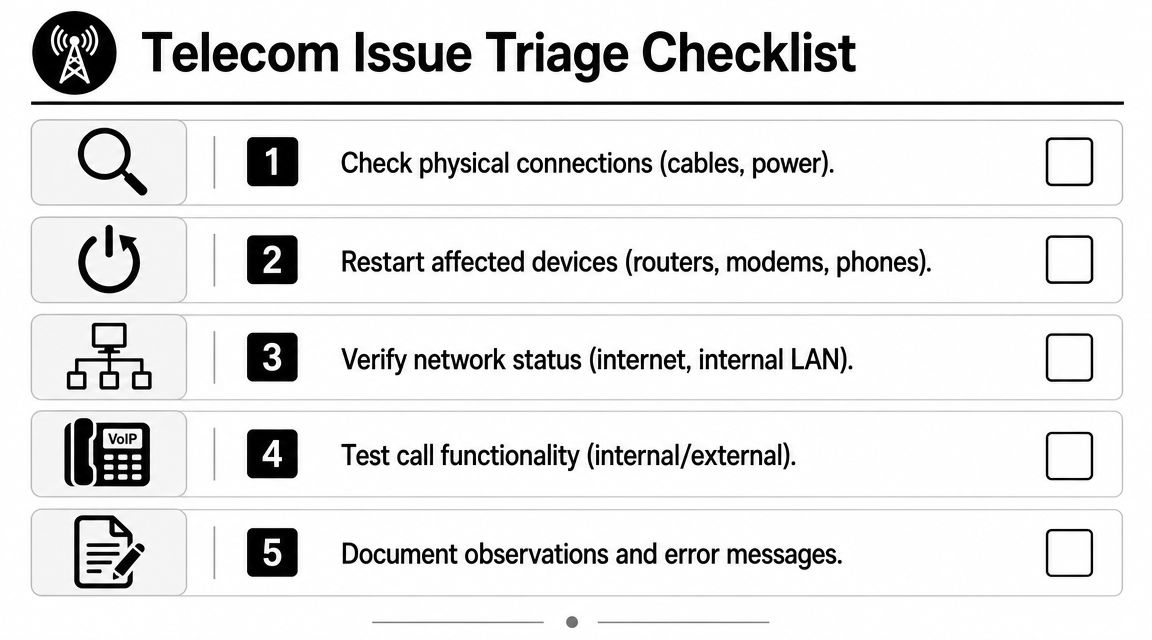
Check the layers in the right order
Use a simple sequence.
- Physical first. Confirm power, cabling, patch connections, handset connections, and link lights. A loose patch cord can produce symptoms that look much larger than they are.
- Core service next. Test whether internet access is down, internal LAN is affected, or only voice traffic is impacted.
- Call behavior after that. Can users call internally but not externally? Can they receive inbound calls but not place outbound calls? That split often narrows the fault domain quickly.
- Recent changes last. MACD activity, firmware updates, new desk moves, and ad hoc cable swaps cause more confusion than is often anticipated.
A junior manager's common mistake is collecting opinions instead of evidence. “The internet is down” and “the phones are dead” are not diagnostics. “Internal extension dialing works, inbound fails, and the edge device was moved yesterday” is useful.
Separate repair from billing and inventory noise
A lot of telecom tickets don't belong to field repair at all. In large environments, untracked moves, adds, changes, and disconnects create bad inventories and invoices that no longer match physical locations. That's why the disciplined workflow is to normalize inventory, compare billed services against active services and contract terms, flag duplicate or post-disconnect charges, and only then route validated faults to carriers or repair vendors.
This is more than process hygiene. Enterprise telecom billing errors are commonly reported at 12-20% of spend, and one source cites Gartner research that 85% of telecom invoices contain errors (telecom cost management analysis). If your team jumps straight to dispatch, you can spend money chasing a “repair” that is really a disconnected service, a duplicate charge, or a recordkeeping problem.
If the asset list is wrong, the first truck roll is often just a paid discovery session.
For teams that need a local maintenance lens on this process, Atlanta telecom maintenance support is a relevant example of how repair, documentation, and lifecycle decisions intersect.
Document before you escalate
When you open a ticket with any provider, hand them a short incident brief:
- Affected scope: Which site, floor, users, or departments are impacted.
- Service impact: Voice only, data only, both, or intermittent.
- What still works: Internal dialing, internet access, mobile fallback, or a secondary circuit.
- Recent change: Office move, provider change, power event, closet work, or hardware swap.
- Evidence gathered: Error messages, indicator lights, screenshots, and timestamps.
That level of discipline shortens bad back-and-forth and helps you hire the right specialist the first time.
How to Find and Vet Local Repair Services
A local outage creates a predictable mistake. Someone searches telecom repair services near me, clicks the nearest result, and sends the first available technician into a problem they are not equipped to solve. That is how a one-visit fault turns into a day of handoffs, repeat dispatches, and missing notes on gear you may need to replace later.
The search only helps if you separate convenience from fit. A storefront that handles cracked mobile screens serves a different need than a low-voltage contractor, and both are different from a telecom field team that can test switching, trace cabling, and coordinate with the carrier if the fault crosses provider boundaries.
In major urban markets, the local bench is usually wide enough to give you choices. Jersey City is a good example. CPR Cell Phone Repair lists a storefront at 60 Sip Avenue Unit D2, Jersey City, NJ 07306 with Tuesday hours of 10:00 am to 8:00 pm and same-day repair offerings; uBreakiFix by Asurion lists a location at 213 Newark Avenue, Jersey City, NJ 07302; and Cellairis advertises screen repairs in 45 minutes or less in Jersey City (local repair listing example). Those listings confirm local availability. They do not confirm business outage capability, documentation discipline, or whether the provider can support the asset after the immediate fix.

Build a shortlist by capability
Start with scope and failure domain.
| Provider type | Good fit for | Usually not enough for |
|---|---|---|
| Consumer device repair shop | Broken screens, batteries, handsets, walk-in fixes | PBX faults, structured cabling, carrier escalation |
| Low-voltage or cabling contractor | Patch panels, drops, MDF and IDF issues, physical layer faults | Hosted voice platform issues, billing disputes |
| Telecom and network field service provider | VoIP, routers, switches, onsite diagnosis, coordination across layers | Specialized application issues if they do not support your platform |
This sorting step saves time, but it also supports better asset decisions. If a provider can only swap a failed handset and leave, your team still needs a record of model, age, failure pattern, and replacement options. If the same handset model is failing across sites, the repair call is no longer just a repair call. It is the start of a replace or retire decision.
Ask questions that expose real competence
The first call should sound like an incident review, not a sales conversation.
Ask whether the vendor supports your PBX or hosted voice platform. Ask whether they can isolate carrier issues from LAN issues and premises equipment faults. Ask who answers after hours, what parts access looks like, and whether they provide written closeout notes with port changes, device serials, and findings. Ask how they handle equipment that may contain stored configurations or call data.
Experienced providers answer these questions directly. Weak ones stay vague, promise to “take a look,” and leave you managing the ambiguity.
If your issue also touches laptops or user endpoints, this outside guide on how to find reliable computer technicians shows the same principle in another service category. The nearest shop is not always the right technical match.
Read reviews like an operator
Consumer reviews still help, but only if you read them for operational signals. Ignore praise that only covers speed at the front counter. Look for comments about showing up on time, explaining fault isolation clearly, documenting the work, and fixing the problem without a second visit.
One pattern matters more than star count. Did the vendor solve business-impacting issues, or only simple retail repairs?
Use that review pass to narrow the list to two or three firms, then verify whether they can support what happens after the outage. Can they tag failed units for return? Can they document assets that should be replaced instead of repaired again? Can they help your team avoid stacking short-term fixes onto equipment that belongs in an ITAD workflow? A good local repair partner reduces downtime now and gives you cleaner inputs for lifecycle planning later.
For teams building that shortlist, telecom services in your area is a practical starting point for separating telecom field support from shops that belong in a different service category.
Evaluating Service Levels Warranties and Data Security
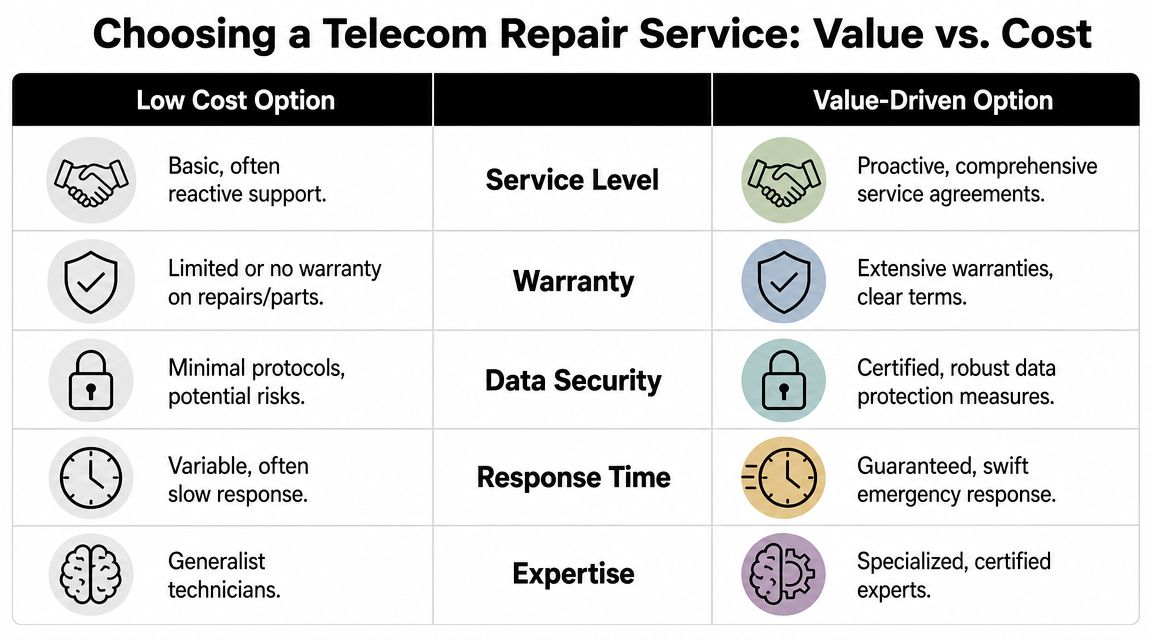
Hourly rate is the wrong place to anchor. downtime, repeat visits, weak handoff notes, and unnecessary exposure inside your network. A cheap first visit becomes expensive if the provider fixes the symptom, misses the cause, and sends you back into the same outage two days later.
That's why service levels matter more than the quote line. You need to know what the provider commits to, what they exclude, and how they handle access to systems that touch business data.
What to read in the SLA
Look for four things in every agreement.
| SLA item | What you want to see | Red flag |
|---|---|---|
| Response commitment | Clear definition of who responds and when | “Best effort” language with no clock |
| Onsite terms | Whether dispatch is included and under what conditions | Remote response counted as full SLA compliance |
| Resolution process | Escalation steps if the first fix fails | No defined path after initial troubleshooting |
| Documentation | Written closeout notes and asset-level findings | Work completed with no formal record |
One useful lens comes from telecom operations work outside the small-business space. McKinsey notes that repair performance is often constrained by operational complexity, not just the physical fix, and stronger providers are judged by first-time-right completion and structured diagnostics that prevent repeat dispatches (repair performance discussion). That's exactly how you should evaluate a local vendor. Not “did they come fast,” but “did they isolate the fault correctly and stabilize the environment afterward.”
Warranties are only useful if they are specific
A warranty should tell you what happens if the same issue returns. Does it cover labor, parts, or both? Does it apply only to replaced hardware or also to the repair work itself? If a switch port issue reappears, are you opening a brand-new ticket or getting follow-up under the original work order?
Ask for examples. A serious provider can explain the difference between a defective replacement part, a recurring environmental issue, and a fault outside the original scope. A vague warranty usually means future disputes.
Data security isn't a side topic
Telecom gear often stores more than people think. Configuration files, credentials, call records, management logs, and locally cached settings can all sit on devices that a contractor handles during troubleshooting or swap-out.
That's why your vetting should include practical security controls:
- Access control: Who is allowed into telecom rooms and who approves that access.
- Credential handling: Whether vendor access is supervised, temporary, and documented.
- Removed equipment custody: Where failed devices go after replacement.
- Data sanitation: What happens if the device contains storage or retained configs.
If you're refining your internal review process, Server Scheduler's security risk insights are a useful outside reference for framing technology risk in operational terms rather than treating it as a compliance box-check.
For decommissioned drives and data-bearing components, secure data destruction support belongs in the conversation before the repair closes, not after someone stacks old gear in a closet.
A ticket is not finished when service comes back. It's finished when the removed equipment, credentials, and documentation are under control.
The Strategic Choice Repair vs Replace and Recycle
Some outages expose a deeper truth. The equipment isn't unlucky. It's old, unstable, unsupported, or no longer worth the operational friction. That's when a search for telecom repair services near me turns into a lifecycle decision.
A lot of managers wait too long because repair feels cheaper in the moment. It often is cheaper on paper for that single day. But if the same PBX module, handset fleet, router, or switch keeps generating tickets, then the organization is paying in hidden ways: more staff attention, more vendor coordination, more uncertainty during every incident, and more risk from hardware nobody fully trusts.

Signs that replacement is the smarter move
You don't need a complicated spreadsheet to spot the pattern.
- Repeat incidents: The same location or device keeps failing after “successful” repair.
- Parts uncertainty: The provider can still patch it together, but replacement parts are scarce or inconsistent.
- Documentation gaps: Nobody is fully sure what's active, what's spare, and what was retired but never removed.
- Security discomfort: Older telecom assets retain settings or data, and the handoff process is weak.
Consumer devices make this trade-off obvious. A cracked foldable screen may be technically repairable, but the economics and durability question change fast. That's why a specialized outside resource such as this guide to foldable phone screen repair can be useful as a reminder that not every fix is automatically the right business decision.
Replacement creates an end-of-life problem you need to manage
Many businesses stop planning once the new gear is selected. That's a mistake. Old telecom equipment doesn't become harmless when it leaves production. It becomes an asset disposition issue.
Global e-waste reached 62 million metric tons in 2022, and only 22.3% was formally documented as collected and recycled (e-waste context). For business teams, the critical question often isn't just who can repair the failed equipment. It's who will securely remove, track, sanitize, and recycle what's being replaced.
That's where IT asset disposition, secure data destruction, and donation-based recycling belong in the telecom conversation. If your business is retiring phones, PBX systems, conference room endpoints, switches, or related hardware, telecom equipment recycling in Atlanta is one example of a controlled downstream path for that category of equipment. In that same lifecycle context, Reworx Recycling is a practical option for businesses that need electronics recycling, IT equipment disposal, and secure handling of retired telecom hardware as part of a broader office cleanout or refresh.
Building Your Telecom Resilience Plan with Reworx
The strongest teams treat an outage as a signal, not just a disruption. They triage before dispatch, hire to the actual fault, read service agreements carefully, and make a clean decision when equipment has crossed from maintainable to burdensome. That approach protects uptime, but it also reduces the clutter and risk that build up around undocumented spare gear and half-retired telecom hardware.
Long-term resilience comes from joining two disciplines that too many companies separate. The first is incident response. The second is asset lifecycle control. If you only do the first, the same weak points come back. If you only do the second, you still struggle when something fails at 8:15 on a Monday morning.
For businesses in Atlanta and beyond, that's where a social-enterprise recycling partner fits the operating model. A controlled end-of-life process supports electronics recycling, ITAD, computer recycling, laptop disposal, facility cleanout, product destruction, and secure data destruction without treating old telecom hardware like an afterthought. It also supports broader sustainability goals through donation-based recycling and responsible material handling.
If you're building a more disciplined program, make sure your telecom plan includes these basics:
- Incident intake discipline: One owner gathers facts and validates scope before escalation.
- Vendor fit: Use specialists that match the actual issue, not just the nearest listing.
- Lifecycle trigger: Define when repeated repair becomes replacement.
- Disposition workflow: Decide where retired equipment goes before the swap begins.
If your business is clearing out retired telecom gear, planning an office cleanout, or needs a documented path for secure data destruction and donation-based recycling, Reworx Recycling is a practical place to start. You can use their resources to plan pickups, retire outdated equipment responsibly, and build a repeatable process that supports both operations and community impact.