A lot of Dallas infrastructure projects start the same way. The help desk keeps hearing about dropped calls in Teams, slow file syncs, bad Wi-Fi roaming, and conference rooms that work fine until everyone shows up at once. The switches get blamed first. Then the ISP. Then the firewall. Eventually someone traces the issue back to the physical layer and realizes the building is still leaning on yesterday's cabling decisions.
That's the point where a simple patch job stops making sense. If you're planning a serious office refresh, floor remodel, branch relocation, or telecom room cleanup, network cabling services dallas isn't just a procurement line item. It's the foundation for every cloud app, camera, access control panel, wireless access point, and video meeting room that depends on stable connectivity.
The mistake I see most often is treating cabling as a narrow install task instead of a business infrastructure program. The best Dallas projects are scoped around uptime, future capacity, documentation, and a clean handoff to operations. They also account for the old hardware coming out of racks, closets, and desktops before that gear becomes a security problem or a disposal scramble.
Your Dallas Business Deserves a Faster Network
Monday at 8:15 a.m., the sales floor is online, two conference rooms are trying to start client calls, facilities is waiting on a badge reader issue, and IT is tracing an intermittent drop that only seems to happen when the office is full. That is usually when a Dallas company realizes the problem is not another switch setting. It is the cabling plant underneath everything else.

A faster network starts with the physical layer. If the building was wired years ago for lighter Wi Fi loads, fewer video meetings, and lower endpoint density, the business will feel it long before anyone approves a cabling project. Users report unstable calls, slow file access, dead ports, and wireless that performs differently from one area to the next. Operations feels it too. Simple adds and changes turn into half-day tasks because labels are missing, pathways are crowded, and nobody fully trusts the drawings.
What the bottleneck usually looks like
Physical-layer problems show up as recurring operational costs:
- Conference rooms behave inconsistently: One room handles video calls well, another drops audio or fails to connect because patching, uplinks, and terminations were never standardized.
- Closets slow every service call: Mixed cable categories, old patch panels, and poor labeling force technicians to spend time tracing runs instead of fixing issues.
- Wireless upgrades underperform: New access points cannot deliver the expected result if the copper feeding them is outdated or poorly terminated.
- Growth gets expensive: Each new user, camera, or device becomes a special project because the original cabling was not planned around expansion.
Office design plays into this more than many teams expect. Layout changes affect pathway routing, IDF placement, workstation density, and how much slack future moves will require. If your facilities team is reworking the floor plan at the same time, this guide to boosting workplace productivity is useful context. Space planning and network reliability usually succeed or fail together.
One more planning point gets missed in Dallas upgrades. The old gear coming out of closets, racks, and work areas needs a disposition plan before the installers arrive. Retired switches, access points, UPS units, and fiber jumpers can create security, storage, and compliance problems if they pile up in the back room. Teams replacing backbone links should also account for certified handling of removed optical components and legacy runs as part of the broader fiber optic installation project planning process.
Practical rule: If the same users keep reporting “network issues” and each fix is a one-off hardware swap, scope the physical layer before buying more electronics.
Dallas projects usually go better when cabling, cutover, and old-equipment removal are treated as one program with one owner. That keeps budgets honest, reduces surprise downtime, and prevents the common mistake of finishing a clean install while the decommissioned hardware sits unmanaged in a closet. A faster network is the immediate goal. A cleaner, safer infrastructure handoff is what keeps the upgrade from creating a new problem.
Decoding Cabling Types Cat6 Cat6A and Fiber Optics
Most Dallas buyers don't need a lecture on networking theory. They need a clean answer to one question: what cable should go where? The right choice depends on run length, device density, future speed expectations, and how much disruption you can tolerate if you underbuild now.
What Dallas providers typically install
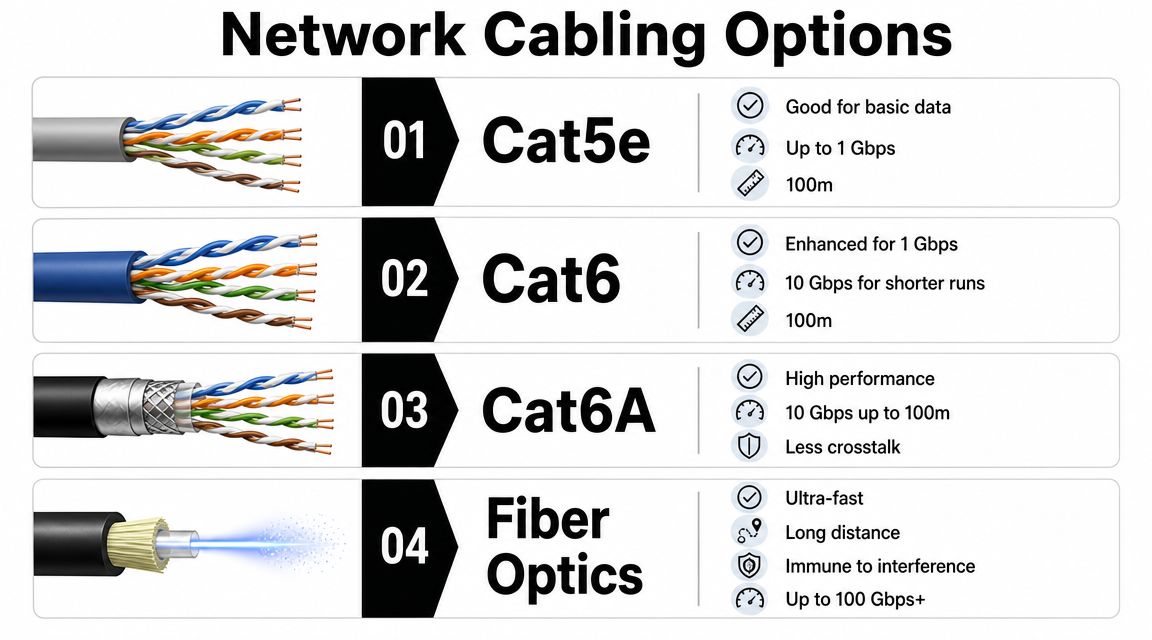
Local firms commonly deploy Cat5e, Cat6, Cat6a, and fiber optic cabling, and Dallas providers position Cat6a for environments that need 10 GbE copper links and tighter noise margins, making it the safer benchmark for many office refreshes, as noted by Cloudavize's Dallas network cabling guidance.
That tracks with what works in the field. Cat5e may still exist in older spaces, but few teams want to invest in fresh infrastructure that already feels dated on day one. The primary decision is usually Cat6 versus Cat6A for horizontal runs, then fiber for backbone connections and any location where distance or bandwidth demands exceed copper's comfort zone.
A practical way to think about each option
Use this as a planning lens, not a marketing checklist:
| Cable type | Best fit | Where it falls short |
|---|---|---|
| Cat5e | Legacy environments and lighter-duty use | Doesn't make much sense for a fresh commercial build if you expect growth |
| Cat6 | Standard office runs, routine workstation connectivity, many everyday business needs | Less margin for dense, higher-frequency environments |
| Cat6A | Office refreshes, telecom rooms, heavier workloads, stronger noise control | Costs more and takes more discipline to install cleanly |
| Fiber optics | Backbone links, longer runs, inter-closet connections, high-capacity transport | Requires different optics, testing, and termination skill sets |
A simple analogy helps. Cat6 is the dependable road most offices can use today. Cat6A is the wider road with more room for future traffic. Fiber is the express route you use when copper becomes the constraint.
If the building is already open and you're touching ceilings, pathways, and closets, that's the moment to think beyond today's minimum requirement.
When Cat6 is enough and when Cat6A is the better call
Cat6 still has a place. In a smaller office with ordinary workstation counts, modest telecom density, and no immediate need for high-performance copper links, it can be a sensible fit. The issue is that many Dallas offices aren't simple anymore. They layer in Wi-Fi, cameras, badge readers, conference systems, and heavier application usage all at once.
That's where Cat6A earns its keep. It's the more conservative choice when you want to avoid revisiting the same pathways too soon. In dense closets and busier floors, the tighter noise margin matters.
Here's the decision shorthand I use:
- Choose Cat6 when the budget is tight, the environment is straightforward, and the infrastructure roadmap is modest.
- Choose Cat6A when you're refreshing a serious office, planning for longer service life, or trying to avoid another disruptive re-cable later.
- Choose fiber when the link is part of the backbone, the run is longer, or the bandwidth target clearly pushes past copper's practical role.
If your project includes uplink planning, risers, or longer-distance transport between spaces, it helps to review a provider that handles fiber optic installation in commercial environments so your design doesn't stop at workstation drops and ignore the backbone.
Understanding Core Network Cabling Services
A good cabling provider doesn't just pull cable. They design a physical layer that your IT team can operate, support, and expand without guesswork. That means the service scope has to include design discipline, installation craft, and documented proof that every run performs as intended.
Design is where expensive mistakes start or stop
Dallas structured cabling firms emphasize ANSI/TIA-568 or BICSI-based design, plus Fluke-certified testing and documentation of every run, and they stress that most failures come from poor termination, bend-radius violations, or labeling errors, according to Shelby Communications' Dallas structured cabling page.
That's why design matters before a single box of cable hits the site. A solid design phase should answer practical questions such as:
- Where should telecom rooms sit: Not where space happens to be available, but where pathways, density, and serviceability make sense.
- How will pathways be managed: Tray, conduit, riser, and wall routing all affect labor, maintenance, and future adds.
- Which drops are standard and which are special: Conference rooms, wireless access points, security devices, and shared spaces often need different treatment.
- How will the system be documented: Labels, port maps, test records, and as-builts should be part of the deliverable, not an afterthought.
Installation quality is a technical issue, not a cosmetic one
Clean installs look better, but appearance isn't the primary concern. The main focus is performance and maintainability. Crews that rush terminations, overpack pathways, ignore bend radius, or leave patching inconsistent create the kind of intermittent trouble tickets that waste months of support time.
The best Dallas teams treat installation like controlled physical work. They coordinate around ceilings, occupied spaces, after-hours windows, and other trades. They also know that messy closets usually signal messy operations later.
A provider offering telecom installation services for Dallas-area projects should be able to explain not only how they install, but how they protect uptime while they're doing it.
Bad cabling work often stays hidden until the office is busy, the room is full, and the one run that “usually works” becomes the one everyone depends on.
Testing, labeling, and remediation separate pros from patch crews
Testing is where vendors prove they delivered what they sold. Every run should be certified, logged, and tied back to a labeling scheme that operations can follow. If they can't hand you complete documentation, the project isn't finished.
Three deliverables matter most:
- Certification results for each run
- Consistent labeling at both ends
- As-built documentation that reflects reality
Remediation also belongs in the conversation. Many Dallas projects aren't greenfield installs. They're partial rebuilds in buildings that already contain mixed-quality legacy cabling. A competent provider should be able to identify what's salvageable, what needs replacement, and what should be abandoned and removed.
Planning Your Cabling Project Budget and Timeline
Budget conversations go sideways when teams talk about “the cabling project” as if it's one line item. In reality, Dallas cabling work is priced by a mix of per-drop economics, labor conditions, backbone requirements, and building complexity. That's why early estimates can feel reasonable and final proposals vary sharply.
What Dallas pricing typically looks like
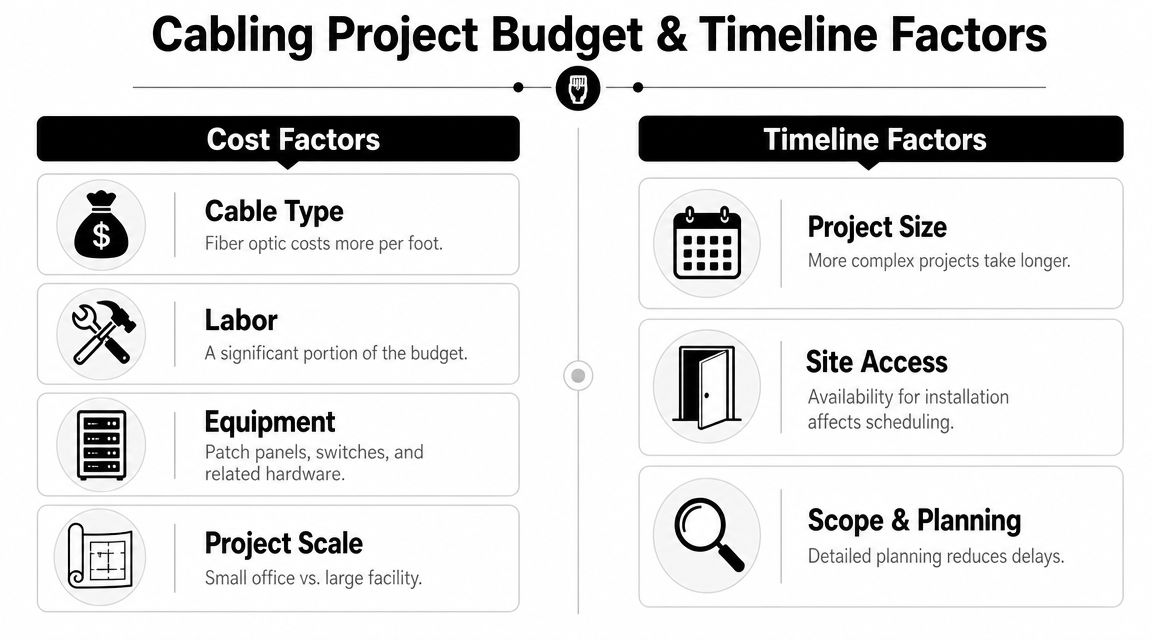
Multiple Dallas-area sources cite about $150 to $225 per Cat6 drop and $225 to $350 per Cat6A drop, while fiber-optic backbone work can start around $3,000 to $5,000+ and technician labor commonly runs about $85 to $135 per hour, based on Dallas structured cabling cost guidance from ZTech Communications.
Those numbers are useful because they anchor the discussion the right way. They show that your quote will usually hinge on drop counts, cable category, labor conditions, and backbone needs rather than a simple flat project fee.
The line items that move the estimate
A low bid isn't always efficient. Sometimes it just omits work you'll need later.
Key budget drivers include:
- Cable category: Cat6A costs more than Cat6, and that price gap becomes meaningful at scale.
- Backbone scope: Fiber uplinks, riser work, and inter-closet connections can shift the project fast.
- Building layout: Open pathways are one thing. Dense, occupied, finished spaces are another.
- Testing and documentation: Mature vendors include certification and records. Cheap quotes sometimes thin these out.
- Schedule constraints: Night work, weekend work, or phased occupancy protection usually adds labor complexity.
Here's a simple planning view:
| Budget factor | Why it matters |
|---|---|
| Per-drop count | More devices, rooms, and APs create the core cost base |
| Cable type | Cat6A and fiber increase material and installation demands |
| Labor conditions | Access windows and occupied-space restrictions affect crew efficiency |
| Finishing scope | Patch panels, racks, labeling, certification, and cleanup all add real work |
Timeline realism matters more than optimistic promises
Most timeline failures happen before installation starts. Stakeholders underestimate site walkthroughs, approval cycles, pathway decisions, room readiness, and coordination with electricians, remodel teams, furniture installers, or security vendors.
A practical Dallas rollout usually works better when you phase it by area, closet, or floor instead of trying to cut everything over at once. That lets the business keep operating while you move users and services in controlled steps.
A timeline checklist should include:
- Site survey and scope validation
- Final drawing review and material approvals
- Access planning for occupied areas
- Installation sequencing by floor or function
- Testing, punch list, and turnover documentation
The schedule that looks fastest on paper often becomes the project that creates the most disruption. Controlled phasing usually wins.
If you're building a business case, use Dallas market pricing as your baseline, then add contingency for building conditions and handoff requirements. That's more honest than pretending every drop in every room takes the same effort.
How to Choose the Right Cabling Vendor in Dallas
A bad vendor decision usually does not fail on day one. It shows up three weeks later, when labels do not match the drawings, test results are incomplete, the cutover slips, and nobody owns the pile of retired gear sitting in the MDF.
Choose a vendor that can manage the whole job, not just pull cable
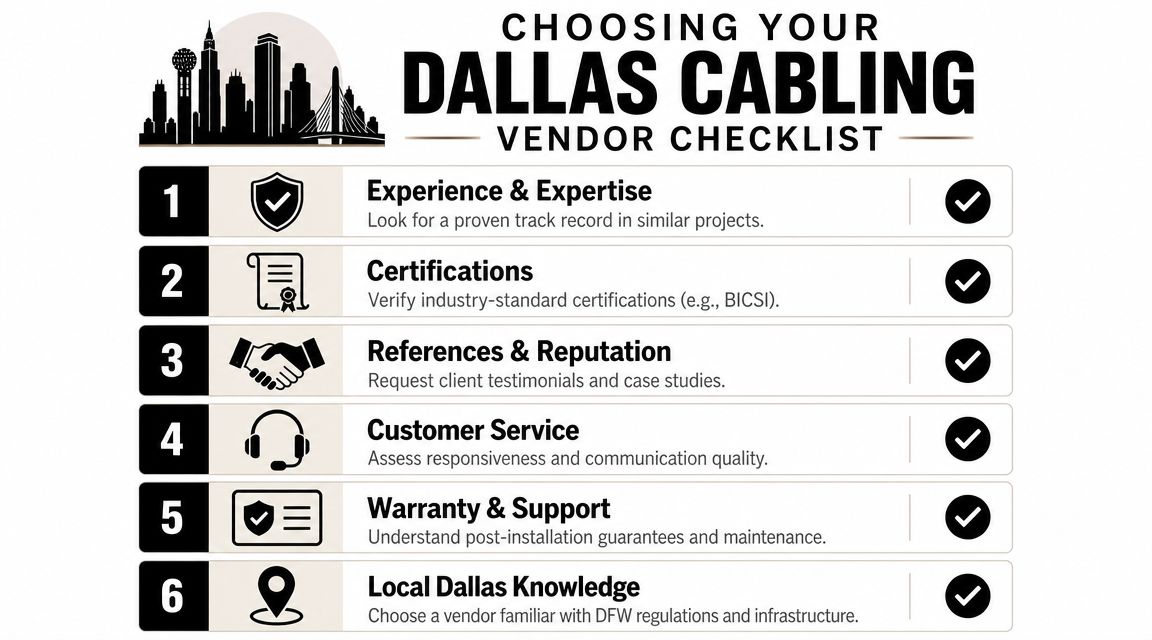
Dallas has plenty of firms that can install cable. Fewer can handle scope control, coordinate with facilities and electricians, document the plant properly, and leave the closets in a condition your IT team can support six months from now.
That distinction matters on active sites. In occupied offices, medical spaces, warehouses, and multi-tenant buildings, the hard part is often coordination, access, cutover discipline, and cleanup. A capable vendor should be able to explain how it handles pathway conflicts, room readiness, patch panel terminations, certification results, and turnover documentation without speaking in generalities.
What your RFP should force them to show
A useful RFP makes weak bidders uncomfortable. It asks for deliverables, named responsibilities, and examples of how they run projects in real Dallas buildings.
Ask for specifics in these areas:
- Design and technical ownership: Who approves cable types, pathways, rack layouts, labeling standards, and test requirements?
- Testing and documentation: Will you receive certification results, as-builts, labeling schedules, and closet photos at closeout?
- Installation control: How do they protect occupied spaces, schedule after-hours work, and manage cutovers without disrupting users?
- Change handling: What happens when field conditions differ from plan? Who prices changes, approves them, and updates documentation?
- Decommissioning scope: Will they remove abandoned patching, retired rack gear, and replaced hardware, or does that fall back on your internal team?
- Post-project support: Who handles moves, adds, changes, warranty calls, and troubleshooting after turnover?
Many of the same hiring standards apply across trades. These crucial questions for safe electrical work are a useful comparison because they reinforce the same point. Vet the firm before work starts, define scope in writing, and confirm who is accountable in the field.
Red flags that should shorten your shortlist
Low bids deserve extra scrutiny. In cabling, the cheapest proposal often gets there by excluding testing, cleanup, documentation, patching labor, or removal work that will surface later as change orders.
Watch for vendors that rely on vague terms like “turnkey” or “full service” but cannot list the closeout package. Watch for firms that talk confidently about installation but get thin when you ask about certification reports, labeling logic, or what happens to the old switches, UPS units, patch panels, and copper they remove during the upgrade.
That last point gets missed often. If the vendor has no answer for retired equipment, your project inherits security, storage, and disposal risk.
A provider with experience in Dallas telecom consulting and infrastructure planning should be comfortable discussing standards, phasing, room layouts, and lifecycle decisions, including how removed assets are documented and handed off for proper disposition.
The best vendor is the one that reduces cleanup later
I would rather hire a disciplined mid-priced firm with a clear method than a flashy bidder with a vague promise and an aggressive start date. Good cabling vendors show their value in documentation, testing, field supervision, and handoff quality.
Ask one final question before award. What exactly will be left behind when the job is done? If the answer is incomplete, the proposal is incomplete too.
Integrating Your Cabling Upgrade with IT Asset Disposition
Most cabling plans are thorough until the new network goes live. Then the project team turns around and sees the leftovers. Old switches, firewalls, rack hardware, patch panels, access points, UPS units, desktop gear, and piles of retired copper are still sitting in closets, storage rooms, and loading docks. That's where an otherwise disciplined project starts creating avoidable risk.
Old gear becomes a security problem fast
Retired infrastructure doesn't stop mattering because it's unplugged. It can still hold configuration data, storage media, labeling details, site information, and internal asset tags. If that equipment gets piled into a hallway, handed to the wrong recycler, or left in a back room for months, your project just created a governance problem.
The practical answer is to fold IT asset disposition into the project plan at the same time you finalize cabling scope. That gives you a chain of custody for removed equipment, a documented path for secure data destruction where needed, and a clear process for sorting what can be remarketed, recycled, donated, or physically destroyed.
Treat decommissioning as a workstream, not cleanup
The best approach is to run removal and disposition as its own controlled stream with owners, dates, and signoff. That usually means coordinating facilities, IT, security, and any outside partners before the first cutover window.
A workable sequence looks like this:
Inventory what's being removed
Don't rely on memory. List network devices, endpoints, rack accessories, storage-bearing equipment, and any surplus user hardware tied to the refresh.Separate data-bearing from non-data-bearing assets
A patch panel and a hard drive don't carry the same risk. Your handling process should reflect that.Define chain of custody and pickup timing
Gear should move from production to staging to final disposition without sitting around unaccounted for.Document outcomes
Keep records for internal controls, sustainability reporting, and audit readiness.
Why this matters beyond compliance
There's also a financial and operational angle. Old equipment left onsite clutters valuable space, slows future moves, and creates confusion about what's still active. During office cleanouts and facility refreshes, I've seen support teams waste time tracing hardware that should have been retired weeks earlier.
A disciplined disposition process also supports broader sustainability goals. Businesses replacing network gear often have adjacent streams of retired laptops, monitors, phones, lab devices, and storage media tied to the same upgrade cycle. Handling all of it through one controlled plan is usually cleaner than splitting decisions across departments.
If your refresh includes telecom gear, room cleanouts, and older business electronics, a partner focused on secure IT asset disposition for Dallas businesses can help align removal, chain of custody, and end-of-life handling with the broader infrastructure project.
A network upgrade isn't finished when the new ports test clean. It's finished when the old environment is removed, documented, and retired responsibly.
What works and what does not
What works:
- Planning disposition before cutover
- Using a staging area with access control
- Keeping a removal log
- Assigning one owner for final signoff
What doesn't work:
- Letting decommissioned gear accumulate “for later”
- Treating electronics like ordinary construction debris
- Assuming unplugged equipment carries no data risk
- Splitting pickup decisions across multiple teams without one record of truth
This is one of the easiest places to save your project from a messy ending. Cabling upgrades create physical turnover. Physical turnover creates surplus assets. If you design for that from the start, the project closes cleanly.
Post-Installation Maintenance and SLA Guidance
A structured cabling system is a long-term asset, but only if someone maintains it like one. Once the install is complete, the temptation is to move on and assume the physical layer is done for years. That's how good closets slowly become messy closets, and messy closets become expensive troubleshooting projects.
Keep the documentation alive
The first rule is simple. As-built records have to stay current. If your team moves users, repatches rooms, adds cameras, or repurposes offices without updating documentation, the original closeout package loses value fast.
A workable post-install routine should include:
- Periodic closet reviews: Check patching consistency, cable management, labeling integrity, and abandoned jumpers.
- Room change tracking: Reflect office reconfigurations before tribal knowledge disappears.
- Patch discipline: Use approved patch lengths and labeling conventions instead of ad hoc fixes.
- Housekeeping: Keep telecom rooms clean, controlled, and free from unrelated storage.
Write the SLA around real failure scenarios
A vendor SLA shouldn't be a generic service attachment buried in procurement paperwork. It should reflect the incidents your business cares about. That includes damaged copper runs, cut fiber, failed terminations, emergency troubleshooting, and support for moves, adds, and changes after occupancy shifts.
When reviewing support terms, look for clarity around:
| SLA element | What to pin down |
|---|---|
| Response expectations | How quickly the vendor acknowledges and dispatches on urgent incidents |
| Coverage scope | Which parts, labor, and remediation scenarios are included |
| Escalation path | Who owns the issue when the first contact can't resolve it |
| MAC support | How routine changes are requested, scheduled, documented, and billed |
A provider with broader telecom infrastructure support in Dallas should be able to explain how post-install service works in plain language, especially for business-critical spaces that can't wait through vague support queues.
Keep one rule in place after go-live: no one touches patching, labeling, or closet layouts without updating the record.
Protect the investment with small habits
You don't need an elaborate maintenance bureaucracy. You need consistency. A short quarterly review, one owner for records, and clear MAC procedures prevent most of the long-tail disorder that makes physical networks hard to support.
That's the difference between cabling that ages well and cabling that slowly turns back into a mystery.
Build Your Future-Ready Dallas Office Today
A Dallas cabling project usually gets judged on cutover day. The better test happens 18 months later, when your team has added staff, shifted departments, replaced edge gear, and opened the same closet for the tenth time. If the plant still makes sense then, the project was managed well.
That long view changes how smart teams close out the job. They do not stop at passing test results and a clean punch list. They set a standard for how the site will absorb change without turning back into a patchwork of undocumented runs, abandoned racks, and retired equipment stacked in a locked room.
One decision matters more than it gets credit for. Decide who owns the physical network after turnover. In many offices, the installer leaves, operations takes over, and no one clearly owns labeling discipline, closet access, patching standards, or the retirement path for replaced hardware. That gap is where good installs start to decay.
I advise Dallas clients to treat closeout as an operations handoff, not a construction finish. The final review should answer practical questions. Who approves adds and changes? Where do updated as-builts live? Which team signs off before old switches, UPS units, phones, or rack components leave the building? How is chain of custody documented if any storage media is involved?
That is also where ITAD belongs. If old assets are still sitting on-site months after the upgrade, the project is not really done. You are carrying security exposure, tying up storage, and making the next cleanup more expensive than it needs to be.
The payoff is straightforward. A well-finished cabling project gives your next office move, wireless refresh, security expansion, or floor reconfiguration a stable physical layer and a clean asset trail to build on.
If your Dallas organization is replacing switches, endpoints, rack gear, or other legacy hardware during a cabling upgrade, Reworx Recycling can help you turn that final phase into a controlled, responsible outcome. Their work supports electronics recycling, donation-based recycling, secure data destruction, IT equipment disposal, office cleanout, and broader ITAD needs so retired technology doesn't become a security risk or landfill problem. For businesses that want a practical path to sustainable recycling while supporting community impact, Reworx is a smart partner to contact for pickup planning, decommissioning support, or a broader corporate donation program.