You're staring at a stack of retired laptops, a few monitors, maybe a box of adapters and cables, and the shipping deadline's already on the calendar. The temptation is to grab the nearest carton, add some bubble wrap, and hope the carrier treats it gently. That's usually where the trouble starts, because how to pack electronics for shipping is really a custody problem, not just a padding problem.
A device that arrives cracked, shifted, or missing documentation doesn't just create a repair bill. It can stall receiving, trigger a claim, and leave your team rebuilding the asset trail after the box has already left the building. The safest packing job is the one that protects the hardware, preserves the data story, and leaves the receiving party able to verify what was shipped.
Why Most Damaged Shipments Start Before the Box Is Sealed
A pallet shows up at a recycling partner with crushed corners, tape peeling loose, and no serial-number log inside. The hardware may still be usable, but the receiving team now has to sort out what arrived, what was supposed to arrive, and whether anything was swapped in transit. That delay is the loss, because the box failed before it ever reached the carrier.

Three failure modes show up again and again
The first is impact shock. Under-filled voids let the device move, and even a small shift can turn a drop into a cracked screen or bent corner. The second is compression, which starts when the carton isn't stiff enough for the load and gets worse when the box sits under other freight.
The third is electrostatic discharge, especially when a device or accessory is handled without anti-static protection. Electronics don't need to look active to be vulnerable, and a dead-looking board can still be damaged by static and rough handling.
Practical rule: if the item can touch the wall of the carton or slide when you shake it, the pack job isn't done.
That's why packing and data handling have to be treated as one workflow. A damaged unit often means a claim, a delay, and sometimes another round of handling for hardware that should've already been retired through a controlled process. For office moves and device retirement programs, Reworx Recycling's office relocation support fits into that same chain-of-custody mindset, because the shipping box is only one handoff in a larger asset trail.
Choosing Materials and Packing a Single Device the Right Way
The right materials matter more than the amount of filler. Anti-static bags, anti-static bubble wrap, and a new double-walled corrugated box rated to at least 32 ECT create a real shipping package, while old cartons and soft grocery-store fill just create a container that looks packed. For shipments over 20 kg, guidance recommends upgrading to 44 ECT or higher and reinforcing all seams with tape, because box strength starts to matter as compression loads rise. That standard comes from practical electronics shipping guidance that also stresses keeping the device away from the walls and immobilized when shaken. electronics shipping guidance
A packing sequence that holds up in transit
Start by removing accessories that can scratch the device or punch through the wrap. Then place the electronics in an anti-static bag or wrap it in anti-static bubble wrap, especially if you're shipping circuit-bearing gear, laptops, or open accessories.
Next, build a minimum 2 inches, or 5 cm, of cushioning on all six sides. DHL's guidance for high-value electronics points to 6 cm of cushioning on all sides for the inner box and recommends an outer box that's at least 14 cm larger than the inner box in every dimension, with the inner package centered so it can't touch the outer walls. The practical effect is a controlled crush zone, not a snug fit. DHL packing guide
Seal the carton with H-tape, then do the shake test. If you hear movement, the void fill isn't doing its job. If the corners flex badly when you lift the box, the carton is too light for the load.
A box that fits “perfectly” around the item usually fits too tightly for transit. The carrier needs room for impact absorption, not direct contact.
For a commercial reality check, a typical 3–5 lb laptop measuring about 12 × 8 × 6 inches can ship coast-to-coast in the U.S. for roughly $12.20–$15.31 by ground, and USPS Signature Confirmation is noted as a common $3.25 add-on when laptop insurance coverage requires a signature. Those figures from practical shipping guidance make the trade-off obvious, because a cheap box job can turn into a claim fast. electronics shipping tips
For shippers who want a quick sourcing reference for static-safe materials, Packaging Panda static control packaging is a useful example of the kind of product category that belongs in this workflow.
Material Checklist for Single-Device Electronics Shipments
| Material | Specification | Why it matters |
|---|---|---|
| Anti-static bag or wrap | Sized to fully cover the device | Helps reduce static exposure |
| Corrugated outer box | New, double-walled, 32 ECT or higher | Adds crush resistance |
| Reinforced carton for heavier loads | 44 ECT or higher over 20 kg | Better for compression and stacking |
| Void fill | Enough to keep the device from shifting | Prevents impact damage |
| H-tape | Applied across center and seams | Helps keep seams from failing |
For preparation work before the box is sealed, Reworx Recycling's electronics recycling preparation page is the sort of checklist businesses should use before assets move out of the office.
Adapting the Method by Device Type
A laptop and a rack server do not belong in the same packing logic. The core idea stays the same, but the protection strategy changes as soon as weight, shape, and fragility change. That's where a lot of generic tutorials fall apart.
Laptops, tablets, and small accessories
These are the easiest to pack because the mass is low and the footprint is predictable. Anti-static wrap, a snug but not tight inner layer, and enough void fill to stop movement are usually enough. Keep chargers, dongles, and cables in separate labeled bags so they don't become loose projectiles inside the box.
Desktops, all-in-ones, and monitors
These need more attention to corners, stands, and screens. A monitor can survive a surprising amount of vibration, but a screen edge or protruding stand can fail fast if the carton crushes unevenly. The safer move is upright orientation, panel protection, and more rigid bracing around the face of the unit.
For flat panels, the weak point is often the edge, not the center. Protect the perimeter first.
Servers and rack gear
Once the item becomes heavy or awkward, palletization starts to make more sense than parcel shipping. Rack hardware also tends to include rails, power supplies, and dense internal components that can shift under vibration. If you're handling that class of equipment, the box isn't the whole answer, because internal bracing and controlled transport matter just as much.
Mobile devices and small accessories
Phones and tablets seem simple, but they create their own problems. They mix easily, batteries complicate the shipment, and small items disappear into larger voids if they aren't compartmentalized. Separate sleeves or partitions help here more than oversized cartons do.
For monitors specifically, Reworx Recycling's guidance on old computer monitors fits the same decision-making logic, because screens usually need more structure than a general electronics box provides.
Battery Rules, Hazmat Declarations, and What Cannot Go in a Normal Box
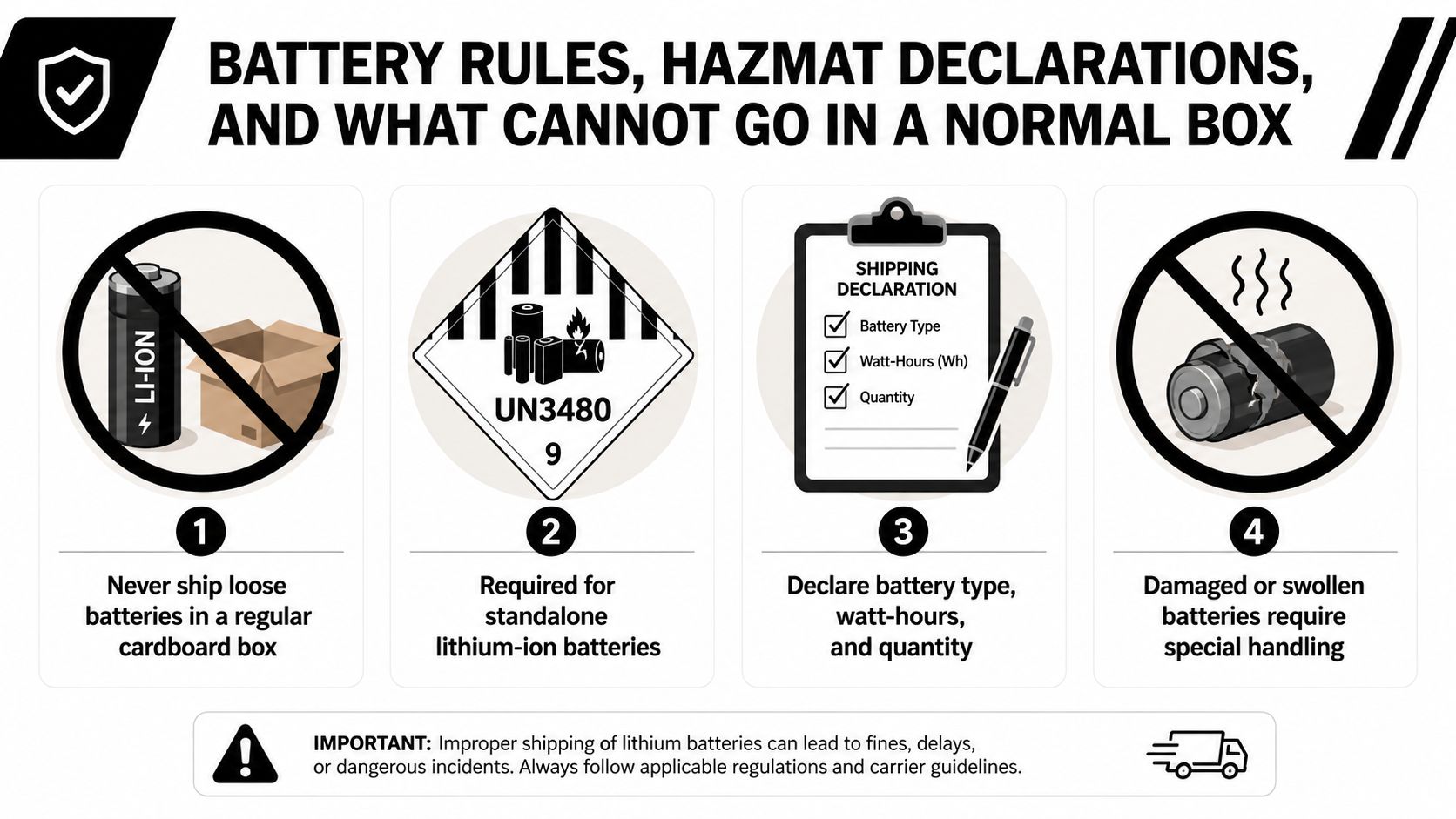
Batteries are where good packing plans get rejected at the counter. Electronics shipping guidance treats batteries as a static-control and regulatory issue, not just a padding issue, and that's the right way to look at it. A device with a battery inside it is often a normal shipment, but the moment the battery is loose, damaged, swollen, or separated from the device, the rules get stricter.
The practical line between normal and special handling
Installed batteries are usually easier to move than loose ones, but that doesn't mean every unit can go in a standard carton. Damaged or swollen cells need special handling, and battery-only consignments can move into dangerous goods territory fast. If the device can't safely ship with the battery in place, it should be routed through a specialized process rather than forced into a routine parcel label.
That's also why batteries should be removed or secured when possible. When you're dealing with retired hardware, the battery condition can change the shipping path completely. If the team packing the box isn't comfortable answering what type of battery is inside, whether it's installed, and whether it's intact, the shipment probably isn't ready yet.
Practical rule: if a battery looks damaged, swollen, or loose, stop packing and route the item through a controlled handling process.
For devices that need battery labeling and shipping compliance, Reworx Recycling's UN 3481 label resource belongs in the same planning folder as the box materials.
Preparing Devices for the Chain of Custody
Packing is only half the job when the device holds data. The decision has to be made before sealing the carton, because the shipping path and the data path are linked. Existing electronics guidance often talks about anti-static wrap and cushioning, but it doesn't always answer the harder question of what to do with the storage media itself.
Four ways to handle the data before the box closes
A full cryptographic wipe works when the device is staying in circulation and the organization can validate the erase. Drive removal for separate destruction fits retired assets that still need the chassis moved, but not the storage media. Encryption plus key retirement can make sense for managed fleets where the device is leaving service but still has to be transported. Physical destruction of the storage media is the hard stop for regulated data-bearing equipment leaving the building for the last time.
The right choice depends on where the asset is going. A redeployed laptop has different needs from a retired machine headed for recycling, and neither should be handled the same way as a device that's being returned under lease terms. If you're asking whether to pack it or sanitize it first, the answer usually depends on whether the destination expects a working device or a decommissioned one.
What travels with the device
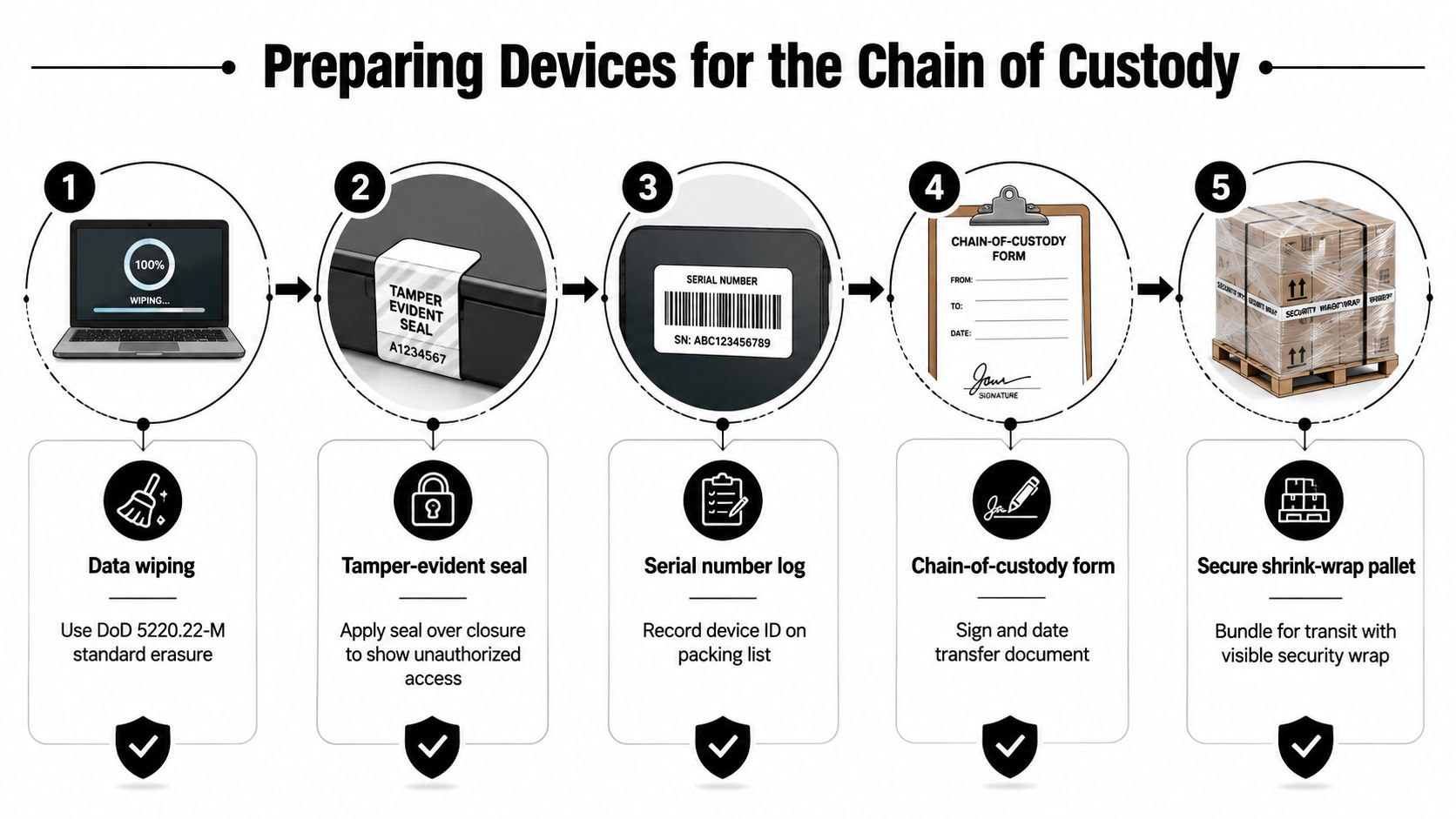
A serial-number log, asset tag reconciliation, photographs, and a packing list inside the box make the receiving side's job much easier. Those records help confirm what arrived and support claims handling if something goes missing or gets damaged. The chain of custody gets stronger when the box and the paperwork tell the same story.
A secure handoff can also include a tamper-evident seal over the closure and a signed transfer document. If a team can't tie the asset record to the carton, the transfer is already weaker than it should be.
For teams that need a formal trail, Reworx Recycling's chain-of-custody documentation page is the right place to start.
Labeling, Documentation, Insurance, and Carrier Choice
A strong box can still fail the business if the paperwork is sloppy. Labels, packing slips, and carrier choices need to support the same outcome, which is getting the device there intact and proving what happened if the shipment gets challenged. The carton is only one part of the claim file.
What to mark and what to record
Use clear fragile marking when the device needs it, but don't assume arrows or orientation markings will override conveyor handling. Those labels help human handlers, not machine sorting. The more useful documentation is the one that matches the physical pack job, including what's inside, what's been removed, and whether the carton was double-boxed.
A packing slip that lists the device model, serial number, and contents supports claims better than a vague handwritten note. Photos taken before the carton is sealed help too, especially if the outer box gets crushed in transit. Carrier photographs usually show the outside of the box, so the outside needs to tell the same story as the records inside.
Choosing a carrier with eyes open
Carrier choice comes down to the factors that affect electronics most, namely declared-value coverage, signature requirements, loss handling, and battery rules. For laptop shipments, the modest cost of a signature requirement can be the difference between a clean insurance path and a messy exception later. Double-boxing also helps here, because the outer carton is the one most likely to survive conveyor handling and become the visible evidence in a dispute.
The cheapest label isn't the cheapest move if the claim process gets complicated.
For corporate shipments, the right carrier is the one that matches the device, the risk, and the documentation. If the carton doesn't have a traceable identity, the label can't fix that after the fact.
When Bulk Shipments Belong With an ITAD Partner
Some shipments shouldn't be packed in-house at all. Once you're dealing with pallet quantities, mixed-device lots, retired assets, regulated media, or hardware leaving under a destruction certificate, the sender starts carrying risk that a specialized ITAD partner is built to manage. That's especially true when the highest risk isn't transit damage, it's what happens to the data trail before and after the box moves.
A responsible handoff starts with serialized inventory and clear device grouping. From there, secure transport, witnessed or on-site destruction where needed, and certificates of recycling or data destruction close the loop. That process is hard to replicate with ad hoc boxes, tape, and a standard carrier label.
There's also a downstream choice that gets missed too often. Donation-based recycling can extend device life instead of cutting it short, which keeps usable equipment in circulation and supports digital inclusion and workforce programs. Reworx Recycling sits in that category as a donation-based recycling and IT asset disposition partner, so it belongs in the decision tree when an organization wants a controlled handoff that still preserves a reuse path where appropriate.
What a better bulk workflow looks like
- Inventory first: list every asset by serial number before anything leaves the floor.
- Segregate by outcome: separate redeployable devices, recycle-bound units, and destruction-only media.
- Use controlled transport: don't mix unsecured hardware with loose accessories and unlabeled cartons.
- Document the transfer: keep chain-of-custody forms, packing lists, and destination records together.
- Choose the right downstream path: donation, recycling, or destruction should match the device's condition and data status.
That's the point where packing becomes part of sustainability strategy, not just logistics. A business that sends every device through the same rough shipping process usually loses value, creates more claims, and makes data handling harder than it needs to be. A business that routes the right assets to the right partner reduces risk and keeps more equipment in use.
If your team is retiring laptops, monitors, or mixed corporate hardware, Reworx Recycling can help with electronics recycling, IT equipment disposal, secure data destruction, and pickup coordination in one process. Visit Reworx Recycling to schedule a pickup, ask about chain-of-custody support, or explore a donation-based path for equipment that still has life left in it.