A San Antonio IT manager rarely gets a clean last day on old equipment. The lease ends, the pallets show up, someone from finance wants the room cleared, and the help desk is still trying to track which laptops were assigned to which employees. That's the moment many teams make the wrong call; they treat electronics as clutter instead of as assets that still carry data, compliance risk, and sometimes reuse value.
Electronic recycling San Antonio Texas works best when you stop thinking about it as a dump run and start treating it like an end-of-life program. The city already moves a meaningful amount of electronics through formal channels, Texas already has a manufacturer take-back framework in place, and the core question for a business is not whether to recycle, it's how to do it without creating a data exposure or a paperwork problem.
Why San Antonio Businesses Need a Real E-Waste Plan
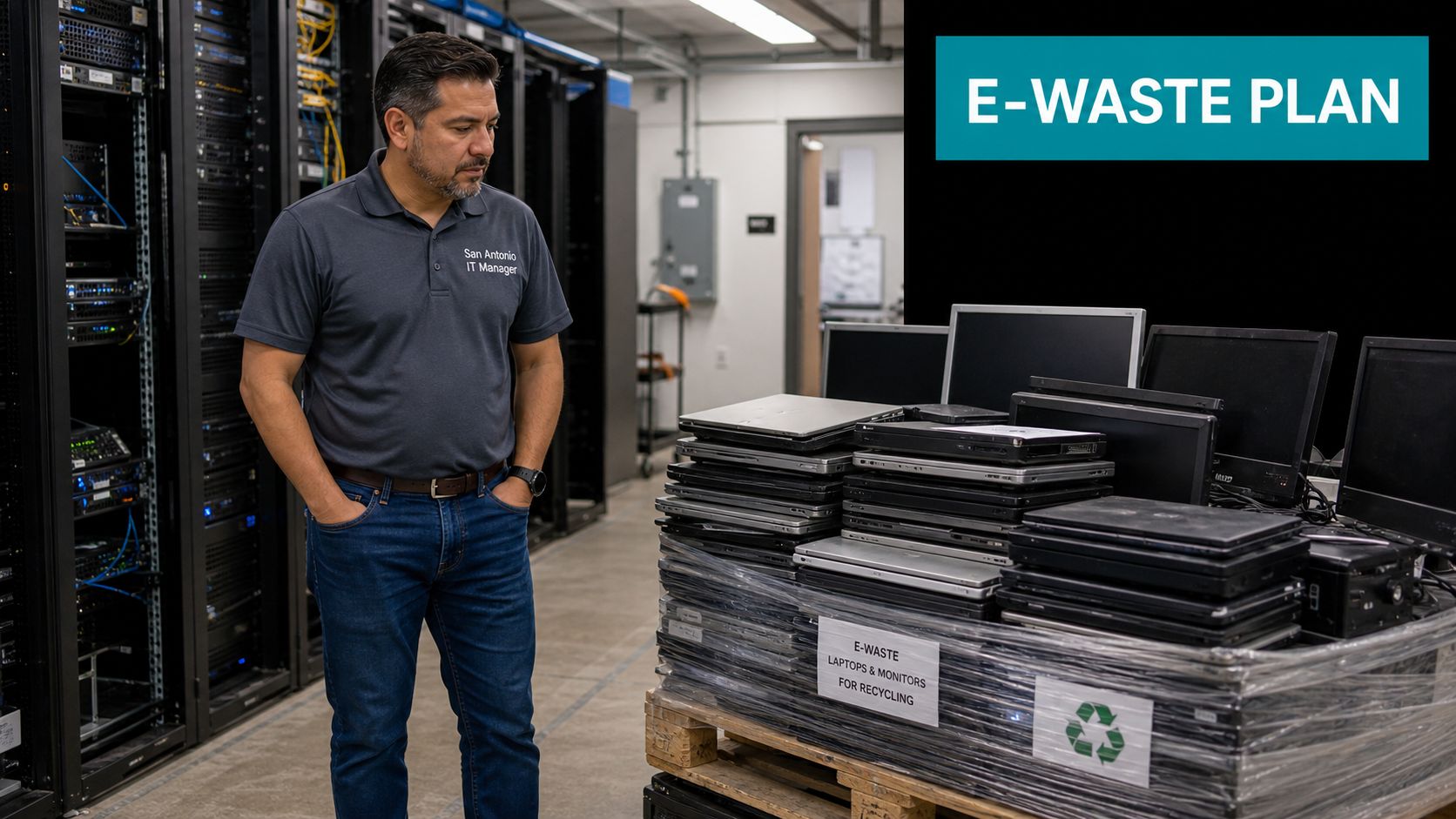
A pallet of retired laptops looks harmless until you remember what's inside them. Hard drives, cached files, browser sessions, email archives, and saved credentials don't disappear because the machine is unplugged. A school district, clinic, or mid-sized office in San Antonio can't afford to wing this, especially when a refresh, lease return, or facility cleanout puts dozens of devices in motion at once.
San Antonio already runs a formal electronics recovery stream, and that matters. The City's Solid Waste Management Department reported collecting approximately 190 tons of e-waste annually from its drop-off facilities and events, including TVs, VCRs, stereos, PCs, laptops, monitors, and cell phones (City procurement notice). That volume tells you electronics recycling here is a recurring public service, not a side activity.
Texas adds another layer. The state requires television and computer-equipment manufacturers to provide recycling opportunities for consumers, and the Texas Commission on Environmental Quality points residents to statewide recycling resources for computers and TVs (TCEQ electronics recycling guidance). For a business, that means the local market isn't just about disposal, it's about choosing a process that fits compliance, chain-of-custody, and brand risk.
Practical rule: if a device touched company data, treat it as a controlled asset until you've documented what happened to it.
The right mental model is simple. First decide whether the asset can be reused, donated, resold, or recycled. Then decide how data will be handled. Then decide whether the load is consumer-style material or something that may trigger additional documentation. That sequence is what separates a clean closeout from a messy one.
Drop-Off Sites, Mobile Events, and What They Accept
San Antonio does not treat electronics recycling as an afterthought. For residents and small businesses, the city's system gives you two permanent drop-off locations plus up to three rotating mobile locations each year, so there is a predictable route for material instead of waiting around for a one-off event (City procurement notice). Use municipal drop-off when the load is simple, clearly permitted, and already sorted. If the shipment is mixed, packed with data-bearing devices, or tied to an office closeout, use a controlled ITAD process instead.
The city's Household Hazardous Waste guidance also says e-waste does not belong in curbside carts, and it requires a recent CPS Energy bill showing payment of the Environmental Fee plus a picture ID for drop-off (San Antonio HHW guidance). That matters because too many trips fail on basics, not policy. Assign one person to handle proof of residency, acceptance rules, and transport, then make sure the load matches the site's current intake rules before anyone leaves the building.
Partner-run collection points can be faster for working equipment or smaller mixed loads, but the acceptance rules still vary. Some San Antonio sites only take specific categories, and that is where businesses get burned. An “electronics recycling” sign does not mean every device is welcome.
Where to Take Common Electronics in San Antonio
| Device Class | Best Channel | Notes |
|---|---|---|
| Laptops | Municipal drop-off or qualified donation partner | Best when data is wiped and units are sorted by condition |
| Monitors | Municipal drop-off | Confirm current acceptance rules before transport |
| TVs | Municipal drop-off | Handle separately from mixed computer loads |
| Printers | Partner-run collection or qualified recycler | Often accepted with office cleanout loads |
| Cables and accessories | Keep with the device batch if accepted, otherwise separate | Mixed loose items slow intake |
| Batteries | Separate handling | Don't leave them mixed into general electronics |
If you need an after-hours overflow option, a dedicated drop box can keep the handoff moving. The after-hours electronics recycling drop-off box on Reworx Recycling's site is one example of that kind of channel. Use that model for modest loads and schedule gaps. Skip it for bulk decommission work, where chain-of-custody and paperwork matter more than convenience.
Do not show up with a trunk full of random devices and expect fast intake. Sort first, then transport.
Preparing Devices the Right Way Before They Leave the Building
The handoff needs to start before the truck arrives. Most pickup problems come from sloppy staging, not from the recycler. Sort devices by type and condition first, and you cut confusion while making it easier to separate donation candidates from true scrap.
For San Antonio businesses, the baseline is simple. Personal information has to be removed before devices leave the building, and non-working electronics should go to approved drop-off channels with certified recyclers. That is the floor. A business should go further and tie every box, pallet, or cart to an internal inventory list before anyone moves it.
A clean office refresh follows a tight sequence. For a 200-laptop office refresh, IT tags the laptops by department, separates working units from damaged ones, removes chargers and docking stations only if the receiving partner wants them separated, and confirms which machines are candidates for donation versus recycling. The pickup becomes a scheduled event instead of a hallway pileup.
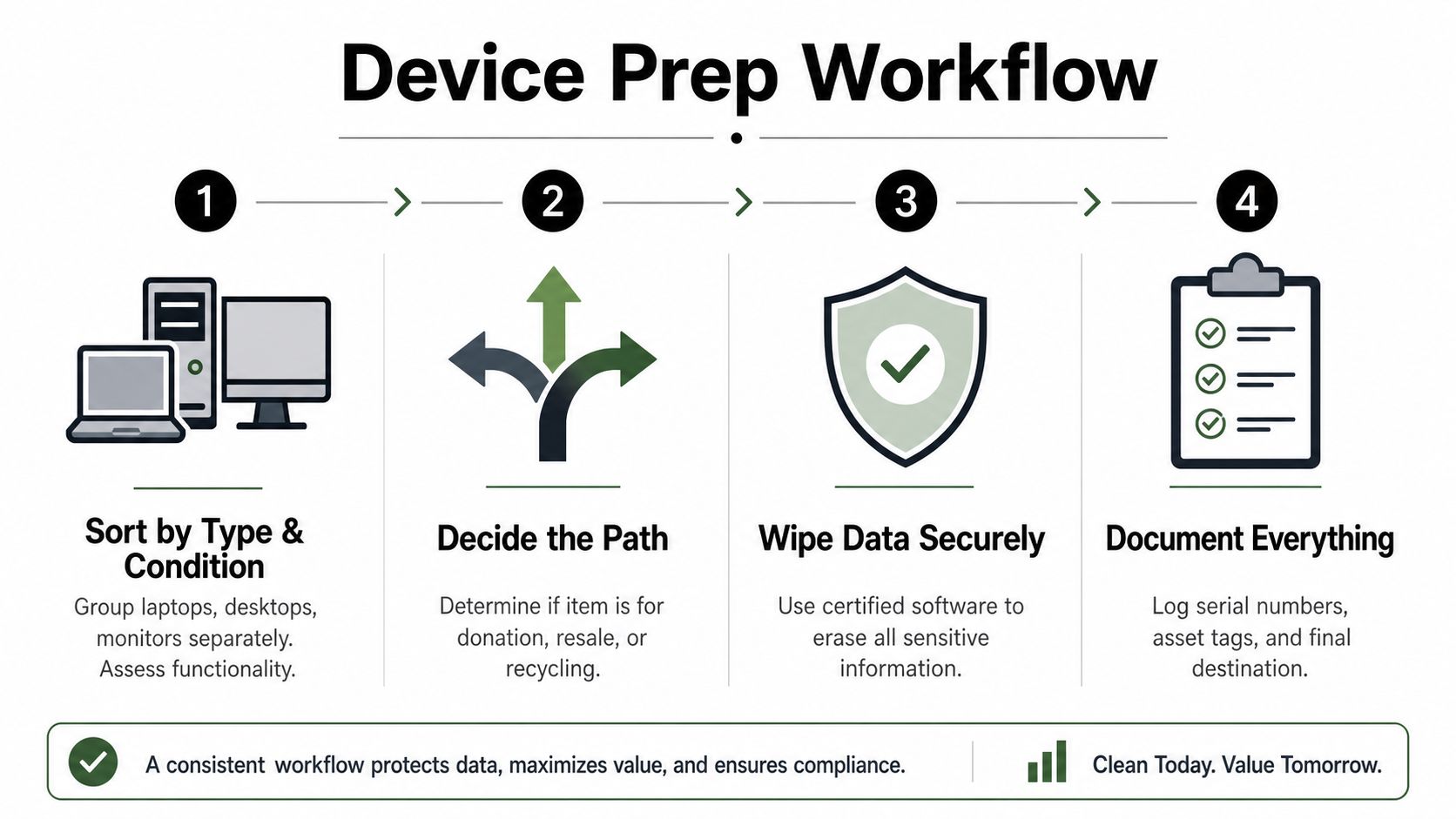
Device Prep Workflow
- Sort by Type and Condition. Group laptops, desktops, monitors, and peripherals separately. Do not mix dead boards with usable equipment.
- Decide the Path. Set aside donation candidates, resale candidates, and recycling-only items before anything leaves the floor.
- Wipe Data Securely. Use certified wiping or arrange destruction for drives that should not be reused.
- Document Everything. Record serial numbers, asset tags, and the final destination.
San Antonio teams make the same mistakes over and over. Mixed TV and monitor loads get rejected or delayed because they are harder to process. Peripherals thrown in with workstations create intake confusion. Lithium batteries need separate handling, so do not leave them in the same bin as the laptops.
Use a written checklist and make it part of the closeout process. A practical starting point is how to prepare your company's electronics for recycling, which gives facilities and IT teams a repeatable way to stage equipment before pickup.
Donate, Resell, or Recycle
A lot of companies say “recycle” when they really mean “we need this stuff gone.” That's sloppy. The right end-of-life path depends on the condition of the asset, the sensitivity of the data, and how much reporting you need after the handoff.
Donation works when equipment still has useful life. It supports community impact and keeps working hardware in circulation. Reworx Recycling operates as a donation-based electronics recycler, and that model fits organizations that want a social outcome alongside responsible disposition. Resale makes sense when the equipment is newer and holds clear market value, but it demands tighter asset tracking. Final recycling is the right answer for broken, obsolete, or data-sensitive equipment that shouldn't return to use.
Texas already has a mature take-back system, which gives businesses room to choose the right route instead of forcing everything into one bucket. The state summary in the TCEQ electronics guidance reports that manufacturers collected 3.4 million pounds of computer equipment, of which 3.39 million pounds were recycled and over 26,000 pounds were reused, while television programs collected over 12.8 million pounds and recycled all 12.8 million pounds (TCEQ electronics recycling guidance). Those figures matter because they show the infrastructure exists to support different end-of-life outcomes.
Decision rule: if it still works and the data risk is manageable, evaluate donation first. If it has clear resale value, decide whether the added tracking is worth it. If it's damaged, obsolete, or sensitive, recycle it with full documentation.
If you need a single-minded triage model, use this order. Assess reuse value first. Check data sensitivity second. Review compliance load third. That sequence keeps you from destroying usable value or donating hardware that should have been handled as a controlled asset. For working laptops that still meet your standards, a donation route such as donating a laptop is often a cleaner outcome than pushing everything straight to scrap.
Data Destruction and the Proof You Should Demand
Data security is the filter that should eliminate most bad vendors. A pretty pickup truck doesn't prove anything. A nice quote doesn't prove anything. What proves the job was done is the method, the record, and the chain of custody.
Three destruction methods matter. Software wiping is appropriate when a drive is going back into service or donation and the media still works. Physical shredding is the right move for end-of-life drives that won't be reused. Degaussing applies to magnetic media when a customer wants magnetic data rendered unreadable before disposal. Pick the method based on the drive's final destination, not on what the vendor finds convenient.
The documentation needs to be specific. Ask for a serialized certificate of destruction, chain-of-custody timestamps, and a written method statement that shows how the vendor handles secure media processing. If they can't tie the serial number to the outcome, you don't have proof, you have a sales pitch. The EPA says only about 15% of e-waste was formally recycled in 2022, which is exactly why audit trails matter when devices leave your building and disappear into the market (EPA e-waste facts). The issue isn't just recycling, it's proving what happened.
The hard drive certificate page at Reworx Recycling is the kind of documentation benchmark buyers should expect from any serious vendor. If a recycler can't produce something comparable, keep looking.
Red flags that should end the conversation
- Verbal-only assurance. If they say “we always wipe drives,” that's not enough.
- No per-device reporting. If your asset list disappears into a bulk count, you've lost auditability.
- No written data-destruction policy. If they can't explain their process, don't let them near your drives.
A vendor that handles your hardware but can't prove media handling is a liability, not a partner. Price matters, but breach exposure costs more.
Business Pickups, Compliance, and Choosing a Trusted ITAD Partner
Bulk pickups are where good intentions get expensive fast. If you're clearing a branch office, school lab, or surplus room, start by classifying the source of the assets before anyone loads a truck. That matters because facilities that accept electronics from an industrial site may need to file TCEQ Form 0524, the Notification for Receiving and Recycling Hazardous or Industrial Waste (TCEQ e-recycling regulations). Consumer drop-off assumptions don't always apply to enterprise material.
A free metro-area pickup can be a smart option for a normal office refresh, but only if the vendor documents what they receive and what happens next. That's the standard you should apply to every quote. Ask whether the vendor is a donation-based social enterprise or a for-profit reseller, whether they issue serialized certificates of destruction, and whether they track downstream outcomes beyond “picked up.”
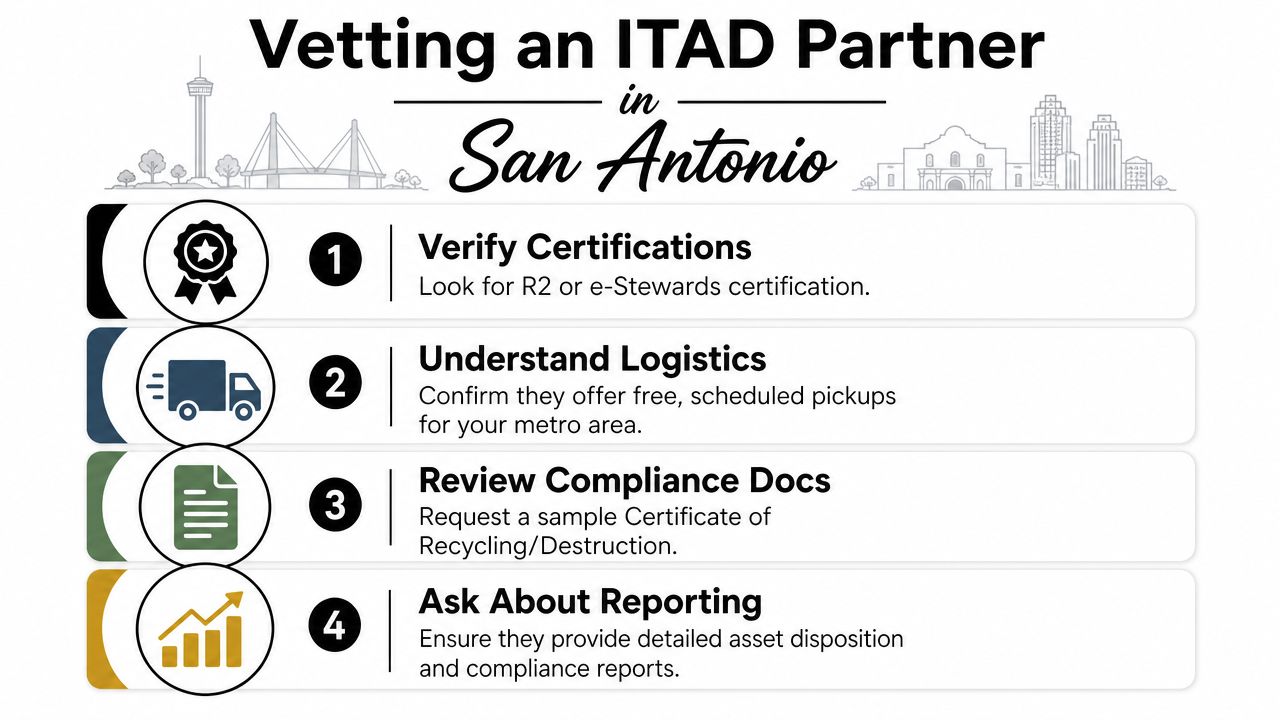
The vetting list should be blunt.
- Confirm authorization. Ask what permits, notifications, or certifications apply to your load.
- Demand reporting. Require asset-level documentation, not a vague summary.
- Check logistics. See whether they handle pickup, packing, palletization, and on-site shredding.
- Ask about reuse outcomes. If you care about community impact, make them explain donation and reuse paths.
For a useful planning reference, the vendor selection criteria page at Reworx Recycling gives you the right kind of decision lens for IT asset disposition. The company's model is donation-based, which makes sense for organizations that want to align secure disposition with community benefit instead of pushing everything into commodity recovery.
A mid-sized San Antonio business comparing two quotes should ignore the lowest number on the page if that vendor won't give serialized destruction records, pickup documentation, and a clear answer on downstream handling. On audit day, the cheaper quote won't help if the file is thin. The better quote is the one that protects the company, not the one that merely clears space.
Your Next Step for San Antonio Electronics Recycling
The cleanest electronics program follows four decisions. Choose the right end-of-life path. Prep devices before pickup. Demand proof of data destruction. Pick a partner whose reporting matches your risk profile. If you do those four things, electronics recycling stops being a scramble and becomes a controlled operational task.
That's the key lesson for San Antonio. Lease returns, refresh cycles, and facility cleanouts keep coming back. The partner you want is the one that shows up on time, documents every unit, and turns retired equipment into a responsible outcome instead of an afterthought.
If your team has laptops, monitors, or mixed office equipment ready for retirement, Reworx Recycling can help you move them through a documented process that fits this kind of work. Visit Reworx Recycling to plan your next pickup, donation, or secure electronics disposal with a partner that treats chain-of-custody as part of the job.