A lot of first major disposal projects start the same way. New laptops are approved, the rollout calendar is fixed, and someone realizes the old equipment is still sitting in offices, storage rooms, server closets, and maybe a locked room nobody has opened in months.
Then leadership asks the question that decides everything else. How long will it take to clear it out securely?
That question matters because IT asset disposition, electronics recycling, secure data destruction, and internal coordination don't happen in one motion. A realistic timeline keeps the project from colliding with desk moves, lease exits, audit requests, loading dock schedules, and chain-of-custody requirements. If you're planning computer recycling, laptop disposal, office cleanout, or a broader facility cleanout for the first time, implementation timelines are what turn an anxious cleanup into a controlled business process.
Planning Your End-of-Life IT Asset Disposal
The most common mistake at the beginning is treating disposal like a pickup request instead of a project. That works when you have a handful of retired monitors. It fails when you have mixed assets, multiple departments, and any requirement for data security, reporting, or sustainability documentation.
A typical scenario looks like this. IT has completed a refresh. Facilities wants the floor space back. Finance wants visibility into what was removed. Security wants documented handling. Sustainability wants responsible downstream recycling and reuse. Everyone assumes the work can happen quickly, but nobody has defined what “done” means.
Start with the end state
A usable timeline begins with a specific endpoint. For some organizations, done means every old laptop is removed before the new deployment finishes. For others, done means all drives are sanitized, all serials are reconciled, and certificates are in hand. Those are very different schedules.
Use this first planning pass to answer:
- What assets are in scope. Laptops, desktops, monitors, servers, network gear, drives, peripherals, medical equipment, or lab devices.
- What outcome is required. Recycling only, remarketing, donation-based recycling, product destruction, or a mix.
- What proof is needed. Asset-level reports, chain-of-custody, secure data destruction records, or environmental documentation.
- What business constraint matters most. Speed, minimal disruption, budget control, social impact, or compliance support.
A documented framework helps prevent a cleanup from turning into repeated onsite discovery. The planning process outlined in an IT asset disposition strategy is a good benchmark because it forces scope, roles, and logistics into the conversation before trucks are ever scheduled.
Practical rule: If leadership asks for a completion date before anyone has confirmed the inventory, building access, and data handling requirements, they're asking for a guess, not a timeline.
Why early planning changes the whole project
When companies skip planning, the delays don't usually show up on day one. They appear later when pallets aren't ready, elevators aren't reserved, security won't release equipment, or a forgotten closet adds another wave of devices. Good implementation timelines account for those friction points early.
That matters whether you're handling sustainable recycling for a small office or coordinating IT equipment disposal across several sites. The timeline is the operating plan, not just the calendar.
Understanding the Core Phases of an ITAD Project
Every professional ITAD engagement follows a sequence, even if the scale changes. If you understand the phases, you can estimate time with much more confidence and spot where bottlenecks are likely to appear.

Phase one planning and inventory
Projects are won or lost at this stage. The team defines scope, confirms locations, identifies asset types, and flags anything that needs special handling. A rough count can work for early budgeting, but execution gets smoother when the inventory is closer to reality.
You also decide what each asset path should be. Some devices may be candidates for reuse or donation-based recycling. Others belong in secure data destruction, product destruction, or commodity recycling streams.
A clear overview of what IT asset disposition means in practice helps here because ITAD isn't only removal. It's the controlled retirement of equipment with documentation, data handling, and environmental responsibility built in.
Phase two logistics and transportation
This phase looks simple from the outside. It rarely is. Someone has to determine packing needs, dock access, elevator reservations, security procedures, staging areas, and pickup windows that don't disrupt normal operations.
For a single office, this may move quickly. For a multi-floor headquarters, a hospital wing, or a site with restricted access, logistics can take longer than expected because physical movement is often the primary constraint.
Phase three processing and data destruction
Once assets leave the site, the work isn't over. Devices have to be received, reconciled, sorted, and routed for sanitization, shredding, refurbishment, recycling, or resale. If the project includes secure data destruction, this is the phase where the most scrutiny usually lands.
The time to remove assets from your building is not the same as the time to complete the project.
That distinction matters. A room may be cleared in a day, while final processing takes longer because chain-of-custody, serialized verification, and material sorting still have to be completed.
Phase four reporting and certification
This is the closing phase clients often underestimate. Reporting can include itemized inventory confirmation, disposition outcomes, data destruction certificates, and records used by compliance, finance, or sustainability teams.
A project isn't operationally finished until the paperwork matches the physical work. That last step is what turns “we hauled it away” into “we can defend this in an audit.”
Here's a simple way to think about the workflow:
- Define the job so nobody is solving scope questions at the loading dock.
- Move assets securely with the building, security, and facilities details worked out ahead of time.
- Process equipment correctly according to data sensitivity and material type.
- Close with documentation that internal teams can use.
Project Timelines for Small Mid-Size and Enterprise Businesses
Business size changes the timeline because size changes coordination. It isn't just about more boxes and more devices. It's about more approvals, more locations, more stakeholders, and more exceptions.
A small office often finishes quickly because one person can answer every question. A larger organization usually moves slower because IT, facilities, procurement, security, legal, and sustainability all need some level of involvement. The actual handling of equipment may be efficient. The internal readiness often isn't.
Estimated ITAD Implementation Timelines by Business Size
| Business Size | Asset Count | Phase 1 Planning | Phase 2 Logistics | Phase 3 Processing | Total Estimated Timeline |
|---|---|---|---|---|---|
| Small Business | Fewer than 50 assets | A few business days | A short pickup window, often scheduled quickly once scope is confirmed | Several business days depending on asset mix and data handling needs | Often completed within about one to two weeks |
| Mid-Size Organization | About 50 to 500 assets | Around one to two weeks when inventory and approvals are organized | Several days to coordinated pickups across one or more locations | About one to two weeks for receiving, reconciliation, sanitization, and disposition reporting | Commonly spans multiple weeks |
| Enterprise | More than 500 assets | Multiple weeks because stakeholder alignment, site planning, and asset validation take longer | Staged removals over days or weeks depending on building access and site count | Several weeks or longer for serialized processing, secure data destruction, and final reporting | Often runs over an extended multi-week or multi-month schedule |
These are planning ranges, not guarantees. A tightly organized mid-size company can move faster than a poorly coordinated small office. The difference is usually preparation, not company logo size.
What small businesses should expect
Small business projects are usually constrained by attention, not infrastructure. The owner or office manager often has to coordinate IT, operations, and logistics at the same time. When the asset list is simple and everything is in one place, electronics recycling and computer recycling can move quickly.
What slows SMB projects down is mixed inventory. Old desktops in one room, a few backup drives in another, and monitor piles split between departments create avoidable friction. The fastest small projects have one staging area, one approval path, and one decision-maker.
What mid-size organizations need to plan for
Mid-size projects get complicated when different teams own different parts of the environment. IT may know what is on the network. Facilities may know where the equipment sits. Finance may want disposition details. Security may require signoff before anything leaves the site.
That means implementation timelines should include time for internal alignment, not just vendor handling. The businesses that stay on track usually hold one kickoff meeting, lock scope, and nominate a single internal lead who can make day-to-day decisions.
A mid-size project doesn't become difficult because of asset count alone. It becomes difficult when nobody owns the cross-functional details.
Where enterprise timelines stretch
Enterprise work introduces a different category of delay. Assets are often spread across departments, regions, or leased spaces. Pickup has to be staged. Access windows are narrower. Documentation expectations are higher. There may also be corporate donation programs, remarketing rules, and sustainability reporting requirements layered into the project.
For enterprise teams, the planning phase is usually the longest for good reason. If the early work is rushed, the rest of the project becomes a series of exceptions. If the planning is disciplined, the downstream execution tends to be much smoother.
That same principle applies whether the project is standard laptop disposal, secure hard drive handling, a facility cleanout, or a broader IT equipment disposal program tied to a refresh cycle.
Timelines for Specialized Projects Like Data Centers
Specialized projects don't follow office-cleanout logic. A standard workplace disposal project may involve carts, pallets, and straightforward pickup coordination. A data center decommissioning or laboratory equipment disposal project often begins with risk controls long before any equipment leaves the site.

Data center work takes staged execution
A data center project usually starts with rack-level planning. Teams identify what can be retired, what must remain live until cutover, and what dependencies exist between systems. Then comes de-racking, cable management, asset verification, drive handling, palletization, and outbound logistics.
That sequence is why data center decommissioning services need more runway than office pickups. The project often has to be staged around production schedules, security controls, and physical site rules. In practice, that means the visible removal may be only one part of a much longer effort.
A common planning mistake is assuming server removal starts as soon as the migration ends. In reality, there is usually a transition period where IT validates shutdown status, security confirms handling protocol, and operations clears the release sequence for equipment rows or cages.
Labs and medical environments move at a different pace
Laboratory equipment disposal and medical equipment disposal add another layer. The issue isn't only data. It's also decontamination, condition verification, chain-of-custody, and specialized packaging or handling requirements depending on the equipment type and prior use.
Some items can move through the project quickly once cleared. Others stay in place until internal teams document readiness for removal. That internal release process often drives the schedule more than transportation does.
- Lab devices may require departmental signoff before they can be staged.
- Medical equipment may need handling procedures that differ from standard office electronics recycling.
- Mixed environments slow down because the project team is managing several disposal paths at once.
On specialized jobs, the timeline usually expands because the organization is reducing risk, not because the provider is moving slowly.
That distinction matters when you're communicating upward. Leadership may see pallets and assume speed is the metric. In specialized settings, accuracy, documentation, and controlled execution are the metric.
Factors That Can Accelerate or Delay Your Timeline
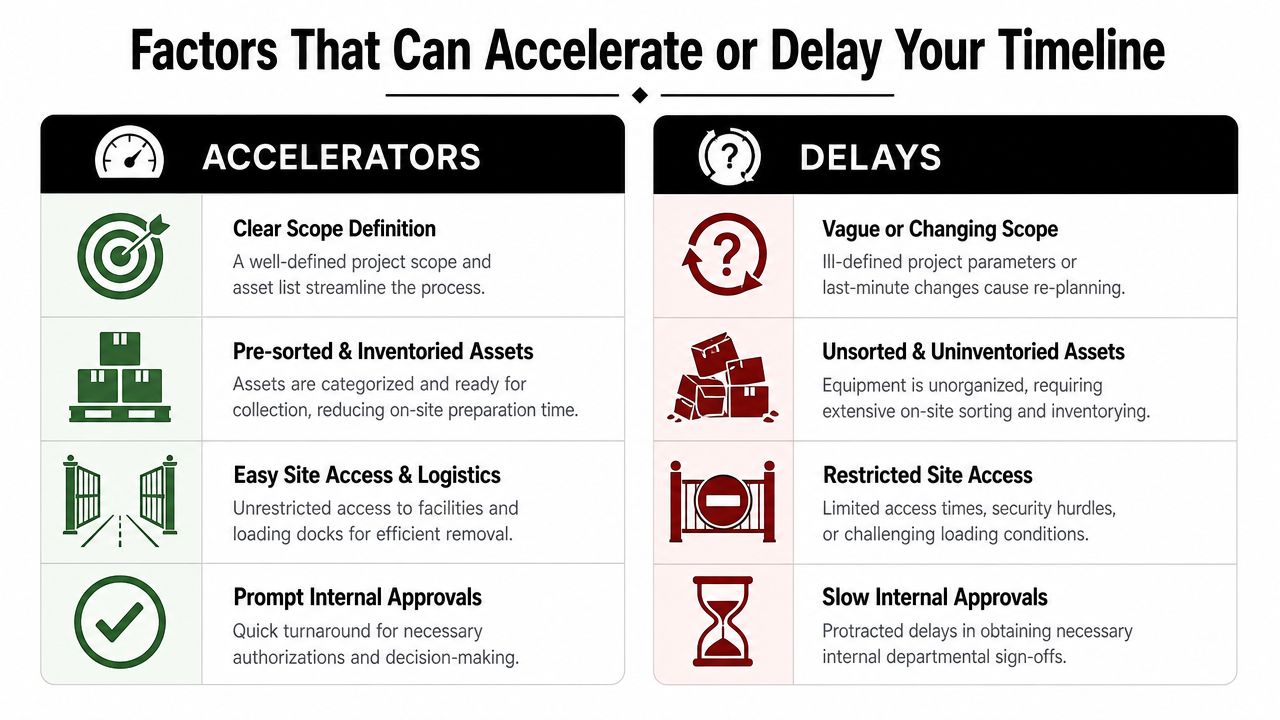
Most implementation timelines don't fail because one big thing goes wrong. They slide because several small assumptions prove false at the same time. The fix is to identify what speeds execution and what drags it down before the project starts.
What moves a project faster
The fastest projects usually have boring fundamentals in place. That's a good thing.
- Clear scope definition. A written asset list, identified locations, and agreed project goals prevent onsite surprises.
- Pre-sorted inventory. When laptops, monitors, servers, drives, and peripherals are already separated, loading and reconciliation move more cleanly.
- Simple site logistics. Reserved dock access, working elevators, available carts, and known building rules reduce wasted onsite time.
- Fast internal approvals. Security, facilities, and IT all know who can approve release, schedule, and access.
Organizations choosing a partner often review these operational details along with security and reporting criteria. A practical framework for vendor selection criteria is useful because timeline reliability often depends as much on process discipline as on recycling capabilities.
What creates delays
Delays usually come from uncertainty, not effort. Teams are working hard, but they're solving preventable problems in real time.
Here are the common ones:
- Changing scope. Someone remembers another storage room, remote office, or pile of retired gear after the project is already scheduled.
- Unsorted assets. Devices are mixed with personal items, cables, furniture, or equipment still needed by staff.
- Restricted access. Loading docks have limited hours, elevators need reservations, or security requires escort support that wasn't booked.
- Slow signoff cycles. The project waits while departments decide who can release assets or approve destruction methods.
The planning habit that matters most
If you want a shorter project, remove ambiguity before scheduling. Walk the site. Confirm access. Decide who owns the final yes. That work feels administrative, but it has the biggest effect on the calendar.
A timeline isn't only a forecast. It's a test of how prepared the organization is to execute.
Key Stakeholder Roles and How to Streamline Execution
A disposal project runs well when each internal team owns a specific lane. It slows down when everyone assumes someone else is handling the details. That's why even a straightforward office cleanout needs a visible role map.
Who should own what
The IT manager usually owns the asset list, confirms data-bearing devices, and decides which systems are ready for retirement. If there are servers, backup drives, networking gear, or devices tied to compliance obligations, IT has to be involved early.
The facilities manager handles building realities. Dock access, carts, freight elevator timing, room access, and onsite staging often sit with facilities, not IT. Many timeline problems that look technical turn out to be physical access problems.
The security or compliance lead confirms chain-of-custody expectations and release protocols. This matters most when the project includes secure data destruction, product destruction, or restricted work areas.
The finance team often wants disposition records, buyback visibility, or asset retirement support for internal accounting. If they aren't brought in until after pickup, reporting requirements can change late in the project.
The sustainability lead focuses on sustainable recycling outcomes, donation pathways, and internal reporting tied to environmental goals or social impact initiatives.
A simple execution checklist
Use a checklist that is short enough to follow and specific enough to prevent confusion:
- Name one internal project lead who can make scheduling and scope decisions without waiting on a committee.
- Hold a kickoff meeting with IT, facilities, security, finance, and any sustainability stakeholders before the first pickup date is offered.
- Approve the asset scope in writing so everyone is working from the same list and same locations.
- Confirm site logistics early including dock availability, elevator access, badges, escorts, and staging space.
- Define the document package needed at closeout, such as inventory reconciliation or destruction records.
- Set a communication rhythm so updates go to the same people throughout the project.
The companies that finish cleanly don't have more meetings. They have one useful meeting before the work starts.
How to prevent internal handoff problems
Internal handoffs are where projects drift. IT says the assets are ready, but facilities hasn't reserved the dock. Security says equipment can leave, but finance still needs a final list. The best fix is simple. Put the owner of each dependency next to the deadline on the project plan.
That sounds basic because it is. Basic coordination beats reactive coordination every time.
How Reworx Recycling Ensures a Predictable Timeline
A predictable schedule starts with accurate scoping and a realistic execution plan. For organizations that want support with IT asset disposition, electronics recycling, secure data destruction, computer recycling, or pickup coordination, Reworx Recycling's IT asset disposition services provide one option for aligning scope, logistics, and reporting before the project begins.

The reason that matters is simple. Most timeline misses happen at the edges of the project. Incomplete inventories, unclear pickup conditions, shifting internal approvals, and reporting requirements that surface too late. A structured intake process reduces those surprises by clarifying what is being removed, how it will be handled, and what documentation the client will need at closeout.
This is especially useful for businesses evaluating donation-based recycling, social enterprise recycling, corporate donation programs, laptop disposal, facility cleanout support, or more specialized jobs like data center decommissioning. A social enterprise lens changes the conversation in a practical way. The project isn't only about getting obsolete hardware out of the building. It's also about responsible reuse, digital inclusion, and keeping materials in productive channels when possible.
Businesses planning a first major disposition project should expect a partner to help with the basics first. Scope definition, access planning, chain-of-custody expectations, pickup sequencing, and closeout reporting. When those are handled well, implementation timelines become far more predictable and much easier to defend internally.
For broader environmental context on responsible e-waste handling, the EPA guidance on electronics donation and recycling is a useful external reference.
If you're preparing for an office refresh, a server retirement, or a larger IT equipment disposal project, Reworx Recycling can help you plan the timeline, coordinate pickup, and retire equipment through responsible recycling and donation pathways. Businesses can donate old equipment, schedule a pickup, or explore a partnership that supports both secure disposition and community impact.