A lot of businesses are in the same spot right now. There's a storage room with retired desktops, a rack with old servers nobody wants to touch, backup drives in a cabinet, and file drawers full of contracts, HR paperwork, and invoices. Everyone knows there may be sensitive data inside. Nobody is fully sure what must be kept, what can be destroyed, or what legal problem starts if the wrong device gets hauled away too soon.
That uncertainty is exactly why record retention policies matter. They aren't paperwork for paperwork's sake. A good policy tells your team what a record is, where it lives, how long it stays, who owns it, when destruction stops, and how disposal gets documented. Without that structure, companies tend to do one of two risky things. They keep everything forever, which raises storage, breach, and discovery risk. Or they delete inconsistently, which creates compliance gaps and ugly surprises during audits or disputes.
The practical value is straightforward. A formal retention policy improves legal safety, because people can show why a record was preserved or destroyed. It improves operational efficiency, because staff stop guessing and IT stops carrying junk data indefinitely. It improves financial security, because excess storage, unmanaged hardware, and sloppy disposal all cost money.
The missing piece in many retention discussions is the hardware itself. Records don't just exist in a policy manual. They sit on laptops, SAN volumes, tape, cloud archives, phones, and decommissioned servers. That's why retention and IT asset disposition have to connect. If the policy says a record has reached end of life, the business still needs a controlled process to remove the data from physical assets and retire those assets responsibly.

Introduction
A retention policy starts as a governance document, but in practice it's a business control. It decides how your company behaves under pressure. When a regulator asks for records, when outside counsel issues a hold, when finance wants to purge stale files, or when IT is ready to retire old hardware, the policy is what keeps people aligned.
Why companies get stuck
Most organizations don't struggle because the concept is hard. They struggle because the data is scattered. Paper sits in branch offices. Email lives in multiple systems. Shared drives hold draft files and final records together. Old laptops and servers remain on shelves because nobody wants to destroy something that might still be needed.
Old equipment is rarely just old equipment. It's often undeclared storage for records the business has already lost track of.
That's why the first conversation shouldn't be “How long do we keep everything?” It should be “What records do we create, and where do they live?” Once you answer that, the policy gets practical.
What a workable policy should deliver
A useful retention policy does three things well:
- It defines scope clearly. The policy should cover paper records, email, collaboration tools, databases, backup media, and retired devices.
- It assigns responsibility. Someone has to own updates, legal holds, destruction approvals, and audit support.
- It closes the loop. Destruction has to be secure, documented, and aligned with both digital systems and physical media.
Businesses that do this well don't treat retention as a legal memo that sits untouched in SharePoint. They operationalize it through procedures, system settings, storage reviews, and disposition workflows.
The Business Case for a Formal Retention Policy
A formal policy earns its keep long before a lawsuit or regulatory request shows up. It reduces confusion during day-to-day work. Staff know what belongs in a system of record, what needs controlled storage, and what shouldn't be retained at all. That alone cuts a surprising amount of avoidable risk.
Federal rules are one reason this can't be handled casually. The Sarbanes-Oxley Act requires relevant auditing and review documents to be retained for seven years, HIPAA requires related policies and documents to be kept for at least six years, and the IRS generally sets a three-year baseline for most business records while many tax-related records should align with a seven-year period according to Miami University's retention standards guide. Those timelines don't sit neatly in one box. They overlap across departments, systems, and formats.

Four actions that turn policy into business value
Most companies can build momentum by doing four concrete things.
Inventory the records you already have
Start with finance, HR, legal, operations, and IT. Include line-of-business systems, email, shared folders, cloud repositories, and paper archives.Classify them by risk and use
Separate sensitive, regulated, contractual, and operational records. Don't give every file category the same treatment.Assign retention timelines
Legal requirements matter, but so do business needs, audit windows, and active operational use.Document the rule in one place
If staff have to hunt for the schedule, they won't follow it. A master schedule should be easy to read and easy to update.
The three benefits owners and IT managers actually feel
Here's where the policy starts paying off.
| Benefit | What it changes in practice |
|---|---|
| Compliance | Staff can explain why records were kept or destroyed and show the rule behind the action. |
| Efficiency | IT stops preserving low-value clutter indefinitely, and teams retrieve needed records faster. |
| Security | Fewer unnecessary records means less sensitive data exposed across aging systems and forgotten devices. |
A policy also sharpens cyber hygiene. If you're reviewing governance alongside endpoint protection, access control, and staff awareness, this overview of small business cyber security is a useful companion resource for owners trying to connect records discipline with broader risk management.
Practical rule: If a company can't tell you which records it keeps, where they're stored, and who approves destruction, it doesn't really have a defensible retention program.
A final point often gets missed. The business case isn't only about deletion. It's also about value recovery and orderly retirement. Surplus devices can have residual value, but only if records are identified, disposition is authorized, and the chain of custody is tight enough to support asset recovery planning.
Building Your Record Retention Schedule
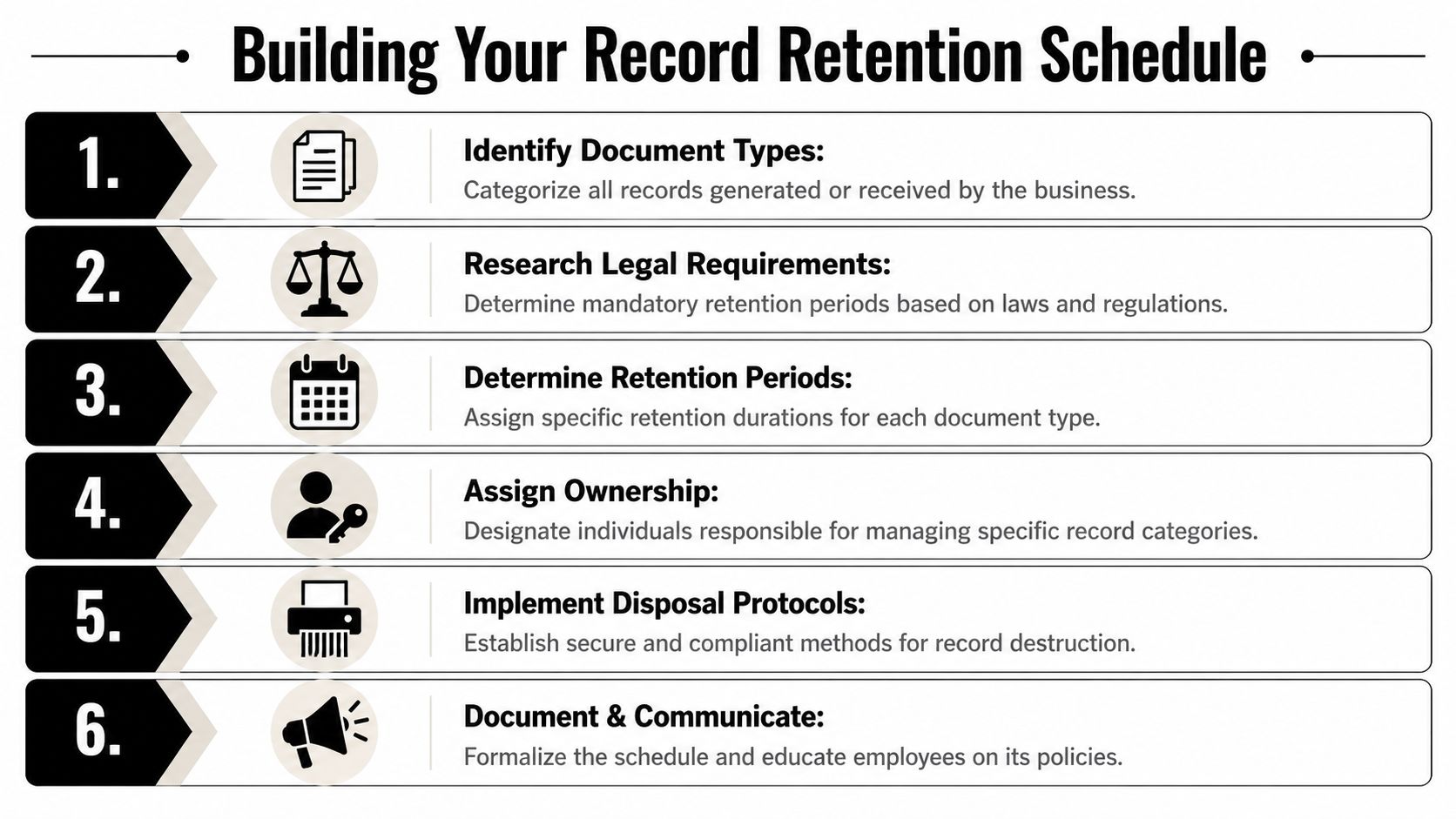
The retention schedule is the engine of the policy. If the policy is a statement of intent, the schedule is the operating manual. It tells employees what to keep, for how long, in which system, under whose control, and by what disposal method.
Start with a real inventory
Begin with a record inventory, not a spreadsheet copied from another company. Walk department by department and list what gets created or received. Include signed contracts, AP files, payroll records, purchase orders, engineering drawings, quality documentation, patient files, audit workpapers, database exports, emails, and structured data inside business applications.
The most common mistake here is stopping at active systems. Old NAS devices, desk drawers, archive mailboxes, and decommissioned servers often hold records that still fall under the schedule. If you don't account for those locations, your policy looks complete on paper but fails in practice.
A simple way to structure the inventory is to track five fields:
- Record series such as vendor contracts or employee files
- Business owner responsible for the record
- System or storage location where the record resides
- Trigger event that starts the retention clock
- Disposition method at the end of retention
Classify by tier, not by guesswork
A retention schedule works better when tied to a classification model. The strongest approach is to sort records into tiers based on sensitivity and legal impact, then assign retention rules accordingly. A healthcare provider might place clinical records and HIPAA documentation in a high-sensitivity tier, while vendor communications and operational memos sit in a lower tier.
Hyland's guidance on retention management supports this approach. A best-practice methodology includes defining a policy overseer, mapping retention periods to tiered data categories, and maintaining a Records Destruction Log for the final disposition of both physical and digital files in its document retention periods resource.
A schedule without ownership is just a wish list. Every record category needs a named business owner and an operational custodian.
Assign timelines with business context
Legal minimums matter, but they aren't the only factor. You also need to identify the event that starts the clock. “Seven years” means very little unless the schedule states whether the period begins at creation, effective date, termination, final payment, employee separation, or audit completion.
Different industries expose this quickly:
- Healthcare often has to distinguish between administrative HIPAA documentation, patient records, and state-specific medical record rules.
- Financial services may need separate handling for correspondence, accounting records, and supervision records.
- Engineering and project-based firms frequently deal with design files, project closeout documents, and grant records with unique triggers.
This is why template-driven policies often fail. They list durations but ignore lifecycle events.
Build a master schedule people can use
Your master schedule should be centralized and plain enough for non-lawyers to follow. Avoid legal shorthand that only counsel understands. A usable schedule usually includes:
| Record type | Owner | Trigger | Retention period | Storage location | Destruction method |
|---|---|---|---|---|---|
| Signed contracts | Legal | Expiration or termination | Per schedule | Contract repository | Secure deletion or shredding |
| HR employee files | HR | Separation date | Per schedule | HRIS and archive | Secure deletion or shredding |
| Audit workpapers | Finance | Audit completion | Per schedule | Finance repository | Controlled destruction |
To make execution easier, many businesses connect the schedule to tagging rules in content systems or to an asset inventory management process so they can match records to the devices, drives, or repositories where the data sits.
Don't forget destruction documentation
The schedule should end with evidence, not assumption. A proper destruction log records what was destroyed, when it was destroyed, how it was destroyed, and who approved it. That's what turns policy language into a defensible compliance record.
Understanding Key Legal and Compliance Mandates
Retention law isn't one law. It's a stack of obligations from federal rules, industry regulations, grant terms, contract language, and state-level requirements. Businesses get into trouble when they treat retention as a generic “keep it seven years” exercise. That shortcut fails the moment one department handles regulated data that follows a different rule.
Where special rules override the default
Engineering and grant-funded work are good examples. In specialized fields, retention may extend well beyond an ordinary business schedule. According to the National Society of Professional Engineers white paper, engineering retention protocols should run for the Statute of Repose plus three years, NSF grant records must be kept for three years after report submission to avoid a 100% failure rate in grant compliance and disqualification from future funding, and permanent records such as contracts and intellectual property should be retained indefinitely in its document retention white paper.
That changes the compliance conversation. A universal policy is fine as a framework, but the schedule needs room for exceptions tied to actual business activities.
Litigation holds are non-negotiable
A litigation hold overrides normal destruction. If legal proceedings are pending or reasonably foreseeable, routine deletion has to stop for the affected records. That includes paper files, email, shared drives, archived data, and retired systems that still contain relevant material.
What doesn't work is issuing a legal hold memo while leaving automated deletion untouched. Once a hold is active, IT and records teams need a process to suspend the normal schedule, identify custodians, preserve targeted sources, and document what changed.
When a hold is issued, “business as usual” must stop for the records in scope. Otherwise the company is preserving policy language, not evidence.
Recorded communications count too
Retention questions often extend beyond documents. Call recordings, support logs, meeting captures, and voice records may also fall under operational, contractual, or regulated retention obligations depending on the business model. For teams evaluating how those systems fit into governance, this guide on business call recording is useful because it frames recording as both an operational tool and a records issue.
Destruction is part of compliance, not an afterthought
A surprising number of organizations treat destruction as an IT cleanup task instead of a formal compliance action. That creates problems fast. If retention says a record should be destroyed after its lawful period, the business needs proof that destruction happened in a controlled way. If retention says a record must be preserved indefinitely, the business needs storage and indexing that support retrieval years later.
State obligations can complicate this further, especially when incidents involve personal information on retired equipment or forgotten storage. That's why legal review should be informed by operational exposure, including state data breach laws that can shape what happens after records are mishandled, lost, or exposed during disposal.
Executing Secure Data and Asset Destruction
A retention policy's true test comes when it either becomes real or falls apart. A record reaches end of life on the schedule, but the data still exists on a hard drive, in a backup set, on a multifunction printer, inside a storage array, or on paper in an offsite box. If the company can't destroy that information securely and document the result, the policy is incomplete.
Deletion is not destruction
Deleting a file from a workstation or moving records to a recycle bin doesn't satisfy a disposal requirement. The same goes for sending old laptops to storage with a sticky note that says “wiped.” End-of-life handling has to match the medium.
For physical records, secure destruction can mean controlled shredding. For electronic media, organizations typically need an approved method such as cryptographic wiping or physical destruction, depending on the asset and the sensitivity of the data. What matters most is consistency, chain of custody, and proof.
A defensible destruction workflow usually includes:
- Authorization before disposition so nobody destroys records still under hold or active use
- Asset verification to confirm serials, owners, and storage media involved
- Approved destruction method matched to the media type
- Certificate or log entry that preserves evidence of the action
Backup media is the blind spot
One of the most common compliance failures sits outside active production systems. Businesses often fail to coordinate backup retention cycles with active data destruction schedules, which can leave records preserved on backup media long after they should have been destroyed and create legal risk under HIPAA and FINRA, as discussed in this business records retention guide.
This problem shows up in several ways:
| Overlooked source | Why it creates risk |
|---|---|
| Legacy backup tapes | Data may remain restorable even after production files were destroyed. |
| Cloud snapshots | Retention settings may preserve copies outside the schedule. |
| Retired servers in storage | Drives still contain data that was never securely processed. |
| Departmental USB drives | Informal copies escape both retention and destruction controls. |
That's why retention and disaster recovery teams need to work together. The backup strategy cannot operate as a separate universe.
Build a continuous improvement loop
Secure destruction isn't one event. It works best as a loop of training, auditing, and policy adjustment.
- Train the people who touch records and hardware. Facilities, desktop support, compliance, legal, and department admins all need role-specific instructions.
- Audit what occurred. Compare destruction logs to retired asset lists, backup schedules, and storage invoices.
- Update the policy when the environment changes. New cloud platforms, remote work devices, and line-of-business tools all affect disposal controls.
Sometimes businesses first confront retention issues while trying to recover information from failing equipment. If a system is unstable and records may still be required, it may make sense to pause disposition and recover lost data before applying end-of-life controls. The key is authorization and documentation, not improvised handling.
For media that has reached lawful end of life, secure execution matters. A documented secure data destruction service helps close the gap between the schedule on paper and the evidence a company needs during an audit, inquiry, or internal review.
A retention policy is only as strong as the last drive, tape, and backup set it forgot to account for.
Keeping Your Retention Policy Current and Effective
A retention policy ages faster than most companies expect. New systems get deployed. Teams adopt new collaboration tools. A merger introduces inherited data stores. A department starts recording calls or moving archives into a different cloud platform. If the policy doesn't keep pace, it slowly stops describing the current environment.

Review the policy like an operating control
The best review process is cross-functional. Legal checks new obligations and hold procedures. IT maps storage changes. HR, finance, operations, and security confirm that the schedule still reflects what they create and where they store it. Records management or compliance should own the review calendar and maintain revision control.
A quick annual read-through isn't enough if the environment changes frequently. Reviews should also be triggered by new systems, acquisitions, regulatory changes, or a major cleanup initiative.
Useful review questions include:
- Has any department added a new system of record
- Are backup settings still aligned with destruction requirements
- Do retired asset workflows capture all media types
- Are destruction logs complete and easy to retrieve
- Are legal hold procedures tested, not just documented
Train employees on decisions, not slogans
Training fails when it stays abstract. Employees don't need a lecture on “good governance.” They need to know what to do with a revised policy, an expired contract file, a retired laptop, or a legal hold notice.
Short scenario-based training works better than generic awareness material. Teach managers how to identify trigger events. Teach IT how to disable automated deletion for held records. Teach department coordinators when a draft becomes a record. Teach facilities and operations staff that old devices are storage media, not scrap.
Staff usually don't violate retention policies out of defiance. They violate them because the policy never got translated into everyday decisions.
Keep the old policy versions too
The policy itself is also a record. When a company revises a policy, the prior version often needs to remain available as part of the audit trail. This point is routinely missed. When a HIPAA policy has been in effect for three years before revision, the original version must be retained for a total of nine years, as explained in this discussion of policy retention after revision.
That matters because audits and disputes often turn on timing. Investigators may need to know which version was in force when an incident occurred, what the destruction rule said at that moment, and whether employees were following the then-current standard.
Treat it as a living system
The strongest record retention policies are maintained like any other control set. They have ownership, version history, evidence, exception handling, and periodic testing. They also connect governance to the physical world. If the policy says records must be destroyed, the company has to know which devices and media still contain them. If the policy says records must be preserved, the company has to know those records are retrievable.
That's the true maturity test. Not whether the document exists, but whether the business can carry it out under ordinary operations and under pressure.
If your business is ready to retire old hardware, clean out storage areas, support an office cleanout, or align electronics recycling and IT equipment disposal with defensible record retention policies, Reworx Recycling can help. Their work in donation-based recycling, secure data destruction, IT asset disposition (ITAD), computer recycling, laptop disposal, data center decommissioning, medical equipment disposal, laboratory equipment disposal, product destruction, facility cleanout, sustainable recycling, social enterprise recycling, and corporate donation programs gives organizations a practical way to dispose of obsolete technology responsibly while supporting community impact. Businesses can donate old equipment, schedule a pickup, or explore a partnership with Reworx Recycling for a more secure and sustainable end-of-life process.