Data breach prevention starts long before an attacker gets into a network, and it does not end when a login is disabled or malware is removed.
A business protects data the same way it protects any high-value asset. It sets rules for access, monitors how the asset is used, limits unnecessary exposure, and controls what happens at the end of its life. In practice, that means security has to cover the full chain of custody for information. Data lives in cloud platforms, employee laptops, backup drives, retired servers, and devices waiting for resale, recycling, or destruction.
That lifecycle view is where many security programs break down. Leadership teams often fund email security, endpoint protection, and identity controls, yet give far less attention to the physical devices that store years of company and customer data. A decommissioned laptop in a storage closet can create the same exposure as a misconfigured server if the data on it is still readable.
Physical security and digital security work like the front door and the archive room key. You need both. Strong breach prevention includes network defenses, access controls, staff habits, incident planning, and a clear process for end-of-life IT assets such as verified data wiping, documented chain of custody, and certified hard drive shredding when destruction is the right choice.
That broader view turns data protection from a narrow IT task into an operational discipline. It helps business leaders reduce risk at every stage, from active systems in daily use to equipment leaving the building for responsible ITAD.
The High Cost of Inaction on Data Security
Data loss is expensive long before anyone calculates a final breach total.
For leadership teams, the cost of weak data security shows up in the same places as any other operational failure: lost revenue, stalled work, legal exposure, damaged customer confidence, and management time pulled away from growth. A breach is not a single event with a single bill. It is more like a factory shutdown caused by a safety failure. Production stops first. Then the investigation starts. Then the repair costs spread across departments.
What the cost looks like inside a business
The immediate expense usually begins with emergency response. IT has to contain the problem. Legal and compliance teams have to assess reporting duties. Operations teams may need manual workarounds if systems are unavailable. Senior leaders often spend days making decisions they did not plan to make.
Then the secondary costs appear.
- Business interruption when staff lose access to files, email, payment systems, or core applications
- Customer and partner risk when contracts, renewals, or vendor relationships come under review
- Regulatory exposure if personal, financial, health, or other protected data is involved
- Recovery work such as forensics, restoration, reconfiguration, and audit documentation
- Reputation damage that can affect future sales long after the incident is closed
Some losses are harder to see, but they still matter. Product plans, pricing models, customer lists, engineering files, and internal financial records can all leave the building without a broken window or a smashed server. Once that information is copied, the business cannot "unshare" it.
Security gaps often appear at the end of the asset lifecycle
Many companies invest in firewalls, endpoint tools, and access controls, then relax once a device is retired. That creates a blind spot. A laptop in storage, a backup drive awaiting disposal, or a decommissioned server in a loading area can still contain years of recoverable data.
That is why breach prevention has to follow data from creation to destruction.
The model is straightforward:
| Pillar | What it covers | Common failure point |
|---|---|---|
| Technical controls | Encryption, endpoint protection, monitoring, access management | Security tools are deployed inconsistently |
| Organizational controls | Policies, training, offboarding, governance | Access stays open longer than it should |
| Physical controls | Asset tracking, chain of custody, sanitization, destruction, recycling | Retired hardware is handled like surplus equipment |
A practical standard is simple. If your policies protect active systems but ignore retired devices, the program has a hole in it.
Physical controls matter because storage media do not become safe when they leave daily use. They become safe when the data is wiped, destroyed, or otherwise made unrecoverable through a documented process. Businesses that want that full-chain approach should treat end-of-life equipment with the same discipline used for live infrastructure, including ITAD risk management best practices for secure asset disposition.
The cost of inaction is not limited to the moment of attack. It includes every weak handoff, every forgotten device, and every asset that leaves the company without proof that its data is gone.
Understanding Common Data Breach Threats and Causes
Attackers rarely need a dramatic Hollywood-style hack. Most breaches start with something ordinary: an employee clicks a convincing email, reuses an old password, or leaves sensitive access connected to the wrong person or system.
The pattern is simple. Attackers look for the easiest opening, not the most advanced one.
The most common entry points
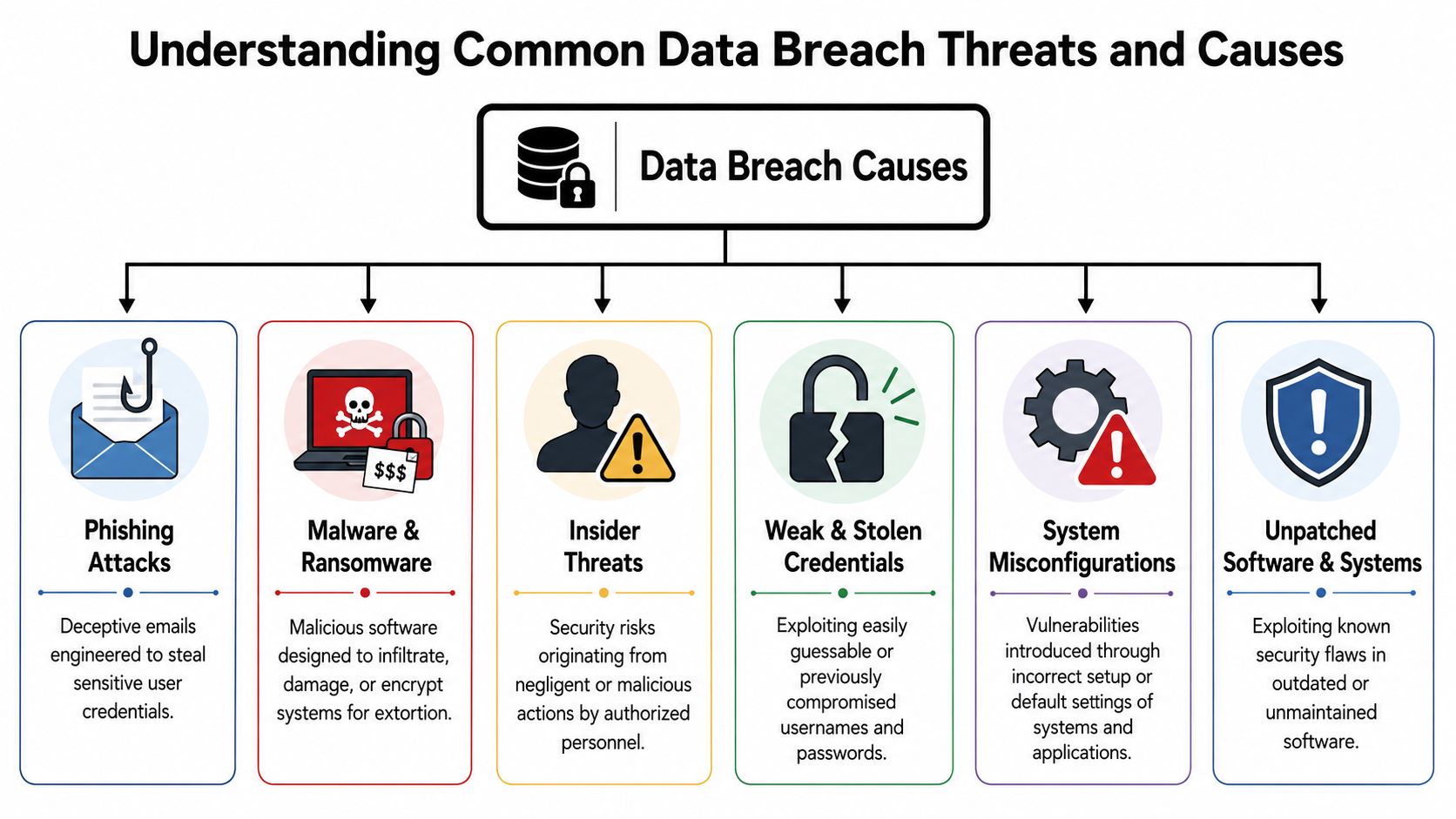
In day-to-day business terms, breaches usually begin in a few recognizable ways:
- Phishing emails that look like invoices, HR messages, shipping notices, or login alerts
- Weak or stolen credentials that let someone sign in as if they belong there
- Malware and ransomware delivered through attachments, downloads, or compromised websites
- Insider mistakes such as sending the wrong file, storing data in the wrong place, or mishandling a device
- Misconfigurations like default settings, overly broad permissions, or exposed storage
- Unpatched systems where known flaws remain open long after updates are available
One reason leaders underestimate these risks is that many of them don't look dramatic. A phishing message can look routine. A stale admin account can remain dormant for months. An old laptop in storage doesn't seem like a security event until someone recovers the data from it.
What attackers want most
The clearest target is personal information. In 2024, customer PII was involved in 48% of breaches, and 63% of successful attacks used a weak, stolen, or default password, according to Statista's overview of data breaches worldwide.
That combination matters. It means attackers often don't need to break through advanced defenses if they can log in with a compromised credential and reach customer records.
The first question after a breach is often “How did they get in?” The second is usually more painful: “Why could that account reach so much data?”
Employee information is also commonly exposed, and social engineering remains effective because it targets human behavior, not just technology. Someone under deadline pressure is more likely to click quickly, approve quickly, or share too much.
Why asset handling belongs in this conversation
Many businesses separate digital security from physical operations when they shouldn't. The same governance problem that leaves passwords unmanaged can also leave laptops untracked during office moves, offboarding, or refresh cycles.
A strong way to close that gap is to align cyber controls with documented ITAD risk management practices. That pushes teams to think beyond active systems and include storage rooms, transport, vendor handoffs, and end-of-life devices in the threat model.
Implementing Layered Technical Security Controls
A useful way to explain technical security is to think like a castle designer. You wouldn't protect a treasury with one wooden gate and hope for the best. You'd use a moat, walls, guards, locked rooms, and a plan for spotting intruders early.
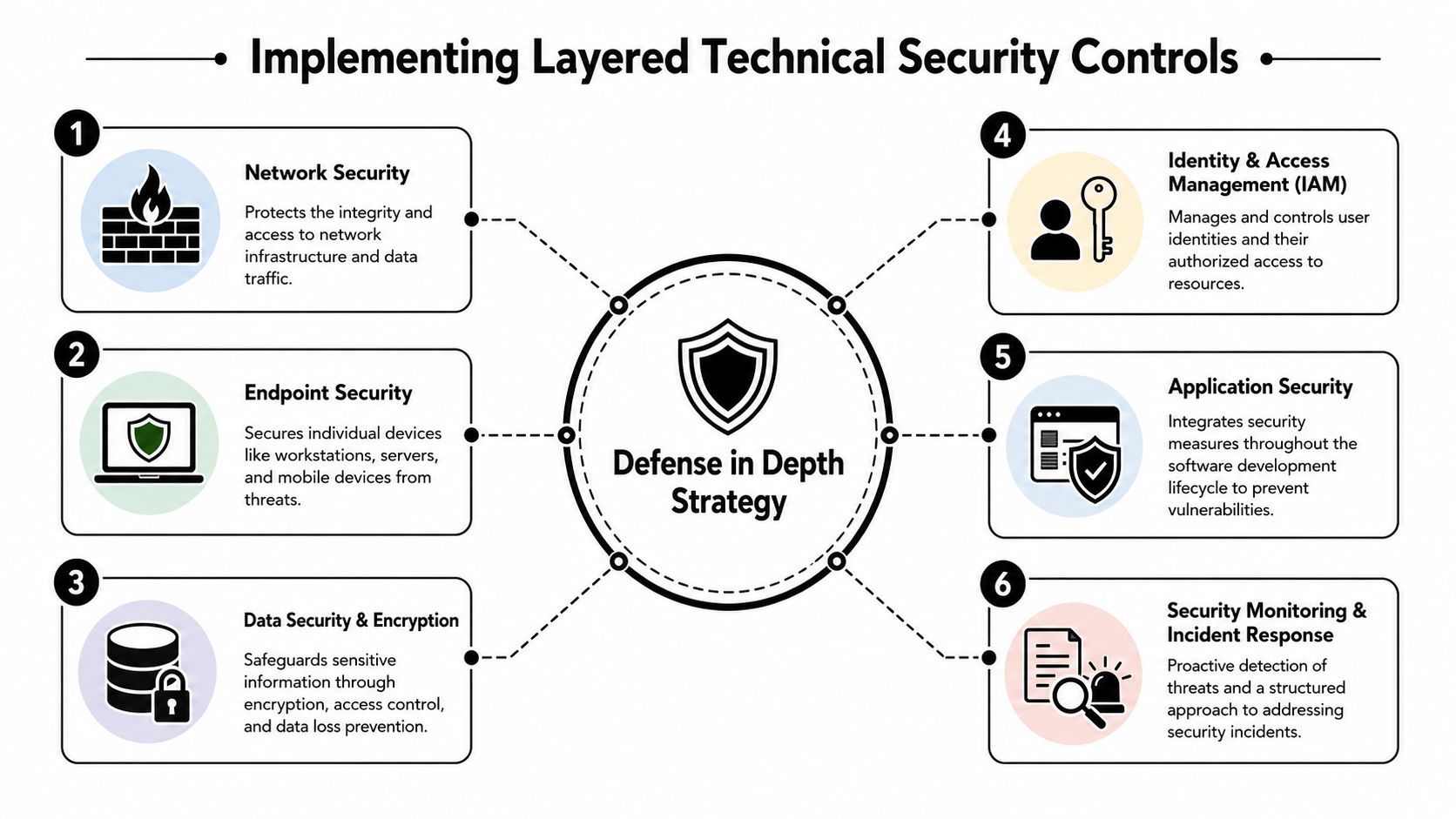
That's what defense in depth means in business technology. No single tool prevents every breach. Multiple controls work together so one mistake doesn't become a full compromise.
The outer wall and the guards
Start with the systems that control traffic and watch devices.
Network security acts like the outer wall. Firewalls, segmentation, and secure remote access reduce how far an attacker can move if they get in.
Endpoint protection acts like the guards. Laptops, desktops, servers, and mobile devices need monitoring because they're often where phishing, malware, and credential theft first take hold.
A practical setup usually includes:
- Traffic control through firewalls and segmented networks so one compromised device doesn't expose everything
- Endpoint detection that watches for suspicious behavior on workstations and servers
- Patch discipline so known weaknesses don't stay open longer than necessary
The vault matters most
If the crown jewels are data, encryption is the vault.
The strongest specific control in the verified data is AES-256 encryption for both data at rest and data in transit. Organizations using that approach saw a 94% rate of zero successful data exfiltration events, based on SecurityScorecard's discussion of breach prevention practices.
That finding is practical, not abstract. If someone steals a device or intercepts information moving across a network, encrypted data is far less useful without the key.
Here's the plain-language distinction:
| Control area | What it protects | Example |
|---|---|---|
| Data at rest | Information stored on drives, servers, laptops, backups | A lost laptop doesn't expose readable files |
| Data in transit | Information moving across networks or between systems | A captured transmission doesn't reveal usable credentials or records |
Operational advice: Encrypt first, then manage access tightly. Encryption is strongest when it's paired with disciplined key handling and role-based permissions.
Identity decides who gets near the vault
A castle also needs rules about who enters which room. In technical terms, that's identity and access management.
Give users only the access they need. Require stronger authentication for privileged roles. Review old accounts, vendor accounts, and shared credentials. Many businesses focus on stopping unknown outsiders while overlooking excessive access held by known users.
Asset tracking supports that effort too. When an organization can match devices to owners, locations, and status, it's easier to disable access at the right time and retire equipment cleanly. That's one reason asset tracking systems for IT equipment belong in the broader conversation about data protection, not just inventory management.
Building a Human Firewall with Organizational Measures
Even the strongest technical stack can be undone by weak habits. Someone approves a fake payment request. A manager delays offboarding access. A departing employee keeps local copies of files on a device no one collects for weeks.
That's why organizations need a human firewall. It's not a product. It's a culture supported by training, policy, and consistent management action.
Governance problems create security problems
One of the clearest signs of organizational weakness is poor control over sensitive data. Despite knowing the risks, 63% of businesses still lack a fully mature method to track and control sensitive data, as summarized in the verified data from Statista.
That gap usually shows up in familiar ways:
- Unclear ownership where nobody knows who approves access to a dataset
- Messy storage with sensitive files spread across inboxes, shared drives, desktops, and portable devices
- Inconsistent offboarding where accounts are disabled but hardware and local data remain unaccounted for
- Policy drift where written rules exist but daily practice doesn't match them
The habits that matter most
The strongest organizational measures are often simple, but they require discipline.
First, apply the principle of least privilege. If someone in accounting doesn't need HR records, they shouldn't have them. If a vendor only needs temporary access, remove it when the project ends.
Second, make phishing awareness practical. Don't train people with abstract warnings alone. Show them how to inspect an unexpected invoice request, a password reset message, or an urgent executive email that feels slightly off.
Third, tighten offboarding. Access removal, device return, local file review, and chain-of-custody documentation should happen as one coordinated process, not as separate tasks owned by different teams.
Policies fail when they live only in a handbook. They work when managers, HR, IT, and facilities all follow the same checklist.
For organizations that need staff education tied to real operational workflows, security-focused training and education resources can support repeatable habits around device handling, data awareness, and end-of-life procedures.
Preparing for the Inevitable with an Incident Response Plan
A breach response plan is the business equivalent of a fire drill. The goal is not to make the incident disappear. The goal is to stop confusion from making the damage worse.
That matters because the first hours of a breach are usually crowded with competing questions. Should IT shut down access now or wait for more evidence? Who preserves logs? Who contacts counsel, cyber insurance, regulators, customers, or law enforcement? If those decisions are made in real time, under pressure, small delays can turn a contained event into a business interruption.
A useful plan gives people order. It should define four stages and the handoff between them.
Detection
Someone spots abnormal activity. That might be a security alert, unusual login behavior, a ransomware note, missing files, or a report from an employee who noticed something off.Containment
The team limits spread and protects evidence at the same time. Common steps include isolating affected devices, disabling accounts, blocking remote sessions, and segmenting parts of the network.Eradication
The underlying cause is removed. That can include deleting malware, closing a misconfiguration, resetting compromised credentials, removing persistence mechanisms, and checking whether the attacker still has another path in.Recovery
Systems are brought back carefully. Backups are validated, business processes are tested, and leaders confirm that restored devices, applications, and data are safe to return to production.
Sequence matters. If a company restores systems before it understands how the attacker got in, it can put the same problem back into service.
The plan also needs decision rights, not just technical steps. Legal, HR, communications, operations, and executive leadership each have a role. Security incidents rarely stay inside the security team for long.
A practical incident response checklist usually includes:
- Named owners for technical response, legal review, internal communications, customer communications, HR, and executive sign-off
- Escalation thresholds for when to isolate systems, bring in outside forensics, or notify cyber insurance
- Evidence handling procedures so logs, laptops, servers, and mobile devices are preserved in a forensically sound way
- Notification workflows aligned with applicable state data breach laws and reporting duties
- Asset control steps for any affected hardware, including device quarantine, chain-of-custody records, and documentation for systems that may later require certified destruction
That last point is often missed. A compromised server, retired laptop, or failed storage array may become both evidence and a disposal risk. If hardware leaves the building without custody records, the incident response process breaks at the physical layer.
During an incident, clarity beats polish. People need to know who decides, who documents, and which devices, accounts, and records must stay under control.
Closing the Loop with Secure IT Asset Disposition
Many data protection programs stop too early. They protect active devices on the network, then lose discipline when those devices leave a desk, a server rack, or a facility.
That creates a dangerous blind spot. A laptop scheduled for donation, a storage array headed for decommissioning, or a stack of retired drives from a data center move can still hold sensitive information. If those assets are mishandled, the breach doesn't begin with a phishing email. It begins with an old device that should have been controlled from the moment it was disconnected.
Why retired hardware is still a live risk
The verified data is direct: 41% of discarded corporate hardware contains recoverable sensitive data, and 28% of healthcare data breaches stem from improper device handling during offboarding, according to Panorays' data breach prevention guide.
Those numbers expose a common mistake. Companies think of disposal as a facilities task, or at most a recycling task, rather than a security control.
That view is too narrow for several reasons:
- Storage media outlives employment status because data remains on the device after a user leaves
- Device movement creates chain-of-custody risk during storage, pickup, transport, and consolidation
- “Wiped” doesn't always mean verified unless sanitization is documented and matched to the media type
- Recycling pressure can conflict with security pressure if teams move hardware quickly without proper controls
What secure ITAD actually requires
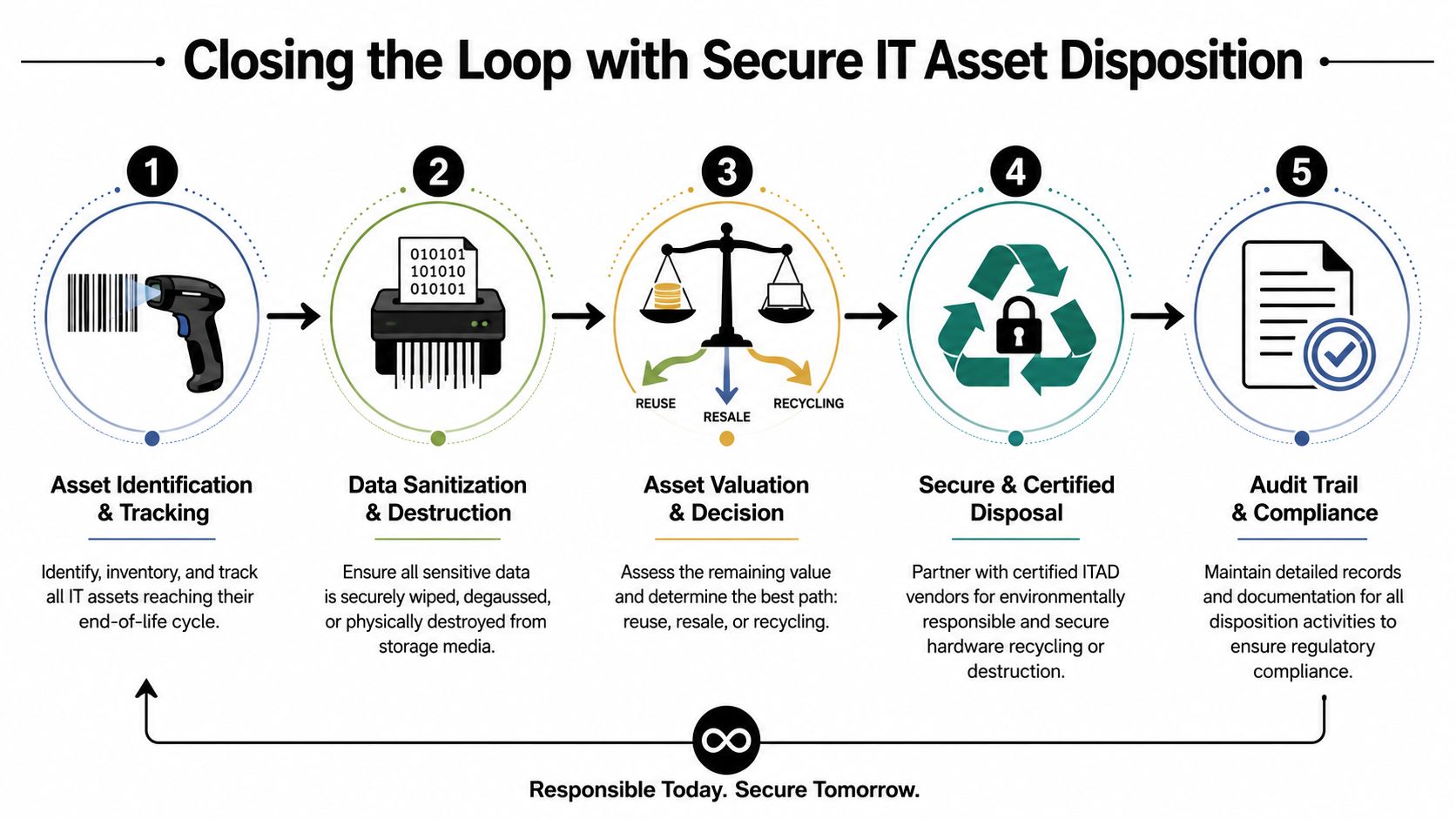
A mature IT asset disposition (ITAD) process closes the loop between cyber policy and physical action. It doesn't treat hardware retirement as an afterthought.
A sound process includes:
| ITAD step | Security purpose | Sustainability purpose |
|---|---|---|
| Asset identification | Confirms what equipment exists and who used it | Prevents unmanaged stockpiles |
| Data sanitization or destruction | Removes or destroys sensitive data before reuse or recycling | Enables safe reuse where appropriate |
| Disposition decision | Separates reuse, resale, donation, and recycling paths | Preserves recoverable value |
| Certified handling | Documents chain of custody and destruction outcomes | Supports responsible downstream processing |
| Audit documentation | Proves what happened to each asset | Helps with reporting and governance |
This matters beyond security too. In 2022, the world generated 62 million tonnes of e-waste, with 78% not formally collected or recycled, according to global e-waste statistics summarized by EMEW. The environmental side of disposal is real, and so is the information risk attached to unmanaged hardware.
The same is true for unsafe recycling practices. The World Health Organization notes that unsound e-waste activities can release harmful substances into the environment, which is one more reason to use documented, responsible disposal channels instead of informal handling. There's also significant recoverable value in e-waste resources, which creates incentives to move hardware quickly. Without controls, that pressure can work against data security.
Where a service partner fits
For many businesses, especially those managing office cleanouts, laptop disposal, data center decommissioning, medical equipment disposal, or broader electronics recycling, internal teams can't handle every step alone. They need a documented chain of custody, verified data destruction, and sustainable downstream handling.
One option in that category is secure data destruction services from Reworx Recycling, which supports secure hardware retirement through services such as hard drive shredding, pickup coordination, and IT asset disposition workflows tied to electronics recycling and donation-based recycling.
That's the missing connection many companies need to make. Data breach prevention includes what happens after the device leaves production. If your program doesn't account for offboarding, storage, transport, destruction, and recycling, it leaves a physical opening in an otherwise digital strategy.
Partnering for Complete 360-Degree Data Protection
Effective data breach prevention works only when three pillars stay connected. Technical controls reduce exposure during daily operations. Organizational controls guide how people handle data, access, and offboarding. Physical controls protect information when devices are retired, donated, recycled, or destroyed.
Business leaders usually have at least one of those pillars in place. The risk appears in the gaps between them.
A complete program treats an employee laptop, a medical workstation, a backup drive, and a retired server as part of the same security lifecycle. That means encryption and access controls on the front end, governance and training in the middle, and documented ITAD at the end. When those pieces align, data protection becomes much more practical, measurable, and defensible.
If your organization is planning an office cleanout, laptop disposal project, data center decommissioning effort, or broader electronics recycling program, Reworx Recycling provides a practical next step. Businesses can use its resources to plan secure data destruction, schedule equipment pickup, support donation-based recycling, and build an end-of-life process that protects sensitive data while advancing sustainability and community impact.