You've got a storage room full of retired laptops, desktops, monitors, and a few devices nobody can identify. The pickup deadline is close, your team needs the space back, and searching “computer recycling near me” produces a list of drop-off sites, retailers, brokers, and informal buyers that all make similar promises.
Distance isn't the selection criterion. You need to know who accepts your equipment, who protects the data, who documents every handoff, and who can prove what happened afterward. This guide gives facilities managers, IT leaders, and sustainability teams a practical way to vet local computer recycling, IT equipment disposal, and IT asset disposition (ITAD) options before anything leaves the building.
Why Finding the Right Computer Recycling Option Near You Is Harder Than It Looks
A nearby recycler may be perfectly suitable for a household printer and completely unsuitable for a truckload of corporate laptops. Local listings often fail to distinguish between residential drop-off, commercial pickup, secure data destruction, refurbishment, material recovery, and downstream brokerage. That makes a simple search operationally risky.
Start by defining the job before calling vendors. Count laptops, desktops, servers, monitors, printers, mobile devices, loose drives, batteries, and peripherals separately. Note which devices still boot, which are damaged, which contain regulated or confidential information, and whether the load includes equipment from a data center decommissioning, medical environment, laboratory, or office cleanout.
Then screen each provider against five questions:
- Service fit: Does the company handle business quantities and your specific equipment categories?
- Security: Does it offer documented sanitization or physical destruction matched to the media and data sensitivity?
- Custody: Will you receive serialized inventory and records showing who handled the equipment?
- Downstream control: Can the provider explain where reusable assets and non-reusable materials go?
- Documentation: Will the final file include certificates, receiving reports, and disposition results?
Practical rule: If a vendor can't describe its chain of custody before pickup, don't let it take custody.
Curbside collection and informal cash buyers create particular problems. They may not issue a written manifest, may lack insurance, and may provide no defensible answer about data destruction or final processing. A responsible donation-based recycling partner can create community value, but donation doesn't replace secure sanitization or accountable records. Reworx Recycling's discussion of common e-waste recycling misconceptions is useful background when your team is separating charitable reuse from basic disposal.
Your objective is a short list of qualified recyclers, not the longest list of locations. Ask for accepted-item rules, pickup requirements, certifications, sample documentation, pricing, and turnaround before scheduling.
The Scale of the E-Waste Problem Behind Every Local Search
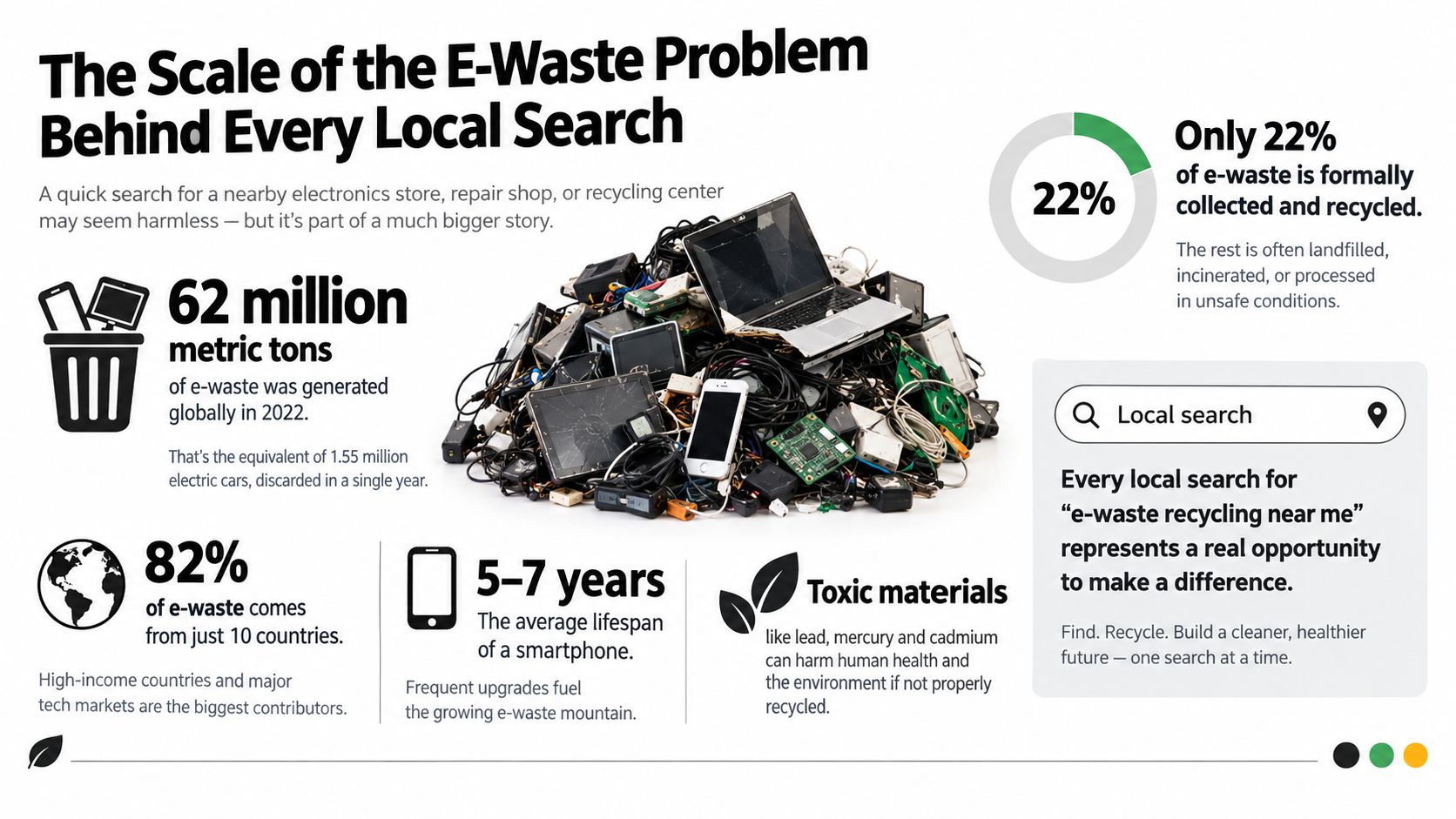
By Friday, a truckload of retired laptops can become either a documented recovery stream or an unmanaged liability. The Global E-waste Monitor 2024 reports that the world generated a record 62 million tonnes of e-waste in 2022, or about 7.8 kilograms per person. Global volume had risen 82% since 2010, and the monitor projects 82 million tonnes by 2030 if current trends continue. The United Nations Institute for Training and Research reports these figures in its 2024 monitor release.
Computers sit within that stream alongside displays, peripherals, phones, networking equipment, and other electronics. Only 22.3% of global e-waste was formally collected and recycled in 2022. More than three-quarters therefore bypassed documented recycling channels, while roughly US$62 billion in recoverable resources were lost because recycling systems were inadequate.
For a facilities manager, these figures make the local search a vetting and preparation problem. A nearby address proves little. The handoff must send equipment into a documented path for reuse, dismantling, and material recovery, rather than an uncontrolled chain with unknown environmental and data consequences. Reworx Recycling's overview of e-waste's environmental impact provides useful context for that decision.
Local access determines the outcome
Policy and infrastructure shape local results. In the United States, Maine enacted the country's first electronics extended producer responsibility law in 2004. Earlier national discussions also helped lead to the first voluntary retail-based computer recycling program with Staples and the EPA in 2004. The Product Stewardship Institute documents this policy history.
Collection performance remains uneven across major regions. Europe records about 42.5% collection and recycling, compared with 11.7% in Asia and 9.4% in the Americas, according to the same source. Those differences show why a facilities team must evaluate the actual local route, not rely on the word “recycling” in a listing.
The EPA describes donation and recycling as pollution-prevention actions because they conserve natural resources and help avoid air and water pollution. Its electronics donation and recycling guidance supports a practical rule: prepare the equipment, verify the receiving process, and treat the change of custody as the point where your environmental and data obligations become real.
Local Computer Recycling Options and Their Acceptance Policies
By Friday, a truckload of retired laptops needs a confirmed destination, not another search result. Local options fall into four categories. Match the provider to the load, then verify its rules directly because accepted materials, documentation, and commercial terms vary.
Drop-off centers suit small, organized batches. They commonly take laptops, desktops, cables, and selected peripherals, while excluding monitors, printers, batteries, or large business loads. Some provide recycling only and no documented data destruction. A receipt confirms delivery, not that a drive was sanitized.
Scheduled business pickups fit offices, schools, warehouses, and multi-site organizations. A professional pickup may cover palletized equipment, serialized inventory, secure transport, hard-drive destruction, refurbishment, and ITAD reporting. Before booking, ask whether the provider takes mixed loads, loose drives, servers, medical equipment, laboratory equipment, and devices containing batteries. Confirm how inventory and certificates will be handled.
Retailer and manufacturer take-back programs work well for consumers and small quantities. Restrictions may apply to brands, categories, item counts, or participating locations. Use these programs for a few eligible devices. They generally do not replace a corporate chain of custody or certificates linked to every asset.
Municipal collection events can accept many electronics at no charge, but availability is seasonal or occasional. Confirm business eligibility, appointment requirements, accepted materials, and data-destruction documentation. Public collection is not automatically secure ITAD.
| Service Type | Typical Volume | What They Accept | Data Destruction | Cost |
|---|---|---|---|---|
| Drop-off center | Small batches | Common computers and selected peripherals | Often limited or unspecified | Free or fee-based |
| Scheduled pickup | Office, school, or multi-site loads | Laptops, desktops, servers, monitors, drives, and approved mixed equipment | May include documented wiping or destruction | Quote or program-based |
| Retailer take-back | Individual or small quantities | Selected branded devices and categories | Usually the owner's responsibility | Free or item-based |
| Municipal event | Occasional household or community loads | Broad categories listed for that event | Varies and may be undocumented | Often free |
Before loading the vehicle, compare the provider's rules with its published accepted items. Ask specifically about monitors, batteries, printers, networking equipment, medical equipment disposal, laboratory equipment disposal, and product destruction. A provider that accepts computers but rejects attached accessories can leave your team with the most difficult materials.
The EPA says computers and peripherals should not go in curbside carts. Cuyahoga County's public computer recycling guidance shows why local rules matter: communities often direct these items to drop-offs, special events, or retailer programs instead of ordinary curbside collection. Verify the route before dispatching the load.
Preparing Your Devices for Safe Handoff
Treat preparation as a controlled process, not a last-minute wipe. Your vendor's certificate is only useful when your internal inventory shows which device was released, when it left, and what data policy applied.
Build the asset record first
Export or create a list containing the asset tag, manufacturer, model, serial number, storage type, location, assigned user, and disposition status. Record laptops, desktops, servers, phones, loose hard drives, SSDs, and RAID components separately. Remove devices from active management only after your IT team confirms that the machine is no longer needed, then clear BIOS locks, Apple Activation Lock, Windows Autopilot enrollment, and mobile device management profiles where applicable.
For ordinary low-sensitivity devices, a verified logical wipe may be appropriate when the media stays within a controlled process. For encrypted drives, document whether cryptographic erasure is being used and retain the verification result. Don't treat a factory reset as proof of secure sanitization.
Match the method to the media
NIST SP 800-88 identifies Clear, Purge, and Destroy as distinct sanitization outcomes. The method depends on the storage technology, the sensitivity of the information, the device's condition, and whether the media will leave your organization's control. NIST SP 800-88 Rev. 2 guidance is summarized in this media-sanitization resource.
- Laptops and desktops: Identify internal drives, verify the wipe or remove the drive for destruction, and record the result by serial number.
- Servers and storage arrays: Document each drive and enclosure. Pull SSDs from RAID groups only under a controlled procedure so no media is missed.
- Phones and tablets: Back up approved business data, remove accounts, disable activation locks, and complete the organization's mobile wipe procedure.
- Loose drives: Place them in a secure container immediately. Don't mix unidentified media with cleared assets.
Healthcare, legal, payment, research, and government systems deserve a stricter path. When media is damaged, leaves organizational control, or can't be reliably sanitized, require purge or physical destruction and request a certificate that identifies the method and the specific assets. Reworx Recycling's explanation of what data sanitization means can help non-specialists distinguish a reset from a controlled sanitization process.
Keep the preparation log with the receiving report, custody transfer, and final certificate. If the vendor's count differs from yours, stop the transaction and reconcile the discrepancy before approving the load.
Refurbish, Resell, or Shred How the Best Outcome Gets Chosen
Shredding is not automatically the responsible outcome. A functional laptop that can be securely sanitized may retain more environmental and social value through refurbishment, resale, or donation than through immediate destruction. A damaged or non-wipeable drive, however, shouldn't be forced into reuse just to improve recovery value.
A professional processor generally makes the routing decision after examining condition, data sensitivity, repairability, demand, and material composition. Working equipment can enter refurbishment or resale. Devices that fail full reuse may provide usable memory, drives, batteries, screens, or other components. Remaining material fractions move through dismantling, sorting, and specialized recovery.
Peer-reviewed research describes e-waste processing as collection, pretreatment, and recovery. It reports that optimized recycling can recover up to 95% of base and precious metals in some streams, including materials such as copper, tin, gold, palladium, and silver. The research review describes these processing stages and recovery methods.
| Pathway | Device Condition | Data Sensitivity | Primary Outcome |
|---|---|---|---|
| Refurbishment or resale | Functional, repairable, and marketable | Sanitization can be verified | Extended use and value recovery |
| Component harvesting | Partially functional or uneconomical to repair | Media is removed and controlled | Reusable parts recovered |
| Material recovery | Damaged, obsolete, or unsuitable for reuse | Media is purged or destroyed as required | Metals and other materials recovered |
| Physical destruction | Failed, compromised, or non-wipeable media | High or regulated sensitivity | Data-bearing media rendered unusable |
The phrase “lowest environmental footprint” shouldn't be used as a blanket rule without examining the device and data. Reuse usually preserves more of the product's existing function, but sensitive information may require purge or destroy. A responsible vendor should explain the decision for each class of equipment rather than promise that every laptop will be resold or every drive will be shredded.
For a donation-based program, ask where working devices go, how recipient organizations are selected, and what happens when an asset fails testing. Digital inclusion and workforce development are meaningful outcomes only when the equipment is secure, functional, and tracked.
How to Vet a Computer Recycling Vendor Before You Hand Anything Over
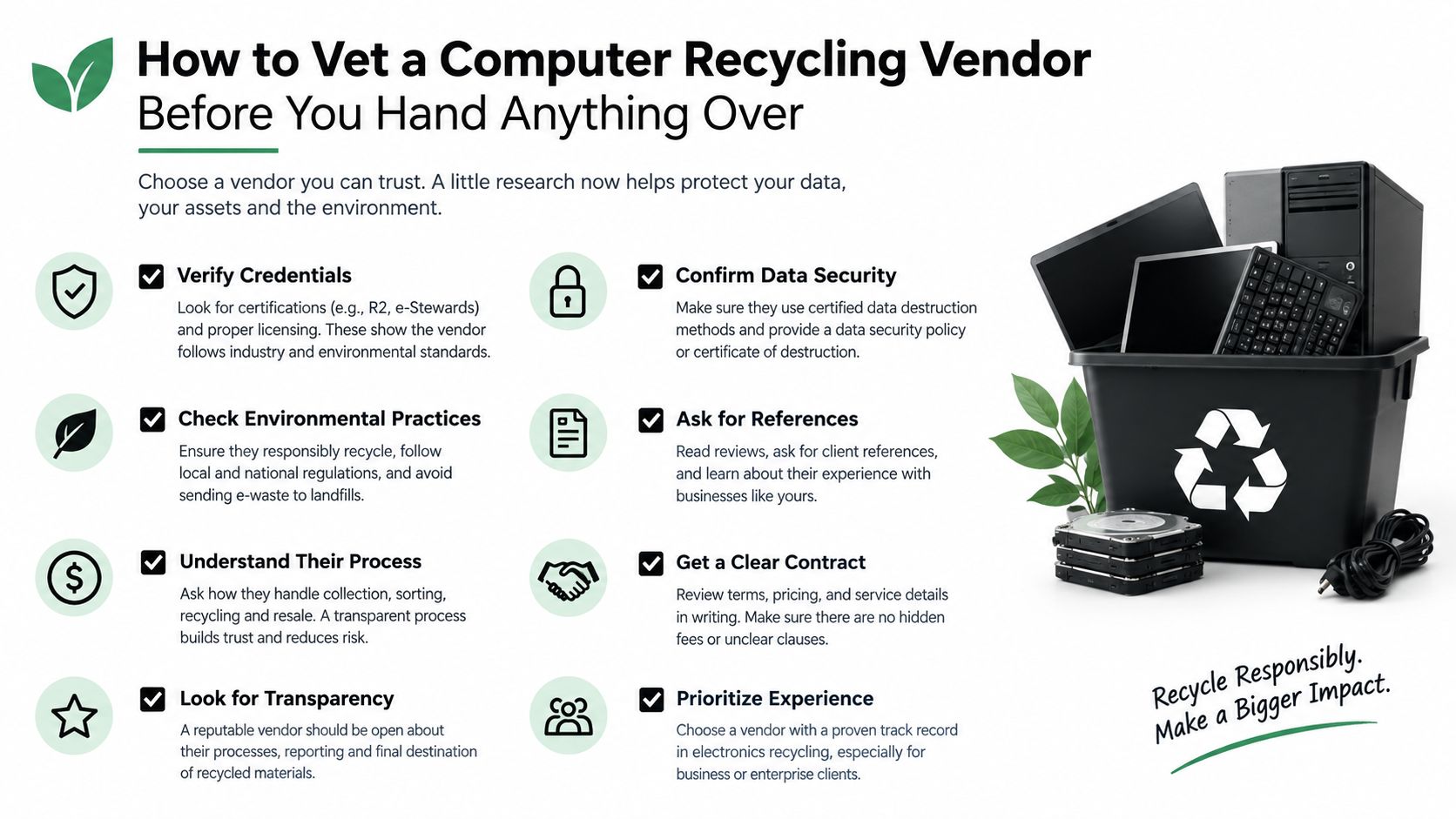
You can eliminate most unsuitable vendors with a focused call. Don't start with price. Start with evidence.
Run the fifteen-minute screen
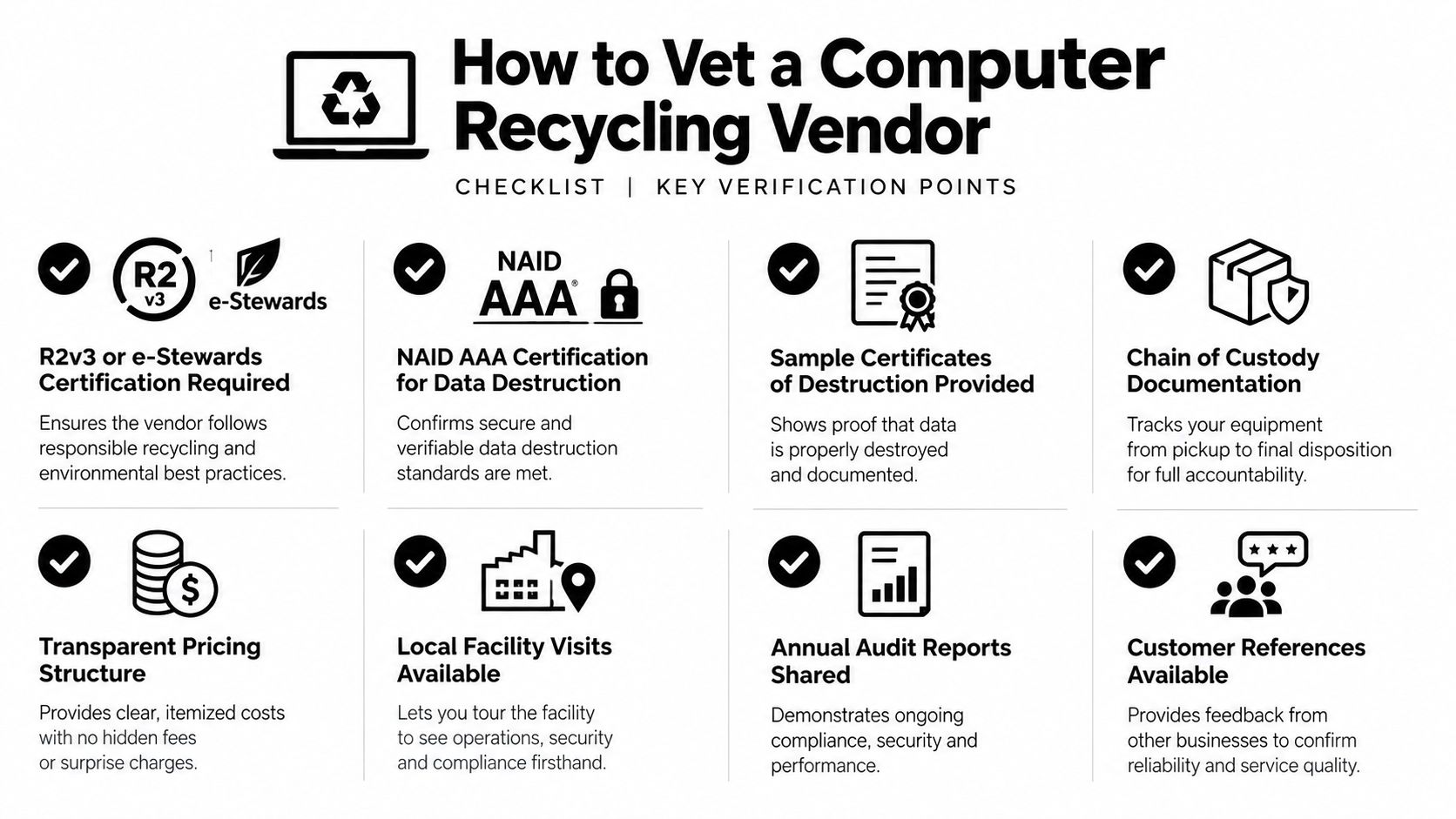
Ask whether the processor holds R2v3 or e-Stewards certification and request the certificate number or current documentation. For destruction services, ask whether the responsible facility or provider holds NAID AAA certification. Then request a sample certificate of destruction, a sample serialized receiving report, and an example of the audit trail connecting pickup to final disposition.
Trace the downstream chain. A broker that can't identify the processing facility or explain how it controls downstream partners isn't ready for a corporate load. You should also ask about insurance, written manifests, locked transport, minimum quantities, pickup windows, accepted items, and certificate turnaround.
Reject these red flags:
- No written manifest: You can't prove what left your building.
- No insurance certificate: The vendor hasn't demonstrated basic risk controls.
- Vague final disposition: “We recycle everything” isn't a process description.
- Cash-only scrap buying: A cash transaction creates weak accountability and poor audit evidence.
- No sample documentation: A legitimate ITAD provider should show what its reports look like.
- Unclear subcontracting: You need to know who performs destruction and where equipment goes.
Preserve your own compliance file
Retain the original asset list, signed pickup manifest, serialized receiving report, custody records, destruction or sanitization certificates, and final disposition report. Keep notes from vendor approval, including certifications, insurance, pricing, and downstream answers. If you're also evaluating digital marketing or local search visibility for your recycling program, reviewing Transactional LLC's approach offers a separate perspective on how service businesses present local expertise. It shouldn't replace operational due diligence.
Before contracting, review the provider's vendor selection criteria. The practical standard is simple: if an auditor asked you tomorrow where each device went, you should be able to answer from your records without relying on a vendor's verbal reassurance.
Partnering With a Local Recycler That Closes the Loop
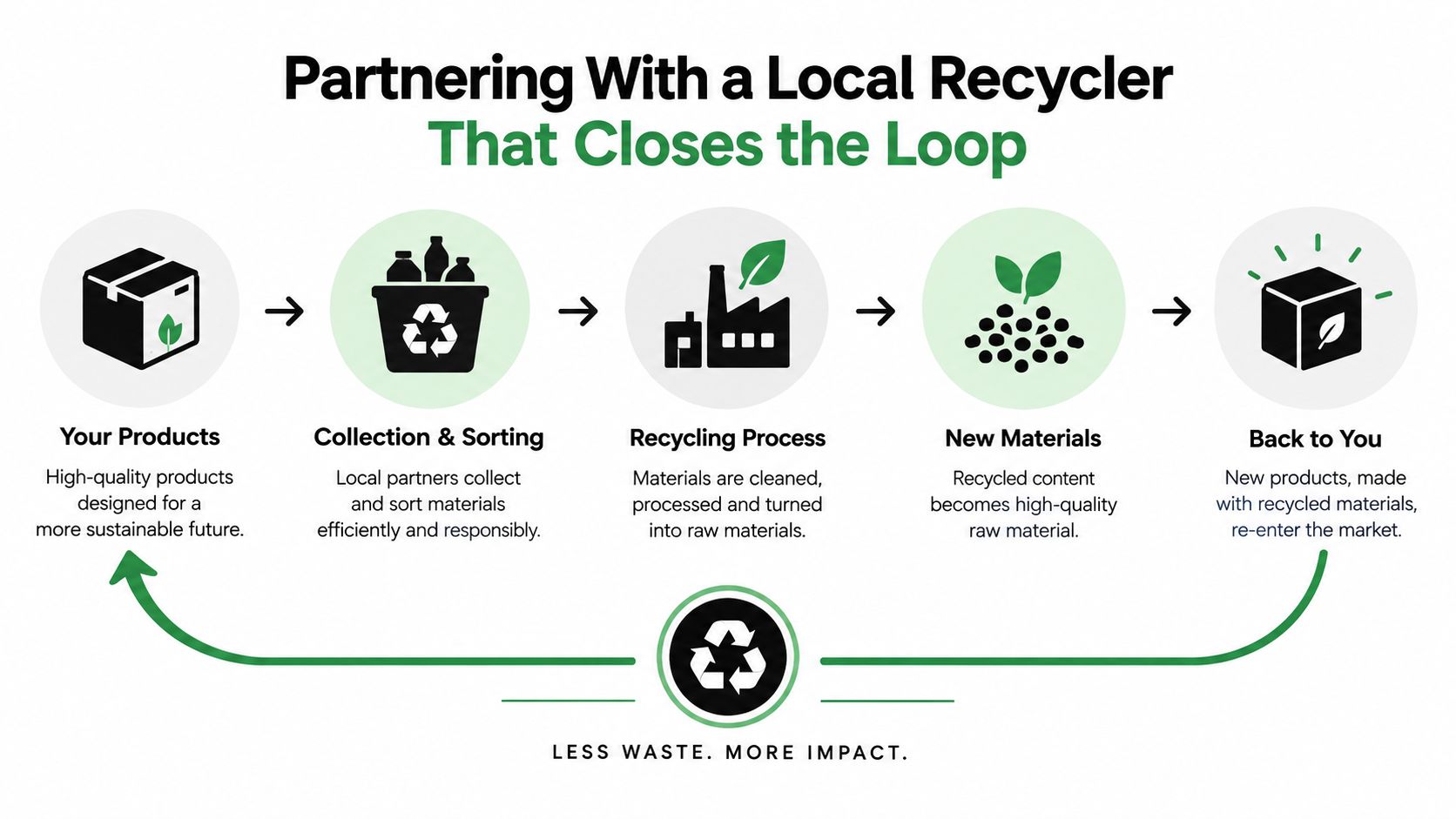
The right local partner combines four capabilities that are often sold separately: reliable logistics, secure media sanitization, documented downstream control, and a credible reuse or recovery route. That combination matters more than proximity alone. A nearby drop-off that can't issue asset-level records isn't a complete solution for a corporate laptop retirement.
Put the requirements in the service order and invoice. Require a serialized inventory, custody documentation, certificates of destruction or sanitization, weight tickets where relevant, and a written commitment describing downstream processing. If your policy requires zero-landfill handling or R2v3 processing, state that requirement before pickup, not after the equipment has been loaded.
Regional accountability has operational value
A regional recycler can offer faster scheduling, shorter freight routes, easier facility access, and a person who knows your site when a truck is delayed. Those benefits don't excuse weak certifications or poor records, but they can make a documented program easier to manage than a remote broker with multiple unknown subcontractors.
The same framework applies to specialized work. Data center decommissioning requires controlled removal and media accounting. Medical equipment disposal and laboratory equipment disposal may require separate handling instructions. An office cleanout may combine laptops, printers, batteries, monitors, furniture, and product destruction. Ask the partner to scope each category instead of treating the whole load as generic scrap.
Reworx Recycling is one option for organizations that need business pickups, equipment decommissioning, IT asset management, recycling consultation, and secure hard-drive shredding. Its donation-based social enterprise model also connects usable equipment with community impact through technology donations, digital inclusion, and workforce development. Confirm the current service area, accepted equipment, documentation package, and scheduling terms before approving a project.
A successful retirement doesn't end when the truck leaves. It ends when every asset has a documented, defensible destination.
For this week's load, inventory the devices today, separate data-bearing media, request sample documentation from qualified vendors, and schedule the pickup only after the scope is written down. That process turns “computer recycling near me” from a location search into a controlled ITAD decision.
Reworx Recycling provides business electronics recycling, computer recycling pickup, secure hard-drive shredding, equipment decommissioning, and donation-based ITAD support for organizations retiring technology. Visit Reworx Recycling to review its services and take the next step toward a secure pickup, responsible reuse, or documented material recovery program.