Your facilities team finished a technology refresh. The old laptops are stacked in a storeroom. A few monitors are leaning against the wall. Someone also dropped off fluorescent tubes from the warehouse and a bucket of used batteries from maintenance.
At that point, most organizations ask the same question. What can stay in ordinary recycling, what counts as hazardous, and what requires a special process?
That is where universal waste becomes useful. It sits between everyday trash handling and full hazardous waste regulation. For busy facilities managers, IT teams, school administrators, and sustainability leaders, it can make the difference between an orderly recycling program and a compliance problem that grows undetected in storage.
Navigating the Complex World of Universal Waste
A common scenario starts small. An office replaces laptops. A facilities team changes lamps. A maintenance supervisor swaps out thermostats. Each job seems separate, but the leftovers often end up in one holding area.

The risk is not just clutter. Some of those items contain materials that require controlled handling. If staff members guess wrong, they can mislabel waste, store it too long, or send it to the wrong outlet.
Why this matters more now
The volume of discarded electronics keeps rising. In 2022, global e-waste generation reached a record 62 million metric tons, marking an 82% increase from 2010 levels, according to the world waste statistics summary. That growth is one reason efficient programs such as universal waste rules matter.
For a business, the practical value is simple. Universal waste rules give organizations a manageable path for handling common hazardous items without forcing every generator into the full hazardous waste system.
Where people get tripped up
Most confusion starts with three assumptions:
- “If it looks recyclable, it can go with scrap.” Not always. Some items need a controlled chain of custody.
- “If it came from the office, it is not hazardous.” Office waste often includes batteries, lamps, and devices with regulated components.
- “IT and facilities can manage their own piles separately.” That can lead to inconsistent labeling, poor storage, and missed pickup timing.
A useful starting point is understanding what electronic waste recycling involves and then separating electronics management from general disposal habits.
Practical takeaway: If your site has a room where used batteries, lamps, retired laptops, or mercury devices collect over time, you already need a universal waste review.
Universal waste is not a loophole. It is a simplified compliance pathway. Used correctly, it helps your team move material out safely, protect workers, and avoid avoidable disposal mistakes.
Defining Universal Waste and Its Regulatory Roots
Universal waste is a subset of hazardous waste. The category exists because some hazardous items show up across almost every type of workplace. Offices, schools, clinics, warehouses, labs, and government buildings all generate them.
Instead of regulating these common items under the full set of hazardous waste rules in every case, EPA created a simplified system.
Why the category was created
The federal idea was practical. If the rules were easier to follow for common hazardous items, more organizations would participate in proper collection and recycling.
That federal framework started in a formal way when the EPA designated the first universal wastes, batteries, pesticides, and mercury-containing equipment, in 1995 under 40 CFR Part 273 to simplify management and boost recycling rates, as described by the Minnesota Technical Assistance Program overview.
This matters for businesses because the category was built to reduce friction. It is still regulated, but the day-to-day obligations are more workable than full hazardous waste handling for these specific materials.
What universal waste is trying to prevent
Many universal waste items contain materials that should not end up in ordinary trash. Think of mercury in older equipment, battery chemistries in portable devices, or residues in certain aerosol cans.
If those materials break, leak, or get crushed in municipal waste systems, disposal shifts from a housekeeping issue to an environmental and liability issue.
A facilities manager does not need to memorize every federal citation to manage that risk. But they do need to know the basic intent:
- Keep common hazardous items out of regular trash
- Make collection and recycling easier
- Preserve traceability from generation to final destination
What it is not
Universal waste is not “anything hard to recycle.” It is not a catch-all label for all unwanted electronics or all maintenance leftovers. The category applies only to specific waste streams recognized under the rules that apply to your location.
That is why policy teams often pair internal procedures with recognized e-waste certification standards when evaluating vendors and downstream handling.
Key point: Universal waste rules simplify management. They do not remove responsibility. Your team still has to identify the waste correctly, store it safely, and send it to an authorized destination.
Why busy organizations benefit from the distinction
If every used battery or fluorescent lamp triggered the full hazardous waste framework, many organizations would struggle with cost and administration. Universal waste gives them a more realistic operating model.
For facilities teams, that means fewer excuses for delay. Once staff understand which materials fit the category, they can build a clear process around storage, labeling, training, and pickup scheduling.
Identifying Common Universal Waste in Your Business
The fastest way to improve compliance is to stop thinking of universal waste as a legal term and start thinking of it as a facility inventory problem. Walk your site. Open maintenance closets. Check storage cages. Ask IT what sits on shelves after refresh cycles.
Most businesses find universal waste in more places than expected.
The main federal categories
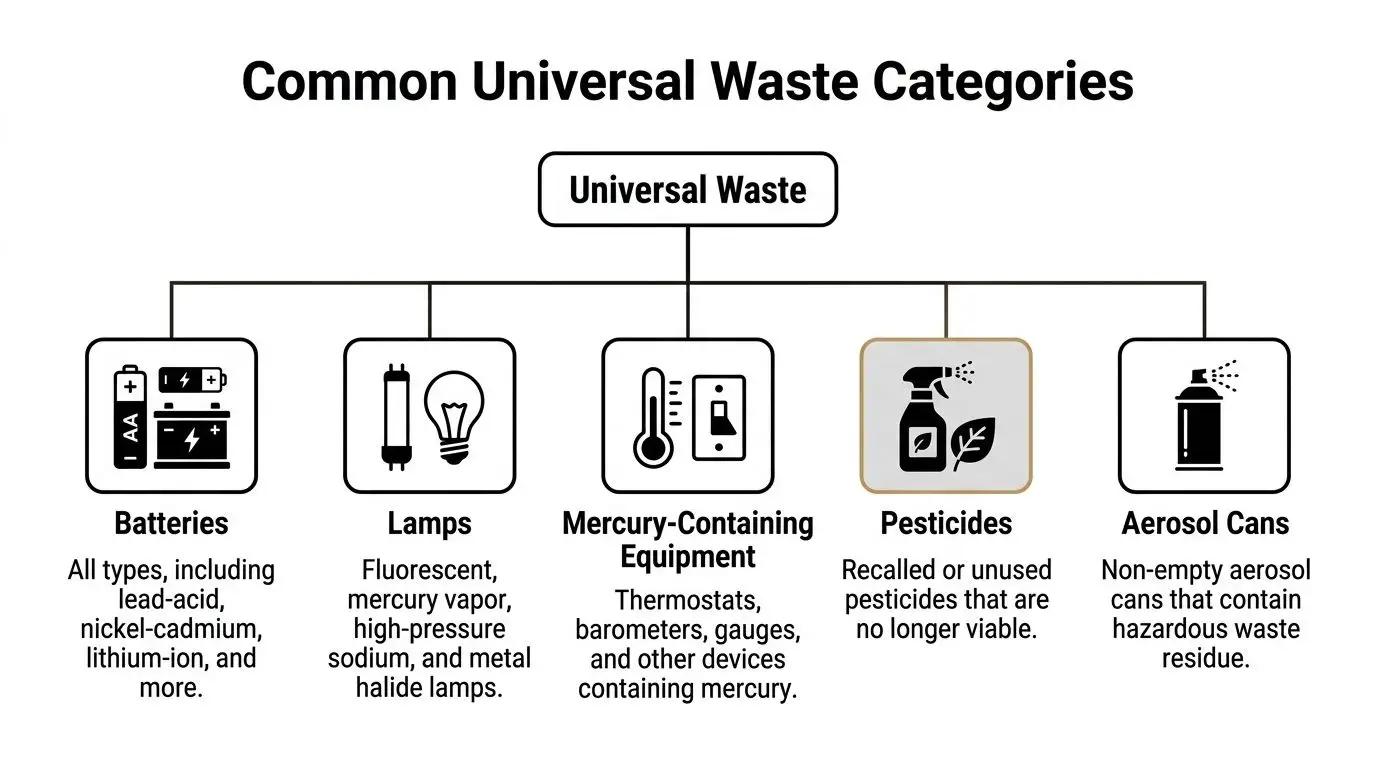
Under the federal framework, you are most likely to encounter these categories:
- Batteries. This includes many battery types used in business operations. Think laptop batteries, backup power batteries, batteries from emergency lighting, handheld tools, alarm systems, and maintenance equipment. Legal explainers on common universal waste like batteries can help clarify why these items receive special handling.
- Lamps. Fluorescent tubes are the classic example, but the category also covers other lamps that may contain regulated materials.
- Mercury-containing equipment. Older thermostats, switches, gauges, and similar devices often fall here.
- Pesticides. This can affect facility operations, groundskeeping, or campus maintenance.
- Aerosol cans. These are now part of the universal waste category and often show up in maintenance shops, janitorial areas, and production support spaces.
Where businesses usually overlook them
The overlooked waste stream is rarely in the main office. It is usually in support areas.
A few examples:
- Warehouse maintenance rooms often hold spent lamps and aerosol cans.
- Security or life-safety storage may contain batteries from alarms, detectors, and emergency devices.
- School science departments may store mercury devices or older specialty equipment.
- IT closets and server rooms often generate batteries, peripherals, and mixed electronic scrap.
- Grounds departments may have unused or outdated pesticides.
The e-waste question
Many teams get confused on this point. Not all electronics are federal universal waste. But some states treat certain electronics under their own universal waste programs. That means your compliance answer for retired devices depends on where you operate.
A practical example helps. A desktop computer is not automatically “universal waste” everywhere under federal rules. But if your state regulates certain electronics under its universal waste program, your office cleanout may need to follow that framework.
That is why facility audits should include a device-by-device review of common items, not just a general pile marked “old electronics.” Many organizations are surprised by the range of items described in lists such as electronics you probably didn’t know you could recycle.
A simple site walkthrough method
Use this short approach during your next walk:
Check maintenance areas first
These spaces often hold lamps, batteries, mercury devices, and aerosol cans.Review IT and AV storage
Ask what happens to laptops, monitors, docks, cables, and equipment removed from service.Inspect satellite spaces
Reception closets, lab prep rooms, school stockrooms, and janitorial areas often contain regulated items no one is counting centrally.Separate by waste type
Do not create one mixed pile. Mixed accumulation increases handling mistakes.
Tip: If staff call everything “e-waste,” slow down. That label is useful for internal awareness, but it is not detailed enough for compliance decisions.
The primary job is identification. Once your team can name the waste correctly, storage and shipping decisions become much easier.
Your Role in the Universal Waste Chain Small vs Large Quantity Handlers
The most important universal waste threshold for many organizations is not a disposal technology. It is a quantity line.
Universal waste regulations under 40 CFR Part 273 create a distinction between Small Quantity Handlers accumulating less than 5,000 kg and Large Quantity Handlers at or above that threshold, with Large Quantity Handlers facing mandatory EPA identification numbers, three-year recordkeeping, and documented staff training, as described in this regulatory summary from Beveridge & Diamond.
For a busy site, that threshold can become a surprise during a cleanout, renovation, or IT decommissioning.
Why the tipping point matters
A site may operate comfortably as a small quantity handler for most of the year. Then one large technology refresh lands in the storage room at the same time as a lighting retrofit and maintenance purge.
That is how organizations cross the line without realizing it.
The difference is not academic. Once you are in Large Quantity Handler territory, paperwork, training, and tracking expectations increase materially.
SQH vs. LQH Compliance Requirements at a Glance
| Requirement | Small Quantity Handler (SQH) <5,000 kg | Large Quantity Handler (LQH) ≥5,000 kg |
|---|---|---|
| Accumulation status | Below threshold | At or above threshold |
| EPA identification number | Not required under the verified rule summary | Required |
| Shipment records | Not subject to the same detailed recordkeeping requirement described for LQHs | Must maintain detailed shipment records for three years |
| Staff training | More limited expectations | Documented staff training required |
| EPA notice of activity | Not required in the verified summary | Required |
A practical example
A school district clearing out old classroom technology can run into this quickly. So can a mid-sized company replacing office hardware, UPS units, and warehouse lighting in one project window.
The mistake is waiting until pickup day to estimate volume. By then, storage, labeling, and training obligations may already be in play.
What managers should do before a cleanout
Estimate the waste stream early
Include batteries, lamps, and other regulated items. Do not count only computers.Coordinate IT and facilities
The threshold applies to total universal waste accumulation, not just one department’s pile.Document the plan
Large projects need a written handling path before equipment starts moving.
Key takeaway: The biggest compliance problem for growing organizations is often not improper intent. It is discovering too late that a one-time project changed their handler status.
If your organization plans a large office cleanout, data center refresh, school surplus event, or facility renovation, the quantity threshold deserves attention before the first pallet is staged.
Safe Storage Labeling and Transport of Universal Waste
Once you know what you have, day-to-day management becomes the next control point. Universal waste rules are more forgiving than full hazardous waste rules, but they still expect disciplined handling.
The biggest operational mistakes are usually simple. Containers stay open. Lamps get stacked where they can break. Batteries are tossed in mixed bins. Pickup planning slips and material sits too long.
Store waste to prevent releases
The purpose of storage rules is straightforward. Prevent breakage, leaks, and employee exposure.
That means using containers that fit the waste type and keeping them in sound condition. A battery drum should not double as a lamp box. Mercury-containing devices should not sit loose on a shelf where they can fall during routine work.
A good storage area has three traits:
- Controlled access
- Clear segregation by waste type
- Visible labeling
Label clearly and consistently
Labels matter because regulators and employees both need to know what is in front of them. If your organization uses central accumulation areas, every container should communicate waste type without guesswork.
Examples of practical labels include naming the universal waste category directly on the container. The exact wording and local requirements should be checked against your jurisdiction and waste stream, but clarity should be the minimum standard.
If your battery program includes lead-acid units from forklifts, floor equipment, or backup systems, teams often benefit from operational guidance on services related to lead-acid battery recycling, especially when multiple departments generate the same waste.
Watch the one-year clock
Universal waste must be sent exclusively to another certified Universal Waste Handler or a final Destination Facility, and handlers are prohibited from storing it for more than one year from the generation date, according to this overview of universal waste requirements.
That one-year limit creates a planning discipline. You cannot treat storage space as a permanent holding area.
A workable internal system usually includes:
- Date tracking at intake
- Regular internal reviews
- Scheduled outbound pickups before deadlines tighten
Practical tip: If your team cannot answer when a waste container started accumulating, your labeling and inventory process is already too weak.
Transport and destination rules
Universal waste is not something staff should send to any convenient recycler, scrap yard, or municipal option. The receiving endpoint matters.
The destination must fit the regulatory chain. Improvised disposal decisions are one of the fastest ways to create exposure, especially when local staff assume a general recycler can accept anything.
For facilities managers, transport planning should answer four questions before pickup:
- Who is taking the waste
- Where it is going
- Whether that destination is authorized for the waste category
- How your team will document the handoff
This is less about bureaucracy and more about defensibility. If a question arises later, you need to show that the material moved through the right path.
Navigating State Rules and Data Security for E-Waste
Federal universal waste rules are only part of the picture. Electronic devices create a second layer of complexity because states may regulate them differently.
A company with one office may have a straightforward procedure. A company operating across several states may need different instructions for the same retired device.
Why electronics cause confusion
Facilities staff often ask whether old computers, monitors, servers, and peripherals count as universal waste. The honest answer is often, “It depends on the state.”
Some states place certain electronics into their universal waste structure. Others do not. That means a national policy written too broadly can be wrong in one location and incomplete in another.
This is especially important for organizations using shared service teams. If a headquarters procedure says “all electronics are universal waste,” that may oversimplify the legal status of devices in another state.
For organizations managing equipment across multiple locations, a coordinated nationwide recycling approach is often necessary so legal review, logistics, and data handling stay aligned.
The compliance issue is only half the problem
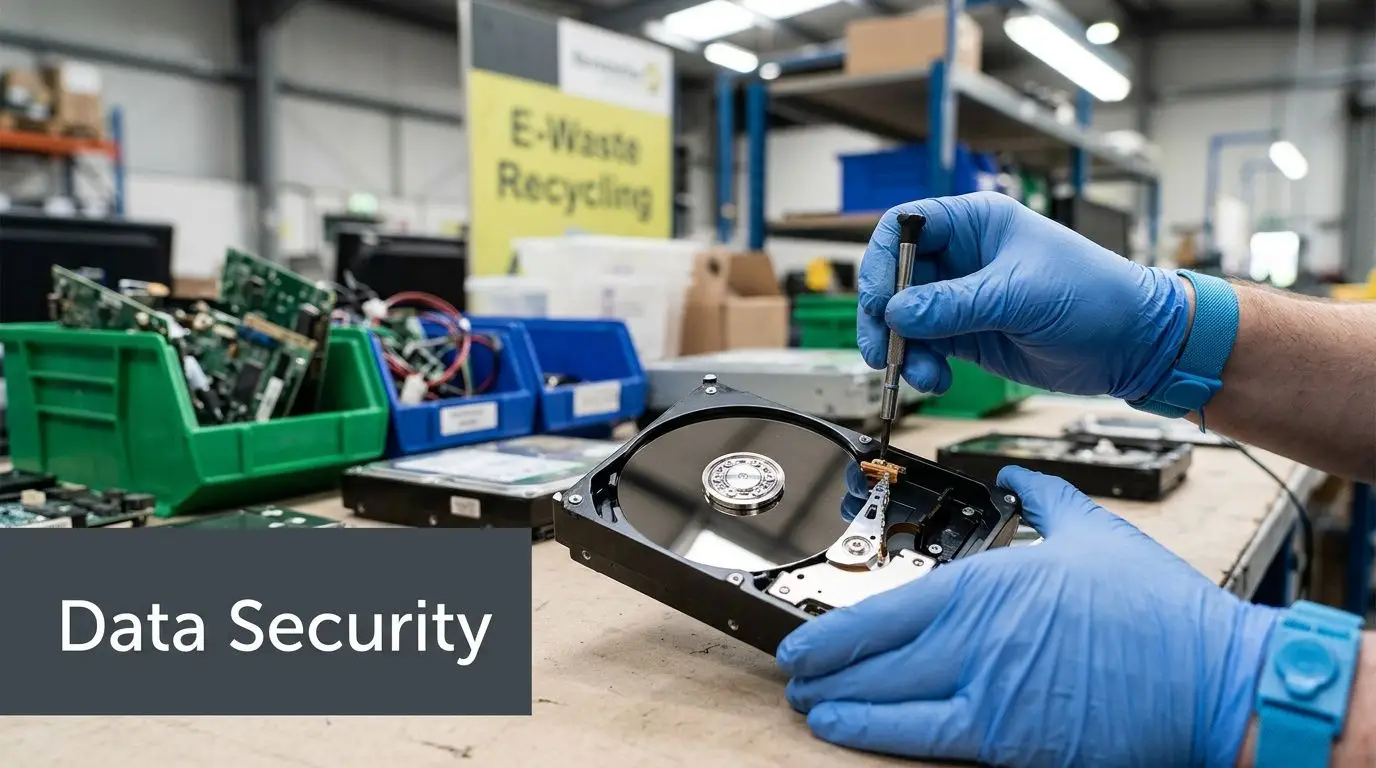
E-waste is different from lamps or pesticides because it often carries information risk. A retired laptop is not just a physical object. It may still contain employee records, client data, financial files, login credentials, engineering documents, or health information.
Deleting files is not enough for a formal disposal program. Reformatting is not enough either if the device still contains recoverable data and leaves your control.
That is why IT asset disposition programs should treat environmental compliance and data security as one process, not two separate jobs.
A workable way to think about e-waste
Break the issue into three questions:
- What is the device under state waste rules
- What data may still exist on it
- What chain of custody protects both concerns
If you answer only the first question, you may stay environmentally compliant but create an information security problem. If you answer only the second, you may shred drives correctly but mishandle batteries, screens, or other regulated components.
Key takeaway: E-waste management fails when IT owns the data question and facilities owns the disposal question, but no one owns the full handoff.
Common problem areas during IT transitions
A few situations deserve extra caution:
- Office relocations where old devices are boxed quickly without inventory discipline
- Server refreshes where racks are removed but supporting batteries and accessories are overlooked
- Medical or laboratory equipment retirements where devices may hold regulated data and contain regulated components
- School surplus events where mixed device loads arrive from many rooms with inconsistent labeling
The safest programs join state-specific waste review with controlled data destruction and documented downstream handling.
A Practical Compliance Checklist for Your Business
Most universal waste problems are preventable. They happen because the organization lacks a repeatable routine, not because the rules are impossible to follow.
One point deserves special attention. A key compliance gap for SMBs and schools is unexpectedly crossing the 5,000 kg threshold to become a Large Quantity Handler during an IT decommissioning, which triggers mandatory EPA ID numbers and advanced training requirements that they are often unprepared for, as EPA notes on its universal waste guidance page.
That risk is manageable if your process is built before the cleanout begins.
Start with a site audit
Walk the facility with both operations and IT in mind. List every area that may generate universal waste. Include satellite spaces, not just central storage.
For technical environments, teams that already use an inspection resource such as a laboratory compliance checklist often adapt that same habit to waste identification and storage reviews.
Build a simple operating system
You do not need a complicated platform to improve compliance. You need consistency.
Use this checklist:
Identify waste streams
Separate batteries, lamps, mercury-containing equipment, aerosol cans, and any state-regulated electronics.Assign one accumulation area
Avoid random storage in closets, hallways, and loading dock corners.Use proper containers
Match the container to the waste. Protect fragile items from breakage and isolate leak risks.Create labeling rules
Give staff approved wording and examples. Do not rely on handwritten guesses.Track dates
Record when waste begins accumulating so the one-year limit does not become a surprise.Estimate quantity during projects
Before an office cleanout or IT refresh, estimate whether the total load could push the site into Large Quantity Handler status.Train the right employees
Focus on the staff who touch the waste first. Maintenance, facilities, shipping, custodial, and IT teams all need role-specific instructions.Vet downstream vendors
Confirm the receiving chain before material leaves your site.
The hidden pitfalls
The rules usually break down in ordinary moments, not during audits.
Common trouble spots include:
- Mixed loads where batteries, electronics, and lamps are combined for convenience
- Unmarked start dates on containers
- Department silos that prevent anyone from seeing total accumulation
- One-time decommissioning events that outgrow normal procedures
- Assumptions about state e-waste status based on another facility’s rules
Keep projects from becoming compliance events
Large cleanouts need their own planning timeline. If you wait until a loading dock fills up, you have already lost visibility.
A better approach is to set decision points before work starts:
| Project stage | What to confirm |
|---|---|
| Before removal begins | Waste types, likely volume, internal owners |
| During staging | Labels, dates, segregation, secure storage |
| Before shipment | Destination qualification, pickup timing, chain of custody |
Practical tip: Treat a technology refresh like a regulated materials project, not just an asset replacement project.
Facilities managers who do this well make the process boring. That is the goal. Boring means documented, contained, scheduled, and easy to defend.
Partner with Reworx for Responsible Universal Waste Management
Universal waste is easier than full hazardous waste regulation, but it still demands discipline. Teams need accurate identification, safe storage, quantity awareness, timing control, and a verified downstream path.
That becomes harder when a single project combines office electronics recycling, battery handling, lamp disposal, secure data destruction, and equipment pickup logistics. It becomes harder still when multiple sites, school departments, or business units feed material into one program.
Reworx Recycling helps organizations handle that complexity with a practical, service-driven approach. The company supports electronics recycling, donation-based recycling, IT equipment disposal, computer recycling, secure data destruction, office cleanout projects, facility cleanout support, and broader IT asset disposition needs. Its social enterprise model also connects responsible recycling with community impact through technology donations and digital inclusion.
For business owners, IT managers, and sustainability leaders, that means one partner can help reduce confusion while supporting responsible disposal and stronger internal controls.
If your organization is planning a technology refresh, office cleanout, data center decommissioning, or ongoing universal waste program, connect with Reworx Recycling to donate old equipment, schedule a pickup, or build a safer end-of-life process for your devices and regulated materials.