The box of retired laptops in the records room looks harmless. So does the decommissioned copier in the hallway, the old file server in the closet, and the backup drives nobody has touched since the last office move. In a Chicago law firm, those devices aren't clutter. They're dormant breach points.
Managing partners usually see the risk only when a lease ends, a storage room fills up, or the IT team starts an upgrade. By then, the firm is often making disposal decisions under time pressure. That’s when bad habits show up. A local recycler without legal-sector controls. A casual pickup with no documented custody. A “wipe” that nobody verifies. For firms that handle privileged communications, discovery files, financial records, and increasingly biometric data, that’s a dangerous way to operate.
Secure IT Disposal Services for Law Firms in Chicago should be treated like any other matter involving confidential information. You need a documented process, a clear chain of responsibility, and proof that the work was done correctly. Anything less leaves the firm exposed to ethics issues, regulatory scrutiny, client fallout, and preventable litigation.
The High-Stakes Challenge of IT Disposal for Chicago Law Firms
A copier lease ends on Friday. By Monday, the machine is gone, along with its internal drive and a year of scanned pleadings, settlement drafts, wire instructions, and client intake records. That is how an ordinary office task turns into a privilege problem, a breach notice analysis, and a hard conversation with clients who assumed their law firm handled disposal with the same care it gives active files.
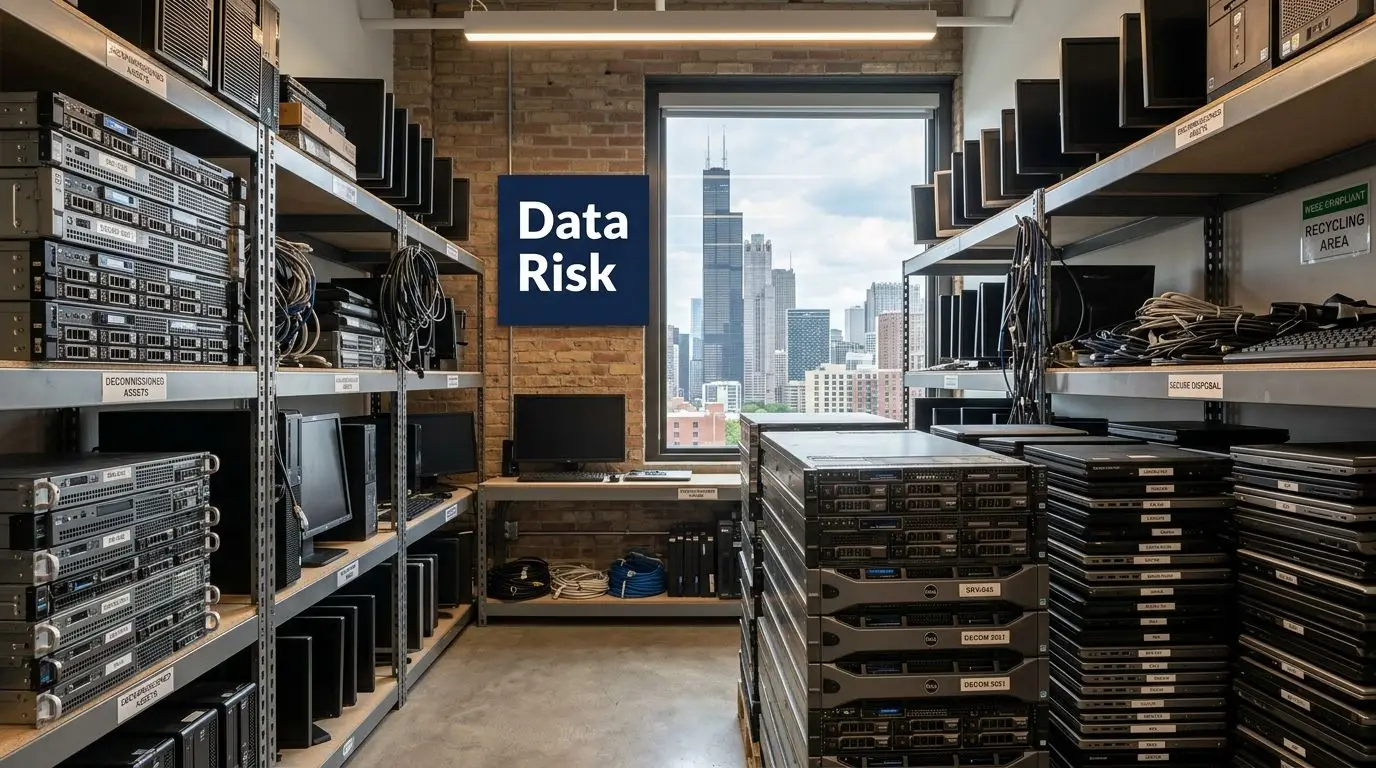
Chicago firms face a narrower margin for error than many other businesses. They do not just hold personal information. They hold privileged communications, litigation strategy, financial records, HR files, medical records in some practice areas, and, in some offices, biometric data tied to access control systems or timekeeping. In Illinois, disposal mistakes can pull the firm into more than one legal problem at once. PIPIA can trigger breach response duties, and BIPA creates a separate class of exposure that plaintiff firms in this state know how to pursue aggressively.
That combination changes the risk calculation. A retired laptop is not just old hardware. It is a potential source of malpractice allegations, disciplinary scrutiny, waived confidentiality arguments, and client loss.
Why law firms get this wrong
The breakdown is usually operational, not technical. Firms often have solid controls while devices are in service, then loosen discipline the moment equipment is marked “retired.”
Common failure points include:
- No ownership: IT, facilities, office management, and practice leadership each assume someone else controls end-of-life decisions.
- Poor documentation: Devices leave offices or storage rooms without serial-number logs, user history, or confirmation of what data they likely held.
- Unverified sanitization: A staff member says a drive was wiped, but the firm has no report, no certificate, and no process record to prove it.
- Wrong vendor type: The firm hires a recycler or moving company for pickup when the assignment requires a provider that can handle legal-sector data destruction, custody controls, and audit documentation.
I see this trade-off often. Firms try to save money by treating disposal as facilities work. The short-term invoice is lower. The risk is not.
Practical rule: If the firm cannot show what left the office, who handled it, and what destruction method was used, it cannot defend the disposal decision later.
Why this belongs with firm leadership
Managing partners and executive committees should treat IT disposal as a governance issue because Illinois liability does not stop with the IT department. The Illinois Personal Information Protection Act requires businesses to protect and properly dispose of records containing personal information, and the Illinois Attorney General states that disposal must make the data unreadable and unusable. See the Attorney General’s guidance on the Personal Information Protection Act and proper disposal duties.
For Chicago law firms, BIPA raises the stakes further. If the firm uses fingerprint or facial recognition systems for building access, time clocks, or device authentication, old hardware may contain biometric identifiers or biometric information that require careful retention and destruction handling. The statute provides a private right of action, and the Illinois General Assembly’s text of the Biometric Information Privacy Act shows why disposal cannot be improvised.
The professional duty side is just as serious. ABA Formal Opinion 483 makes clear that lawyers must address data breaches with competent, fact-specific response measures, which starts with preventing avoidable exposure in the first place. The opinion on Lawyers’ Obligations After an Electronic Data Breach or Cyberattack is focused on incident response, but the practical lesson for disposal is straightforward. If the firm cannot document reasonable safeguards before a device leaves custody, it starts any later investigation from a weak position.
Budgeting should reflect that reality. Secure disposal costs more than basic hauling because custody logs, verified sanitization, serial-level reporting, and certified destruction all take labor and controls. For most firms, that is money better spent upfront than in breach counsel fees, client notifications, forensic review, and reputational repair.
If your team needs a plain-language refresher on why secure data destruction matters, this overview is a useful starting point.
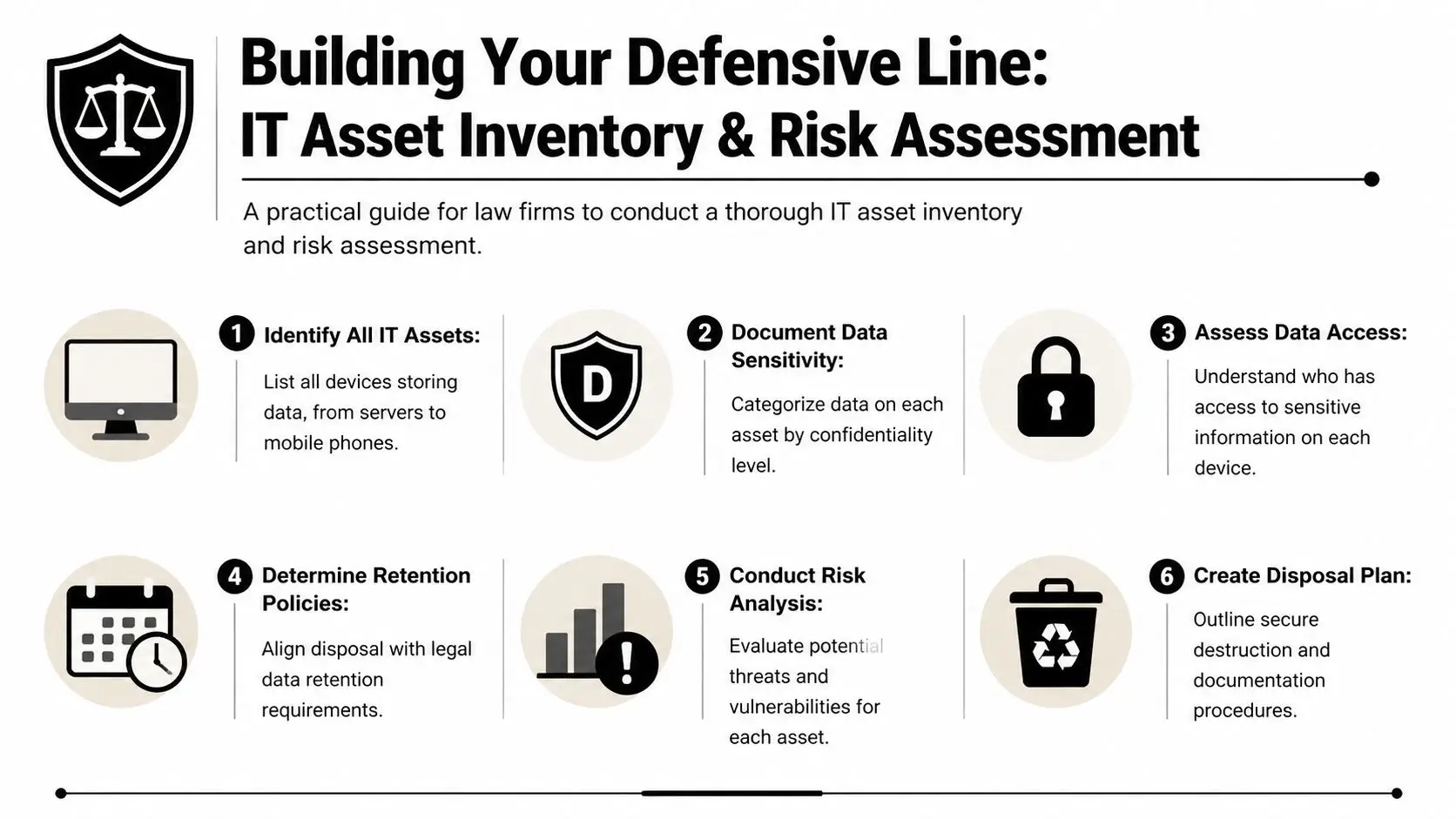
Building Your Defensive Line with Asset Inventory and Risk Assessment
Most law firms start disposal too late. They begin with the truck, not the inventory. That reverses the process.
Before a single device is boxed, moved, wiped, or shredded, the firm needs to know what exists, where it is, what data it may hold, and whether any retention rule or litigation hold applies. In legal environments, an asset list isn't just an operations document. It's part of a defensible risk record.
A practical guide for law firms to conduct a thorough IT asset inventory and risk assessment.
Start with every device that can store data
That includes obvious assets such as desktops, laptops, servers, NAS units, and external drives. It also includes less obvious equipment. Copiers, multifunction printers, voicemail systems, backup appliances, network gear with local storage, old smartphones, tablets, and even conference room systems may retain sensitive information.
The first step is simple in concept and tedious in execution. Walk the office, server room, storage areas, and any off-site archive or secondary location. Match what you physically find against procurement records and asset tags. Where firms get into trouble is assuming the CMDB or spreadsheet is complete. It usually isn't.
Classify by legal risk, not just by hardware type
Two laptops of the same model may carry very different disposal risk. One may have held marketing files. The other may contain litigation strategy, HR records, financial statements, or client intake materials.
Build your inventory around data sensitivity:
Privileged and client-confidential data
Case files, legal work product, discovery sets, settlement materials, and communications should sit at the top of the risk stack.Regulated personal information
Devices with financial records, employee information, health information, or biometric data require tighter handling.Operational but lower-sensitivity data
General office systems still need control, but they don't warrant the same disposal path as a litigation file server.
A clean asset inventory reduces arguments later. If a client, regulator, or insurer asks what happened to a retired device, the answer should already exist in your records.
Build a disposal map, not just a spreadsheet
A strong inventory tells you more than make, model, and serial number. It should answer:
- Who used the device
- Where it was located
- What classes of data it likely stored
- Whether a hold or retention rule applies
- Which destruction method fits the media
- Who approved release for disposition
Successful IT disposal requires legal operations and IT to work together. The records team knows retention obligations. Practice leaders know matter sensitivity. IT knows media type and device condition. Disposal decisions fail when one group acts alone.
The point of this exercise is full accountability. The 7-step ITAD process used for law offices begins with asset inventory via barcode or asset tags for 100% tracking and then moves into data classification before sanitization, according to this law office ITAD process breakdown. That sequence matters.
For firms trying to tighten the front end of the process, Reworx also has a practical piece on IT inventory audits before recycling.
Navigating the Chicago Legal and Regulatory Minefield
A Chicago firm can retire a copier, a litigation support workstation, or a partner laptop on a Friday and still have a Monday morning compliance problem if the disposal process is sloppy. The risk is not limited to lost hardware. It extends to client confidentiality, malpractice exposure, disciplinary scrutiny, and state privacy law.

Chicago law firms operate under overlapping duties. Court rules, engagement terms, cyber insurance conditions, records retention policies, and Illinois privacy statutes all bear on what happens when equipment leaves service. The disposal question is simple: can the firm prove that sensitive data remained protected from the moment the device was approved for retirement through final destruction or remarketing?
Illinois law makes that proof more important. Under PIPIA, the issue is not only whether a breach occurred. Investigators and claimants will also examine whether the firm used reasonable security measures in storing, transferring, and disposing of personal information. For a law office, that usually means written procedures, documented approvals, chain-of-custody records, and a destruction method that fits the media involved.
BIPA raises the stakes further. Many firms now hold biometric data indirectly through employment records, building access systems, timekeeping platforms, and client-related evidence sets. A retired laptop from HR, a case team machine used to review video evidence, or a multifunction device in an intake area may contain data that triggers questions far beyond ordinary file deletion. Generic ITAD language about "wiping devices" is not enough if the firm cannot show that Illinois-specific risks were identified before release.
That gap is common in practice. Firms often build disposal procedures around convenience and vendor availability, then discover too late that the process was never mapped to PIPIA, BIPA, or legal ethics duties. Support models can also blur accountability when IT is partially outsourced, which is why managing partners should define who owns disposal approvals and vendor oversight before devices start leaving the office. For firms reviewing that governance question, Blocsys Technologies' outsourcing IT guide is a useful reference point.
The consequences hit law firms differently than other businesses. A disposal failure can expose client names, medical records, financial data, litigation strategy, or privileged communications. That creates a second layer of damage. The firm may face privacy claims and breach costs, but it may also have to explain the incident to clients, carriers, disciplinary authorities, and courts.
When a disposal incident is examined, reviewers usually ask for records, not assurances.
Expect requests for:
- Asset-level logs showing exactly which devices were retired
- Data-type assessments showing whether personal, financial, health, or biometric information may have been present
- Release approvals confirming no hold, retention duty, or matter need blocked disposition
- Chain-of-custody records from pickup through destruction or downstream processing
- Certificates of Destruction or sanitization reports tied to specific assets
- Vendor due diligence files showing certifications, procedures, and employee controls
This is why a hauler or general recycler is rarely enough for a Chicago law firm. The provider has to support legal defensibility. That includes state-aware documentation, controlled handling, and reporting that stands up if an insurer, regulator, or opposing party starts asking detailed questions. Firms sorting through disposal options can review Illinois-specific requirements and program details through this resource on Illinois electronics recycling.
How to Vet and Select a Truly Secure IT Disposal Partner
A managing partner usually sees the risk too late. A copier is replaced, a stack of retired laptops leaves the office, and six months later someone asks for proof of what happened to each drive. If the vendor can only provide a generic invoice and a bulk destruction statement, the firm has a documentation problem before it has even assessed whether a security problem exists.
Vendor selection decides whether your disposal process will hold up under client scrutiny, insurer review, or an Illinois breach inquiry. Chicago law firms should treat ITAD due diligence the way they treat any other outside party handling sensitive client information. Price matters, but process control, record quality, and legal defensibility matter more.
Baseline Vetting Criteria
A law-firm-ready provider should be able to show a repeatable process that covers intake, asset tracking, media handling, data destruction, downstream recycling, and reporting. The point is not to collect marketing claims. The point is to verify that the vendor can account for each asset and produce records that match the way law firms are asked to defend their decisions.
Start with direct questions:
What certifications do you currently maintain, and for which facilities?
Ask for current certificates, not logos on a website.How is every asset logged at pickup and at processing?
Serialized tracking should begin before the equipment leaves your office.What proof do you issue after destruction or sanitization?
Device-level certificates are far more useful than a one-line batch summary.How do you handle failed drives, encrypted devices, backup tapes, and copier hard drives?
Edge cases are where weak vendors lose control.Who has physical access to client media, and how is that access restricted and recorded?
Employee screening and facility controls matter because insider risk is still risk.What happens when counts do not match, labels are missing, or a device arrives damaged?
A serious provider has an exceptions procedure, not improvisation.
For Chicago firms, I also recommend one more question. Ask the vendor how its documentation would help if the firm had to investigate a possible exposure involving Illinois personal information or biometric data. A provider that understands the pressure created by PIPIA and BIPA will answer in operational terms, not sales language.
What separates a hauler from a security-focused ITAD provider
The difference shows up in the handoff.
A hauler talks about truck routes, loading windows, and recycling volume. A security-focused ITAD provider talks about sealed containers, serialized manifests, intake reconciliation, restricted processing areas, audit trails, and documented downstream vendors. That level of detail is what protects a law firm when questions start.
For firms evaluating outsourced IT responsibilities more broadly, Blocsys Technologies' outsourcing IT guide is a useful companion read because it frames the larger issue correctly. When a firm outsources a sensitive function, responsibility for the outcome stays with the firm.
One practical test works well in vendor interviews. Ask the provider to walk through a single laptop disposal from pickup to final certificate, including what happens if the asset tag is unreadable or the drive cannot be wiped. Firms usually learn more from that answer than from a polished capabilities deck.
Certifications you should insist on
Certifications are not paperwork for its own sake. They are a shortcut to understanding whether the vendor operates under audited controls.
| Certification | Why it matters to a law firm |
|---|---|
| NAID AAA | Indicates audited data destruction procedures, employee controls, and handling practices relevant to confidential client information. |
| R2v3 | Shows the recycler follows defined rules for environmental management and downstream accountability. |
| ISO certifications | Useful support for firms that want evidence of documented quality, security, or management systems, depending on the specific ISO standard held. |
If you're screening providers, Reworx has a concise overview of what NAID AAA certification means for secure data destruction vendors. Review it before interviews so you can ask better follow-up questions.
Reworx Recycling is one example of a provider that offers donation-based recycling, secure data destruction, pickup scheduling, and IT equipment disposal services relevant to firms managing retired legal tech, but the same vetting standard should apply to any vendor under consideration.
Comparing Data Destruction Methods and Why Certification Matters
A Chicago firm closes a matter, retires the laptop used by a departing associate, and sends the machine out with a generic request to "destroy the data." That sounds tidy until a client asks how the firm verified destruction, whether the drive was reused, and what standard governed the process. For a law firm subject to confidentiality duties and Illinois privacy laws, the answer cannot be vague.
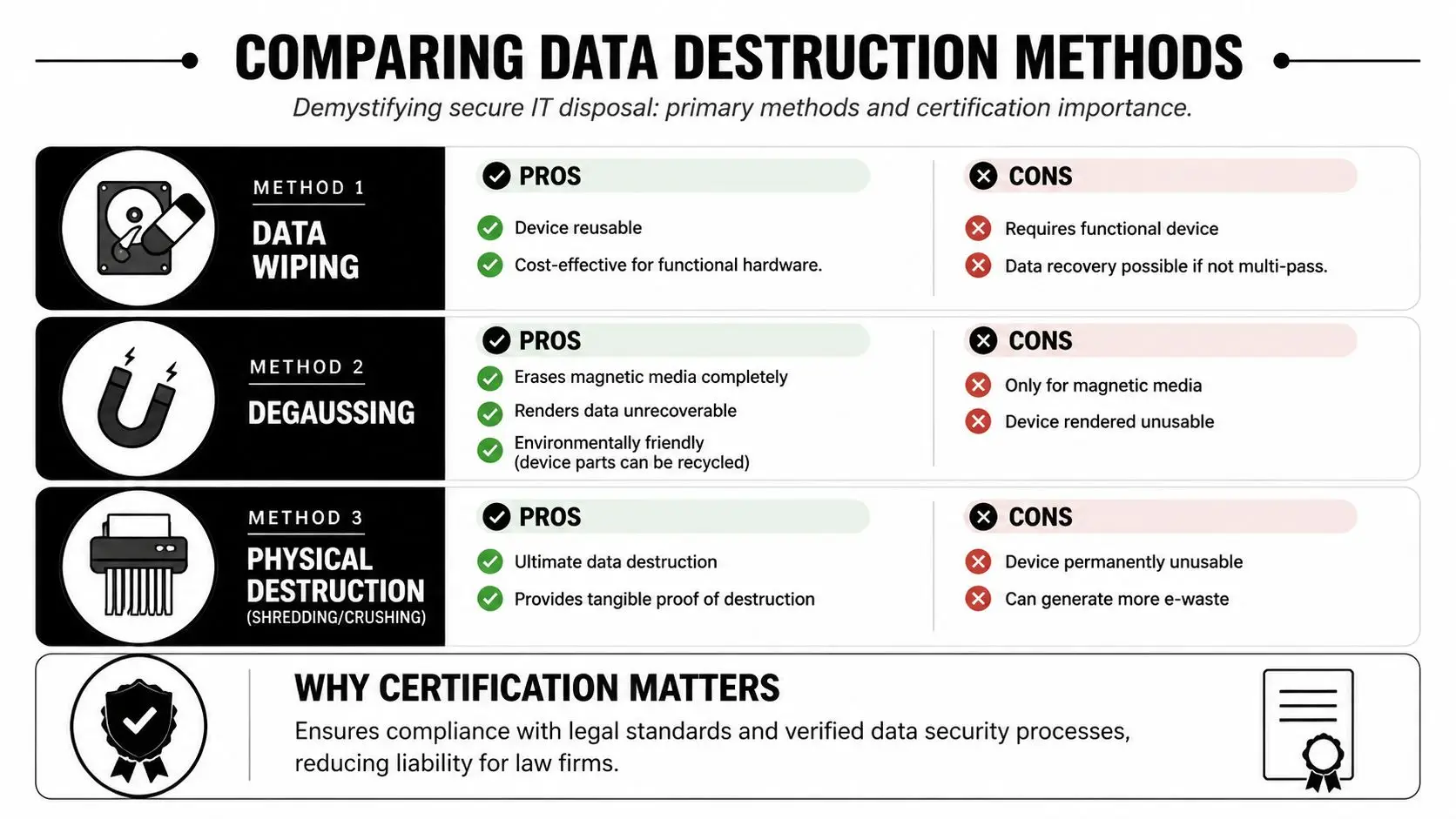
Law firms usually hear three methods from vendors: wiping, degaussing, and physical destruction. Each serves a different purpose. The right choice depends on the media type, the condition of the device, whether the firm wants resale value, and how much proof the firm may need later if a client, insurer, regulator, or disciplinary body asks questions.
Demystifying secure IT disposal: primary methods and certification importance.
Wiping when the asset may be reused
If a computer is still functional and the firm wants to preserve reuse or resale value, wiping is often the best fit. The standard most firms should ask about is NIST SP 800-88 Rev. 1 media sanitization guidance, which explains when logical sanitization methods are appropriate and how organizations should verify the result.
That verification point matters. A completed wipe job should be tied to the specific asset, with serial number or other unique identifier, method used, date processed, and result. In a legal practice, especially one holding client financial records, medical data, or HR files that may implicate PIPIA or BIPA, a bare statement that a tool was run is weak evidence.
Wiping also has limits. It is appropriate only when the media can be accessed and sanitized correctly. Failed drives, locked devices, some damaged media, and certain high-risk matters call for a different approach.
Degaussing and shredding when reuse is off the table
Degaussing applies to magnetic media, such as traditional hard disk drives and some backup tapes. It does not work the same way for solid-state storage. The NSA's media destruction guidance is useful here because it separates approved destruction approaches by media type rather than treating every device the same.
Physical shredding is the cleanest answer when the firm wants irreversible destruction and visible proof. It is also often the safer choice for damaged drives, failed devices that cannot be wiped, and matter files with unusually high sensitivity. Firms handling biometric data, criminal defense records, major corporate investigations, or family law archives often choose destruction over value recovery because the downside of a mistake is far larger than the resale upside.
A practical rule set looks like this:
- Use wiping for working devices when value recovery matters and the wipe can be verified.
- Use degaussing for magnetic media that will not be reused.
- Use physical shredding when the firm wants irreversible destruction or the device cannot be reliably sanitized.
The method is only half the decision. The other half is whether the vendor can show that the chosen method matched the media and the firm's risk profile.
Why certification and documentation carry so much weight
Certification matters because it gives the firm audited evidence that the provider follows defined destruction controls. That is especially important for Chicago law firms that may need to defend their disposal process in a breach review, malpractice claim, client audit, or ARDC inquiry. A vendor with a polished truck and a reassuring sales script is not the same as a vendor operating under audited destruction procedures.
Documentation is where that difference shows up. i-SIGMA explains that a Certificate of Destruction documents that materials were destroyed in accordance with the service provided. For a law firm, that certificate should do more than confirm a pickup. It should support an audit trail by tying the destruction event to the firm's asset list, processing records, and the exact media retired.
If a certificate only says "10 hard drives destroyed," it has limited value. If it identifies the devices, date, method, and provider, the firm has something it can effectively use to answer a hard question later.
For firms that need physical media destruction, Reworx outlines its approach to secure destruction of hard drives.
Maintaining an Unbroken Chain of Custody Onsite vs Offsite
The moment a retired device leaves a lawyer’s office, a clerk’s desk, or a server rack, the question changes. It’s no longer only about whether the data will be destroyed. It’s about whether the firm can prove the device remained controlled the entire time.
That proof is the chain of custody. In practice, it means documented transfers, restricted handling, sealed transport, and traceable movement from pickup through final destruction or processing. Without it, even a legitimate destruction event may be hard to defend later.
What an actual chain of custody looks like
Law firms should look for practical controls, not just policy language.
A credible chain of custody usually includes:
- Serialized asset logging at pickup
- Tamper-evident containment before transport
- Named personnel handling the load
- Transfer records at each custody point
- Secure receiving procedures at the processing location
- Final reconciliation back to the original inventory
In more mature ITAD programs for legal offices, chain-of-custody controls can include GPS seals and dual-signature logs. The point isn't sophistication for its own sake. It's to make unauthorized handling much harder and easier to detect if it occurs.
Onsite and offsite each have a place
Law firm leaders often ask which is safer. The better question is which fits the firm's risk tolerance, workflow, and evidence needs.
Onsite destruction gives the firm direct visibility. Staff can witness physical destruction on the premises, which reduces anxiety and can simplify internal signoff for highly sensitive media. The trade-off is logistics. Mobile shredding has to work around building access, loading areas, schedules, and space constraints.
Offsite destruction can be more efficient for large refreshes, office decommissioning, data center decommissioning, or multi-floor cleanouts. The trade-off is that custody controls have to be stronger on paper and in execution, because the actual destruction happens later at the plant.
Some firms choose onsite for partner devices, litigation servers, and executive media, then use offsite processing for lower-risk bulk equipment. That hybrid model often works well.
Onsite vs. Offsite Secure Data Destruction for Law Firms
| Consideration | Onsite Destruction (Mobile Shredding) | Offsite Destruction (Plant-Based) |
|---|---|---|
| Witnessed verification | Strong. Firm representatives can watch destruction happen. | Indirect. Relies on custody records, facility controls, and final documentation. |
| Operational convenience | Can be disruptive in busy offices or high-rise environments. | Usually easier for large pickups and consolidated loads. |
| Scalability | Works well for targeted or high-priority media. | Better for larger volumes and broader facility cleanout projects. |
| Speed to destruction | Immediate once service begins. | Depends on transport and intake scheduling. |
| Documentation needs | Still requires asset logs and certificates. Witnessing doesn't replace paperwork. | Requires especially disciplined chain-of-custody records and reconciliation. |
| Best fit | Sensitive media where leadership wants direct assurance. | Firms that need efficient, repeatable processing at scale. |
What firms often overlook
The weakest point in the process is often the handoff, not the destruction. Devices get staged in unsecured rooms. Staff members add “just one more box” that wasn't inventoried. Pickup teams receive equipment that doesn't match the release list.
Those small breaks are exactly what create later uncertainty. The best way to prevent that is to appoint one internal owner for each disposition event. That person doesn't need to perform every task, but they do need authority to stop the process if inventory, approvals, or custody records don't line up.
For Chicago law firms, chain of custody is where physical security and legal defensibility meet. If you can show consistent control from office to final disposition, you're in a much stronger position if anyone questions how retired devices were handled.
From Liability to Asset Environmental Stewardship and Value Recovery
A managing partner approves a hardware refresh, the new systems arrive, and the old laptops and servers start piling up in a file room. At that point, the firm has two jobs. Protect client data beyond question, and decide which assets still have resale value after proper sanitization.

For Chicago law firms, that second job deserves more attention than it usually gets. A disciplined ITAD program can separate devices that should be physically destroyed from devices that can be remarketed after documented data destruction, testing, and grading. Non-viable equipment should go to certified e-waste processors, not into general recycling streams or a landlord's loading dock cleanup.
The trade-off is straightforward. Older encrypted laptops with clear ownership records and no damage may be good candidates for resale once sanitization is complete and documented. Aging servers, failed drives, mixed media from closed matters, and anything with uncertain custody history usually belong in the destruction lane. Law firms that blur that line create unnecessary exposure, especially in Illinois, where a preventable data incident can turn into a PIPIA notification problem or, if biometric data was ever stored, a much more expensive BIPA problem.
Where value recovery fits
Value recovery is real, but it only counts if the process stands up to scrutiny. Firms often recover part of the remaining value of recent business-class laptops, monitors, and network gear through certified remarketing. The exact return varies by age, model, condition, and market demand, so it should be treated as offset, not forecasted savings.
That matters during a large refresh. A mid-sized Chicago firm replacing equipment to support newer document management, AI-assisted review tools, or updated litigation support platforms may have a mixed pool of assets. Some devices are too old, too damaged, or too risky to remarket. Others still have market value, and a qualified ITAD partner can test, grade, and process them while keeping the audit trail intact. The goal is not to squeeze every last dollar from aging hardware. The goal is to recover reasonable value without weakening legal defensibility.
Why environmental stewardship matters to law firms
Environmental handling is not a side issue. It is part of vendor oversight.
Clients increasingly ask law firms for evidence of responsible third-party management, documented controls, and ESG practices that are more than boilerplate. A poor disposal decision can undercut all three. If retired devices are exported through questionable channels, stripped informally, or discarded without downstream accountability, the reputational cost can outlast the equipment itself.
A well-run end-of-life program should cover:
- secure data destruction for devices that held client, employee, or case-related information
- documented remarketing for reusable assets after compliant sanitization
- certified e-waste recycling for equipment that has no safe reuse path
- donation programs only after the same control, wiping, and documentation standards are met
- clear reporting for office moves, consolidations, and cleanup projects
Some firms prefer donation-based recycling because it supports community reuse. That can be a sound choice, but only after security and documentation requirements are satisfied. Donation is not a shortcut around legal risk.
The better end-of-life story
The strongest outcome is specific and defensible. The firm inventoried what it had, identified regulated and privileged data exposure, chose destruction or remarketing by asset type, documented every transfer, and sent non-reusable material into certified recycling channels.
That approach turns retired hardware from a storage problem into a controlled business process. It also gives firm leadership something useful if a client, auditor, insurer, or disciplinary body ever asks how technology assets were retired.
If your Chicago firm is planning a hardware refresh, office relocation, secure hard drive shredding project, or broader IT equipment disposal effort, Reworx Recycling provides donation-based recycling, secure data destruction, pickup scheduling, and ITAD support that can fit a documented legal-sector disposal workflow. A practical next step is to inventory your retired devices, identify any privileged or regulated data exposures, and schedule a compliant pickup or consultation before those assets sit another quarter in a storage room.