A lot of Nashville companies are sitting on the same problem right now. There’s a storage room with retired laptops, a closet full of monitors, a few old servers nobody wants to touch, and maybe a cart of failed devices from a recent refresh. Finance wants the space back. IT wants the data risk gone. Sustainability wants proof the material didn’t end up in the trash.
That’s where Corporate E-Waste Recycling Services in Nashville stop being a simple hauling decision and become an operational one. The right process protects sensitive data, keeps you aligned with compliance requirements, supports ESG reporting, and can even turn surplus equipment into a community asset instead of a liability.
Nashville makes this more relevant than many markets. Healthcare, education, professional services, logistics, and corporate offices all retire technology at a steady pace. If you handle patient information, employee data, financial records, or research materials, your e-waste process needs to be documented, auditable, and easy to repeat.
Your First Step A Comprehensive IT Asset Audit
Most disposal projects go wrong before the truck ever arrives. The problem isn’t recycling. The problem is poor visibility.
A proper IT asset audit is more than a count of “20 laptops and 6 printers.” It should tell you what each item is, where it came from, whether it stores data, what condition it’s in, and whether it has reuse or buyback potential. That’s what turns a messy pile into a manageable ITAD project.

Build the inventory before you move anything
Start with a serialized list. If the device has a manufacturer serial number, service tag, asset tag, or drive identifier, capture it. If it doesn’t, assign your own internal reference before the equipment leaves your control.
For most Nashville businesses, the inventory should include:
- End-user devices like laptops, desktops, tablets, phones, docks, and monitors
- Infrastructure equipment such as servers, switches, routers, firewalls, UPS units, and racks
- Peripheral and specialty hardware including printers, scanners, label systems, AV equipment, point-of-sale devices, and medical or lab-adjacent electronics
- Storage media like hard drives, SSDs, backup devices, and removable media that may need separate destruction handling
The reason to get this right is simple. A serialized inventory is the backbone of chain-of-custody, proof of destruction, and any future audit trail. It also makes pickup day much faster because your recycler isn’t sorting a mystery pile at the dock.
If your team needs a practical framework before scheduling a haul, this guide on why IT inventory audits matter before recycling is a useful starting point.
Separate data risk from hardware condition
Companies often mix two separate questions. First, does the asset contain sensitive data? Second, is the asset still useful?
A cracked laptop with an intact SSD is still a data security issue. A clean, late-model workstation with no drive may still have resale value. Don’t let “old” become your only category.
Use a simple triage model:
High data risk
Devices with internal storage, devices used by executives, HR, finance, legal, healthcare staff, or field teams handling regulated information.Moderate data risk
Shared systems, kiosks, conference room PCs, multifunction devices, and network gear with configuration data.Low data risk
Monitors, cables, non-smart peripherals, and equipment with no onboard storage.
Then grade physical condition separately. Good, repairable, parts-only, and scrap is usually enough for planning. This lets you evaluate buyback potential without confusing it with destruction requirements.
Practical rule: Never assume a device is safe because someone “wiped it already.” Treat every storage-bearing asset as if it still contains data until you have documented destruction or verified sanitization.
Match the audit to the project type
Not every audit needs the same level of detail. A routine quarterly pickup is different from a merger, a clinic closure, or a data center decommissioning.
A quick planning table helps:
| Project type | Audit priority | What matters most |
|---|---|---|
| Office refresh | Speed and inventory accuracy | User devices, monitors, docking gear |
| Facility cleanout | Space recovery and segregation | Mixed assets, unknown equipment, old peripherals |
| Data center work | Chain-of-custody and media handling | Servers, drives, networking, rack assets |
| Healthcare or regulated environment | Documentation and data risk | Storage media, certificates, secure handling |
For internal process discipline, it helps to borrow from broader IT asset management best practices so retirement doesn’t become a disconnected afterthought. The companies that handle e-waste well usually treat end-of-life as part of asset lifecycle management, not a last-minute cleanup job.
A good audit gives you four things immediately: a pickup scope, a data destruction plan, a resale screen, and a documentation baseline. Without those, you’re guessing. With them, you can run the rest of the project like a controlled operation.
Finding the Right E-Waste Partner in Nashville
The Nashville market gives you options, but not all options solve the same problem. Some vendors are really scrap haulers with basic collection capability. Others operate like mature ITAD providers with documented security controls, downstream accountability, and reporting that stands up in an audit.
That distinction matters more than the pickup price.

Free pickup is not the same as full ITAD
Nashville-area providers often advertise business pickups, and some offer strong documentation. For example, in the Greater Nashville area, services like Triangle Ecycling provide free pickups in corridors including Maryland Farms and Cool Springs, along with serialized inventory, certificates of destruction, and carbon reduction receipts that support ESG reporting under GRI or SASB frameworks, which general recyclers often can’t provide. You can review that service model through Triangle Ecycling’s Nashville corporate computer recycling page.
That’s useful, but it shouldn’t be your only filter. A “free pickup” offer can still leave major questions unanswered:
- Who handles downstream processing
- What happens to storage media
- Whether chain-of-custody is documented at item level
- How exceptions are managed for servers, arrays, or damaged drives
- Whether your sustainability team gets usable reporting or just a weight ticket
If your company is in healthcare, finance, legal, or any regulated environment, those details matter more than whether the truck arrives at no charge.
What to ask before you sign anything
The fastest way to screen a recycler is to ask operational questions, not marketing questions.
Use this checklist in the first call:
Certification scope
Ask whether the provider uses R2v3, e-Stewards, or NAID AAA processes where applicable. Don’t just ask if they’re “certified.” Ask what part of the service the certification governs.Data handling method
Ask whether they support wiping, shredding, degaussing, or a combination. The answer should change based on asset type, not sound scripted.Inventory detail
Ask whether they provide serialized inventory, exception reporting, and certificates tied to collected assets.Chain-of-custody
Ask when custody transfers, who signs, how assets are secured in transit, and whether transport records are retained.Downstream transparency
Ask where non-reusable material goes and whether the provider can describe its downstream network clearly.
A weak vendor usually answers with broad claims. A strong one answers with process detail.
If a provider can’t explain how a server drive is tracked from pickup through destruction, they’re not ready for a regulated business environment.
Social enterprise value is a real selection factor
Many comparison lists fall short, focusing on hauling, compliance, and pricing, but ignoring what happens when equipment still has useful life.
A social enterprise model changes the business case. Instead of treating every retired device as scrap, the provider can route appropriate equipment toward refurbishment, donation-based recycling, digital inclusion, and community technology access. That gives sustainability leaders and CSR teams a better story than “we disposed of obsolete hardware.”
One option in that category is Reworx Recycling’s Nashville computer recycling service, which supports business pickups, IT equipment disposal, and related electronics recycling workflows. For companies that want secure retirement plus a community impact angle, that model is worth evaluating alongside more traditional recyclers.
Compare the partner, not just the service list
A simple side-by-side framework works well:
| Vendor type | Usually handles | Usually misses |
|---|---|---|
| Scrap hauler | Basic collection, commodity recovery | Detailed reporting, data-risk controls, ESG-grade documentation |
| General recycler | Standard electronics recycling | Specialized decommissioning, policy alignment, auditable custody |
| Certified ITAD partner | Inventory, secure data workflows, documented disposition | May require more planning upfront |
| Social enterprise recycler | Compliance-minded recycling plus donation pathways and community outcomes | Requires clear screening for what can be reused versus destroyed |
The best fit depends on your asset mix. If you’re clearing out non-data peripherals from one office, a simpler service may be fine. If you’re retiring endpoint fleets, handling medical equipment disposal, or working through a multi-site upgrade, choose the partner that can document every step without improvising.
Nashville companies usually don’t need more vendor promises. They need fewer blind spots.
Secure Logistics From Pickup to Decommissioning
The safest e-waste jobs are uneventful. The truck arrives on time, the inventory matches, the assets are staged correctly, and every handoff is documented. That smoothness comes from logistics discipline, not luck.

What pickup day should look like
For a routine office collection, your team should already have assets separated into three groups: devices for possible reuse, devices that require destruction, and non-data peripherals for material recovery. That reduces dock confusion and prevents a reusable laptop from getting mixed into a shred batch.
On arrival, the crew should verify the pickup scope against your list, label exceptions, and document transfer of custody. For higher-security projects, that can also include sealed containers, palletization, and item-level scanning before the truck departs.
The best providers also think about fleet efficiency because transport is part of environmental performance, not just scheduling. In one Tennessee ITAD example, S3 Recycling Solutions reduced truck idling from 12.4% to 5.14%, resulting in a 7.26% carbon footprint reduction, and targeted a 10-20 day cycle time from collection to destruction or resale, as described in S3 Recycling Solutions’ operational overview.
Chain-of-custody is the control point
A lot of companies focus on what happens at the facility. The more immediate risk is often the gap between your building and that facility.
Chain-of-custody should answer five questions clearly:
- What was collected
- Who released it
- Who received it
- When custody changed
- How the material stayed secure in transit
That record protects IT, facilities, legal, and compliance teams at the same time. If something doesn’t reconcile later, you need a documented path back to the pickup event.
Assets don’t become safer because they’ve left your building. They become safer because someone can prove who controlled them at every step.
Decommissioning needs planning before the truck rolls
The difficult jobs aren’t usually large in volume. They’re complex in sequence. Data center decommissioning, server room turnover, and clinical equipment retirement all involve dependencies. Racks may need to stay live until cutover. Drives may need separate treatment. Equipment may have to be removed outside business hours.
That’s where reverse logistics planning matters. Mapping the order of removal, staging, packaging, and transport avoids downtime and keeps your internal team from making disposal decisions in the middle of a shutdown window. For companies building that process, this resource on optimizing e-waste management with reverse logistics is a practical reference.
The handoff should feel controlled from the first signature to final disposition. If it feels improvised, it probably is.
Ensuring Bulletproof Data Destruction
For most companies, the environmental side of electronics recycling matters. The data side is what keeps executives awake.
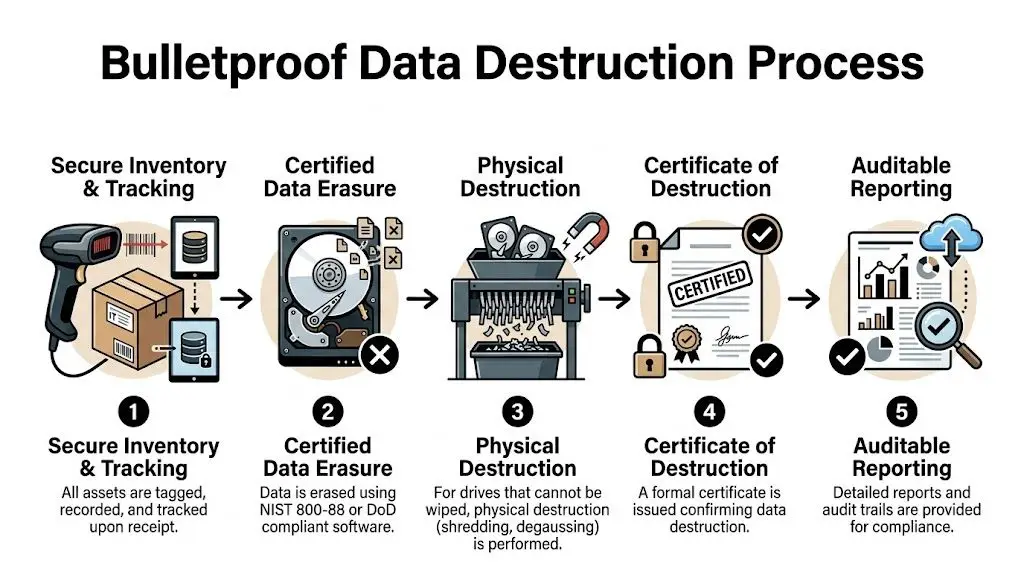
Deleting files isn’t enough. Reformatting isn’t enough. Sending intact drives to a recycler with vague assurances isn’t enough either. If a retired asset ever held customer records, employee files, financial data, clinical information, intellectual property, or login credentials, your destruction process needs to be specific, documented, and repeatable.
What secure destruction actually means
The standard most IT teams should recognize is NIST 800-88. In practice, that means the destruction method fits the media type and the risk level. Some drives can be sanitized through approved erasure workflows. Others should be physically destroyed through shredding or degaussing.
For Nashville organizations in healthcare and other compliance-heavy sectors, certified ITAD processes require data destruction through shredding or degaussing to NIST 800-88 standards, with processing at R2 or e-Stewards certified facilities to support 100% compliance with regulations like RCRA. That requirement is outlined in the earlier cited Tennessee ITAD source, and it’s the right benchmark for any business that needs auditable proof.
A simple rule helps here. If your team can’t explain why a device was wiped instead of shredded, or shredded instead of wiped, the policy probably isn’t mature enough.
Wiping versus shredding
Both methods matter. The mistake is treating one as universally correct.
Use this decision guide:
Software sanitization
Best for devices with resale or redeployment value, when the media is healthy and the process is fully documented.Degaussing
Useful for certain magnetic media when reuse isn’t needed and the goal is to neutralize data before material processing.Physical shredding
Best for failed drives, damaged media, highly sensitive assets, and equipment that won’t be remarketed.
There’s also a practical business question before destruction begins. Some devices still contain business records that should be recovered first. If a server or laptop failed unexpectedly, involve your internal recovery team or a specialist before authorizing physical destruction. In those cases, understanding how professional data recovery works can help you separate salvageable information from end-of-life hardware decisions.
Compliance check: A Certificate of Destruction is not paperwork for a file cabinet. It’s evidence that your company followed through on a control it claimed to have.
What documents you should receive
The destruction event is only half the job. The reporting is the other half.
At minimum, ask for:
- Serialized inventory records tied to the collected assets
- Certificate of Destruction showing what was destroyed and when
- Chain-of-custody documentation covering pickup through processing
- Disposition reporting that distinguishes reuse, resale, and recycling streams
If a provider says, “We destroy everything,” but can’t produce item-level records, that’s not bulletproof. It’s a verbal assurance.
For companies that need a more structured process around retired devices, secure data destruction services should be built into the disposal workflow, not added as an afterthought. That’s especially true in Nashville environments where endpoint fleets, medical devices, office printers, and backup media often move through multiple departments before retirement.
The risky habits to stop immediately
A few practices still show up in otherwise capable organizations:
Desk-side accumulation
Employees stash old laptops and phones in drawers instead of routing them into controlled retirement.Informal handoffs
Equipment moves from IT to facilities to storage without any custody record.Assumed erasure
Someone says a drive was wiped, but there’s no log, report, or verification.Bulk disposal with no segregation
Servers, monitors, drives, and accessories all get stacked together and leave the building as one load.
These habits create uncertainty. Uncertainty is what breaks compliance when questions come later. Strong ITAD programs remove uncertainty through documented method, custody, and evidence.
From Disposal Costs to Strategic Returns
Most companies start with one question. How much will it cost to get this stuff out of the building?
That’s fair, but it’s incomplete. A smarter question is this: what value can you recover, what risks can you avoid, and what story can you tell after the project is done?

The hidden cost problem
A lot of Nashville businesses get tripped up by the phrase “free pickup.” The pickup may be free. The total project often isn’t.
Some providers advertise free collections but aren’t transparent about charges tied to certified data destruction, server decommissioning, or specialized handling. That lack of clarity can lead to 20-30% unexpected costs for businesses, which is why cost scoping matters before approval, as noted by Omega’s Nashville electronics recycling service page.
That doesn’t mean free pickup offers are bad. It means you should ask for a line-by-line scope before you commit.
Where the return actually comes from
The strongest ITAD programs create value in more than one lane.
Residual hardware value
Newer laptops, commercial desktops, networking gear, and some enterprise equipment may still have resale or buyback potential.Avoided risk
A documented process can prevent the much larger cost of a data handling failure, an internal investigation, or an audit headache.Space recovery
Clearing dead inventory from offices, clinics, and storage rooms has operational value even when it doesn’t show up as a line-item rebate.ESG and CSR value
Reporting on responsible disposition, diversion, and community benefit helps sustainability teams turn a back-office task into a visible program.
Donation-based recycling changes the narrative
This is the part many companies underuse. Not every retired device belongs in a shred stream. Some assets can be refurbished, donated, or redirected to support digital inclusion if they meet policy and data-security requirements first.
That’s why the social enterprise model matters. It gives your company a way to connect electronics recycling, IT equipment disposal, and corporate donation programs into one end-of-life strategy. Instead of saying, “We got rid of obsolete hardware,” you can say, “We retired equipment responsibly, protected data, and supported broader community access to technology.”
The best e-waste program isn’t the one with the cheapest truck. It’s the one that gives finance, IT, compliance, and sustainability each a clear win.
A practical way to evaluate vendors is to request two versions of the project scope. One for destruction-only. One for value recovery plus qualified donation pathways. That comparison often reveals whether the provider focuses on material removal or provides comprehensive asset management.
Building a Sustainable Office E-Waste Program
One successful cleanout helps. A repeatable office program is better.
That’s especially important in Nashville because local waste operations may be highly optimized for residential routes, but Metro Code 10.20.095 prohibits e-waste in commercial or residential containers, which means businesses need a separate, compliant recycling path through certified providers. The broader city waste system’s 99.6% operational success in digital route optimization shows how much disciplined process matters, even though that container system doesn’t cover electronics, as reported by Recycling Product News on Nashville’s digital waste route transition.
Make retirement easy for employees
If employees don’t know where old electronics go, they’ll create their own system. That usually means drawers, cabinets, or informal drop piles.
Set up a simple internal program with:
A designated collection area
One locked, labeled location for retired laptops, docks, phones, drives, and approved accessories.A short intake rule
Require a basic handoff record with employee name, department, device type, and date.A clear “do not place in trash” policy
Include printers, batteries where applicable, monitors, cables, and storage devices in your employee guidance.A trigger for pickup
Decide what prompts service. That may be volume, a quarterly schedule, or a project event like an office move.
Write a policy your team will actually follow
The best internal e-waste policy is short. It should define who owns the process, what assets are covered, how data-bearing equipment is segregated, and when approved vendors are engaged.
A good internal owner is usually one of these:
| Program owner | Works well when | Main focus |
|---|---|---|
| IT manager | Device retirement is frequent | Data handling and asset tracking |
| Facilities manager | Office cleanouts are the main driver | Space, staging, pickup coordination |
| Sustainability lead | ESG and reporting are central | Reporting, diversion, vendor standards |
| Shared ownership | The company has multiple sites | Governance and escalation |
The key is consistency. When retirement procedures vary by department, inventory control breaks down fast.
Schedule the program, don’t improvise it
Regular pickups prevent stockpiles and reduce the chance that equipment gets mishandled between refresh cycles. Employee education matters too. A brief onboarding note and an annual reminder usually do more than a long policy nobody reads.
For companies building that routine, this guide on how to reduce electronic waste offers practical habits that support a steady, lower-friction program. The goal isn’t just to remove old tech. It’s to make responsible retirement the default behavior across the office.
If your Nashville business is planning an office cleanout, laptop disposal project, medical equipment disposal workflow, or a broader IT asset disposition program, Reworx Recycling is one option to consider for donation-based recycling, secure data destruction, and business pickup coordination. The right partner can help you retire equipment responsibly, protect sensitive data, and turn surplus technology into environmental and community value.