If you're a CIO or IT director in Chicago, this situation is probably familiar. A laptop refresh is underway, a server room cleanup is overdue, or a lease return is approaching. The devices look old, the project feels routine, and then someone asks the question that changes the whole conversation: what happens to the data on those drives?
That’s where many disposal projects go sideways. Teams focus on moving equipment out of the building, but secure disposal is really about controlling risk, proving compliance, and protecting the organization long after the hardware is gone. In a city with major healthcare systems, financial firms, law offices, manufacturers, and public agencies, secure hard drive destruction services in Chicago sit at the intersection of cybersecurity, legal defensibility, and operational discipline.
A shredding truck, a sealed container, and a certificate might look like simple logistics. They aren’t. They’re evidence that your organization treated retired media as a business risk, not as scrap.
Understanding Secure Hard Drive Destruction
Secure hard drive destruction means making stored data permanently unrecoverable. It’s not the same as deleting files, reformatting a drive, or sending old equipment to a recycler and hoping the downstream process is safe. A proper destruction program is controlled, documented, and auditable.
That matters because the media itself is broader than many teams expect. It includes desktop and server hard disk drives, solid-state drives in laptops, backup tapes, USB devices, phones, and removable media. In many environments, the highest risk isn’t the newest storage array. It’s the forgotten box of retired drives in a closet near the loading dock.
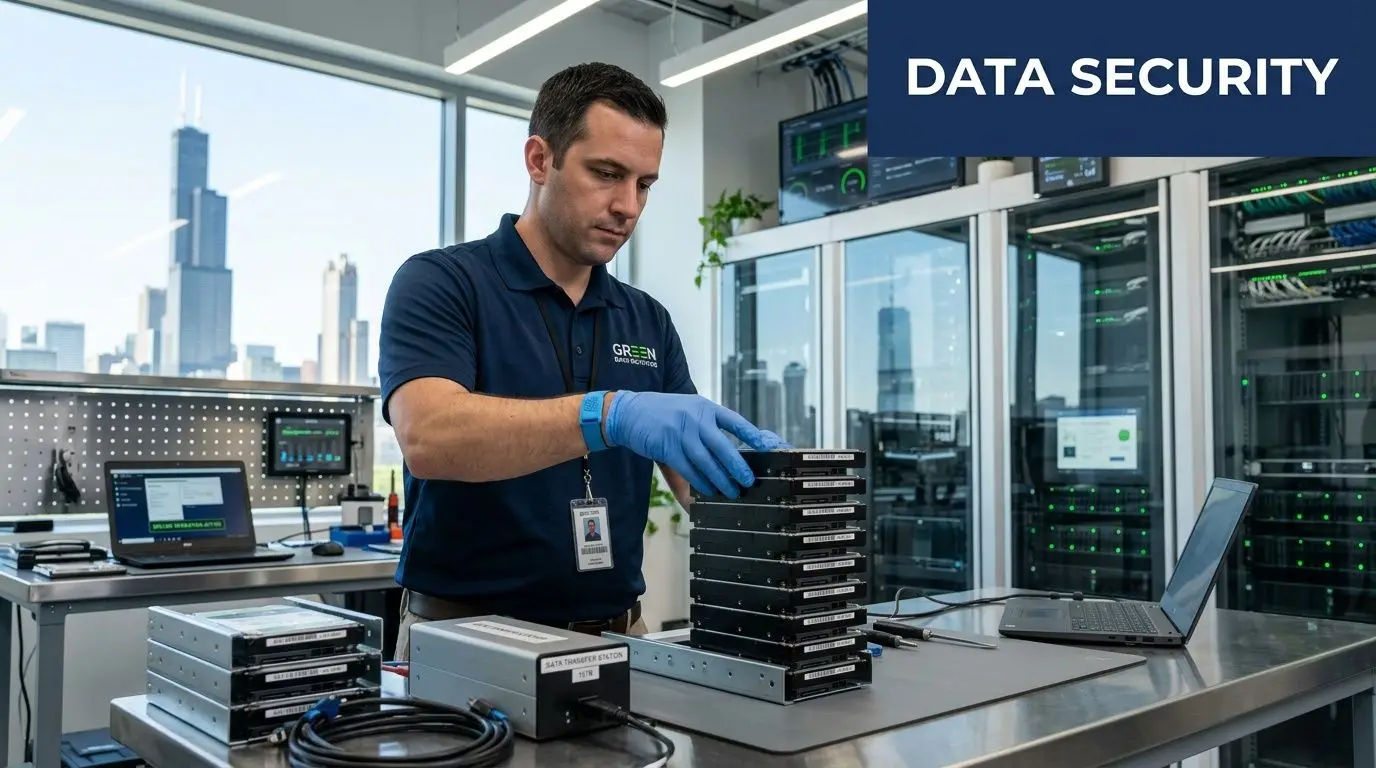
What secure destruction actually includes
A professional service usually combines several controls:
- Media identification: Teams log what’s being retired, often down to the serial number.
- Controlled handling: Devices move through a documented chain of custody instead of informal office cleanout practices.
- Approved destruction method: The process matches the media type and security requirement.
- Proof after the fact: A certificate records what was destroyed and when.
Chicago has the provider depth to support that standard. At least 15 specialized companies are listed in the local market, with offerings that include NAID AAA certification and R2v3 compliance, serving clients such as Hulu, Google, and Goodwill while processing millions of pounds of e-waste annually through networks like the Riparian Group, according to Clutch’s review of Chicago media destruction providers.
That local density is useful for buyers. It means Chicago organizations can compare vendors on process quality, certifications, witnessing options, and reporting, rather than settling for a generic hauler.
Why Chicago businesses treat it as risk management
For a Loop finance team, the issue may be customer records and audit exposure. For a hospital network, it may be protected health information on clinical workstations. For a manufacturer, it may be design files or pricing data sitting on old engineering laptops. The hardware changes, but the core risk stays the same. If a drive leaves your control with recoverable data on it, your disposal project has become a security incident waiting to happen.
Practical rule: If a device ever stored regulated, confidential, or strategically sensitive information, treat end-of-life handling as a security workflow, not a facilities task.
Many organizations start with secure destruction when they first face a move, merger, data center cleanup, or insurance review. The better approach is to build it into your standing secure hard drive destruction process so every retired asset follows the same playbook.
Decoding the Three Main Destruction Methods
Most confusion around media disposal comes from one assumption: that there’s a single “right” way to destroy data. There isn’t. The right method depends on the media type, the sensitivity of the data, and whether the organization wants the asset physically destroyed or just logically rendered unusable.
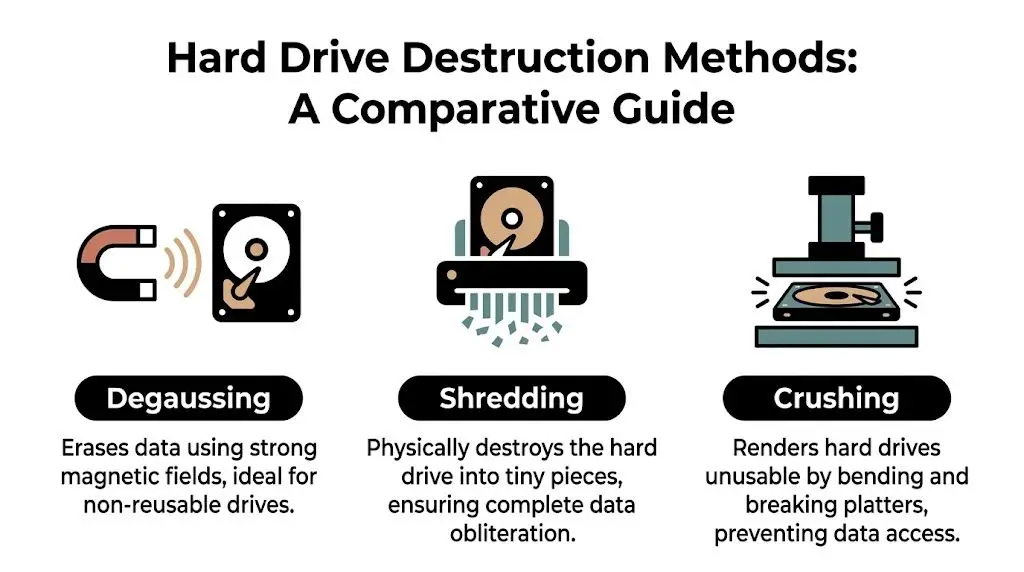
The three methods most buyers hear about are shredding, degaussing, and crushing. Some providers also discuss software-based erasure in broader ITAD programs, but when security teams talk about final disposition, these three physical or magnetic approaches usually drive the decision.
Shredding
Shredding is the easiest method to explain and often the easiest for stakeholders to trust. The drive is fed into an industrial machine that breaks it into small fragments. Once the platters, chips, and housings are reduced to particles, reconstruction isn’t a realistic concern.
Shredding works well when your policy requires irreversible physical destruction. It’s especially common for high-sensitivity drives, mixed media loads, and witnessed destruction programs where legal, compliance, or executive stakeholders want visible confirmation.
A few reasons organizations prefer it:
- It’s intuitive: Nontechnical observers understand what happened immediately.
- It works across many media types: HDDs, SSDs, phones, tapes, and optical media can often be handled in one event.
- It supports witnessed service: Mobile shredding trucks make the process visible on site.
The tradeoff is simple. Once shredded, the asset is gone. There’s no remarketing, no reuse, and no possibility of refurbishing the device.
Degaussing
Degaussing uses a strong magnetic field to disrupt the magnetic structure of traditional hard drives and some tape media. A useful analogy is a giant reset at the magnetic level. Instead of deleting files, it scrambles the medium so the original stored pattern no longer exists in a usable form.
Degaussing can be effective for magnetic media, but it has limits. It doesn’t solve every device type, and it isn’t the answer for SSD-heavy fleets. It also tends to make reuse impractical because the drive itself may no longer function in a normal way after treatment.
Use cases often include legacy environments, archived magnetic media, and organizations with policies that call for magnetic sanitization before physical destruction.
Crushing
Crushing physically bends or punctures the drive so the platters and internal components can’t operate normally. It’s more forceful than many office teams realize. This isn’t someone hitting a drive with a hammer. It’s a controlled industrial action using specialized equipment.
Crushing can be a good intermediate option when an organization wants visible physical disablement but isn’t necessarily specifying shredding. The limitation is that “unusable” and “forensically unrecoverable” aren’t always the same concept in policy conversations. That’s why security teams usually want the vendor to align the method with compliance requirements, not just operational convenience.
How to choose the right method
A practical way to evaluate options is to ask four questions:
| Decision factor | What to ask |
|---|---|
| Media type | Is this an HDD, SSD, tape, phone, or mixed load? |
| Security threshold | Does policy require destruction or allow sanitization? |
| Witnessing need | Do internal stakeholders want to observe the event? |
| Value recovery | Is preserving hardware resale value important, or is destruction mandatory? |
If your environment includes several device types, don’t assume one method fits all. A mixed-media retirement project often needs different handling rules for different assets.
Buyers often benefit from reviewing the provider’s secure data destruction services in the context of their own retention policy, legal obligations, and asset recovery goals. The best outcome is usually not the most dramatic method. It’s the method that matches the risk profile of the media in front of you.
Navigating Data Privacy Compliance in Chicago
In Chicago, compliance questions usually surface after the disposal project has already started. Someone from legal asks for documentation. Internal audit wants chain-of-custody records. A privacy officer wants to know whether the destruction standard was appropriate for the data category involved.
By that point, it’s too late to improvise.
For most organizations, the key issue isn’t memorizing every rule. It’s understanding that different regulatory frameworks all point toward the same operational requirement: if data-bearing media leaves service, your organization must ensure the information can’t be recovered and must be able to prove how that was done.

The regulations Chicago buyers usually care about
Chicago’s business mix makes a few frameworks especially important:
- HIPAA: Healthcare providers, clinics, insurers, and business associates need controls for media that may contain protected health information.
- GLBA: Financial institutions and related service providers must safeguard customer information throughout the asset lifecycle.
- SOX: Public companies need defensible processes and records around information governance and control environments.
- DoD and internal policy standards: Some contractors, public entities, and security-conscious enterprises adopt stricter sanitization or destruction requirements even when not formally mandated by federal contract language.
The standard that often helps translate these obligations into actual media handling is NIST SP 800-88. It gives organizations a practical framework for deciding whether media should be cleared, purged, or destroyed.
Why “delete” fails a compliance test
The technical issue is straightforward. Deleting a file only changes what the operating system sees as available. It doesn’t necessarily eliminate the underlying data pattern in a way that satisfies a high-assurance destruction standard.
For high-security data, NIST SP 800-88 specifies physical destruction to particle sizes of 2mm or smaller, and the same source notes that software wiping can leave magnetic remnants recoverable with advanced forensic tools. It also states that up to 80% data recovery has been shown from improperly “wiped” drives, which is why physical shredding is used to eliminate that risk, according to STS Electronic Recycling’s discussion of NIST-aligned hard drive shredding in Chicago.
That’s the point many executive teams miss. “We erased it” and “we can defend the process in an audit” are not the same statement.
Compliance officers don’t just need a secure outcome. They need evidence that the outcome matched the sensitivity of the data and the policy governing it.
Turning regulations into a working policy
A strong internal policy usually answers these questions:
- Which media types require destruction
- Which categories of data trigger the highest handling standard
- Who approves disposition
- What documentation must be retained
- Which vendor certifications are mandatory
If you operate across healthcare, finance, education, or public sector environments, it also helps to align your retirement program with broader Illinois electronics recycling requirements and service planning. That doesn’t replace privacy compliance, but it keeps environmental handling and data security moving together instead of in separate silos.
The Unbreakable Chain of Custody Process
A secure destruction method can still fail if the handoff process is weak. Most data disposal risk sits in the gaps between touchpoints. The drive is removed from a workstation. It waits in a hallway. It gets boxed without an inventory. It rides in an unsealed truck. Nobody notices that two devices listed internally never reached the vendor.
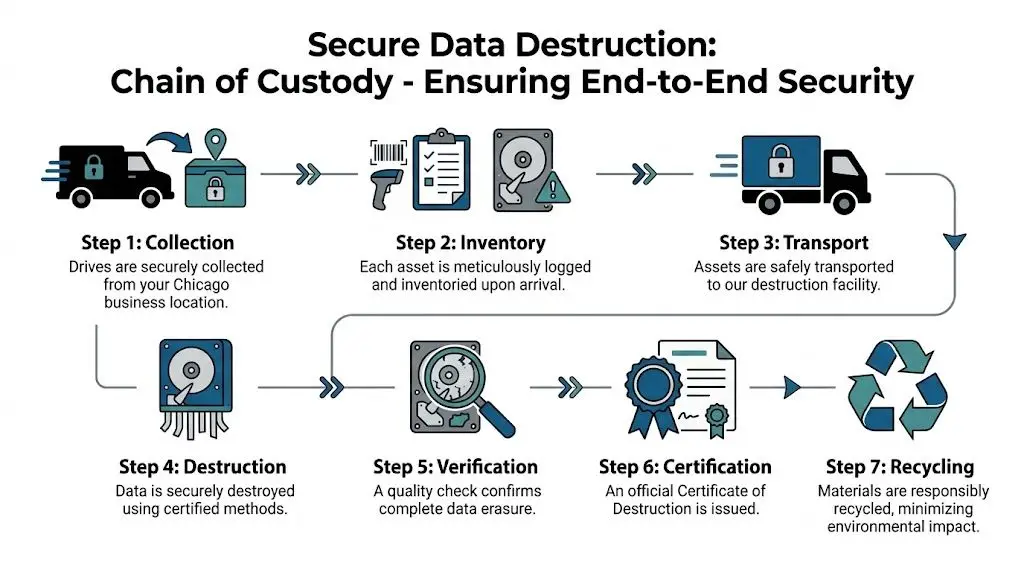
That’s why chain of custody matters so much. It creates a documented story of who handled the asset, when they handled it, where it moved, and what finally happened to it.
What a strong custody process looks like
A defensible process usually includes these stages:
Collection at your site
Drives are gathered from offices, server rooms, storage areas, and staging zones under controlled supervision.Inventory and identification
Serial numbers or asset tags are logged so there’s a record of exactly what entered the destruction stream.Sealed containment and transport
Media goes into secure containers or locked transport systems instead of open bins or unmarked cartons.Controlled destruction event
The vendor applies the agreed method, on site or at a secure facility.Documentation and reconciliation
Your records are matched against the vendor’s destruction record so missing items are flagged immediately.
The certificate is not a formality
The Certificate of Destruction is what turns a disposal event into evidence. A useful certificate should tell your audit, privacy, or legal team enough to understand what happened without relying on memory or informal email summaries.
Leading Chicago providers show how detailed this can be. GreenTek Solutions records each step on DVD for audit trails, and Vanguard Archives, a SOC 1 certified provider, issues emailed shred certificates to document chain of custody for HIPAA, SOX, and GLB compliance, as described in Vanguard Archives’ overview of hard drive shredding and media destruction in Chicago.
A good certificate answers three questions clearly: what was destroyed, when it was destroyed, and under whose control the media remained throughout the process.
For many organizations, it’s smart to review a sample Certificate of Destruction for hard drives before signing a service agreement. If the documentation is vague, the process behind it usually is too.
On-Site vs Off-Site Destruction A Strategic Decision
This decision is often oversimplified. On-site sounds safer. Off-site sounds cheaper. In practice, the better choice depends on your risk tolerance, your media volume, your building constraints, and how much documentation your stakeholders need.
On-site destruction gives your team the comfort of direct observation. The drives stay at your facility until destruction occurs, and that lowers anxiety for boards, compliance teams, and executives who want a highly visible control. For hospitals, law firms, and financial organizations, that visibility can matter as much as the technical method.
Off-site destruction shifts the event to a certified facility. That can reduce disruption on campus or in the office, especially for larger cleanouts, phased decommissions, or multi-location collections. If the vendor runs a disciplined chain of custody, off-site service can still be highly defensible.
When on-site makes sense
Choose on-site service when the organization values immediate witness capability more than logistical efficiency.
Common examples include:
- Executive sensitivity: Leadership wants visual confirmation for high-risk media.
- Restricted data classes: Internal policy requires destruction before assets leave the premises.
- Smaller batches: A modest number of drives may fit cleanly into a scheduled truck visit.
When off-site is the better business decision
Off-site often makes more sense when asset counts are larger, site access is difficult, or the organization is balancing security with budget discipline. That budget question matters because pricing in this market isn’t always easy to compare.
A 2023 NAID report found that 68% of SMBs cite unclear pricing as a major barrier to using professional ITAD services. In Chicago, some providers do publish line items, including $5 for on-site destruction per unit plus a $70 to $150 truck charge, but many still don’t provide the volume-based transparency buyers need for planning, according to Proshred’s discussion of hard drive destruction pricing concerns in Chicago.
That doesn’t mean on-site is a poor choice. It means buyers should ask better questions.
Here are the ones that matter:
- What triggers extra fees for truck time, stairs, packing, or serial tracking?
- How are mixed media loads priced if the project includes SSDs, phones, tapes, or optical media?
- Can the provider quote by volume for a range instead of requiring exact counts weeks in advance?
- What documentation is included in the base service?
If a quote is hard to understand, the final invoice usually won’t get easier.
For many Chicago organizations, the best answer isn’t ideological. It’s practical. Use on-site for the most sensitive or politically visible media, and use off-site for larger, routine retirement streams where custody controls are strong and the workflow is more efficient.
Why Choose Reworx Recycling for Your Chicago ITAD Needs
The strongest ITAD programs do more than destroy data. They connect security, asset recovery, environmental handling, and social impact into one operating model. That’s where vendor selection becomes a strategic decision rather than a purchasing task.
A basic destruction-only approach solves one immediate problem. It gets the data risk off the table. But many organizations also want to know whether reusable equipment can be separated from destruction streams, whether recycling is handled responsibly, and whether the project supports ESG or community goals instead of ending as a pure cost center.
Security and ITAD should work together
In practice, mature programs sort assets into different lanes. Some devices go directly to destruction because the data risk or policy requirement is too high. Others may enter a broader IT asset disposition workflow with tracking, evaluation, and downstream handling decisions.
That’s also where cost structure becomes important. Off-site certified facilities can offer up to 40% cost savings on bulk destruction compared with on-site services, according to R4 Services’ hard drive destruction overview. For public agencies, facilities teams, and enterprises managing larger volumes, that can materially change the project plan.
At the same time, the article’s larger issue is one many CIOs now care about. End-of-life technology decisions affect more than legal exposure. They shape how your organization handles waste, recovers value, and participates in responsible reuse.
Where Reworx Recycling fits
One option in this space is Reworx Recycling’s IT asset disposition service for enterprise companies in Chicago, which combines secure data handling with broader electronics recycling and IT equipment disposition support. For organizations that care about donation-based recycling and social enterprise outcomes, that model can connect secure data destruction to community benefit rather than treating it as an isolated compliance event.
That matters for sustainability leaders as much as for security leaders. A retired device isn’t just a storage risk. It’s also a materials decision, a reporting decision, and sometimes a community investment decision.
The most useful ITAD partner is the one that helps your security policy, facilities workflow, and sustainability goals stop competing with each other.
For Chicago businesses running office cleanouts, computer recycling programs, laptop disposal events, medical equipment disposal, product destruction, or data center decommissioning, that integrated approach is often easier to govern than a patchwork of separate vendors.
Your Pre-Destruction Checklist for Chicago Businesses
Even strong vendors can’t fix a disorganized client-side process. The smoothest destruction projects start with internal preparation. That doesn’t require a massive playbook, but it does require discipline before the truck arrives or the pickup is scheduled.
A good checklist prevents the common failures. Wrong devices get mixed into the load. Asset records don’t match. Facilities and IT assume the other team confirmed site access. Finance gets a quote that doesn’t reflect the actual media count.

What to do before scheduling service
Use this list as a working template.
Build the inventory first
Identify the media type, approximate quantity, and business owner for each batch. Separate laptops from loose drives, and separate hard drives from phones, tapes, and removable media.Create a secure staging area
Don’t let retired devices remain scattered across cubicles, closets, and branch locations. Move them into a restricted-access area with clear ownership.Match method to media
Decide which assets require physical destruction and which may belong in a broader ITAD workflow. This discussion should happen before vendor pickup, not while equipment is being loaded.Verify certifications and documentation
Ask for proof of NAID AAA or other relevant certifications, and review a sample certificate before approving the engagement.
Questions to ask your vendor
Different providers explain their process differently, so direct questions help uncover gaps fast.
- How do you log and reconcile serial numbers?
- What does your chain of custody look like from pickup through final processing?
- Which destruction methods do you use for HDDs, SSDs, and mixed media?
- What exactly is included in the final certificate?
- How do you handle recycling after destruction?
Operational details teams often forget
These items sound minor until they delay the project:
- Loading access: Confirm dock availability, elevator rules, parking restrictions, and building security procedures.
- Scheduling window: Pick a time that won’t conflict with office moves, major deliveries, or change freezes.
- Internal owner: Assign one person from IT or facilities to sign off on counts, escort the vendor, and reconcile documents.
- Budget assumptions: Clarify whether pricing is per unit, by volume, or affected by transport and tracking requirements.
Chicago businesses tend to do best when they treat destruction as a mini-project with named ownership instead of a one-off service call. That approach scales whether you’re handling a few retired drives from an office cleanout or a larger enterprise disposal tied to a facility transition.
If your organization is planning secure data destruction, electronics recycling, laptop disposal, office cleanout support, or a broader ITAD program, Reworx Recycling offers a practical next step. You can use their educational resources to plan a compliant project, explore donation-based recycling options, schedule a pickup, and turn retired equipment into a more responsible outcome for both your business and the communities that benefit from technology reuse.