
A Los Angeles technology refresh often starts as a routine procurement project and ends with a harder question: what happens to the retired laptops, failed SSDs, backup drives, medical workstations, and storage arrays still holding sensitive data?
For IT managers, facilities teams, compliance officers, and sustainability leaders, that question carries legal, operational, and reputational weight. A drive sitting in a staging room is still a risk. A pallet of old devices waiting for pickup is still a risk. A rushed office cleanout without a documented chain of custody is a risk with paperwork attached.
That’s why Secure Data Destruction Services in Los Angeles should be treated as a formal business process, not a recycling errand. In this market, organizations often need to balance privacy law, internal audit demands, logistics across multiple sites, and sustainability goals at the same time. The right process protects data first, keeps records tight, and makes sure end-of-life electronics are handled responsibly.
The High Stakes of Data Disposal in Los Angeles
A common Los Angeles scenario looks like this. A company upgrades employee laptops, replaces a storage appliance, clears out a satellite office, or shuts down an older server room. The new systems are live, but the old hardware is still on-site, still serialized, and still carrying data that matters.
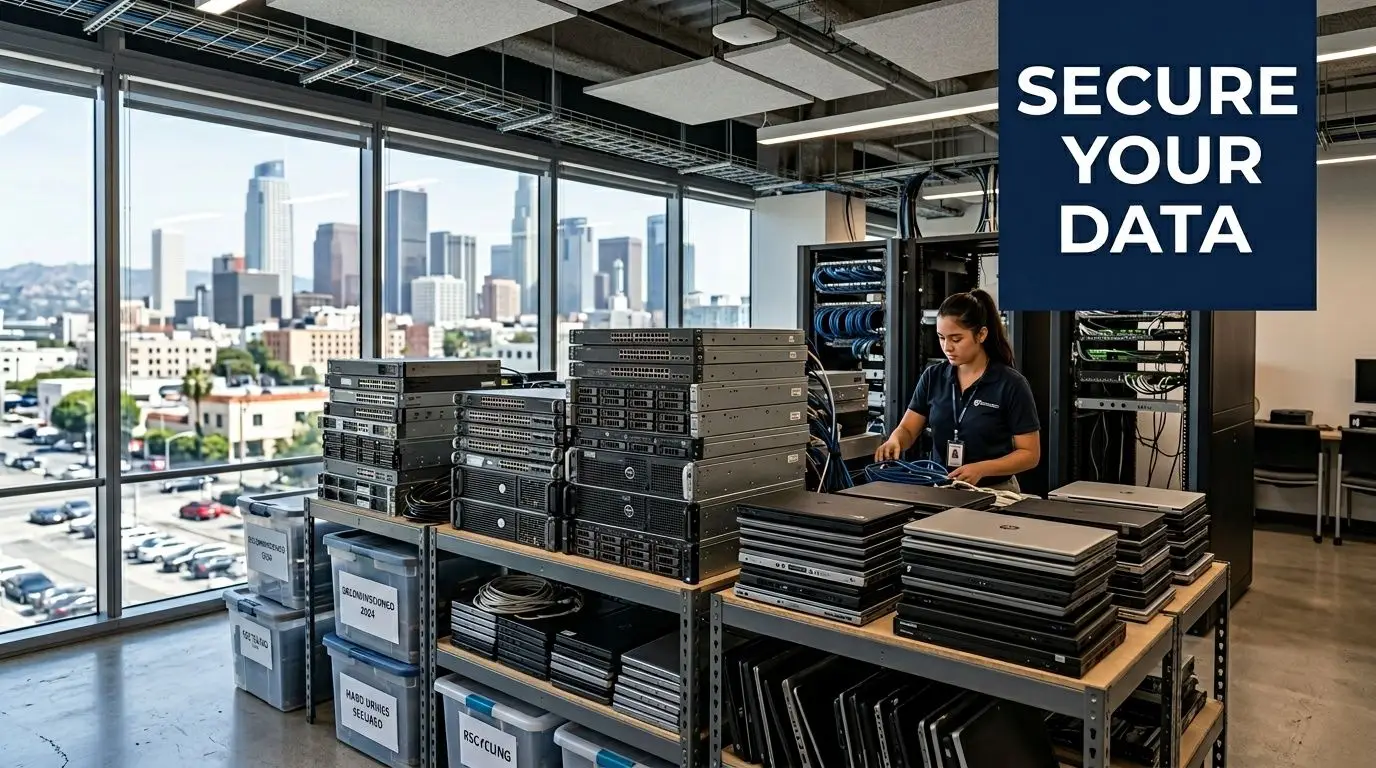
In Los Angeles, the stakes are unusually high because the business mix is unusually data-rich. Entertainment firms handle unreleased media and contract records. Healthcare providers manage patient information. Financial, legal, education, and public sector organizations all maintain personal or regulated data that can’t just be tossed into a surplus stream.
California law gives this issue real teeth. The CCPA and CPRA require secure deletion and data minimization, while California Civil Code § 1798.81 requires reasonable security and proper disposal of personal information. Those state rules sit alongside federal requirements like HIPAA for protected health information and FACTA for consumer credit data. Data destruction isn’t a housekeeping task. It’s part of your compliance program.
A practical starting point is to align your disposal plan with a documented security policy and a defensible vendor process. The guidance in why secure data destruction matters for company data is useful because it frames destruction as part of risk control, not just equipment disposal.
Practical rule: If a device ever stored customer, patient, employee, financial, or proprietary business data, treat it as a controlled asset until destruction is complete and documented.
The other reason this matters in Los Angeles is public trust. Companies here operate in visible industries and competitive markets. A sloppy disposal event can create more than a technical problem. It can raise questions from clients, regulators, partners, and internal leadership about whether the company understands basic information governance.
Secure destruction also intersects with sustainability. Electronics shouldn’t end up unmanaged or landfilled when they can be processed through a formal ITAD stream. The strongest programs handle both sides together: destroy the data beyond recovery, then route the remaining material through responsible electronics recycling and reuse channels.
Planning Your Disposal Strategy From Asset to Risk
Most disposal problems start earlier than people think. They start when the organization doesn’t know exactly what it owns, where it sits, or what data may still be on it.
A defensible process begins with an inventory that’s more detailed than an equipment list from procurement. You need device type, serial number, location, assigned department, storage media type, and whether the asset is owned, leased, failed, or waiting for redeployment.
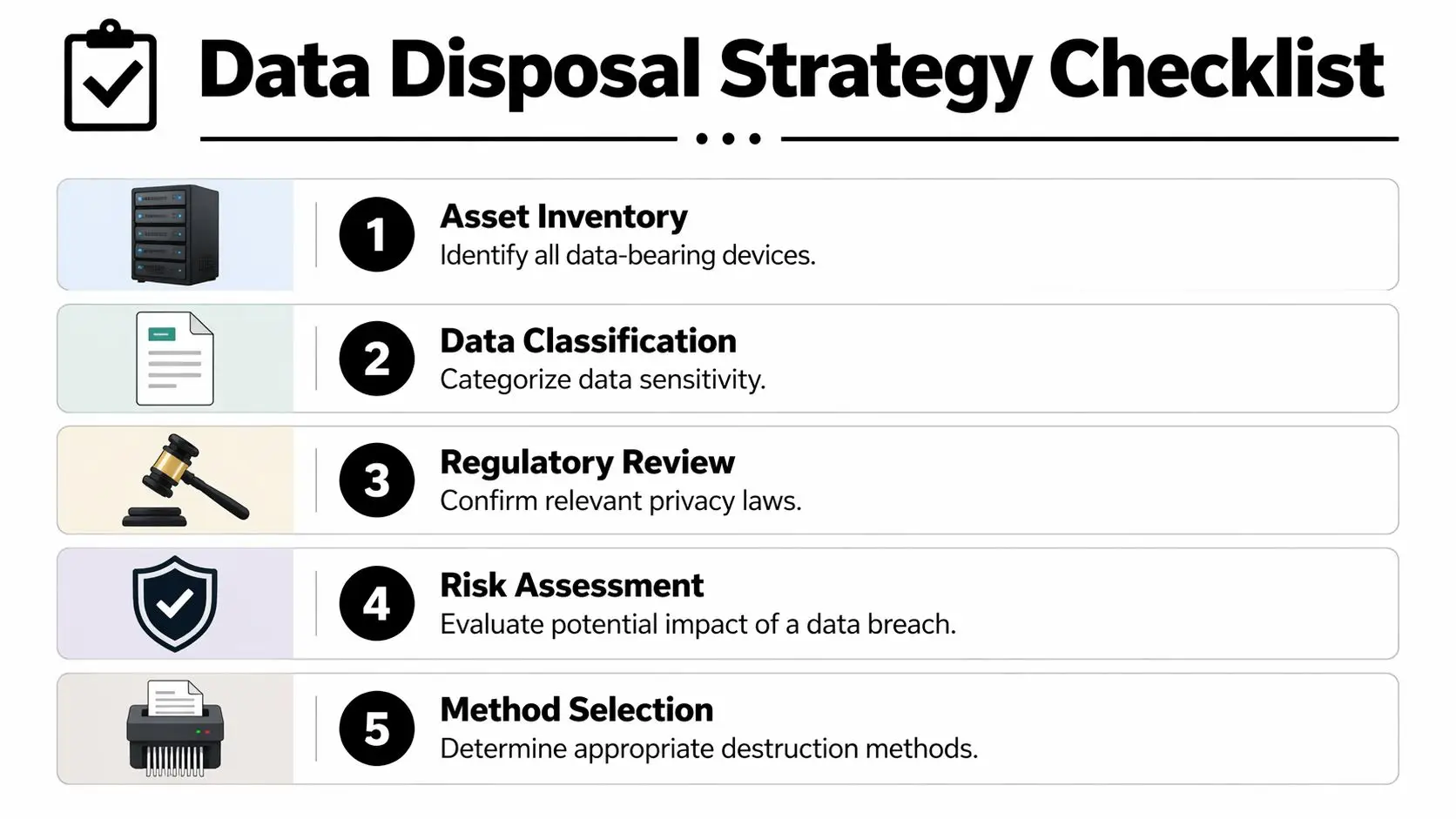
For many organizations, the easiest way to tighten this step is to treat retirement planning like a mini audit. A good reference point is this guidance on IT inventory audits before recycling, because it pushes teams to reconcile what the records say with what’s physically present.
Build an inventory that operations can actually use
Start with all data-bearing assets, not just the obvious ones. That includes:
- User devices like laptops, desktops, tablets, and workstations issued during a refresh cycle.
- Infrastructure hardware such as servers, SAN or NAS equipment, backup devices, and decommissioned network gear with local storage.
- Specialized equipment including medical systems, production devices, lab instruments, copiers, and appliances with embedded drives.
- Loose media like failed hard drives, SSDs pulled from endpoints, removable drives, and legacy backup media sitting in storage.
Los Angeles businesses often miss the last two categories. That’s where risk hides. The hospital might remember the servers but forget the retired imaging workstation in a closet. The media company may focus on edit bays and miss the portable drives moved between teams.
Classify by data risk, not just asset type
A laptop and a server don’t automatically require different handling. The data on them does.
Use a simple classification model that your legal, IT, and facilities teams can all understand:
| Risk level | Typical examples | Practical handling approach |
|---|---|---|
| Low | General internal files, non-sensitive operational data | Controlled sanitization may be appropriate if the device is eligible for reuse |
| Medium | Employee records, internal financial files, business contracts | Stronger sanitization or purge-level methods with verification |
| High | PHI, consumer personal data, regulated financial data, sensitive IP | Physical destruction or the most restrictive approved method with full documentation |
The point isn’t to create a perfect taxonomy. The point is to avoid treating every device the same and to prevent a low-cost disposal decision from being applied to high-risk media.
A disposal strategy should answer one question before anything leaves the building: if this exact device were misplaced today, what would the exposure be?
Set chain of custody at the first touch
Chain of custody doesn’t start when the truck arrives. It starts when your team removes an asset from service.
That means using tagged containers, sealed bins where appropriate, sign-off at each handoff, and a named internal owner for the project. If devices are spread across multiple Los Angeles facilities, assign a staging lead at each location and use one standard intake form. Without that discipline, assets drift into side closets, loading docks, and personal vehicles. That’s how hardware “walks away.”
A useful internal checklist includes:
- Tag every asset with serial and location before disconnection.
- Separate working gear from failed media so technicians don’t mix reuse candidates with destruction-only devices.
- Stage in secure areas with limited access, not open office corners or shared dock space.
- Record exceptions immediately when serials are missing, labels are damaged, or embedded storage is unclear.
This planning work feels slow only until the first audit, lease return, or breach question arrives. Then it becomes the difference between a controlled program and guesswork.
Comparing Data Destruction Methods for Modern IT Assets
Choosing a destruction method without looking at the media type is one of the most common mistakes in IT asset disposition. What works for a magnetic hard drive may be the wrong choice for a solid-state drive. What’s efficient for low-risk internal data may be inadequate for regulated records.
The old benchmark many teams still recognize is DoD 5220.22-M, especially its three-pass overwrite approach. That method writes zeros, then ones, then a random pattern across addressable locations. It’s still widely cited, but current practice is better guided by NIST. As noted in the secure data destruction services market overview, NIST SP 800-88 organizes media sanitization into Clear, Purge, and Destroy, and for modern SSDs, purge methods using internal device commands are often more effective than traditional overwriting, while physical destruction remains the gold standard for ultimate security.
What the NIST framework means in practice
NIST’s categories are useful because they tie method selection to business risk.
- Clear fits lower-risk situations where logical sanitization is acceptable and the media may remain in controlled use.
- Purge is stronger. It may involve advanced overwrite methods or cryptographic erase, especially where the organization wants reuse but needs greater assurance.
- Destroy means the media is physically destroyed so recovery isn’t a practical option.
This helps Los Angeles organizations avoid two expensive errors. The first is overspending by physically destroying every device even when some can be sanitized and reused appropriately. The second is under-securing high-risk media because software wiping sounded cheaper and faster.
Method comparison for real-world environments
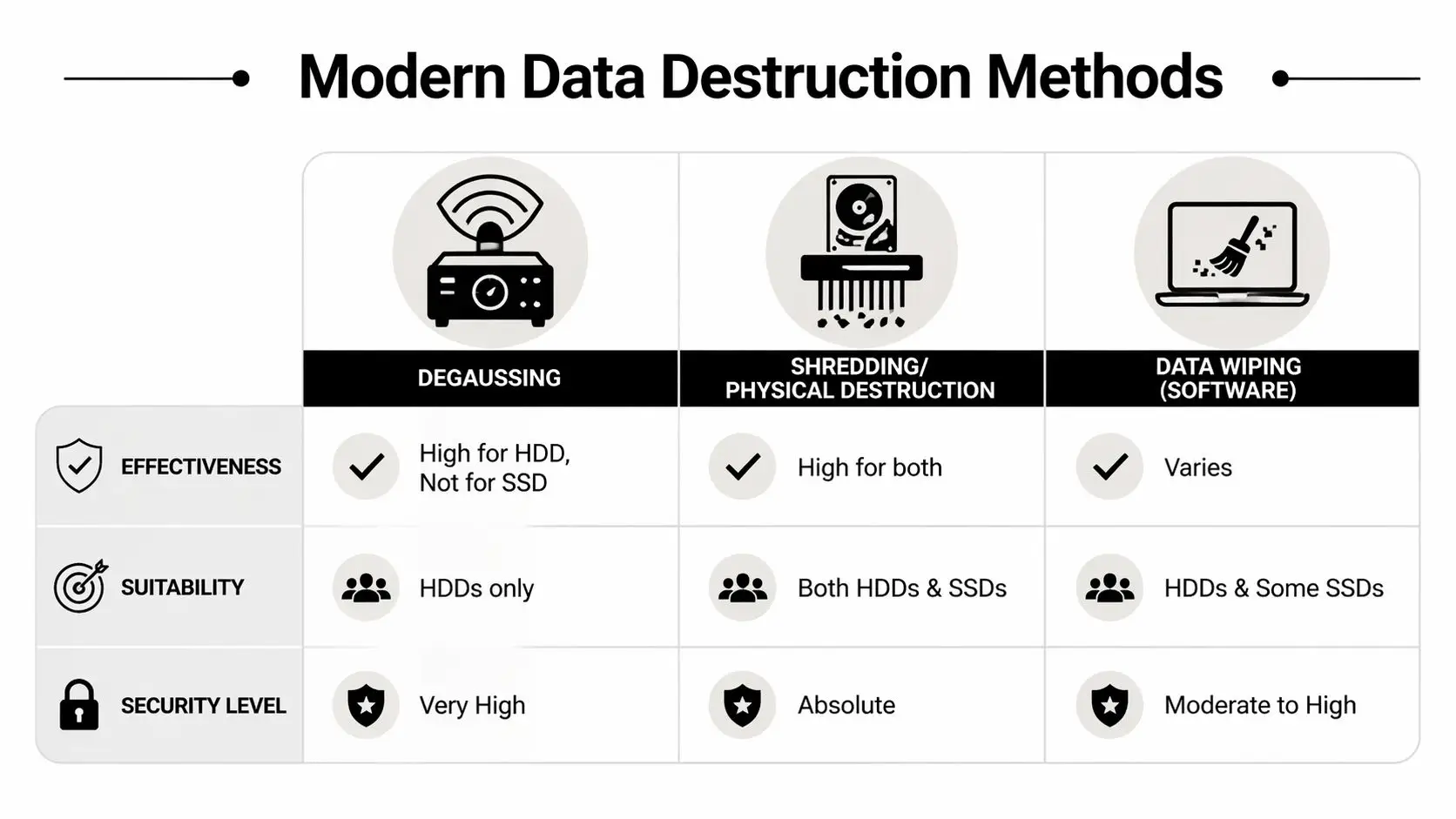
Here’s the practical view of the three methods most buyers evaluate:
| Method | Best fit | Strengths | Limits |
|---|---|---|---|
| Software wiping | HDDs and some reusable assets | Preserves equipment value when reuse is allowed | Needs verification and isn’t equally effective across all media types |
| Degaussing | Magnetic HDDs | Strong for magnetic media, fast in the right workflow | Not suitable for SSDs and can render drives unusable |
| Physical shredding | HDDs, SSDs, failed media, high-risk devices | Highest assurance and straightforward for compliance-heavy environments | Eliminates reuse of the storage media |
Why HDDs and SSDs must be handled differently
Hard disk drives store data magnetically. That’s why overwrite techniques and degaussing have a place in HDD workflows. If the drive is functional and the business objective includes reuse, wipe or purge methods may be operationally sensible.
Solid-state drives are different. Their architecture, controller behavior, wear leveling, and reserved blocks mean traditional overwriting is less predictable. For SSDs, purge-level methods that use device-native commands are often more reliable than legacy overwrite routines. When the risk is high or the drive is failed, physical destruction is usually the cleaner decision.
If your team can’t confidently identify the media type and verify the sanitization result, move up to a more restrictive method instead of guessing.
What works and what doesn’t
What works:
- Matching the method to the media type
- Matching the method to the data classification
- Verifying completion with records that tie back to serial numbers
- Using witnessed or documented destruction when audit sensitivity is high
What doesn’t work:
- Treating a drill, hammer, or ad hoc breakage as a destruction policy
- Assuming one overwrite routine covers every storage technology
- Mixing reusable assets and destruction-only media in the same process
- Relying on vendor promises without proof of execution
For organizations that need physical destruction, secure hard drive shredding and destruction services are one example of a service model built around chain of custody and documented destruction. The key point isn’t the brand. It’s that the process should specify media handling, final method, and documentation before pickup is scheduled.
A practical selection model
A simple decision path keeps teams out of trouble:
- Identify the media.
- Confirm the data sensitivity.
- Decide whether reuse is allowed or irrelevant.
- Choose the least permissive method that still meets security and audit needs.
- Require documentation that proves the method was performed.
That last step matters more than many teams realize. A destruction method is only useful if your organization can demonstrate it happened.
Navigating California's Strict Data Privacy and Disposal Laws
California doesn’t treat data disposal as an afterthought. It treats it as part of the organization’s duty to protect personal information throughout the full lifecycle of the asset.

For Los Angeles businesses, that means disposal decisions must line up with privacy law, sector-specific rules, and the records your auditors or counsel may ask for later. According to Shred Nations’ Los Angeles market overview, secure data destruction in Los Angeles is driven by CCPA and CPRA requirements for secure deletion of personal data, along with sector-specific rules like HIPAA for medical records and FACTA for consumer credit data. The same source notes that Los Angeles businesses average 40 boxes per shredding job, which shows how much sensitive material organizations here manage at disposal time.
Translate the rules into operational actions
The legal acronyms matter, but the operational steps matter more.
CCPA and CPRA push companies toward secure deletion, data minimization, and controlled handling of consumer information. If your company stores customer data on endpoints, backup systems, returned devices, or archived equipment, those assets need a documented end-of-life process.
HIPAA changes the stakes for healthcare providers, medical groups, billing companies, and any business associate handling protected health information. In practice, that means irretrievable destruction standards, stricter chain of custody, and documentation that can survive review.
FACTA applies when organizations handle consumer credit information. Disposal has to prevent unauthorized access. That pushes teams away from casual e-waste streams and toward controlled destruction.
A lot of in-house legal and compliance teams now pair destruction planning with broader workflow and records tools. For firms refining those processes, this roundup of best legal tech tools is useful background because it highlights how legal operations can support documentation, review, and defensible procedures around sensitive information.
What regulators and auditors usually care about
They typically want to see that your organization didn’t improvise.
That means being able to show:
- A written process for retiring data-bearing assets
- A chain of custody from internal collection through final destruction
- A reasoned method selection tied to the sensitivity of the data
- Proof of completion, usually in the form of destruction records and asset reconciliation
Documentation is your defense. If a company can’t show who handled the device, when it left control, and how the data was destroyed, it has a compliance story problem even if the hardware is gone.
Why the Certificate of Destruction matters
A recycling receipt tells you material was collected. It does not necessarily tell you data was destroyed.
A Certificate of Destruction is more useful because it supports auditability. The strongest certificates are paired with serialized reporting, service dates, method details, and enough project information to reconcile against your original inventory. Without that, your team may know the pickup happened but still struggle to prove that the right media was destroyed under the right controls.
Organizations combining secure destruction with broader environmental goals also need a compliant downstream path for the physical equipment. For companies operating in California, electronics recycling requirements and service considerations in the state are part of the same governance conversation. Data security and environmental handling should be managed as one process, not two disconnected projects.
Choosing Your Destruction Partner and Managing Logistics
Vendor selection is where strong internal planning either holds up or falls apart. The market is full of providers that say the right words: compliant, secure, certified, cost-effective. Those labels don’t mean much unless the operating model behind them is clear.

One issue stands out in Los Angeles. As noted by Bionew USA’s Los Angeles secure data destruction page, many providers emphasize compliance but few offer pricing transparency for SMBs, leaving key questions about volume discounts, per-item costs for onsite versus offsite service, and hidden fees unanswered. That makes budgeting harder for businesses, schools, and public agencies.
Vet the vendor like a risk partner, not a hauler
A vendor handling retired equipment is taking temporary custody of one of your organization’s highest-liability waste streams. Treat the selection process accordingly.
Ask for evidence in these areas:
- Certification and standards alignment such as NAID AAA where applicable, plus documented handling procedures for data-bearing media.
- Chain of custody controls including sealed containers, serialized intake, handoff documentation, and restricted facility access.
- Workforce controls like employee screening, training, and clear supervision policies.
- Documentation quality covering destruction certificates, itemized reports, and exception handling.
- Downstream transparency for recycling, remarketing, and final material processing.
A vendor’s public guidance can reveal a lot. If their materials focus on generic security language but avoid operational specifics, ask harder questions.
A good screening resource is this checklist on selecting a reliable e-waste recycling partner. It’s useful because it looks beyond pickups and asks how the partner handles accountability.
Onsite versus offsite is a trade-off, not a moral choice
Some buyers assume onsite destruction is always the right answer. It isn’t.
Onsite destruction makes sense when the organization needs immediate witness verification, has highly sensitive media, or wants to reduce the time assets spend in transit. It can also help when internal stakeholders want visible proof that drives were destroyed.
Offsite destruction can make more sense for larger volumes, multi-site consolidations, or projects where secure transport and facility controls are mature enough to support the same audit outcome. It may simplify scheduling and bulk processing.
The right choice depends on your risk profile, project size, timeline, and internal approval culture. If legal or executive leadership wants live witness capability, onsite may shorten decision cycles. If you’re decommissioning a large amount of equipment across facilities, offsite processing may be operationally cleaner.
Ask pricing questions before pickup day
Many organizations often get caught flat-footed. If a provider says the service is cost-effective, that’s not a quote. It’s a phrase.
Ask direct questions such as:
- What is billed by item, by pallet, by weight, or by project scope?
- Are there separate charges for pickup, sorting, deinstallation, stairs, packing, or urgent scheduling?
- Is onsite witness service priced differently from offsite processing?
- Are failed drives, embedded media, and mixed equipment billed differently?
- What documentation is included, and what triggers extra fees?
You’re not just trying to lower cost. You’re trying to remove uncertainty. The primary financial risk often isn’t the line-item destruction charge. It’s the unplanned labor, project delays, and exception handling that appear when the scope was never clarified.
A provider that can’t explain its pricing model usually can’t explain its process model either.
Look at the full cost-benefit picture
The cheapest quote can become the most expensive decision if it creates delay, confusion, or documentation gaps.
A more useful evaluation compares:
| Decision factor | Low quote vendor | Well-scoped vendor |
|---|---|---|
| Pricing clarity | Often limited | Usually more explicit |
| Chain of custody detail | May be generic | Should be documented |
| Audit readiness | Depends on follow-up | Built into the workflow |
| Internal labor required | Can increase when details are vague | Often lower because roles are defined |
There’s also a strategic angle many procurement teams miss. Some retired equipment has reuse or donation potential once data-bearing components are handled correctly. A partner with broader ITAD capabilities can help separate destruction-only assets from reusable equipment, which supports sustainability goals and may improve the project economics.
Reworx Recycling fits that broader model because it combines electronics recycling, IT equipment disposal, and secure data destruction with a donation-based social enterprise approach. For organizations doing office cleanouts, laptop disposal, data center decommissioning, or facility transitions, that can matter. It gives the business a path to destroy sensitive media while routing eligible equipment into responsible reuse and community benefit rather than treating every asset as scrap.
That added value won’t replace compliance requirements, and it shouldn’t. But it can improve the business case for a more structured program.
Finalizing the Process with Documentation and Sustainable ITAD
The project isn’t finished when the last drive is shredded or the truck leaves the dock. It’s finished when your records show that every planned asset was accounted for, the data destruction method was completed, and the remaining equipment entered a responsible downstream process.
Close the audit trail completely
At minimum, the final file should include the internal inventory, pickup or transfer records, any exceptions logged during collection, and the Certificate of Destruction. If the project involved multiple departments or locations, reconcile all of it back to the original scope. Missing serials and unexplained quantity differences are exactly the kind of loose ends that create trouble later.
The best final package usually includes:
- Serialized asset reporting that maps destroyed devices to your intake records
- Service dates and handling records showing when custody changed hands
- Method confirmation identifying whether the media was wiped, purged, or physically destroyed
- Exception notes for items that were missing, non-functional, or handled separately
A simple recycling receipt won’t do this job. You need enough documentation to answer a future question without rebuilding the project from memory.
Keep destruction records where legal, compliance, and IT can all retrieve them. If the records live only in one manager’s inbox, they’re one departure away from disappearing.
Don’t separate security from sustainability
Strong ITAD programs treat physical disposition as part of the same decision framework as data destruction. Once the storage media has been properly sanitized or destroyed, the remaining hardware and materials still need responsible handling.
That matters in Los Angeles because businesses are under pressure from both privacy expectations and environmental expectations. Clients, employees, and leadership teams increasingly want to know that old hardware wasn’t just made safe. They want to know it was managed responsibly.
Donation-based recycling and social enterprise recycling create a more useful end-of-life story. Equipment that can’t be reused should enter proper electronics recycling channels. Equipment that can be refurbished, once data risk has been removed, can support digital inclusion and community technology access through corporate donation programs.
A mature ITAD process turns retired devices from a liability into two separate outcomes: destroyed data, and recovered social or environmental value. That’s a much stronger finish than merely proving the equipment left the building.
Common Questions About Secure Data Destruction in LA
Is it acceptable to destroy drives ourselves with a hammer or drill
For a formal business process, that’s usually a bad idea. It’s inconsistent, hard to verify, unsafe for staff, and weak from a documentation standpoint. Even if the media looks damaged, your organization may still struggle to prove the data was rendered irretrievable and handled under controlled custody.
How should we handle leased equipment that must be returned
Start with the lease terms and the lessor’s data sanitization requirements. Some lessors allow approved wiping or purge methods with documentation. Others require specific return conditions. The mistake is waiting until the return date to ask. Review this at the beginning of the refresh so legal, IT, and procurement agree on the method before the equipment is packed.
What’s the best approach for a large facility cleanout with mixed devices
Treat it like a project, not a pickup. Build a site inventory, classify the media by risk, separate reuse candidates from destruction-only assets, and define staging and custody rules for each area. Large office cleanouts and data center decommissioning jobs fail when everything is loaded together and sorted later.
A practical order of operations is:
- Survey the space and identify all data-bearing assets.
- Create zones for collection, verification, and sealed staging.
- Assign one owner for inventory reconciliation.
- Schedule destruction and recycling workflows so nothing sits unsecured.
What’s the difference between a Certificate of Destruction and a recycling receipt
A recycling receipt usually confirms collection or transfer of material. A Certificate of Destruction is stronger because it documents that data-bearing media was destroyed through a defined process. For compliance and audit purposes, that distinction matters. One confirms movement. The other supports proof of sanitization or destruction.
Should every retired device be physically shredded
No. The right method depends on the media type, risk level, and whether reuse is allowed. Physical destruction is often the clearest answer for high-risk or failed media, but not every asset needs the same treatment. A well-run program applies the method that meets the security requirement without creating unnecessary waste or cost.
If your organization is planning laptop disposal, an office cleanout, medical equipment disposal, product destruction, or a larger IT asset disposition project, Reworx Recycling is a practical place to start. Businesses can use Reworx resources to evaluate secure data destruction options, plan responsible electronics recycling, schedule pickup logistics, and explore donation-based recycling paths that support community impact after data-bearing media has been properly handled.


















