
Your lease renewal is coming up, the next laptop refresh is already approved, and there’s a closet full of retired devices nobody wants to touch. In Washington DC, that situation isn’t just an operations task. It’s a compliance decision.
For a federal contractor, law firm, association, healthcare practice, or NGO in the district, old laptops, failed SSDs, backup media, and decommissioned servers can carry client files, health records, litigation material, employee data, and regulated government information long after users think the files are gone. Deleting folders or reimaging a machine feels final. It often isn’t.
That’s why Secure Data Disposal Services in Washington DC deserve a different standard than generic recycling. In this market, you need a process that protects data, documents every handoff, and stands up to legal scrutiny. You also need an end-of-life plan that fits sustainability goals, because DC buyers and stakeholders increasingly expect both security and responsible electronics recycling.
The High Stakes of IT Asset Disposition in the Nation's Capital
A typical DC technology upgrade creates two problems at once. First, you have to remove data from old equipment without leaving anything recoverable behind. Second, you have to move those assets out of the building in a way that won’t create a chain-of-custody gap, environmental issue, or audit headache.
That pressure is sharper in Washington than in many other cities. The district is dense with regulated organizations handling procurement records, legal files, health information, donor databases, public-sector data, and internal communications that would be damaging if exposed. The disposal step is where many otherwise sound security programs get casual.

The broader market tells you this isn’t a niche concern. The secure data destruction market is valued at USD 9.82 billion and projected to increase by USD 25.5 billion by 2030 at a 14.52% CAGR, according to this market report summary. That kind of growth usually means organizations have learned the hard way that end-of-life media handling is part of risk management, not a cleanup detail.
Why DC organizations feel this pressure earlier
Federal contractors often work under contract clauses, internal security plans, and customer expectations that go beyond ordinary commercial practice. Law firms have client confidentiality obligations and reputational exposure. Nonprofits and associations may hold donor, employee, and constituent records without having a large in-house compliance team.
All of them face the same basic question. What exactly happens to each retired device from the minute it leaves a desk to the minute the data is rendered unrecoverable?
Practical rule: If your team can’t explain the disposal path for a retired laptop in one clear sentence, your process probably has a control gap.
A proper IT asset disposition program addresses that gap. If you need a baseline on what belongs in that program, Reworx publishes a useful overview of IT asset disposition fundamentals.
What makes the risk so easy to underestimate
Most disposal failures don’t start with malicious intent. They start with convenience. A facilities team moves devices into storage. An office manager schedules a pickup without asking about certificates. An internal technician assumes encryption alone is enough. A recycler says “we wipe everything” but can’t tell you which standard they follow.
That’s how sensitive media slips into an informal process. In Washington DC, informal is expensive.
Why Secure Data Disposal is Non-Negotiable in Washington DC
The first source of confusion is simple. People assume deleted data is destroyed data. It isn’t. Data remanence means information can remain recoverable on a device even after files are deleted, a drive is reformatted, or a user account is removed.
For a DC law office, that could mean archived matter files surviving on a retired laptop. For a contractor, it could mean controlled project material lingering on SSDs that were set aside for resale. For a medical practice, it could mean patient-related data remaining on devices headed to recycling.
Deletion solves convenience, not compliance
When your team deletes files, they usually remove pointers to the data, not the underlying content in a way that guarantees irrecoverability. That difference matters because regulators, counterparties, and clients care about outcomes. If data can still be recovered, it may still be exposed.
Washington DC’s legal environment sits inside a broader pattern of stricter disposal and recycling obligations. Thirty-two states mandate secure disposal of personal data, and 25 states plus DC enforce certified e-waste recycling, according to this state-by-state regulations overview. That same source notes that statutes tied to health and privacy, including the My Health My Data Act, require affirmative consent for certain health data handling and provide consumer rights such as deletion, with enforcement oversight by the Attorney General.
Federal expectations meet local realities
Federal contractors usually think first about contract requirements, internal policies, and frameworks such as NIST and FISMA. That’s appropriate, but it can create a blind spot. Teams focus heavily on production systems, access control, logging, and incident response, then treat retired hardware as a facilities matter.
That separation doesn’t hold up well in practice.
A disposal vendor is a service provider touching regulated information at a high-risk moment. The due diligence standard should reflect that. You’re not just buying hauling or recycling. You’re assigning part of your security obligation to another party.
The safest mindset is to treat end-of-life media handling as an extension of your information security program, not as a back-office cleanup task.
What this means for common DC organizations
Different organizations feel the risk in different ways:
- Federal contractors need disposal practices that align with customer expectations, written procedures, and defensible records.
- Law firms need a process that preserves confidentiality and minimizes the chance of data exposure from retired laptops, external drives, and office servers.
- Healthcare and benefits organizations need to consider health-data handling obligations, plus the risk that older multifunction devices and local storage media may retain sensitive records.
- Nonprofits and associations often manage donor, HR, and program data with lean internal teams, which makes vendor due diligence even more important.
The business case is stronger than the procurement shortcut
Professional secure data destruction may look like an added line item. In reality, it’s a way to avoid a much larger problem. The moment a retired device leaves your control without a documented, validated process, you create legal, reputational, and operational exposure that is difficult to unwind later.
For DC organizations, secure disposal isn’t optional because the data itself isn’t ordinary. The district runs on sensitive information, and disposal is one of the few moments when that information can leave your environment in bulk.
Understanding the Methods of Secure Data Destruction
The most useful framework for discussing data destruction is NIST SP 800-88, which groups media sanitization into three categories: Clear, Purge, and Destroy. Those terms sound technical, but the logic is practical. The method should match the sensitivity of the data, the type of media, and whether the organization plans to reuse the asset.
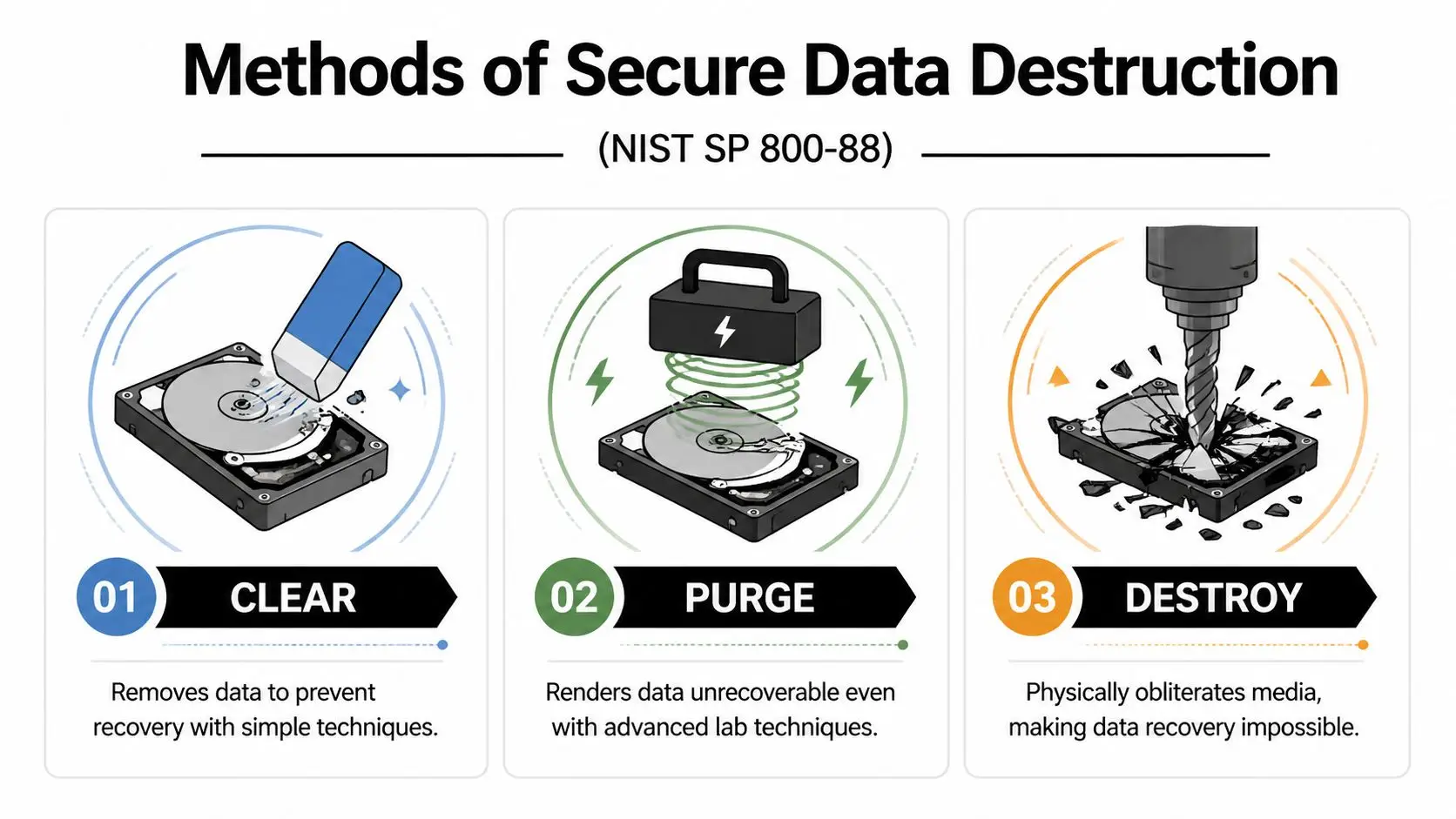
According to this NIST 800-88 explainer, Clear methods like software overwrites are often sufficient for low-risk data on HDDs, but NIST tests show they can fail to erase 20-30% of data on SSDs. The same source states that Destroy methods such as shredding to less than 2mm particles are the only way to guarantee 99.999% non-reconstructibility for high-security data on all media types.
Clear means logical removal
Think of Clear as making ordinary recovery impractical. This usually involves software overwriting or similar logic-based methods that sanitize the media without physically damaging it.
For some traditional hard disk drives, that can be acceptable when the data is lower risk and the organization intends to reuse or remarket the device. But it’s easy to apply this method too broadly because it sounds neat, efficient, and cheap.
Where teams get into trouble is assuming all storage behaves the same way.
Purge goes further, but it has limits
Purge is meant to defeat more advanced recovery attempts. Depending on the device type, this can involve degaussing or cryptographic erase.
Degaussing disrupts magnetic media. That makes it relevant for certain hard drives and tapes, but not for every modern device in your inventory. SSDs don’t behave like magnetic drives, and wear-leveling complicates the assumption that every data block is being touched in a predictable way.
If your retired equipment mix includes a large number of SSD-based laptops, Purge may sound stronger than it is unless the method is specifically appropriate to that media.
A good disposal conversation starts with media type, not with vendor preference. HDDs, SSDs, backup tapes, and mobile devices don’t all respond to the same sanitization method.
Destroy means physical irrecoverability
Destroy is the straightforward option. The media is physically broken down so the stored information can’t be reconstructed.
This usually means shredding, disintegration, or another physical destruction method. For highly sensitive data, especially on SSDs, destroy is often the cleanest answer because it removes ambiguity. You aren’t relying on software success, controller behavior, or encryption assumptions. You’re reducing the media itself to unusable fragments.
That’s why organizations handling regulated or mission-sensitive data often specify physical destruction for particular media classes even when some reuse value is possible.
A simple way to choose
If you’re advising operations, legal, or procurement colleagues, this plain-language framing helps:
- Use Clear when the data is lower risk, the media type is suitable, and reuse is a priority.
- Use Purge when stronger sanitization is needed and the media supports the method.
- Use Destroy when the data is highly sensitive, the media is difficult to sanitize reliably, or you need the strongest defensible outcome.
A secure provider should be able to explain the method in those terms, not hide behind jargon.
Comparison of Data Destruction Methods
| Method | How It Works | Best For | Effectiveness (HDD/SSD) | Allows Reuse? |
|---|---|---|---|---|
| Clear | Software-based overwrite or logical sanitization | Lower-risk data on suitable drives | Stronger fit for HDDs, limited reliability on SSDs | Yes |
| Purge | More intensive sanitization such as degaussing or cryptographic erase | Cases needing stronger sanitization without immediate physical destruction | Can work well for some HDD scenarios, depends heavily on media type for SSDs | Sometimes |
| Destroy | Physical shredding or disintegration of media | Highly sensitive data, mixed media, high-assurance environments | Effective for both HDDs and SSDs when properly executed | No |
Questions smart buyers should ask vendors
Before approving a disposal quote, ask these questions:
- Which NIST category are you proposing for each media type?
- How do you handle SSDs differently from HDDs?
- Will the certificate identify the destruction method used?
- If an asset is remarketed, what proof shows it was sanitized before leaving controlled custody?
If the answers are vague, keep looking. Reworx has a service page that outlines secure data destruction options in the context of broader electronics recycling and ITAD planning.
The Critical Role of Chain of Custody and Certification
Secure destruction isn’t just about what happens inside the shredder or wiping station. It’s about proving that the right asset reached the right process without disappearing, being swapped, or sitting unsecured in transit.
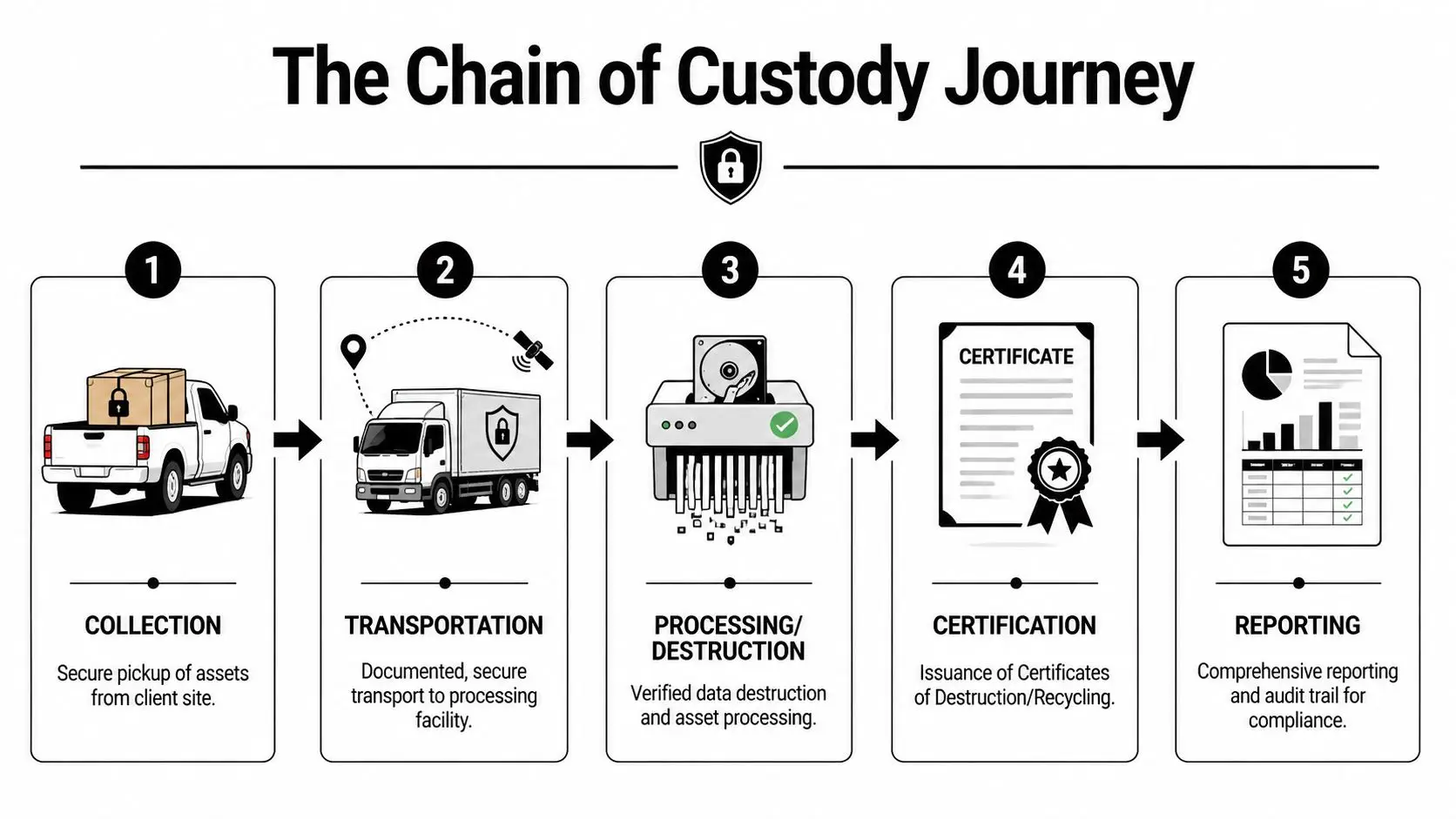
That proof is the chain of custody. In practical terms, it’s the documented trail showing who had the asset, when they had it, where it went, and what happened to it.
Why a pickup receipt isn’t enough
Many organizations still accept very thin documentation. A driver signs a bill of lading. A recycler sends a general invoice. Weeks later, someone emails a one-line statement saying the material was processed.
That may be fine for scrap metal. It’s weak for regulated data-bearing devices.
If your organization faces an internal audit, client questionnaire, incident review, or government inquiry, you need more than proof that “items were removed.” You need evidence that the specific devices in question moved through controlled handling to verified destruction or sanitization.
What certification adds
Certification matters because it imposes process discipline that a basic recycler may not have. One of the most important benchmarks in this space is NAID AAA certification for secure destruction operations.
According to this NAID-focused overview, NAID AAA certification can reduce audit failures by 98% compared to uncertified providers. The same source says its chain-of-custody controls, including GPS-tracked transport and video-monitored shredding, cut the risk of insider-theft-related breaches from 40% of incidents to less than 1%.
That doesn’t mean every certified vendor is identical, but it does mean certification gives you a stronger starting point for due diligence.
Audit mindset: Certification is not a substitute for vendor review. It’s evidence that the vendor operates under a stronger control framework than an uncertified provider.
What strong chain of custody looks like
When I review a disposal process for a contractor or law office, I look for these operational markers:
- Serialized intake records that identify the assets collected, not just the number of boxes.
- Controlled packaging or sealed containers before assets leave the client site.
- Documented transport controls such as tracked vehicles and accountable handoffs.
- Verified processing records tying the received asset list to the destruction or sanitization outcome.
- Final reporting that can be retained for compliance files and future audits.
A weak process usually fails in the middle. The vendor may have a shredder and a certificate, but not enough discipline between pickup and processing.
What to expect in a real Certificate of Destruction
A valid certificate should be more than a marketing document. At minimum, it should make it possible for your team to match the disposal event to a set of identified assets and a recognized method.
Look for details such as:
- Date of service
- Client identity and service location
- Asset identifiers or sufficiently detailed inventory reference
- Destruction or sanitization method
- Provider identity
- Authorized signoff or formal issuance details
For high-scrutiny environments, many organizations also want itemized serial tracking and method notation that aligns to internal policy or NIST categories.
If your vendor can’t explain what their certificate proves, your legal team may eventually have to.
A helpful starting point for understanding that credentialing layer is Reworx’s page on NAID AAA certification and secure destruction controls.
A Procurement Checklist for DC Businesses and Agencies
Buying secure disposal services gets messy when teams compare quotes without comparing controls. One proposal includes onsite shredding. Another offers offsite processing with reporting. A third bundles electronics recycling, pickup, and asset remarketing. The cheapest option can look sensible until someone asks how SSDs are handled or what happens if a serial-numbered drive goes missing.
That matters even more for smaller organizations. According to this SMB-focused industry page, a 2025 FTC report found that 60% of data breaches at SMBs stem from improper e-waste disposal, while only 25% of SMBs in the DC metro area use certified services. The same source notes that DC e-waste ordinances can impose fines up to $10,000 for non-compliance.

The checklist I’d use before issuing a PO
Use this list the way you’d use a risk review, not a marketing scorecard.
- Match the method to the media. Ask the vendor how they handle HDDs, SSDs, backup tapes, phones, and multifunction devices. If they give one generic answer for all media, that’s a warning sign.
- Confirm certification scope. Don’t just ask whether they’re certified. Ask which certifications apply to secure destruction, electronics recycling, or downstream handling.
- Require chain-of-custody detail. You want to know how devices are inventoried, packed, transported, processed, and reported.
- Review certificate samples. Request a sample Certificate of Destruction before you buy. Make sure it contains the level of detail your legal or audit team would need.
- Check employee handling controls. Ask how the provider screens personnel and restricts access to client material during collection and processing.
- Clarify onsite versus offsite options. Some organizations need visual confirmation of destruction. Others need scheduled pickups, serialized reporting, and lower operational disruption.
- Ask about environmental processing. A secure data outcome shouldn’t mean careless downstream recycling. You still need responsible electronics recycling and reporting.
- Address value recovery early. If some assets can be remarketed, ask how the provider separates reusable equipment from data-bearing media that should be destroyed.
What SMBs and schools should prioritize
Smaller buyers often assume certified service is out of reach. That assumption causes problems because they delay proper disposal, store devices too long, or rely on informal drop-offs.
For SMBs, schools, and nonprofits, the practical priorities are usually:
- Simple pickup scheduling
- Clear per-asset or per-project pricing
- Certificates that are easy to retain
- A bundled approach combining secure data destruction with electronics recycling
The right vendor should be able to make the process easier, not more bureaucratic.
What larger agencies and contractors should add
Larger organizations usually need a deeper review. In those cases, add these procurement questions:
- Can the provider support serialized asset lists at scale?
- Can they separate reuse streams from destroy-only streams based on your policy?
- Will they follow your site access rules and facility security requirements?
- Can they produce audit-ready reporting after each event?
- Do they understand that some devices may need physical destruction regardless of residual value?
If a vendor conversation stays focused on trucks, bins, and pickup windows, the buyer needs to pull it back to controls, documentation, and liability.
A useful reference point for procurement teams is Reworx’s guide to choosing an e-waste recycling partner. It’s especially relevant when your organization wants one provider that can handle electronics recycling, IT equipment disposal, and secure data destruction under the same operating model.
The Reworx Recycling Advantage Compliant Secure and Socially Responsible
Once you understand the compliance side, the selection criteria get narrower. You need a partner that can handle electronics recycling, secure data destruction, and broader IT asset disposition without treating those as separate, conflicting goals.
That’s where the social-enterprise model becomes useful, not just admirable. A disposal program can protect sensitive information and support sustainable recycling at the same time. It can also create a path for appropriate equipment donation, reuse, and community benefit when assets are suitable for a second life.
Where that matters in practice
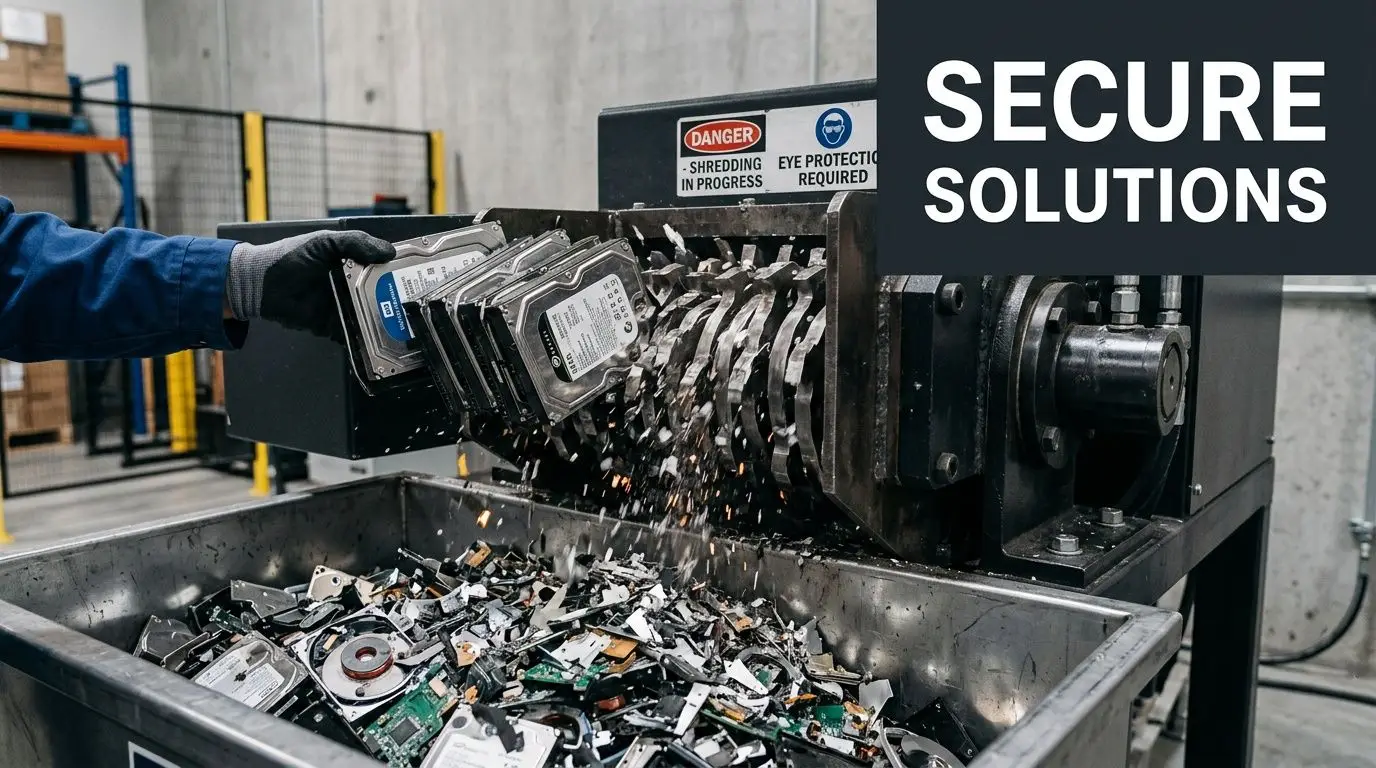
A DC law firm may need hard drive shredding for retired litigation support systems while also clearing offices of monitors, docks, and peripherals. A federal contractor may need a structured office cleanout tied to a relocation or data center decommissioning event. A healthcare or research organization may need a split process where some devices are destroyed and other equipment goes through compliant recycling channels.
In those situations, a fragmented vendor setup creates friction. Security teams, sustainability staff, facilities, and procurement all end up using different language and measuring success differently.
One option in this category is Reworx Recycling’s secure data destruction program, which combines secure hard drive shredding and documented handling with broader donation-based recycling and IT equipment disposal services. For organizations trying to align data security with sustainability reporting and community impact, that integrated model is often easier to manage than separate one-off vendors.
Why the social impact piece belongs in the same conversation
Some buyers still separate compliance from community benefit. They shouldn’t.
A mature disposition program can support corporate donation programs, digital inclusion, and landfill diversion while still drawing a hard line around media that requires destruction. That balance matters for sustainability leaders who are under pressure to show environmental responsibility, and for executives who want a practical CSR outcome from routine technology refresh cycles.
The strongest outcome isn’t just “nothing leaked.” It’s “sensitive data was securely destroyed, usable equipment was responsibly handled, and the organization can document both.”
Frequently Asked Questions About Data Disposal in DC
Is onsite shredding always the safest option
Not always. It’s often the most reassuring option because your team can witness destruction, but the right choice depends on asset volume, media type, scheduling, and the provider’s controls.
In the DC area, onsite hard drive shredding typically costs $1.50 to $3 per unit for bulk disposals of 100+ drives, degaussing is around $2 to $4 per unit, and offsite wiping averages about $0.75 per drive, according to this Washington DC secure destruction pricing overview. The same source notes that demand for high-security micro-shredding rose by 45% in the region after post-2025 CISA alerts on SSD encryption vulnerabilities.
If your organization has highly sensitive SSDs or wants witnessed destruction, onsite can make sense. If you need lower-cost processing for lower-risk assets, offsite service with strong chain-of-custody controls may be appropriate.
Are SSDs harder to sanitize than old hard drives
Yes, and that’s where many internal disposal assumptions break down. SSD architecture can make overwrite-based methods less predictable. That doesn’t mean every SSD must always be shredded, but it does mean buyers should treat “we wipe everything” as an incomplete answer.
For high-security SSD use cases, physical destruction is often the cleaner and more defensible path.
Can we donate old computers if we’re worried about data
Yes, but only after your organization has defined which assets are eligible for reuse and what sanitization standard applies before release. Donation-based recycling works well when the provider can separate reusable equipment from media that should be destroyed.
A common mistake is trying to maximize reuse without first classifying the data risk. The sequence should be policy first, asset decision second.
What should a law firm ask that a general office might miss
Law firms should ask for three things very clearly:
- Matter confidentiality protection
- Itemized reporting for data-bearing assets
- A documented method for every laptop, desktop, server drive, and removable drive
Legal clients may never ask how disposal was handled. If a problem arises, they’ll care immediately.
How often should a DC organization schedule disposal
That depends on your refresh cycle, growth rate, and storage constraints. The bigger issue is avoiding long-term accumulation of retired devices in closets, staging rooms, or basements.
A scheduled program usually works better than ad hoc cleanouts because staff know where assets go, procurement knows which vendor to call, and compliance teams get a repeatable paper trail.
Retired devices shouldn’t become a long-term storage category. Once an asset leaves active use, the safest path is controlled disposition on a defined schedule.
Is electronics recycling enough, or do we need a separate data destruction service
If an asset ever stored sensitive information, recycling alone is not the full question. You need to know how the data was sanitized or destroyed before the asset was recycled, refurbished, or resold.
That’s why buyers should look for a provider that can document both the data outcome and the downstream electronics handling outcome. In Washington DC, that combination is what turns disposal from a vague operational task into a defensible compliance process.
If your organization needs a documented, practical path for electronics recycling, IT equipment disposal, secure data destruction, or donation-based recycling, Reworx Recycling is a useful place to start. You can review their educational resources, plan a pickup, explore secure hard drive shredding, or discuss how to retire old equipment in a way that supports compliance, sustainability, and community impact.


















