The safest way to retire every hard drive isn't to shred everything by default. That approach can eliminate recoverable asset value, complicate sustainability goals, and fail to answer the question auditors pose: Was the selected method appropriate for the media, the data, and the final disposition?
For Atlanta businesses, secure hard-drive destruction should be a documented IT asset disposition process. NIST distinguishes between Clear, Purge, and Destroy, with each outcome serving a different security and reuse objective. The right decision depends on whether the drive is functional, whether the data is sensitive, whether the media will leave organizational control, and whether the business needs to preserve the hardware for redeployment or donation.
That matters across Atlanta's financial services, healthcare, logistics, technology, education, government, and corporate real estate sectors. Verizon's 2025 Data Breach Investigations Report found that ransomware appeared in 88% of breaches involving small and medium-sized businesses, compared with 39% of breaches involving larger organizations. Discarded storage isn't the same threat as ransomware, but the lesson is direct: a smaller organization still needs disciplined controls around sensitive data.
Rethinking the Default Shredding Reflex
Many IT managers treat physical shredding as the automatic answer because it appears simple. Put every retired drive into a destruction stream, receive a certificate, and close the ticket. In practice, that policy can destroy working hardware that could have been safely redeployed, donated, or refurbished after verified sanitization.
NIST's media-sanitization framework takes a risk-based approach. Clear uses logical techniques to address user-accessible storage areas. Purge uses physical or logical methods intended to make recovery infeasible, even with state-of-the-art laboratory techniques. Destroy makes recovery infeasible and prevents the media from being reused for storage. These are different outcomes, not interchangeable labels.
Practical rule: Choose the sanitization outcome before the drive leaves your control, not after it arrives at a recycler.
A quick format, file deletion, or operating-system reset doesn't establish that data is unrecoverable. The procedure must account for the storage technology, information classification, intended disposition, and verification evidence. Traditional HDDs, SSDs, removable media, and failed drives shouldn't be placed into one undifferentiated workflow.
The value that shredding can erase
Physical destruction is appropriate when a drive is damaged, inaccessible, obsolete, or contains information requiring the strongest recovery resistance. It also makes sense when the organization doesn't need the hardware returned to service. NIST describes destruction techniques including disintegration, pulverization, melting, and licensed incineration as processes designed to completely destroy the media.
The trade-off is permanent loss of reuse value. The Blancco State of Data Sanitization Report found that up to 47% of devices destroyed for security reasons were still functional. It also reported that 17% of organizations experiencing a breach or leak attributed the compromise to redeployed devices or drives retaining prior data. Those findings support a balanced position: unnecessary destruction wastes value, while uncertified wiping creates exposure.
For Atlanta organizations, a sound standard operating procedure should classify the information, select Clear, Purge, or Destroy, record the device and serial number, and retain evidence of completion. A NIST-aligned data sanitization process gives facilities, IT, and sustainability teams a shared framework instead of leaving each technician to make an informal judgment.
Building a Defensible Pre-Pickup Inventory
A destruction workflow becomes difficult to defend when nobody can prove what was collected. Before scheduling a pickup, freeze unauthorized access and create an inventory that connects every storage device to its owner, serial number, data classification, custody location, and disposition decision.
Start with the physical environment, not just the asset database. Check server rooms, locked storage cabinets, repair queues, executive offices, imaging areas, help-desk shelves, and any staging space used during a technology refresh. Drives often remain in places that aren't visible in the standard equipment report.
Build the inventory around the media
Record each item separately rather than listing “retired computers” as a single batch. At minimum, identify:
- HDDs: Note the manufacturer, model, serial number, working condition, and whether the drive contains magnetic media.
- SSDs: Record solid-state drives separately because their storage behavior differs from traditional hard drives.
- Removable media: Include USB drives, memory cards, tapes, and other devices that may contain business information.
- Failed drives: Flag devices that can't boot, can't be read, or can't be reliably sanitized.
- Enclosures and servers: Confirm whether each enclosure contains one drive or multiple data-bearing components.
The inventory should also identify the business owner, current custody location, data classification, and planned outcome. A finance drive containing payment records may require a different decision from a test machine containing no confidential information. A failed SSD may need physical destruction because software verification isn't possible.
A quick format isn't destruction. Neither is deleting a user profile or resetting a laptop through the operating system. Those actions may remove convenient access to files without proving that the underlying data has been rendered unrecoverable.
Reconcile before the truck arrives
Seal the prepared assets in a controlled area, restrict access, and document each handoff. The pickup record should match the pre-pickup inventory, including exceptions for missing, damaged, or substituted devices. A practical IT inventory audit before recycling helps expose gaps before custody transfers to an outside provider.
When the job closes, reconcile every destroyed serial number against the original list. That final comparison can reveal an untracked drive left in a repair queue, storage room, truck, or downstream stream. NIST also recommends representative sampling for process verification and a certificate of media disposition for each sanitized item. Verification should be performed by personnel without a stake in the process whenever practical.
Choosing Between Sanitization and Physical Destruction
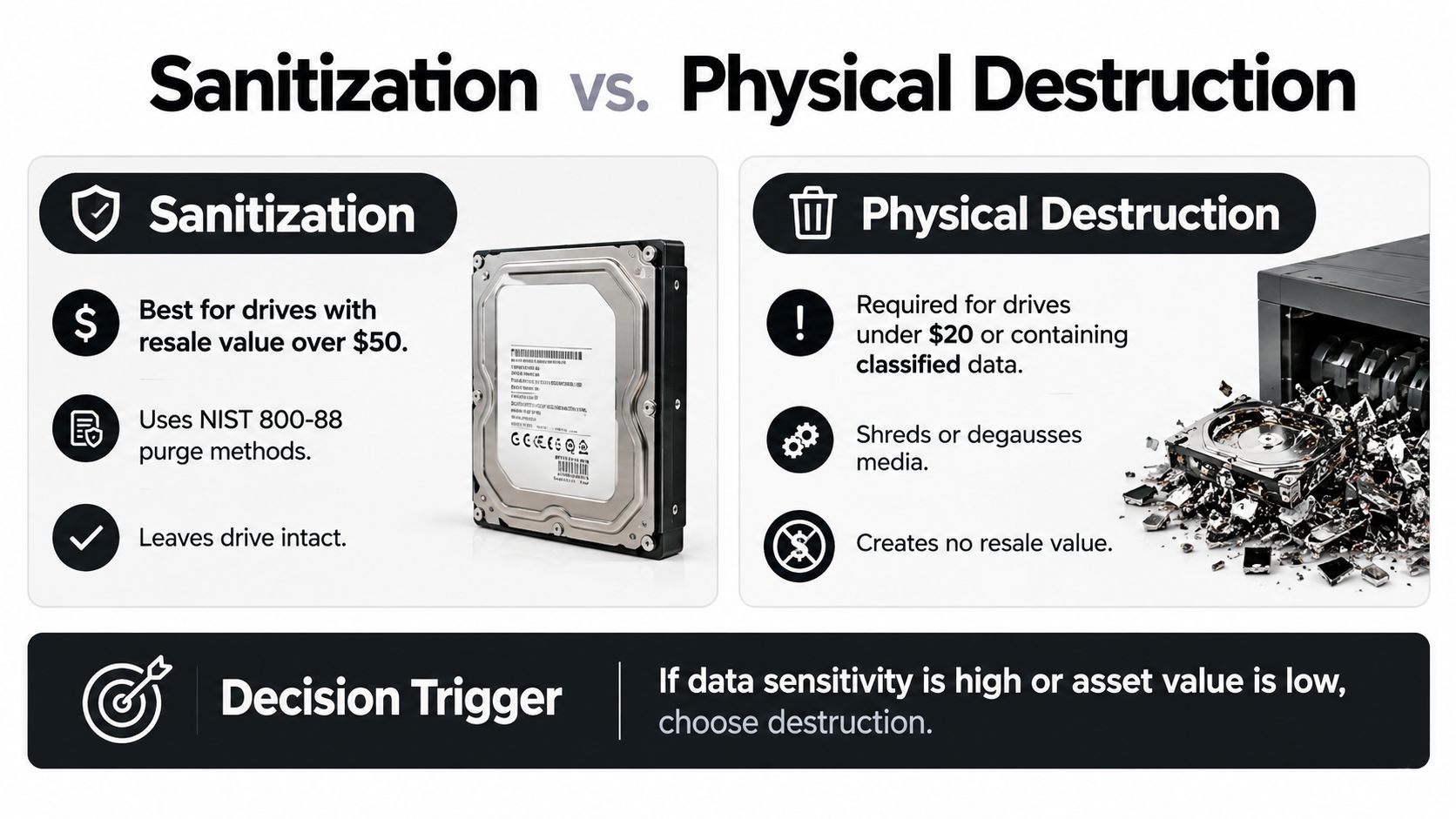
A functional drive doesn't automatically belong in a shredder. The decision should follow the relationship between media type, data sensitivity, recovery requirements, and final disposition.
The three NIST outcomes provide a useful decision structure. Clear may address limited circumstances where the storage remains under controlled conditions and the logical technique matches the risk. Purge is stronger when the drive will leave organizational control but the organization wants to preserve the hardware. Destroy is the endpoint when recovery must be infeasible and the media won't be reused.
| Outcome | Appropriate use | Reuse result |
|---|---|---|
| Clear | Lower-risk situations where logical techniques address user-accessible storage areas | May preserve reuse, subject to verification and policy |
| Purge | Media leaving organizational control when recovery resistance is required | Can preserve the drive when the method works for the technology |
| Destroy | Damaged, inaccessible, exceptionally sensitive, or non-reusable media | Prevents storage reuse |
Match the method to the drive
For internal redeployment or a corporate donation program, retain functional equipment only after documented, verified sanitization. For a working drive leaving the organization, use a purge method appropriate to the storage technology and security category. For a failed or exceptionally sensitive drive, physical destruction is the more defensible endpoint.
Degaussing isn't a universal answer. It targets magnetic media, so it isn't a suitable control for SSDs that store data on flash memory. Physical destruction also needs to be performed through a controlled process, not by drilling or striking a device without confirming that all data-bearing components have been addressed.
The NIST guidance on data destruction supports a method-specific decision rather than a blanket policy. That distinction preserves circular-economy value without weakening security.
When a move or office cleanout includes technology, facilities teams may also benefit from practical office relocation planning tips. The same planning discipline applies to IT assets: identify what is moving, what is being retired, who controls it during transit, and what evidence closes the disposition record.
The decision should be made before pickup. If a drive's value justifies reuse and the method can be verified, sanitization may be the responsible choice. If the drive is damaged, cannot be verified, or carries data requiring irreversible destruction, send it to physical destruction and document the result.
Proving Destruction Through Chain of Custody
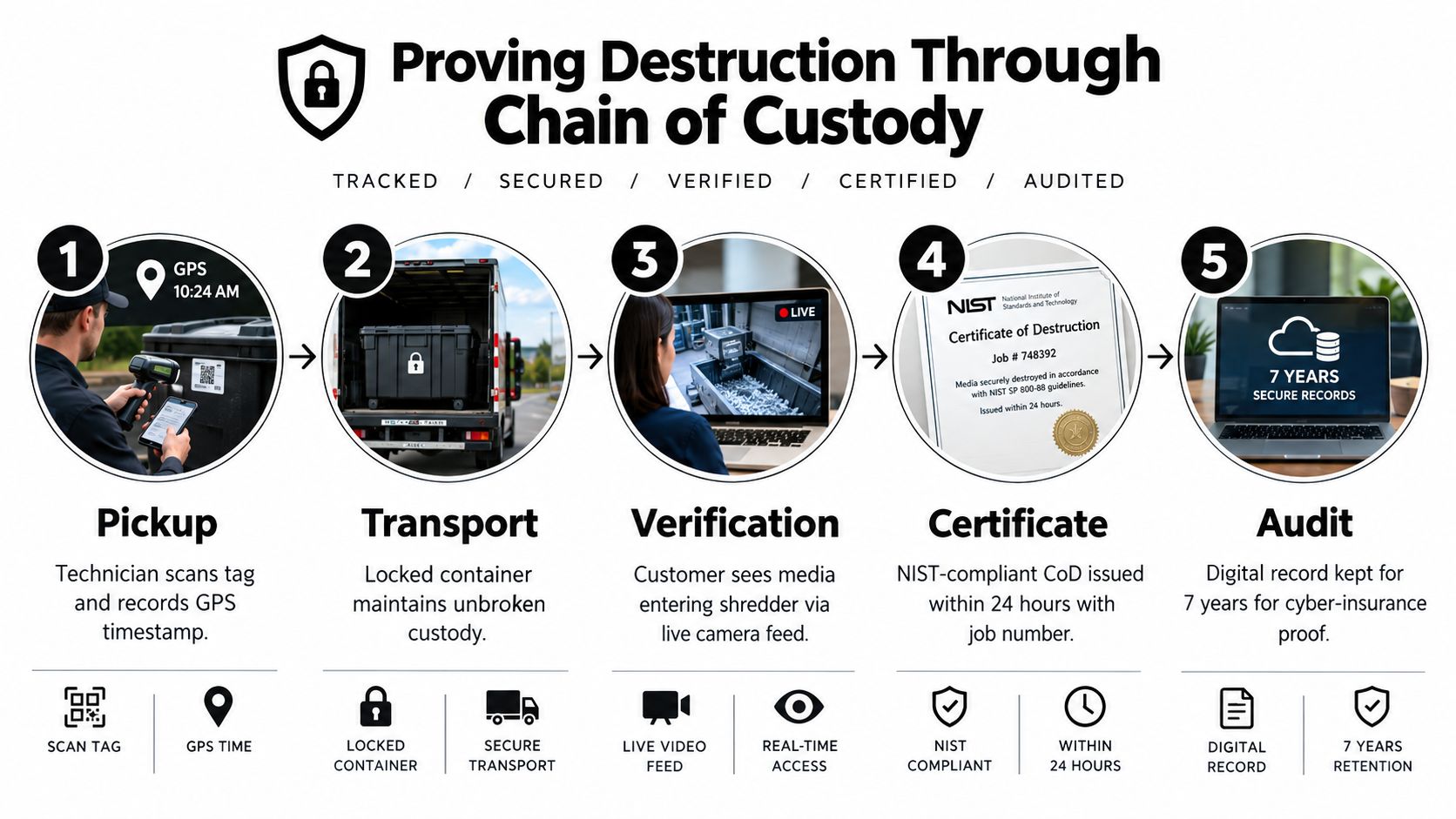
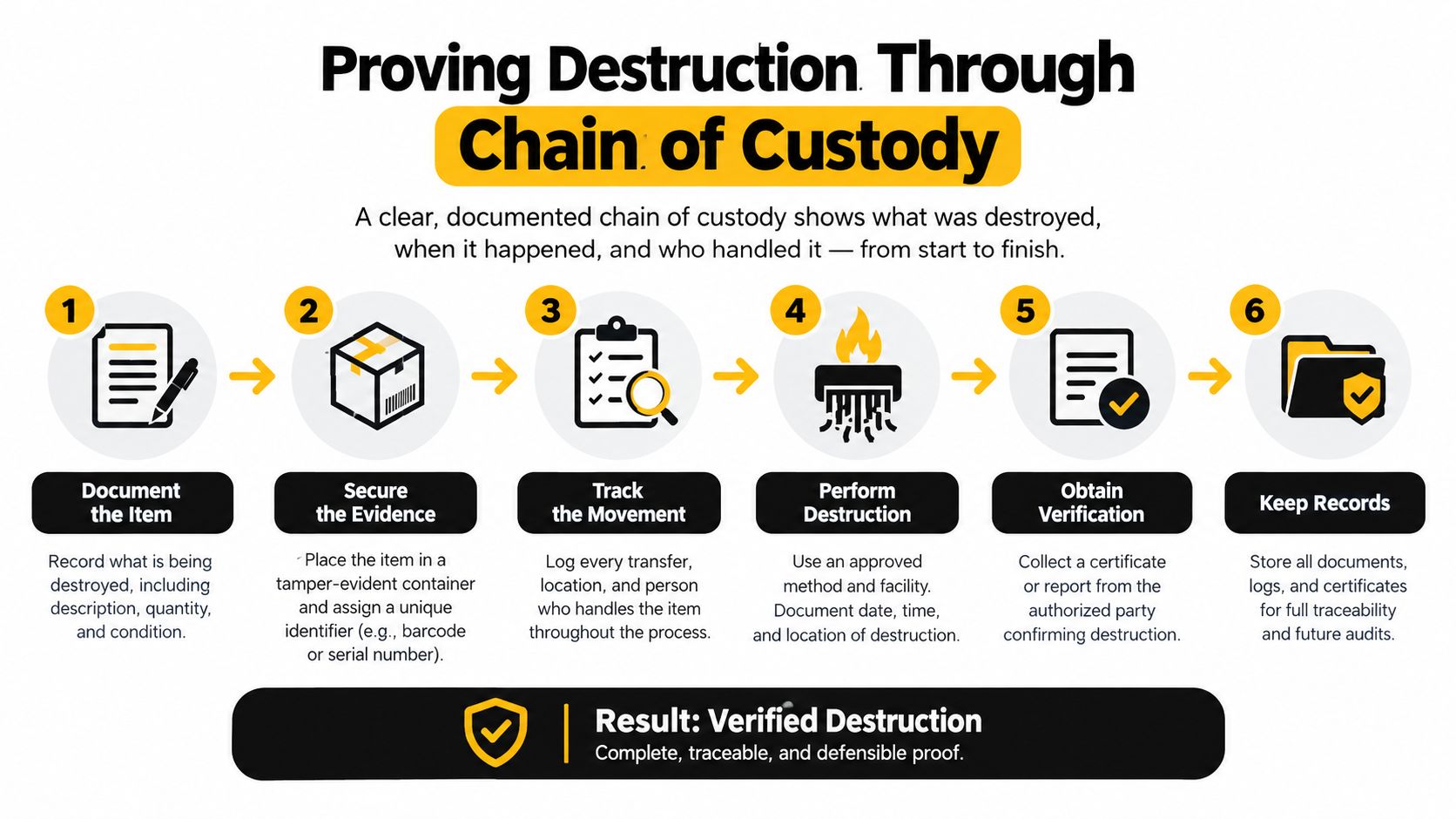
A generic certificate can be weak evidence if it doesn't identify the assets covered by the job. An auditor, insurer, or internal reviewer needs to see how each drive moved from the Atlanta facility to its final disposition.
The audit package should connect the asset identifier to the custody transfer, selected method, verification result, date, operator, equipment, disposition, and any exception. That connection is more valuable than a document that merely says “hard drives destroyed.”
The evidence trail
A practical package includes:
- Pre-pickup inventory: List the owner, serial number, media type, classification, custody location, and intended outcome.
- Access and release record: Document who authorized release, who prepared the assets, and when the sealed load left the facility.
- Transfer record: Identify the container, transporter, destination, and each custody handoff.
- Serialized outcome report: Match every device to Clear, Purge, Destroy, reuse, recycling, or an exception.
- Verification result: Record how the process was checked and who performed the verification.
- Exception log: Explain missing, failed, unreadable, substituted, or returned devices.
Why serial-level reconciliation matters
A certificate covering a batch without device-level identification leaves an avoidable gap. It may confirm that a provider performed a service, but it won't necessarily prove that the drive from a particular workstation was included. Reconcile the final report against the original inventory and investigate every mismatch.
Georgia businesses handling personal information must take reasonable measures to prevent unauthorized access and render discarded records unreadable. Breach notification obligations can apply when computerized personal information is compromised, which makes custody documentation part of the organization's broader risk controls. It shouldn't be treated as paperwork added after the physical work is complete.
The chain-of-custody documentation process should also support sustainability reporting. If a functional laptop is sanitized and donated, the record should say so. If a failed SSD is destroyed and sent into responsible electronics recycling, that outcome should be visible. Facilities directors can then demonstrate both security diligence and responsible material management.
Aligning Data Security with Environmental Stewardship
Secure destruction and environmental responsibility shouldn't operate as separate programs. The same disposition decision that protects information determines whether a working laptop becomes a donation, a reusable business asset, or a material stream.
The EPA recommends using certified electronics recyclers for unwanted electronics. The agency says certified programs are designed to maximize reuse and recycling, minimize exposure to human health and the environment, manage downstream handlers safely, and require data destruction on used electronics.
Evaluate the downstream process
A provider's pickup service is only the first stage. Procurement teams should ask where devices go, how data-bearing components are handled, what happens to assets approved for reuse, and how downstream vendors are controlled. A responsible electronics recycling partner should be able to explain both the information-security process and the material disposition process.
Reworx Recycling operates as a donation-based electronics recycling and IT asset disposition partner for organizations retiring computers, servers, laptops, and other equipment. Its service mix includes secure hard-drive shredding, business pickups, equipment decommissioning, equipment donation, and recycling support. The model connects secure data destruction with community technology donations, digital inclusion, and workforce development rather than treating reuse as an afterthought.
That approach gives sustainability leaders a practical way to evaluate outcomes. Sensitive or failed media can move to physical destruction, while usable equipment can be sanitized and considered for donation or redeployment. Businesses reviewing the financial treatment of those outcomes may also find a plain-language chart of accounts explained useful when coordinating asset retirement, charitable contributions, and recycling services with finance.
Use the decision to support community impact
A secure donation program requires the same discipline as destruction. The organization must know what it released, confirm the data was sanitized, document the recipient or disposition route, and retain the evidence. That creates a defensible path from corporate IT refresh to community benefit.
Atlanta companies planning a computer recycling project, medical equipment disposal, laboratory equipment disposal, office cleanout, or data center decommissioning can place these activities under one ITAD policy. The result is a clearer record, fewer informal handoffs, and a better chance of preserving useful equipment without compromising sensitive data.
Vetting Local ITAD Partners and Scheduling Pickup
A local ITAD partner should be evaluated on evidence, not just convenience. Before approving a vendor for an Atlanta pickup, ask how it identifies assets, secures transport, handles HDDs and SSDs, verifies outcomes, controls downstream recycling, and reports exceptions.
Use a short procurement checklist:
- Serialized reporting: Confirm that the final report identifies each drive by serial number or inventory identifier.
- Media-specific methods: Ask how the provider distinguishes HDDs, SSDs, removable media, and failed devices.
- Controlled transport: Request details about locked containers, custody transfers, access restrictions, and destination controls.
- Verification: Ask who verifies the process and what evidence accompanies the certificate.
- Downstream accountability: Confirm whether reusable equipment, shredded media, and recyclable materials follow documented routes.
- Operational readiness: Clarify pickup windows, loading requirements, access credentials, floor protection, and safety procedures.
- Exceptions: Establish how missing, unreadable, damaged, or substituted devices are reported and resolved.
The vendor selection criteria for ITAD services can help facilities and procurement teams compare providers consistently. A good partner should fit the organization's security policy, sustainability objectives, insurance requirements, and operating schedule.
Prepare the site before pickup by separating data-bearing equipment from general office recycling, labeling containers, confirming the inventory, and assigning one person to authorize release. For a data center decommissioning project, coordinate rack removal, power-down procedures, asset scans, and access control with the destruction plan. For an office cleanout or laptop disposal project, keep donation candidates separate from devices already approved for physical destruction.
Reworx Recycling can support Atlanta-area organizations with secure hard-drive shredding, IT equipment disposal, electronics recycling, donation-based recycling, and pickup planning. Businesses should request a process that matches the data and media, preserves a serialized record, and accounts for the final environmental outcome.
Reworx Recycling helps Atlanta businesses manage secure data destruction, certified electronics recycling, equipment donation, office cleanouts, and IT asset disposition with documented custody and responsible downstream handling. Visit Reworx Recycling to discuss a pickup or build a secure, sustainable retirement plan for your next technology refresh.