You're staring at a spreadsheet that says the office has 312 laptops, but the floor walk keeps turning up machines that never made it into the register. A few are in storage, a few were reassigned months ago, and a few look like they were retired in theory only. That's the moment an IT equipment audit stops being a housekeeping task and starts looking like a control failure.
Done well, an it equipment audit gives you a real picture of what exists, who has it, where it sits, and what happens next. Done poorly, it creates false confidence, especially in distributed environments where devices move between offices, homes, loaners, and shared workspaces without clean handoffs. The difference shows up in budgets, compliance exposure, and how confidently you can decide whether to repurpose, recycle, or replace a device.
Why Your IT Equipment Audit Is About More Than Counting Devices
The first bad surprise usually isn't the missing laptop, it's the pile of assets nobody can explain. A stale register, a few unreturned loaners, and a drawer full of swapped-out peripherals can quickly turn a “routine” audit into a reconciliation mess that exposes how weak the underlying process has been all year.
That's not just an inconvenience. Flexera's 2023 State of ITAM report found that 53% of respondents said Microsoft audited them in the previous three years, up from 46% the year before, and 3% reported paying $25 million or more in software audit costs over the prior three years while 12% paid $5 million or more. Those figures show why inventory integrity matters, because audit exposure becomes much harder to manage when the hardware picture is fuzzy too. Flexera's 2023 State of ITAM report
Ghost assets turn into business risk fast
Industry summaries also estimate that ghost assets can represent 12% to 25% of fixed assets in many organizations, which is exactly why incomplete records keep showing up as budget variance, missing accountability, and bad refresh planning. When a device exists in one system but not another, the organization ends up paying for support, software, or replacement decisions based on fiction instead of evidence. That's especially painful in enterprises that split ownership between IT, finance, and facilities.
Practical rule: if the register, the floor, and the assigned-user list don't agree, assume the audit has found a process problem, not just a missing device.
That's also where asset recovery work becomes relevant. A clean audit can surface equipment that still has value, equipment that needs secure exit handling, and equipment that should be sent into a documented disposition stream. For organizations that want a structured end-of-life path, asset recovery services fit directly into the audit closeout.
Defining Scope and Aligning Stakeholders Before You Start
A useful audit starts with scope, not scanning. If the team tries to cover everything at once, time gets spent on low-risk items while the assets that create exposure still slip through, like remote-user laptops, shared docks, and gear parked in branch offices.
The simplest scope document sorts assets into practical buckets. Include workstations, laptops, servers, network devices, and peripherals, then add the shared equipment that gets overlooked most often, such as docks, monitors, loaner pools, and return-to-stock devices. For hybrid teams, extend the scope to home-office endpoints and any shadow IT that has already escaped the normal procurement path. That scope definition also needs to account for what happens after the count, because physical inventory only becomes useful when it can be matched to utilization and energy data for repurpose, recycle, or replace decisions.
Assign owners before anyone touches the floor
Each stakeholder should own a distinct part of the audit. IT usually owns the register and technical validation, facilities often handles location access and room-level inventory, finance cares about depreciation and disposal timing, and security tracks chain of custody and data exposure. If nobody is named as the decision-maker for exceptions, every unresolved item gets stuck in email. That usually means the same device gets counted twice, or not at all.
A good way to reduce drag is to document what counts as in scope and what doesn't. For example, a printer in a shared conference area belongs in the audit if it connects to the network, but a decorative display without corporate ownership might not. The point is consistency, not perfection. Cross-department collaboration guidance helps here because the people who approve access, confirm ownership, and clear exceptions need the same playbook before the first site walk begins.
The best scope conversations also deal with geography. A branch site, remote home office, and backroom storage cage all create different access problems, so the audit plan needs a route and evidence standard that works in every location. If the team cannot explain how it will capture exceptions from hard-to-reach spaces, the audit scope is too optimistic.
Choosing the Right Inventory Method for Your Environment
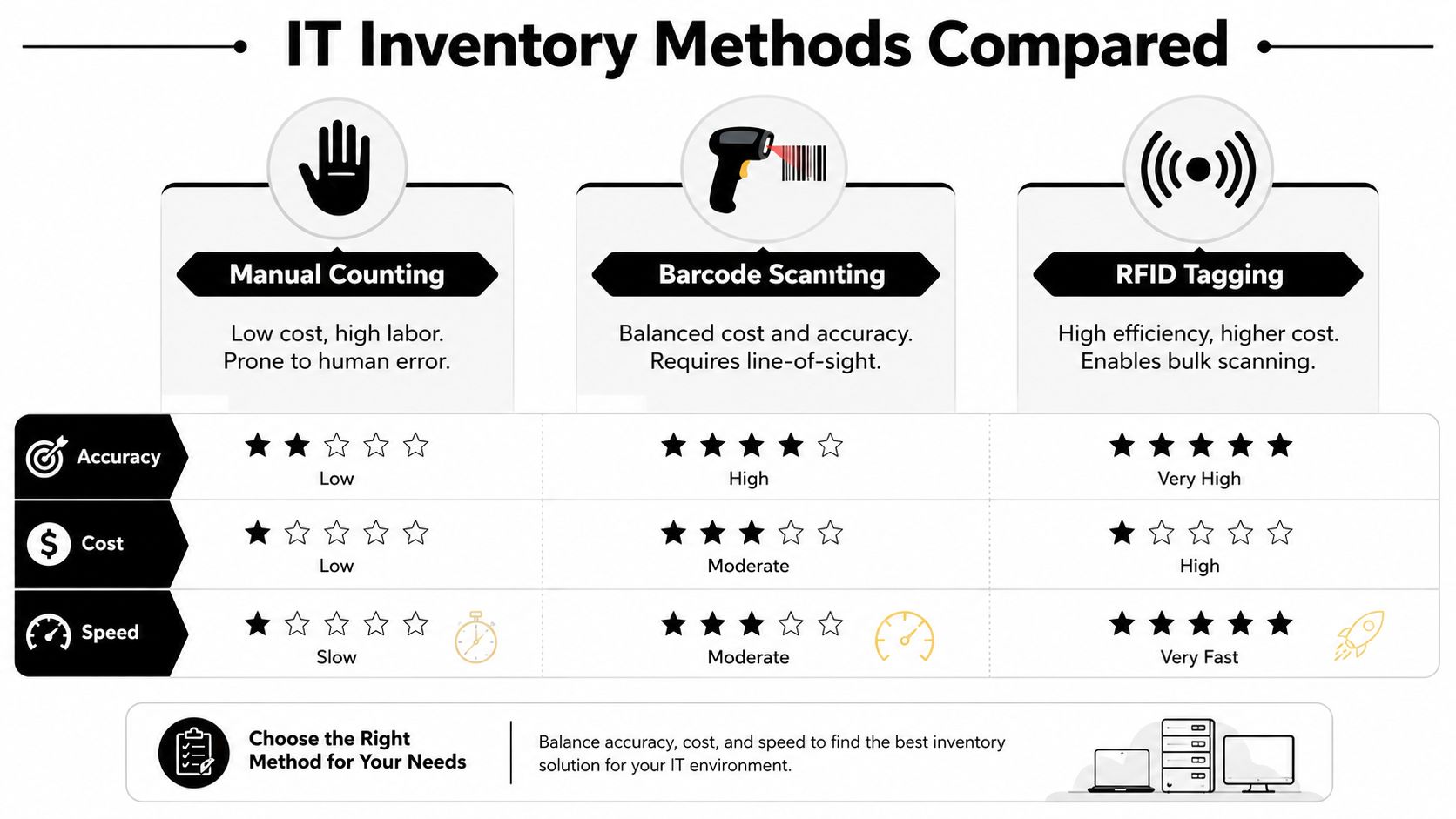
No single inventory method wins in every setting. Manual counting gives you visibility quickly, barcode scanning gives you a better balance of cost and accuracy, and RFID can make bulk capture easier where the environment justifies the extra spend. Automated discovery tools help too, but they only see what's online and reachable.
For a small office, manual counting plus barcode labels may be enough if the asset base is stable and the site is easy to walk. For a distributed enterprise, the better answer is usually a hybrid model, because offline devices, air-gapped systems, and loaners won't always appear in discovery data. That's where audits fail when teams trust one source too much.
Match the method to the risk
Use the method that fits the environment, not the one that sounds modern in a vendor demo. Barcode scanning still works well where line-of-sight is practical and devices are physically accessible. RFID helps when you need faster bulk reads, but it adds cost and process complexity that some organizations don't need.
Field insight: automated discovery is useful, but it's not a substitute for walking the site. If the machine is off the network, the tool won't rescue you.
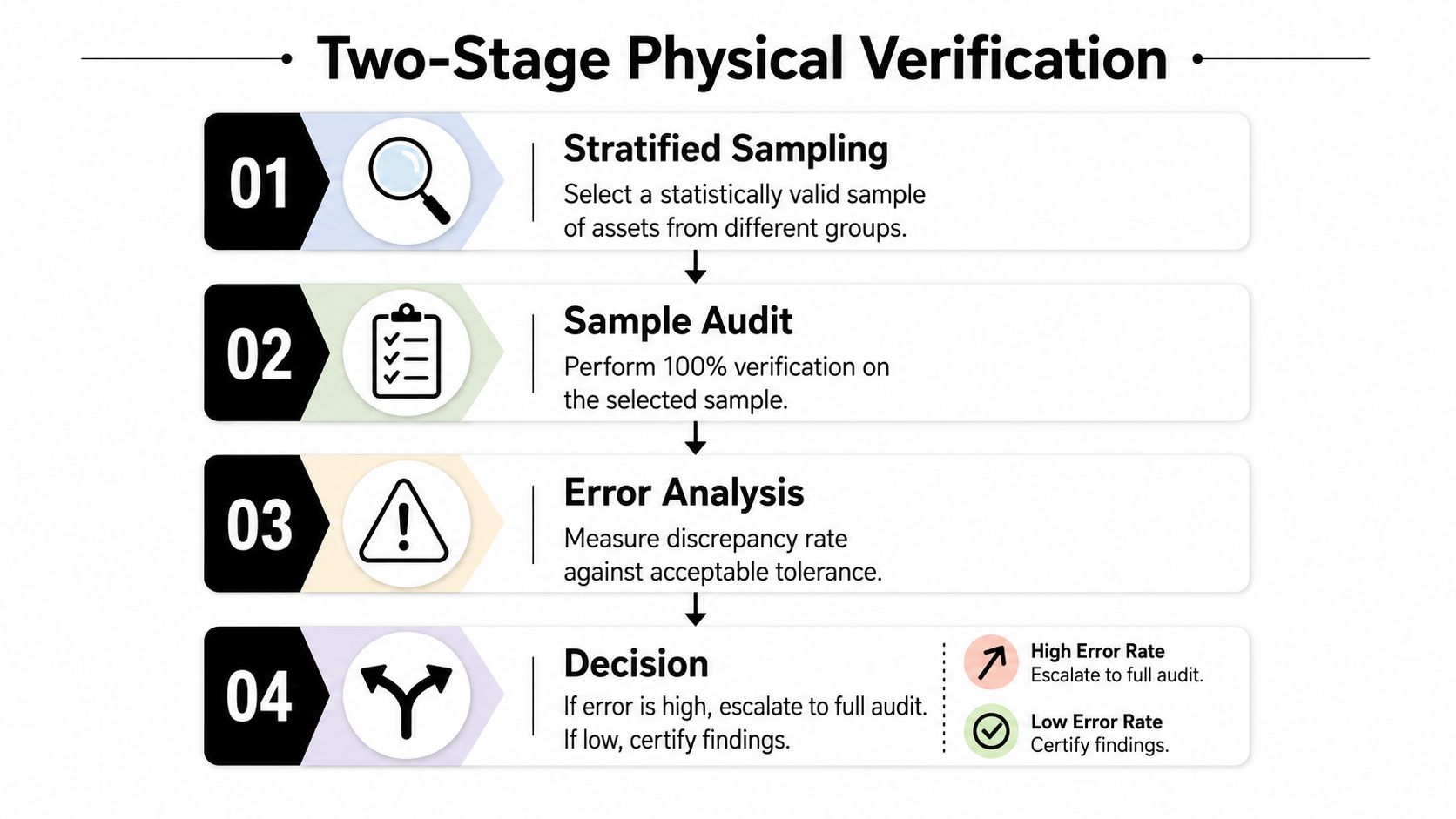
One strong approach is the two-stage physical verification workflow. The first stage freezes the asset register and samples a subset by location or asset class, while the second stage expands or certifies based on what the sample shows. That gives you a way to avoid full-population labor without pretending every site has the same error profile.
For teams managing inventory records in one system, asset inventory management should be treated as a standing process, not a one-time clean up. That matters most when devices move across departments and locations faster than the spreadsheet can keep up.
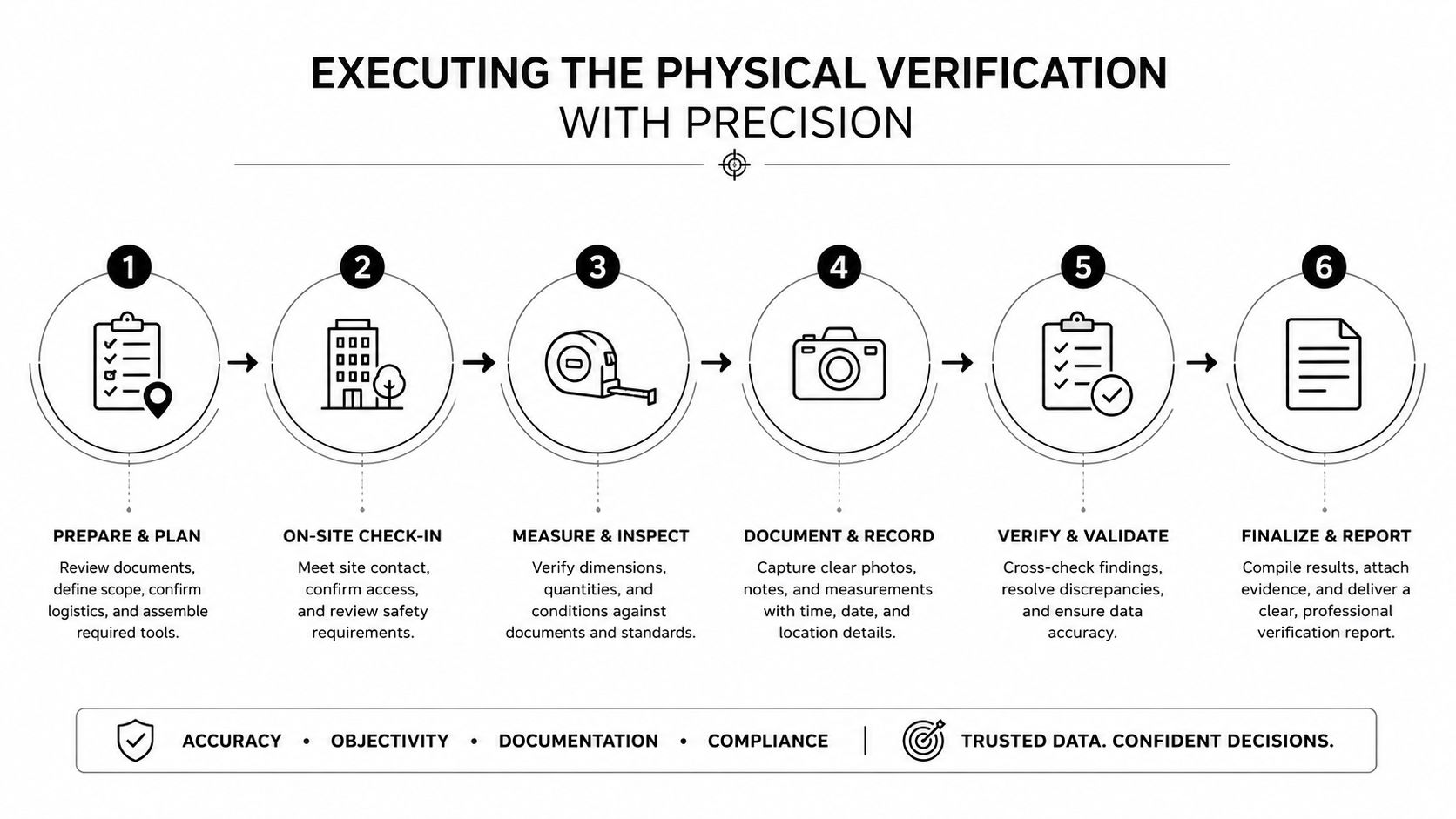
Executing the Physical Verification With Precision
The audit gets real when someone is standing in front of a rack or desk checking what exists. The most reliable field method I've seen is simple: freeze the register, walk the site in a fixed order, and verify each item against the record before moving on. That prevents the common trap of comparing today's floor to last week's export.
A technically sound cycle uses a random sample of 50 to 80 assets per round, which is practical for populations from about 500 to 5,000. Each sampled device should be matched by asset tag, manufacturer serial number, and model, then checked for assigned user and status, with photographs captured for exceptions. That's how you expose systematic control failures without trying to full-count every device every time.
What to verify on the floor
The verification itself should be boring and repeatable. Confirm physical presence, identity, location, condition, and return status in one pass, then log every variance immediately. If you wait until the end of the walk to clean up notes, you'll miss the context that makes exceptions easy to resolve.
The most common failure modes are easy to spot once you know what to look for:
- Untagged equipment that never got entered correctly
- Relocated devices sitting in another office or storage area
- Missing peripherals that break the host-device relationship
- Undocumented network gear hiding outside approved records
A fixed route and consistent evidence capture make discrepancy rates comparable across sites and audit cycles. That comparability matters because it lets you see whether a site really improved or just had a friendlier sample.
The strongest audits don't depend on memory. They depend on a dated register snapshot, a disciplined walk order, and photo evidence for every exception that needs follow-up. When those three pieces line up, reconciliation becomes a controlled process instead of a debate.
Moving Beyond Inventory to Utilization and Disposition Decisions
Most audit programs stop after the count is reconciled, which leaves value on the table. The sharper move is to combine physical verification with utilization and energy data so you can separate active assets from underused ones, and then decide whether each device should be repurposed, recycled, or replaced.
That gap matters because an asset can be physically present and still be a poor candidate for retention. A machine that sits idle, sleeps incorrectly, or shows weak performance patterns can consume budget and power without supporting the work it was bought for. Inventory alone can't tell you that.
Use the audit to sort by operating reality
A useful disposition review starts with three questions. Is the device still needed for a real user or workflow, is it configured well enough to keep, and does its operating profile justify another lifecycle? If the answer is no on two of those, the device is usually a better candidate for redeployment, recovery, or retirement than for indefinite shelf time.
That's where audited hardware becomes actionable for ITAD planning. IT asset disposition services can take the verified inventory and move it into a documented channel for redeployment, secure retirement, or responsible recycling. The audit no longer ends with a spreadsheet, it feeds the refresh plan.
One overlooked checkpoint is energy and utilization evidence after inventory is matched. Standard checklists often stop at serial number and location, but organizations that add configuration review and actual power data get a much clearer view of hidden waste. That's especially useful for offices trying to cut down on devices that were kept “just in case” long after their real use disappeared.
Keep the asset if the data says it's earning its place. Move it if it isn't.
That logic also helps finance and sustainability teams speak the same language. Finance wants lower carrying cost and cleaner refresh cycles. Sustainability leaders want fewer unnecessary replacements and better reuse. A single audit can support both when it goes beyond counting.
Navigating Compliance Checkpoints and Data Security Requirements
An audit that ignores compliance is incomplete, and in some cases risky. If a device is tracked physically but not tied to disposal evidence, wipe records, or chain-of-custody documentation, the organization still has an exposure problem even if the count looks clean.
A complete record should capture device type, make and model, serial number, location, assigned user, purchase date, warranty expiration, end-of-life date, and disposal evidence for retired equipment. One checklist also calls out status fields such as hostname, asset tag, lifecycle status, and wipe or approval records, which makes the audit file much more useful when someone asks how a device left the environment. IT inventory audit checklist guidance
Treat remote assets as high-risk until proven otherwise
Loaners, remote-user devices, and shared equipment need special handling because they move. If a laptop changes hands without a clean record update, the organization loses the custody trail that security and audit teams depend on. Escalation rules should be explicit for assets that never come back or remain unmanaged after employee exits.
Federal audit-record guidance also matters here. It requires that logs capture the type of event, when it occurred, and where it occurred, while also limiting personally identifiable information in those records. Federal audit-record guidance
| Audit field | Why it matters |
|---|---|
| Event type | Shows what happened to the asset or record |
| Time and location | Supports chain of custody and review |
| User and status | Clarifies responsibility and current condition |
| Disposal evidence | Proves retirement was handled correctly |
A clean compliance process does more than satisfy auditors. It shortens investigations when a missing device surfaces, and it reduces the chance that retired hardware lingers in a drawer with sensitive data still on it. The audit file should be strong enough that a second reviewer can reconstruct the asset's path without guessing.
For organizations that need a practical standard for handling audit evidence and controls, information security standards should sit alongside the inventory checklist, not after it.
Connecting Your Audit to Responsible ITAD With Reworx Recycling
Once the audit is complete, the next decision is operational, not ceremonial. The verified list tells you which devices can be redeployed, which ones need secure data destruction, and which ones should leave the environment through a documented disposition path. That's the point where a dependable ITAD partner matters.
Reworx Recycling is one option for organizations that want electronics recycling, secure hard drive shredding, business pickup coordination, equipment decommissioning, and donation-based recycling tied to community impact. Based in Smyrna, Georgia, Reworx also supports corporate donation programs, office cleanouts, and year-end equipment turnover, which makes it easier to move from audit findings to actual action.
Turn the audit into a clean exit plan
The best handoff is simple. Use the audit list to separate surplus assets from active ones, flag anything that needs secure data destruction, and group items for pickup or decommissioning. That reduces back-and-forth, cuts down on forgotten devices, and helps keep reverse logistics organized.
An audit-backed ITAD process also supports sustainability goals. Devices that still have usable life can be directed toward donation or redeployment, while end-of-life gear can move through a documented recycling stream instead of sitting in storage. That's a better outcome for compliance teams, facilities teams, and sustainability leaders at the same time.
If your inventory still has gaps, if storage rooms are full of untracked gear, or if the next refresh cycle needs a cleaner offboarding path, Reworx can fit into that workflow as the disposition partner once the audit is done.
If your audit has surfaced surplus laptops, old network gear, or retired endpoints that need secure handling, Reworx Recycling can help you move them out cleanly and document the handoff. Visit Reworx Recycling to explore pickup, donation, and ITAD resources, then schedule the next step with a partner that understands both inventory control and responsible disposition.