When business leaders hear "refurbished desktop," the first thought is often cost savings. While the financial benefit is significant—typically 30-50% less than new hardware—the real value for modern enterprises goes much deeper.
Smart IT managers, business owners, and corporate sustainability leaders now recognize refurbished hardware as a strategic move. It’s a decision that delivers a powerful trifecta of wins: optimizing your budget, advancing corporate social responsibility goals, and streamlining your entire IT lifecycle management. This approach moves beyond simple cost-cutting into the realm of intelligent, circular economics.
Every refurbished desktop computer deployed is one less new machine that needs to be manufactured, directly reducing the demand for raw materials and avoiding the significant carbon emissions from production. For any company committed to its Environmental, Social, and Governance (ESG) targets, this represents a tangible victory—a key performance indicator for your next sustainability report.
More Than Just Savings
Let's break down the advantages beyond the attractive price tag, because that's where the real value lies for a business.
- Proven Reliability: These aren't flimsy consumer-grade PCs. We're typically talking about enterprise-level machines from giants like Dell, HP, and Lenovo. They were built with higher-quality components from the start, designed to withstand the daily grind of a demanding corporate environment.
- Faster Deployment: Waiting on a new hardware order can feel like an eternity, often delaying critical projects. Refurbished models are already in the supply chain and ready to go, meaning you can get your team up and running much faster.
- Environmental Impact: Choosing refurbished is a powerful statement. It directly reduces e-waste, conserves precious natural resources, and shrinks your organization's carbon footprint. It’s a practical step that aligns with broader goals, and you can learn more about the far-reaching benefits of responsible e-waste recycling and its positive effects.
Refurbished vs New Desktops A Quick Comparison
Deciding between new and refurbished desktops involves weighing several factors. This table breaks down the key considerations to help you make an informed choice that aligns with your business's priorities—from budget constraints to sustainability commitments.
| Factor | Refurbished Desktops | New Desktops |
|---|---|---|
| Cost | 30-50% lower initial investment. | Highest upfront cost. |
| Performance | Comparable for most business tasks. | Latest generation processors and components. |
| Reliability | High; typically enterprise-grade hardware. | High; backed by full manufacturer warranty. |
| Warranty | Varies by vendor, often 1-3 years. | Typically 3+ years from manufacturer. |
| Availability | Immediate; bypasses manufacturing lead times. | Can involve long lead times and supply chain delays. |
| Sustainability | Excellent; promotes a circular economy and reduces e-waste. | High environmental impact from manufacturing. |
Ultimately, both options have their place. New machines are ideal for power users who need the absolute latest technology, while refurbished desktops offer an unbeatable combination of value, reliability, and sustainability for the vast majority of business needs.
Closing The Loop With A Circular IT Strategy
This sustainable approach is most powerful when it becomes a complete cycle. This is where partnering with a dedicated social enterprise like Reworx Recycling really pays off. A truly circular IT strategy isn't just about smart buying; it’s about having a responsible plan for your existing assets when they reach the end of their life.
By integrating IT Asset Disposition (ITAD) and corporate donation programs into your hardware refresh cycle, you create a sustainable loop. The equipment your business retires today is responsibly processed, with data securely destroyed, and viable components are used to create the high-quality refurbished machines your business might need tomorrow.
This model transforms what used to be a disposal headache into a valuable resource. It guarantees your old desktops are handled securely and ethically, keeping them out of landfills while fueling the supply of affordable, reliable technology for other organizations. This closed-loop system isn't just a trend—it's the future of responsible IT management.
How to Vet and Select Your Refurbishment Partner
Picking where you get your refurbished desktops is just as important—if not more so—than picking the actual machines. A great partner is your first line of defense, handling quality control, ensuring data security, and acting as a long-term ally in your IT strategy. A bad one? They’ll introduce risk, create deployment nightmares, and wipe out any cost savings you thought you were getting.
Your vetting process needs to be more than just a price check. It’s about digging into the fundamentals that show a vendor is serious about quality and security.
Verifying Credentials and Certifications
In the world of electronics refurbishment, certifications are the bedrock of trust. They aren't just fancy logos for a website; they represent a real commitment to audited, rigorous processes for keeping workers safe, data secure, and the environment clean.
There are two big ones you absolutely need to look for:
- R2 (Responsible Recycling): This certification ensures the vendor is following best practices for electronics recycling, with a major focus on proper data sanitization and environmental protection. An R2-certified partner gives you peace of mind that any unusable parts are handled ethically.
- e-Stewards: Often seen as the gold standard, e-Stewards is incredibly strict. It completely prohibits shipping hazardous e-waste to developing nations and holds vendors to the highest standards for worker safety and data destruction.
When a vendor has these certifications, it means they’ve invested serious time and money into their operations. That’s a powerful signal that they’re a reliable player.
Scrutinizing Data Destruction and Security Protocols
Let’s be honest: for any IT manager, data security is the one thing you can't compromise on. A reputable refurbisher has to give you absolute certainty that every last bit of data from the previous owner is gone for good.
Don’t be shy about asking direct questions. You need to know their exact data sanitization methods. Do they adhere to the NIST 800-88 guidelines? This is the U.S. government standard for media sanitization and is widely considered the bible for data destruction.
Ask to see a sample Certificate of Data Destruction (CoDD). What you’re looking for is detail. A legitimate CoDD will list the unique serial number of every single device, confirming it has been properly sanitized.
Choosing a partner is a critical step, and for those managing the end-of-life for their own equipment, many of the same principles apply. You can learn more by exploring our detailed guide on selecting a reliable e-waste recycling partner, which covers key criteria for ensuring both data security and environmental compliance.
Decoding Grading Systems and Warranties
Nearly every refurbisher uses a grading system—like Grade A, B, or C—to describe the cosmetic condition of their computers. But here’s the catch: these grades aren't standardized across the industry. One vendor’s "Grade A" could easily be another’s "Grade B."
Always ask for their specific grading criteria in writing. What kind of scuffs or scratches are acceptable for each grade? Better yet, ask for photos of typical units from the grade you’re considering. The market has already spoken on quality, with corporate buyers now making up nearly 40% of the global demand for refurbished desktops. Grade A machines, prized for their near-perfect condition and strong warranties, dominate this space, accounting for 47.95% of the market and growing at 9.92% annually. It’s clear businesses see the value in paying for reliability.
The process of turning old IT assets into valuable, ready-to-use desktops is a powerful cycle.
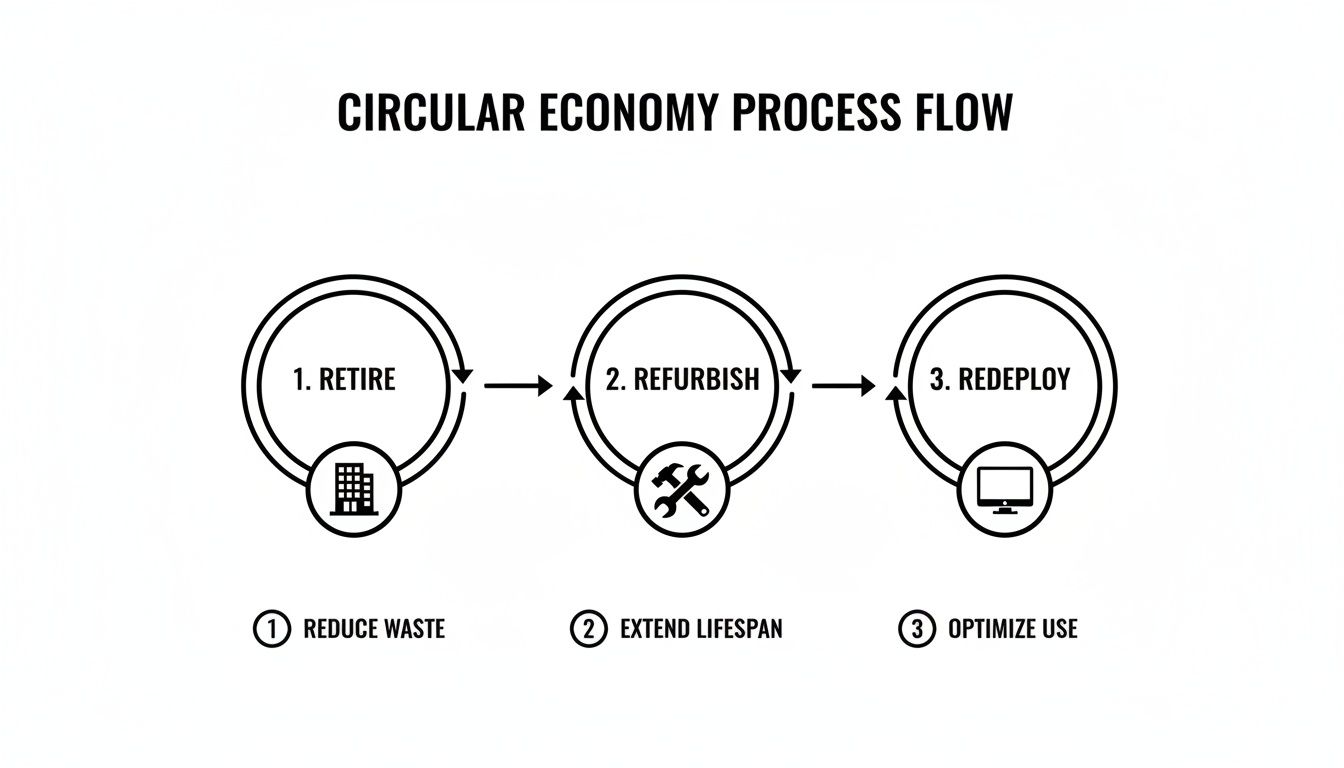
This retire-refurbish-redeploy loop is what powers a sustainable IT strategy, cutting down on waste and squeezing every bit of value out of your hardware.
Finally, look closely at the warranty. A solid one-year warranty shows the refurbisher has confidence in their product. Dig into the Service Level Agreement (SLA) to understand the return and replacement process. If a machine fails, how fast will they ship a replacement? Do they offer advance replacement to keep your team working? A vendor who stands behind their gear with a clear, supportive warranty is one you can build a long-term relationship with.
Your On-Arrival Quality and Testing Checklist
The pallets of refurbished desktops have finally arrived. This is the moment your vendor partnership gets its first real test. A thorough, systematic on-arrival inspection isn't about mistrust—it's about pure diligence. This is how you confirm you got exactly what you paid for and de-risk the entire deployment before a single machine hits an employee's desk.
The first step is a physical audit. Before anyone even thinks about plugging a unit in, your team needs to pull a representative sample—say, 5-10% of the shipment—for a comprehensive visual inspection. This initial once-over is your chance to make sure the cosmetic condition lines up with the grade you purchased.

Initial Physical and Spec Verification
Right out of the gate, you need to match the physical goods to your purchase order. This goes beyond just counting boxes; it's a detailed verification that sets the foundation for all the functional testing to come. Any inconsistencies you find here are usually the easiest to sort out with your vendor.
A methodical approach is everything. I recommend creating a simple checklist for your team to run through for each sample unit:
- Cosmetic Grade Check: Does the physical condition—scratches, scuffs, dents—actually match the "Grade A" or "Grade B" description you agreed on? Make a note of any significant deviations.
- Port Inspection: Quickly check all the essential ports. I'm talking USB, DisplayPort, Ethernet, and audio jacks. A single dead port can make a machine completely useless for a specific user's setup.
- Purchase Order Cross-Reference: Does the model number, CPU, RAM, and storage on the machine line up with what's on your invoice? If you find discrepancies, they need to be flagged immediately.
This verification process is crucial at both ends of the IT lifecycle. For a deeper dive into asset tracking, our guide on why IT inventory audits matter before recycling has some valuable strategies you can easily adapt for receiving new assets.
Power-On and Diagnostic Stress Testing
With the physical checks out of the way, it's time to see how these machines perform under pressure. We're moving from a visual look-see to true functional validation, pushing the hardware to expose any hidden weaknesses that a simple boot-up would never reveal.
To do this right, you have to know your core PC hardware components to properly evaluate their condition. Use bootable diagnostic tools—something like MemTest86+ for RAM or the manufacturer's own diagnostics—to run stress tests. These tools simulate heavy workloads, heating up the components to identify potential failures in the CPU, memory, or storage before they ever affect your users.
Pro Tip: Don't just boot to the desktop and call it a day. Let those diagnostic tests run for at least a few hours on your sample machines. This "soak-in" period is fantastic for catching those intermittent hardware faults that a quick check always misses.
The Pilot Program Advantage
Before you give the green light for a full-scale deployment, run a small pilot program. Pick a few users from different departments and have them use the refurbished desktops for their daily tasks for a week or two. This kind of real-world testing is absolutely invaluable.
It's the best way to catch any fleet-wide quirks, like driver incompatibilities with certain peripherals or strange issues with your corporate software image. The feedback you get from this pilot group gives you that final layer of confidence to proceed with a full rollout across the organization, saving you from a world of helpdesk tickets down the line.
When it comes to deploying new hardware, IT managers know the drill: security is non-negotiable. Bringing refurbished desktop computers into your environment is no different. With the right strategy, these cost-effective machines can be just as secure as their brand-new counterparts, starting from the moment they arrive.

The single most critical security document you should get your hands on is the Certificate of Data Destruction (CoDD) for each device. This isn't just a piece of paper; it's your verifiable proof that the previous owner's data has been completely and irretrievably wiped. Reputable vendors follow stringent standards like NIST 800-88.
If a vendor can't provide a CoDD, that's a major red flag. Without it, you're introducing an unacceptable risk into your network. Think of verifying this document as your first and most important security checkpoint.
Establishing Corporate Control From Day One
Once you've confirmed the previous data is gone for good, the next move is to bring the device under your corporate control. This means wiping any pre-installed operating system and applying your company's standard "gold image." This process ensures every machine starts from a known, secure baseline configured with your specific policies, software, and security settings.
This is also where you'll loop the desktops into your existing management infrastructure. Key actions include:
- Joining the Domain: Add each desktop to your Active Directory or Azure AD to enforce Group Policy Objects (GPOs) and standardized user authentication.
- Deploying Endpoint Security: Immediately roll out your standard suite of security tools, including antivirus, anti-malware, and Endpoint Detection and Response (EDR) agents.
- Enrolling in Management Systems: Make sure the devices are visible in your IT asset management and remote monitoring tools, like SCCM, Intune, or other MDM solutions.
By applying your corporate image and management tools right away, you eliminate any unknown configurations. From that point on, you can treat the refurbished machine exactly like any other new piece of hardware joining your fleet. For businesses managing their own end-of-life hardware, understanding the importance of secure data destruction services is just as critical to protect against downstream risk.
Data Destruction Standards and Methods
Understanding the standards behind a Certificate of Data Destruction gives you confidence in the security of your refurbished assets. Here’s a quick look at some common methods and their applications.
| Standard/Method | Description | Best For |
|---|---|---|
| NIST 800-88 | A U.S. government standard outlining processes for media sanitization. It specifies three methods: Clear, Purge, and Destroy. | Organizations needing to meet federal compliance and data privacy regulations (e.g., HIPAA, GDPR). |
| DoD 5220.22-M | An older U.S. Department of Defense standard that involves overwriting data multiple times (typically 3-pass or 7-pass). | General-purpose data wiping where verifiable, multi-pass overwriting is desired. |
| Physical Destruction | Methods like shredding, crushing, or degaussing that render the storage media physically unusable. | The ultimate security for highly sensitive data where the drive will not be reused. |
These standards are the backbone of secure IT asset disposition, ensuring that when you receive a refurbished machine, it's a completely clean slate.
Locking Down The Foundation: BIOS and Firmware Updates
Hardware-level security is just as important as what you do on the software side. Before any desktop is handed off to an end-user, it's essential to lock down the BIOS/UEFI to prevent unauthorized changes.
This foundational step involves setting a strong administrator password for the BIOS/UEFI and disabling boot options from external devices like USB drives. This simple action prevents unauthorized OS installations or the use of malicious bootable media, hardening the device at its most basic level.
Finally, a day-one update strategy is crucial. Your team should immediately check for and apply the latest firmware, BIOS/UEFI, and driver updates directly from the original equipment manufacturer (OEM), such as Dell, HP, or Lenovo.
Refurbished machines may have been sitting in inventory for a while, and these updates contain critical patches for security vulnerabilities discovered since the hardware was first built. This proactive patching closes potential security gaps before they can be exploited.
Beyond the physical hardware, securing your digital footprint on these desktops is paramount. For general guidance on safeguarding user data, it's always helpful to explore how to protect privacy online. These combined efforts ensure your newly acquired refurbished desktop computers are as resilient and secure as any other asset in your IT framework.
Calculating the True TCO and Environmental ROI
The sticker price on a refurbished desktop is always attractive, but that's just the tip of the iceberg. To really understand the financial win, you have to look past the initial invoice and calculate the Total Cost of Ownership (TCO). This gives you the full picture, factoring in not just what you pay upfront, but also the ongoing operational costs and even the value you get back at the end of the machine's life.
Think about it: enterprise-grade machines were built for efficiency from the start to meet corporate standards. That means they often sip less power than cheaper consumer models, which translates into real savings on your utility bills when you've got a whole fleet of them running. On top of that, many refurbished PCs come with an OS license already included, saving you from a software expense that can really add up during a large deployment.
Quantifying the Green Return on Investment
The environmental ROI is just as compelling as the financial one, especially if you're a sustainability manager or a leader focused on ESG reporting. Choosing refurbished hardware is one of the most direct and impactful moves you can make. It takes a tremendous amount of energy, water, and raw materials to manufacture a brand-new computer.
When you opt for a refurbished desktop, you're extending the life of a product that already exists—a fundamental principle of the circular economy. This simple decision cuts your company's demand for new manufacturing and, in turn, shrinks your carbon footprint.
The impact here is huge. We consistently see data showing that choosing refurbished hardware can reduce the carbon emissions associated with manufacturing by up to 80%. That's a powerful, verifiable number you can plug directly into your annual sustainability reports to show a real commitment to environmental stewardship.
This isn't just about feeling good; it's a strategic move that builds a powerful story for your stakeholders, employees, and customers. It proves your IT strategy is in lockstep with modern sustainability goals and is a key step in minimizing the carbon footprint of IT departments.
The Full Circle IT Strategy
This forward-thinking approach creates a powerful loop between how you buy equipment and how you retire it. When you partner with an ITAD provider like Reworx Recycling, your IT strategy becomes a closed-loop system. The refurbished computers you buy today are available because other organizations responsibly retired their assets.
The market is definitely catching on. The global refurbished PC market is on track to hit $19,770 million, growing at a solid 6.4% CAGR. A big driver for this is businesses realizing that refurbished desktops slash carbon emissions compared to making new ones. It’s becoming a cornerstone of smart, sustainable IT. You can read the full research about these market trends to see just how big this shift is.
Ultimately, when your own devices reach the end of their road, a partnership with Reworx ensures they're handled securely and ethically. The machines that still have life in them get refurbished for someone else, and the rest are responsibly recycled. This not only keeps e-waste out of landfills but also funnels residual value back to you through buyback programs—directly offsetting the cost of your next tech refresh and completing the sustainable IT cycle.
Closing the Loop with Smart IT Asset Disposition
A truly strategic hardware plan doesn't just stop at procurement—it accounts for the entire lifecycle of a device, right down to the very end. The final, and arguably most crucial, piece of the puzzle is smart IT Asset Disposition (ITAD). This is where your strategy for acquiring refurbished desktop computers comes full circle, turning what used to be a disposal problem into a sustainable asset.
When you partner with a social enterprise like Reworx Recycling for your ITAD, you’re not just getting rid of old equipment. You're completing a circular economy model. Instead of paying someone to haul away outdated machines, you create a system that actually feeds back into itself, ensuring your retiring assets are handled securely and ethically while keeping hazardous materials out of landfills.
Unlocking Residual Value Through Buyback and Donation
Don't be mistaken—those aging desktops are far from worthless. Many of them contain components and materials that still hold significant value. A solid ITAD program helps you tap into this hidden potential in two key ways: equipment buyback and corporate donation programs.
- Equipment Buyback: Partners like Reworx Recycling can assess your retired fleet and offer to purchase the machines and components that are still viable. That cash-back or credit can then directly offset the cost of your next tech refresh, further lowering the TCO of your refurbished desktop program.
- Corporate Donation Programs: For equipment that might not qualify for a buyback but is still perfectly functional, donation is a powerful alternative. This path supports community programs, helps bridge the digital divide, and builds positive brand recognition. Your old hardware becomes a tool for social good.
Building a Continuous and Responsible Hardware Cycle
This kind of end-of-life planning is what elevates a simple purchasing decision into a continuous, responsible hardware strategy. It creates a predictable and sustainable loop where the assets you retire today help fuel the supply of affordable, high-quality technology for tomorrow. This model is quickly gaining traction, with North America now commanding about 36% of the global refurbished computers market as more businesses embrace green IT. The shift is fueled by major cost savings and the reliable performance of certified machines, making it a cornerstone of modern corporate refresh cycles. You can dive deeper into the numbers and learn about the refurbished computer market size.
By integrating a formal ITAD process, you're not just disposing of old computers—you're actively participating in and strengthening the circular economy. This ensures your organization's environmental and social commitments are woven into every stage of your IT asset management.
Ready to close the loop on your hardware strategy? Schedule a pickup with Reworx Recycling today. We’ll handle your retired equipment with certified, secure data destruction and make sure your assets are repurposed or recycled responsibly, supporting community programs in the process.
Common Questions About Refurbished Desktops
Even with the clear financial and environmental upsides, the idea of switching to refurbished desktops still raises a few eyebrows. IT managers and stakeholders often have valid questions, and tackling them head-on is the best way to get everyone on board. Let's walk through some of the most common concerns we hear from teams making the shift.
What Is The Typical Lifespan of a Refurbished Desktop Computer?
You can realistically expect a high-quality, Grade A refurbished desktop to give you a solid 3-5 years of service. That’s pretty much on par with a brand-new machine.
How is that possible? It comes down to where these computers originate. Most are enterprise-grade models pulled from corporate leasing cycles, and they were built with premium components meant to last. A good refurbisher puts them through the wringer—diagnostics, stress tests, component replacements—essentially hitting the reset button on their operational life.
Are Refurbished Computers Reliable Enough for Business Use?
Absolutely. In many cases, they’re even more reliable than some new consumer-grade PCs you could buy off the shelf. Think about it: these machines were engineered from the ground up to handle the 9-to-5 grind in a corporate setting. They’re built tougher.
When you source them from a certified vendor who does comprehensive testing and backs their work with a real warranty, you’re getting a workhorse. The combination of that initial build quality and a professional refurbishment process results in a seriously dependable asset.
The real measure of reliability isn't whether a machine is new or refurbished. It's the quality of its components and the rigor of its testing. A Grade A refurbished enterprise machine often has a lower failure rate than a brand-new, low-end consumer desktop.
How Does The Warranty on a Refurbished Desktop Compare to a New One?
This is a big one, and it's a fair question. New PCs usually come with a standard 1 to 3-year manufacturer warranty. Reputable refurbishers will typically offer warranties from 90 days to one full year as part of the package.
But here’s the key part: most vendors will let you purchase extended warranties to cover your fleet for 2-3 years. This brings the protection level right in line with buying new, giving you the peace of mind you need to know your investment is covered for its entire planned lifecycle.
Can We Install Our Own Corporate Software Image on Refurbished Machines?
Yes, and you should treat them no differently than a new machine. A professionally refurbished desktop is essentially a blank slate ready for your standard operating procedures.
Go ahead and deploy your corporate OS image, security stack, and management tools. This ensures every device is compliant with your IT security policies and integrates seamlessly into your existing infrastructure, whether that’s Active Directory or your endpoint protection platform.
We've covered some of the most common questions IT managers have when considering refurbished desktops, but you might have more. Here are a few other frequent inquiries we've put together to help you make a fully informed decision.
FAQ
| Question | Answer |
|---|---|
| What's the difference between "used" and "refurbished"? | A "used" computer is sold as-is. A "refurbished" computer has been professionally tested, repaired, cleaned, and certified to be in full working order, often with a warranty. |
| Do refurbished PCs come with an operating system? | Most reputable refurbishers will install a genuine, licensed version of an operating system (like Windows Pro), so the machine is ready to use out of the box. |
| Can I customize the specs of a refurbished desktop? | Yes, many vendors offer customization options. You can often request upgrades to RAM, storage (like switching from HDD to SSD), or other components to meet your specific needs. |
| Is there a noticeable cosmetic difference? | It depends on the grade. Grade A refurbished products have minimal to no signs of wear. Lower grades (B or C) might have minor cosmetic scuffs or scratches but are still 100% functional. |
Hopefully, this clears up any lingering doubts. The takeaway is that with the right vendor and process, refurbished desktops are a smart, reliable, and cost-effective choice for modern businesses.
Ready to build a more sustainable and cost-effective IT strategy? Reworx Recycling can help your business implement a responsible IT equipment disposal plan that closes the loop. Through our donation-based social enterprise, your old equipment supports community impact, digital inclusion, and workforce development. Schedule a pickup today or explore our recycling blog to learn more.