You've probably got the same scene a lot of facilities and IT managers run into after a refresh cycle. A staging room fills up with retired laptops, power bricks, docking stations, and a deadline nobody planned for carefully enough. By Thursday afternoon, somebody says, “Can't we just recycle all of this?” That's the wrong question.
Old laptops disposal isn't a trash problem. It's a control problem. Some units still have reuse value. Some still hold sensitive data. Some have failing batteries and shouldn't sit in a corner another month. If you treat every device like generic e-waste, you lose resale value, create audit gaps, and increase your data risk for no good reason.
For Georgia businesses dealing with electronics recycling, donation-based recycling, IT equipment disposal, computer recycling, office cleanout work, or a broader facility cleanout, the right move is triage first, logistics second. That's the standard I'd apply whether the load came from a law office in Atlanta, a healthcare admin site in Marietta, a school district near Smyrna, or a mixed commercial property anywhere in metro Georgia.
Why Old Laptops Disposal Is a Triage Problem
A facilities manager opens the cage and finds a pallet of 240 retired laptops from a rushed hardware refresh. Some are three generations old. Some still power on. A few have handwritten sticky notes that say “HR,” “finance,” or “loaner.” Nobody's fully sure which ones were encrypted, which ones had local files, or which batteries are starting to swell. The deadline is Friday because the space is needed for another move.
That's not a recycling errand. That's a triage queue.
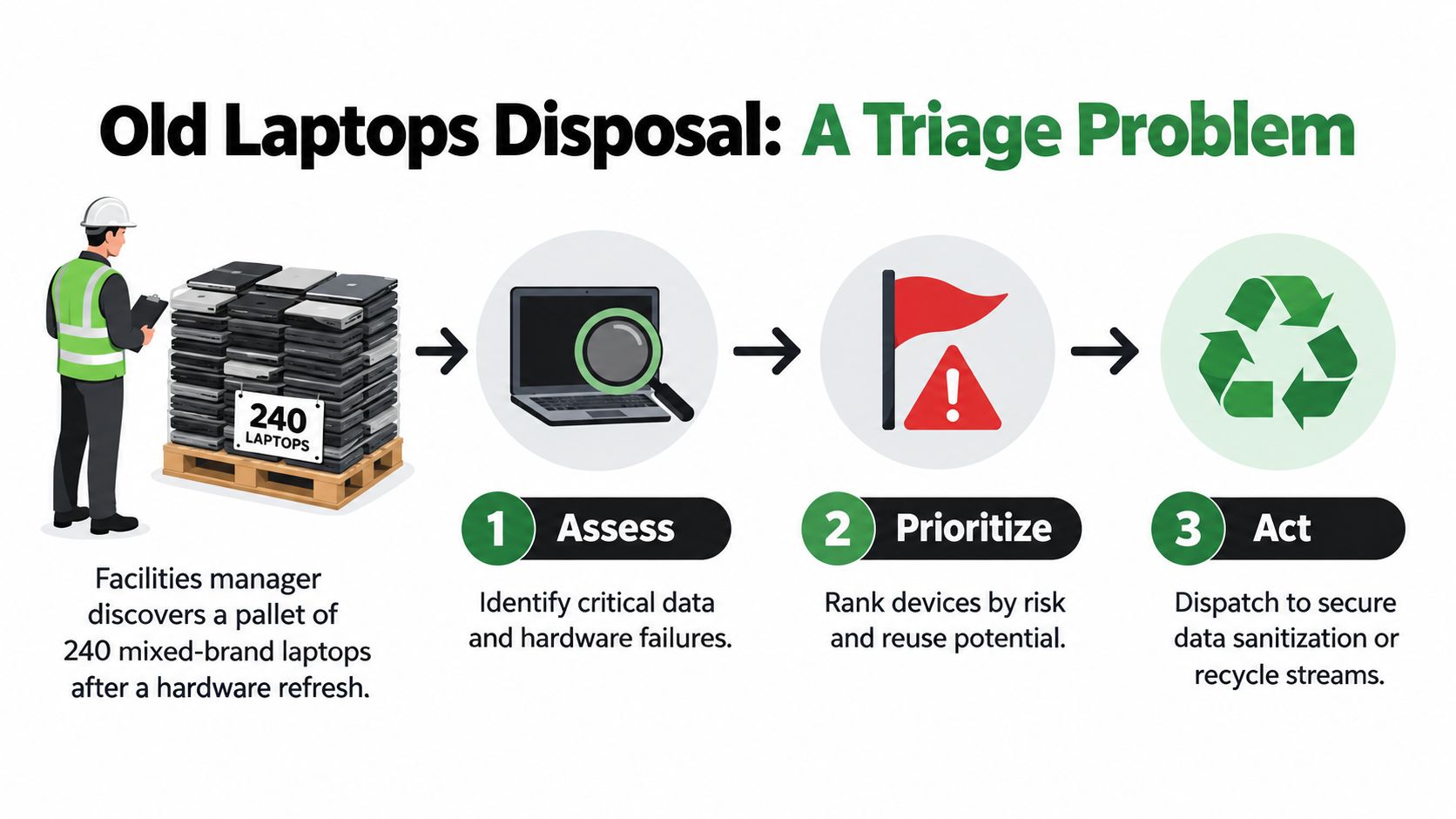
A single “drop it all off” mindset fails because each laptop carries three separate issues. First, it's a data-bearing asset. Second, it's a device with a battery that may require careful handling. Third, it may still have reuse value through redeployment, refurbishment, donation, trade-in, or IT asset disposition (ITAD).
The three questions that matter first
Before anyone books a truck, answer these:
- What data did it ever touch. Finance, HR, healthcare, student records, customer files, export-controlled material, or just low-risk general office work.
- Can it run a current operating system. If it can't support a current OS cleanly, don't waste labor pretending it's a redeploy candidate.
- What does the battery look like. Healthy, weak, dead, or physically compromised. A swollen pack changes the handling plan immediately.
Practical rule: If you haven't classified the data, you haven't classified the laptop.
That's where decent asset discipline pays off. If your refresh process is still loose, Finchum Fixes IT asset management is a useful primer on tightening the upstream controls that make end-of-life easier.
Triage before transport
The workflow I recommend is simple. Redeploy what's safe and still useful. Refurbish or resell what can stay in service with minor work. Recycle what's broken, too old, hazardous, or not worth touching. If you need a model for the handoff side, Reworx's guidance on reverse logistics practices is relevant because chain of custody starts before pickup, not after.
Inventory, Backup, and Secure Data Sanitization
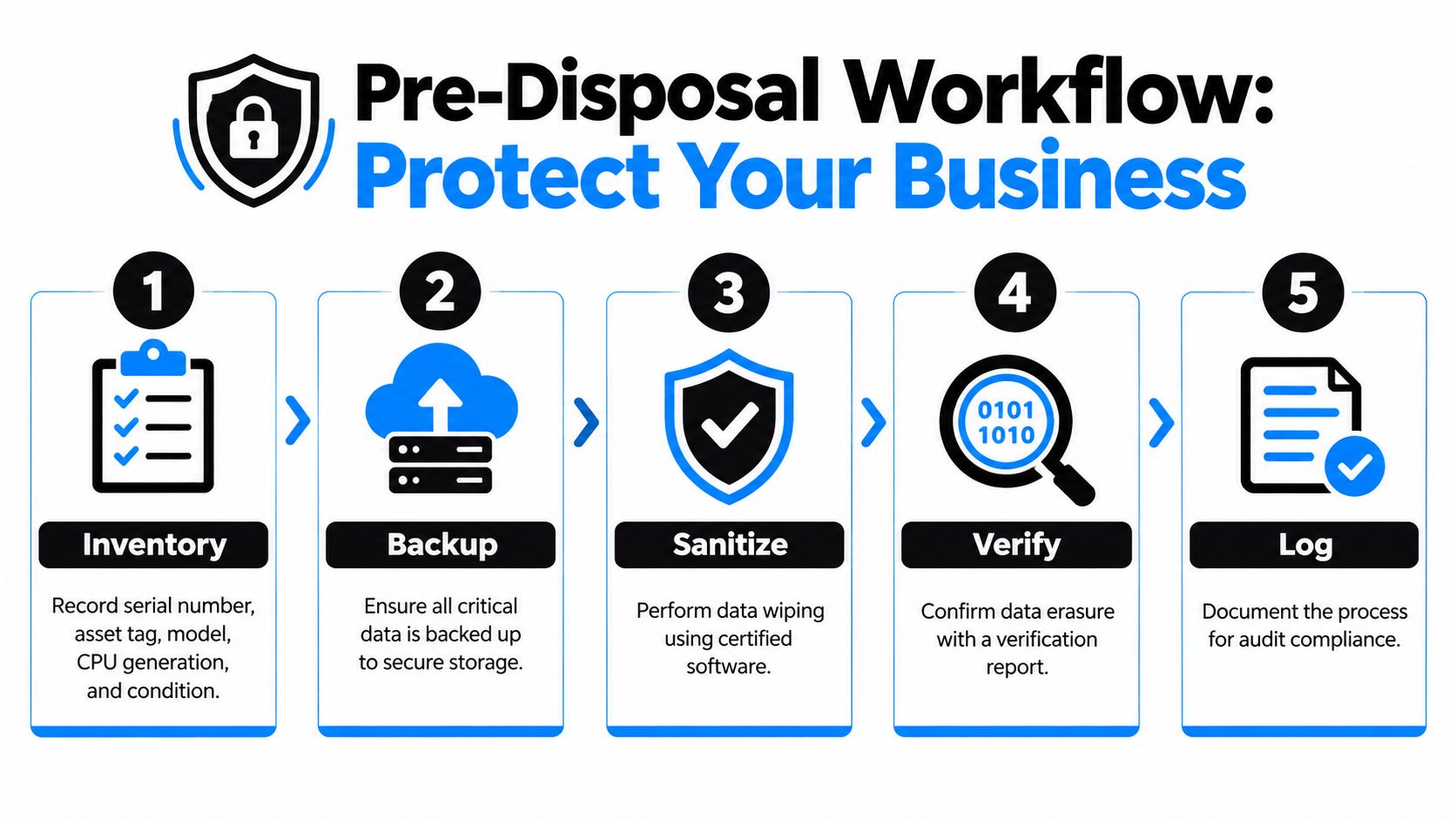
If a laptop is leaving your control, your protection comes from paperwork and process, not good intentions. Build the inventory first. Then back up what matters. Then sanitize the storage based on actual risk.
Build the inventory people actually need
Don't settle for “about two hundred laptops.” That's useless in an audit and useless at the loading dock.
Capture these fields for every unit:
- Serial number and asset tag so the device can be reconciled later
- Make and model because supportability and resale depend on it
- CPU generation and RAM since that determines whether current software is realistic
- Storage type such as SSD or HDD, because sanitization methods differ
- Battery condition including swollen, weak, dead, or acceptable
- Highest data classification handled which drives the Clear, Purge, or Destroy decision
Backup what matters and prove it restores
Too many teams “back up” by copying folders and calling it done. That's sloppy. Pull the user data, any required local application data, browser artifacts only if policy requires them, and any line-of-business exports needed for retention. Then restore a sample to a clean machine or test environment and confirm the files open correctly.
Backups without restore testing are just assumptions saved to another device.
Use NIST terms the right way
NIST SP 800-88 treats sanitization as Clear, Purge, or Destroy. That language matters because it forces you to match the method to the risk. For old laptops being donated, sold, or recycled, NIST warns that ordinary methods can miss inaccessible areas on modern storage because of features like wear-leveling and overprovisioning. That's why relying on a factory reset or a casual overwrite is a mistake, especially on SSDs. The standard's practical sequence is inventory, isolate the media, apply the right sanitization method, validate the result, and document chain of custody or sanitization records in the same workflow described in NIST SP 800-88 Revision 1.
Here's the plain-English version:
- Clear works for devices staying inside the organization under continued control
- Purge fits devices leaving the company but remaining in service
- Destroy is the right answer for high-risk media or devices with no sensible reuse case
If you need a plain-language refresher before assigning the work, Reworx has a straightforward explainer on what data sanitization means in practice.
Tape this checklist to the pallet
- Identify the laptop. Match serial number, asset tag, and assigned user or department.
- Classify the data. Note the highest sensitivity the device ever handled.
- Confirm backup status. Mark complete only after restore testing.
- Inspect the battery and chassis. Flag swelling, cracks, missing screws, and liquid damage.
- Select the sanitization outcome. Clear, Purge, or Destroy.
- Validate and log. Keep the evidence with the asset record.
Donation, Recycling, or Trade-In Compared
Most organizations don't have one exit route. They have three. The mistake is forcing every laptop into the same lane because it's administratively convenient.
Donation-based recycling has the strongest community impact story. It also fits social enterprise recycling and corporate donation programs well. But donation only works when the device is serviceable, the data has been handled correctly, and the recipient can use what you're giving. A dead battery and unsupported OS turn a “donation” into deferred disposal.
Recycling is the right call for units that are broken, unsafe, obsolete, or not economical to repair. It's also where downstream discipline matters most. Globally, only 22.3% of e-waste generated in 2022 was documented as properly collected and recycled, and roughly 62 billion USD in recoverable resources was not formally recovered, according to the 2024 Global E-waste Monitor media release. That's why I push a reuse-first screen before shredding anything with a viable second life.
Trade-in or buyback is the budget-friendly route when the machines are still marketable. It usually has the weakest ESG story of the three, but it can help offset refresh costs if the models still meet OEM or remarketer specs.
Donation vs Recycling vs Trade-In at a Glance
| Criterion | Outcome | Fee | Time |
|---|---|---|---|
| Working laptops with acceptable battery health and low to moderate data risk | Donation can support digital inclusion if sanitization and documentation are handled properly | Varies by provider and prep work | Usually moderate because screening and recipient fit take time |
| Broken, unsafe, or obsolete laptops | Recycling is appropriate when reuse no longer makes technical or economic sense | Varies by device condition, logistics, and data handling requirements | Can be fast if inventory and chain of custody are organized |
| Newer laptops with resale value | Trade-in or buyback can recover budget value | Often offset by hardware value if the units qualify | Usually fastest when devices match standard acceptance criteria |
For businesses that want the social impact route, laptop donation programs make sense only after triage. Donation is an outcome, not a shortcut around data handling.
Sorting Devices Into Reuse and Recycle Streams
Old laptops disposal stops being theoretical. Put hands on the devices and sort them decisively. Don't create a fourth pile called “we'll decide later.” That pile turns into shelf storage, then disappears from control.
Use a simple three-stream rubric
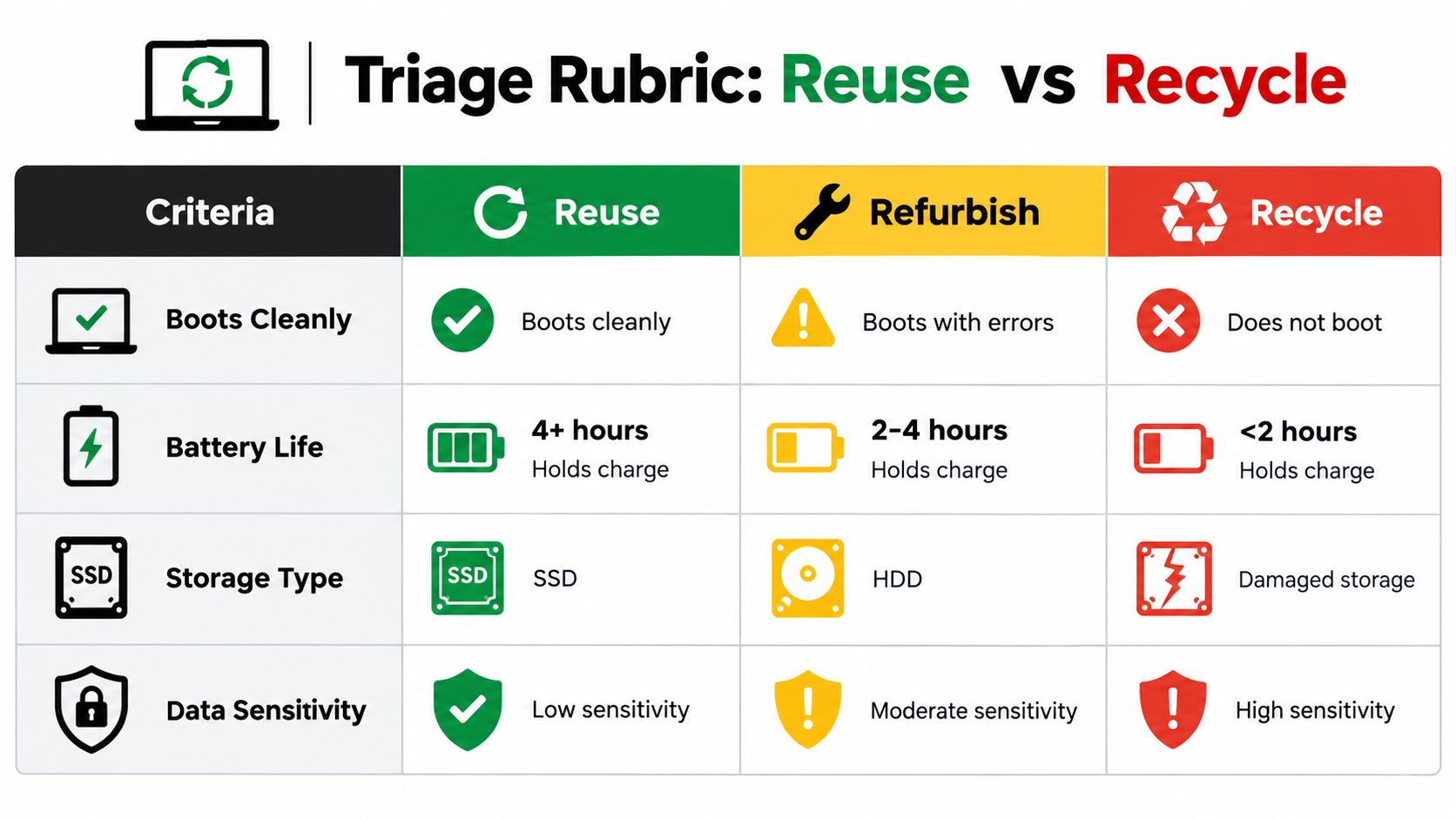
I'd sort the pallet like this:
- Redeploy if the laptop boots cleanly, supports a current OS, presents well enough for internal use, and holds a charge for 4+ hours
- Refurbish if the screen, keyboard, ports, and chassis are intact but the battery, SSD, or image needs work. This is the 2-4 hours battery group
- Recycle if it won't boot reliably, has physical damage, a swollen battery, damaged storage, or battery life under 2 hours
Those battery thresholds are operational cutoffs. They're not regulatory standards. They help teams decide fast.
Flag the exceptions early
Some units need separate handling regardless of cosmetic condition.
A clean-looking laptop can still be the highest-risk device on the pallet if it ever held regulated data.
Flag any machine that handled HIPAA, PCI, legal matter files, export-controlled material, or similar controlled information. Those shouldn't drift into a casual refurbishment queue. Also separate encrypted SSD systems so IT can verify whether the chosen sanitization path matches the encryption state and organizational policy.
If you need a reuse lens before you send devices downstream, Reworx's page on repurposing an old laptop is useful for deciding what's still practical to keep in circulation.
Don't skip device-level reconciliation
Label each pallet by stream. Keep the count tied to serial numbers. If you're sending mixed streams to different destinations, use separate manifests. That matters because ITAD is broader than simple recycling. It includes sanitization, value recovery through remarketing or buyback, and certified recycling for the rest, as summarized in this IT asset disposition glossary.
Choosing the Right Disposal Partner
A lot of providers say they handle electronics recycling. Far fewer can support secure data destruction, serialized reporting, product destruction, data center decommissioning, medical equipment disposal, laboratory equipment disposal, and corporate audit needs without getting messy.
Start with four requirements: R2v3 or e-Stewards certification, chain of custody, validated data destruction practices, and audit-ready documentation. If a vendor gets vague when you ask what happens after pickup, move on.
Where common partner types fall short
Donation-only charities often mean well, but many fall apart on enterprise data controls and asset-level reporting. Municipal programs are fine for household drop-off. They usually aren't built for business-grade manifests or facility cleanout documentation. Manufacturer trade-ins are efficient for narrow, newer model sets, but they can be rigid.
A practical benchmark is whether the provider treats proof as standard procedure. Federal and professional guidance commonly expects records like a certificate of destruction or recycling record tied to the serial number for data-bearing devices, which is outlined by Hummingbird International's documentation guidance.
Disposal Partner Comparison
| Partner Type | Data Risk | Recovery Value | ESG Reporting | Best Fit |
|---|---|---|---|---|
| Donation-only organization | Often higher unless data controls are mature and documented | Usually low to moderate | Strong community story, lighter compliance detail | Serviceable laptops with low-risk data and a clear donation pathway |
| Municipal e-waste program | Often unclear for business assets | Low | Limited business reporting | Small, low-risk loads with minimal documentation needs |
| Manufacturer trade-in | Moderate if their process fits your device set | Moderate to strong for eligible units | Limited sustainability narrative beyond trade-in | Newer, standardized fleets |
| Certified ITAD provider | Lower when chain of custody and sanitization are documented | Moderate to strong depending on mix | Strong if reporting is complete | Mixed enterprise loads, regulated data, office cleanouts, decommissions |
If you're evaluating vendors formally, use a written scorecard. Reworx has a decent framework for vendor selection criteria that matches how procurement teams should compare data handling, reporting, and downstream controls.
I'd place Reworx Recycling in the category of providers suited to organizations that need electronics recycling, laptop disposal, secure data destruction, pickup coordination, and a donation-based recycling option under one operational umbrella. That's useful when your load includes reusable and non-reusable devices in the same project.
Preparing Laptops for Pickup or Drop-Off
The loading dock is where good plans break. A rushed handoff, a vague manifest, or an unsigned bill of lading can undo everything you did upstream.
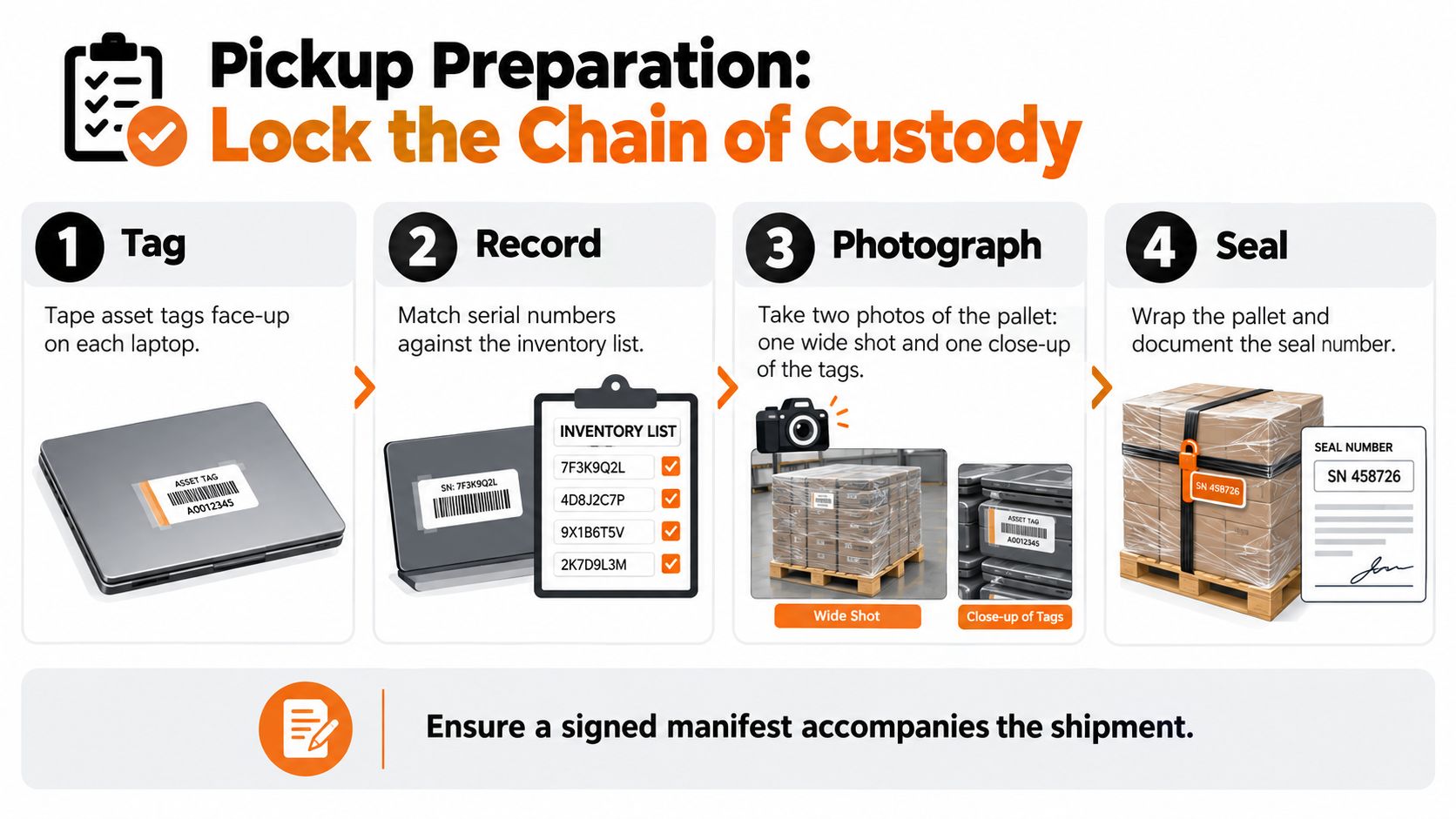
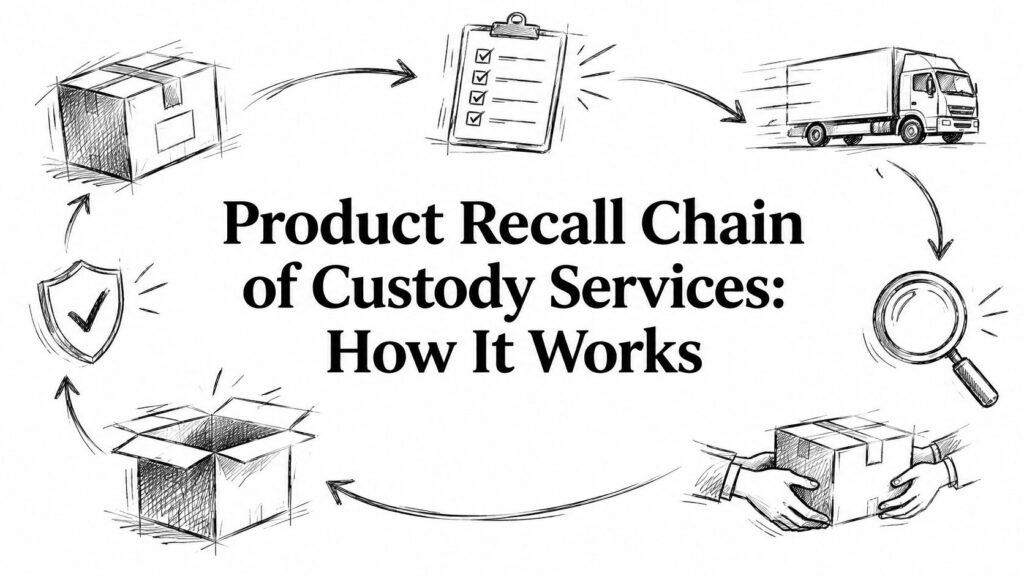
Lock the chain of custody before pickup
Do these four things every time:
- Tag each unit clearly. Keep asset tags face-up if the devices are stacked or cased.
- Match serials to the manifest. Don't rely on carton counts alone.
- Photograph the pallet. Take one wide shot and one close view showing tags or labels.
- Seal and note the seal number. If the load is wrapped, document it before the truck leaves.
Separate the problem devices
Keep regulated-data laptops in a sealed tote or segregated pallet marked for the stricter sanitization path. Isolate swollen batteries and visibly damaged units so the driver and downstream processor know they aren't standard reusable inventory.
If a pallet mixes reusable laptops, damaged batteries, and high-risk data devices without separation, expect confusion later and missing confidence now.
Require the right documents at handoff
Ask for the carrier's certificate of insurance if your site requires it. Confirm packing method, pickup window, and who signs for transfer. Then reconcile line by line before releasing the load.
For destroyed media, engineering detail matters too. NIST-linked destruction guidance commonly treats shredded residues as sufficiently reduced when they reach nominal edge dimensions of 5 mm and a surface area of 25 mm², as described in this overview of hard drive shredding specifications. That gives you something concrete to ask about instead of accepting “we shred drives” at face value.
A Simple Disposal Plan and Next Steps
Most companies don't need a fancy framework. They need one repeatable workflow with owners and documents attached. I use Count, Clean, Choose, Certify.
Count
Assign an inventory lead. Build the asset register with serials, models, storage type, battery condition, and data class. If your organization is weak on this discipline, it helps to revisit the broader concept of what fixed asset management is because disposal problems usually start with poor control much earlier in the asset lifecycle.
Clean
IT owns sanitization. Use the organization's approved method and keep the validation record with the asset file. If there's any doubt about the media, move up the control ladder instead of down.
Choose
Route each unit to redeploy, refurbish, recycle, donation, or trade-in based on actual condition and risk. CFOs notice whether the business is extending asset life intelligently or just paying to make usable devices disappear.
Certify
Book the downstream partner. Get the paperwork back into the same audit folder. That includes manifests, reconciliation records, and certificates tied to the devices processed.
There's also a sustainability reason to get this right. The world generated a record 62 billion kg of e-waste in 2022, equal to about 7.8 kg per person, and only 22.3% was formally collected and recycled in an environmentally sound manner. That same global monitoring work projects 82 billion kg by 2030, which makes disciplined device retirement an operational issue, not a side task, according to the Global E-waste Monitor 2024.
For Georgia organizations in logistics, healthcare administration, education, professional services, light manufacturing, and mixed corporate campuses, this matters locally too. Metro Atlanta keeps generating refresh projects, office closures, laptop disposal needs, computer recycling loads, and broader decommissioning work. The teams that handle them well aren't lucky. They triage first and move with records.
If you've got a room, cage, or pallet stack full of retired devices, Reworx can help you sort what should be redeployed, donated, recycled, or destroyed with documented chain of custody and secure handling. Visit Reworx Recycling to plan a pickup, review disposal options, or start a partner conversation before those laptops sit another quarter.