If your Houston business is still running on an aging PBX, a patchwork of desk phones, and internet circuits nobody has reviewed in years, the pressure usually shows up before the budget does. Calls break up during client conversations. Staff bounce between mobile phones, Teams, Zoom, and a legacy phone menu that nobody wants to touch. Then a storm rolls through, the office loses power, and everyone discovers the phone system was “cloud-based” only in the sales deck.
That's why businesses looking at cloud telecom services in Houston need more than a feature list. They need a migration plan that accounts for local weather risk, carrier diversity, branch office realities, remote users, and the messy work of retiring old telecom gear without creating a security or e-waste problem later.
A good cloud telecom deployment can absolutely improve flexibility, support hybrid work, and simplify expansion across the Houston metro. A bad one just moves old problems into a monthly subscription.
The Business Case for Cloud Communications in Houston
A Houston office loses power at 3:40 p.m. on a Thursday. The phones at the front desk stop ringing, sales calls start rolling to voicemail, and managers realize half the team has no reliable way to pick up business calls from home or the road. That is usually the moment cloud communications moves from a nice upgrade to an operating requirement.
Houston companies do not replace telecom because the feature list looks better. They replace it because old systems create daily friction and fail at the worst time. A dispatcher in East Houston needs one business number that can reach field staff wherever they are. A medical office needs coverage when staff cannot get in because of flooding or freeway closures. A logistics team needs call routing that still works if one site is offline.
Cloud communications helps because it removes dependence on one room, one handset group, or one office circuit. UCaaS, VoIP, mobile apps, softphones, and presence tools give staff a common system for calling, transferring, messaging, and checking availability across locations.
A useful visual summary:

Why the business case is stronger in Houston
Houston spreads people across downtown, the Energy Corridor, The Woodlands, Sugar Land, Baytown, and industrial facilities closer to the Ship Channel. Many businesses also split staff between offices, homes, warehouses, clinics, and field vehicles. A legacy PBX was not built for that operating model.
The gain is not just convenience. It is continuity.
A well-planned cloud phone system can keep the main number live during an office outage, let reception or a call queue shift to another site, and keep managers reachable on business caller ID instead of personal cell numbers. That matters in any city. In Houston, it matters more because weather events, localized flooding, and power problems regularly test whether communications can keep going when the building cannot.
What Houston businesses usually gain
The strongest case for cloud telecom services in Houston is operational. Businesses get one calling environment for office staff, remote users, and mobile employees instead of maintaining separate habits and tools for each group.
Common gains include:
- Consistent call handling across locations: Front-desk staff, branch users, and remote employees can work from the same dial plan and call queue structure.
- Faster response during disruptions: Calls can be rerouted to mobile apps or another site without waiting on onsite telecom work.
- Less dependence on aging hardware: IT spends less time supporting old PBX cards, handsets, and vendor-specific gear.
- Cleaner moves and expansions: New offices, temp spaces, and reconfigured floors usually require network work, not a full phone rebuild.
- Better visibility for managers: Reporting, recordings, and call flow changes are handled in software instead of through carrier tickets and manual patches.
There is a trade-off. Monthly subscription costs can look higher than keeping an old system alive for one more year. But that comparison often ignores maintenance contracts, PRI or analog line costs, replacement parts, truck rolls, and the business impact of outages or missed calls. In practice, Houston companies usually get the best return when they treat cloud telecom as an operating model change, not a line-item phone swap.
What makes the investment pay off
The projects that go well start with business workflows. They identify who answers inbound calls, which teams need hunt groups or recordings, what happens after hours, and how calls should fail over if an office is unavailable. They also review the internet side early. Phone quality and continuity still depend on local connectivity, so it makes sense to review Houston broadband provider options for business sites before locking in a voice platform.
The projects that disappoint usually make three mistakes. They buy on seat price alone. They port old call flows into the new system without cleanup. They assume "cloud" automatically means outage-proof.
Practical rule: If your phone service still depends on one physical location being available, you do not have a communications strategy. You have a single point of failure.
For Houston businesses, that is the ultimate business case. Cloud communications can reduce telecom sprawl, support hybrid work, and simplify growth, but the bigger win is keeping customers, staff, and field teams connected when the local office is not fully available.
Navigating Houston's Unique Connectivity and Resilience Landscape
Houston buyers often get polished uptime language from providers and very little detail about what happens when a building loses power, a fiber path is cut, or staff can't return to the office. That gap matters more here than in many markets.
Cloud services still depend on local internet, power, and networking. For Houston businesses, resilience isn't theoretical. The hidden risk in migration is failing to design around outages, especially when severe weather affects offices, branch locations, and last-mile connectivity. Buyers should prioritize providers that can clearly explain failover for call routing and E911 during a site outage, as discussed in this cloud telecom operations overview.

Start with failure points, not product brochures
The most practical way to plan resilience is to ask where communications can fail in your specific building. Most Houston businesses have exposure in at least three places:
| Risk area | What can fail | What to check |
|---|---|---|
| Power onsite | switches, firewalls, access points, PoE phones, ISP handoff gear | battery runtime, generator coverage, shutdown order |
| Last-mile connectivity | local fiber entrance, building riser, neighborhood plant | diverse entrance paths, carrier diversity, wireless backup |
| User location | branch office, remote worker, field staff endpoint | mobile app behavior, E911 procedures, call forwarding logic |
A vendor that can't walk through those layers in plain language probably isn't ready for your cutover.
What resilient design looks like in Houston
A solid design usually combines several controls rather than relying on one promise from one provider.
- Diverse-path connectivity: Ask whether your primary and backup circuits enter from different physical routes. Two services billed by different brands can still share the same vulnerable path.
- LTE or 5G failover: This won't replace every workload, but it can preserve voice traffic and core application access during an outage.
- Battery planning for network gear: If your switches power phones and access points, the telecom design has to include runtime for the switch stack, not just the handsets.
- Call-routing failover: Main numbers should be able to reroute to another site, an auto-attendant, a live answering group, or mobile users if the office goes dark.
- Remote administration: Someone should be able to change routing, greetings, and hunt groups without physically entering the building.
When a provider says “the platform stays up,” ask the next question. “How do my users stay reachable if this office can't connect to it?”
Questions worth asking before you sign
Many outages don't become disasters because of technology. They become disasters because nobody answered the operational questions beforehand.
Use questions like these in vendor meetings:
- How does inbound call routing behave if my primary site loses internet?
- What happens to E911 information for remote and hybrid users?
- Can our main number fail over to mobile devices or another location without manual intervention?
- What hardware at our site must remain powered for phones to keep working?
- If we use desk phones, what's the plan when PoE switches are down?
- Who changes routing after hours if the outage starts overnight?
That kind of planning overlaps with physical telecom work too. If you're reviewing circuits, cabling, or handoff locations, local teams often need help coordinating the onsite pieces. For that part of the project, onsite telecom service planning in Houston is directly relevant.
Don't confuse provider redundancy with business continuity
A cloud provider may have redundant infrastructure in its own environment and still leave your office exposed if your site design is weak. That's common. The business bought resilience at the platform layer but not at the branch, campus, or user layer.
What works in practice is boring, but effective:
- documented failover routing,
- tested mobile app usage,
- battery runtime matched to business needs,
- alternate connectivity that staff have relied on,
- a written call tree for who changes what during an outage.
Houston businesses that treat continuity engineering as part of the telecom purchase usually recover faster and with less improvisation.
Your Cloud Telecom Vendor Selection Checklist
A Houston telecom purchase usually looks simple until the questions get specific. The sales team shows polished apps and clean admin screens. Finance sees a lower monthly number than the old PBX support contract. Then the project reaches provisioning, porting, compliance, and site dependencies, and the gap between vendors becomes obvious.
Choose the vendor that can run your business on an ordinary Tuesday and during a Gulf Coast disruption. That standard changes the shortlist fast.
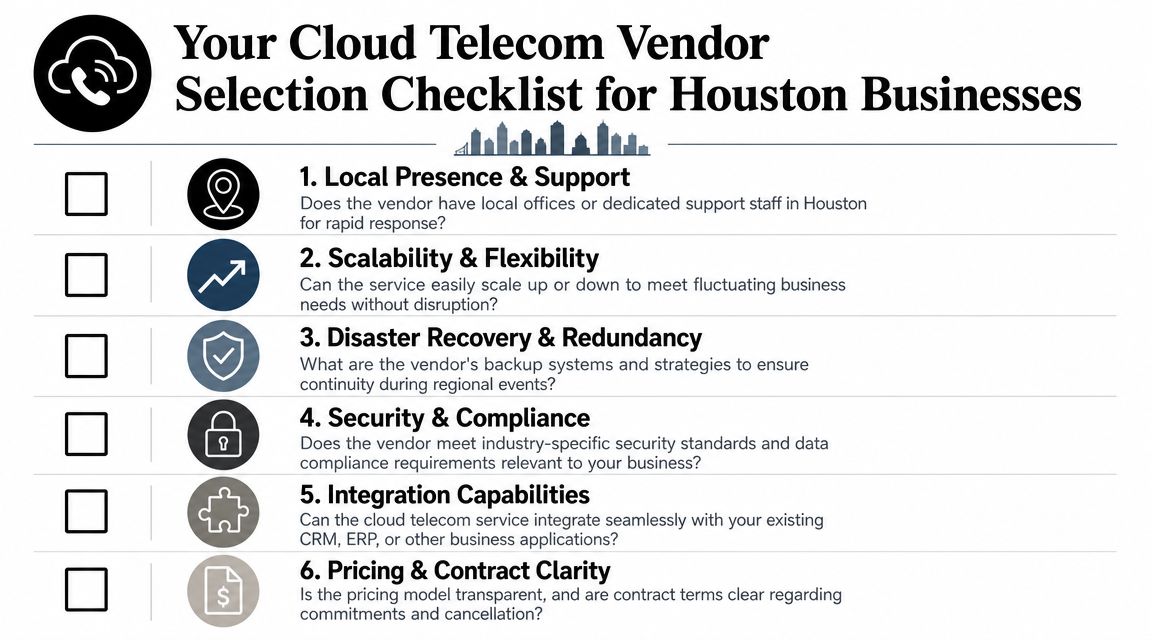
Start with operating reality, not the demo
The right evaluation process begins with your call flows, staffing model, and risk points. A medical office, distributor, law firm, and field service company may all buy cloud voice, but they do not need the same queue logic, recording controls, or failover behavior.
Put each vendor through the same set of practical scenarios. Ask them to show, not just describe, how the platform handles:
- auto-attendants and call queues,
- mobile and desktop apps,
- voicemail routing,
- receptionist workflows,
- call recording administration,
- user provisioning,
- integrations with Microsoft 365, CRM tools, and line-of-business apps.
If you run dispatch, intake, reservations, or a compliance-heavy front desk, ask for the exact workflow your staff will use on day one. Generic confirmation is not enough. A vendor that cannot demonstrate the process usually creates trouble during cutover.
Technical fit
Technical fit is less about feature count and more about friction. Can the system support shared devices at a reception desk? Can supervisors change routing without opening a support ticket? Can remote users keep the same experience across desktop and mobile without creating E911 or identity problems?
Those details shape adoption and support load far more than a long feature sheet.
Platform maturity and site design
Some providers still sell cloud telecom as little more than hosted calling. For a single office with simple needs, that may be fine. For a multi-site Houston business with uptime requirements, you need more clarity.
Ask how the vendor handles:
- hybrid deployments,
- branch survivability,
- session management at the edge,
- provisioning across multiple sites,
- future changes if you add locations, contact center functions, or compliance controls.
As noted earlier, serious telecom platforms rely on more than moving a phone system into someone else's data center. The provider should be able to explain architecture decisions in plain language and connect them to outcomes your team cares about, such as call quality, recovery options, and admin effort.
Buyer filter: If the conversation stays at the level of handsets, calling plans, and softphone screenshots, ask to speak with the implementation or solutions team before you sign.
Price the labor around the service
The monthly quote rarely captures the actual cost of migration. Internal IT time, network cleanup, headset replacement, identity work, compliance retention, and legacy shutdown can exceed the savings buyers expect in the first year.
Bain's analysis of telecom platform shifts points to the same issue. Platform change only pays off when the business accounts for the operating work attached to it, not just the subscription itself, according to Bain's analysis of telecom platform shifts.
Use a review list that forces those costs into the open:
- Identity management: Does the platform match your actual user lifecycle, including shared phones, temporary staff, contractors, and remote users?
- Compliance retention: Where are recordings, logs, and admin changes stored, and who controls retention policies?
- Hardware replacement: Do you need new switches, more PoE capacity, SBCs, handsets, headsets, or UPS upgrades?
- Licensing changes: Which features are included, and which ones appear later as add-ons?
- Legacy retirement: Who removes, inventories, and processes the old PBX, phones, and related network gear?
Legacy removal deserves attention early. Telecom upgrades often leave behind shelves of handsets, gateways, and unsupported network hardware that no one owns by project closeout. If decommissioning is part of your scope, build it into the migration plan and align it with broader telecom services planning in Houston.
Support quality shows up after go-live
A vendor earns trust during the first ugly week, not the sales cycle. That is when a port gets delayed, one site reports poor audio, or an executive assistant finds that call handling does not match the old workflow.
Use this comparison table during vendor interviews:
| Evaluation point | Strong answer | Weak answer |
|---|---|---|
| Implementation ownership | named project lead, escalation path, migration plan | “our onboarding team handles it” |
| Support model | clear response process, after-hours coverage, issue ownership | generic help desk wording |
| Outage handling | documented failover and admin procedures | vague platform uptime language |
| Contract clarity | transparent terms on ports, hardware, usage, and support | bundled language that hides assumptions |
The best vendor usually sounds less flashy and more precise. They answer operational questions directly, document assumptions, and tell you where your own network or staffing model may need work. That kind of honesty saves money in Houston, where weather events, circuit issues, and multi-site sprawl punish loose planning fast.
Building Your Technical Readiness and Migration Plan
At 8:15 on a Monday, your main number is ringing, the front desk is taking overflow calls on personal cell phones, and one branch can place outbound calls but cannot receive them. In Houston, that kind of failure is rarely caused by the phone system alone. It usually starts with weak switching, an overloaded circuit, old cabling, or a migration plan built for a normal week instead of a storm season.
A cloud telecom project works best when readiness is tested before licenses are assigned and numbers are scheduled for porting. For Houston businesses, that means planning for day-to-day call quality and for the less pleasant scenarios, including ISP outages, office closures, and staff working from home during severe weather.
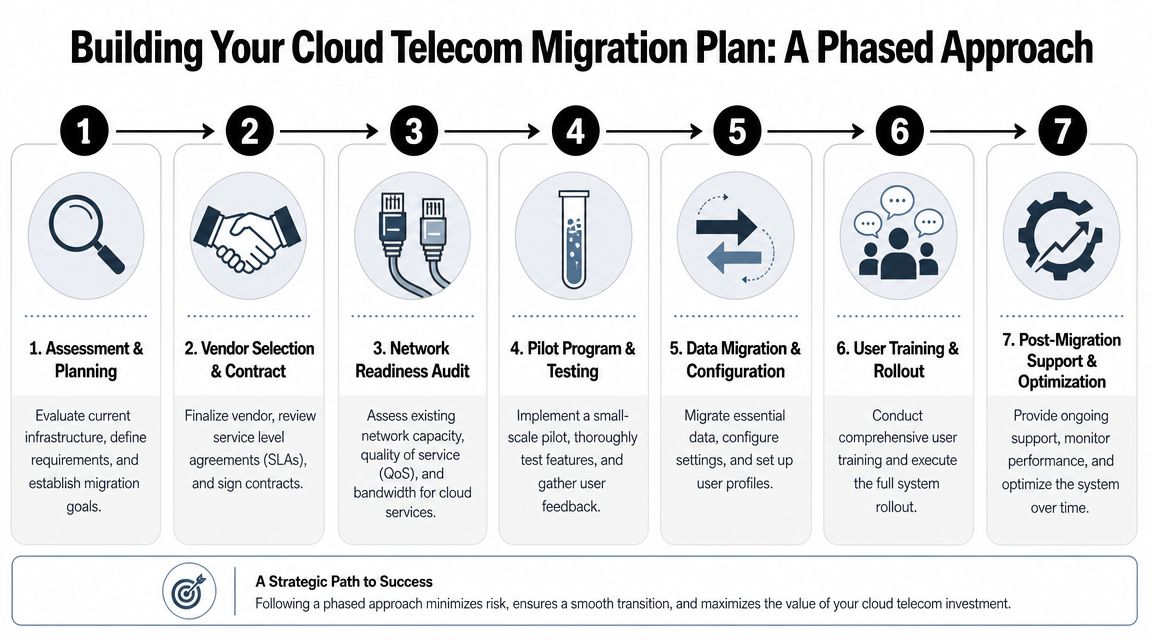
Start with a migration model your team can actually run
Large telecom programs often split migration work into a few practical decisions. What stays in place for now, what gets replaced, what needs redesign, and what can move without creating operational risk. That same logic applies to a Houston law firm, distributor, clinic, or multi-site service company.
The mistake is trying to modernize everything at once. Keep the plan simpler than the architecture diagram.
Define four categories early:
- Move as-is: users, numbers, and call flows that can shift with minimal change
- Replace: unsupported phones, aging SBCs, failing analog adapters, or niche tools with no cloud path
- Retain temporarily: fax lines, elevator phones, alarm circuits, paging, and other analog items that need a staged exit
- Redesign: reception workflows, call queues, CRM integrations, and remote-worker policies that no longer fit how the business operates
That exercise controls scope. It also exposes where the actual work is. In many Houston offices, the hard part is not buying a hosted voice platform. It is deciding which pieces of the old environment still matter during a power event, a flood-related closure, or a branch circuit failure.
Check the network before you touch the phones
Voice issues usually show up on calls, but they often begin in the wiring closet.
Review switching capacity, Power over Ethernet headroom, QoS configuration, Wi-Fi coverage, and the condition of your cabling and uplinks. Offices that added cameras, access points, and desk phones over several years often run out of PoE budget or uplink capacity without realizing it. Then the new telecom platform gets blamed for packet loss that was already there.
Look closely at:
- switch age and support status
- available PoE for phones and access points running at the same time
- VLAN design and voice traffic prioritization
- WAN utilization during peak business hours
- conference room and warehouse coverage
- branch connectivity back to core systems or cloud apps
If the handoff, backbone, or structured cabling needs work first, plan that before rollout. Projects such as fiber optic installation for office network upgrades often determine whether the voice migration goes smoothly or turns into a call-quality cleanup project.
Map every dependency tied to the old phone system
Many first-time migrations often lose control. A company believes it is replacing desk phones. In reality, it is replacing call routing, voicemail behavior, analog lines, front-desk habits, and several quiet dependencies that nobody documented.
Inventory:
- direct inward dial numbers
- hunt groups and auto attendants
- paging adapters
- fax machines and fax servers
- alarm, gate, elevator, and life-safety lines
- call recording requirements
- CRM or help desk integrations
- after-hours routing and holiday schedules
- shared voicemail boxes and executive assistant workflows
Hidden dependencies create the expensive surprises. The warehouse paging line, the backup line for card processing, or the analog device in a remote office tends to surface late, usually after the port request is already in motion.
Document the owner for each item. If nobody owns it, assign one before the migration proceeds.
Build for Houston resilience, not just office convenience
Houston businesses need a telecom design that survives bad weather and uneven connectivity. That changes the readiness checklist.
Test how calls will route if a site loses internet access. Decide whether the fallback is mobile apps, automatic forwarding to an answering service, rerouting to another office, or a temporary remote receptionist setup. Confirm that leadership, reception, and customer-facing teams know how to trigger those changes without waiting on a vendor ticket.
A practical resilience review should answer these questions:
- Can the main number fail over to a different site or user group?
- Can staff work from laptops and mobile devices on non-office networks?
- Are emergency dialing records accurate for office, home, and hybrid users?
- Do you have more than one connectivity path for locations that cannot tolerate downtime?
- Are key users equipped with battery backup, cellular failover, or alternate work locations?
There is a cost trade-off here. Full redundancy for every branch is rarely justified. Redundancy for the headquarters, contact center, clinic front desk, or dispatch function often is. Spend based on business impact, not on a generic best practice.
Pick a rollout shape that matches your tolerance for disruption
The right migration pattern depends on call complexity, location count, and how much change your staff can absorb in one week.
Pilot rollout
A pilot works well when you need proof before scale. Start with IT, a small office, or a department that can give useful feedback without putting revenue or patient access at risk.
Use the pilot to test:
- call routing accuracy
- voicemail and transcription settings
- softphone and mobile app adoption
- headset compatibility
- remote-user quality on home internet
- failover behavior during a circuit interruption
Phased departmental rollout
This is usually the safer option for Houston mid-market companies with multiple locations or mixed user types. It keeps support focused and limits the blast radius if one workflow was documented poorly.
Good fit:
- healthcare and legal offices
- logistics and field-service teams
- companies with shared reception functions
- organizations still carrying analog devices
Flash cut
A one-day cut works for a small office with simple routing and low integration risk. It does not leave much room for correction. If number records are messy or user training is unfinished, postpone it.
Good fit:
- single-site offices
- limited queue and receptionist complexity
- very few analog lines
- strong internal IT ownership
Readiness includes people and fallback procedures
Technical prep alone does not produce a stable migration. Reception staff, office managers, IT admins, and department leads need role-based training before end users get login instructions.
Use a practical checklist:
- Set the endpoint policy: desk phones, softphones, or a mixed model by role
- Verify carrier records: billing telephone number, service address, account details, and authorized contacts
- Build call flows in a test state: main number, departments, after-hours, and holiday routing
- Train power users first: reception, supervisors, executive assistants, and internal support staff
- Train end users by task: sign-in, transfers, voicemail, mobile use, and emergency dialing
- Define rollback triggers: failed port, major call-routing error, unusable audio, or a site outage during cutover
- Assign support coverage: on-site help, remote IT, vendor contacts, and after-hours escalation
The clean migrations are the ones where each task has an owner, each dependency has a plan, and each site has a fallback if Houston weather or local connectivity interferes.
Executing the Cutover and Ensuring Post-Migration Success
Cutover day should feel controlled, not heroic. If the migration depends on last-minute improvisation, the planning phase wasn't finished. The best go-lives are quiet because the hard decisions were made earlier.
Start with a written cutover runbook. Include number port timing, vendor contacts, internal escalation paths, final call-routing maps, handset or app assignment status, and exact validation steps. Keep it short enough to use under pressure and specific enough that nobody has to guess who owns the next move.
What to verify before go-live
A practical final check should cover both business workflows and technical behavior.
- Main number reachability: test inbound calling from external carriers.
- Extension-to-extension behavior: confirm transfers, park, pickup, and voicemail routing.
- Reception and queue logic: verify greetings, overflow paths, holiday settings, and agent login behavior.
- Emergency dialing setup: make sure user location handling is current for office-based, remote, and hybrid staff.
- Mobile and desktop clients: test sign-in, call quality, caller ID, and failover behavior on non-office networks.
- Compliance functions: confirm call recording rules, retention settings, and admin permissions.
One mistake shows up often here. Teams verify that the platform works in ideal conditions but skip outage behavior. Test what happens if a handset loses network access, a branch loses internet, or a receptionist must shift to a softphone.
A successful cutover isn't just “calls went through.” It's “the business kept operating when one part of the environment didn't.”
Negotiate service terms that matter in practice
After go-live, support quality and service terms shape the experience more than the original demo did. Contract language should reflect the workflows your business depends on.
Press for clarity on:
- uptime commitments and what they apply to,
- support response expectations,
- porting issue ownership,
- call quality troubleshooting steps,
- admin access during incidents,
- credits or remedies when service misses expectations.
If a provider offers broad guarantees but can't explain how they handle branch-specific issues, queue failures, or emergency-routing changes, that's a support risk.
For businesses that need local operational help after launch, ongoing telecom system support options can help close the gap between cloud platform support and what your onsite users experience.
The first month after migration decides long-term success
The first month is when small misalignments become either routine fixes or long-term frustration. Watch user behavior closely. Front-desk teams will notice queue pain first. Mobile users will expose identity and login issues. Managers will surface reporting gaps. IT will see whether the vendor owns problems or deflects them.
Use post-migration reviews to check:
- recurring quality issues by site or user group,
- dropped adoption of mobile or desktop apps,
- call flow exceptions nobody accounted for,
- emergency location updates for remote staff,
- old telecom gear still sitting in closets after the project.
That last item matters more than many teams expect. Telecom refreshes often leave behind retired handsets, switches, cabling, and PBX components. If those assets aren't inventoried and removed as part of closeout, the migration creates a storage and governance problem instead of ending cleanly.
A successful Houston telecom upgrade is not just a cloud subscription with new phones attached. It's a communications operating model built for local outages, distributed teams, and cleaner lifecycle management.
If your Houston business is upgrading phones, replacing network gear, or retiring a legacy PBX, Reworx Recycling can help you handle the equipment left behind through donation-based electronics recycling, secure data destruction, IT asset disposition, and pickup coordination. That's useful when a cloud telecom migration also triggers an office cleanout, handset replacement, or broader IT refresh. Donate old equipment, schedule a pickup, or explore a long-term partnership that supports responsible recycling, digital inclusion, and community impact.