You’re probably starting with a simple search for telecom solutions near me because something already feels broken. Calls drop. Video meetings lag. Your team complains that cloud apps are slow at the worst possible times. A provider tells you fiber is “available,” but nobody can explain what installation really looks like, what service guarantees you’ll get, or what happens to the old routers, switches, PBX gear, and edge hardware once the upgrade starts.
That’s where most telecom buying guides stop too early. They treat telecom as a procurement task. In practice, it’s an infrastructure transition with security, operational, and end-of-life consequences. If you only shop for bandwidth, you’ll miss the hidden work that causes delays, compliance problems, and racks full of retired equipment no one wants to touch.
A sound telecom upgrade starts with requirements, moves through disciplined provider vetting, and ends with a controlled cutover that includes secure retirement of legacy hardware. That last piece matters more than most buyers realize. Old network gear often leaves behind stored credentials, configuration files, and residual business data. If you don’t plan for that at the start, you create risk the moment the new line goes live.
Defining Your Business Telecom Requirements
A speed test won’t tell you what business telecom service you need. It only shows what one connection did at one moment, usually from one device, under one set of conditions. Buying from that snapshot is how companies end up with the wrong circuit, the wrong failover design, or a contract that solves last quarter’s problem instead of next year’s.
Start with business operations, not carrier marketing. Ask what your network has to support when the office is busy, when a remote team joins a call, when files sync to cloud storage, and when an outage would hurt revenue or customer service.

Move beyond raw bandwidth
Bandwidth matters, but it isn’t the whole requirement. A law office using VoIP and document management needs something different from a warehouse pushing camera feeds, scanner traffic, and cloud ERP transactions. A medical group with telehealth traffic cares about consistency and security in a different way than a design firm moving large media files.
Build your requirements document around actual usage patterns:
- Core applications: List Microsoft 365, Google Workspace, VoIP platforms, video conferencing, ERP, CRM, remote desktop tools, and any line-of-business systems.
- Traffic behavior: Identify whether your load is steady all day or spikes around meetings, backups, batch uploads, or customer-facing events.
- User distribution: Count office users, remote users, guest devices, phones, conference rooms, printers, cameras, and any IoT endpoints.
- Critical workflows: Mark which systems can slow down and which cannot.
A business that says “we need faster internet” usually means one of several different things. It may need more throughput. It may need lower latency for voice and video. It may need cleaner internal network design. It may need a provider with better support and a real escalation path.
Practical rule: If your requirement can’t be tied to a business process, it’s too vague to send to a vendor.
Define uptime, latency, and risk tolerance
Experienced buyers set themselves apart from frustrated shoppers. If your phone system rides over the same connection your staff uses for large file transfers, a service that looks fine on paper can perform badly in production. If your customer service team can’t work during a mid-day outage, redundancy belongs in the requirements from the first draft.
Write down the consequences of failure in plain language. What happens if the circuit is unavailable for an hour? What happens if voice quality degrades but the internet is technically still “up”? What happens if one office loses service while another stays online?
Use a short decision table before you contact providers:
| Requirement area | What to define internally |
|---|---|
| Availability | How much downtime your business can tolerate |
| Voice and video | Whether calls and meetings need low-latency, stable performance |
| Security | VPN needs, segmentation, guest access, logging, and access controls |
| Growth | Headcount plans, new sites, additional devices, future cloud adoption |
| Recovery | Whether you need failover, secondary connectivity, or hybrid design |
This exercise also helps when aligning network planning with broader operational goals like sustainability, hardware refresh timing, and asset retirement policy. If that’s already part of your internal planning, a documented green IT strategy for business technology decisions can keep telecom upgrades from becoming isolated one-off projects.
Include scalability and location reality
Don’t write requirements for your current floor plan alone. Account for office reconfiguration, expansion, hybrid work, branch connectivity, and temporary sites. The right telecom design should let you add users, move departments, or shift workloads without renegotiating your entire setup.
This matters even more in mixed-coverage regions. One address may support fiber. Another may rely on cable, fixed wireless, or a combination. In some U.S. service territories, connectivity options have improved significantly. For example, Allconnect’s Virginia broadband overview reports that satellite providers reach near-universal coverage in Virginia, with Hughesnet at 100% coverage and Starlink at 99%. In the Spotsylvania area, EarthLink fiber and Verizon Fios each show 100% availability with speeds up to 940 Mbps, while Xfinity cable reaches 76% availability and T-Mobile 5G home internet reaches 62% of Virginia residents with typical download speeds between 87-498 Mbps.
That kind of local variation is a reminder to define what your business needs before you compare carriers. If your workflows depend on cloud asset systems, real-time tracking, or centralized management across multiple sites, “available” isn’t enough. You need a service profile that matches how your company operates.
What a usable requirements document should contain
Keep it concise enough that providers will read it, but detailed enough that they can’t hide behind generic proposals.
Include:
- Your sites and business hours
- Current pain points
- Required applications and device counts
- Primary and secondary connectivity needs
- Voice, video, and remote access expectations
- Security and compliance requirements
- Growth assumptions for the contract term
- A rough migration window
- A list of legacy systems that will be retired
That final item often gets skipped. It shouldn’t. The moment you identify what’s being replaced, you’re already shaping a safer decommissioning process later.
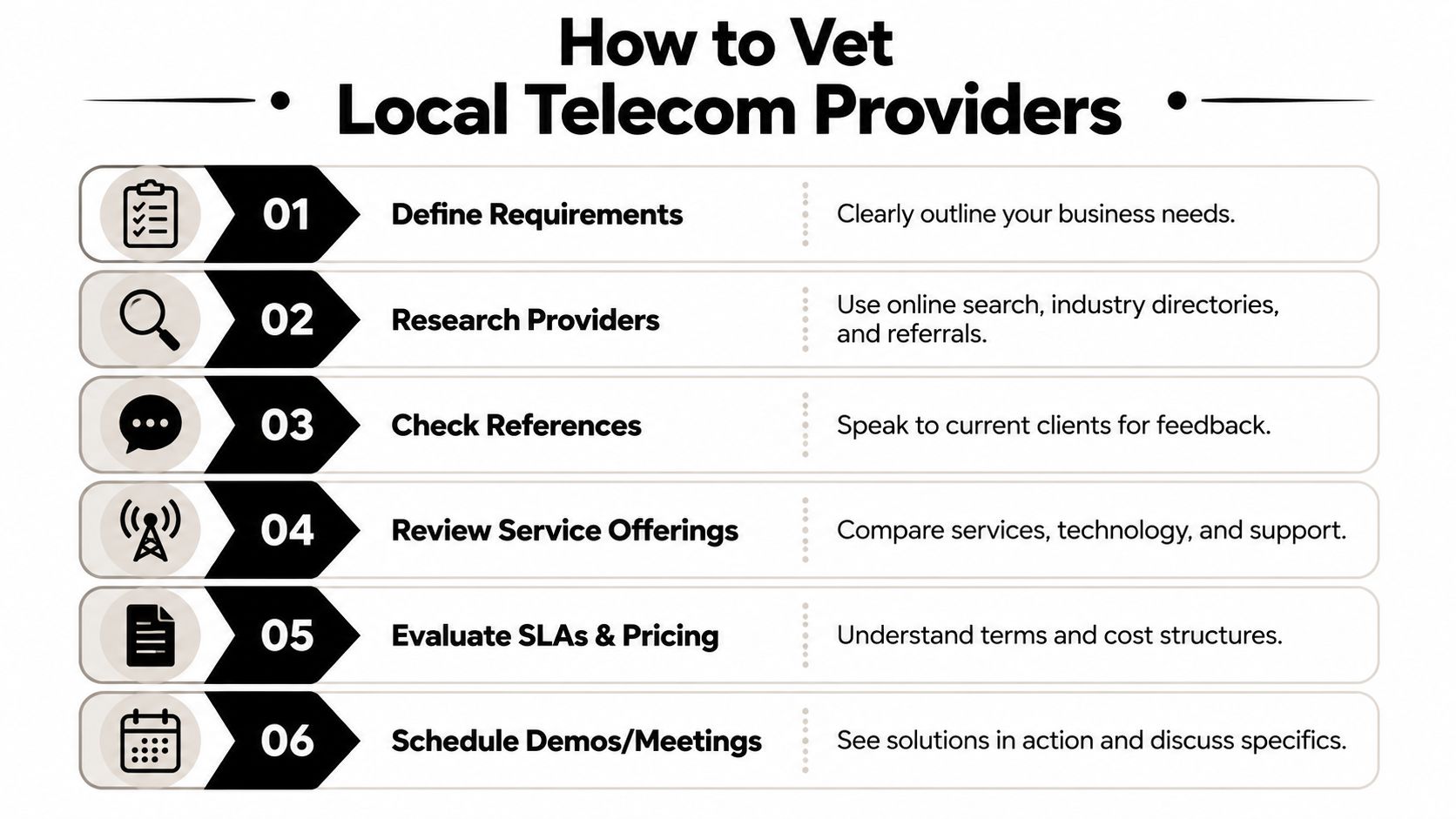
How to Find and Vet Local Telecom Providers
Local telecom shopping gets messy fast because “near me” often suggests a provider is local, directly operating infrastructure in your area, and ready to support your site. Sometimes that’s true. Often, you’re dealing with a reseller, a partial-footprint operator, or a provider whose map looks strong until you test one exact address.
The first pass should be broad. Gather regional carriers, local fiber operators, cable providers, fixed wireless specialists, and firms that handle redundant connectivity. Then narrow the list based on address-level fit, support quality, and installation realism.
Coverage maps are a starting point, not an answer
In many metro areas, provider availability isn’t uniform. HighSpeedInternet’s San Diego coverage analysis notes that Cox shows 99% coverage across San Diego, but that footprint is concentrated northwest of I-8, while neighborhoods such as North Park and South Park rely on alternatives. That’s the practical “last-mile” problem. A market can look saturated on a map while specific business corridors still have limited practical options.
This matters for more than connectivity. It affects hardware planning. If your primary site can get fiber but your satellite office can’t, you may need temporary appliances, hybrid connectivity, or a different phased rollout. Those decisions change what equipment stays in service and what gets retired.
Don’t ask providers whether they “serve the area.” Ask whether they can install, support, and guarantee service at your exact suite.
What to verify before you schedule meetings
A provider belongs on your shortlist only after it passes a basic reality check. This doesn’t require a formal RFP yet. It requires disciplined screening.
Use this checklist:
- Exact serviceability: Ask for service at your full address, suite included, not just ZIP code or building shell.
- Access method: Confirm whether the provider owns the last mile, leases it, or resells another carrier’s network.
- Install dependencies: Ask about conduit, rooftop access, landlord approvals, riser access, demarc extension, and inside wiring.
- Support model: Find out whether support is local, national, outsourced, or split between sales and operations teams.
- Escalation path: Ask who owns incident resolution after installation.
A lot of buying mistakes happen because the sales conversation sounds polished while operations remains invisible.
Vet the vendor, not just the circuit
Technical fit and organizational fit aren’t the same thing. A provider may offer the right handoff and throughput but still be a poor operational partner if support is weak, project management is fragmented, or post-install documentation is sloppy.
Here’s a practical comparison framework:
| Vetting area | Strong answer | Weak answer |
|---|---|---|
| Proposal detail | Specific design, timelines, assumptions, exclusions | Generic package descriptions |
| SLA discussion | Clear remedies, support commitments, performance terms | “Standard business-grade service” with little detail |
| Site readiness | Identifies building constraints early | Assumes installation will be simple |
| Security posture | Explains testing, segmentation, and responsibilities | Treats security as separate from telecom |
| Transition planning | Addresses coexistence with legacy systems | Focuses only on turn-up date |
If you’re evaluating broader modernization efforts, it can help to look at how telecom work intersects with workflow and service platforms. A useful example is Modernizing IT for Saudi Arabian telecom, which shows how telecom upgrades often sit inside larger operational change programs rather than isolated carrier swaps.
Questions worth asking references
References are only useful if you ask operational questions. “Are you happy with them?” won’t tell you much.
Ask instead:
- What went wrong during installation, and how did the provider respond?
- Did the final invoice match the proposal?
- How does support behave during a live outage?
- Were there surprises around demarc extension, internal cabling, or building access?
- Would you trust the same provider for a second site?
You’re listening for specifics. The best references talk about project managers, dispatch behavior, communication quality, and whether promises survived contact with reality.
Include decommissioning in early provider screening
Telecom vendors usually focus on getting the new service in. They rarely own what happens to the old hardware. That gap becomes a problem when retired firewalls, switches, PBX components, and edge devices start stacking up in closets.
If your shortlist doesn’t force the conversation early, your transition will end with stranded equipment and unclear responsibility. That’s why businesses planning a complete technology refresh often review IT asset disposition providers that support structured decommissioning in parallel with telecom vetting, not after the new service is already installed.
Crafting an Effective RFP and Managing Site Surveys
A good telecom RFP makes vendors answer the same business problem in the same format. That’s how you compare proposals without guessing. A weak RFP invites vague pricing, missing assumptions, and generic language that sounds competent until implementation starts.
The most common mistake is starting with a product request instead of an operating requirement. If you ask for “business fiber” or “managed telecom services,” many providers will respond with templated offerings. If you describe your users, applications, resilience needs, security expectations, and migration constraints, you force useful detail.

Write the RFP so vendors can’t stay vague
Your RFP should make it difficult for a vendor to hide behind marketing terms. The document needs structure, but it also needs pressure points.
At minimum, require these response areas:
- Service design: Access type, handoff, managed equipment, installation assumptions, and support model
- Commercial terms: Contract length, setup fees, recurring charges, change fees, and what is excluded
- Implementation plan: Survey process, permits, landlord coordination, lead times, dependencies, and customer responsibilities
- Performance commitments: Service levels tied to business outcomes
- Security controls: Responsibilities for network segmentation, device access, monitoring, and incident handling
- Legacy equipment handling: Whether the vendor disconnects, removes, labels, or leaves retired hardware behind
Don’t bury success criteria in a paragraph. Put them in a required response table and make vendors fill them in.
Define KPIs before the first proposal arrives
Many telecom projects fail, and NetSuite’s telecom industry guidance identifies a common failure point as the lack of “clearly defined business goals” and success criteria. The same source states that more than one in four households often experience unreliable fixed broadband connectivity, with no improvement year after year, which underscores why buyers need rigorous pre-deployment validation rather than assumptions.
Use that lesson in your RFP. State the business-level KPIs the provider must support, then require the project plan to address interoperability and security testing before and after cutover.
A practical RFP KPI table might look like this:
| KPI category | What to request from vendors |
|---|---|
| Availability | Service commitment and remedy structure |
| Voice quality | How they validate performance for VoIP and meetings |
| Security | How they test and document access protection |
| Interoperability | How new service works with current firewalls, phones, and WAN design |
| Support | Response workflow for incidents and escalations |
“If a provider can’t explain how they’ll prove the network is working, they haven’t given you a deployment plan. They’ve given you a quote.”
That same source also emphasizes interoperability testing, security testing, KPI alignment, and the value of automated and ongoing validation. Those aren’t enterprise luxuries. They’re the difference between a clean launch and a painful rollback.
What to observe during the site survey
The site survey is where abstract promises meet the physical building. This is not a ceremonial walkthrough. It’s the moment when hidden installation risk becomes visible.
During the survey, pay attention to:
- Building entry points: Where the service enters, who controls access, and whether landlord permissions are needed
- Pathway reality: Conduit condition, riser capacity, ceiling access, wall penetrations, and distance to the telecom room
- Rack readiness: Power, cooling, grounding, space, cable management, and demarc placement
- Internal wiring condition: Existing copper, fiber runs, patch panels, labeling quality, and abandoned cabling
- Legacy equipment footprint: What will remain in the room during transition and what should be removed
If the provider’s engineer and your internal team aren’t discussing those details, the survey is too shallow.
A lot of organizations also benefit from treating server and network retirement planning as part of the same field exercise. A practical server decommissioning checklist for infrastructure transitions helps teams capture what’s active, what’s dormant, what holds data, and what needs controlled removal before closets and racks become mixed with old and new gear.
How to compare proposals without fooling yourself
The cheapest proposal often excludes the most work. The most expensive one may include tasks you don’t need. What matters is normalized comparison.
Review each proposal against the same five filters:
- What exactly is being installed
- What assumptions the price depends on
- What the provider will test and document
- What support commitments are written, not implied
- What happens to replaced equipment
If one vendor writes a detailed migration and validation plan while another talks mainly about speed and monthly cost, they are not offering equivalent solutions.
Integrating ITAD into Your Telecom Upgrade Strategy
A common telecom upgrade failure starts after the new service is live. The carrier turns up the circuit, the phones register, users go back to work, and the old firewall, switch stack, or PBX gets pushed to a closet for “later.” Later is where companies lose track of serial numbers, leave sensitive configs on retired gear, and create a disposal problem that nobody owns.
Retired telecom hardware still carries risk. Routers, switches, firewalls, PBX systems, wireless controllers, and related appliances may hold credentials, topology data, VPN settings, logs, IP addressing details, and configuration backups. If those assets are not tracked and sanitized as part of the upgrade plan, the project solves one infrastructure problem and creates a security and compliance problem beside it.
Old telecom gear can create a live compliance issue
That risk is practical, not hypothetical. Shaun’s Telecom shows the gap you see across much of the telecom market. Providers talk about cabling, fiber, voice systems, and network design. They rarely address what happens to the hardware being removed. Yet old network gear can retain cached credentials and unencrypted configuration files, which creates real exposure under frameworks such as HIPAA and PCI-DSS.
The fix is straightforward. Put IT asset disposition into the telecom project scope before procurement closes and before installation dates are locked.
Security rule: If a device ever authenticated users, stored configurations, managed traffic, or logged events, send it through controlled data destruction and documented disposition.
What effective ITAD looks like during a telecom upgrade
Good ITAD work is not a junk-haul step. It is an operating process tied to asset control, security, timing, and cost recovery.
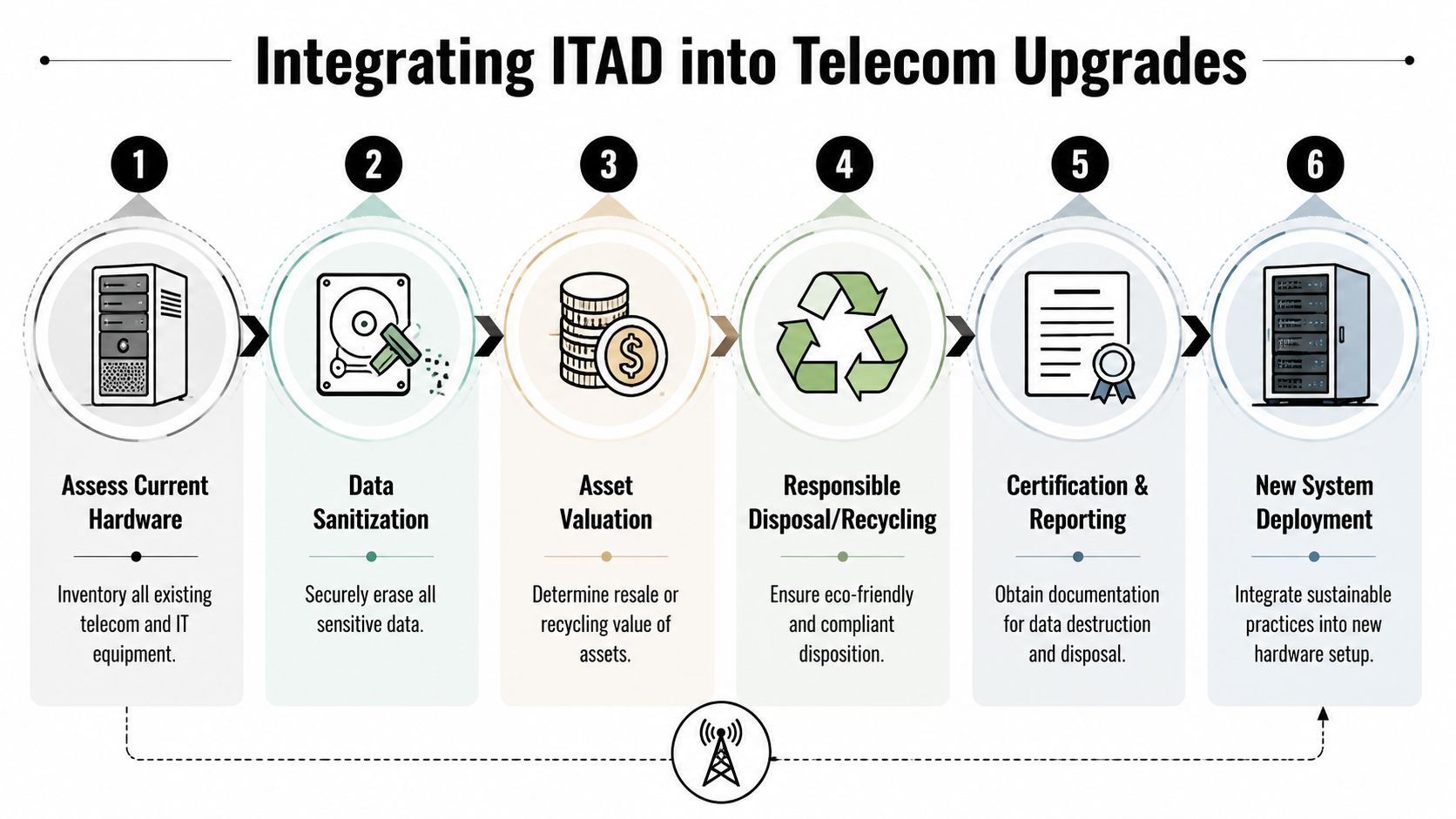
A disciplined workflow usually includes:
- Asset inventory: Identify every device being replaced, including branch hardware, spare units, UPS-connected appliances, and previously retired equipment still sitting onsite.
- Ownership review: Confirm whether each asset is leased, provider-owned, financed, or customer-owned before removal starts.
- Data handling controls: Decide which devices need wiping, physical destruction of embedded media, or special processing based on what the hardware stored.
- Chain of custody: Record who handled the asset, where it moved, and when responsibility changed hands.
- Disposition path: Sort equipment for reuse, resale, recycling, destruction, or donation where that fits policy and data risk.
- Documentation: Keep serialized reports, pickup records, internal approvals, and certificates tied to the final disposition method.
In practice, telecom refreshes often expose more than telecom gear. A branch upgrade may uncover old backup appliances, unused servers, laptops, access control hardware, or storage devices that were never removed after prior projects. That is why I advise clients to treat telecom modernization and retirement planning as one lifecycle decision, not two separate workstreams.
Why the installer usually is not the right owner for retired equipment
Telecom installers are hired to deliver the new environment. Their job is turn-up, testing, acceptance, and closeout. Some will disconnect legacy hardware and stage it neatly. Very few will provide certified data destruction, downstream recycling documentation, or a clear recovery path for assets with resale value.
That difference matters during scheduling. If no one owns decommissioning early, old and new gear end up sharing rack space, closets fill with data-bearing equipment, and the project team starts making disposal decisions under time pressure. Those are expensive conditions for IT and risky ones for compliance.
A better approach assigns ITAD work at the same time you assign carrier tasks, cabling responsibilities, and internal network cutover duties.
Build ITAD into the project charter
A practical telecom charter should identify who owns each retirement task before installation begins.
| Task | Internal IT | Telecom provider | ITAD partner |
|---|---|---|---|
| Identify active gear | Yes | Sometimes | No |
| Disconnect legacy hardware | Yes | Sometimes | No |
| Data destruction | Oversee | Rarely | Yes |
| Buyback and recycling | Review | No | Yes |
| Documentation and certificates | Review | No | Yes |
This prevents the usual handoff failure where the provider assumes IT will handle removal, IT assumes facilities will store it, and nobody manages the chain of custody.
If the upgrade is part of a larger refresh, move, or sustainability initiative, it helps to use a lifecycle framework that connects deployment and retirement from the start. This guide on using IT asset disposition services to improve tech refresh planning is useful for teams that need disposal planning, asset tracking, and reporting built into the project instead of patched on at the end.
Sustainability is part of operational discipline
Companies that upgrade networks without a disposition plan usually create three avoidable problems. Obsolete gear stays in storage too long. Data-bearing devices fall out of inventory control. Recyclable equipment turns into unmanaged waste.
Early ITAD planning fixes those issues by tying procurement, removal, sanitization, reporting, and recycling into one managed process. It also gives leadership a clearer record of what was removed, what was destroyed, what was remarketed, and what still requires action.
The strongest telecom upgrades are finished only when the old environment is accounted for, sanitized, documented, and sent through the right disposition channel.
Negotiating Contracts and Managing the Transition
A provider can win the bid and still deliver a painful rollout. I see this happen when a business negotiates price hard, then signs vague service terms and treats cutover planning like an install appointment instead of an operational change project.
Contract terms and transition planning carry the same weight as provider selection. If either is weak, the business pays for it later through avoidable downtime, slow escalations, disputed credits, and old hardware that sits in a closet because no one owned the exit plan.

Negotiate the SLA like your operations team will have to live with it
The SLA is the service contract behind the sales pitch. Good language defines what the provider must deliver, how support responds when something breaks, and what happens if performance slips.
Press on the details that affect day-to-day operations:
- Availability and performance metrics: Define uptime, latency, packet loss, and any service thresholds that matter to your applications.
- Incident handling: Set response times, escalation paths, and clear severity definitions.
- Service credits and remedies: Make the process easy to trigger and easy to verify.
- Planned maintenance rules: Confirm notice periods, approved windows, and any exclusions.
- Customer obligations: Limit vague clauses that push excessive troubleshooting or proving fault onto your internal team.
Ask the provider to walk through a real outage from first ticket to final resolution. That conversation usually reveals more than the proposal does.
Run the cutover as a controlled change, not a vendor task
The physical transition needs a schedule, owners, dependencies, and rollback criteria. It also needs one integrated plan for the incoming service and the outgoing equipment. If those workstreams split apart, the business ends up with a functioning new circuit and an unmanaged pile of retired firewalls, switches, handsets, or WAN gear.
A practical cutover sequence often looks like this:
- Confirm readiness for cabling, rack capacity, power, carrier handoff, firewall rules, and internal network changes.
- Turn up and test the new service before any production traffic moves.
- Run in parallel long enough to validate key applications, voice quality, VPN behavior, and failover.
- Cut over during an approved window with business notifications and escalation contacts already in place.
- Verify stability before disconnecting the legacy service.
- Remove and separate retired hardware under documented custody instead of leaving it in place “for later.”
That last step matters more than many teams expect. The handoff from implementation to decommissioning is where projects often lose control. New service is live, internal attention shifts elsewhere, and the old gear becomes someone else’s problem. In practice, it remains your security, audit, and facilities problem until it is collected, tracked, sanitized if needed, and sent to the right disposition channel.
Coordinate contracts, people, and site activity on one timeline
Telecom upgrades rarely happen in isolation. They overlap with relocations, office reconfigurations, lease exits, and hardware refresh cycles. That overlap is useful if the schedule is managed well. It becomes expensive if carrier install dates, user moves, and asset removal all drift on separate calendars.
For businesses changing sites or reorganizing space, this office relocation technology planning guide is a practical reference for aligning connectivity changes with equipment removal and site readiness.
Use a single transition plan that assigns responsibilities across teams:
- Facilities: Access windows, risers, loading areas, and after-hours approvals
- IT: Network configuration, firewall updates, switch staging, acceptance testing
- Operations: User communications, downtime approvals, escalation contacts
- Procurement and finance: Contract signature, billing start dates, legacy circuit termination
- Disposition and security teams: Pickup timing, packing requirements, chain of custody, final reporting
This is also the point where broader integrated network solutions thinking helps. The best telecom transitions are not isolated carrier projects. They are coordinated infrastructure changes that account for service delivery, internal dependencies, support ownership, and end-of-life handling in one operating plan.
A well-run transition feels uneventful to staff. That is the goal. The new service works, the support path is clear, and the retired equipment leaves on schedule with documentation to match.
Building a Sustainable Future-Proof Telecom Ecosystem
A business searching for telecom solutions near me usually thinks it’s buying connectivity. It is, in fact, making a longer lifecycle decision about infrastructure, security, operational resilience, and end-of-life accountability.
The companies that handle this well don’t separate those decisions. They define requirements based on real work, challenge provider claims at the address level, force clarity through the RFP, and plan for legacy hardware retirement before the first installer arrives. That approach produces a cleaner network and a cleaner project.
It also reflects how mature organizations think about infrastructure. Telecom isn’t just a line item. It’s part of a broader operating environment that includes network design, support, compliance, equipment handling, and sustainability. If you want more perspective on how that broader planning mindset shows up in practice, resources discussing integrated network solutions can be useful alongside your own vendor evaluations.
A future-proof telecom ecosystem is one where the new service works, the old equipment is responsibly handled, and the business doesn’t have to revisit the same avoidable mistakes at the next refresh cycle.
If your business is upgrading connectivity, retiring network hardware, planning an office cleanout, or looking for a responsible partner for electronics recycling and secure data destruction, Reworx Recycling can help you turn telecom transitions into a safer, more sustainable process. Reach out to schedule a pickup, explore donation-based recycling options, or build an ITAD plan that supports your business, your data security requirements, and your community impact goals.