Your phone system usually fails in small, expensive ways before it fails in a dramatic one. Calls drop during sales conversations. Remote staff rely on personal mobiles because the office setup doesn't reach them cleanly. Internet circuits were added over time, nobody remembers why half the lines exist, and every monthly bill raises a new question.
That's why businesses start searching for telecom solutions for businesses near me. They're not just shopping for phones or faster connectivity. They're trying to remove friction from operations, support growth, and avoid buying the wrong system twice.
The wider market shows why this decision matters. The U.S. telecom services market was valued at USD 468.08 billion in 2023 and is projected to grow at a CAGR of 6.6% through 2030, driven in part by unified communications, which can reduce operational costs for SMBs by 30 to 50% according to Grand View Research's U.S. telecom services market report. More companies are replacing fragmented tools with integrated calling, messaging, conferencing, and mobile access.
The part many buyers miss is the final phase. A telecom upgrade doesn't end when the new system turns on. It ends when the old handsets, switches, PBX hardware, routers, and storage media are securely retired. If you ignore that step, you carry security risk, clutter, and unnecessary disposal problems into the next cycle.
Starting Your Search for New Telecom Solutions
If you're dealing with an aging setup, the first move isn't to call the first carrier that shows up in search results. It's to define the business problem clearly. “We need better phones” is too broad. “We need call reliability for a hybrid sales team, simpler billing across two locations, and a cleaner path to retire our old equipment” is something a good provider can solve.

A local search matters because implementation is never purely digital. Someone may need to inspect cabling, confirm signal strength, validate circuit availability, swap edge hardware, or coordinate number porting with your current provider. That's one reason many companies begin with local market research such as this guide to local telecom companies, then narrow the list based on operational fit rather than ad spend.
What to clarify before you contact vendors
Start with three practical questions:
- What breaks most often: dropped calls, weak mobile coverage, billing complexity, poor conference quality, or support delays.
- Who is affected: front desk staff, field teams, remote employees, contact center users, or leadership.
- What has changed: more locations, more remote work, heavier file transfers, compliance pressure, or a coming office move.
Practical rule: Treat telecom as a workflow decision, not a hardware purchase.
Think in full lifecycle terms
A solid procurement process includes more than selecting VoIP seats or internet bandwidth. It also includes implementation planning, user adoption, contract controls, and end-of-life handling for the equipment you're replacing.
That lifecycle view keeps teams from making a common mistake. They budget for installation, then discover later that the closet still holds old rack gear, retired desk phones, and storage devices with business data still on them. Smart buyers plan the replacement and the retirement at the same time.
Assessing Your Business's True Communication Needs
Most telecom projects go sideways before the first quote arrives. The business hasn't translated day-to-day work into technical requirements, so the vendor fills in the blanks. That usually leads to overbuying, under-scoping, or both.
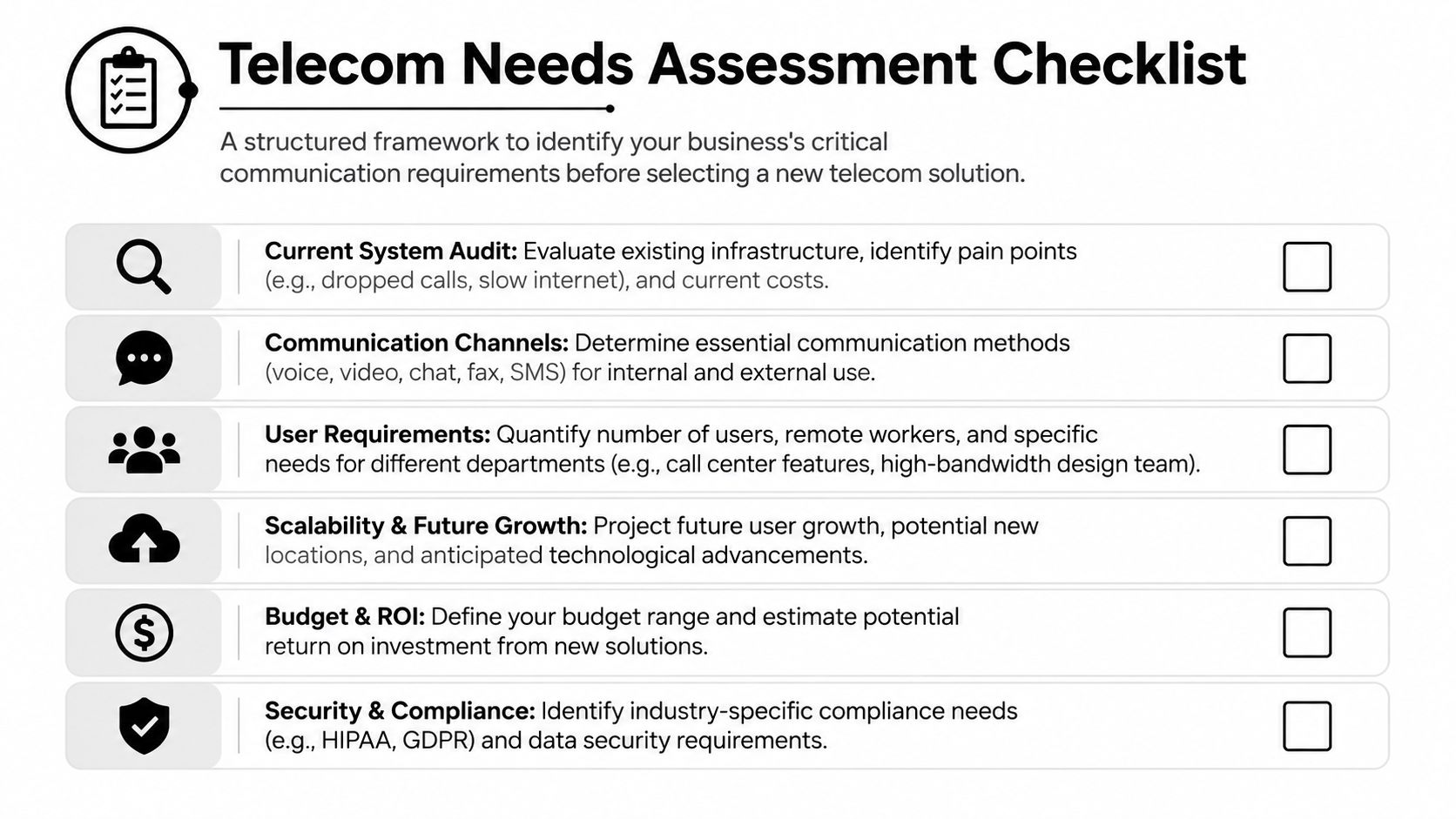
A better approach is to run a short internal audit. Keep it practical. You're not writing a thesis. You're building a requirements document that will help you compare providers on the same basis.
Many teams also overlook the connection between telecom uptime and physical security. If your communications environment supports alarms, access control alerts, remote monitoring, or network-connected cameras, it helps to review how providers and network design choices affect resilience. For a useful adjacent perspective, see how firms safeguard your property with ABCO Security through network protection and security planning.
Audit the current environment
Document what you have before you talk about what you want.
- Internet services: note each circuit, provider, location, contract term, and the teams that depend on it.
- Voice systems: list PBX platforms, SIP trunks, cloud seats, call flows, auto attendants, and any fax or analog dependencies.
- Mobility: capture company-issued phones, reimbursement practices, field staff needs, and whether calls must move cleanly between desk and mobile devices.
- Collaboration tools: identify what staff use for video, chat, file sharing, and presence.
A lot of businesses discover they're paying for tools that overlap. Someone has a UC platform, another group uses a separate video app, and the call center still runs on older software because no one wanted to touch it.
Separate must-haves from nice-to-haves
This step changes the whole buying process. If every request becomes mandatory, every quote looks justified. If you prioritize, weak proposals become obvious.
Use a framework like this:
| Requirement type | What belongs here |
|---|---|
| Must-have | Reliable calling, number porting, mobile app support, call recording if required, failover, admin visibility |
| Important | CRM integration, advanced analytics, softphones for all staff, conference room compatibility |
| Nice-to-have | AI summaries, niche integrations, premium handset refreshes, specialty contact center features |
A second filter helps. Ask whether a feature changes revenue, customer response time, compliance posture, or support workload. If it doesn't, it may not belong in the first phase.
Map users by role, not by headcount alone
A 50-person company doesn't need 50 identical telecom profiles. Front desk users, sales reps, warehouse supervisors, clinicians, and executives usually need different features.
Break people into groups:
- Reception and customer-facing staff: need call routing, hunt groups, voicemail handling, and overflow logic.
- Remote and hybrid staff: need strong mobile and desktop apps, headset compatibility, and easy call transfer.
- Operations teams: may need paging, shared lines, or communications that tie into facilities and logistics.
- Leadership and finance: often need secure access, reporting, and cleaner billing visibility.
If you can't explain why a department needs a feature, don't approve it yet.
Define security and administration expectations
Many first-time buyers get too casual at this stage. Ask who can add users, who can review call records, how permissions are handled, and what happens when an employee leaves. If telecom changes are still processed by email with no inventory discipline, the system will sprawl fast.
A more structured path is to evaluate managed telecom services near me if your internal team doesn't want to manage provisioning, billing cleanup, support escalation, and asset tracking alone.
Write the final requirements into one plain document. Include sites, user groups, known pain points, integration needs, support expectations, compliance concerns, and a realistic go-live window. That document will save you time on every vendor call after this.
Finding and Vetting Local Telecom Providers
Once your requirements are documented, the market gets easier to read. You're no longer reacting to sales language. You're checking whether a provider can support your environment.
That matters because the market is broad. In 2025, the U.S. is home to 1,021 wireless carriers and 2,536 telecommunications resellers, creating a fragmented field with plenty of local choice according to IBISWorld's wireless telecommunications carriers industry data. Choice is good. It also means weak providers can hide behind attractive pricing.

National carrier, regional provider, or reseller
Each model has trade-offs.
| Provider type | Usually works well for | Watch for |
|---|---|---|
| National carrier | Multi-site organizations, broad coverage needs, standardized packages | Rigid contracts, slower custom support, account complexity |
| Regional provider | Businesses that want local engineering access and site familiarity | Smaller service footprint, fewer bundled options |
| Reseller or agent-led solution | Companies that want flexibility and provider comparisons | Support handoff confusion, uneven post-sale accountability |
If your team also needs stronger in-building Wi-Fi as part of the broader communications refresh, compare structured local options alongside a vetted directory such as these top 2026 wifi installation companies. That kind of list can help you separate pure telecom sellers from firms that can handle wireless design and deployment well.
What to ask on the first serious call
Don't open with price. Open with fit.
Ask questions like these:
- How do you support businesses in our area: You want specifics on dispatch, installation coordination, and escalation paths.
- Who handles implementation: Their direct staff, subcontractors, or a mix.
- What industries do you support most often: A provider familiar with your workflow will ask better questions.
- How do you handle changes after go-live: Adds, moves, deactivations, and billing corrections matter more than most demos suggest.
Then ask for references that resemble your operation in complexity, not just in company size.
Vet the support model, not just the platform
Many telecom products are fine. Support is where the difference shows up.
The platform may be cloud-based, but your problem on Monday morning is always local to your business.
Test responsiveness before you sign. Call support. Email after hours. Ask who owns number port issues. Ask what happens if your internet carrier and voice platform provider blame each other during an outage.
A local evaluation can also include firms listed under telecommunications company near me to compare how providers present installation, support, and business service capabilities in your area.
Signs a provider is worth shortlisting
Look for practical evidence:
- Clear discovery process: they ask for user roles, network dependencies, site details, and migration concerns.
- Transparent scope: they state what's included, what's excluded, and what could delay deployment.
- Realistic implementation language: no promises that every migration is quick and effortless.
- Operational maturity: they can discuss onboarding, training, MACD activity, billing reviews, and offboarding.
The best provider for your company may not be the biggest one nearby. It's the one that can explain, in plain language, how your environment will work on day one and how it will still be manageable a year later.
Decoding Contracts and Service Level Agreements
A polished demo can distract buyers from the document that matters most. The contract defines cost, flexibility, service accountability, and your exit path if the relationship goes wrong.
Read telecom agreements with an operator's mindset. You're not only buying service. You're accepting terms for billing changes, support boundaries, implementation assumptions, equipment ownership, and cancellation risk.
Clauses that deserve extra scrutiny
Start with the sections that create downstream pain.
- Term length and renewal language: check whether the agreement auto-renews and how much notice is required to stop that.
- Early termination provisions: understand what triggers fees and whether site closures or mergers change your obligations.
- Included versus excluded support: onboarding support may be strong while post-launch admin help is billed separately.
- Hardware treatment: confirm whether phones, routers, and gateways are purchased, financed, leased, or bundled into service.
A lot of businesses also miss change-order language. If cabling, after-hours work, number remediation, or special configuration falls outside the base quote, your final cost can move quickly.
Read the SLA like someone who has to live with it
Service Level Agreements look reassuring until you test the wording. “Uptime” alone isn't enough. Ask how the provider measures incidents, what response windows apply, what exclusions exist, and whether credits compensate for business disruption.
Focus on these areas:
| SLA element | Why it matters |
|---|---|
| Outage definition | If the provider defines failures narrowly, many real problems won't count |
| Response commitments | Fast acknowledgment isn't the same as fast resolution |
| Escalation path | You need named levels of support, not vague promises |
| Credit mechanism | Credits should be understandable and easy to claim |
Contract habit: If a salesperson makes a promise that matters to operations, get it reflected in writing before signature.
Use Telecom Expense Management carefully
A Telecom Expense Management, or TEM, process can help businesses regain control of billing, inventory, and policy enforcement. According to Tellennium's guidance on TEM pitfalls, implementing a TEM strategy can lead to 20 to 40% cost reductions within a year, but vendor lock-in affects 40% of failed TEM initiatives. That's the trade-off. TEM can clean up sprawl, but only if the program stays transparent and aligned with your business.
Use TEM to answer practical questions:
- Which lines are active but unused?
- Which invoices no one checks?
- Which devices still belong to departed staff?
- Which service bundles no longer fit the business?
If you're comparing external support options, a review of telecom services near me can help frame what local providers and service partners typically include beyond raw connectivity.
Negotiation points that actually matter
A lower monthly seat price is nice. Better terms are often more valuable.
Try to negotiate:
- Implementation credits or waived setup items
- Clear billing start dates tied to usable service
- Flexibility for seasonal staffing changes
- Defined support contacts for critical incidents
- Removal of vague language around “commercially reasonable” performance
Buyers who rush this step often spend the next few years working around contract language they could have challenged in one meeting.
Planning a Seamless Integration and Migration
The technical cutover is where even a good purchase can stumble. Systems are usually fine in a controlled demo. Real businesses have old numbers, shared mailboxes, analog devices, informal workarounds, and staff who just want the phone to ring when customers call.
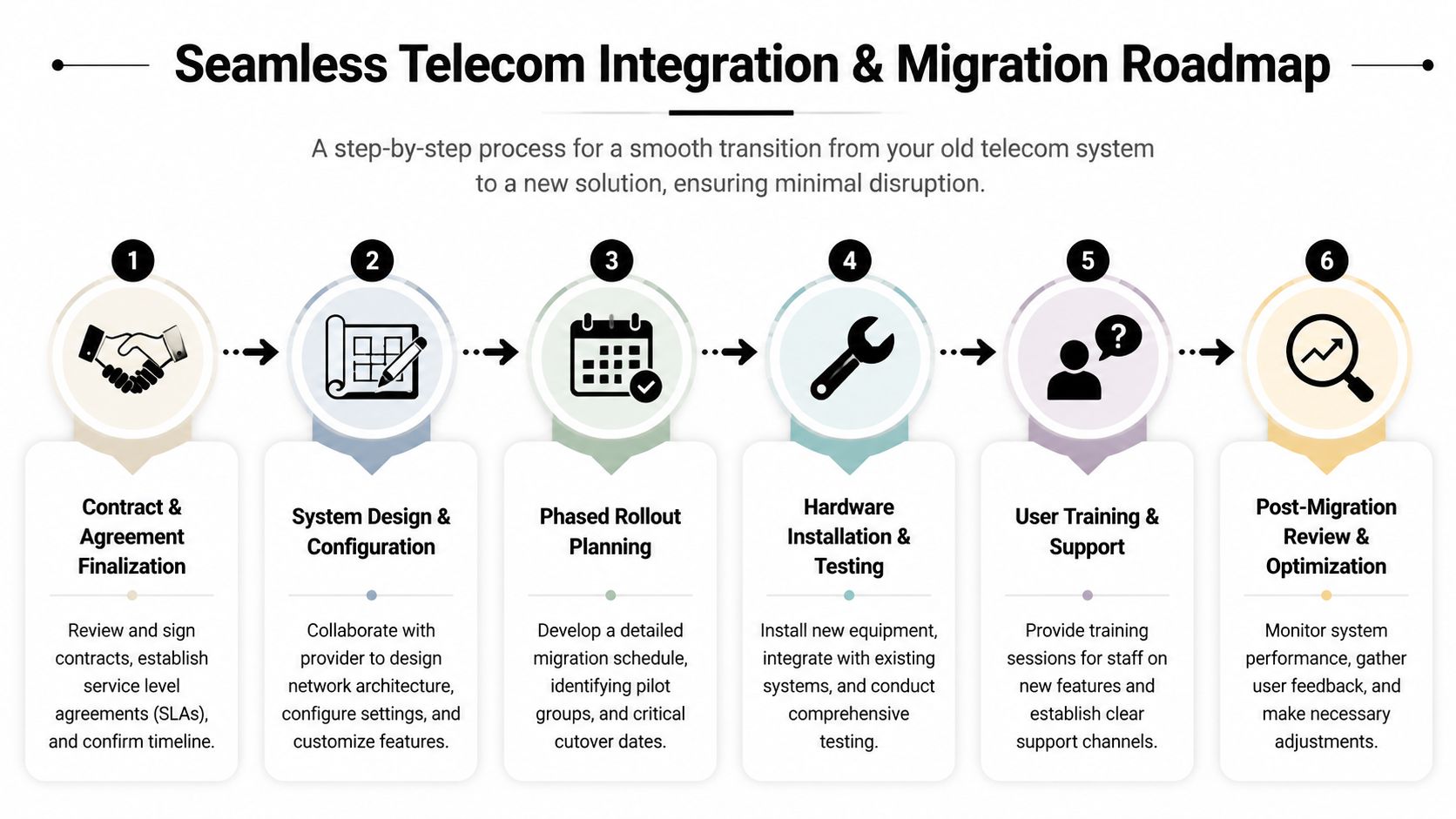
A clean migration starts with ownership. One person should own the internal project. One person from the provider should own implementation. If those roles are fuzzy, tasks drift and assumptions multiply.
Build the migration around business risk
Not all users should move at once. Reception, customer support, executive assistants, clinics, and production sites usually need more careful planning than a small back-office team.
A practical sequence looks like this:
- Stabilize the design with final user lists, call flows, emergency location data, and hardware assignments.
- Pilot a smaller group that uses core features heavily and will report issues quickly.
- Port numbers in phases if the business can tolerate a staged approach.
- Keep temporary fallbacks such as call forwarding, alternate contact paths, and direct escalation routes.
Watch the dependencies people forget
Telecom migrations often fail at the edges. Conference rooms stop joining meetings. Door entry systems use old analog lines. Fax workflows linger in finance or healthcare. Alarm and elevator lines may still depend on legacy circuits.
Use a dependency checklist before cutover:
- Analog remnants: fax, alarms, paging, specialty devices
- Room technology: speakerphones, meeting bars, shared displays
- User equipment: headsets, mobile apps, softphone permissions
- Integration points: CRM pop-ups, voicemail-to-email, directory sync
A successful migration usually looks uneventful to employees. That's the right outcome.
Train users for the real jobs they do
Most vendor training is feature-based. Employees need scenario-based training instead. Show reception how to transfer and recover calls. Show managers how to update greetings. Show mobile staff how to switch between desk and app calling without creating confusion for customers.
Keep training simple:
- Short live sessions for teams with specialized call handling
- One-page job aids for common tasks
- Named support contacts for the first week after cutover
- Manager briefings so supervisors can absorb first-line questions
Include the retirement plan in the project calendar
The technical and operational tracks must converge at this point. Once the new system is live, old hardware should be tagged, removed from service, and held in a controlled area until secure disposition is complete.
That means your migration plan should record:
| Post-cutover task | Why it matters |
|---|---|
| Collect old handsets and gateways | Prevents shadow reuse and inventory confusion |
| Identify storage-bearing devices | Helps isolate equipment that may retain sensitive data |
| Update asset records | Reduces billing and endpoint tracking errors |
| Schedule end-of-life handling | Keeps retired telecom gear from piling up in closets |
Teams that skip this step often end up with a half-finished project. The new platform works, but the old environment never really leaves.
Sustainably Retiring Your Old Telecom Hardware
Old telecom hardware has a way of becoming invisible. It sits in a closet, in a rack corner, or in a back office after the migration. People assume it's harmless because it's unplugged.
It isn't harmless. Phones, gateways, servers, storage media, and supporting equipment can still hold configuration data, credentials, call records, or other business information. On top of that, disposal creates environmental and compliance obligations that many telecom buying guides ignore.

The scale of the issue is significant. Globally, 53 million metric tons of e-waste were generated in 2023, with only 22.3% formally recycled, and improper handling can expose businesses to data breach risk and non-compliance with standards such as NIST 800-88 for data destruction, as summarized in this discussion of telecom and e-waste practices at ABA Communications.
What responsible retirement actually includes
Proper retirement is more than hauling equipment away.
It should include:
- Asset identification: know exactly what came out of service
- Segregation by risk: separate simple peripherals from devices that may retain data
- Secure data destruction: apply documented processes for storage-bearing equipment
- Chain of custody: maintain records from pickup through final disposition
- Recycling or remarketing: recover usable value where appropriate and recycle the rest responsibly
IT asset disposition, or ITAD, belongs in the telecom conversation. The procurement team, IT staff, facilities, and compliance leaders should all know what happens to retired equipment before the cutover happens.
Why this step adds business value
Responsible disposal protects more than the environment.
It can also help you:
- Reduce security exposure tied to retired devices and media
- Support audit readiness through documented disposition records
- Free up storage space in offices, IDF rooms, and warehouses
- Improve sustainability reporting for internal and customer-facing goals
For companies that need a practical handoff, a resource like this server decommissioning checklist helps teams structure inventory, shutdown, data handling, and final removal tasks. Reworx Recycling is one example of an organization that handles donation-based electronics recycling, secure data destruction, decommissioning support, and business pickups as part of broader end-of-life equipment management.
Retiring old telecom gear is part of the upgrade. It isn't cleanup work left for “later.”
What not to do with old telecom equipment
Avoid these common mistakes:
- Don't leave it untracked: unlogged retired devices create both security and accounting confusion.
- Don't let departments self-dispose: scattered disposal methods break chain of custody.
- Don't assume every device is data-free: some systems retain more than staff expect.
- Don't wait until year-end: delayed cleanup turns one migration into a storage problem.
A business upgrade should leave you with better communications and fewer lingering risks. If old equipment is still stacked in the back room months later, the project isn't finished.
If your business is replacing phones, network hardware, servers, or other aging equipment, Reworx Recycling can be part of the final step. Use them to plan donation-based recycling, schedule a pickup, coordinate secure data destruction, or build an ITAD process that keeps retired telecom hardware out of storage closets and out of landfills.