A storage room often becomes the default destination for retired technology. Laptops from a refresh sit beside phones awaiting reassignment, servers from a completed decommissioning project, and monitors no one has claimed. Then an office closes, a lease ends, or an employee asks when the equipment will finally be cleared out.
An electronics recycling pickup solves the transport problem, but it doesn't decide what happens to each device. Your team still needs to identify reusable equipment, protect data, document custody, and confirm final disposition. Reworx Recycling is a donation-based electronics recycling and IT equipment disposal social enterprise. A responsible process can support environmental stewardship, technology donations, digital inclusion, and workforce development, but not every item is suitable for reuse.
Plan the Electronics Recycling Pickup
Start by treating the equipment pile as an asset-disposition project, not a removal appointment. A laptop with a working battery and supported software may be a candidate for redeployment or donation. A server containing sensitive data needs a documented sanitization or destruction decision before it leaves your control. A broken monitor or damaged battery may require a different handling route altogether.
That distinction matters at a global level. The world generated approximately 62 billion kilograms of e-waste in 2022, while only 22.3%, about 13.8 billion kilograms, was documented as formally collected and recycled in an environmentally sound manner, according to the Global E-waste Monitor 2024. Formal collection is the point where an organization can begin creating a traceable record of responsible downstream recycling, asset disposition, and environmental compliance.
Before requesting a pickup, decide what you need the project to accomplish:
- Schedule and logistics: What is being collected, where is it staged, and who will meet the transporter?
- Asset decisions: Which devices may be reused, repaired, donated, or remarketed, and which need recycling?
- Data protection: Which equipment stores information, and how will your team document sanitization or destruction?
- Evidence: What records will link the original inventory to the pickup and final disposition?
An IT equipment audit can help turn a general cleanout into a device-level plan. The useful starting point is a reliable list of assets, not a guess about how many boxes are in storage.
Choose the Right Pickup Arrangement
The right arrangement depends on more than whether a recycler can collect equipment. A single laptop, a floor of office technology, and a data center decommissioning project have different requirements for access, loading, documentation, and data handling.
| Arrangement | Best-Fit Scenario | Planning Focus | Evidence Needed |
|---|---|---|---|
| Customer drop-off | A small, manageable quantity such as a single laptop | Transport, accepted items, and data status before delivery | Receipt and any applicable disposition record |
| Scheduled business pickup | An office cleanout or a mixed batch of computers, phones, servers, and peripherals | Inventory, staging, loading access, and pickup coordination | Asset list, handoff record, and downstream records |
| ITAD or decommissioning engagement | Distributed equipment, a facility cleanout, or a larger data center project | Scope, phased logistics, asset tracking, data controls, and exceptions | Chain-of-custody records and item-level processing evidence |
A school or small business may have a compact load but still need to track devices that contain student, employee, or customer information. A government agency may want a formal record for assets moving between departments and a transporter. Enterprise IT teams handling servers should settle the scope of decommissioning and storage-media processing before the equipment reaches the loading area.
Laboratory equipment disposal and medical equipment disposal deserve the same deliberate scoping. Identify embedded storage, batteries, and special handling needs, then confirm the recycler's process and required records. Don't assume that a device is data-free because it isn't a conventional computer.
Ask potential providers what their pickup process covers, what records they supply, and how they handle downstream partners. The EPA recommends choosing electronics recyclers certified by an accredited, independent third-party auditor. The EPA's electronics recycling guidance explains that certification programs are designed to support reuse and recycling, reduce health and environmental exposure, control downstream handlers, and require data destruction.
If you're comparing scheduling arrangements, confirm practical constraints such as operating hours and access through the provider's business pickup availability information. A donation-based recycling partner and a formal ITAD process can complement each other when the project needs both community-minded reuse and auditable handling.
Prepare Devices and Coordinate Logistics
A confirmed pickup date should trigger a preparation workflow. The aim is simple: make the physical load match the inventory, and make every exception visible before equipment changes hands.
Inventory each device. Record its serial number, asset owner, condition, and storage media. Note removable drives and embedded storage where known. This lets the team reconcile what leaves the building against what was approved for disposition.
Triage by condition and data status. Separate working equipment, data-bearing devices, batteries, and damaged or hazardous items. Then decide whether each asset should be repaired, redeployed, donated, remarketed, harvested for parts, recycled, or securely destroyed. Don't send working hardware straight to shredding because the pickup is already booked.
Prepare the load. Package and label boxes or pallets by asset category. Clearly identify lithium batteries and keep damaged items separate for instructions from the recycler. For fragile equipment, use suitable protective packaging. An operations team handling sensitive electronics may find anti-static small bubble wrap rolls useful for reducing static exposure during packing.
Confirm the logistics. Settle the pickup date, equipment count, building access, loading area, contact person, and any special handling in advance. Tell the transporter about stairs, dock restrictions, access procedures, or a required check-in process before pickup day.
The process below provides a simple sequence for turning the appointment into a controlled handoff.
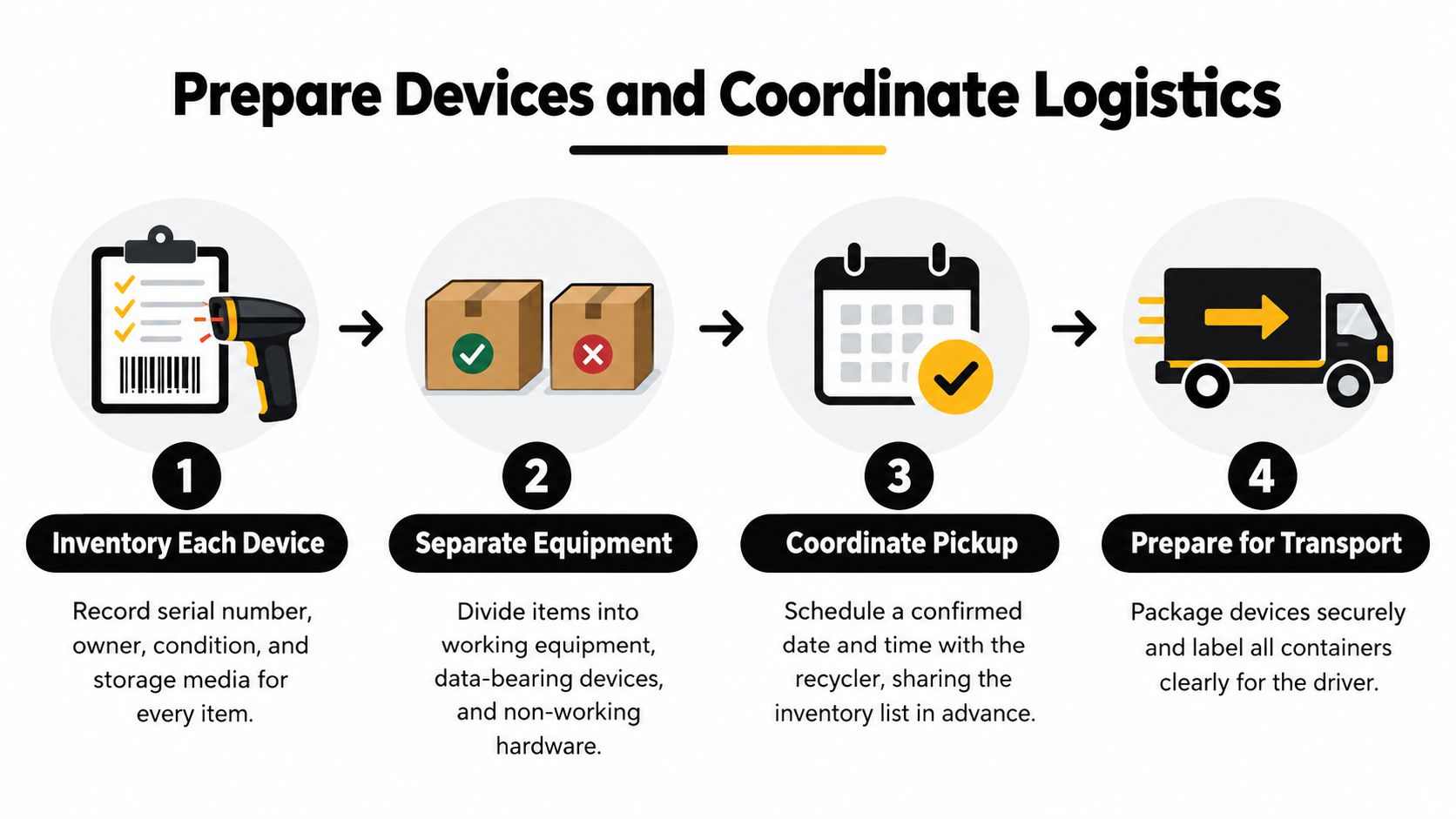
For a small office cleanout, designate one staging area and keep the inventory beside the equipment. For a facility cleanout or data center decommissioning project, stage equipment by category or work area and assign someone to reconcile each group. Mixed, unidentified pallets create avoidable uncertainty about ownership, data-bearing components, and final routing.
At handoff, compare the physical count with the manifest and record the transporter, date, quantity, and destination. Resolve discrepancies before the load leaves. A clean, accurate load reduces missing assets, exceptions, and downstream uncertainty.
Match Secure Data Destruction to Each Device
Pickup doesn't sanitize a device. Ordinary file deletion, a factory reset, and media sanitization aren't interchangeable, and a recycler can't infer your organization's data requirements from a box of mixed equipment.
NIST defines media sanitization as rendering access to target data infeasible for a defined level of effort. Its guidance distinguishes Clear, Purge, and Destroy methods so organizations can match the technique to information sensitivity and intended disposition. Destroy prevents media reuse for storage; it isn't the default answer for every device. See the NIST media sanitization publication when setting your organization's method and evidence requirements.
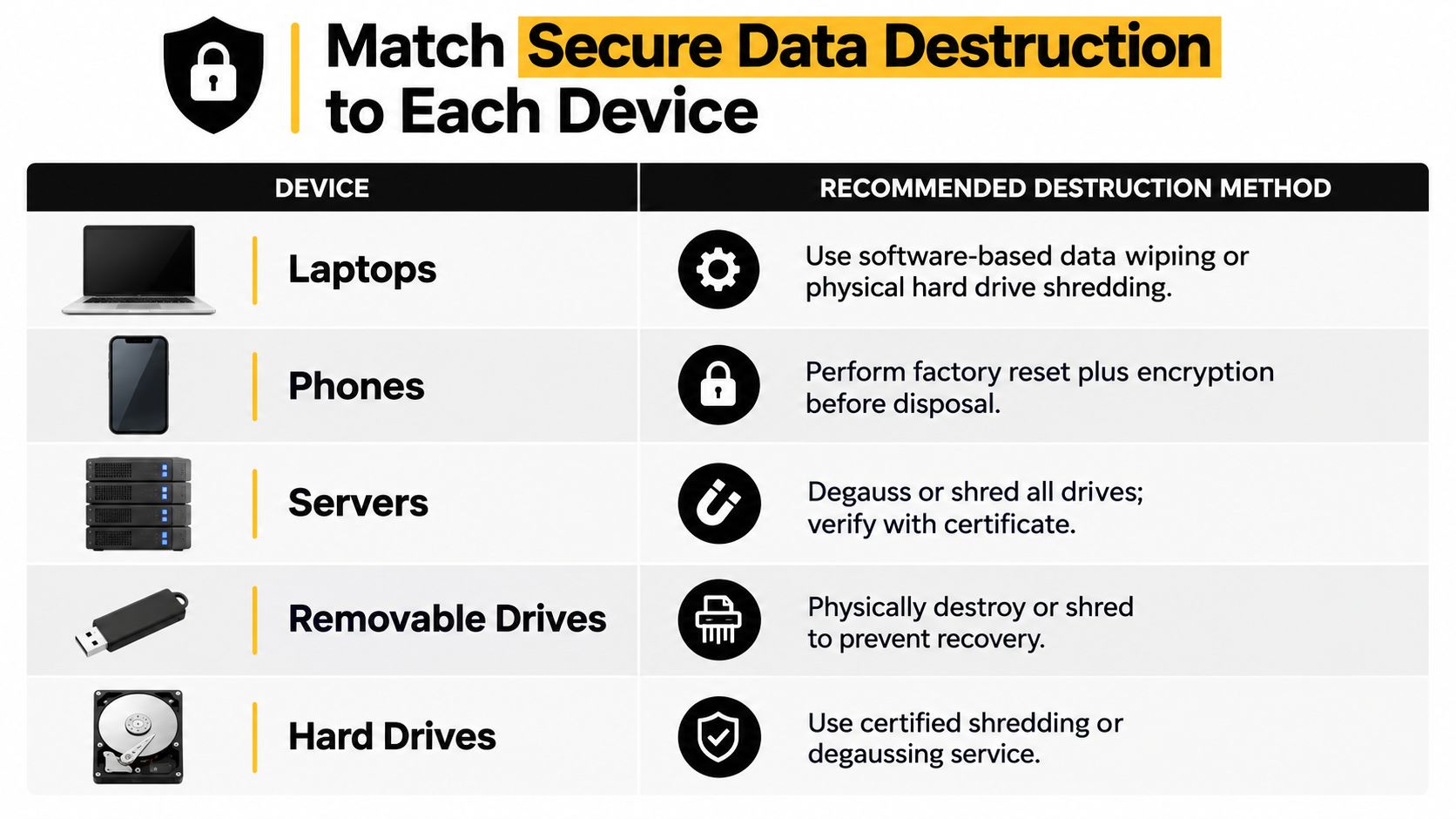
Use a device-by-device decision, not a blanket instruction:
- Laptops and servers: Identify every drive and decide whether the equipment will be reused. Select a sanitization method appropriate to the data and intended disposition, then retain item-level results.
- Phones: Account for built-in storage and any removable media. A reset alone shouldn't substitute for a documented process matched to the information and reuse plan.
- Removable drives: Track each item separately. Small devices are easy to overlook when teams inventory only the computer they were attached to.
- SSDs and hard drives: Confirm that the selected technique is suitable for the media type. If reuse isn't appropriate or sanitization cannot be reliably completed, physical destruction may be the chosen route.
- Embedded or failed storage: Record the device and the exception. If a device can't power on, don't treat it as sanitized; determine whether an alternate method or physical destruction is needed.
A secure data destruction overview can help teams distinguish data destruction from general electronics recycling. Reworx Recycling's described capabilities include equipment decommissioning and secure hard-drive shredding with data destruction. Confirm the scope and records for your specific load rather than assuming every device needs shredding.
The pickup manifest should connect each asset identifier and media identifier to its sanitization or destruction outcome. NIST also calls for verification of sanitization results and, where practical, representative sampling by personnel not involved in the original operation. For sampled media, its guidance recommends pseudorandom locations across user-addressable and reserved areas, with consecutive sample locations covering at least 5% of the relevant subsection without overlap. If verification or validation fails, the item should be reprocessed using a different or more secure method, not released as complete.
Document Chain of Custody and Compliance
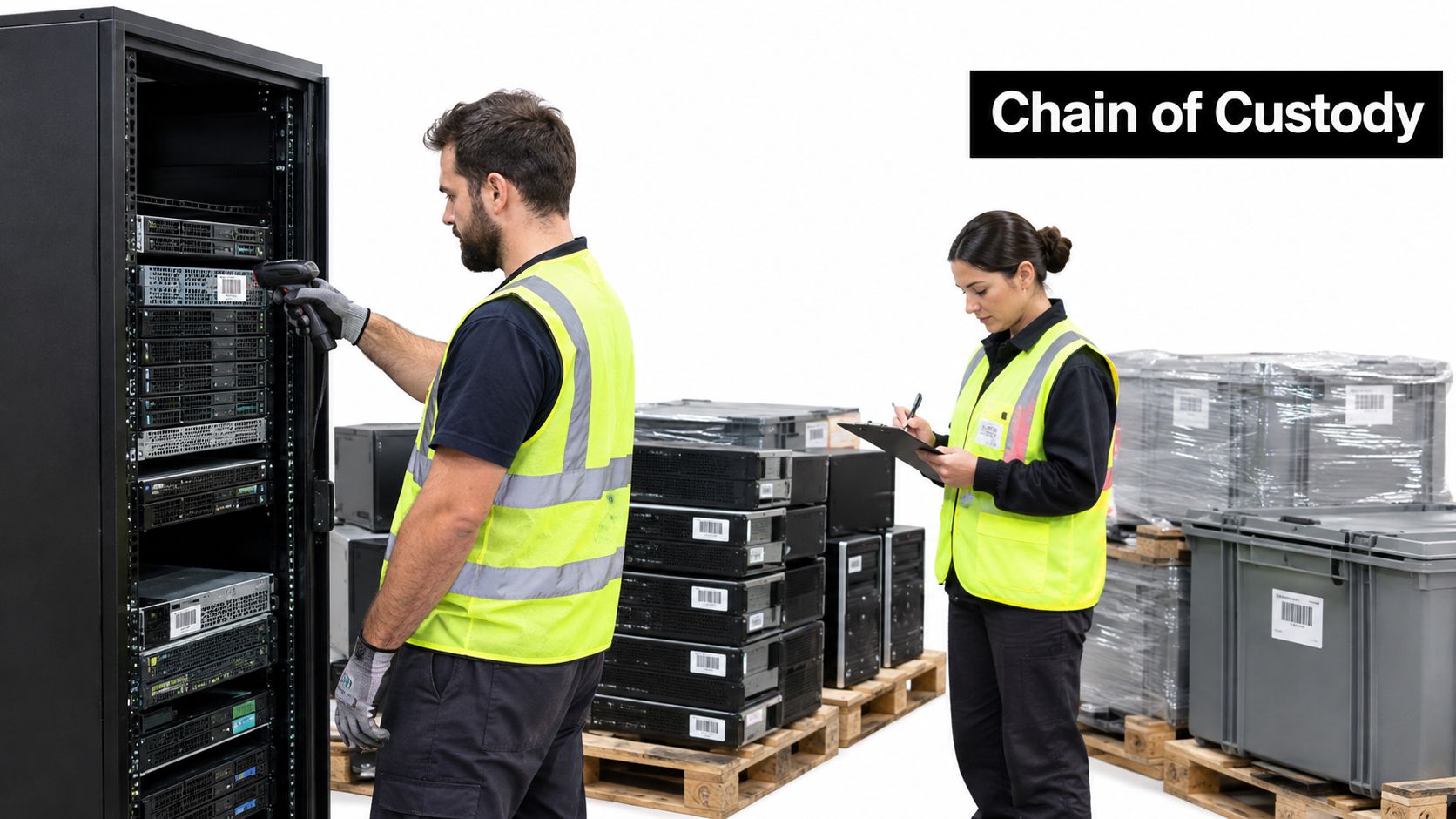
A pickup receipt proves that a load moved. It doesn't necessarily prove which assets were collected, who handled them afterward, how data was treated, or where equipment ended up. Build an auditable file that follows assets from inventory to final disposition.
At minimum, retain an asset-level manifest with identifiers and condition, plus a handoff record listing the date, quantity, transporter, and destination. Add the processing method, data-sanitization or destruction result, certificates, and any exceptions. When downstream processors are involved, request records that connect their work back to your inventory rather than accepting an unlinked summary.
That connection matters in a mixed load. Laptops, servers, phones, batteries, and peripherals may follow different paths. A serial-level manifest makes it possible to determine whether a particular server was sanitized, whether a phone was routed for reuse, or whether a damaged battery was handled as an exception.
NIST distinguishes verification from validation. Verification asks whether the sanitization technique completed without technical errors or anomalies. Validation is the higher-level decision about whether the result is effective for the confidentiality and sensitivity of the information involved. NIST's related media sanitization FAQ also addresses certificates and documentation. Record both the technical outcome and the approval that the remaining confidentiality risk is acceptable.
Schools, public agencies, laboratories, healthcare organizations, and data center teams should use records suited to their own sensitivity and governance needs. Don't assume that one generic certificate answers every internal audit question. For warehouse operations teams reviewing broader carbon reduction efforts for warehouses, responsible electronics disposition can sit alongside other operational sustainability practices, but the equipment records still need to stand on their own.
A chain-of-custody documentation process should leave your organization able to trace each asset, identify its disposition, and explain any exception without relying on someone's memory.
Evaluate Pricing Buyback and Reuse Value
Don't compare pickup proposals by headline price alone. A low-cost or free collection offer may not include the same preparation, data controls, downstream processing, specialized handling, or evidence as another proposal. Ask for a written scope before you compare options.
Check whether the proposal addresses:
- Pickup logistics: Loading requirements, site access, and whether the equipment must be staged in a particular way.
- Asset management: Inventory review, tracking, and reconciliation of the physical load.
- Data services: The methods available for sanitization or destruction and the evidence supplied for each item.
- Processing and documentation: Recycling, certificates, downstream records, and how exceptions are reported.
- Value recovery: Whether eligible equipment may be considered for buyback, donation, remarketing, or parts recovery.
Working equipment deserves a decision before it enters a recycling stream. Consider age, condition, battery health, software support, encryption status, repair economics, and resale demand. A repairable laptop with supported software may be a candidate for redeployment or donation, while an obsolete device with failed storage may be better suited to materials recovery after data risks are addressed. Reuse can extend product life, but it isn't automatically the right choice if repair, security, or logistics make it unsuitable.
Reworx Recycling offers equipment buyback options and a donation-based model for consideration. Confirm in writing which assets qualify, how data will be handled, where equipment will go, what records you'll receive, and how any recovered value will be calculated. A cost recovery strategy discussion can help frame those questions, but the final comparison should use the actual scope for your equipment.
Avoid Pickup Pitfalls and Verify Completion
Free pickup is a logistics offer, not proof of secure data disposition. Convenience becomes a risk when an organization skips its inventory, assumes recycling equals data destruction, or accepts a generic certificate that doesn't identify the devices processed.
Correct the common failures before they become exceptions:
- Mixed, unidentified loads: Separate equipment by category and reconcile it against an asset manifest before handoff.
- Missing storage media: Track removable drives and embedded storage as part of the asset, not as loose accessories.
- Unmarked lithium batteries: Identify batteries and damaged items clearly, then confirm handling requirements before collection.
- Untracked subcontractors: Ask who will transport and process the equipment, and require downstream records that preserve the custody trail.
- Reusable equipment sent directly to destruction: Triage condition and data status first. EPA notes that reuse or repair extends product life and keeps equipment out of the waste stream longer.
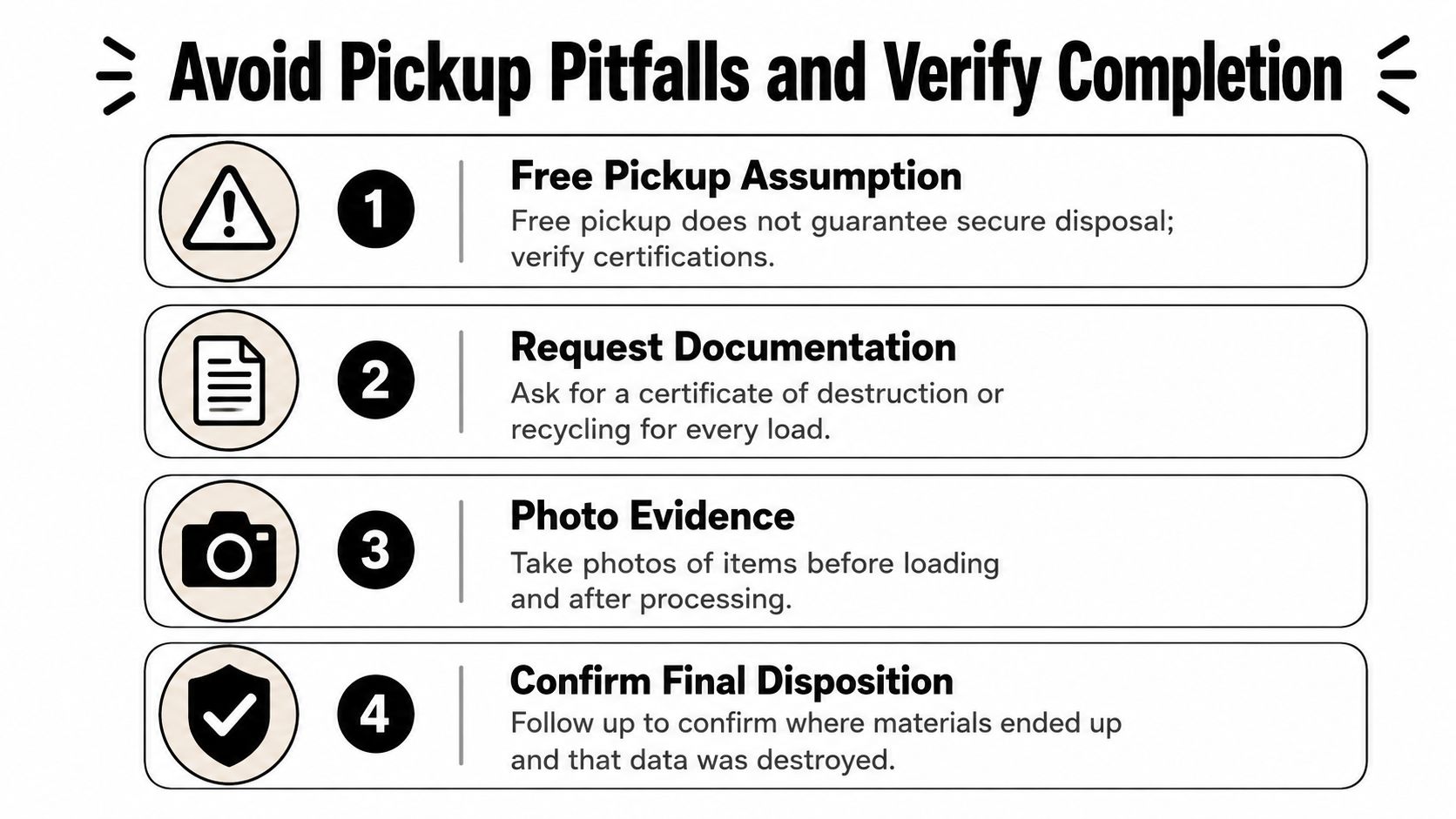
Before scheduling, ask what the pickup covers, which records the provider will return, and how the provider handles devices that can't be sanitized. At handoff, confirm the count, transporter, date, and destination, and document any discrepancy. After processing, match the final records to the original inventory and check that each exception has a recorded outcome.
Measure completion by documented final disposition, not by the number of items removed.
For businesses, public agencies, schools, and enterprise teams, the final test is practical: Was every inventoried asset accounted for? Does the record show the method used for each data-bearing item? Were exceptions documented? Can you tell what happened to equipment selected for reuse? Do the final certificates and processing records connect to the pickup manifest?
Reworx Recycling supports electronics recycling, business pickup, equipment decommissioning, secure hard-drive shredding, and equipment buyback options. If you're preparing a cleanout, looking to donate old equipment, or evaluating a social enterprise recycling partnership, contact the team through Reworx Recycling to discuss your equipment and documentation needs.