Your team is replacing laptops, retiring servers, or clearing out a storage room full of old drives. Someone asks a familiar question: “Can’t we just delete everything first?”
That question comes up in San Jose companies of every size, from small offices to large data center environments. It sounds practical, but it often confuses file deletion with data destruction, and those are not the same thing.
For businesses in Silicon Valley, hard drive disposal sits at the intersection of security, compliance, operations, and sustainability. A drive can hold customer records, employee data, contracts, product plans, financial files, or protected health information. Once that device leaves your control, the risk changes fast.
Hard Drive Destruction Services in San Jose matter because this region handles large volumes of end-of-life technology and operates under strict expectations around privacy, audit readiness, and responsible electronics recycling. The strongest programs treat secure data destruction as part of a larger IT asset disposition strategy, not as an afterthought at the end of an office cleanout or data center decommissioning project.
Why Deleting Files Is Never Enough for Data Security
A San Jose company retires a batch of laptops after a hardware refresh. The files are deleted, the devices look clean, and the team assumes the risk is gone. Weeks later, those same drives are sitting in a storage room waiting for pickup, still capable of exposing customer records, contracts, or employee data if the information is recovered.
That gap between what looks deleted and what is still recoverable causes many disposal mistakes.
Deleting a file usually removes the pointer to the data, not the data itself. The operating system marks that space as available for reuse, but the underlying information may remain on the device until it is overwritten or the media is destroyed.
A better comparison is a book with its card removed from the library desk. The checkout system no longer shows it, but the book is still on the shelf.
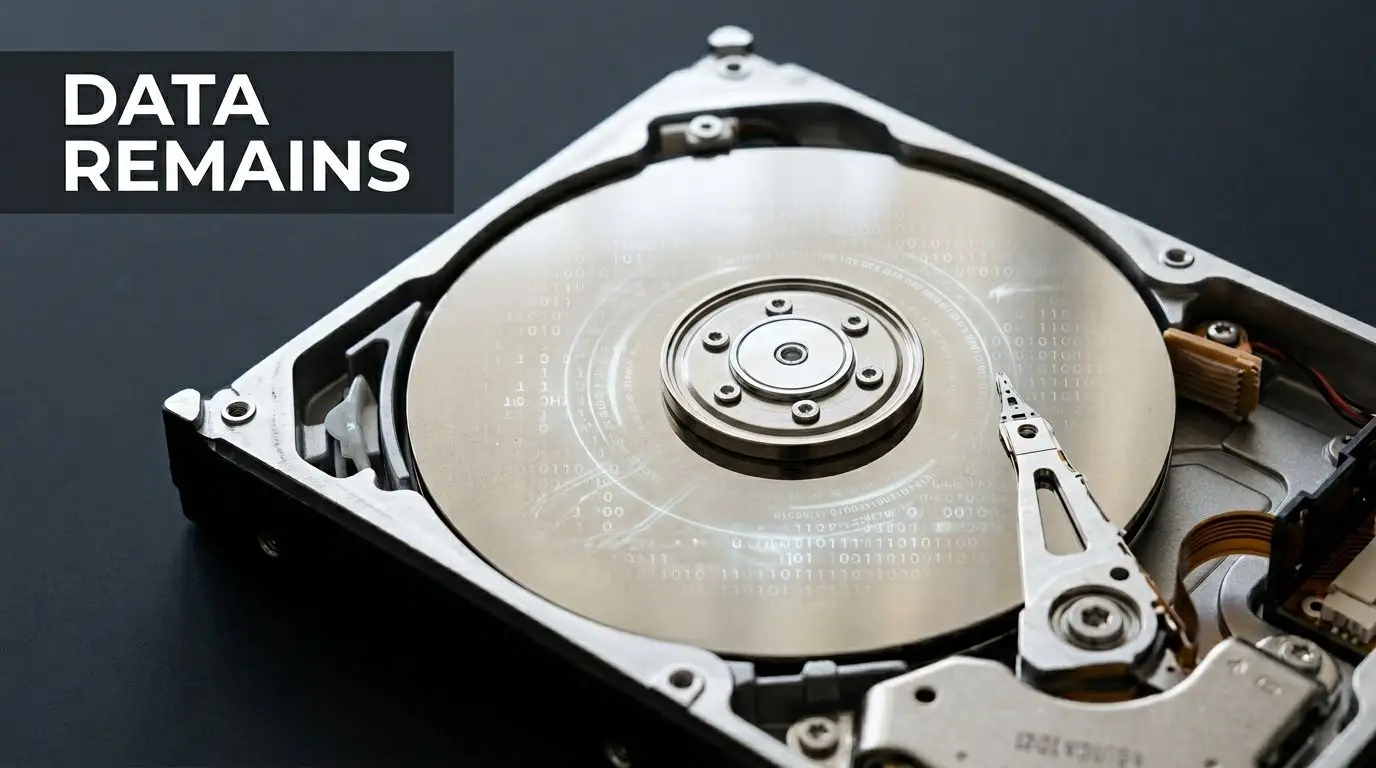
What deletion does, and what it does not do
A common misconception is that a hard drive works like a file cabinet. Remove the folder, and the papers are gone. Storage devices do not behave that way.
When someone deletes files or formats a drive, the system may only change the map that tells the computer where to look. Recovery tools can sometimes read what is still sitting in those locations. That is why IT teams distinguish between deleting data, sanitizing data, and destroying media.
If you want a plain-language walkthrough of the basics, this guide on wiping a hard drive is a helpful starting point.
Why businesses run into trouble
Old drives rarely move from active use straight to final disposal. They get stacked in an office, moved during a relocation, packed with surplus gear, or handed off during a hurried cleanout. Every extra handoff increases the chance that a device leaves your control before the data is completely gone.
The risk is well documented. IBM's Cost of a Data Breach Report notes that lost or stolen devices remain a common breach vector, which is one reason many organizations choose physical destruction for end-of-life media that held sensitive information.
Practical rule: If a drive stored sensitive business data and you do not need to reuse that media, physical destruction is the clearest way to prevent future access.
Why physical destruction matters beyond IT
Physical destruction addresses a different question than deletion. Instead of asking whether software can still recover the files, it removes the storage device from use as a readable object.
The distinction is straightforward:
- Delete a file and the system may hide the route to the data.
- Sanitize a device properly and the stored information may be overwritten or cleared according to a defined method.
- Shred or crush the drive and the media itself can no longer function as a usable container for data.
For San Jose businesses, this is not only a security decision. It is also part of responsible operations. A documented destruction process supports privacy obligations, reduces the chance of harmful data exposure, and fits a broader corporate social responsibility program when the materials are handled through a recycler that also prioritizes environmental recovery and community benefit. That combination matters because secure disposal should protect both the business and the people affected by how electronic waste is managed.
Exploring Physical Hard Drive Destruction Methods
Once a company decides deletion isn’t enough, the next question is practical. What method should we use? In San Jose, the most common answers are shredding, degaussing, and crushing.
Each method has a place. The right choice depends on the media type, your compliance posture, and whether you need visible proof that destruction happened.
Three methods, three different outcomes
Shredding is the easiest for most non-technical teams to understand. The drive goes into an industrial system and comes out as fragments. That visible result is one reason many organizations prefer it for secure data destruction.
Degaussing works differently. It targets magnetic media by disrupting the magnetic field that stores data. It’s associated with magnetic drives and some tape-based media, but it isn’t the universal answer for every device type.
Crushing uses force to damage the drive body and internal components. In San Jose service environments, industrial units may apply up to 7,500 pounds of force, according to Data Destruction’s hard drive shredding overview. That level of force helps deform key components so the device can’t function as a readable storage unit.
For many readers, the biggest point of confusion is SSDs. Solid state drives don’t store data the same way traditional magnetic hard drives do, so methods that work well on one media type don’t always translate cleanly to another.
Comparison of Hard Drive Destruction Methods
| Method | Process | Effective On SSDs? | Best For | Verifiability |
|---|---|---|---|---|
| Shredding | Physically fragments the drive into small pieces | Yes | Mixed media streams, high-security destruction, office and data center projects | High, because teams can often witness the result and receive documentation |
| Degaussing | Uses a strong magnetic process to disrupt stored magnetic data | No, not the preferred option for SSDs | Magnetic HDDs and certain tape media where magnetic sanitization fits policy | Moderate, because the change isn’t as visually obvious as shredding |
| Crushing | Mechanically pierces or mangles the drive housing and internal parts | Can damage SSDs, but policy should confirm suitability | On-site events, quick physical disablement, staged decommissioning | High if witnessed, though residue may need follow-up handling |
Why shredding often becomes the default
Shredding checks several boxes at once. It physically destroys both HDDs and SSDs, supports witnessed service models, and fits well with downstream recycling because the material can be separated after destruction.
San Jose businesses also deal with volume. For larger projects, that matters. A useful overview of methods and planning considerations appears in these strategies for hard drive destruction.
Shredding is often easier for legal, IT, and facilities teams to agree on because everyone can understand the result without technical interpretation.
How to choose without overcomplicating it
A simple decision framework works well:
- If you have mixed media, shredding is usually the clearest option.
- If your policy focuses on magnetic sanitization, degaussing may play a role for specific media.
- If you need immediate physical disablement on-site, crushing can fit, especially as part of a controlled chain-of-custody process.
The key is matching the method to the device. Don’t let a vendor describe one technique as universal if your asset mix includes laptops, SSDs, USB devices, tapes, and retired server drives. Good destruction planning starts with knowing what you have.
Navigating Data Destruction Compliance Standards in California
Compliance language can make secure disposal sound more mysterious than it is. In practice, most standards are asking a straightforward question: When your business is done with a device, can you prove the data on it was handled safely?
That question matters in San Jose because local businesses often operate across regulated sectors at once. A single organization may hold employee files, payment data, customer information, engineering documents, and medical or research records.
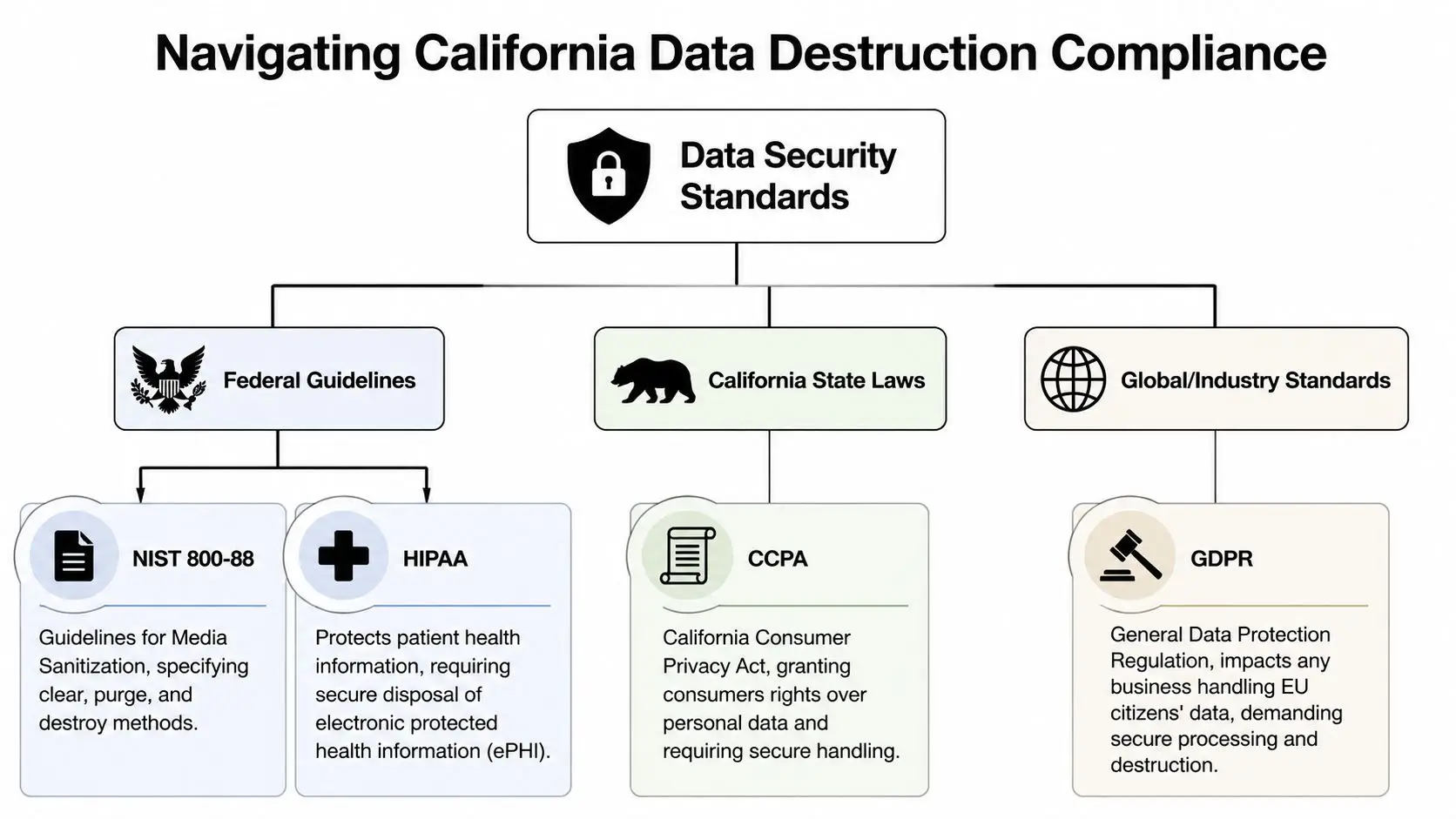
The standards San Jose businesses hear most often
One of the clearest anchor points is NIST 800-88, which organizations use as a guide for media sanitization decisions. It helps teams think through whether media should be cleared, purged, or destroyed based on the risk and the end use of the asset.
Healthcare organizations also focus on HIPAA, because devices that once stored electronic protected health information need secure disposal controls. Payment environments care about PCI-DSS. California businesses also need to think about CCPA when personal information is involved.
A broad summary from the Bay Area market is useful here. Hard drive destruction services in San Jose are designed to meet standards including NIST 800-88, DoD 5220.22-M, HIPAA, PCI-DSS, and CCPA, as described by Evergreen IT’s data destruction services page.
What these standards mean in plain language
Most business leaders don’t need to memorize regulatory text. They need to know what the standards require operationally.
- NIST 800-88 means you need a defensible sanitization method for the media and the use case.
- HIPAA means healthcare-related devices can’t be retired casually or passed around without secure disposal controls.
- PCI-DSS means payment-related storage media needs careful end-of-life handling.
- CCPA raises the bar for how California businesses manage personal information throughout its lifecycle, including disposal.
For organizations managing distributed sites, hybrid offices, or remote equipment returns, the compliance challenge is often less about the rule itself and more about process discipline.
California compliance also touches environmental responsibility
Data destruction and e-waste handling aren’t separate conversations. In California, companies are expected to think about both. The secure destruction step protects data. The downstream recycling step helps prevent improper disposal of electronic material.
That connection matters for corporate social responsibility teams. An end-of-life program should answer two questions at once:
- Was the data irreversibly handled?
- Were the resulting materials managed responsibly?
Compliance works best when legal, IT, procurement, facilities, and sustainability teams use one retirement workflow instead of separate ones.
Organizations with operations across the state often benefit from a broader California ITAD services perspective, especially when they need to align pickup logistics, device tracking, and sustainable recycling in one program.
A useful test for your internal process
Ask your team this: if an auditor requested evidence for a retired batch of drives from six months ago, could you show:
- what devices were retired,
- who handled them,
- what destruction method was used,
- and what documentation proves completion?
If the answer is uncertain, the issue usually isn’t awareness. It’s process design.
The Critical Role of Certification and Chain of Custody
A hard drive can be physically destroyed and still leave a business exposed if nobody can prove what happened. That’s why documentation matters so much in Hard Drive Destruction Services in San Jose.
Security isn’t only about the final shred. It’s also about the record of custody before that moment.
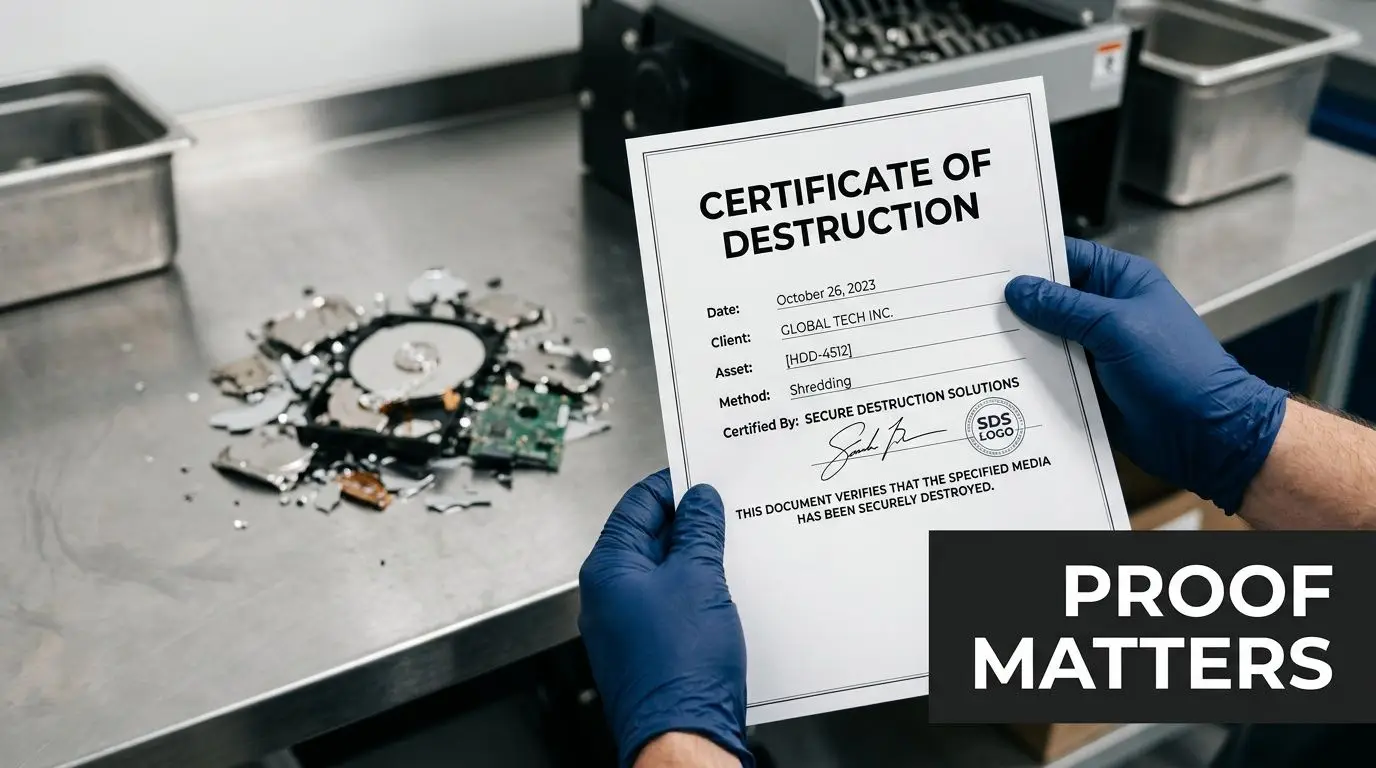
What chain of custody actually means
Chain of custody is the documented trail showing where an asset was, who handled it, and when it changed hands. For retired drives, that trail should begin before pickup or on-site service starts.
A weak process usually fails in the middle. Drives get consolidated without logs, serial numbers aren’t verified, or containers sit in unsecured areas waiting for transport. Those gaps create uncertainty, and uncertainty is exactly what auditors and legal teams dislike.
Why a Certificate of Destruction matters
A Certificate of Destruction is the formal record that destruction occurred. The strongest versions include identifying details such as serialized asset references, service date, method used, and confirmation that the media was processed according to the provider’s documented procedure.
This certificate becomes useful long after the truck leaves. It supports internal audit files, customer questionnaires, legal review, cyber insurance discussions, and vendor oversight.
For a closer look at what buyers often expect from documented service, see this overview of certified hard drive destruction.
A destruction event without documentation can leave your team answering the worst kind of question later: “How do we know those specific drives were included?”
Why certification changes vendor quality
Certifications don’t replace oversight, but they do show that a provider follows defined controls rather than improvising the process. For San Jose businesses, that matters because drive retirement often involves multiple departments and high-value data categories.
When a provider can pair witnessed service, serial tracking, and a certificate with a clear custody trail, your business has more than reassurance. It has evidence.
That evidence is what turns secure destruction from a promise into a defensible business process.
How to Evaluate a Destruction Provider in San Jose
A San Jose company retires a stack of laptops after a refresh project. Facilities wants the space back. IT wants the drives gone fast. Legal wants proof. Sustainability wants to know where the material ends up after destruction. A good provider should be able to answer all four groups in one process.
That is the true test.
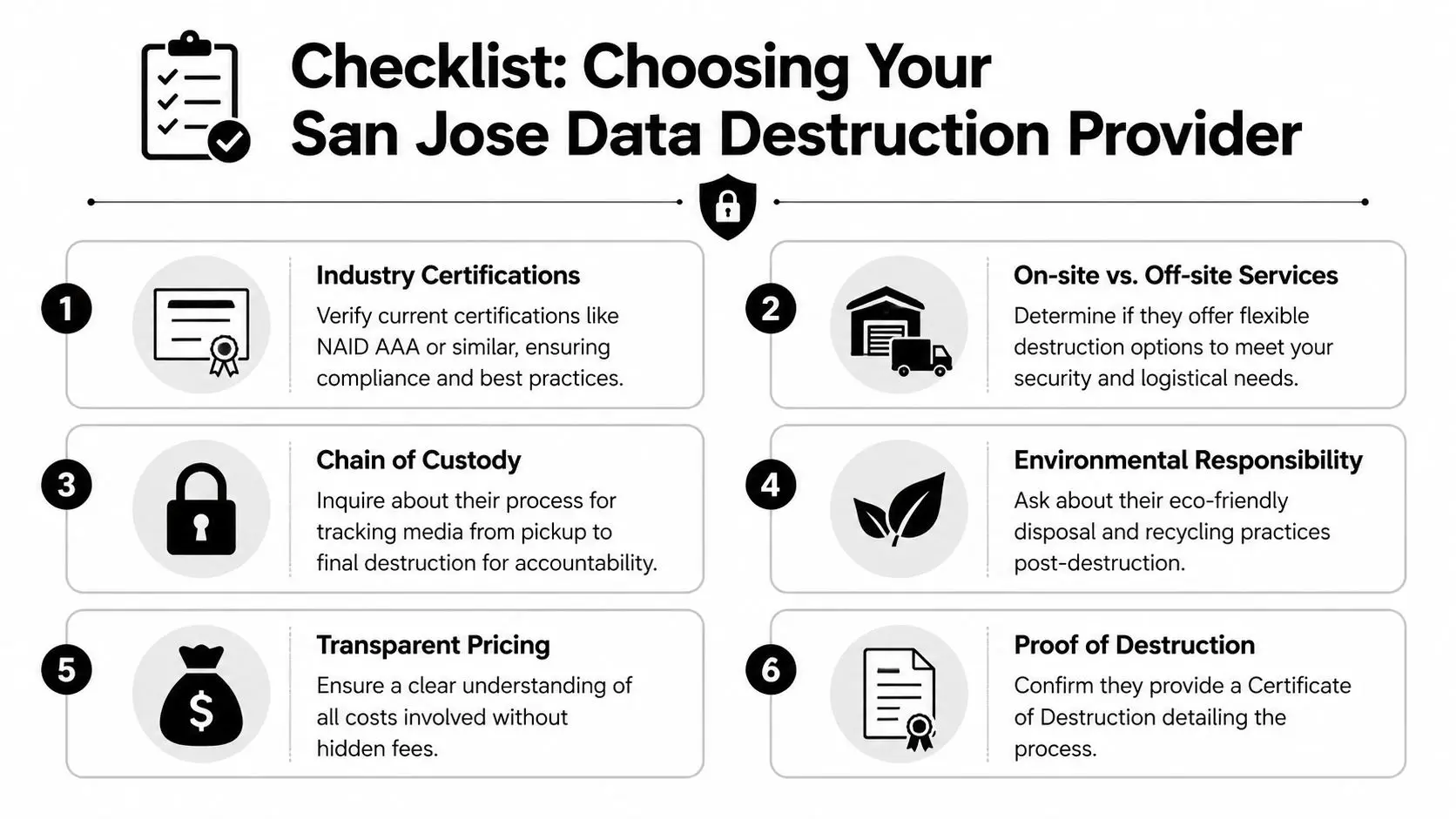
Start with questions that show how the work actually happens
Marketing language can make providers sound interchangeable. The useful differences show up when you ask them to describe each handoff, record, and service option in plain terms.
Ask questions like these:
- What certifications do you hold today? Ask for current documents, not a logo on a homepage.
- Do you offer both on-site and off-site destruction? Different projects need different controls.
- How do you identify each asset from pickup through destruction? Look for serial number tracking, itemized logs, and controlled transfers.
- What documentation do we receive after service? You want records that support audit, vendor review, and internal reporting.
- What happens to the shredded material afterward? Destruction should connect to responsible recycling, not disappear into a vague scrap stream.
A mature provider explains the process the way a good contractor explains a building permit. Clear steps. Clear records. No guessing.
Compare on-site and off-site service based on your project, not convenience alone
On-site destruction gives your team direct visibility. That can help during office closures, healthcare equipment retirement, or projects where internal stakeholders want to witness the event. Off-site destruction can make sense for recurring pickups, multi-location programs, or jobs where loading and traffic constraints make mobile service less practical.
Mobile capacity matters during larger projects. If a provider brings an on-site shredding truck, ask what volume it can handle in a normal service window and how that changes for mixed media. As Allegheny Shredders explains in its mobile shredding equipment overview, output depends on the system configuration and the material being processed. That is a useful reminder for buyers. A realistic capacity discussion is usually more trustworthy than a blanket promise.
For San Jose teams, this matters during server room cleanouts and refresh cycles. Media that sits in storage for weeks creates avoidable risk and often turns a simple retirement project into a messy one.
Evaluate the provider as part of your CSR and ITAD strategy
Security is one outcome. Responsible business practice is the larger goal.
A provider should be able to fit destruction into a broader sustainable IT asset disposition program that addresses data risk, recycling, and community impact together. That matters for companies in San Jose that report on ESG, supplier standards, or local community commitments.
The practical question is simple. After the drives are destroyed, does the remaining material move through a documented recycling path that supports your environmental policy and your corporate responsibility story?
A social enterprise model adds another layer of value. Your company is not only reducing data exposure. It is also choosing an end-of-life process that can support responsible recycling and community benefit in the region.
A practical buyer checklist
Use this checklist when comparing vendors:
- Ask for method-by-media detail. HDDs, SSDs, backup tapes, and USB devices do not all follow the same workflow.
- Review sample reporting. Ask to see a certificate, asset list, and any serial-based reporting before you sign.
- Check pickup and scheduling fit. A provider that works well for a data center project may not be the best fit for smaller branch pickups.
- Look at environmental handling after destruction. Ask where the output goes and how the recycling stream is documented.
- Read the quote carefully. Pickup, labor, on-site equipment, reporting, and media-specific handling should be spelled out.
The strongest providers make different departments comfortable for different reasons. IT sees control. Compliance sees evidence. Sustainability sees a responsible downstream path.
Red flags worth noticing
A few warning signs usually appear early:
- Vague claims about security with no explanation of media-specific methods
- No clear answer about how assets are logged before destruction
- Thin documentation that sounds more like a service receipt than a destruction record
- No downstream recycling explanation for shredded material or related electronic scrap
- Pressure to choose one service model without discussing your facility, volume, or witness requirements
A provider that handles sensitive media well should also explain the process well. If the answers stay fuzzy during the sales conversation, the service itself often does too.
The Reworx Advantage Sustainable ITAD for San Jose
Secure destruction solves one problem. Responsible IT asset disposition solves several at once.
That distinction matters for San Jose businesses trying to manage security, environmental goals, and community impact under the same policy. A drive with sensitive data may need destruction, but the surrounding equipment from the same project often belongs in a broader electronics recycling or reuse workflow.
Security and sustainability should work together
A mature ITAD program separates assets by outcome. Some devices go straight to secure data destruction because the media risk is too high. Others can move into refurbishment, computer recycling, donation-based recycling, or structured redeployment.
That’s where a social enterprise model becomes strategically useful. It frames end-of-life technology not only as waste to remove, but as a set of materials and devices to manage responsibly.
For businesses building ESG or CSR narratives, that changes the story. An office cleanout or data center decommissioning doesn’t have to end with disposal alone. It can support sustainable recycling goals and community benefit at the same time.
Why this matters for corporate responsibility
In practice, corporate responsibility teams want outcomes they can explain clearly:
- sensitive data-bearing devices were securely handled,
- non-reusable components were processed through responsible recycling channels,
- suitable equipment was directed toward higher-value reuse when possible,
- and the overall project reduced landfill risk while supporting a more circular approach.
That combination is especially relevant in the Bay Area, where businesses often face both security scrutiny and stakeholder pressure to demonstrate environmental responsibility.
Organizations looking for that broader model can explore sustainable IT asset disposition services to see how secure handling and environmental planning can be integrated.
A better way to think about hard drive destruction
Hard drive destruction is often assigned to IT because the assets are technical. But the business impact extends far beyond IT.
It affects:
- Legal and compliance, because documentation matters
- Facilities and operations, because pickups and cleanouts need coordination
- Sustainability leaders, because e-waste handling reflects corporate values
- Community impact programs, because reuse and donation pathways can create social value
That broader lens is why Hard Drive Destruction Services in San Jose shouldn’t be treated as a narrow back-room task. Done well, they become part of a responsible retirement strategy for the whole organization.
Common Questions About Hard Drive Destruction Services
Businesses usually understand the general idea once they see the process. The remaining questions are usually practical.
Is hard drive destruction different for SSDs
Yes. SSDs and HDDs store data differently, so the method has to match the media. That’s one reason physical destruction remains important. A provider should be able to explain how it handles flash-based devices versus traditional magnetic drives and why that method fits each type.
If a vendor talks about every device as though it behaves the same way, that’s a sign to ask more questions.
Can providers destroy media other than hard drives
Usually, yes. Many secure destruction programs handle a broader range of data-bearing media such as USB devices, SD cards, tapes, and optical discs. The important thing isn’t whether the item looks like a hard drive. It’s whether it stores sensitive information and whether the provider has a defined method for that media type.
This matters during office cleanouts because media often shows up in mixed batches, not in neat, labeled categories.
What happens to the shredded material afterward
After destruction, the remnants should move into a responsible recycling stream. Good providers separate secure handling from disposal, then connect the destroyed material to appropriate downstream recycling processes.
That point often gets overlooked. Businesses think the job ends when the drive is broken. From an environmental standpoint, it doesn’t. Electronics recycling still matters after the data risk is removed.
Should we choose on-site or off-site destruction
It depends on your priorities. If your team wants to witness the destruction event directly, on-site service may be the better fit. If logistics, volume management, or scheduling matter more, off-site service can work well when custody controls and reporting are strong.
The decision should reflect your risk tolerance, internal policy, and operational setup. Neither option is automatically correct for every business.
Is software wiping enough for retired company devices
Sometimes sanitization by erasure can fit a controlled reuse workflow, but it should never be treated as a casual shortcut. The device type, the data sensitivity, and the reuse plan all matter. For many end-of-life drives that no longer need to stay intact, physical destruction gives the clearest outcome.
That’s especially true when multiple stakeholders need confidence in the result, not just the IT team.
What should we prepare before scheduling a pickup
Start with an asset list if you have one. Separate data-bearing devices from other electronics if possible. Identify anything that may require witnessed destruction, and decide whether the project is a one-time purge, recurring service, laptop disposal event, or larger facility cleanout.
The cleaner your inventory and decision rules are upfront, the smoother the project will run.
If your business needs a secure, responsible path for retiring old technology, Reworx Recycling can help you plan the next step. Whether you’re managing electronics recycling, donation-based recycling, IT equipment disposal, secure data destruction, or a larger ITAD project, Reworx supports organizations that want to protect data, recycle sustainably, and create community impact. Reach out to donate old equipment, schedule a pickup, or explore a long-term partnership.