Chain of custody is a documented chronological trail that records where an asset was, who handled it, and what happened to it from collection through final disposition. For an IT manager, that means having proof you can hand to an auditor, legal team, or executive when they ask what happened to retired laptops, servers, drives, and network gear after they left production.
That question usually arrives at the worst time. A compliance review is underway. A merger is in diligence. A security incident has everyone tracing old devices. Someone asks for evidence that the hardware leaving your office was transported securely, stored securely, sanitized correctly, and recycled or destroyed as promised.
An inventory spreadsheet won't solve that. A pickup receipt alone won't solve it either. You need a record that ties a specific asset to specific custody events, specific handlers, and a final documented outcome.
That's why chain of custody matters so much in IT asset disposition. In legal and forensic settings, the concept exists to preserve authenticity and show continuity. In ITAD, the same logic applies to retired business equipment. If you can't prove where devices went and who touched them, you create avoidable exposure around data security, internal accountability, regulatory response, and company reputation.
Most explanations of what is chain of custody stop at crime labs or courtroom evidence. That leaves a gap for IT managers who are dealing with racks of decommissioned servers, employee laptop refreshes, office closures, and storage devices headed for destruction or recycling. The practical version is simpler and more useful. Think of it as the defensible history of every retired asset.
A mature ITAD process turns that history into routine documentation, not a scramble after the fact. If you're evaluating your current program, start with the fundamentals of IT asset disposition and then look closely at how custody is recorded from your site to final processing.
Introduction Why Your IT Assets Need a Paper Trail
A lot of IT disposal failures don't start with bad intent. They start with weak process. Devices get stacked in a storage room. A facilities employee moves pallets before IT updates the list. A recycler issues a generic receipt, but nobody can match that receipt to actual serial numbers. Months later, nobody can prove what happened.
That gap is where risk lives.
If your organization handles employee laptops, backup drives, failed SSDs, networking equipment, mobile devices, or data center hardware, you already have a chain of custody problem whether you've documented it or not. The only real choice is whether that chain is controlled and auditable.
What the question really means in business terms
When someone asks, "What is chain of custody?" in an ITAD setting, they're usually asking three things at once:
- Who had the asset after it left production
- Whether anyone could access the data without authorization
- Whether the final disposition can be proven if a regulator, customer, or executive asks
Those are business questions, not just legal ones.
A retired laptop can still contain regulated data, customer communications, saved credentials, intellectual property, or internal documents. A decommissioned server can still expose application data or system histories if custody breaks down before sanitization or destruction. If a device disappears between your loading dock and a processor, the problem isn't theoretical anymore.
Practical rule: If an asset contains data, your disposal process needs the same discipline you would apply to moving sensitive records offsite.
Why a paper trail changes the risk profile
Strong custody records do two things at once. They reduce the chance of mishandling, and they give you evidence if you're asked to prove controls later.
That second point matters more than many teams realize. Plenty of organizations have reasonable intentions around disposal. Fewer have records detailed enough to stand up during a dispute, investigation, or audit. A paper trail creates accountability at each handoff. It also exposes weak spots early, before they become incidents.
For IT managers, this isn't only about avoiding blame. It's about running a process that legal, security, procurement, and sustainability teams can all trust.
Defining Chain of Custody for Business and ITAD
The most precise definition comes from the National Institute of Justice. It describes chain of custody as the documented, chronological record that tracks evidence from collection through transfer, storage, analysis, and disposition, and notes that the record must include identifiers such as the evidence's location and position when found, who collected it, and confirmation that it was packaged and sealed, because missing continuity can make evidence inadmissible in court, according to the NIJ chain of custody record guidance.
In business ITAD, swap "evidence" for "retired asset" and the idea holds up almost perfectly.

More than inventory tracking
An inventory list tells you what you own. A chain of custody record tells you what happened to each item after it entered a controlled disposition process.
That distinction matters. Inventory is static. Custody is event-based.
A good analogy is a high-value shipment. You don't just want a list that says the shipment exists. You want scan points, transfer confirmations, named handlers, receiving verification, and a final delivery record. If there's a gap, you know where to investigate. The same thinking applies to retired IT hardware, especially anything that stores or processes sensitive data.
This is also why teams that care about disposal discipline usually tighten their upstream asset records too. Better tagging and better custody work together. If your organization is still cleaning up inconsistent device records, guidance on effective computer inventory control can help you strengthen the starting point before assets enter the ITAD stream.
What works and what doesn't
What works is a process where each handoff is documented when it happens, not reconstructed later from memory. Devices are identified individually. Containers are sealed when appropriate. Pickup personnel, receiving teams, and processing staff all leave a trace in the record.
What doesn't work is relying on broad descriptions like "miscellaneous laptops," unsigned manifests, or verbal confirmations that "everything was destroyed." Those shortcuts save minutes upfront and create major uncertainty later.
The standard isn't whether everyone involved meant well. The standard is whether the record can prove continuity, accountability, and final disposition.
For an IT manager, that's the business value of chain of custody. It lowers the chance of data loss, reduces disputes with vendors, supports internal accountability, and protects brand credibility if questions come up later.
The IT Asset Chain of Custody Lifecycle
The easiest way to understand what is chain of custody in ITAD is to follow one asset from your environment to its final outcome. The details vary by device type and disposition path, but the custody logic stays the same. Every stage needs a clear record, a responsible custodian, and a formal handoff.
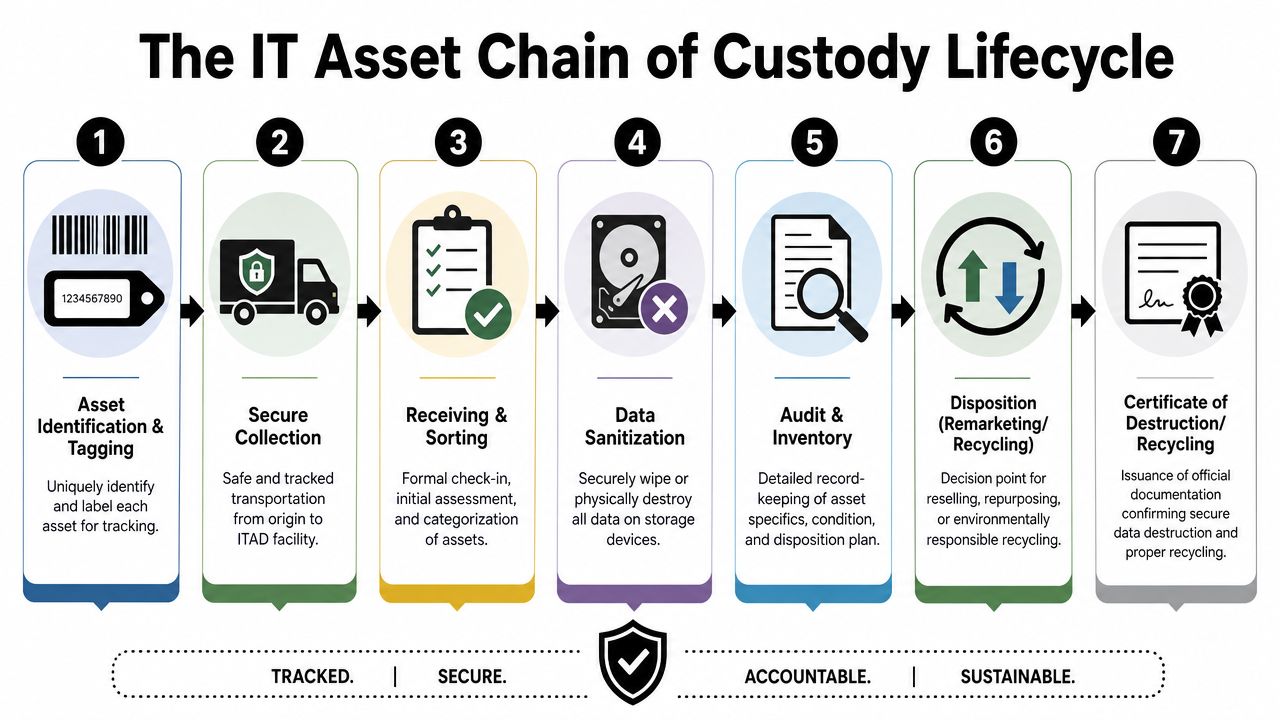
Stage one begins on your site
The chain starts before a truck leaves your parking lot.
When assets are pulled from service, they need to be identified in a way that can survive the rest of the process. That usually means recording internal asset tags, manufacturer serial numbers, device type, and the collection location. If drives are removed separately, those need their own identifiers and counts.
At this point, the process should also show who released the equipment and who accepted it into controlled handling.
A practical collection record often includes:
- Asset identifiers: Internal tag, serial number, model, and device category
- Collection details: Building, room, rack, closet, floor, or office location
- Custodian names: The employee releasing the devices and the person receiving them
- Security status: Whether the item was boxed, palletized, sealed, or otherwise secured
For organizations retiring large volumes of equipment, the lifecycle of IT equipment from acquisition to recycling is a useful way to map custody requirements back to earlier stages of asset management.
Transport is a custody event, not a logistics footnote
Many breakdowns happen during transit because teams treat transportation as a simple pickup instead of a formal transfer.
The handoff from your facility to the transport team should document time, date, the identity of the person taking possession, and the condition of the shipment. If containers are sealed, the seal status should be noted before departure. If assets travel loose on carts or open pallets, that should be an intentional exception, not an accident.
For sensitive loads, stronger programs also log vehicle assignment, route controls, and receiving expectations.
Operational advice: If your process can't show who had the assets while they were in transit, your chain is already weaker than most managers realize.
Receiving and storage need their own controls
When assets arrive at an ITAD or recycling facility, custody doesn't pause. It shifts.
Receiving teams should verify that the shipment matches the manifest, record exceptions, and place material into controlled storage. If a pallet arrives short, damaged, or with mismatched serials, that discrepancy should be documented immediately. Waiting until processing begins makes investigation harder.
This stage typically separates strong vendors from weak ones. A mature receiver creates a clean record of what arrived, what condition it arrived in, and where it was stored pending data sanitization, destruction, refurbishment, or recycling.
Final processing closes the loop
The last stage is where business value and compliance proof come together. Assets are assessed, storage media is sanitized or physically destroyed as required, and the device is routed for remarketing, component harvesting, recycling, or other approved disposition.
The key point is that the final outcome must tie back to the original asset record. If a hard drive was shredded, the destruction record should map to the original identifier or to a controlled sub-record created when drives were removed from host devices. If a laptop was reused or donated, the custody record should still show how data handling was completed before that path.
A simple lifecycle view looks like this:
| Stage | Core custody question |
|---|---|
| On-site collection | What exactly was removed, and who released it? |
| Secure transport | Who possessed it between your facility and the processor? |
| Receiving and storage | Did the shipment arrive intact and get placed under control? |
| Final disposition | Can the recorded outcome be tied back to the specific asset? |
A chain is only complete when the final documentation closes that last question.
Essential Documentation and Audit Trails
A custody process is only as credible as its records. If the log is vague, incomplete, or inconsistent, the process becomes hard to defend no matter how careful the team thought it was.
The core standard is straightforward. Chain of custody is a chronological documentation system that records every transfer, access event, analysis step, and disposition of physical or electronic evidence, and its technical value is that it preserves authenticity by proving the item presented later is the same item originally collected and that custody remained continuous, as described in the Wikipedia overview of chain of custody.
What a defensible log includes
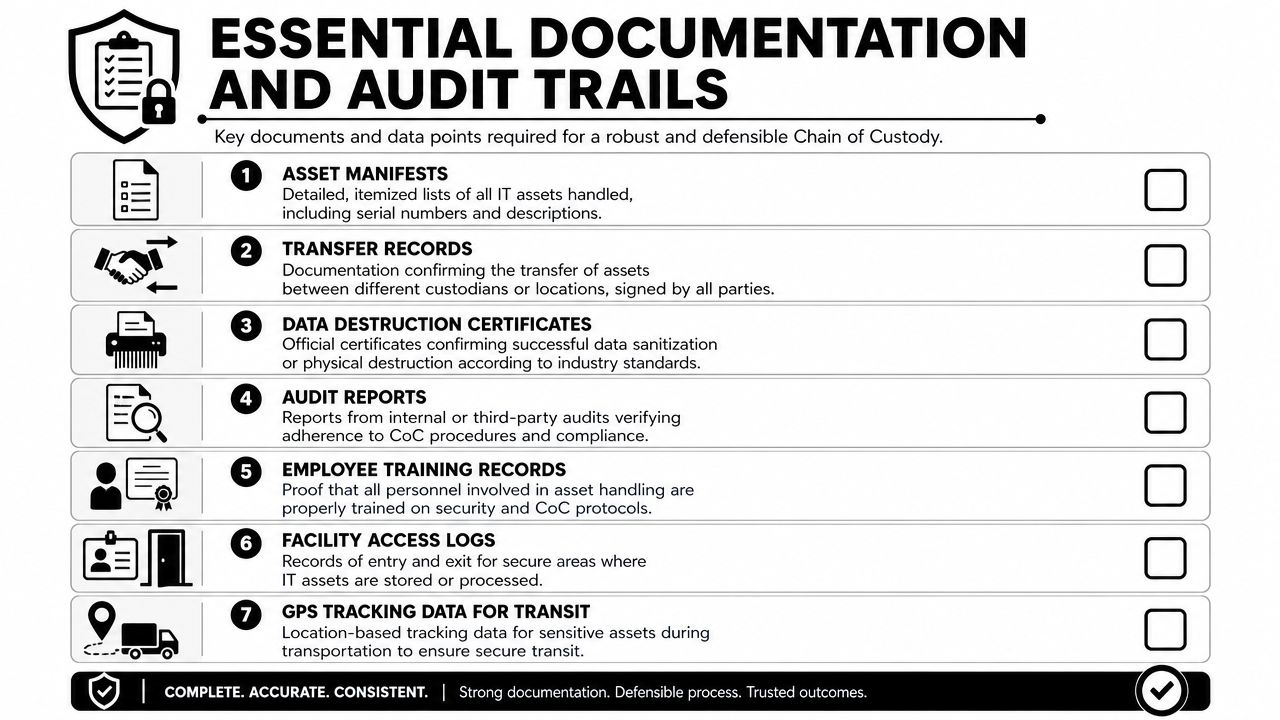
For ITAD, a useful custody log needs enough detail that another person can reconstruct the asset's path without guessing. That usually means recording the asset, the event, the time, the handler, and the outcome.
A practical log should capture:
- Unique asset reference: Asset tag, serial number, drive ID, or another traceable identifier
- Asset description: Laptop, desktop, server, switch, SSD, hard drive, mobile device, or peripheral
- Date and time: When custody changed or an action occurred
- From and to parties: The individual or team releasing the asset and the individual or team receiving it
- Action taken: Collected, loaded, received, stored, wiped, shredded, tested, recycled, remarketed, or donated
- Location: Where the event took place
- Verification marker: Signature, initials, badge ID, scan event, or system-authenticated confirmation
- Exception notes: Damage, seal issues, missing items, or count discrepancies
A generic "picked up electronics" line item doesn't meet that bar. It leaves too many unanswered questions.
A simple format you can actually use
Many organizations overcomplicate custody forms and then stop using them consistently. The better approach is to create a small set of fields your team can complete every time.
Here's a lean example:
| Asset ID | Device | Event | Date and time | Released by | Received by | Location | Notes |
|---|---|---|---|---|---|---|---|
| A-10452 | Laptop | Collected from client room | Recorded at handoff | IT manager | Pickup technician | HQ 3rd floor | Screen cracked |
| D-7781 | SSD | Received at facility | Recorded at intake | Driver | Intake staff | Secure receiving | Seal intact |
| D-7781 | SSD | Physical destruction | Recorded at processing | Processing lead | Verified in log | Destruction area | Linked to destruction record |
That kind of structure is easy to audit because it answers the core questions quickly.
If you want a benchmark for how serialized records are organized in practice, review chain of custody documentation examples from Reworx Recycling. The value isn't the form itself. It's the discipline of making every transfer attributable and reviewable.
If a record can't tell an outside reviewer who touched the asset, where it moved, and what happened next, it isn't an audit trail. It's a note.
Best Practices for Maintaining an Unbroken Chain
Good custody doesn't happen because a policy exists somewhere in SharePoint. It happens because the physical process, the digital records, and the vendor controls all line up.
The old view of chain of custody focused on a box, a seal, and a signature. That still matters for devices and drives. But modern IT environments are messier. Assets are decommissioned remotely. Files sync before devices are collected. Logs live in multiple systems. The broader challenge is provenance across the whole evidence trail. As noted in the Barnes Walker discussion of modern chain of custody, the concept is less about a single container and more about preserving provenance across systems, access logs, and file integrity checks, with each handler, transfer time, and purpose documented across the lifecycle.
Physical controls that hold up in real operations
The basic controls still matter because physical weakness often creates downstream digital risk.
Use sealed containers when practical. Restrict staging areas to authorized personnel. Separate media-bearing devices from low-risk accessories when your process requires different handling. Label pallets and cartons so that receiving teams can reconcile them without opening everything blindly in a general warehouse area.
For devices or loose media that need cushioning and ESD protection before transport, the right static-free packaging material helps reduce avoidable handling damage while keeping packaging choices aligned with secure transport practices.
A workable baseline looks like this:
- Control access: Only named staff should enter staging, transport, intake, or destruction areas
- Seal intentionally: Use tamper-evident methods for media and high-risk shipments where feasible
- Document exceptions immediately: Missing labels, broken seals, and count mismatches should be logged at once
- Train for handoffs: Most custody mistakes happen at transfer points, not during routine storage
Digital custody needs its own discipline
Many IT teams get caught flat-footed. They think custody starts when the hardware is boxed. In reality, custody questions may begin earlier if data is exported, copied, synced, encrypted, or staged for migration before a device is retired.
If your team decommissions cloud-connected systems, remote endpoints, or SaaS-linked devices, custody has to include system logs, access records, and proof of who performed key actions. A wipe event that isn't tied to a handler or timestamp is weak evidence. A deprovisioning action without a supporting log trail is hard to defend.
What works is aligning physical asset tracking with administrative records from your endpoint tools, identity systems, ticketing platform, and destruction workflow. What doesn't work is treating those as separate universes.
Vendor selection is part of chain integrity
You can't outsource accountability. You can only outsource execution.
When evaluating a provider, ask how they document pickup, receipt, secure storage, data sanitization, destruction, and final disposition. Ask what happens when a manifest doesn't match intake. Ask how they handle removed drives, mixed loads, and assets that shift from recycling to reuse.
The strongest processes are boring in the best sense. Every exception has a path. Every handoff has a record. Nobody relies on memory.
Compliance and Regulatory Considerations
For many organizations, chain of custody isn't just operational hygiene. It's part of how you prove compliance when disposing of technology that once held sensitive information.
The legal logic is simple. If data privacy rules require secure handling and secure disposal, then you need records showing that unauthorized access was prevented during the entire retirement process. StatPearls notes that chain of custody applies to both physical and electronic evidence, and that every transmission must be documented from the moment evidence is collected so unauthorized access can be ruled out, as explained in the StatPearls review of chain of custody.
Where custody records support compliance
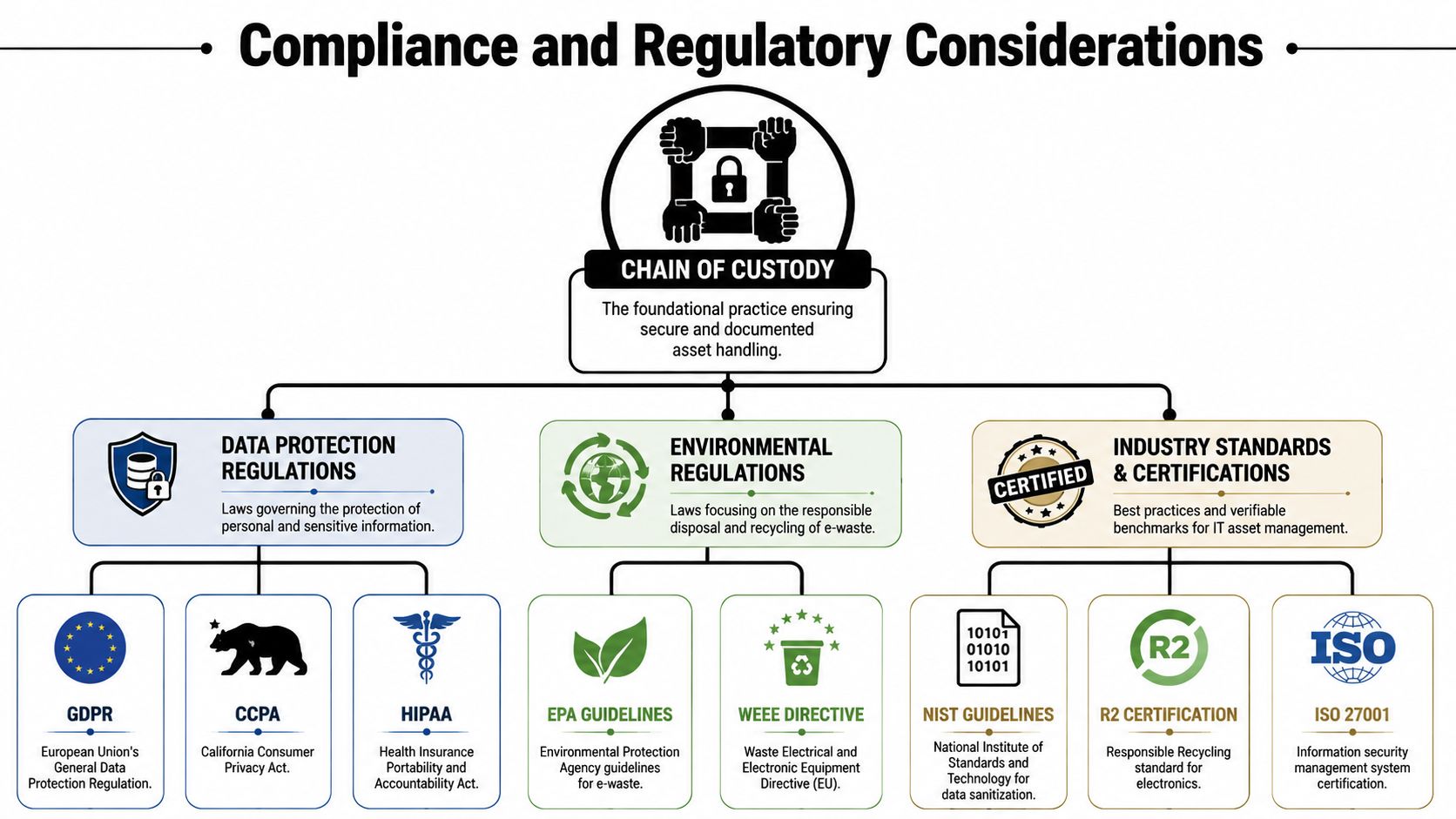
Different regulations use different language, but the practical requirement is familiar. You need to show that devices and media containing sensitive information were handled in a controlled way through final disposition.
That matters in environments dealing with:
- Healthcare data: HIPAA expectations make secure handling and disposal hard to separate
- Consumer and employee information: GDPR, CCPA, and similar frameworks raise the bar on accountability
- Financial and identity data: FACTA and related obligations turn disposal into a records issue, not just a recycling issue
- Public sector systems: Agencies and contractors often need stronger evidence of controlled asset retirement
A certificate of destruction helps, but it isn't enough on its own if no supporting trail exists behind it.
Certifications help, but they don't replace due diligence
Industry certifications and audited programs can simplify vendor review because they indicate that formal controls exist. They are signals, not substitutes.
If your procurement or risk team is maturing its broader governance program, these kinds of proactive GRC strategies for enterprises help frame disposal controls as part of a larger risk model instead of a one-off facilities task.
For vendors involved in media destruction, organizations often review certifications tied to secure destruction practices and documented handling requirements. If you're assessing that area, NAID AAA certification details provide a useful reference point for what disciplined destruction oversight looks like.
Compliance teams don't ask whether your recycler seemed trustworthy. They ask what records you have.
That is why chain of custody matters in audits. It turns disposal from an assumption into evidence.
Secure Your Assets and Support Your Community with Reworx
Most custody failures are familiar. Incomplete manifests. Unlabeled drives. Devices sitting in open staging areas. Generic receipts that don't map to actual assets. Vendors that can describe their process but can't produce a clean record for a specific serial number.
Those aren't minor paperwork issues. They weaken your position when security, legal, procurement, or leadership needs proof.
One practical option is to work with a provider that integrates custody documentation into the service itself. Reworx Recycling's IT asset disposition services are built around controlled handling of retired electronics, including the documentation businesses need to track assets through pickup, processing, and final disposition. That matters for data security, environmental accountability, and internal reporting.
The other reason this choice matters is broader than risk reduction. End-of-life IT doesn't have to end as landfill waste or an unmanaged liability. In a social enterprise model, equipment that can be responsibly processed for reuse or donation can support community technology access while the rest is handled through documented recycling and secure destruction workflows.
For an IT manager, that creates a better outcome on three fronts. Sensitive assets are handled with tighter control. Your organization has stronger records when questions come up. And your disposal program can support sustainability and community goals instead of just checking a box.
If your team needs a documented, defensible process for retiring laptops, servers, drives, and surplus electronics, connect with Reworx Recycling. You can donate old equipment, schedule a pickup, or explore a partnership that supports secure ITAD, responsible recycling, and community impact through technology reuse and workforce development.