A technology refresh usually ends the same way. New laptops are deployed, the server room gets cleaner, users stop complaining about battery life, and a back room starts filling with retired gear that nobody wants to touch yet.
That pile looks harmless because it's powered off. It isn't harmless. Old laptops, failed SSDs, decommissioned servers, office phones, and backup devices still carry regulated data, user credentials, cached files, and business records long after they leave production. If your company treats retired equipment as scrap before it treats it as sensitive media, your security program has a gap.
For many organizations, information security standards are well understood in the network, cloud, and endpoint world. They're much less understood at the point where hardware leaves the building. That's where IT asset disposition, electronics recycling, secure data destruction, product destruction, and sustainable recycling all intersect. It's also where compliance teams, facilities managers, and sustainability leaders often discover that an informal process isn't good enough.
Businesses planning an office cleanout, facility cleanout, laptop disposal project, data center decommissioning effort, laboratory equipment disposal program, or medical equipment disposal workflow need one principle in place from the start. Security doesn't end when the device is unplugged. It ends when the data is verifiably gone and the disposition path is documented.
The Hidden Data Risks in Your Old Equipment
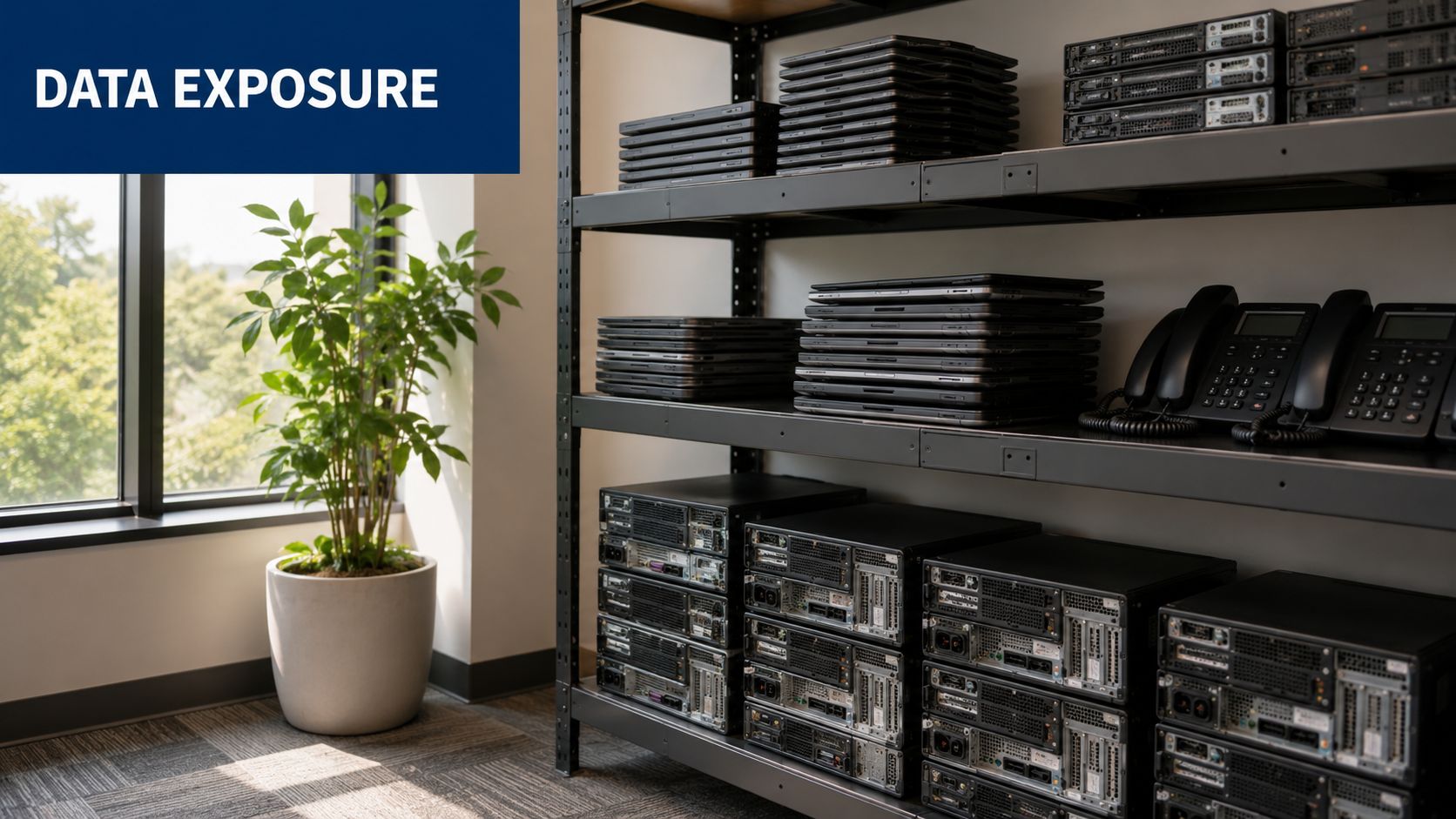
An IT manager authorizes a hardware refresh. The rollout goes smoothly. What slips is the retirement phase. A shelf in the storage room holds old notebooks waiting for pickup. A cabinet in the branch office still contains mobile phones from former employees. A row of de-racked servers sits on pallets because finance hasn't decided whether to remarket or recycle them.
That's a common operating reality, and it creates a blind spot.
Why retired devices stay inside your threat surface
A retired asset is still an asset from a risk standpoint. It may contain client files, HR records, saved browser sessions, archived mail, VPN profiles, or payment-related information. Even if the device no longer has business value, the data on it may still trigger legal, contractual, or reputational exposure.
One practical problem is that organizations tend to separate cyber risk from disposal risk. Security teams think about access control and incident response. Facilities teams think about clearing space. Procurement thinks about residual value. Nobody owns the whole chain unless the company creates a formal IT asset disposition process.
Practical rule: If a device held sensitive data in service, treat it as sensitive at end of life until sanitization and final disposition are documented.
Most guidance in the market still misses that last-mile issue. As noted by ANSI's discussion of IT security standards and disposal gaps, most content focuses on standards like PCI DSS or ISO 27001 for network and cloud security, but ignores their applicability to physical device retirement. The same source notes recent 2024 to 2025 trends showing SMBs increasingly face fines for improper data disposal during ITAD.
Where disposal mistakes usually happen
The failures are rarely dramatic at first. They're procedural.
- Storage drift: Old equipment stays in unsecured closets or mixed-use storage rooms for months.
- Inventory breakdown: Serial numbers aren't reconciled against what was removed from service.
- Drive assumptions: Staff assume a reset, reimage, or quick format equals secure data destruction.
- Vendor shortcuts: A recycler can move material fast, but speed without chain of custody creates liability.
Teams doing threat reviews often benefit from broad operational risk frameworks, not just technical controls. A useful outside reference is AITS security insights, especially for organizations trying to connect physical process failures to wider threat and risk assessment work.
If you're auditing your current process, start with the most common failure point in the field: mishandled media. A practical checklist on mistakes to avoid when disposing old hard drives is a good place to pressure-test internal assumptions before the next electronics recycling or computer recycling event.
Understanding Major Information Security Standards
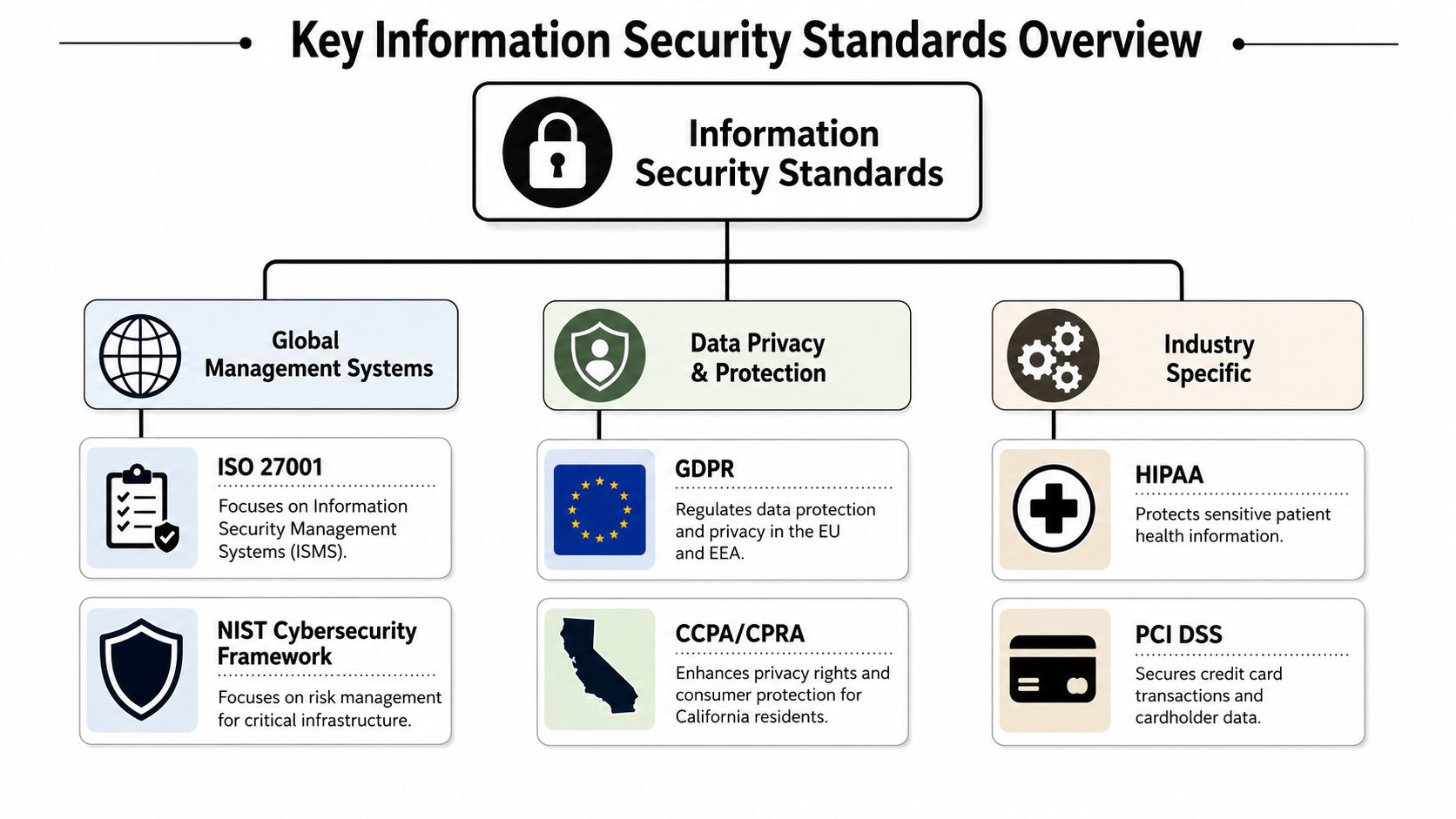
There isn't a single rulebook for all disposal scenarios. There are many. Globally, over 100 data security standards have been established as of 2026, including frameworks such as the ISO/IEC 27000 series, NIST SP 800-53, and PCI DSS, according to DataGuard's overview of data security standards. That's one reason teams get lost. They know the acronyms, but they don't always know which standard drives which decision.
ISO 27001 sets the management discipline
ISO/IEC 27001 matters because it tells an organization how to build an Information Security Management System, not just how to install a control. The same DataGuard reference notes that ISO/IEC 27001 is built on the Plan-Do-Check-Act cycle. That matters in ITAD because retired assets should be handled through a repeatable process, not through one-off cleanup decisions.
In practice, ISO 27001 pushes organizations to ask:
| Standard area | Practical ITAD question |
|---|---|
| Risk assessment | What data types are on retired assets? |
| Policy control | Who approves sanitization and disposition methods? |
| Operational process | How are pickup, transfer, and destruction documented? |
| Continuous improvement | What failed in the last office cleanout or decommissioning cycle? |
An organization can have strong production security and still fail this test if end-of-life hardware sits outside controlled workflows.
NIST gets more operational
NIST is where many teams find the language they can execute. The NIST Cybersecurity Framework is widely used and emphasizes Identify, Protect, Detect, Respond, and Recover, as summarized in the Wikipedia overview of information security standards. That same reference also notes the relevance of NIST SP 800-53 and SP 800-171 for documented security controls and protection of Controlled Unclassified Information in non-federal systems.
This is useful because retired assets touch all five functions:
- Identify: Know what devices and media you're retiring.
- Protect: Prevent unauthorized access while devices await disposition.
- Detect: Catch missing assets, broken seals, and logging gaps.
- Respond: Escalate when a device can't be accounted for.
- Recover: Correct the process so the same failure doesn't repeat.
For organizations standardizing Microsoft 365 governance alongside broader security obligations, Ollo's M365 compliance insights add helpful context on how compliance expectations often spread across systems, vendors, and records management.
PCI DSS is narrower but unforgiving
PCI DSS applies specifically to cardholder data environments. That narrower scope can mislead companies into thinking disposal is someone else's problem. It isn't. If a point-of-sale terminal, payment workstation, or storage device ever handled cardholder data, the retirement path has to support the same protection objective.
A good way to test whether your vendor language is strong enough is to compare it with disposal expectations used in audited environments. This overview of NAID AAA certification considerations helps clarify what documented destruction practices should look like when sensitive media is involved.
How Security Standards Apply to Secure ITAD
Standards become real the moment a device leaves active use. The abstract part is policy. The concrete part is what happens to the hard drive in a laptop, the flash storage in a firewall, or the SSD array pulled from a storage appliance.
That's why secure IT asset disposition isn't separate from information security standards. It's where those standards have to survive contact with loading docks, storage cages, transport bins, and shred lines.
NIST SP 800-88 is the working playbook
For end-of-life media, the most practical standard is NIST SP 800-88. According to this summary of NIST SP 800-88 sanitization requirements, organizations must follow methods such as clearing, purging, or physical destroying so electronic media is rendered unreadable, unusable, and undecipherable.
Those methods aren't interchangeable.
- Clearing: Typically fits situations where overwriting is acceptable and the media type supports it.
- Purging: Adds stronger sanitization methods, such as degaussing in applicable scenarios.
- Destroying: Applies when the media must be physically destroyed rather than logically sanitized.
The same reference makes an important distinction many businesses miss. For hard drives, certified data wiping or physical destruction via shredding can be used to achieve secure outcomes. For SSDs, physical destruction or cryptographic erasure is considered secure because wear-leveling and over-provisioning can make standard overwriting unreliable.
Don't write one disposal rule for all media types. HDDs, SSDs, backup tapes, mobile devices, and embedded flash don't behave the same way.
What works in the field and what doesn't
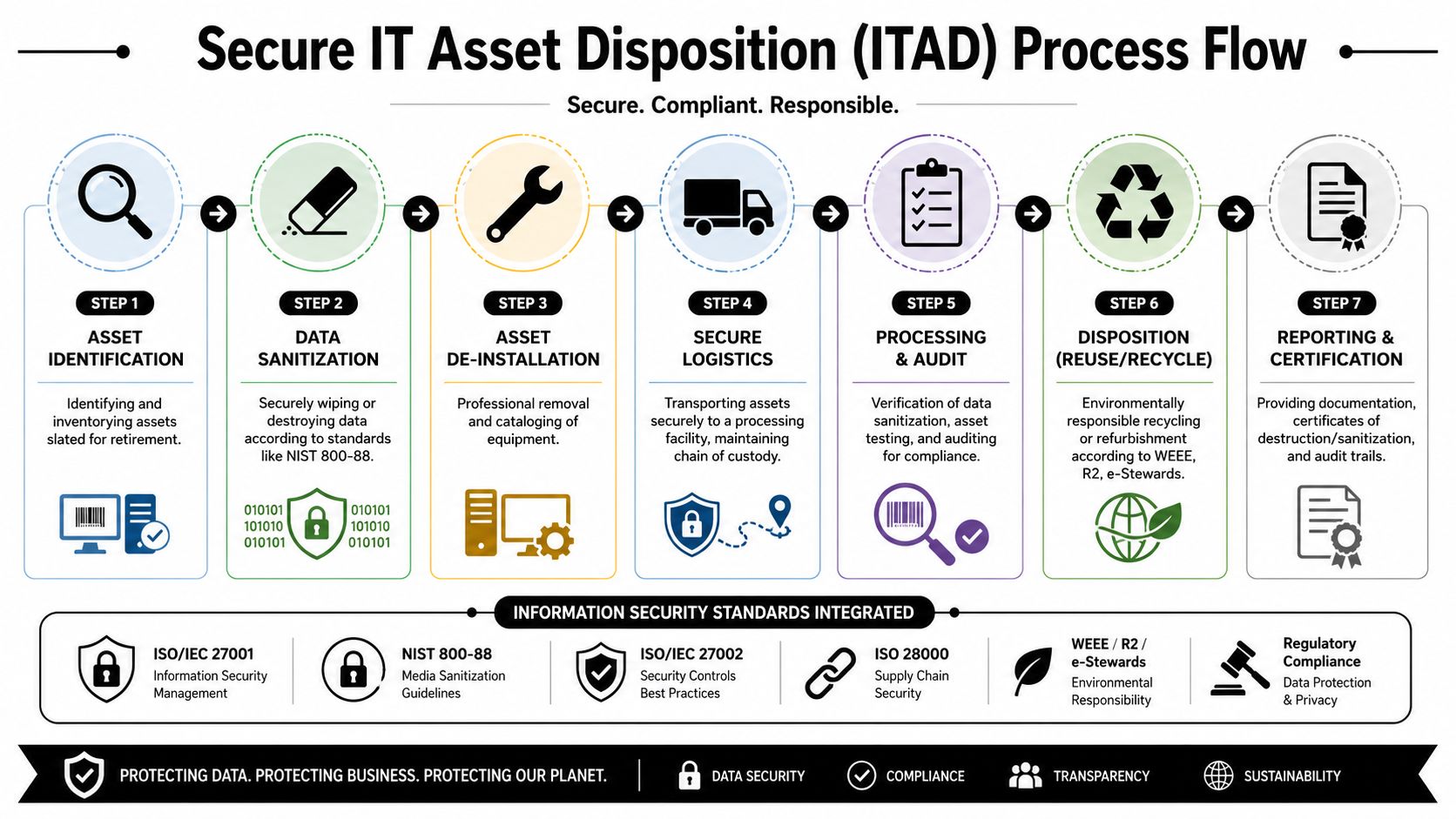
A secure process usually looks ordinary when it's done well. Assets are identified. Devices are serialized. Drives are removed when required. Containers are sealed. Transfer logs are signed. Sanitization is verified. Reports are archived.
What doesn't work is the shortcut version:
| Weak practice | Why it fails |
|---|---|
| Factory reset only | It may not sanitize all recoverable data |
| Mixed pallets of tested and untested gear | Chain of custody becomes unclear |
| Informal pickup receipts | Audit evidence is too thin |
| Verbal confirmation of destruction | No defensible record exists |
For companies modernizing endpoint control and retirement workflows at the same time, 2026 IT asset management strategies provide useful operational ideas around lifecycle handling and documentation discipline.
The other control that separates compliant ITAD from generic scrap removal is documentation. If your process can't prove who had the asset, where it went, how it was sanitized, and what final disposition occurred, the process won't hold up well under scrutiny. This is why chain of custody documentation should be treated as a security record, not a shipping form.
Security and sustainability have to coexist
A mature program doesn't choose between secure data destruction and sustainable recycling. It sequences them correctly. First, you control the media risk. Then you determine whether the asset is suitable for reuse, component harvesting, or downstream recycling.
That matters in donation-based recycling and social enterprise recycling programs too. Community benefit only works if the data risk has already been removed from the equipment stream.
Practical Compliance for Small and Mid-Sized Businesses
Small and mid-sized businesses usually know they need better controls. What they don't have is excess staff, excess time, or a dedicated compliance office. That doesn't excuse weak ITAD. It means the process has to be simple enough to run every time.
The exposure is real. According to EPIC's discussion of cybersecurity harmonization barriers, frameworks like ISO 27001 and NIST CSF offer consensus on security controls, yet underserved groups such as SMBs and local governments often lack resources to implement them effectively. The same reference states that over 60% are targeted by cybercriminals due to these capability gaps.
A workable SMB model
Most smaller organizations don't need a giant governance program to improve. They need a repeatable minimum standard.
Start with a short internal rule set:
- Write one policy: Define who can approve laptop disposal, computer recycling, and product destruction.
- Keep one asset log: A spreadsheet is fine if it captures device type, serial number, user, location, and disposition status.
- Use one approved path: Don't let departments arrange one-off pickups with unknown haulers.
- Require one closure document: Every batch should end with destruction or disposition records.
That's enough to eliminate many of the worst process failures.
Where SMBs usually overspend and underspend
Many SMBs spend too much effort trying to understand every major standard in full detail. They spend too little effort on execution details like packing lists, media segregation, and pickup authorization.
Field note: The best SMB process is usually boring. It uses standard forms, clear approvals, and the same disposition workflow every quarter.
A simple control pack often beats an ambitious policy nobody follows. If you want a starting point that's easier to operationalize, this compliance checklist template can help frame what should happen before, during, and after an IT equipment disposal event.
For local firms planning office moves, branch consolidations, or seasonal hardware refreshes, that kind of structure is especially useful. It keeps electronics recycling, secure data destruction, and corporate donation programs from turning into separate, conflicting initiatives.
Enterprise and Public Sector ITAD Compliance
Large enterprises and public agencies don't have the luxury of loose interpretation. Their retired assets often contain regulated data, sensitive internal records, legal hold material, or Controlled Unclassified Information. In that environment, “we wiped it” is not enough. The organization needs evidence, method, and traceability.
The public sector adds another layer. NIST guidance is often baked into procurement language, security programs, and vendor oversight expectations. Enterprises face similar pressure through customer contracts, audit requirements, and internal governance. The practical result is the same. Every retired device has to move through a controlled process that can stand up to review.
Why physical destruction still matters
There are situations where sanitization through software is acceptable. There are also situations where it won't satisfy the risk profile.
According to CompuCycle's summary of current data destruction standards, physical destruction is the most definitive sanitization method, and the NSA recommends shredding hard disk drives and electronic devices into pieces with edge lengths of 2 to 5 millimeters to ensure the data cannot be reconstructed. That guidance matters most for high-sensitivity media, failed drives that can't be wiped, and environments where residual data risk is unacceptable.
Audit readiness depends on records, not intentions
Enterprise and public sector buyers should expect a disposition trail that answers basic audit questions without guesswork:
| Audit question | Required evidence |
|---|---|
| What was retired? | Asset inventory and serial-level records |
| Who handled it? | Signed custody logs and authorized personnel records |
| How was data sanitized? | Method documentation tied to media type |
| What happened at final disposition? | Certificates, reports, and downstream accountability |
If any of those records are missing, the process becomes harder to defend. That's true whether the project involves data center decommissioning, laboratory equipment disposal, medical equipment disposal, or multi-site facility cleanout work.
The highest-risk organizations usually separate assets into categories before disposition even begins. Devices eligible for remarketing move down one lane. Failed or highly sensitive media moves down another. That split reduces confusion and makes audit narratives cleaner.
How to Vet Your Electronics Recycling Partner
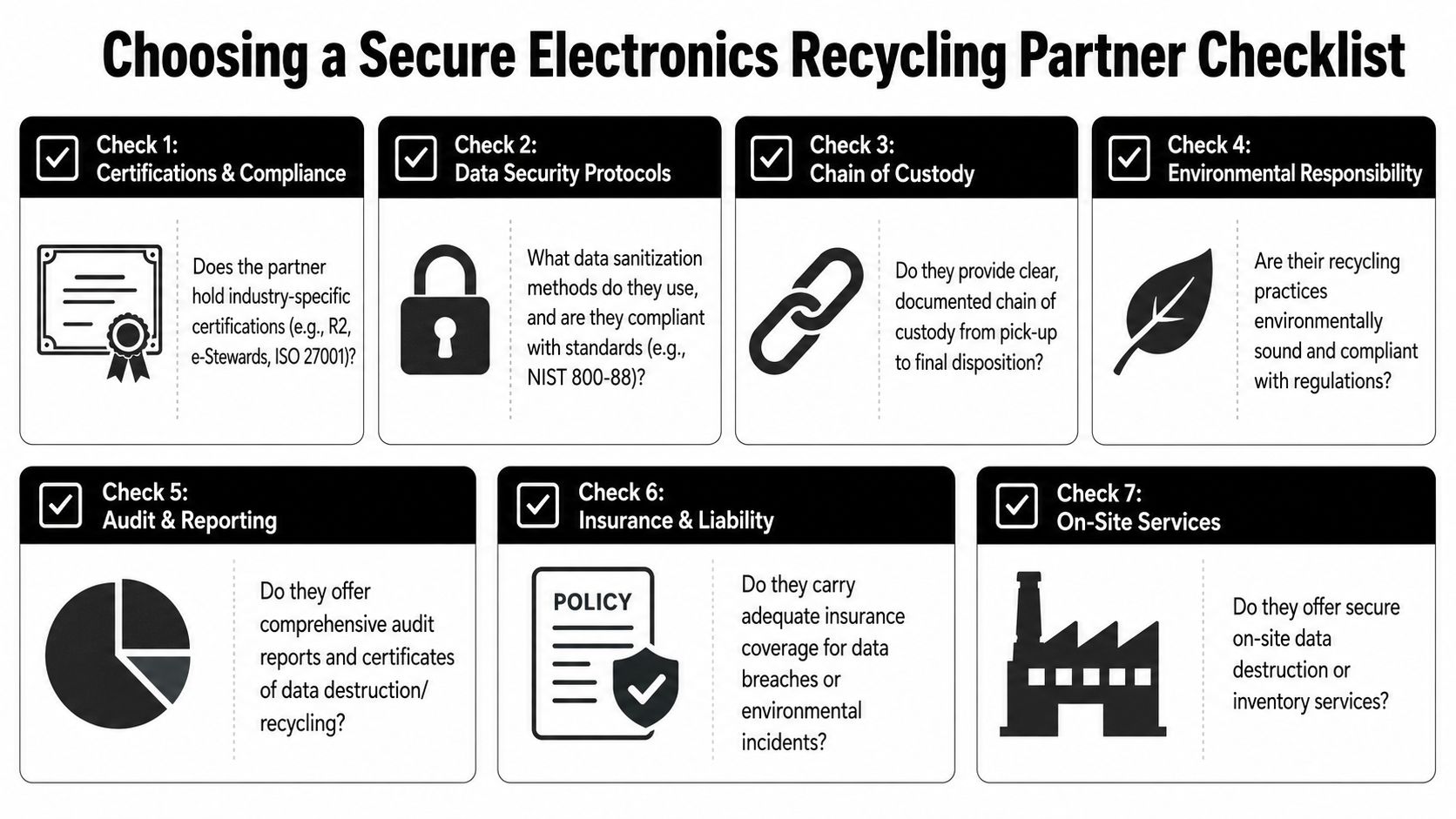
A vendor that can haul equipment away isn't necessarily an ITAD partner. The difference shows up in process detail. If you're evaluating companies for electronics recycling, computer recycling, secure data destruction, or a larger office cleanout, your questions should be specific enough that weak providers get uncomfortable.
Questions that expose process quality
Ask these in plain language.
- Which sanitization methods do you use by media type? A strong provider should distinguish between HDDs, SSDs, mobile devices, and embedded storage.
- How do you document chain of custody? Pickup receipts alone aren't enough for serious compliance needs.
- What happens to non-working drives? If the answer is vague, assume the downstream control is weak.
- Can you support on-site and off-site workflows? Some projects require one, some require both.
- What reports do we receive after completion? You want auditable records, not just a billing invoice.
What good answers sound like
A capable vendor usually explains the sequence clearly. They'll talk about inventorying, tagging, transport security, verified sanitization, exceptions handling, and final reporting. They won't rely on generic reassurances.
“Show me the record package” is often the best buyer question. Serious vendors are ready for it.
You should also ask about environmental handling, especially if your organization has sustainability reporting goals. A secure process should still support sustainable recycling, responsible downstream management, and reusable equipment pathways where appropriate.
For a more structured procurement review, these vendor selection criteria can help distinguish a compliant ITAD provider from a basic scrap or hauling operation.
Red flags worth acting on
Not every warning sign is dramatic. Some are subtle and still important.
- No media-specific explanation: They treat all devices as if one method fits all.
- No clear exception process: Failed drives, locked devices, and damaged hardware aren't handled through a defined path.
- No documentation sample: They promise records later but can't show the format now.
- No discussion of downstream controls: They know pickup. They don't know final accountability.
That's especially relevant for organizations running social enterprise recycling, donation-based recycling, or corporate donation programs. A community-focused or environmentally focused mission is valuable, but it should never come at the expense of defensible data protection.
Secure Your Data from Cradle to Grave
The simplest way to think about end-of-life security is this. A device's risk doesn't disappear when the user stops logging in. It disappears when the organization can prove the data was sanitized or destroyed and the final disposition path was controlled.
That's why information security standards matter in IT asset disposition. They force discipline where companies often rely on habit. They connect policy to evidence. They also prevent a common mistake in electronics recycling programs, which is treating old hardware as a waste problem before treating it as a data problem.
A sound process supports more than compliance. It also supports sustainable recycling, orderly IT equipment disposal, cleaner office and facility transitions, and better outcomes for reuse and donation. When security, environmental stewardship, and documentation are aligned, businesses don't have to choose between responsible recycling and responsible risk management.
For B2B teams planning laptop disposal, data center decommissioning, product destruction, medical equipment disposal, or broader ITAD projects, the standard is straightforward. Build a process that your security team, your auditor, your legal team, and your sustainability lead can all defend.
If you're ready to retire aging technology without losing control of data, Reworx Recycling can help you donate old equipment, schedule a pickup, or build a responsible IT asset disposition program that supports secure handling, sustainable recycling, digital inclusion, and community impact.