Most IT managers don't start the week thinking about retired laptops, chain of custody, or whether an aging storage array should be wiped, redeployed, or sent for recycling. They start with a backlog of tickets, a cloud bill that needs explanation, a patch window nobody wants, and an executive asking whether the business is “covered” on security.
That's the actual job. The title sounds strategic, but the calendar says otherwise.
If you're stepping into IT management, or hiring for it, the biggest mistake is treating the role like a cleaner version of senior sysadmin. It isn't. Modern IT manager responsibilities span operations, budget control, vendor decisions, security coordination, staff management, and one area that gets ignored until it becomes urgent: end-of-life asset management. Devices don't stop being your problem when users unplug them. In practice, they often become riskier at that point.
The Modern IT Manager Role Explained
An IT manager sits between business expectations and technical reality. That sounds simple until you're the person who has to translate “we need to grow” into procurement timing, staffing plans, backup coverage, software renewals, and acceptable downtime.
The market itself reflects how central the role has become. The U.S. Bureau of Labor Statistics projects that employment for computer and information systems managers will grow 15% from 2024 to 2034, much faster than the average for all occupations, according to the BLS occupational outlook for computer and information systems managers. The same BLS profile says the occupation had a median annual wage of $171,200 in May 2024 and about 55,600 openings per year on average. Those numbers exist because companies don't just need someone to keep systems running. They need someone to make technology choices support the business.
The role is broader than most job titles suggest
A new manager often assumes success comes from technical depth alone. It doesn't. Technical depth helps, but the role shifts fast into prioritization, communication, and trade-offs.
You'll be expected to:
- Translate demand into plans by turning vague business requests into roadmaps, budgets, and project sequencing.
- Balance resilience and speed so upgrades happen without creating operational instability.
- Set operating standards for support, access, lifecycle management, and vendor accountability.
- Connect sustainability to operations through policies that include procurement, reuse, and retirement, not just deployment.
That's why smart teams increasingly treat technology planning as part of a broader Green IT strategy, not a side topic for facilities or procurement.
Working rule: If you can't explain a technical decision in terms of cost, risk, continuity, or capacity, you're still thinking like an engineer, not managing like an IT leader.
The modern IT manager isn't just responsible for uptime. They're responsible for aligning systems, people, and policies so the business can operate with fewer surprises.
Managing Daily IT Operations and Support
The part nobody glamorizes is the part that keeps the company open on Monday morning. Daily operations are still the floor beneath everything else.
A broad analysis of IT manager job postings found that 55% mentioned strategy, 80% mentioned support, and 82% mentioned management, which shows how execution-heavy the role is in real life, as noted in this analysis of IT manager responsibilities. If you're mentoring a new manager, this is one of the first corrections to make. Strategy matters, but support load, asset tracking, escalations, and maintenance discipline consume more of the week than many job descriptions admit.

What run-state work actually includes
If your environment is healthy, daily operations should feel boring. Boring is good. It means systems are predictable, backups are verified, the service desk is triaging correctly, and maintenance is planned instead of improvised.
The operational stack usually includes:
- Service desk oversight so ticket queues, escalation paths, and user communication stay under control.
- System monitoring across endpoints, servers, core network equipment, SaaS dependencies, and backup jobs.
- Patch and change scheduling with maintenance windows that protect business-critical workflows.
- Inventory discipline so you know what hardware and software you support.
- Incident coordination when systems degrade, fail, or create a business interruption.
One of the most practical habits in this area is doing routine IT inventory audits before recycling. Managers who skip inventory discipline usually discover the problem late, when a decommissioned device is still assigned to the wrong user, missing from records, or holding data no one accounted for.
What works and what usually fails
A lot of operational failures aren't technical failures. They're management failures.
Here's what tends to work:
- Define severity clearly. If every ticket is urgent, none of them are.
- Separate incidents from requests. Password resets, broken printers, and degraded production systems shouldn't share the same handling model.
- Run maintenance from a calendar, not memory. Patch windows, certificate renewals, backup tests, and hardware reviews need owners and dates.
- Review recurring tickets monthly. Repeated tickets often signal a training issue, a bad device standard, or a weak vendor.
And here's what usually doesn't:
- Hero culture where one admin knows all the critical systems.
- Reactive patching after a scare instead of a stable cycle.
- Unowned SaaS sprawl where departments buy tools and IT inherits the risk later.
- Cloud migration without partner diligence. If your team lacks in-house depth for architecture or modernization, it helps to spend time evaluating AWS partners against clear criteria such as operating model fit, handoff quality, and support expectations.
Stable operations don't come from working harder. They come from making the environment easier to manage.
An IT manager earns credibility by reducing chaos, not by being the fastest person to respond to it.
Driving Business Goals with IT Strategy
Operational control keeps the lights on. Strategy determines whether the business gets stuck with fragile systems, mismatched tools, and rising support costs a year from now.
A core strategic duty is governance and capacity planning. The IT manager translates business needs into an IT roadmap, budget, and staffing plan, and that oversight of budgets, vendors, and policies directly affects cost effectiveness and reliability, as outlined in this IT manager job description reference.
Turn business language into technical decisions
Executives rarely ask for “better endpoint lifecycle controls.” They ask for smoother onboarding, fewer outages, or support for expansion into another market. Your job is to turn those requests into infrastructure, process, and budget implications.
That usually means answering questions like these:
| Business need | IT management response |
|---|---|
| Faster hiring | Standardize device provisioning, identity workflows, and onboarding checklists |
| New location or expansion | Review network capacity, endpoint deployment, support coverage, and vendor contracts |
| Cost pressure | Audit renewals, retire underused tools, and review support model efficiency |
| Higher compliance burden | Tighten access policy, reporting, documentation, and disposal procedures |
A strategic manager also pays attention to what should leave the environment, not just what should be added. Retiring legacy hardware and recovering value from usable assets is part of capacity planning. That's why asset recovery belongs inside planning discussions, not at the end of them. A structured asset recovery approach helps IT, finance, and sustainability teams work from the same playbook.
Budgeting is really prioritization
Early-career managers often think budgeting is about getting approval. It's more accurate to say budgeting is about making trade-offs visible.
You'll constantly choose between:
- extending life on existing hardware or replacing it
- hiring internal staff or leaning on a specialist vendor
- paying for resilience now or absorbing risk later
- standardizing tools or allowing department-by-department exceptions
Manager's lens: A budget isn't a spreadsheet exercise. It's a record of what the business chose to protect, postpone, or accept as risk.
Vendor management belongs here too. Good vendors reduce operational burden. Poor vendors create shadow work through missed deadlines, weak documentation, and finger-pointing during incidents. The right procurement decision isn't the cheapest line item. It's the option your team can support without accumulating hidden complexity.
Strong IT strategy is less about predicting the future perfectly and more about building an environment that can absorb change without breaking your team.
Upholding Security and Compliance Standards
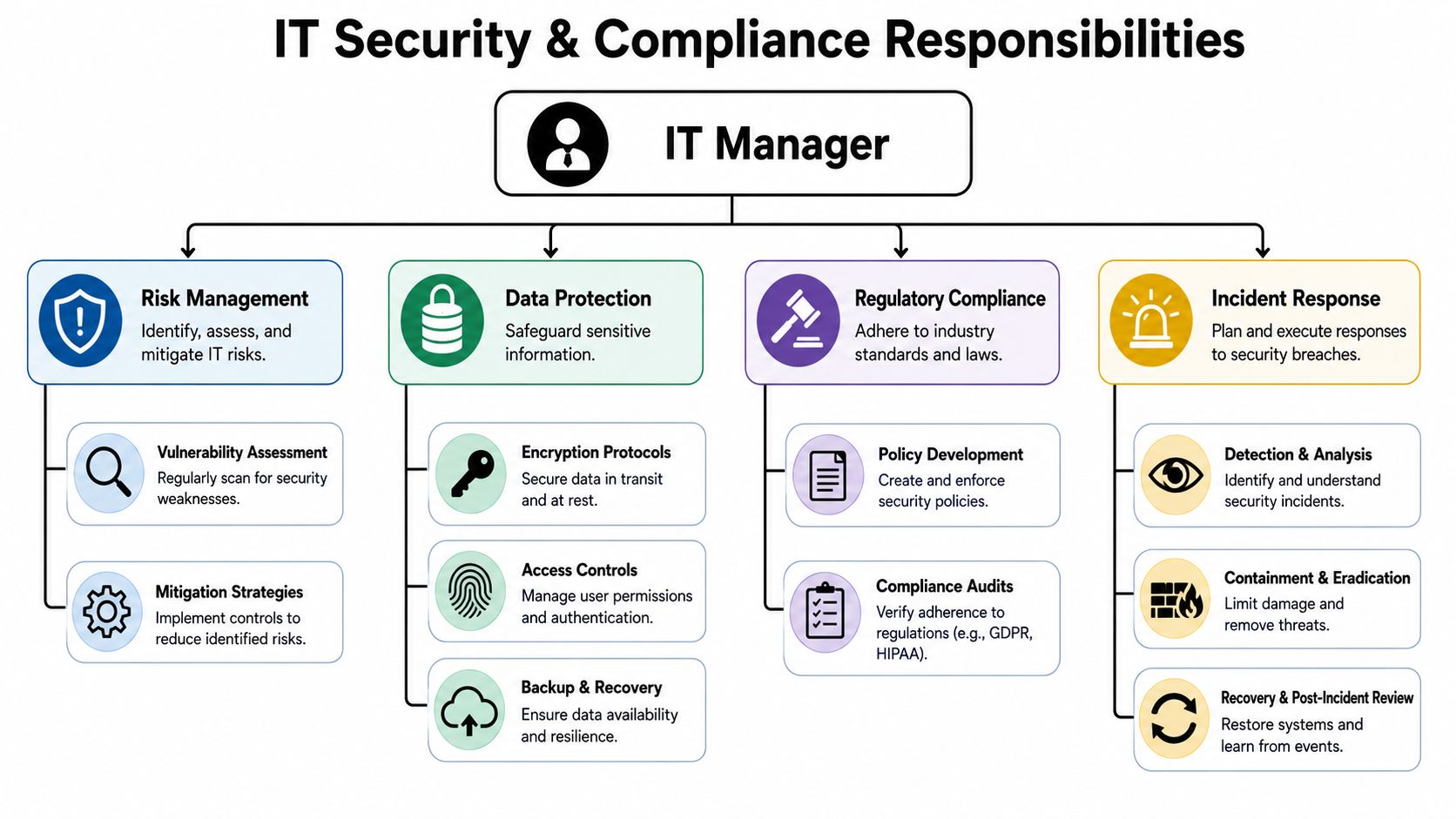
Security responsibility sits with IT management, but ownership doesn't always mean doing every technical control yourself. That distinction matters.
Many organizations now have dedicated security professionals or outside security partners. In those environments, the IT manager still ensures system integrity and responds to incidents, but the role is increasingly about governance and coordination rather than acting as the sole cybersecurity owner, as explained in this overview of the IT manager role in service management and security coordination.
Governance comes before tooling
New managers often jump straight to tools. EDR, MDM, MFA, logging, CASB, SIEM. Those can all matter, but governance has to come first.
Start with the basics:
- Access control ownership so every critical system has named approvers and a review process.
- Written policies for device handling, acceptable use, password and authentication requirements, remote access, and data retention.
- Backup and recovery standards that define what must be recoverable, by whom, and under what timeline.
- Incident roles so legal, leadership, HR, operations, and IT know who decides what during a live event.
If your team is formalizing cloud controls, a practical resource on cloud security risk assessment can help frame the review around assets, exposure, and mitigation instead of jumping straight to product selection.
Compliance includes physical asset handling
A surprising amount of compliance risk sits in forgotten hardware. Old laptops in storage, drives pulled from servers, lab equipment with embedded storage, devices waiting for pickup after an office cleanout. If there's data-bearing equipment in limbo, you have a governance problem.
A solid security posture includes:
- Retention decisions before equipment is moved
- Documented wipe or destruction standards
- Chain of custody during transport and storage
- Certificates and audit records after disposition
That's where dedicated secure data destruction services become part of compliance practice, not just disposal logistics.
Security maturity shows up in handoffs. Access handoffs, incident handoffs, and disposal handoffs.
The practical boundary of the role
An IT manager should know when to escalate. You don't need to be the forensic analyst, legal interpreter, or compliance officer in every case. You do need to make sure those functions connect when an issue appears.
That means asking hard questions early:
- Who approves exceptions?
- Who signs off on disposal of data-bearing assets?
- Which systems fall under formal audit requirements?
- How are incidents documented after containment?
- Where is evidence stored if a review happens later?
Managers who understand those boundaries usually run calmer teams. They don't confuse accountability with doing every specialized task personally.
Overseeing the Full IT Asset Lifecycle
A device enters the business through procurement, then moves through deployment, support, repair, reassignment, and retirement. If you only manage the middle of that lifecycle, you're leaving cost, risk, and waste unmanaged.
That's why asset lifecycle oversight belongs inside core IT manager responsibilities. Procurement decisions affect support burden. Standardization affects training. Warranty coverage affects downtime. Retirement affects security and compliance.
Treat hardware like a governed asset, not a purchase
Good lifecycle management answers basic questions without a scramble:
- Who owns the device?
- What data can it access?
- What software is assigned to it?
- Is it still fit for purpose?
- When should it be redeployed, sold, donated, or recycled?
Those questions sound administrative until an auditor asks for records, finance asks what happened to retired hardware, or a department stores obsolete devices in a closet for a year.
A practical lifecycle discipline usually includes intake records, deployment standards, maintenance status, reassignment rules, and retirement triggers. It should also include a defined end-of-life path. That final stage is where many teams get sloppy.
Retirement is a strategic control point
When equipment reaches end of life, the job isn't finished. It changes shape. You need secure handling, documented disposition, environmental responsibility, and a process that doesn't strand equipment in offices, labs, or storage rooms.
That's the logic behind viewing retirement through the full lifecycle of IT equipment from acquisition to recycling. The asset lifecycle isn't complete when the user stops using the device. It's complete when the organization has retired it in a controlled, documented way.
Terms like IT asset disposition, sustainable recycling, computer recycling, and IT equipment disposal transition from procurement or sustainability language to management language. If old assets leave your control without process, you haven't reduced risk. You've displaced it.
Choosing a Partner for Secure ITAD
A storage room full of retired laptops can turn into a management problem faster than many new IT managers expect. Finance wants disposition records. Security wants proof that data-bearing devices were handled correctly. Facilities wants the room cleared. If your answer is “we'll call a recycler,” you do not have a process yet.
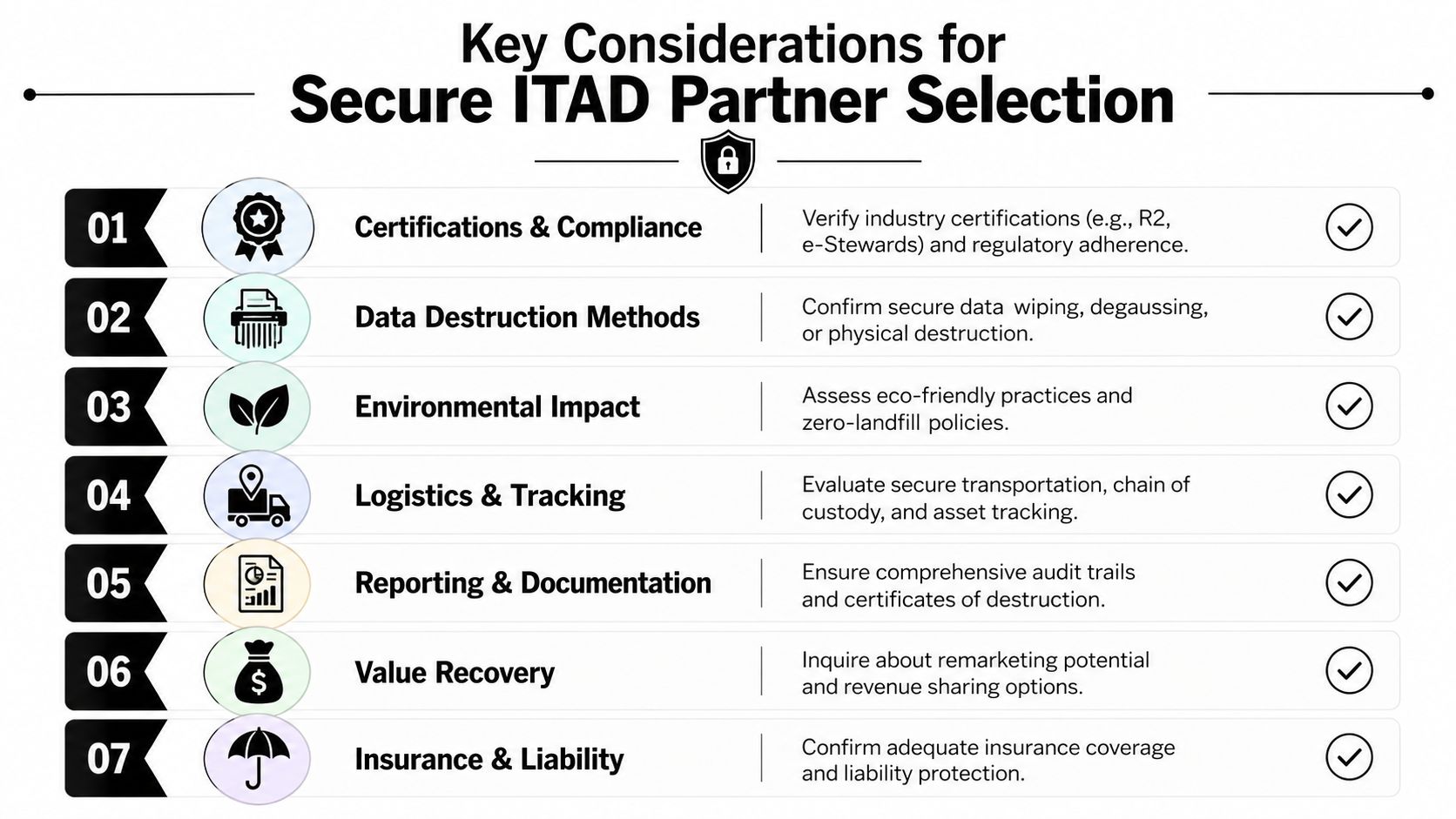
Partner selection deserves the same scrutiny you give to backup vendors, MSSPs, or cloud providers. The ITAD vendor you choose will handle assets at the point where data risk, compliance exposure, asset recovery, and sustainability all meet. If they operate loosely, your controls stop at the loading dock.
What to evaluate before signing anything
Start with the operating model. Sales language is easy. Process discipline is what matters.
- Data destruction methods. Get clear on how the provider handles wiping, shredding, and destruction for laptops, servers, loose drives, mobile devices, and anything else that stores data.
- Chain of custody. Ask where custody starts, how transfers are recorded, and how exceptions are handled if counts do not match.
- Asset-level reporting. You need serialized records, pickup documentation, and final disposition details that stand up in an audit.
- Downstream handling. Ask where equipment goes after pickup, who processes it, and how non-reusable material is managed.
- Logistics and project fit. A laptop refresh, an office cleanout, a data center shutdown, and medical equipment disposal all require different packaging, transport, timing, and documentation.
- Insurance and contract terms. Review liability language before you hand over a single device. Problems in transit or processing become your problem if the contract is vague.
- Reuse and donation options. Some organizations want usable equipment remarketed or donated, but only with documented testing, triage, and approval rules.
A good ITAD partner reduces risk and administrative drag at the same time. A weak one creates follow-up work for IT, legal, procurement, and finance.
The right fit depends on your environment
Requirements change by industry, asset mix, and regulatory pressure. A hospital replacing endpoint fleets has to think differently than a law firm retiring laptops or a manufacturer pulling aging network gear off the floor. The right provider matches your documentation needs, pickup realities, and risk tolerance.
For many teams, the evaluation comes down to a few recurring scenarios:
| Scenario | What matters most |
|---|---|
| Laptop disposal after refresh | Serialized tracking, data destruction records, pickup coordination |
| Data center decommissioning | Chain of custody, drive handling, rack asset documentation |
| Office cleanout after relocation | Logistics, sorting, scheduling, and mixed-equipment handling |
| Laboratory or medical equipment disposal | Embedded storage review, compliant processing, specialized transport |
| Corporate donation programs | Testing, triage, redeployment pathways, reporting |
One option in this category is Reworx Recycling, which provides donation-based recycling, secure data destruction, IT asset disposition support, pickup coordination, and electronics recycling services for businesses. That model can suit organizations that want controlled retirement and a documented social-impact path for appropriate equipment.
Choose the partner whose handling records, custody controls, and disposition documents you would be comfortable defending in front of an auditor, your security lead, and your CFO.
Questions worth asking in the first meeting
Use the first call to test how the provider thinks. Clear answers usually indicate a mature process. Vague answers usually mean your team will end up filling the gaps.
- What documentation do we receive for pickup, processing, and destruction?
- How do you track serialized assets from handoff through final disposition?
- Which assets can be remarketed, donated, recycled, or destroyed?
- How do you handle drives removed from servers or storage arrays?
- What happens to equipment that arrives damaged, locked, or incomplete?
- How do you support secure data destruction for mixed loads?
- Can you support recurring pickups as well as one-time projects?
This is one of the places where an IT manager proves that asset retirement is not cleanup work. It is governance work. The organizations that treat ITAD that way avoid the ugly surprises that show up months later as audit findings, missing records, or unanswered questions about where retired equipment went.
Key KPIs to Measure IT Management Success
Most IT managers get judged on anecdotes. Someone remembers a major outage, a rough migration, or a smooth laptop rollout, then that memory becomes the performance review. That's not enough. You need a scorecard that reflects how the function operates.
The most useful KPI set balances operations, governance, delivery, and asset retirement. Avoid vanity metrics. Measure what helps you decide.
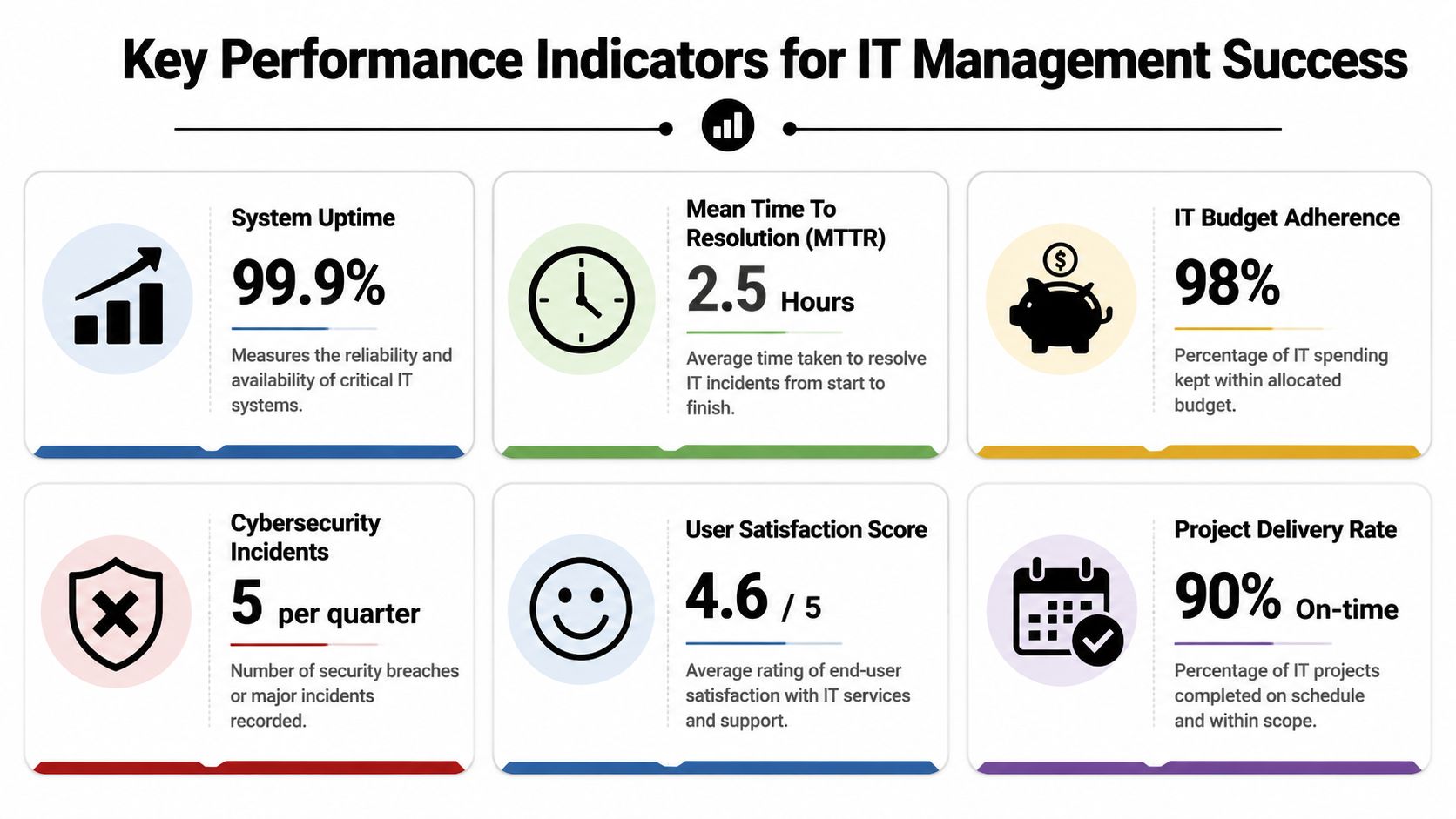
A practical scorecard
Use categories like these:
- Operations metrics such as uptime on critical systems, backlog age, repeat-ticket volume, and time to resolve priority incidents.
- Service quality measures including user satisfaction trends, onboarding completion quality, and escalation rates by team or vendor.
- Strategy execution indicators like project completion against scope, budget variance, vendor performance, and lifecycle refresh adherence.
- Security and compliance checks including access review completion, backup verification status, policy exception counts, and incident follow-up closure.
- ITAD measures such as percentage of retired assets documented, chain-of-custody completion, destruction certificate availability, and disposition lag between retirement and final processing.
What to watch for
A metric only helps if it changes behavior. If your dashboard rewards ticket closure speed, people will close tickets quickly. That doesn't mean issues were solved well.
Useful test: Every KPI should answer one of three questions. Are we stable, are we improving, or are we carrying hidden risk?
Short tables help leadership. Detailed operational views help your team. Keep both. Executives need summary signals. Managers need drill-downs that explain what to fix.
The strongest KPI sets also include the overlooked end-of-life stage. If you can track deployment but not retirement, your asset data is incomplete and your controls are weaker than they look.
Integrating These Responsibilities for Business Success
A new firewall goes in on schedule, ticket volume is under control, and leadership sees IT as stable. Then a stack of retired laptops sits in storage for months with no clear owner, incomplete records, and no proof of final disposition. That gap is not a side issue. It is a management failure that touches security, compliance, asset accuracy, and budget discipline at the same time.
Strong IT management ties the whole system together. Daily support, planning, security controls, vendor oversight, and retirement workflows all shape the same outcome: whether the business can trust its technology environment from purchase through end of life. If one stage is weak, the rest carries more risk than the dashboard suggests.
New managers often separate strategic work from operational work. In practice, they are connected. Refresh planning affects support load. Poor inventory control weakens security reviews. Delayed retirement leaves devices unaccounted for and muddies financial records. Responsible disposal belongs in the same conversation as uptime, patching, and project delivery because it closes the control loop.
That is also where ITAD becomes more than cleanup. Secure data destruction, documented disposition, electronics recycling, product destruction, and donation decisions all require policy, ownership, and follow-through. Managed well, end-of-life processing reduces exposure, improves audit readiness, and gives finance and operations cleaner information about what the company still owns and supports.
The payoff is practical. IT becomes easier to defend in budget meetings because the function shows control, not just effort. Reliability improves because standards hold across the full asset lifecycle. Sustainability goals become operational decisions with records behind them, not promises on a slide.
If your organization needs help with retired hardware, corporate donation programs, office cleanout projects, facility cleanout work, or secure end-of-life processing, Reworx Recycling is one option to evaluate. The useful question is not whether a provider can haul equipment away. It is whether they can support documented chain of custody, verified destruction, and a disposition process that fits your security and compliance requirements.