A lot of managers meet asset recovery the same way. They open a storage room, a back office, or a server closet and find rows of retired laptops, monitors, phones, switches, and hard drives that nobody wants to touch.
Some of that equipment still has value. Some of it still holds sensitive data. All of it still creates responsibility.
That is why asset recovery matters. In a business setting, it is the structured process of identifying retired technology, protecting the data on it, recovering usable value, and handling the rest in a responsible way. Done well, it turns clutter into budget relief, reduces security exposure, and supports sustainability goals that leadership can document.
For a new IT manager, facilities lead, or sustainability director, this topic can feel more complicated than it should. The good news is that the logic is straightforward once you break it into stages. You do not need to treat end-of-life equipment as a last-minute disposal problem. You can manage it as a repeatable business function.
From Clutter to Capital Why Asset Recovery Matters
Most organizations have hidden stockpiles of technology. A few laptops from the last refresh. Old point-of-sale devices in a cabinet. Network gear from a migration project. Monitors kept “just in case.” Nobody intends to create this backlog. It usually builds because daily operations come first.
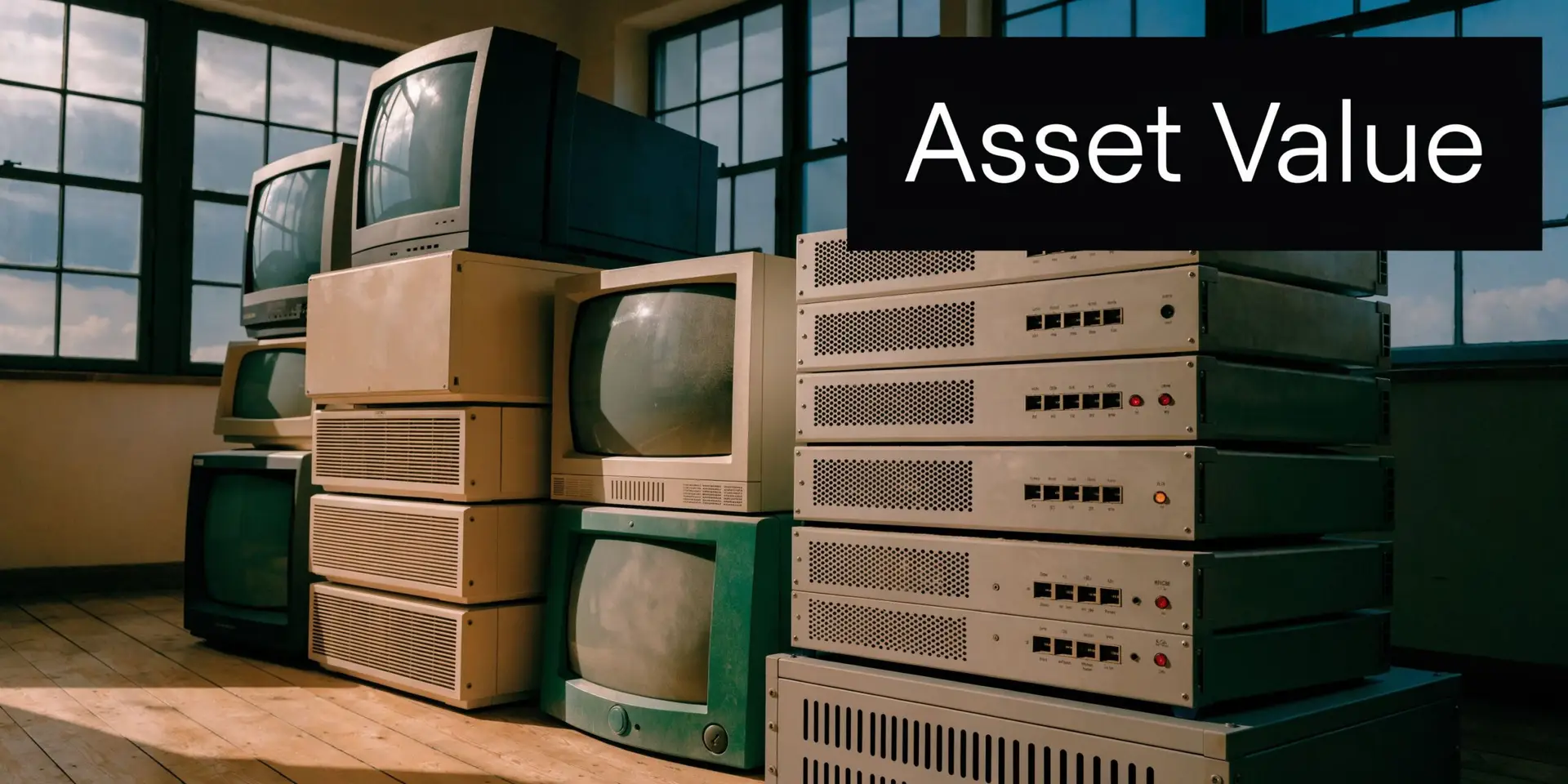
The problem is that retired equipment does not become harmless when it stops being useful. It often becomes harder to manage.
Three forms of value sit inside old equipment
Financial value is the easiest to recognize. A newer laptop, server, tablet, or network appliance may still have resale or parts value. Even mixed batches can offset part of a refresh if someone evaluates them systematically.
Security value is less obvious, but more urgent. Devices often contain customer data, employee records, saved credentials, network information, or licensed software. If you lose track of where those devices are, you lose control of risk.
Environmental and social value matters too. Reuse extends the life of working equipment. Responsible recycling keeps problematic material out of landfill streams. Donation-based pathways can also support digital inclusion, which is one reason many organizations review the benefits of IT asset disposition for a sustainable future before they build an internal process.
Why managers get stuck
Asset recovery sounds simple until real questions show up:
- Who owns the process: IT, facilities, procurement, or compliance?
- What counts as retired: Devices at end of lease, failed hardware, spare inventory, or all of the above?
- What happens first: Inventory, pickup, wiping, or valuation?
- What proof do we need: Audit logs, chain of custody, certificates, settlement reports?
A useful rule is this. If an item ever connected to your network, stored business data, or supported daily operations, treat its retirement as a managed process, not office cleanup.
That shift in mindset is where asset recovery starts. You are not just throwing things away. You are deciding how to reclaim value, document control, and support a more responsible technology lifecycle.
The Complete IT Asset Recovery Lifecycle Explained
Asset recovery works best when you can picture the flow from retirement to final outcome. Once you understand the sequence, the process feels much less mysterious.
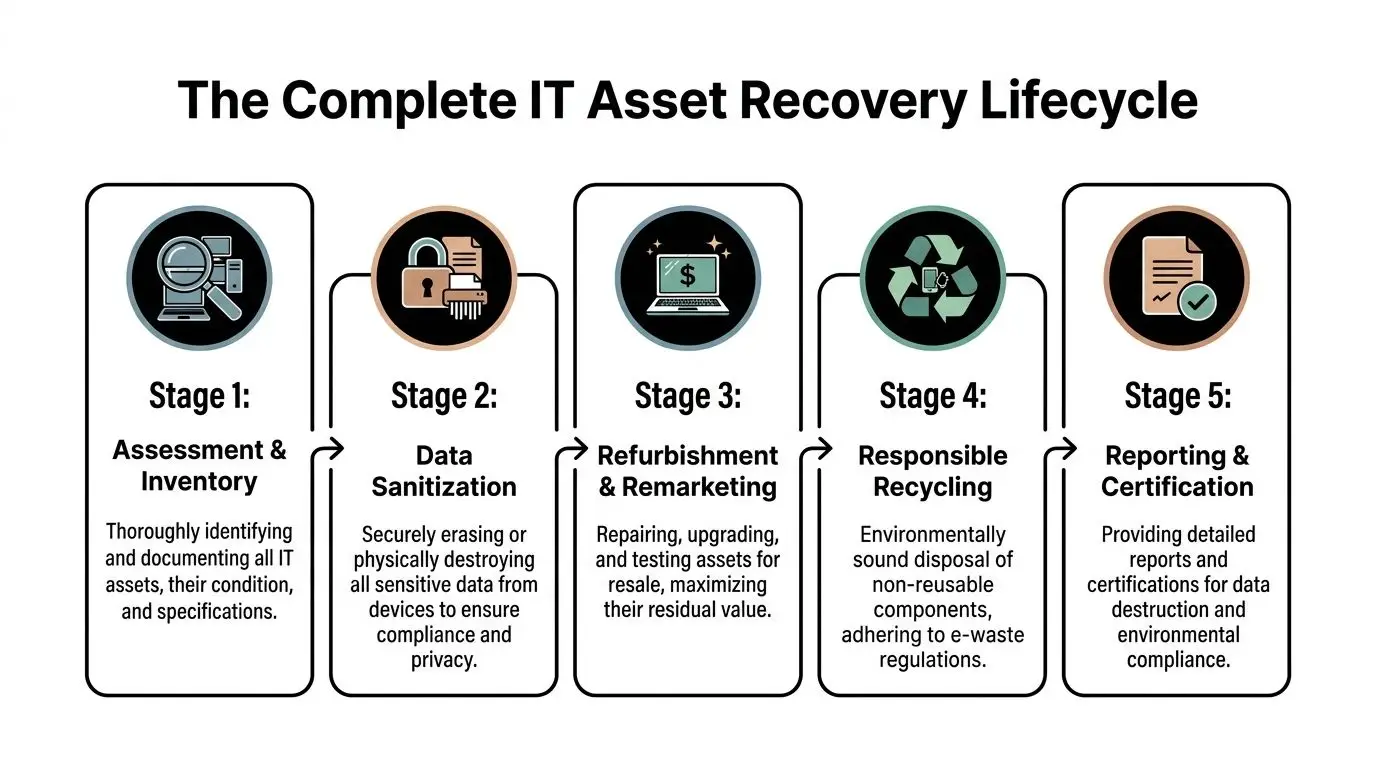
Across many industries, recovery systems underperform when organizations wait too long or track assets poorly. In the broader world of financial crime, asset recovery rates hover below 1% of illicit annual flows, a sign of how much value can be lost when recovery is not systematic, as described in Chainalysis coverage of FATF asset recovery guidance. IT asset disposition has a similar lesson. Unmanaged equipment leaks value.
Stage one starts before pickup
A good program begins with assessment and inventory. Someone identifies what is leaving service, where it sits, what condition it is in, and whether it contains data-bearing media.
This sounds basic, but it prevents many later problems. A desktop with no drive can follow a different path from a laptop that still contains employee files. A rack server may need coordinated decommissioning, while a stack of monitors may only need palletization and serial capture.
Decommissioning and secure movement
For office devices, this may be as simple as collecting and labeling assets. For infrastructure equipment, decommissioning can involve cable removal, rack work, chain-of-custody documentation, and staging by asset class.
Then comes transport. That is not just a trucking issue. It is a control issue.
A professional process should answer questions such as:
- Who handled the devices on-site
- How the equipment was packed or sealed
- Whether serials or counts were captured
- When custody transferred from your team to the processor
Organizations often find it helpful to review a practical walkthrough of the lifecycle of IT equipment from acquisition to recycling with Reworx in Atlanta because it ties day-to-day handling to a full end-of-life chain.
What happens at the facility
Once assets arrive, they are usually received, logged, and triaged. Triage means sorting equipment by likely next step.
Some devices can be tested and refurbished. Some can be harvested for components. Others are too old, damaged, or incomplete to justify remarketing and move directly into materials recycling.
Here is a simple view:
| Asset condition | Typical next move | Why it matters |
|—|—|
| Recent, working equipment | Testing and remarketing | Preserves residual value |
| Working but older gear | Reuse, donation, or parts harvesting | Extends useful life |
| Broken or obsolete devices | Responsible recycling | Avoids improper disposal |
| Data-bearing media | Sanitization or destruction first | Protects confidentiality |
Data sanitization comes before value recovery
This is one area where newer managers sometimes get confused. They assume resale and security are separate tracks. In practice, security comes first.
If a laptop, SSD, HDD, phone, or server stores data, it should move through a documented sanitization process before reuse or resale. If sanitization is not appropriate, the storage media should be destroyed.
The chain of custody matters as much as the final certificate. If you cannot show where a device went and how it was processed, your records are incomplete even if the outcome was technically correct.
Final outcomes split into reuse, parts, and recycling
The last part of the lifecycle is where value is either captured or lost.
A working business laptop might be refurbished and remarketed. A failed workstation may still contain usable RAM, processors, or power supplies. A cracked monitor with no resale path still has recyclable materials that should go through an approved downstream process rather than informal disposal.
The strongest asset recovery programs do one more thing. They report back clearly. That means counts, categories, data destruction records, and disposition summaries that your IT, compliance, and sustainability teams can use.
Unlocking Financial Value from Retired Technology
Many organizations still treat retired equipment as a pure disposal line item. That is expensive thinking.
The better approach is to ask a different question. What value is still trapped in this equipment, and what is the best way to recover it?
Value comes from more than resale
Direct resale is only one path. Financial return can come from several places:
- Buyback for current-generation equipment: Laptops, tablets, phones, and servers with market demand may produce direct recovery.
- Component harvesting: Even when a full unit has limited resale appeal, memory, processors, storage, and power components may still carry value.
- Internal redeployment: Some organizations recover more practical value by moving equipment into lower-demand roles instead of selling it immediately.
- Donation pathways: In the right setting, donation can support budget strategy, ESG reporting, and community outcomes.
For public entities, schools, and agencies, the economics of a program can extend beyond resale. Human-I-T notes that a proper ITAD program can support sustainability and tax planning, and that recycling 1 ton of e-waste can avoid 10 to 15 tons of CO2 emissions while donations of refurbished assets may qualify for significant Section 179 tax deductions in relevant cases, according to its discussion of what ITAD is.
A simple way to think about ROI
You do not need a complicated model to start. Look at asset recovery through four buckets.
- Recovered cash from resale, buyback, or component value
- Avoided cost from not paying for unmanaged storage, emergency disposal, or rushed project cleanup
- Operational savings from redeployment and better timing on refresh cycles
- Mission value from sustainability outcomes and donation-based community benefit
That last bucket is often where organizations underestimate the upside. A social enterprise model can turn a routine hardware retirement into a documented community impact story.
Software and hardware decisions are connected
Strong recovery also depends on better visibility before equipment leaves service. For many teams, retired devices still carry underused subscriptions, endpoint tools, or dormant application seats. Reviewing resources on optimizing software licenses can help managers connect hardware retirement to license cleanup, which improves the total return on a refresh.
Practical questions to ask before a pickup
Instead of asking only “what will you pay,” ask:
- Which items are likely to have resale value
- Will you provide line-item or batch valuation
- Can lower-value devices still support reuse or donation
- How do you report assets that generate no resale return
- What documentation will finance receive at closeout
For teams building a business case internally, guidance on maximizing value in IT asset disposition can help frame retired equipment as a value recovery program rather than a cleanup event.
The important shift is mental. Old technology is not automatically waste. It is inventory at the end of one lifecycle and the start of another.
Fortifying Your Business with Secure Data Destruction
For most managers, this is the point where asset recovery stops being a finance discussion and becomes a risk discussion.
A retired device is often most dangerous in the gap between “we are done using it” and “it has been securely processed.” That gap can last months if storage rooms become informal graveyards for old hardware.
In IT asset recovery, visibility matters as much as destruction. InvGate notes that organizations lose 20 to 30% of hardware value due to untracked assets, and that 70% of data breaches involve lost or stolen devices in its discussion of IT asset recovery. That combination should get any IT or facilities manager’s attention. The same missing laptop can represent both a financial loss and a security event.
Not all destruction methods are the same
People often use “wiped,” “destroyed,” and “recycled” as if they mean the same thing. They do not.
Logical wiping is appropriate when a device can be sanitized and reused. The process overwrites or erases data according to a defined standard.
Degaussing applies to certain magnetic media. It disrupts stored data magnetically, but it is not suitable for every device type.
Physical shredding or destruction is often the clearest option when media is damaged, high-risk, or not intended for reuse.
The right method depends on the device, the data sensitivity, your policy, and your compliance requirements.
Compliance is about proof
Regulations and contract obligations vary, but the operating principle is consistent. You need evidence.
That usually includes:
- Serialized records: What asset or drive was processed
- Chain of custody logs: Who handled it and when
- Method confirmation: Wipe, shred, or other approved process
- Certificate of Data Destruction: Formal documentation for audit and compliance files
If your organization handles health records, financial data, student information, legal documents, or confidential client materials, these records are not optional housekeeping. They are part of your control environment.
A practical complement to internal policy work is reviewing third-party advice on how to prevent data breaches, especially if your team is tightening endpoint controls and end-of-life handling at the same time.
The overlooked role of inventory discipline
Security failures rarely start with a shredder problem. They start with a tracking problem.
A strong program should answer:
| Question | Why it matters |
|---|---|
| Which devices have storage media? | Determines sanitization scope |
| Where are they now? | Prevents informal loss |
| Who approved retirement? | Supports accountability |
| What happened to each unit? | Creates audit proof |
If a device disappears before final processing, you do not have an asset recovery issue alone. You have an incident response issue.
For organizations that need a documented path for hard drives, SSDs, and retired endpoint equipment, reviewing secure data destruction services can help clarify what evidence and handling standards to expect from a provider.
How to Implement a Strategic Asset Recovery Program
The easiest asset recovery program to manage is the one you build before equipment starts piling up.
Many teams wait until a move, an audit, a lease return, or a refresh forces action. That usually creates rushed decisions, weak records, and missed value. A better system starts internally with simple rules that people can follow.
Start with a living inventory
An inventory is not a spreadsheet you update once a year. It is a current record of what you own, where it is, who uses it, and where it is in its lifecycle.
That matters because timing affects recovery. According to the same InvGate material cited earlier, businesses often miss the best window for recovering value from laptops, which is typically 3 to 5 years, and implementing ITAM software can support an estimated 15% annual cost savings through optimized recovery and redeployment. In practice, that means late decisions cost money.
A useful inventory should capture:
- Asset identity: Make, model, serial, tag
- Location: Building, room, user, or storage area
- Status: In use, spare, repair, retired, awaiting pickup
- Data risk: Whether the device stores sensitive information
- Disposition notes: Return, redeploy, wipe, destroy, recycle
Write a policy that removes ambiguity
A policy does not need to be long. It needs to be clear.
Include these decisions:
Retirement triggers
Define when an asset leaves service. This might be age, failure, warranty status, lease end, or refresh schedule.Ownership of the process
Name who approves retirement, who updates records, who stages assets, and who signs off on final documentation.Data handling rules
State what happens to laptops, servers, mobile devices, removable media, and loose drives before any asset leaves your premises.Pickup and storage rules
Decide where retired equipment is staged, how it is labeled, and how long it can sit before processing.Documentation standards
Require intake logs, service records, destruction certificates, and final disposition summaries.
Train the people who touch the process
The biggest policy failure is assuming only IT needs to know it.
Facilities teams may move equipment during office cleanouts. Department admins may collect laptops during employee exits. Procurement may handle lease returns. School staff may store old devices in unsecured classrooms. Every one of those handoffs matters.
Use short training prompts such as:
- Do not place retired laptops in general storage without logging them
- Do not send media-bearing devices to surplus channels without approval
- Do not remove asset tags before final disposition
- Do report loose hard drives immediately
Good asset recovery programs are boring by design. They rely on repeatable habits, not heroic cleanup projects.
Build simple workflows, not heroic ones
If your process takes too many approvals, people bypass it. Make it easy to do the right thing.
A lightweight internal workflow might look like this:
| Step | Internal action |
|---|---|
| Request | User or department flags equipment for retirement |
| Review | IT confirms status and data risk |
| Record | Asset is updated in inventory |
| Stage | Device moves to secured holding area |
| Release | Approved partner receives documented transfer |
| Closeout | Records, certificates, and value reports are filed |
Choose tools that support routine behavior
Some teams can manage with a disciplined spreadsheet and clear controls. Others need full ITAM platforms, barcode workflows, and automated lifecycle alerts.
The right level depends on your environment, but the principle stays the same. You cannot recover what you cannot see, and you cannot defend what you cannot document.
At the operational level, many organizations use an outside processor for pickups, decommissioning, value recovery, and secure handling. One example is Reworx Recycling, which provides electronics recycling, IT equipment disposal, pickup support, and secure hard drive destruction as part of broader ITAD workflows. The value of any outside partner depends on how well your internal program prepares assets before handoff.
Your Checklist for Choosing the Right ITAD Partner
Once your internal process is in place, partner selection becomes easier. You know what you need. The challenge is proving whether a vendor can deliver it.

This matters even more for smaller organizations. Beyond Surplus notes that SMBs often recover only 15 to 20% of potential IT asset value compared with 40% for enterprises, largely because many vendors are not set up for smaller, mixed-asset batches, as explained in its piece on what to do with old computer hardware.
What to verify before you sign
Do not evaluate an ITAD partner on pickup convenience alone. Use a fuller checklist.
Security and chain of custody
Ask how the provider handles collection, transport, intake, media segregation, and final documentation.
Look for clear answers to:
- How are assets tracked from pickup to final disposition
- What happens to loose drives and damaged media
- What certificate or reporting package do we receive
- How are exceptions documented
Value recovery method
A good partner should explain whether your equipment is suitable for buyback, consignment, donation, parts harvesting, or direct recycling.
That conversation should include:
- How mixed loads are valued
- Whether low-volume pickups can still receive detail
- How non-marketable items are reported
- When settlement or summary reporting is issued
Downstream transparency
You want to know where non-reusable material goes. Responsible processing depends on more than the first stop.
Ask whether the provider can explain:
- How recyclable material is managed downstream
- Whether hazardous components are handled through approved channels
- What environmental documentation is available
- How they prevent informal dumping
Certifications are useful, but not the whole answer
Certifications can signal process discipline. They do not replace due diligence.
Treat them as part of a broader review that includes site procedures, responsiveness, references, insurance, reporting quality, and how well the provider handles your actual mix of assets. A firm that works well for large data center decommissioning may not be flexible with a school district’s mixed classroom devices or a medical office’s smaller pickup needs.
Mission fit matters more than many teams realize
For sustainability leaders, the right partner should also match your organization’s values.
If your business reports on waste diversion, community engagement, donation outcomes, or circular economy efforts, ask how the vendor supports those goals. Some organizations want a pure commodity transaction. Others want donation-based recycling, documented social impact, and support for digital inclusion.
A practical starting point is to compare providers against a vendor review checklist such as this guide to selecting a reliable e-waste recycling partner.
The right ITAD partner should make your controls stronger, your reporting clearer, and your sustainability story easier to verify.
For SMBs especially, flexibility is not a bonus. It is often the difference between recovering value and defaulting to unmanaged disposal.
The Reworx Advantage Maximizing Impact and Value
A systematic recovery process changes outcomes. The UK’s 2025 asset recovery figures show this clearly. Authorities recovered £284.5 million, a 15% year-over-year increase, through confiscation, forfeiture, and civil recovery, according to the UK government’s asset recovery statistics for financial years ending 2020 to 2025. The lesson is simple. When recovery is organized, measured, and enforced, more value is preserved.
The same logic applies to retired business technology.
For an organization clearing out old laptops, desktops, networking hardware, drives, and surplus electronics, the outcome depends on whether the process is disciplined. Equipment needs to be identified, secured, evaluated, and directed into the right path. Some assets can be reused. Some can be remarketed. Some should be physically destroyed. Some belong in responsible recycling streams.
Reworx Recycling approaches that work through a donation-based social enterprise model. That gives businesses a way to connect ordinary IT asset disposition with broader community goals such as digital inclusion and responsible reuse. For sustainability managers, that matters because end-of-life hardware is not only a waste issue. It is also a story about resource stewardship and access.
A local business might start with a straightforward need. An office cleanout, a laptop refresh, a server room cleanup, or surplus equipment after a merger. But the right recovery process can produce several outcomes at once: reduced storage clutter, secure handling of media-bearing devices, documented environmental reporting, and a clearer path for equipment that still has useful life.
That is where asset recovery becomes more than disposal. It becomes a practical way to protect data, recover value, and show that your organization manages technology responsibly all the way to the end of its lifecycle.
Frequently Asked Questions About Asset Recovery
What happens to equipment with no resale value
If a device has no practical market value, it should still go through documented processing. That usually means verified data destruction if it contains storage media, then responsible recycling of components and materials through approved downstream channels.
How should we handle leased equipment
Leased assets need a separate review before pickup or disposal. Check the lease terms, return conditions, and any requirements for data sanitization or physical condition. Do not assume a leased laptop or copier can enter the same stream as owned equipment without authorization.
What documentation should we expect
At minimum, expect itemized or batch records, chain-of-custody information, and proof of data destruction for media-bearing devices. Depending on the project, you may also receive valuation summaries, recycling reports, and environmental documentation for your compliance or sustainability files.
Can asset recovery include specialized equipment
Yes, but the process may vary. Medical devices, laboratory equipment, networking gear, AV systems, and industrial electronics often need additional review for data, component handling, or regulatory reasons. The key is to identify those items early so the processor can route them correctly.
What if we only have a small batch
That is common. Small offices, clinics, schools, and branch locations often accumulate modest volumes over time. The important thing is not batch size. It is whether the provider can handle mixed assets, document the process clearly, and give you realistic guidance on value recovery versus direct recycling.
If your organization is sitting on retired laptops, servers, monitors, hard drives, or mixed office electronics, Reworx Recycling can help you turn that backlog into a managed asset recovery program. Use their resources to plan a pickup, review secure data destruction options, and build a process that supports compliance, sustainability, and community impact through responsible electronics recycling and donation-based reuse.