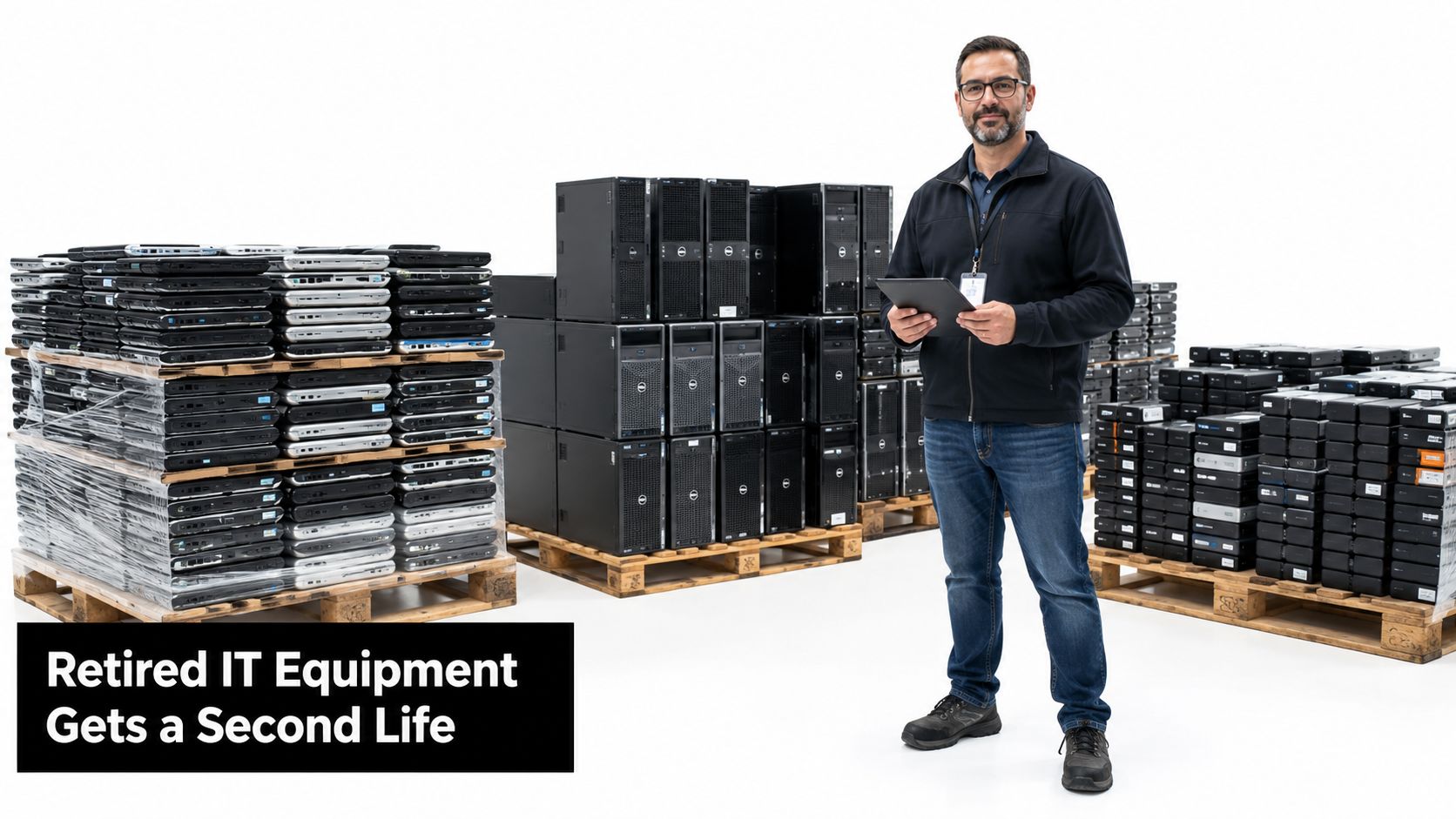
A Mesa IT manager can tell when a technology refresh has become a disposal problem. Retired laptops are stacked beside servers, external drives sit in an open cabinet, and a procurement team is pushing to clear the warehouse before the next delivery arrives. The compliance file, however, still needs an asset inventory, a defensible sanitization method, and evidence that every data-bearing device reached its approved endpoint.
That situation makes hard drive shredding in Mesa AZ more complicated than finding a nearby truck. Mesa is part of the Phoenix metro area, and Arizona providers list Mesa among the communities covered by on-site hard drive shredding and secure destruction services, so local logistics are usually available without sending sensitive media across the country (Phoenix-area data destruction coverage). The harder question is whether your organization needs physical destruction, certified erasure, or a combination of both.
The Mesa Business Dilemma With End-of-Life Drives
A Mesa company finishes a laptop refresh while part of its server environment remains in service. Old equipment is tagged, pallets occupy warehouse space, and the procurement lead wants a pickup date. Then the compliance officer asks, “Which method makes the data unrecoverable, and what evidence will prove it?”
That question determines whether the retirement project is controlled or merely quick. A single pallet may contain magnetic hard disk drives, solid-state drives, removable media, and devices suitable for reuse after verified sanitization. Applying one process to everything can waste resale value, increase disposal costs, or leave gaps in the audit record. Reselling every device without confirming its media type, condition, and sanitization result creates a separate exposure.
The decision is not just where to shred drives in Mesa. It is which sanitization method fits the media, risk level, schedule, and chain-of-custody requirements. Erasure may preserve a usable device when policy permits it. Shredding provides irreversible physical destruction for media that cannot be trusted, cannot be erased reliably, or carries greater audit exposure. Some retirement projects use both methods, depending on the device and its destination.
The operational questions behind the pickup
Before approving collection, the responsible team should document:
- What media is present: Magnetic HDDs, SSDs, hybrid devices, tapes, and removable storage may need different treatment.
- Who controls the data: Healthcare organizations, schools, public agencies, and private offices may follow different policies and face different regulatory triggers.
- What the audit file must prove: Define asset identifiers, custody transfers, sanitization method, and certificate details before equipment leaves the site.
- How quickly the project must close: A facility cleanout or data center decommissioning may favor a local provider with a documented handoff.
The same control used for employee access removal belongs in hardware retirement. Teams reviewing technology startup offboarding steps can connect account closure, asset recovery, and personnel transitions instead of handling data-bearing equipment as an isolated task.
Mesa organizations may also combine destruction with local electronics recycling services. Keep the security decision separate from the convenience of clearing a pallet. The provider, method, custody record, and final disposition should match the organization's risk decision.
What Hard Drive Shredding Actually Does
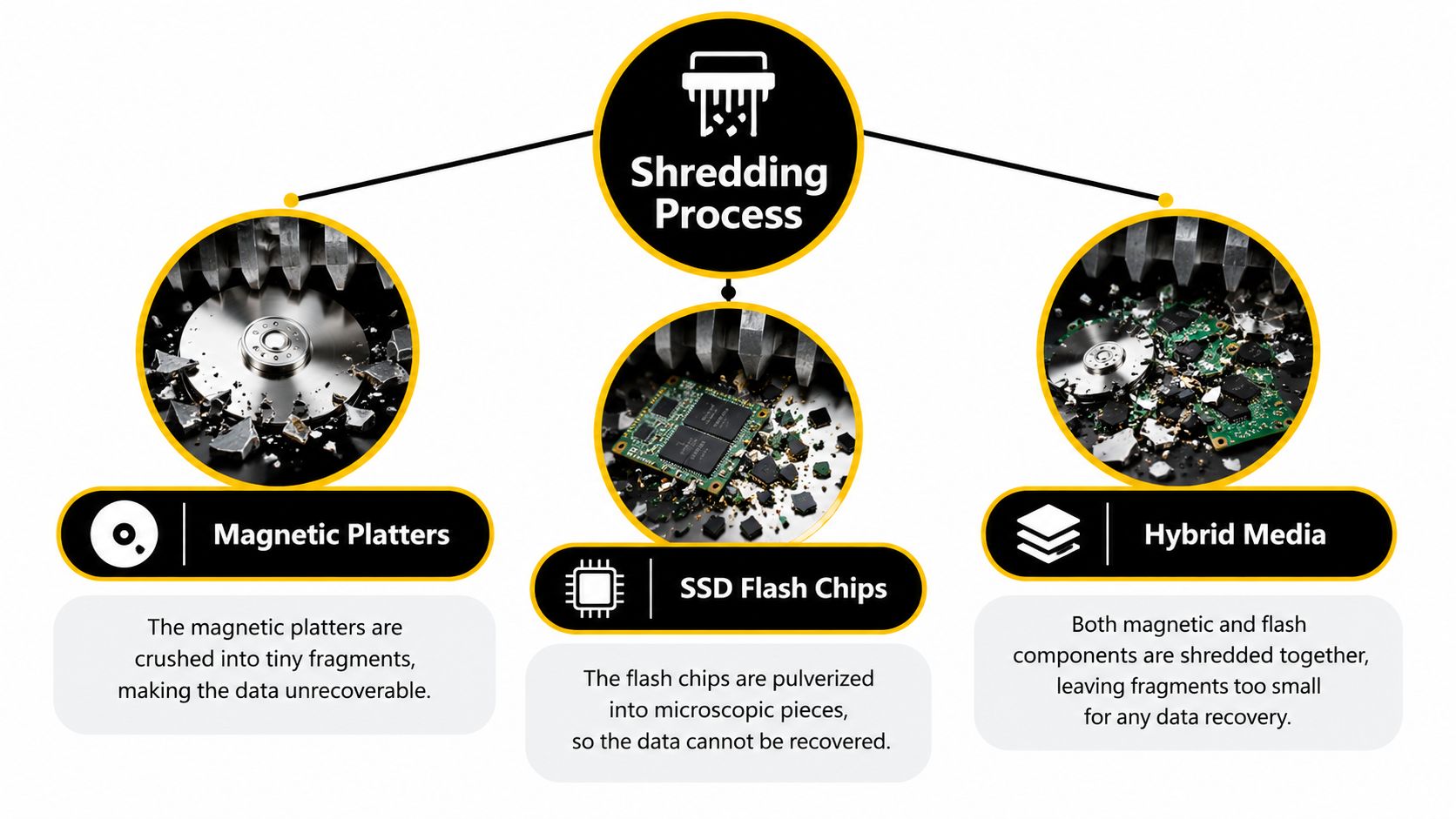
Commercial shredding changes the storage media itself. A machine pulls a drive into cutting and tearing mechanisms that break the enclosure, platters, circuit boards, and other components into fragments. For an HDD, the critical target is the magnetic platter. For an SSD, the relevant components include flash memory chips and the board that controls them. Hybrid devices need an assessment of both types.
The security outcome depends heavily on final particle size. Common commercial outputs are around 6 mm or smaller, while higher-security workflows may target 2 mm or smaller for classified media (hard drive shredding particle-size guidance). Smaller fragments make platter reassembly and forensic recovery less feasible, particularly when physical destruction is being used as the Destroy step under NIST-aligned sanitization practice.
A useful comparison is paper shredding. A strip-cut machine makes a document difficult to handle but may leave long readable sections. A cross-cut machine produces smaller pieces and makes reconstruction harder. Hard drive shredding follows the same general principle, but the buyer needs to ask for the actual output size rather than accepting the word “shredded” as a complete specification.
Why media type changes the order
A shred size suitable for magnetic HDD platters may not be sufficient for SSD flash chips. Flash storage can retain data across multiple chips, and the physical design differs from a conventional platter. A Mesa buyer should therefore specify both the device category and required fragment size in the service order.
That specification should also address:
- Mixed media: Ask whether HDDs, SSDs, hybrid drives, and removable storage will be processed separately.
- Particle verification: Confirm how the provider validates the final output and manages material that doesn't meet the stated requirement.
- Throughput controls: Establish whether the equipment can process the planned load without creating a queue that weakens custody or delays certificates.
- Documentation: Require the destruction record to identify the assets processed, not just the total number of items.
Particle size is a technical control, not a complete compliance program. A provider can produce small fragments and still leave gaps if the wrong assets enter the load, if serial numbers aren't captured, or if certificates don't match the original inventory. The shredder handles the final physical step. The business still owns the classification, authorization, custody, and records.
NIST Standards Meet Arizona Compliance Rules
NIST defines sanitization as a process that makes access to stored data infeasible for a given level of effort. Its framework separates Clear, Purge, and Destroy, so retiring a device does not automatically require physical destruction (NIST SP 800-88 Rev. 1). Hard drive shredding falls under Destroy because it renders the storage medium physically unusable.
That distinction affects Mesa organizations deciding whether equipment can be reused, donated, or resold. A functional device may have another use when an approved sanitization method is applied and the result is documented. A damaged drive, uncertain device history, or higher-risk media may support choosing destruction instead.
Destruction is a deliberate selection
NIST's newer guidance states that destroy techniques make recovery infeasible, while noting that shredding or pulverizing should generally be avoided except for the lowest security categories of data (NIST SP 800-88 Rev. 2). The practical lesson is to match the method to the media, data risk, and intended disposition. Shredding is one control, not the default answer for every drive.
Arizona's IT assets directive requires information technology data to be completely removed or made unrecoverable before an asset is surplused, transferred, traded in, or disposed of. It also requires surplus hard drives to be securely erased or destroyed within 30 days after replacement, and before release outside the agency (Arizona IT asset disposal directive). Organizations reviewing Arizona electronics recycling requirements should align their vendor process with those release and documentation requirements.
For public agencies, schools, and contractors handling government equipment, use this decision sequence:
- Classify the data and identify the media.
- Confirm whether the device is eligible for reuse, donation, or resale.
- Choose Clear, Purge, or Destroy based on policy and risk.
- Complete the selected method within the applicable release timeline.
- Keep records linking each asset to its sanitization outcome.
Arizona's rule does not require every hard drive to be shredded. It requires the data to be removed or made unrecoverable before the asset leaves agency control. Procurement decisions should therefore evaluate the approved method, verification records, custody documentation, and final disposition, rather than selecting a provider solely because it advertises mobile shredding.
On-Site Versus Off-Site Destruction Options
The right destruction model depends on the media, risk level, site conditions, and chain-of-custody requirements. On-site service brings a mobile shredding unit to the Mesa facility, so staff can witness processing and reduce the time sensitive drives spend in transit. Off-site service transfers the assets to a controlled processing location, where centralized equipment and documentation may support larger, more consistent workloads.
On-site does not automatically mean safer. Parking, loading access, building layout, vehicle capacity, and weather can limit what the mobile unit can process. Off-site destruction adds transport and custody steps, so the provider should document locked containers, handoffs, inventory reconciliation, and arrival verification.
Capacity should be tested, not assumed
A Phoenix-area provider states that its equipment can destroy more than 1,200 server hard drives per hour, with certificates listing the serial number of each destroyed hard drive and SSD (Phoenix hard drive destruction capabilities). Treat that as a provider-specific claim, not a standard capacity. Ask how the rate was measured, which drive types were included, and whether sorting or verification time was excluded.
Industry guidance citing NSA/CSS equipment requirements provides practical benchmarks. The guidance calls for platter deformation in 30 seconds or less, continuous operation for one hour while destroying at least 100 hard drives, and jam clearance within 5 minutes (media destruction equipment benchmarks). These measures test more than cutting speed. Loading, mixed media, jams, and post-destruction verification can determine whether a project finishes on schedule.
| Decision factor | On-site mobile shredding | Off-site destruction |
|---|---|---|
| Custody control | Direct witnessing and a short handoff path | Requires verified transport and intake controls |
| Throughput | Depends on vehicle configuration and site logistics | May support centralized, higher-volume processing |
| Documentation | Can include site-level inventory and destruction records | Can support serialized intake, processing, and certificates |
| Best fit | Sensitive loads where witnessing and reduced transit matter | Bulk retirements, data center decommissioning, and planned facility cleanouts |
Choose on-site processing when a compliance officer needs to witness destruction and the property can safely support the vehicle. Choose off-site processing when the retirement is large or standardized, provided every transport handoff, intake count, and destruction result can be verified.
For teams comparing a mobile option with controlled off-site collection, on-site hard drive destruction describes one service model to evaluate. Require the quote to specify equipment, custody steps, expected output, and certificate scope. The service label alone does not establish that the method matches the organization's risk or documentation requirements.
Hiring a Mesa Hard Drive Shredding Provider
A provider can arrive on time, shred the load, and still leave your audit file incomplete. The hiring decision should therefore start before collection, with a clear match between the media involved, the risk of exposure, and the evidence your organization must retain.
Send each bidder an asset profile covering approximate quantities, media types, pickup location, access limits, target completion date, and whether any equipment may be suitable for reuse. State whether the project includes conventional hard disk drives, SSDs, damaged devices, or unidentified assets. A request for “secure shredding” alone invites different assumptions about equipment, handling, and documentation.
Build the custody file at intake
At pickup, the provider should reconcile the physical load with an inventory or collection record. For sensitive retirements, serial-number control provides stronger evidence than a statement that all drives were destroyed. Ask whether the final certificate can identify each drive or SSD, the approved destruction method, the processing date, and the authorized sign-off.
Clarify these points before approving the work:
- Asset capture: Are serial numbers scanned, recorded manually, or copied from the client's spreadsheet?
- Exceptions: What happens when a label is damaged, a serial number cannot be read, or the physical count differs from the inventory?
- Custody transfers: Who signs at collection, transport, facility intake, and destruction?
- Equipment validation: How does the provider confirm that the shredder produces the specified particle size?
- Jam response: What procedure applies if the machine stops during the load, and how is the affected material controlled?
- Certificate mapping: Does the final record identify the method, date, asset list, and destruction location?
A certificate should connect the original inventory to final disposition, with serial numbers where available. If it reports only an aggregate count, staff may later need to rebuild the audit trail from emails, photographs, delivery notes, and internal records. That reconstruction consumes time and may leave unanswered gaps during a compliance review.
Plan the Mesa logistics
Confirm service coverage, loading requirements, appointment windows, parking access, and who prepares the devices for collection. Local access can shorten transit and simplify coordination with a warehouse cleanout, lease exit, or scheduled equipment retirement. It also gives the project owner a practical contact for resolving discrepancies after pickup.
A full IT asset disposition plan should separate data-bearing equipment from ordinary electronics and assign an outcome to every category. Review ITAD services in Mesa alongside destruction, recycling, equipment decommissioning, and reuse options. The provider's responsibility should remain clear from collection through final reporting, especially when shredding is appropriate for some media while erasure or reuse is appropriate for others.
Pricing Factors and Hidden Cost Drivers
A per-drive quote rarely represents the full project cost. The final proposal depends on the media mix, required particle size, equipment condition, processing volume, collection requirements, and reporting scope. A pallet of standard HDDs is simpler to process than a mixed load containing enterprise drives, SSDs, damaged equipment, and assets with unclear labels.
The destruction method also affects pricing. On-site service can include a mobile shredding vehicle, operators, setup time, and limits on the equipment that can be processed at the location. Off-site service may include secure containers, transportation, intake inspection, sorting, and final record preparation. Short turnaround times, witnessed processing, serial-level reporting, and unusual handling requirements can raise the charge.
Compare the work behind the number
A useful quote explains what the provider will do, not just the price per drive. Check these items:
- Media handling: Are SSDs and HDDs accepted, priced, and processed under the same conditions?
- Output specification: Does the provider state the fragment size and explain how the result is checked?
- Documentation: Will the report identify individual assets, or provide only a total count?
- Capacity planning: What processing volume is expected, and what procedure applies if equipment stops?
- Custody design: Are containers, transfer records, and intake reconciliation included in the proposal?
- Downstream disposition: Will the shredded material enter a documented recycling stream?
A low quote can create costs later. An unsuitable particle size may require another processing step. Incomplete records can force staff to reconstruct the audit trail for an auditor. Destroying equipment that could have been reused also removes potential residual value. The lowest unit price is not necessarily the lowest project cost when the service does not match the organization's risk, media types, or reporting requirements.
Price comparisons should also account for assets that may qualify for documented erasure instead of physical destruction. Functional laptops or networking equipment can retain value when policy permits reuse, while damaged or high-risk media may require shredding. Separating those categories can support donation-based recycling, sustainable recycling, and responsible ITAD without applying one costly treatment to every device.
For a clearer commercial review, compare pricing transparency for recycling and ITAD services with the actual scope of each proposal. The buyer should be able to see how security controls, labor, transport, reporting, and downstream handling shape the total price.
Choosing the Right Method for Your Situation
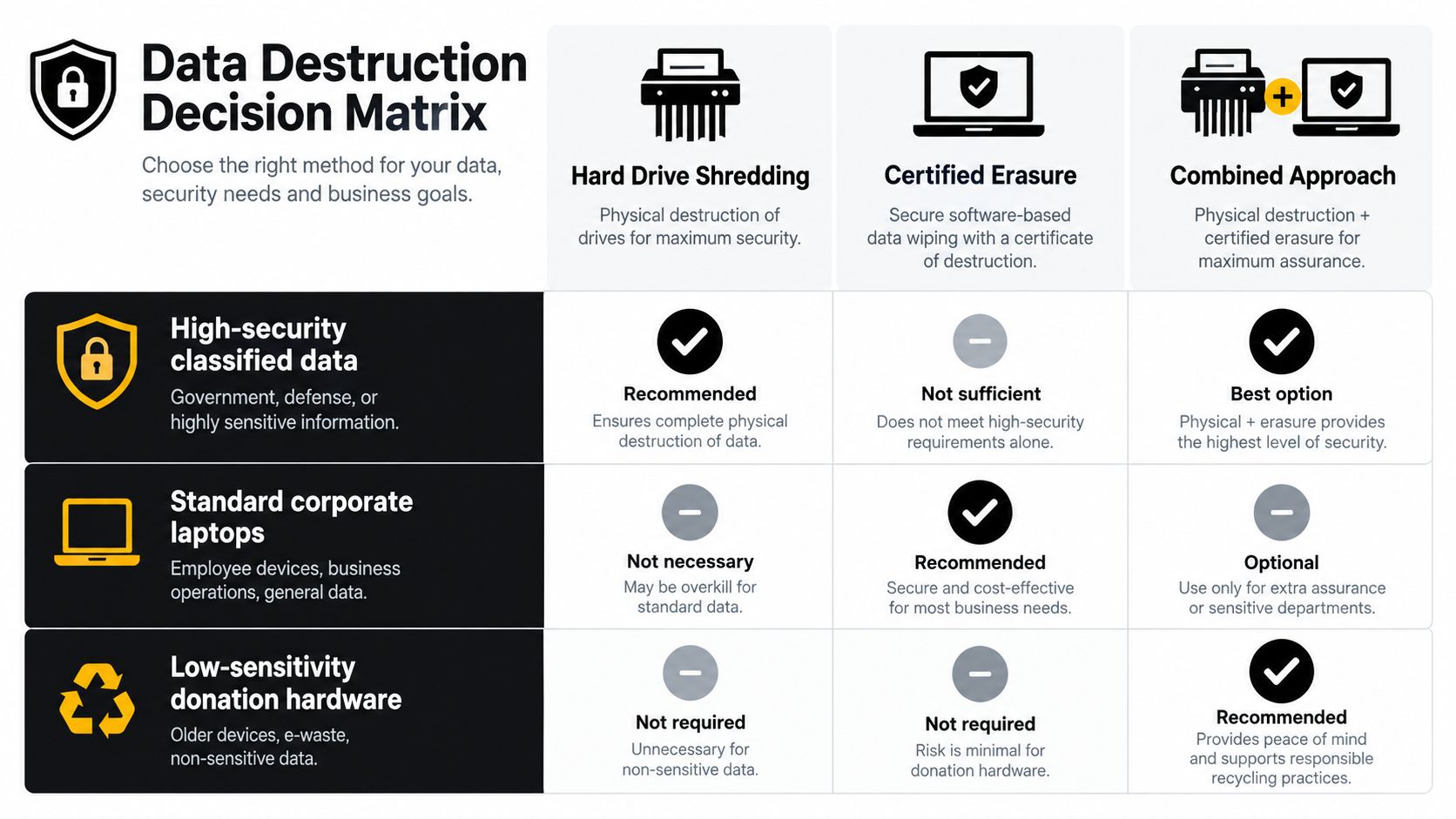
The right method depends on the relationship between data risk and asset value. Shredding is appropriate when the organization needs physical destruction, the device is damaged or compromised, the sanitization history is uncertain, or the applicable policy calls for the Destroy category. Certified erasure is more suitable when the device is functional, the media type is understood, the data can be sanitized under policy, and reuse or resale is a legitimate objective.
A combined approach often gives a business the strongest operational result. Eligible laptops can undergo documented erasure and move into a donation or resale stream, while sensitive server drives, failed devices, and media with uncertain status go to physical destruction. The business avoids both extremes, destroying everything without considering value or reusing everything without proving data removal.
A practical selection matrix
| Situation | Hard drive shredding | Certified erasure | Combined approach |
|---|---|---|---|
| High-security or classified data | Strong fit when policy requires physical destruction | Usually not the primary choice | Use only if policy permits erasure for a defined asset subset |
| Standard corporate laptops | Appropriate for failed, damaged, or high-risk devices | Suitable when reuse is approved and results are documented | Often the most practical portfolio strategy |
| Low-sensitivity donation hardware | May destroy usable value unnecessarily | Suitable when the device and media support reliable sanitization | Use for mixed loads with a separate high-risk group |
Before authorizing a pickup, answer five questions:
- Data classification: What information is stored on the device?
- Device condition: Does the drive work, and can the organization verify its history?
- Regulatory trigger: Must the asset be erased or destroyed before release?
- Audit deadline: When must the certificate and asset reconciliation be complete?
- Sustainability objective: Is donation, reuse, or material recovery part of the retirement policy?
This framework applies beyond hard drives. It can guide computer recycling, laptop disposal, office cleanout, facility cleanout, product destruction, and data center decommissioning. The method should follow the risk and the evidence requirement, not the other way around.
Partnering With Reworx Recycling for Secure Disposal
A Mesa organization can start with its retirement pipeline rather than waiting for a warehouse to fill. List the equipment, identify each storage medium, classify the data, mark assets that may be reused, and define what the final audit file must contain. That preparation gives the selected provider enough information to recommend on-site destruction, off-site processing, certified erasure, or a combined plan.
Reworx Recycling is a donation-based electronics recycling social enterprise based in the Southeast that partners with organizations nationwide. Its services include customer drop-off options, business pickups, equipment decommissioning support, IT asset management guidance, and secure hard drive shredding with documented certificate issuance.
That combination matters for businesses managing more than data risk. Responsible social enterprise recycling can direct usable equipment toward community needs, support digital inclusion and workforce development, and keep recoverable materials in appropriate recycling channels. It also gives corporate donation programs, sustainability leaders, schools, public agencies, and facilities teams a way to connect IT equipment disposal with broader environmental goals.
A business owner, IT manager, or sustainability director can request a consultation, describe its Mesa retirement volume, and ask for a method-specific proposal. The provider should be prepared to explain custody, media handling, documentation, and the disposition of assets that don't require destruction.
Reworx Recycling helps organizations coordinate secure hard drive shredding, electronics recycling, equipment pickups, and responsible IT asset disposition. Visit Reworx Recycling to request a consultation, schedule a pickup, or explore a retirement plan that protects data while supporting reuse, community impact, and sustainable recycling.