A laptop assigned to a former employee is still listed as active. A server in the closet has no purchase record anyone can find. Finance wants to know what can be redeployed before buying more hardware. Security wants a clean list of endpoints. Facilities is planning an office cleanout. Then an auditor asks for proof of custody on retired devices.
That's where many businesses realize their “inventory system” is really a patchwork of spreadsheets, help desk tickets, sticky labels, and memory.
Asset inventory management fixes that. At its core, it gives you a reliable answer to a simple question: what do we own, where is it, who has it, what condition is it in, and what should happen next? That answer affects budgets, cyber risk, uptime, and how safely you retire equipment.
For busy IT managers and business owners, this isn't an administrative side project. It's a control system. When it works, teams stop hunting for missing devices, stop carrying duplicate records, and stop guessing during refresh cycles. When it doesn't, problems spread. Old laptops stay uncollected, software and hardware records drift apart, and end-of-life equipment leaves the building without a clear chain of custody.
The last part often gets overlooked. A clean inventory record doesn't just support procurement and support desks. It also makes IT asset disposition, electronics recycling, secure data destruction, and donation-based recycling far easier to manage. If you don't know what is leaving, you can't confidently document what was wiped, shredded, reused, donated, or recycled.
Beyond the Spreadsheet An Introduction
A common scenario goes like this. Someone asks for a simple asset count before a move, an insurance review, or a technology refresh. The spreadsheet says there are more laptops than the service desk can physically locate. A few devices show one user in HR records and another in the ticketing system. Several monitors are in storage, but nobody knows whether they're spare, broken, or already written off.
That isn't just messy recordkeeping. It creates three direct problems.
- Financial confusion: teams buy replacements before checking whether usable equipment is already sitting in another office or storage room.
- Security exposure: unaccounted-for devices may still hold company data, credentials, or cached access.
- Disposal risk: retired hardware can leave the building without accurate records, making data destruction and environmental reporting harder than it should be.
The fix isn't “use a better spreadsheet.” The fix is building a system that keeps records current as assets move through real business events: purchase, deployment, reassignment, repair, storage, refresh, and retirement.
If you're still using Google Sheets for part of that process, there's value in learning where automation can help before you jump to a larger platform. A useful practical reference is Learn Hopted inventory automation, especially for teams trying to reduce manual updates in early-stage workflows.
Another good starting point is reviewing these inventory management best practices from Reworx Recycling, which focus on how organizations keep records usable across the full asset lifecycle.
What busy teams usually miss
Most inventory failures don't happen because people don't care. They happen because updates depend on human memory.
A laptop gets swapped during a support call. A monitor moves during a department shuffle. A few devices go into storage “temporarily.” A terminated employee's equipment is collected, but the record isn't closed. Over time, the asset list becomes less of a source of truth and more of a rough estimate.
Practical rule: If updating inventory takes too many clicks or depends on one person remembering later, the record will drift.
Why this matters beyond operations
Good asset inventory management changes how a company makes decisions. It gives finance cleaner visibility into what can be reused. It gives security a better map of what needs protection. It gives facilities and operations a cleaner path for moves, cleanouts, and decommissions.
And at end of life, it becomes the foundation for secure, compliant, and sustainable disposition. That's the part many software-only guides skip. Knowing what you own is what makes responsible retirement possible.
What Asset Inventory Management Really Means
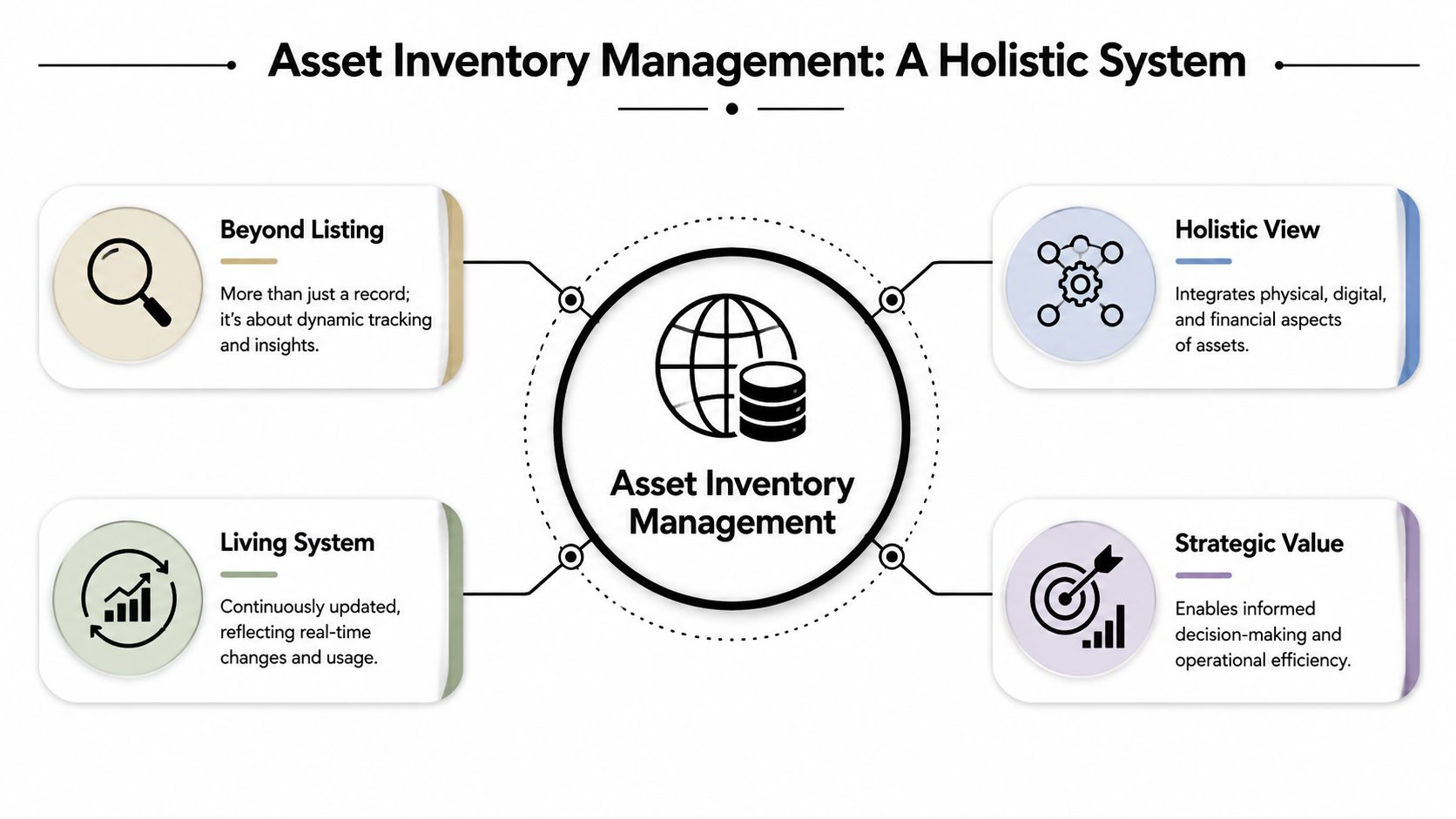
Think of a modern asset inventory system like a digital library catalog. A library doesn't just know that a book exists. It knows where the book belongs, whether it's checked out, who has it, whether it's damaged, and when it should be repaired or retired.
Business assets work the same way. A useful system doesn't stop at a list of serial numbers. It tracks location, status, condition, assignment, and lifecycle state in a way people can use.
From paper records to lifecycle control
A major shift happened when barcoding and computerized maintenance systems started replacing paper-based tracking in the late 1970s and 1980s. By the 2000s, the discipline had expanded into lifecycle management that follows assets from acquisition through disposal, including maintenance, depreciation, compliance, and end-of-life disposition, as described in this overview of asset inventory management history and scope.
That history matters because many organizations still treat inventory like a static stock list. Modern practice is different. It's a live operating record.
What counts as an asset now
For many companies, the word “asset” still brings one thing to mind: laptops. But the working inventory is usually much broader.
| Asset type | Typical examples | Why it needs tracking |
|---|---|---|
| User hardware | Laptops, desktops, monitors, phones | Assignment, support, refresh, return |
| Infrastructure | Servers, network gear, storage devices | Maintenance, security, decommissioning |
| Specialized equipment | Medical devices, lab gear, industrial tech | Compliance, calibration, service history |
| Software and cloud | Licenses, subscriptions, cloud instances | Cost control, access review, renewal decisions |
| Retired or stored assets | Surplus devices, repair stock, pending pickup items | Reuse, donation, recycling, secure disposal |
That broader view is why companies often outgrow basic tracking habits. An old spreadsheet may list what was purchased, but it rarely captures the relationships between assignment, support, compliance, and retirement.
Tracking versus management
Basic asset tracking tells you an item exists. Asset inventory management tells you what action the business should take.
That difference shows up in everyday decisions:
- Redeploy or replace
- Repair or retire
- Store or donate
- Wipe, shred, or recycle
- Renew, consolidate, or cancel
A stronger system also acts as one place where teams can look up the same record. For organizations trying to structure that operationally, these asset tracking system considerations are a useful way to connect movement, check-out rules, and status changes.
A good inventory record should answer operational questions without requiring three departments to compare notes.
Why It Is a Business Imperative Not a Chore
Leadership teams rarely get excited about inventory until the absence of it causes friction. Then it becomes urgent fast.
The business case is straightforward. Better inventory control supports financial discipline, tighter security, smoother operations, and cleaner compliance. Those outcomes matter whether you're managing one office, multiple sites, a clinic, a lab, or a distributed workforce.

Financial discipline starts with visibility
When records are weak, companies often spend money solving the wrong problem. They buy hardware that's already available internally. They keep maintenance plans on equipment no one uses. They miss opportunities to redeploy assets before purchasing new ones.
One industry estimate cited by Assetspire's asset management statistics overview says about $1.1 trillion in working capital was tied up in inventory. You don't need to run a warehouse to understand the lesson. Poor visibility traps value.
A clean inventory makes common decisions easier:
- Procurement reviews: check internal availability before buying.
- Refresh planning: identify which devices are still serviceable.
- Warranty lookups: avoid paying for repairs already covered.
- Disposition timing: retire assets before they become storage clutter.
Security teams can't protect what they can't see
Every forgotten device creates uncertainty. Is it patched? Is it encrypted? Is it still in use? Did someone take it home? Was it retired properly?
Inventory and cybersecurity converge. Endpoint tools, vulnerability management, access reviews, and incident response all depend on having a credible asset list. If the inventory is incomplete, your security program starts with blind spots.
The first security control is knowing which devices exist, who uses them, and whether they still belong in your environment.
Operations run better with fewer unknowns
Support teams feel inventory problems before executives do. They waste time reconciling ticket data with outdated records. They can't tell whether a device in storage is available or broken. Moves, adds, changes, and office cleanouts take longer because no one trusts the list.
A more reliable system improves handoffs between IT, facilities, procurement, and finance. That's one reason many organizations connect inventory discipline with broader sustainable IT asset disposition benefits, since cleaner records reduce confusion when devices are reassigned or retired.
Compliance gets harder when records drift
Industries with privacy, financial reporting, or operational controls face a simple challenge. They need evidence, not assumptions.
If your organization handles regulated data, manages controlled environments, or needs documented disposal practices, inventory becomes part of your compliance posture. You need to know what was deployed, where it was used, and how it was retired. Loose tracking makes every audit harder because the team has to reconstruct history after the fact.
The Core Process and Governance Framework
A workable asset inventory program usually follows a simple pattern. Find assets. Identify them consistently. Put records in one place. Keep them current. Retire them with documentation.
That sounds obvious, but each step breaks down if ownership and rules are vague.
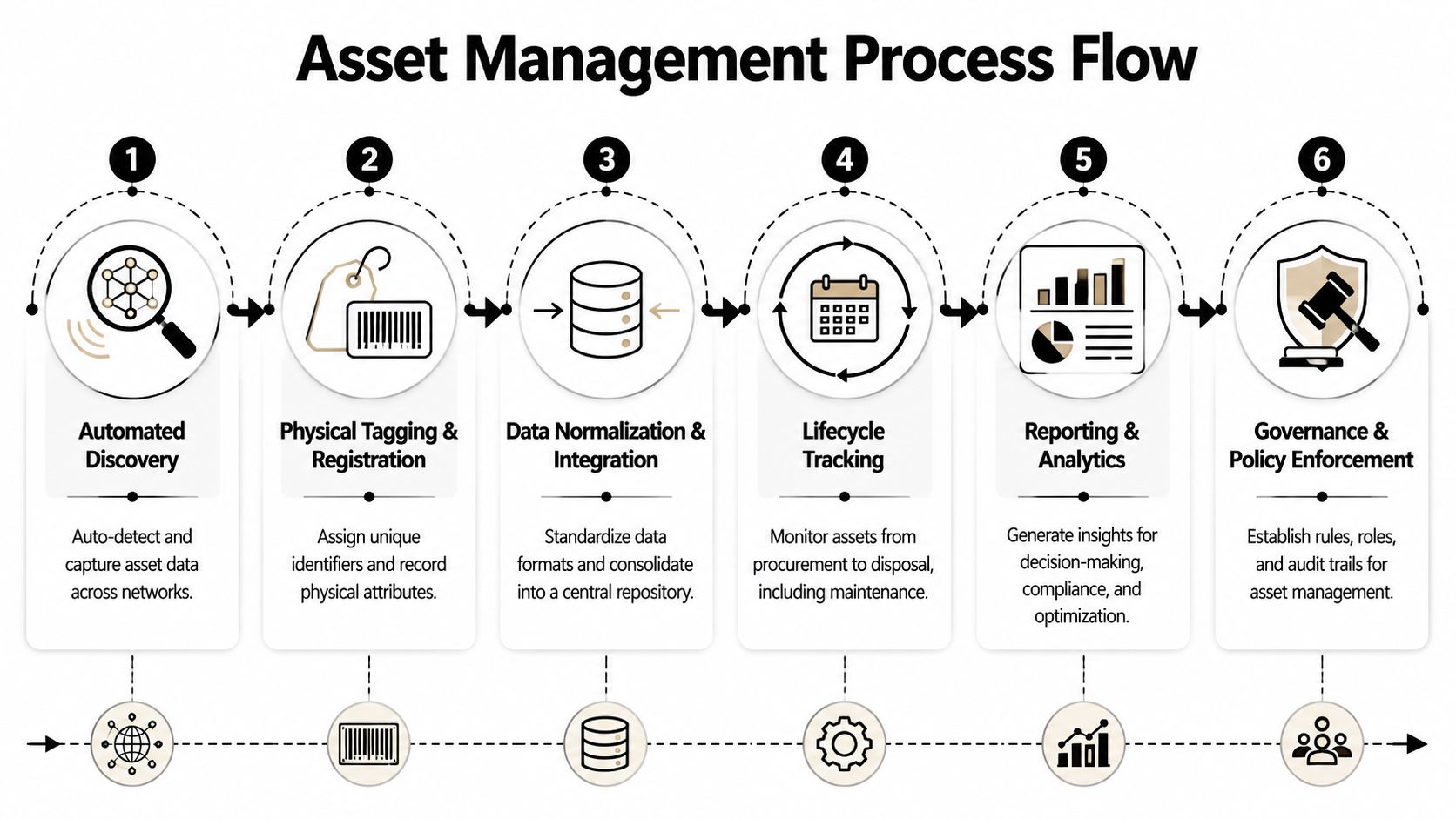
The operating flow
A technically sound program uses unique identifiers and automated discovery to reduce duplicate records and ghost assets caused by manual entry drift. Barcode labels are budget-friendly, while RFID supports faster scanning and bulk reads in denser environments. Core fields should include location, assigned user, purchase date, maintenance history, warranty, and status in a centralized repository, as outlined in this practical guide to asset inventory management methods.
Here's what that looks like in practice.
Discover what exists
Start with network-visible assets, endpoint records, procurement history, storage areas, and departmental equipment lists. You're not trying to create perfection on day one. You're trying to establish a baseline.Assign a unique identifier
Every tracked item needs one durable identity. That may be a barcode label, RFID tag, existing serial number policy, or a company asset tag. What matters is consistency.Normalize the record
Different systems describe the same thing in different ways. One tool says “Dell Latitude,” another says “Laptop,” and a spreadsheet says “John's PC.” Standard naming and required fields keep records usable.Track movement and status changes
Many inventories fail here. If assignment, storage, repair, and retirement events don't update the record, accuracy decays quickly.Audit and reconcile
Use periodic checks to catch drift. Physical spot checks, department reviews, and storage audits all help expose stale records.Manage end of life intentionally
Retirement should be a workflow, not an afterthought. Devices need clear status changes, approved release steps, and documented handoff for data destruction, reuse, donation, or recycling.
Governance is what keeps the process alive
A process without governance turns back into a spreadsheet problem. The right framework doesn't have to be bureaucratic, but it does need clear rules.
Consider these basics:
- Ownership by asset class: one team may govern laptops, another servers, another specialized equipment.
- Check-in and check-out rules: define who can assign, move, and retire assets.
- Required fields: don't let records close without key information.
- Disposition policy: specify what happens before equipment leaves the company.
- Exception handling: create a path for lost, damaged, or transferred assets.
Operational insight: The inventory record should change at the moment the real-world event happens, not at the end of the month.
The documentation most teams wish they had earlier
When equipment is moving toward retirement, documentation becomes critical. The inventory record should connect to pickup manifests, serial number lists, data destruction steps, and final disposition outcomes.
For organizations formalizing that handoff, chain of custody documentation guidance helps translate internal inventory controls into external disposition records.
A good governance model also answers practical questions before they become disputes:
| Question | Policy answer should define |
|---|---|
| Who approves retirement? | Role, threshold, and review path |
| What data must be captured? | Serial, tag, user, location, status, disposition path |
| When is a device removed from active inventory? | Trigger event and required evidence |
| Who keeps the audit trail? | Internal owner and retention process |
If you build those rules early, the system stays usable. If you skip them, teams start creating side lists again.
Connecting Inventory to Responsible ITAD with Reworx
Asset inventory management extends beyond merely being an internal control. It becomes the handoff document for disposition.
When a company plans a laptop refresh, office cleanout, data center decommissioning project, or medical equipment disposal event, the inventory determines whether the next step will be orderly or chaotic. A partner handling secure data destruction, computer recycling, product destruction, or donation-based recycling needs an accurate list of what's coming. Not an estimate. Not “about three pallets.” A real record.
Why the retirement list matters so much
A usable end-of-life inventory usually answers these questions:
- What exactly is being released
- Which items still contain data
- Which assets may be suitable for reuse or donation
- Which items require destruction or specialized recycling
- Which locations need pickup coordination
- Which records must be closed internally after removal
That's why inventory quality directly affects IT asset disposition. If your list is vague, the project scope becomes vague too. Scheduling gets harder. Chain of custody gets weaker. Internal signoff takes longer. Donation opportunities may be missed because the usable devices weren't separated from scrap early enough.
How the social enterprise angle changes the outcome
A standard recycler can remove material. A social enterprise model can also create community value from equipment that still has useful life.
That outcome depends on inventory discipline. If retired devices are identified clearly, businesses can separate equipment that should be securely destroyed from equipment that may support digital inclusion, training, or workforce development after proper processing. Without accurate records, everything tends to get treated as mixed surplus.
One option businesses consider in that handoff stage is Reworx Recycling's overview of IT asset disposition, which explains how inventory, logistics, data handling, and final disposition fit together.
Inventory is what turns end-of-life from a scramble into a controlled business process.
This matters for sustainability leaders too. Electronics recycling programs often focus on bins, pickups, and reporting. But the true upstream work starts much earlier, with the inventory record that distinguishes reusable assets from obsolete ones, and documented assets from mystery equipment.
If your company wants secure disposal, sustainable recycling, and a credible corporate donation program, inventory isn't separate from those goals. It's the operating foundation that makes them possible.
Choosing a System and Taking Your First Steps
The right system depends on your size, complexity, and risk profile. A small business with one office doesn't need the same stack as a healthcare network or a manufacturer with multiple facilities. But the selection criteria are surprisingly similar.
What changes is depth, not direction.
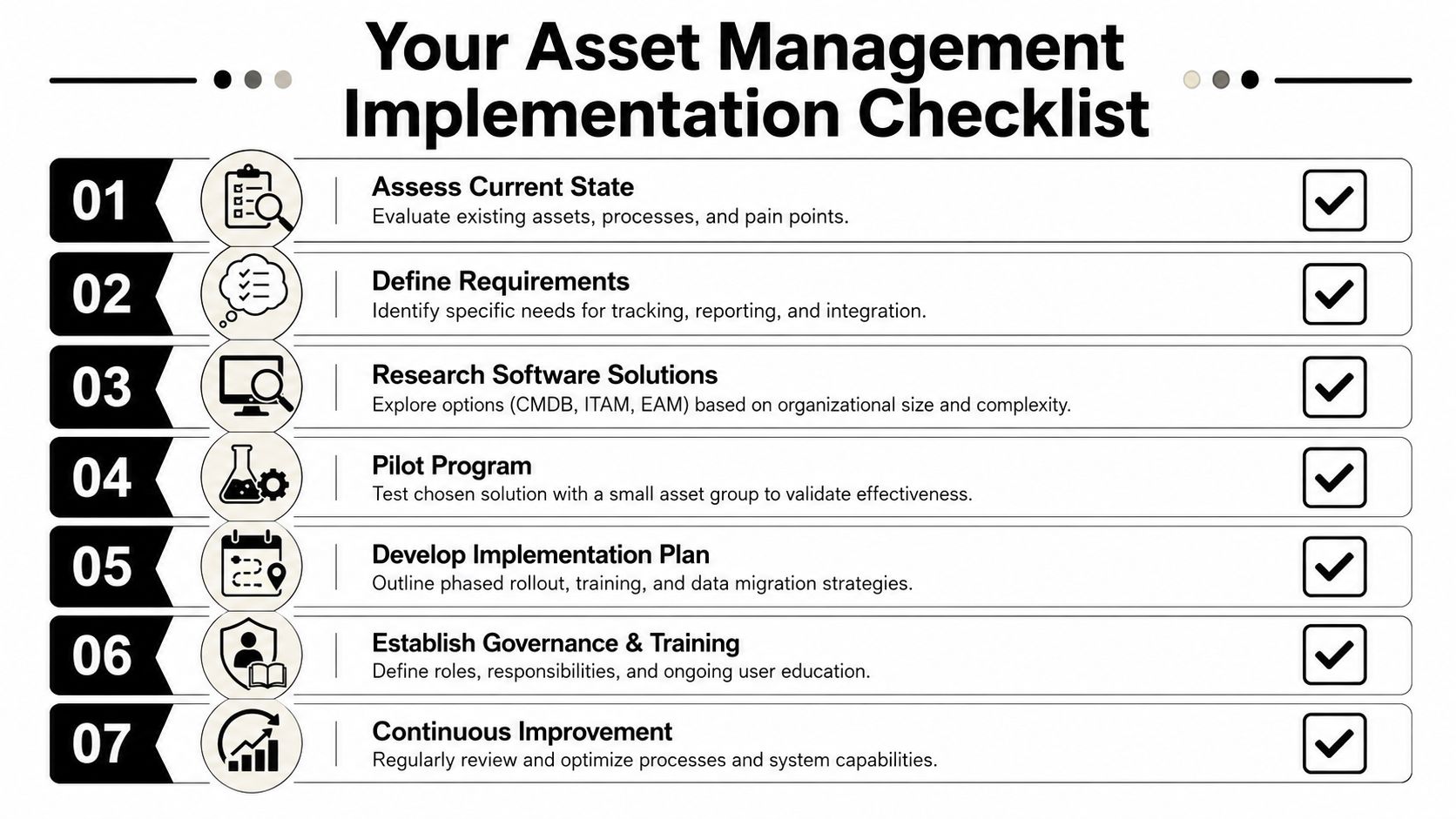
What to look for in a platform
Use this as a short buying checklist.
- Scalability: Can the tool handle more locations, more asset classes, and more users without forcing a rebuild?
- Integration: Can it connect with procurement systems, endpoint tools, help desk workflows, and disposition records?
- Mobile usability: Can technicians scan, assign, and update records where the asset is located?
- Reporting: Can it produce clean export lists for audits, refresh planning, and ITAD events?
- Lifecycle support: Does it help you manage assignment, maintenance, storage, and retirement, not just initial entry?
For teams evaluating enterprise service management ecosystems, it can help to review how specialized platforms fit into larger environments. This overview of the Nuvolo platform on ServiceNow is a useful example of how organizations think about asset, facility, and operational workflows together.
First moves by organization type
Different organizations should start in different places.
SMBs
If you're a smaller business, don't wait for a perfect platform. Start with your highest-risk and highest-value assets. That usually means laptops, desktops, servers, network gear, and storage devices.
A simple approach works:
- Standardize a minimum record
- Tag every active device
- Assign one owner for record quality
- Create one retirement workflow
You can build maturity over time. What matters first is consistency.
Mid-market and enterprise teams
Larger environments need stronger automation and integration. Manual updates alone won't hold up across multiple offices, remote users, storage rooms, and decommissioning events.
Focus on:
- Automated discovery
- Clear ownership across departments
- Normalized data standards
- Linking inventory to security and procurement
- Formal retirement and chain-of-custody workflows
At this point, system design starts to matter as much as tool choice.
Schools, healthcare, government, and regulated environments
Public sector and regulated organizations should lean harder into documentation, status control, and disposition evidence. Specialized equipment, privacy obligations, and public accountability raise the stakes.
Prioritize:
- Role-based approvals
- Retention-friendly audit trails
- Documented data destruction steps
- Separation of reusable versus scrap equipment
- A recycler or ITAD partner that can work from detailed manifests
A practical starting sequence
If you're trying to move from disorder to control, keep the rollout simple:
- Choose the asset classes that matter most first
- Define required fields and naming rules
- Tag or identify active assets consistently
- Create one repository people will use
- Tie updates to real workflows like onboarding, repair, and offboarding
- Run a small audit to find drift early
- Prepare your retirement process before the next refresh project hits
That last step is the one many teams postpone. They shouldn't. The cleanest time to define end-of-life handling is before the pile of retired equipment appears.
If your organization is reviewing electronics recycling, secure data destruction, office cleanout planning, or IT asset disposition workflows, Reworx Recycling offers practical guidance on aligning inventory records with responsible end-of-life processing. It's a useful next step for businesses that want to donate old equipment, schedule a pickup, or build a more controlled disposition process around their asset inventory management program.