You know the moment. A lease return is coming up, three departments have “temporary” laptops in a closet, and finance wants to know why replacement spending keeps drifting. That's usually when device lifecycle management stops being a concept and becomes a cleanup job, because every untracked device is either a cost, a security risk, or both. Reworx Recycling helps organizations turn that scramble into a repeatable process for electronics recycling, IT equipment disposal, computer recycling, secure data destruction, and donation-based handoff of usable hardware.
The Moment That Starts the Lifecycle Conversation
The first sign is rarely dramatic. It might be a storage room full of boxed-up notebooks, a stack of retired desktops near the copier, or a facilities calendar that says the office move is six weeks out and no one has inventoried the equipment yet. At that point, the question is straightforward, should each device be refreshed, wiped and reused, resold, or retired?
That is where a lifecycle mindset matters. A structured IT equipment audit gives you a working inventory, a clearer ownership trail, and a way to separate “still useful” from “should leave the building now” before deadlines force the decision. If you have ever watched an audit turn into a week of manual spreadsheet cleanup, you already know why this discipline exists: it keeps small problems from turning into emergency projects.
Practical rule: if a device's status is unclear, treat it as a risk until the inventory says otherwise.
For IT leaders, the point is not only to track hardware. It is to build a repeatable answer to the same recurring question across every refresh cycle, office move, lease return, and compliance review. That answer should be clear enough for procurement, security, and facilities to follow without a separate investigation each time.
What Device Lifecycle Management Actually Means
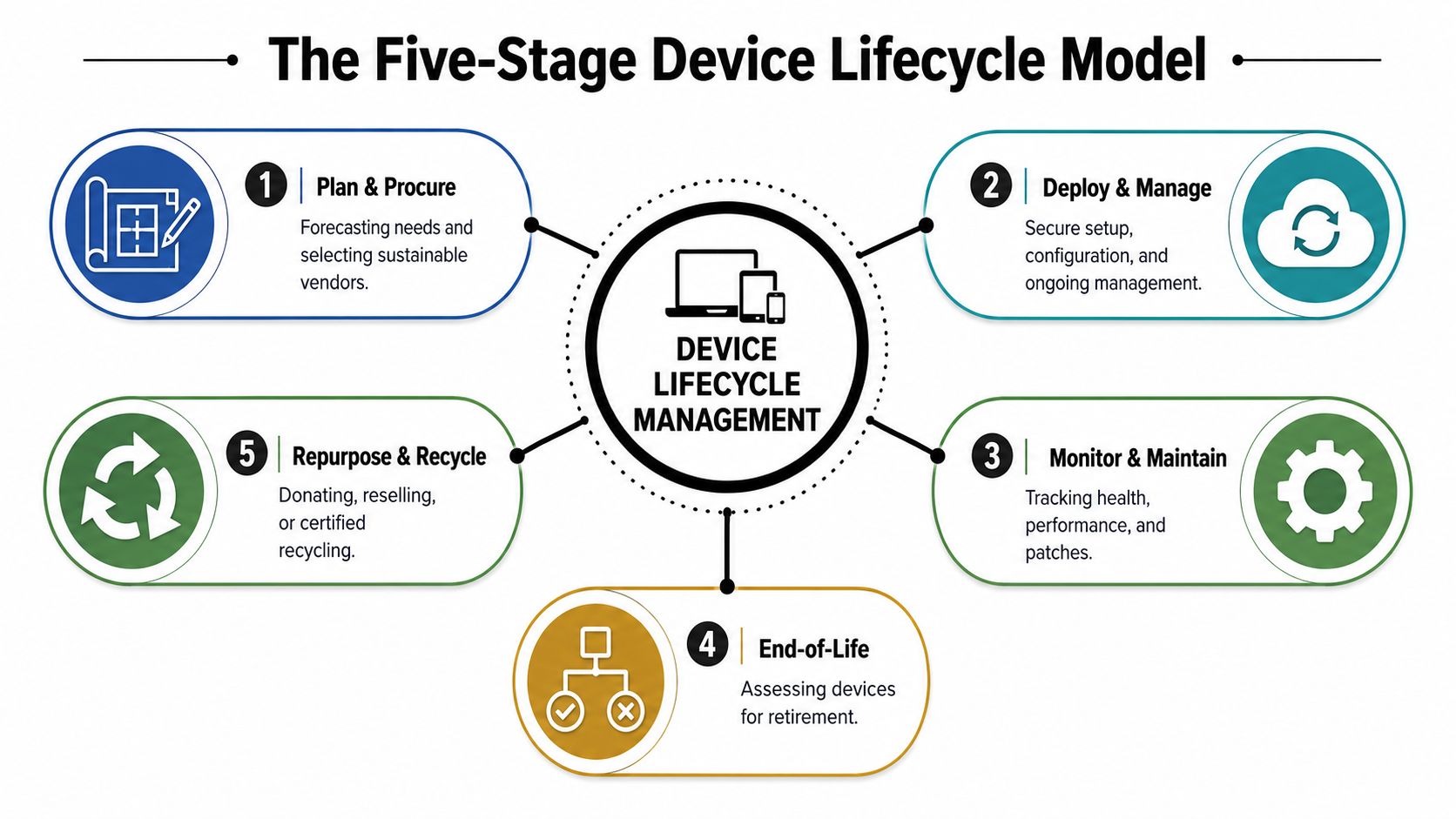
Device lifecycle management is the full operating model for how an organization plans, acquires, deploys, supports, refreshes, and retires devices. The term shows up in a few different stage models, but the workflow is the same, devices move from purchase to use to replacement, and then to disposal or reuse. One common model breaks the process into planning and assessment, procurement, deployment and provisioning, management and maintenance, and decommissioning and disposal from this device lifecycle guide, while another frames it as acquisition, deployment, maintenance, and retirement/recycling in a separate industry overview.
A relay race illustrates this concept: Planning is picking the right runners, procurement is getting them to the start line, deployment is the handoff to users, maintenance keeps the baton moving, and retirement is the clean handoff out of the race. If one runner drops the baton, the whole team pays for it later.
What it covers and what it doesn't
DLM sits above point tools like MDM, ITAM, and ITAD. MDM helps manage configuration and policy, ITAM tracks assets, and ITAD handles secure disposition, but DLM is the thread that ties those jobs together so the handoffs don't break.
A lifecycle program fails when each team optimizes its own step and nobody owns the whole journey.
That matters more now because enterprises are moving toward managed lifecycle services. Gartner's forecast says more than 70% of enterprises will rely on Managed Device Lifecycle Services by 2028, up from fewer than 35% in 2025, and it defines the model as a service where organizations pay to have PCs configured and supported throughout the lifecycle Gartner forecast summary. In plain terms, the operating model is shifting from one-time hardware buying to continuous lifecycle management. For many teams, that's no longer optional, it's how you keep support windows, security expectations, and refresh timing aligned.
For a practical ITAD view of that handoff from active use to retirement, see the internal overview on what IT asset disposition includes.
The Five Lifecycle Phases and What Happens in Each
The clearest way to run DLM is to assign one owner, one output, and one checkpoint to each phase. That keeps the process from turning into “someone else's problem” at the exact moment a device needs a decision.
The working model
| Phase | Primary Activities | Typical Owner | Success Indicator |
|---|---|---|---|
| Plan and procure | Forecast demand, select vendors, standardize models | Procurement with IT leadership | Approved procurement scorecard |
| Deploy and provision | Image devices, enroll them, assign users | Endpoint team | Imaging report and asset record |
| Manage and maintain | Patch, monitor, repair, support | IT operations | Patch compliance and uptime |
| Refresh | Evaluate aging hardware, queue replacements | IT ops with finance | Refresh queue and replacement plan |
| Retire | Wipe, remove from inventory, resell, donate, or recycle | ITAD or security team | Certificate of destruction or transfer record |
Plan and procure is where organizations choose the right mix of standardization and flexibility. The output should be a procurement scorecard, not a pile of vendor emails, because inconsistent buying creates inconsistent support later.
Deploy and provision is the first real handoff to users. A good deployment process leaves behind an imaging report, a tagged asset record, and a device that's already enrolled in management tools, which means support starts from a known baseline instead of a mystery configuration.
Manage and maintain is the long middle of the journey. Patching, repairs, and user support happen here, and most of the day-to-day cost hides if nobody watches device health consistently.
Refresh is the decision point many teams skip. Instead of waiting for failures, the refresh queue should be driven by age, business impact, and replacement timing so procurement can plan rather than panic.
Retire ends the story with proof. If a device leaves active service, the organization should be able to produce a certificate of destruction, a sanitization record, or a documented transfer if the hardware was reused or donated. For a deeper look at recovery options, use the internal guide on asset recovery.
Why a Disciplined Program Pays for Itself
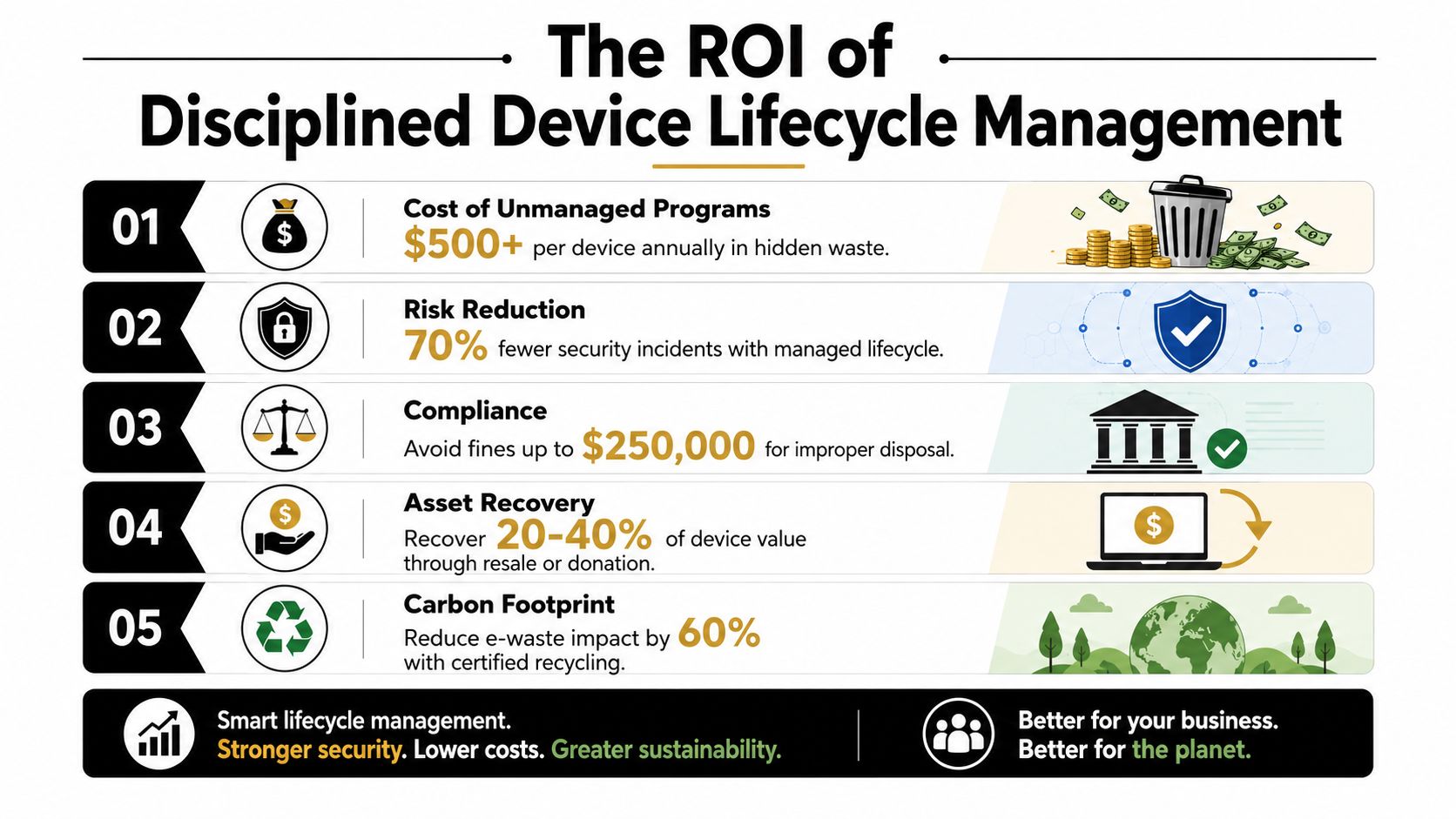
A device program starts paying for itself the moment teams stop treating each laptop, phone, or tablet as a one-off purchase and start managing it like a tracked asset with a lifecycle. Without that discipline, costs show up in several places at once, support time, carrier fees, replacement spending, and the cleanup work that follows a missed retirement. A market report summary shows the Device Lifecycle Management Service market at USD 2.55 billion in 2024, with a projection to USD 5.5 billion by 2035 and a 7.2% CAGR from 2025 to 2035 market report summary. The same source says a disciplined DLM program can cut total device-related spending by 18 to 25%, while organizations without one may pay 20 to 30% more per device annually market report summary.
The cost picture becomes even clearer in a fleet of 1,000 devices, where unmanaged waste can reach roughly $150,000 to $400,000 per year through unnecessary carrier charges, unplanned replacement costs, and IT support overhead market report summary. That is the kind of drag finance notices quickly, because it behaves like a slow leak in a roof. The building still stands, but every month more water gets in.
The business case is wider than cost
Financial waste is only part of the story. When devices are inventoried, patched, reassigned, and retired on schedule, security and compliance teams can work from records instead of assumptions, which makes audits easier to defend. Cleaner retirement also supports ESG reporting, because fewer devices sit in limbo and more hardware gets reused, donated, or responsibly recycled.
The cheapest device is the one that's still useful, secure, and fully tracked.
That is why lifecycle discipline matters to finance as much as IT. It reduces operational drift, gives sustainability teams a clear end-of-life trail, and keeps stale hardware from sitting around as an unpatched liability.
End-of-Life Decisions Without the Guesswork
End-of-life is where good intentions usually get messy. A device looks old, but maybe it still has warranty left. A laptop is slow, but maybe it can be reassigned to a lighter workload. A desktop is ready to go, but the data on it still matters. That's why end-of-life needs to be a decision tree, not a gut feeling.
Use the full signal, not just the age
ManageEngine's End-of-Life Devices insight flags devices approaching or past their recommended operational lifespan, which is useful because unsupported endpoints are harder to patch and harder to secure ManageEngine EOL guidance. The smarter approach is to combine age, hardware health, warranty status, OS support, and compliance posture before you choose the next step.
That's how you avoid keeping a device in service just because it still powers on. If the machine is slow, out of warranty, and no longer supported by the operating system, its remaining value may be lower than the support burden it creates.
Practical rule: write the retirement threshold around business risk, not sentimental hardware lifespan.
The tradeoff is usually simple. If the device still has useful life, it may be cheaper to reuse or repurpose it. If it's no longer fit for daily work but still has residual market value, resale can make sense. If it holds sensitive data or has reached the end of safe use, it should go through secure wipe and then certified recycling or destruction.
Sanitize first, then decide the next destination
Secure decommissioning is the risk-sensitive step because data exposure doesn't disappear when a device leaves the desk. ManageEngine's lifecycle guidance says decommissioning should include data sanitization based on industry standards and documented disposal steps for audit purposes ManageEngine decommissioning guidance. Microsoft Intune's lifecycle model also says that when a device is no longer required, organizations must retire or wipe all sensitive data on it Microsoft Intune lifecycle model.
That means the sequence matters. Remove the asset from inventory, unbind it from management, verify data destruction, then retain the record. When that chain is documented, auditors, security teams, and downstream partners all see the same story.
KPIs and Compliance Checks That Keep the Program Honest
A lifecycle program only works if it produces numbers the business can trust. If the dashboard says devices are in rotation but half the fleet is sitting unrepaired in closets, the program isn't healthy, it's just labeled well. The useful KPIs are the ones that expose delay, waste, and weak handoffs.
The metrics worth reviewing every quarter
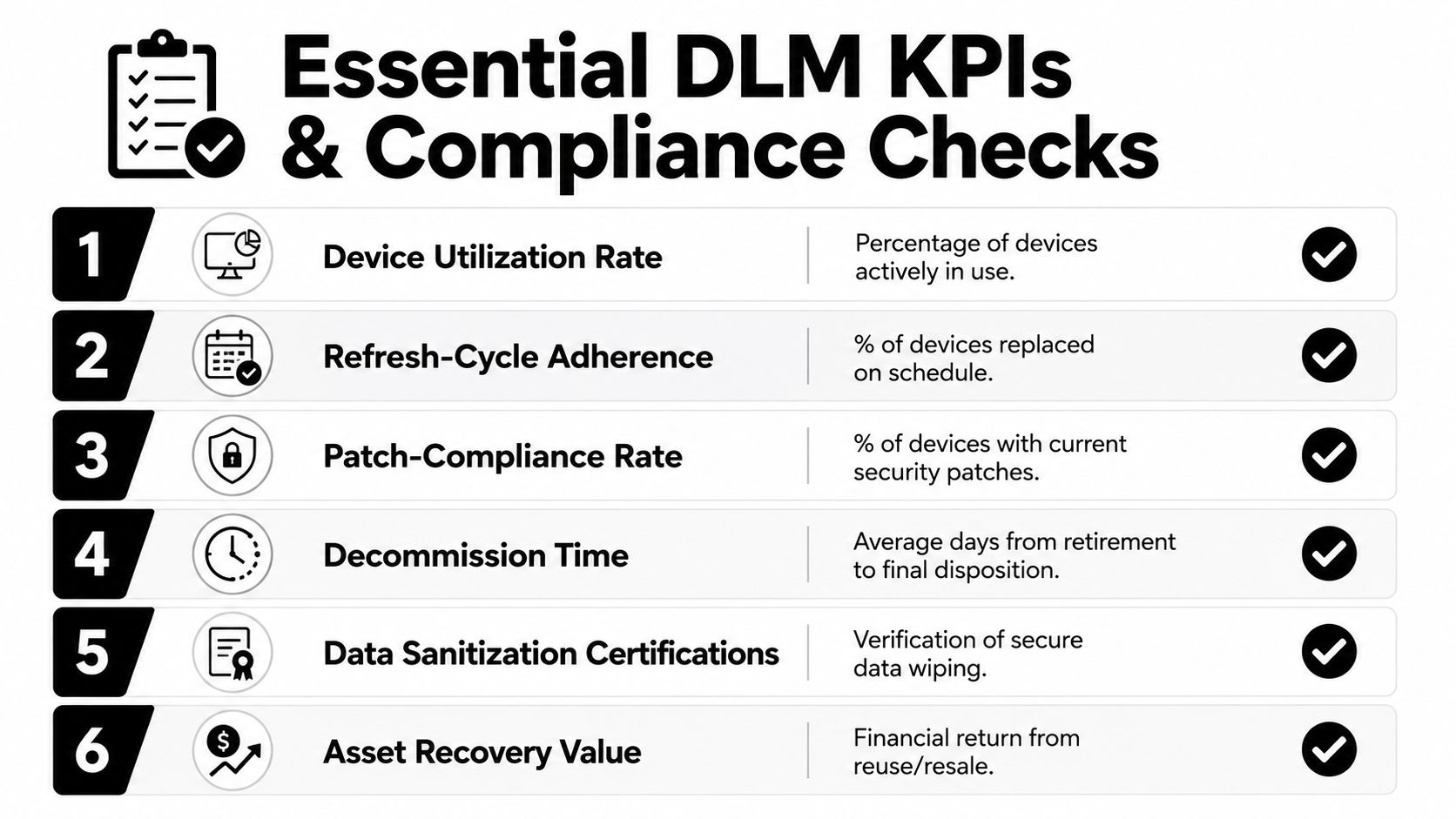
- Device utilization rate: Measure how many devices are in active use, not just assigned on paper.
- Refresh-cycle adherence: Track whether replacements happen on schedule or drift into another budget year.
- Patch-compliance rate: Confirm that managed devices are current on security updates and not lagging behind policy.
- Decommission turnaround: Watch the time between retirement approval and final disposition, because delays create storage and security risk.
- Data sanitization certifications: Keep proof that retired devices were wiped or destroyed according to policy.
- Asset recovery value: Review how much value came back through reuse, resale, or donation.
Compliance checks that should sit beside the KPI dashboard
Data privacy rules, e-waste handling requirements, and sector-specific expectations all intersect here. Healthcare, education, and public-sector teams usually need tighter evidence trails, because device handling can touch sensitive information, records retention, or procurement controls.
For the actual quarterly packet, keep these artifacts ready:
- Inventory exports showing what's active, what's pending refresh, and what's retired.
- Disposition records for every device that leaves the fleet.
- Sanitization certificates for data-bearing hardware.
- Vendor chain-of-custody documentation if a third party handled transport or destruction.
- Exception logs for devices kept longer than policy allows.
For a usable compliance worksheet, the internal compliance checklist template is a practical starting point. The point is simple, if your team can't answer an audit request in one meeting, the lifecycle process still has gaps.
A 90-Day Roadmap to Stand Up Your Lifecycle Program
A useful rollout doesn't need a giant transformation project. It needs a clean first quarter that gets inventory, policy, and retirement controls working together. Start with the devices already in circulation, because the biggest risk usually lives there.
Days 1 to 30, inventory and ownership
Build a current device list, then assign ownership for each major category, laptops, desktops, mobile devices, and shared endpoints. Write a one-page lifecycle policy that says who approves buys, who signs off on refresh, and who owns disposal.
Days 31 to 60, standardize handoffs
Lock down procurement and deployment so devices enter the fleet tagged, enrolled, and tracked the same way every time. If the setup process is different for every team, the support process will be too.
Days 61 to 90, formalize retirement
Choose a partner for secure data destruction, pickup, and certified recycling or resale. Then set the quarterly KPIs you'll review next, so the program doesn't fade after the rollout finishes.
A short implementation checklist keeps momentum visible:
- Build the master inventory.
- Set one lifecycle owner per device class.
- Define refresh and retirement thresholds.
- Standardize deployment and tagging.
- Document wipe, transfer, or destruction steps.
- Review KPIs before the next quarter closes.
Where Reworx Recycling Fits and How to Get Started
A school district replacing aging laptops can use Reworx Recycling for donation-based recycling, secure hard drive shredding, and pickup scheduling through its IT asset disposition service. A business handling an office cleanout can route surplus hardware into a documented disposition flow instead of leaving it in storage until the next move. That keeps the retire phase controlled and gives usable equipment a second life where it makes sense.
Reworx Recycling also fits the quarter-end reset many teams need. If your fleet review shows devices ready to leave active use, the same vendor can help with donation, buyback, or certified recycling, depending on the hardware and data risk involved.
If your team is mapping refresh, wipe, and retirement decisions into one repeatable process, Reworx Recycling can help with secure data destruction, IT equipment disposal, and donation-based recycling that supports both compliance and community impact. Visit Reworx Recycling to plan a pickup, discuss an ITAD initiative, or line up the next round of retired devices for responsible handling.