Your phones start dropping calls at 10:15 on a Tuesday. The front desk can't transfer customers. A sales rep says voicemail isn't syncing. Someone in operations mentions the ISP was “working on something,” while your IT manager is tracing cables in a closet nobody has opened in years.
That's when most businesses search telecom system support near me and call the first local company that looks available.
Sometimes that works. Often it doesn't. A telecom issue might be a bad handset, a carrier handoff problem, an aging PBX, a switch configuration mistake, damaged cabling, or legacy equipment left behind after a VoIP migration. The repair request sounds simple, but the underlying business problem usually isn't. If you treat telecom support as a one-time dispatch, you'll keep paying for the same confusion in different forms: downtime, slow customer response, unclear vendor accountability, and unmanaged hardware piling up in closets.
A smarter approach treats support, upgrades, and retirement of old equipment as one operating process. That's the difference between patching symptoms and managing communications infrastructure like an asset.
Why 'Telecom Support Near Me' Is More Than a Quick Fix
At 10:15 a.m., the immediate goal is obvious. Get calls working again. The larger risk is less obvious. A rushed service call can restore dial tone while leaving the actual failure in place, along with old gear, bad documentation, and no plan for what happens to the equipment you are about to replace.
Local support matters because telecom problems are physical as well as technical. provider near your site can reach the MDF, test handoffs, inspect cabling, check power, and isolate whether the fault sits with the carrier, the LAN, the phone system, or abandoned hardware still tied into production. Distance affects response time. It does not guarantee accurate diagnosis.
I see this often after office moves, VoIP migrations, and partial upgrades. A business calls for a handset issue and finds a larger problem: legacy gateways still connected, unlabeled patching, dead batteries, old analog lines no one meant to keep paying for, or retired phones stacked in storage with no disposition record. The support request starts as break-fix. The business problem is lifecycle control.
What breaks first is rarely the whole story
A dropped call, failed transfer, or dead extension is just the symptom the staff can hear. The root cause may sit in the switch closet, the carrier demarc, the firewall, the paging integration, or the equipment left behind from the last change order. Good local support providers handle the active fault and document what else needs correction before it causes the next outage.
That distinction affects cost. A vendor that only closes the ticket may get you through the day. A vendor that documents dependencies, flags unsupported hardware, and identifies what should be removed helps prevent repeat dispatches, surprise carrier charges, and wasted labor later.
The same issue comes up during relocations. Teams setting up a new site often focus on internet turn-up and phone activation, while older circuits, handsets, and network-connected voice gear from the previous location remain unresolved. For businesses coordinating site changes, even general relocation planning material such as Emmanuel Transport moving resources can be a useful reminder that connectivity, cabling, and equipment retirement need to be planned together.
Support should include the exit plan
Telecom support is stronger when it includes decommissioning from the start. If a provider replaces phones, gateways, switches, batteries, or PBX components, there should also be a documented path for removing, tracking, and retiring those assets. That matters for space, safety, accounting, and data security.
This is the part many businesses skip. Old telecom equipment often contains configuration data, call logs, credentials, or storage media. Even when the data risk is limited, unmanaged hardware left in closets makes future troubleshooting harder and creates confusion about what is still live. A local search should lead to a provider that can repair what is down today and help you decide what stays, what goes, and how retired equipment will be handled properly. Businesses comparing options can use this local telecom service support guidance to frame that conversation around support, transition planning, and responsible ITAD in one process.
Decoding Your True Telecom Support Needs
“Support” means different things depending on what you operate. A small office on hosted VoIP has one set of needs. A school with mixed handsets, old analog lines, paging, and layered network gear has another. A manufacturer with multiple buildings and inherited cabling usually has both active support needs and hidden cleanup work.
Before you call providers, define the environment in plain language. That alone filters out weak vendors quickly.
Start with the system you have, not the one you want
List your current setup under three headings:
- Core calling platform: PBX, hosted VoIP, hybrid, or a mix acquired over time
- Physical layer: patch panels, wiring closets, structured cabling, wall jacks, switches, wireless access points, gateways, and batteries
- Dependent services: call routing, voicemail, hunt groups, paging, door phones, conference rooms, and failover procedures
If you can't describe those basics, your support provider will spend the first part of every visit discovering what you own at your expense.

The hidden problem is often inside the building
One of the most overlooked realities in this search is that telecom support is often a decommissioning problem disguised as a service request. Local search results tend to focus on installation and maintenance, but they rarely address what happens to old phone closets, cable plant, and switch gear after a move to VoIP or wireless-first setups. That gap matters because support for telecom infrastructure inside buildings often overlaps with IT asset disposition and e-waste compliance, as reflected in this discussion of telecom-related work and legacy infrastructure realities in the field from Indeed job market context.
That means your “support issue” may be one of these:
| Situation | What it usually means |
|---|---|
| New VoIP system, old phones and hardware still onsite | You need decommissioning and inventory control |
| Intermittent issues after an office move | Cabling, labeling, and patching need review |
| Users blame the phone system for call quality | The root issue may be switching, Wi-Fi, or ISP handoff |
| Empty desks still have active endpoints | You're carrying unnecessary hardware and support exposure |
Old telecom hardware left in place doesn't stay harmless just because nobody uses it.
Ask what your business needs next year
Good support planning isn't just about current outages. It should also cover location changes, staff changes, carrier changes, and cleanup after migration. If you're planning a move or utility transition, even non-IT checklists can help frame telecom dependencies. Some businesses find Emmanuel Transport moving resources useful because they surface the practical coordination issues that often get missed during site changes.
Use this short self-audit before contacting vendors:
- Name the failure pattern. Is the issue random, location-specific, or tied to peak usage?
- Separate active systems from abandoned ones. Don't lump production gear together with equipment that should've been retired already.
- Decide what requires onsite support. Remote support won't fix damaged cable runs or unlabeled closets.
- Document compliance concerns. If devices store settings, logs, or user data, retirement needs control.
- Define acceptable downtime. That affects your SLA and pricing options later.
If you want a provider that can support both live operations and the infrastructure left behind after upgrades, telecom solutions for business environments should be evaluated through that broader lens.
Your Vetting Checklist for Local Telecom Providers
A provider usually looks competent during the sales call. The true test is what happens at 7:10 a.m. when the front desk cannot place calls, the carrier says the circuit is clean, and your staff has no current diagram of what is still live in the closet. Vetting local telecom support should account for both service recovery and what happens to equipment once it is replaced, removed, or left behind.
Team depth matters here. As noted earlier, telecom support is a field shaped by replacement hiring and uneven experience levels. That is one reason to verify who will work on your system, how long they have supported your platform set, and whether the provider relies on subcontractors for the hard parts.
Ask for evidence, not reassurance
A credible provider can describe its limits without hedging. If the firm supports Avaya, Mitel, Cisco, Microsoft Teams Phone, or hosted VoIP environments, ask which systems its own technicians handle regularly, which tasks get escalated, and what they no longer support.
General claims waste time. Specific answers reduce risk.
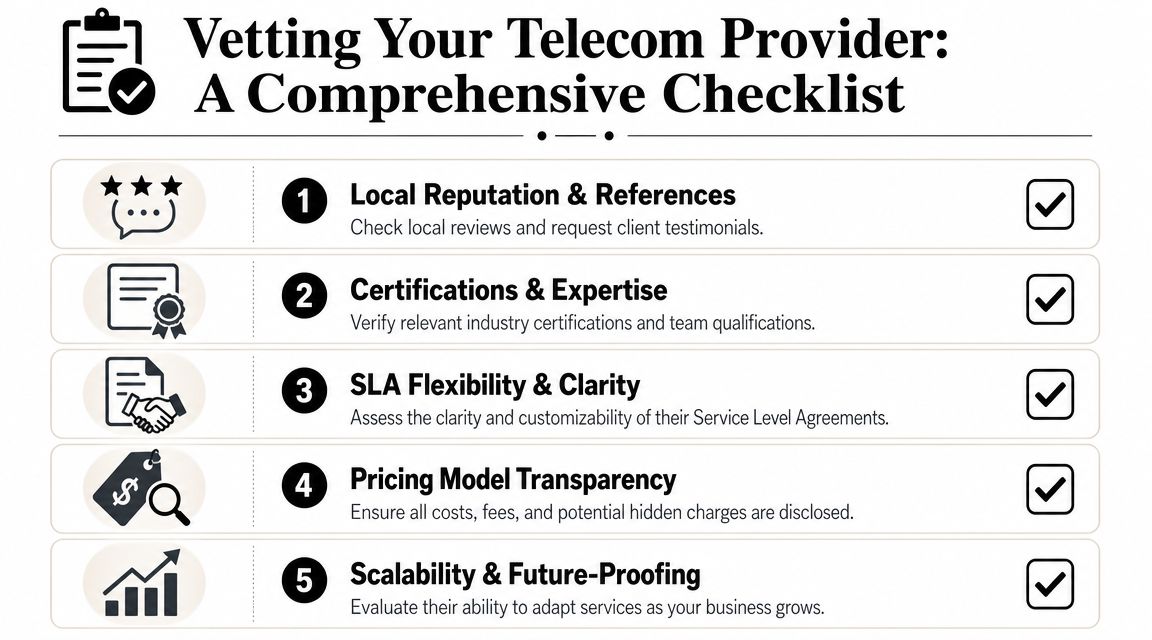
Use questions like these in vendor interviews:
- Platform fit: Which phone systems, gateways, switches, session border controllers, and UC platforms do your technicians support directly?
- Field capability: What gets solved remotely, and what triggers onsite dispatch?
- Escalation path: Who owns the ticket when the issue touches the carrier, your LAN, and telecom hardware at the same time?
- Documentation discipline: Do you update labels, diagrams, asset records, and change notes after each visit?
- Lifecycle handling: Will you remove, inventory, and document retired handsets, PBX modules, gateways, and rack gear during project work?
That last point gets missed often. A provider that installs new equipment but leaves old hardware on the wall creates confusion for the next outage, inflates support scope, and increases the chance that storage media or configuration data stays on site longer than it should.
Read local credibility carefully
Online reviews can help, but references carry more weight if they match your operating conditions. A medical office, school district, warehouse, and multi-site professional firm all use telecom differently. The right reference is one that shows the provider has handled your mix of uptime pressure, site access rules, and legacy equipment.
Use a practical screen:
| What to verify | Why it matters |
|---|---|
| Similar site type | Telecom issues in campuses differ from small office suites |
| Named technician or team | Continuity shortens troubleshooting and reduces repeat discovery work |
| After-hours process | Outages often start before opening, after close, or during cutovers |
| Written scope discipline | Clear scopes limit billing creep and change-order disputes |
| Asset removal capability | Upgrades fail cleanly only when old equipment is identified and removed properly |
A provider who cannot explain how changes are documented usually leaves your business dependent on tribal knowledge.
Watch for these warning signs
Some problems show up before the first truck roll.
- No clear boundary between telecom and network support: Voice issues often sit at that intersection. If the provider cannot explain how it tests both sides, incidents will drag.
- Weak intake process: Serious firms ask for models, symptoms, recent changes, carrier details, site contacts, and access constraints before dispatch.
- Universal claims of expertise: Mature providers can tell you where they are strong, where they need manufacturer support, and where they would decline the job.
- No answer for removed equipment: Replacement work is incomplete if obsolete gear is left mounted, powered, or undocumented.
- Thin local coverage: Real local support means field capacity, stocked parts, and accountable scheduling, not a nearby phone number routed to a distant call center.
For businesses comparing regional options, telecommunications company evaluation criteria for local business support should cover repair skill, staffing continuity, documentation habits, and end-of-life handling in the same review process. That is how you avoid hiring one vendor to keep systems running and another to clean up the avoidable mess later.
Understanding Service Level Agreements and Pricing Models
Most support disappointments start in the contract, not in the server room. Businesses buy “coverage” and discover later that response time doesn't mean resolution, after-hours support means voicemail triage, and reporting is too blended to reveal where service is failing.
That's why a telecom SLA should be read like an operating document, not a sales attachment.

Response time is not the same as business recovery
A provider may promise a quick callback or remote acknowledgment. That's useful, but it doesn't tell you when users can make calls again, when a branch office is restored, or when a failed handoff is escalated to the right party.
Read the SLA for these distinctions:
- Response commitment: When someone starts working the ticket
- Resolution target: When service is expected to be restored or stabilized
- Coverage window: Business hours, extended hours, or true 24/7
- Exclusions: Carrier delays, third-party hardware, unsupported legacy systems
- Onsite terms: Dispatch availability, travel charges, geographic limits
Demand segmented reporting
A common reporting mistake is averaging every issue into one support score. That hides bottlenecks. Telecom support experts recommend tracking performance by service motion and using separate stage definitions and SLAs for different issue types, because blended reporting can hide whether the problem is a fast-turnaround issue or a longer coordination problem, as described in this SPOTIO guidance on segmented telecom pipeline and process tracking.
For business buyers, that means your provider shouldn't hand you one monthly average and call it accountability. You need separate visibility for categories such as:
- user-level incidents
- site outages
- MAC work such as moves, adds, and changes
- carrier coordination
- hardware replacement
- legacy decommissioning tasks
If every ticket type rolls into one metric, you won't know whether the provider is slow, your environment is unstable, or approvals are the real bottleneck.
Match pricing to your operating pattern
Different models work for different environments.
| Pricing model | Best fit | Main trade-off |
|---|---|---|
| Monthly retainer | Businesses with ongoing support needs and multiple issue types | You must define scope tightly |
| Block hours | Offices with moderate change activity | Hours can disappear into documentation gaps |
| Per-incident | Small firms with stable environments | Costs become unpredictable during repeated outages |
If your business has frequent site changes, hybrid systems, or inherited telecom clutter, cheap per-incident support often becomes the expensive option. If your environment is stable and well documented, it can be reasonable.
When comparing proposals, telecom provider service planning should focus on reporting structure, exclusions, and how the vendor handles mixed support and decommissioning work.
Ensuring Compliance and Data Security in Telecom Support
Telecom support is a security decision. The provider may touch call logs, voicemail systems, admin consoles, routing rules, user directories, billing integrations, and internal network paths. If they're weak on access control, your risk isn't limited to dropped calls.
That's why “can they fix it?” is only the first question. The next question is whether they can work inside your environment without creating exposure.
Modern support is software-heavy
Microsoft explains that modern telecom operations rely on Operations Support Systems (OSS) for network infrastructure functions such as fault management and service assurance, while Business Support Systems (BSS) handle billing, subscriptions, CRM, service fulfillment, and revenue management. Microsoft also notes that telcos often run OSS and BSS together to improve end-to-end service, efficiency, security, and revenue, with cloud computing, automation, and analytics now central to these environments, as outlined in its overview of OSS and BSS telecom platforms.
For a business buyer, that changes the vetting standard. Physical repair skills still matter, but they're no longer enough. A local telecom support team also needs discipline around platform access, authentication, change handling, and customer-facing system data.
What to ask before granting access
Use a short compliance screen during procurement and again before onboarding:
- Access control: How do technicians receive admin access, and how is it revoked?
- Change discipline: Are configuration changes documented and approved?
- Staff screening: Who can access client systems and under what supervision?
- Data handling: How are call records, user details, and exported configs stored and transmitted?
- Regulated environments: If your business has sector-specific obligations, can the provider work within your rules without improvising?
A weak vendor creates two problems at once. They increase operational risk during incidents, and they make audits harder later because nobody can reconstruct what changed, who changed it, or where sensitive data moved.
Telecom support should leave an audit trail, not just a fixed ticket.
Planning for Responsible Decommissioning and ITAD
Every telecom upgrade creates leftovers. Desk phones come off walls. Analog gateways get unplugged. PBX shelves sit idle. Network closets keep the old patching “just in case.” Weeks later, nobody knows what's still active, what contains data, or what should be recycled versus destroyed.
That's where many otherwise competent projects fall apart.
TM Forum notes that over 70% of digital transformation projects do not meet their objectives and warns that telecom modernization often fails when business and IT aren't aligned from the start. Its guidance emphasizes business-led scope definition, cross-functional accountability, workflow automation where possible, and realistic adoption timelines, as explained in TM Forum's analysis of pitfalls that sabotage telco transformations.
Decommissioning has to be defined upfront
If the support provider installs the new system but nobody owns the old one, the business is left with a governance problem disguised as a storage problem.
That usually shows up in four ways:
- Untracked equipment still sitting in closets or storage rooms
- Data risk on devices that may retain configurations or logs
- Disposal confusion about what can be reused, recycled, or physically destroyed
- Facilities drag because old telecom gear blocks moves, renovations, and office cleanouts

Treat telecom retirement like any other controlled asset process
A disciplined retirement plan should include:
- Inventory and classification: Separate active devices from obsolete hardware and identify anything with stored settings or operational data.
- Secure data destruction: Don't assume telecom equipment is “dumb.” Some endpoints, appliances, and related devices retain enough information to require controlled wiping or shredding.
- Reuse decisions: A few assets may be suitable for redeployment, parts recovery, or approved resale. Many won't be.
- Electronics recycling: Cabling, endpoints, peripherals, and infrastructure hardware need environmentally responsible downstream handling.
- Documentation: Keep records of what was removed, how it was processed, and what was destroyed.
The lifecycle view reduces both waste and operational noise
Telecom support and IT asset disposition merge into a single workflow, rather than remaining two separate purchases. A business that plans retirement early makes better decisions about moves, upgrades, office cleanouts, and facility changes. It also avoids the common mess where obsolete phones, switches, and accessories occupy expensive space because no team wants to own the last step.
For organizations that want one option for donation-based recycling, secure data destruction, office cleanout support, and broader IT asset disposition (ITAD) handling tied to equipment retirement, Reworx Recycling provides IT asset disposition services relevant to this stage of the process. In practice, that means telecom-related hardware can move through a documented end-of-life workflow instead of becoming forgotten e-waste.
The cleanest telecom upgrade is the one that includes a written exit plan for the equipment you're replacing.
Partner with Reworx for a Complete Telecom Lifecycle Strategy
Most businesses start with uptime. They should. But the stronger strategy is broader: choose local telecom support carefully, define service accountability in writing, protect system access, and decide early what happens to retired equipment.
That's the gap many companies don't address until a move, renovation, or audit forces the issue. If your project includes old handsets, telecom closets, surplus IT gear, or mixed electronics from an office refresh, coordinated decommissioning matters as much as the new install. For teams planning a wider workspace transition, resources like expert office cleanout solutions can help frame the facilities side of decommissioning so telecom retirement isn't handled in isolation.
A complete telecom lifecycle strategy should cover support, documentation, hardware removal, secure data destruction, sustainable recycling, and donation pathways where appropriate. That approach reduces clutter, controls risk, and gives facilities, IT, and leadership a cleaner handoff when systems change.
When your business is replacing telecom equipment, clearing out legacy hardware, or planning a broader office technology transition, Reworx Recycling can help you handle the end-of-life side responsibly. Donate old equipment, schedule a pickup, or explore a partnership that supports secure data destruction, sustainable electronics recycling, and community impact through donation-based recycling.