
Your finance lead wants the refresh done this quarter. Your help desk wants fewer tickets. Your security team wants supported hardware. Then procurement opens a spreadsheet and the gap between new and refurbished pricing changes the whole conversation.
That's usually when a cheap refurbished PC stops looking like a fallback and starts looking like a serious sourcing option.
The mistake first-time buyers make is treating refurbished hardware like a consumer bargain hunt. Business buying works differently. In a bulk purchase, the actual questions aren't just CPU, RAM, and storage. You need to know who refurbished the devices, whether the configuration is consistent across the batch, whether the operating system is properly licensed, whether the hardware will stay supportable long enough to justify deployment effort, and what happens to the equipment you're retiring at the same time.
A good refurbished buy can lower capital spend, support sustainability goals, and give departments usable equipment faster than waiting on a full new-device cycle. A bad one creates ticket volume, compliance headaches, and a second replacement project sooner than planned.
Why Smart Businesses Are Choosing Refurbished PCs
Most organizations reach the same point eventually. The current fleet is aging out, staff are complaining about slow systems, and the budget won't stretch as far as everyone hoped. That's where refurbished business hardware earns a second look.
The refurbished market is no longer a side channel for bargain hunters. The global refurbished PC market was valued at USD 11.351 billion in 2023 and is projected to grow at a 6.51% CAGR from 2023 to 2033, reaching USD 21.321 billion by 2033, according to Spherical Insights' refurbished PC market forecast. That tells you something practical. More buyers now treat refurbished desktops and laptops as a normal procurement lane, not an exception request.

A cheap refurbished PC makes sense when the workload is clear. Office productivity, browser-based systems, kiosks, training labs, remote admin stations, and many shared-use environments don't always need brand-new hardware. They need stable hardware that can be deployed, supported, and replaced predictably.
What makes the strategy work
The strongest refurbished programs are built around four buying disciplines:
- Defined use cases: Assign older or lower-cost systems to known workloads, not vague “general use.”
- Consistent sourcing: Buy from sellers that can provide repeatable specs and batch-level documentation.
- Operational screening: Check warranty terms, OS status, and upgrade path before you approve the purchase order.
- Exit planning: Tie acquisition to future IT asset disposition, electronics recycling, and secure data destruction.
Practical rule: If the device is cheap but uncertain, it isn't cheap for long.
That's why a procurement discussion about refurbished PCs usually turns into a broader IT lifecycle discussion. A circular approach works better than one-off purchases, especially when your team is also planning an office cleanout, computer recycling, or retired asset pickup. For a broader budgeting view, this short piece on why businesses are adopting refurbished desktop equipment is useful context.
Sourcing Channels for Reliable Business PCs
Where you buy matters as much as what you buy. Two machines with the same processor and memory can represent very different risk depending on who inspected them, how they were graded, and what support sits behind the invoice.
Manufacturer programs
Manufacturer-direct refurbished programs usually offer the cleanest process. Inventory tends to be standardized, cosmetic grading is more predictable, and support paperwork is usually easier for internal buyers to approve.
The trade-off is simple. You often pay more than you would through broadline secondary-market sellers. If your team values lower variance and easier stakeholder sign-off, that premium may be justified.
Third-party refurbishers and resellers
Large third-party sellers often have the widest volume and the most attractive pricing. This channel works well when you need a lot of devices quickly and you're comfortable reviewing listings carefully.
What separates a strong reseller from a risky one is process discipline. Ask how they test drives, memory, ports, screens, and batteries. Ask whether part substitutions are disclosed. Ask whether the exact model in the quote is the exact model that ships.
A third-party source is often where buyers first see the strongest pricing delta. A key reason demand stays high is that refurbished computers can sell for 10% to 25% or more below original retail price, while new machines can lose 30% to 70% of their value in the first year alone, as described in this overview of refurbished computer pricing and depreciation.
Social enterprises and recycling-based supply channels
This is the most overlooked category in B2B purchasing. Electronics recyclers and social enterprise recycling organizations sometimes provide refurbished inventory as part of a broader lifecycle service. That can be useful when you're trying to combine procurement, IT equipment disposal, secure data destruction, and sustainability reporting under one operating model.
In practice, this channel can fit schools, local government, healthcare groups, and businesses that want more than a transactional sale. Reworx Recycling, for example, operates in electronics recycling, donation-based recycling, IT asset disposition, pickup logistics, and secure hard drive destruction as part of that broader lifecycle approach. That doesn't replace normal vendor due diligence, but it does change the conversation from “Where can I find the lowest listing?” to “Which partner can support acquisition and retirement responsibly?”
| Channel | Best fit | Main strength | Main caution |
|---|---|---|---|
| Manufacturer refurbished | Standardized deployments | Predictable condition and paperwork | Higher price |
| Third-party reseller | Bulk value buying | Broad inventory and lower upfront cost | More variation between lots |
| Recycling or social enterprise channel | Circular IT programs | Lifecycle alignment and sustainability value | Inventory may vary by timing |
Buy from the seller whose process matches your risk tolerance, not from the listing with the nicest stock photo.
For buyers comparing portable systems, this guide to buying a refurbished laptop for business use is a useful companion.
How to Evaluate Quality Beyond the Spec Sheet
A listing can look good and still create trouble after deployment. Specs tell you what the system should be. They don't tell you what the system is, what parts were swapped, or how hard the machine was used before refurbishment.
That's why quality review has to move past the headline configuration.
Start with the grading language
Most sellers use some version of Grade A, B, and C. Treat those labels as shorthand, not as a standard you can trust blindly.
- Grade A: Usually means cleaner cosmetics and lighter wear.
- Grade B: Usually means visible use but still business-acceptable.
- Grade C: Usually means heavy wear, possible blemishes, and a higher chance of user complaints even if the unit functions.
The problem is that grading systems aren't always consistent across vendors. One seller's Grade B can look like another seller's Grade C. For business rollouts, ask for sample photos of the actual condition standard, not just a text definition.
Verify the internal configuration
A common value configuration in the market is a 4th-gen Intel Core i5 desktop with 8GB DDR3 RAM and a 256GB SSD, and buyers should verify the exact model number because some sellers may substitute lower-grade parts, as noted in PC Liquidations' guide to budget refurbished computers.
That matters because “8GB RAM and 256GB SSD” doesn't tell you everything. You still need to check whether the RAM is installed in a way that leaves expansion room, whether the SSD is from a known brand, and whether the motherboard and power supply match the original platform.
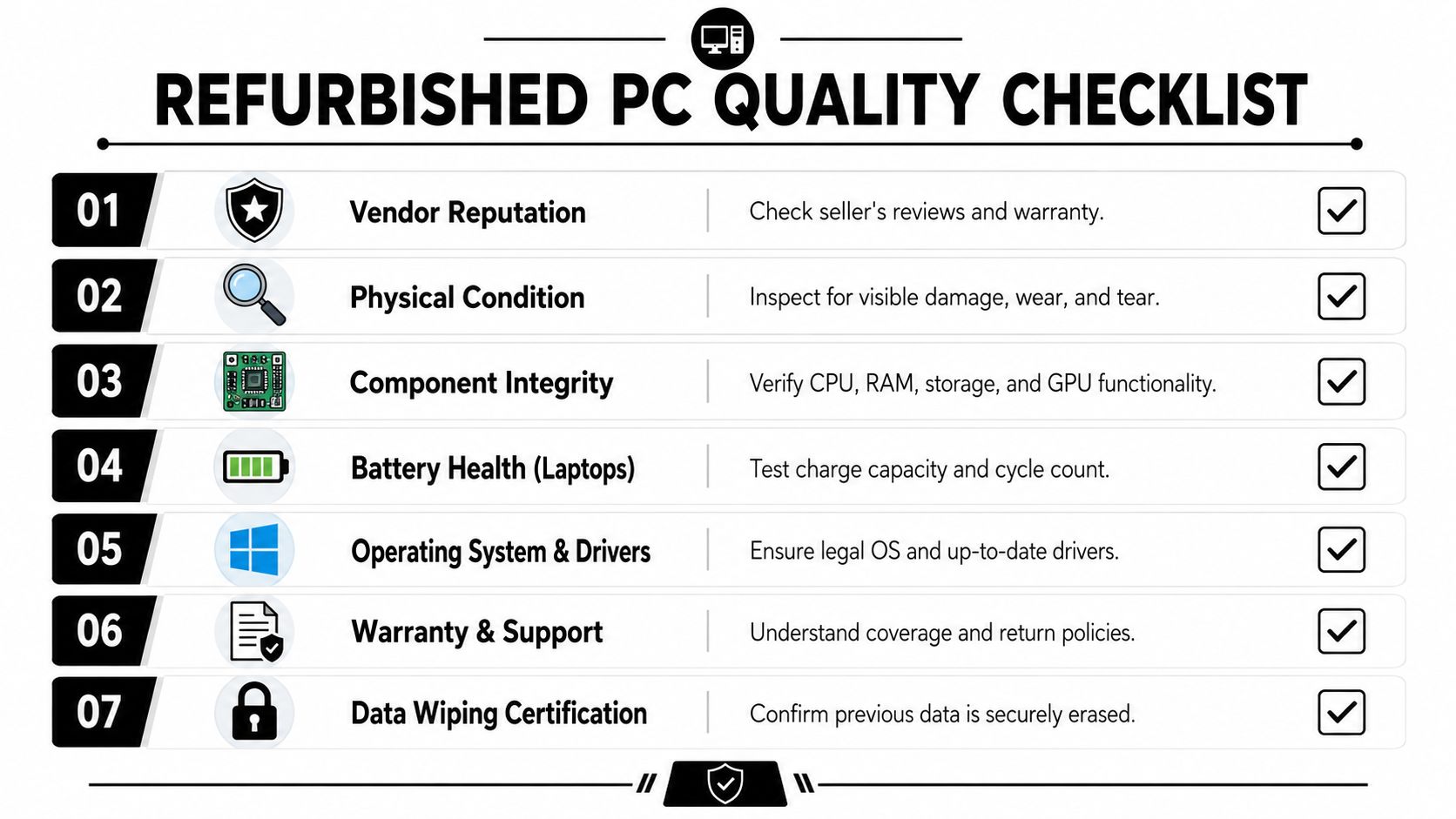
Use a receiving checklist
When a test batch lands, inspect it like you expect to reject part of it. A practical checklist should cover:
Chassis condition
Look for cracks, bent corners, missing screws, swollen panels, or signs the unit was opened roughly.Ports and connectivity
Test USB ports, display outputs, Ethernet, Wi-Fi, audio jacks, and charging ports on laptops.Display quality
On laptops and all-in-ones, check for pressure marks, uneven backlighting, dead pixels, and hinge stability.Storage and memory verification
Confirm the installed SSD and RAM match the invoice. Don't rely on the box label.Thermals and fan noise
Run the device long enough to hear abnormal fan behavior and spot overheating.Battery condition on laptops
Ask for battery health information before buying, then verify again on arrival.Keyboard and input wear
Shiny keys, weak trackpads, or inconsistent key response are support calls waiting to happen.
Receiving advice: If you wouldn't deploy the sample to your CFO or your front desk, don't approve the rest of the lot.
Watch for the quiet failure points
The biggest quality problems often aren't dramatic. They're small inconsistencies that multiply at scale. A mismatched power adapter. A third-party battery with poor life. One model in the lot using a different wireless card than the rest. Those details break your standard image, your spare-parts plan, or your support script.
For desktops, also check expansion options. Older small form factor business machines can still be useful if they have open DIMM slots and standard drive mounting. For laptops, durability and battery status matter more than cosmetic perfection.
A cheap refurbished PC is worth buying when the devices arrive as represented, the lot is consistent, and the condition aligns with the user role. It isn't worth it when your team has to “normalize” every machine manually after delivery.
Security and Compliance in Refurbished IT Assets
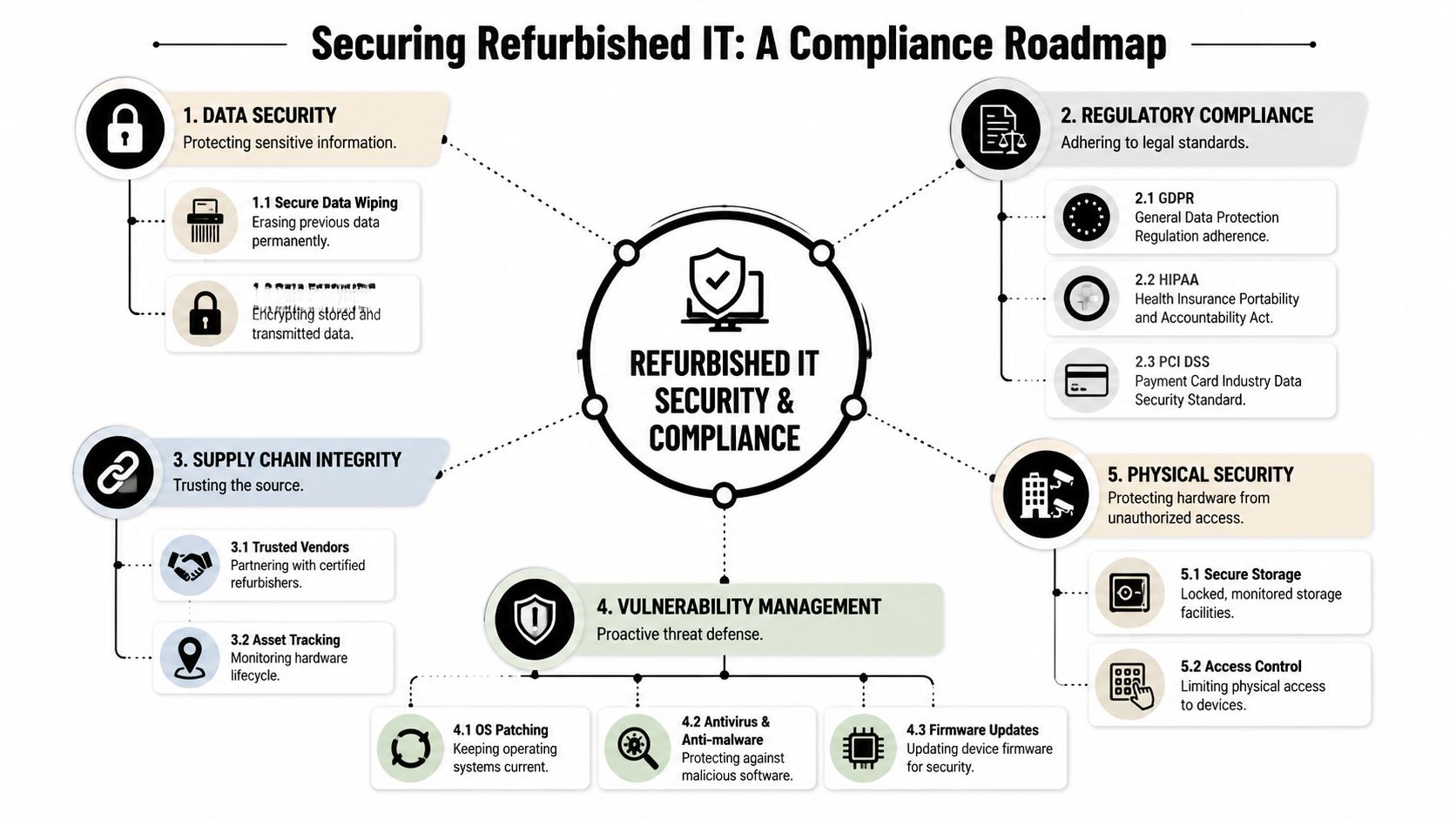
Cheap hardware becomes expensive the minute it creates a compliance issue. In business environments, refurbished IT has to clear the same security expectations as new hardware. There's no discount on risk.
That starts before the device reaches you. Someone owned it before. Their data had to be removed properly. The firmware had to stay intact. The operating system had to remain legitimate. If any of those steps were handled casually, the low purchase price doesn't matter.
Data destruction isn't optional
A professional refurbishing process should include documented data wiping or physical destruction of retired drives where reuse isn't appropriate. Business buyers should ask for the seller's process, chain-of-custody controls, and evidence of how storage media is handled.
This matters in ordinary office settings and even more in regulated environments. Healthcare groups, financial services firms, public agencies, and education buyers all need confidence that prior data was removed in a controlled way before the machine entered the resale channel.
If your organization is also retiring legacy assets during the same project, it helps to understand the wider IT asset disposition process and risk controls.
Check firmware and lock status
Refurbished PCs should arrive free of BIOS or UEFI passwords, remote management lock issues, and activation problems tied to prior ownership. If a seller can't confirm that, stop there.
Use your test batch to confirm:
- Firmware access: Your team should be able to enter BIOS or UEFI settings without hidden credentials.
- Boot integrity: Devices should boot cleanly without unexplained prompts, management lock screens, or provisioning remnants.
- Update path: The platform should accept current firmware and driver updates from the original manufacturer.
A machine that boots isn't automatically a machine you can manage.
Licensing matters more than buyers expect
One of the most common hidden risks in a cheap refurbished PC is software ambiguity. A listing may say “Windows installed,” but that doesn't answer whether the license is valid for business deployment, whether activation is clean, or whether your imaging process will expose problems later.
You need clarity on the OS edition, activation status, and whether the hardware is being sold with a legitimate license appropriate for your use. If your procurement team misses this, the problem often lands on desktop support after rollout.
Support window and Windows 11 readiness
Another practical security question is lifecycle viability. A refurbished PC might be fine for light work today and still be the wrong buy if it can't support modern security expectations going forward.
A key concern for modern workloads is whether the device can run Windows 11 or receive critical security updates. Buyers need to weigh the lower purchase price against the operational risk of a faster, non-compliant replacement cycle, as discussed in this analysis of refurbished PC viability for current workloads.
That decision should be tied to the role:
| Use case | Refurbished fit | Security question to answer |
|---|---|---|
| Kiosk or single-purpose station | Often strong | Can the device be locked down and patched reliably? |
| General office productivity | Often strong | Will it remain supportable for your planned refresh cycle? |
| Remote work endpoint | Mixed | Does it support current security controls and update requirements? |
| Regulated environment | Case by case | Can you document compliance across device, OS, and chain of custody? |
For procurement teams, the key shift is mental. Don't ask only whether the machine works. Ask whether it can remain compliant, manageable, and supportable long enough to justify deployment labor.
Decoding the Deal Price Warranty and Hidden Costs
The sticker price gets attention because it's easy to compare. Total cost of ownership is harder, and that's where most first-time refurbished buyers either save money or accidentally give it back.
The headline deal can be real. Refurbished business PCs are commonly sold at 30-60% below equivalent new models, and a new $1,200 workstation can often appear refurbished for about $500-$700 with the same core specifications, according to CJD E-Cycling's refurbished PC buying guide. That's a meaningful gap for any organization buying at volume.
The problem is that a low purchase price doesn't equal a low deployment cost.

Read the quote like an implementation plan
A cheap refurbished PC should be evaluated as a delivered, deployable endpoint. Not as a box with a CPU inside it.
Here's what to check before comparing offers:
- Warranty scope: Is there a meaningful hardware warranty, or only a short return window?
- Included accessories: Confirm power adapters, power cables, Wi-Fi antennas where applicable, keyboards, mice, and any specialty brackets.
- Operating system status: Verify license legitimacy and the exact OS version being supplied.
- Shipping condition: Ask whether the devices are individually packed and protected for bulk transit.
- Consistency across the lot: One standard image is easier than three slightly different hardware revisions.
The hidden costs that change the math
Many buyer mistakes frequently arise. Mainstream refurbished content often stops at the listing price, but practical buying guides note that listings may exclude peripherals, a valid OS license, or warranty coverage, which can turn a low upfront cost into a higher ownership cost over time. That gap is especially important when buying for a school lab, a branch office, or a multi-site business where admin time multiplies.
Recent consumer-facing examples also show entry prices clustering around basic low-cost systems, but those examples usually don't include the full support and deployment burden. In B2B buying, that missing context matters more than the sticker.
Use a simple TCO screen
You don't need an elaborate model to improve your decisions. A short table works.
| Cost area | What to ask | Why it matters |
|---|---|---|
| Purchase price | What exactly is included in the quote? | The cheapest line item may exclude essentials |
| Warranty | Who handles failures and how fast? | Downtime and shipping delays affect users |
| Licensing | Is the OS legitimate and deployment-ready? | Licensing issues can erase the savings |
| Accessories | Are adapters and peripherals included? | Missing items create unplanned purchases |
| Labor | How much technician time will prep require? | Manual cleanup is a real internal cost |
| Remaining life | How long will this hardware stay useful? | Short lifecycle means earlier replacement |
Budgeting note: If your desktop team has to spend extra time fixing every unit, labor becomes part of the purchase price whether finance sees it or not.
Bulk buying questions worth asking
When reviewing a vendor quote, ask questions that reveal process maturity rather than sales polish.
- Can they guarantee model consistency? Mixed sub-models complicate imaging and support.
- Will they provide a sample batch first? A pilot catches problems before the main shipment.
- How are replacements handled? You want an RMA process your operations team can live with.
- Were any parts replaced with third-party components? That affects reliability and warranty expectations.
- Can they hold inventory for phased rollout? Useful if your refresh happens site by site.
For organizations also planning asset retirement, asset recovery solutions that pair reuse, disposition, and value recovery can help connect the buy side and the exit side of the project.
The best deals usually don't look the cheapest at first glance. They look complete. They arrive with the right accessories, clear support terms, valid licensing, and enough remaining life to avoid a rushed second purchase.
Closing the Loop Your Sustainable IT Strategy
Buying refurbished hardware solves only half of the lifecycle problem. The other half is what you do with the equipment leaving your environment.
A sound strategy connects procurement, deployment, retirement, and disposition. That's where refurbished purchasing fits naturally into a broader sustainability and operations plan. Your organization lowers waste, extends device life where appropriate, and avoids sending usable equipment straight into disposal channels before evaluating reuse.
That's also why electronics recycling, IT equipment disposal, laptop disposal, office cleanout planning, and secure data destruction shouldn't sit in separate conversations. The teams handling procurement, facilities, security, and sustainability are all working on the same lifecycle, whether they realize it or not.
A practical circular model
A workable approach usually looks like this:
- Buy selectively: Match refurbished equipment to stable workloads and supportable timelines.
- Deploy consistently: Standardize imaging, accessories, and replacement handling.
- Retire responsibly: Remove outgoing devices through documented computer recycling and ITAD workflows.
- Recover value where possible: Reuse or remarket assets that still have practical life.
- Document the chain: Keep records for data destruction, pickups, and disposition outcomes.
A social-enterprise model can strengthen that loop because reuse and community benefit can sit alongside compliance and environmental stewardship. That's the logic behind closing the loop through a circular economy approach to electronics reuse and recycling.
For businesses, schools, government offices, healthcare systems, and sustainability leaders, the takeaway is simple. A cheap refurbished PC can be a smart buy, but only when you evaluate it as part of a complete IT lifecycle. That means controlled sourcing, quality checks beyond the spec sheet, security review before deployment, and disciplined handling of the assets you're replacing.
If your team is planning a tech refresh, office cleanout, data center decommissioning, or broader IT equipment disposal project, Reworx Recycling is one option to explore for donation-based recycling, secure data destruction, computer recycling, and pickup coordination. The practical next step is to map both sides of the project at once: what you need to buy, and what you need to retire responsibly.


















