
A lot of organizations are sitting on the same problem right now. There's a storage room with decommissioned laptops, retired desktops, failed servers, backup drives, and a few mystery boxes no one wants to claim. The hardware is out of production, but the risk isn't.
That pile creates operational drag, security exposure, and compliance anxiety all at once. It also creates a decision point. If you treat end-of-life electronics as junk removal, you absorb unnecessary risk. If you treat opportunity secure data destruction as part of your broader IT asset disposition strategy, the same pile becomes a chance to reduce liability, support sustainable recycling, and recover value where reuse or donation still makes sense.
For business owners, IT managers, facilities teams, and sustainability leaders, that shift matters. Secure data destruction isn't just about wiping out old files. It's about controlling what leaves your environment, documenting every step, and making sure electronics recycling, computer recycling, data center decommissioning, laptop disposal, medical equipment disposal, laboratory equipment disposal, office cleanout, facility cleanout, and product destruction all happen under one disciplined process.
From Dormant Risk to Strategic Opportunity
An IT manager usually doesn't call for help because everything is neatly organized. They call when a refresh project has already happened, a lease return deadline is close, or an office cleanout uncovered years of untracked devices.
That's when dormant risk becomes visible. A retired workstation in a locked closet still holds data. A stack of failed drives from a server upgrade still represents legal and financial exposure. A copier pulled during a facility cleanout may still contain stored files. None of those assets stop being sensitive because the business stopped using them.
The business case gets serious fast. The average cost of a single data breach incident has reached $4.44 million globally, and improper handling of retired IT assets is identified as a primary cause. That same pressure is helping drive a secure data destruction market projected to grow to over $68 billion by 2035, according to this data breach cost and market projection summary.
What changes when you treat disposal as strategy
Organizations that handle this well don't wait until the storeroom is full. They build a repeatable process around:
- Risk reduction by isolating and destroying data-bearing devices before they leak into informal resale or scrap channels
- Compliance discipline by documenting custody, destruction, and downstream handling
- Sustainability reporting by connecting secure disposal to electronics recycling and donation-based recycling goals
- Value recovery by separating reusable equipment from assets that need final destruction
Practical rule: If a device ever stored business data, treat it as a security event until you can prove sanitization or destruction.
That's why secure data destruction belongs inside a larger ITAD program, not as an afterthought. If you need a concise framework for that mindset, this overview of data security in IT asset disposition best practices is a useful starting point.
The opportunity is straightforward. A disciplined process lowers the chance of an expensive mistake, strengthens audit readiness, and lets your organization retire equipment in a way that supports both security and sustainability.
Understanding Secure Data Destruction
Most disposal mistakes start with one bad assumption. Someone believes deleting files, reformatting a drive, or doing a quick reset means the data is gone.
It usually isn't.
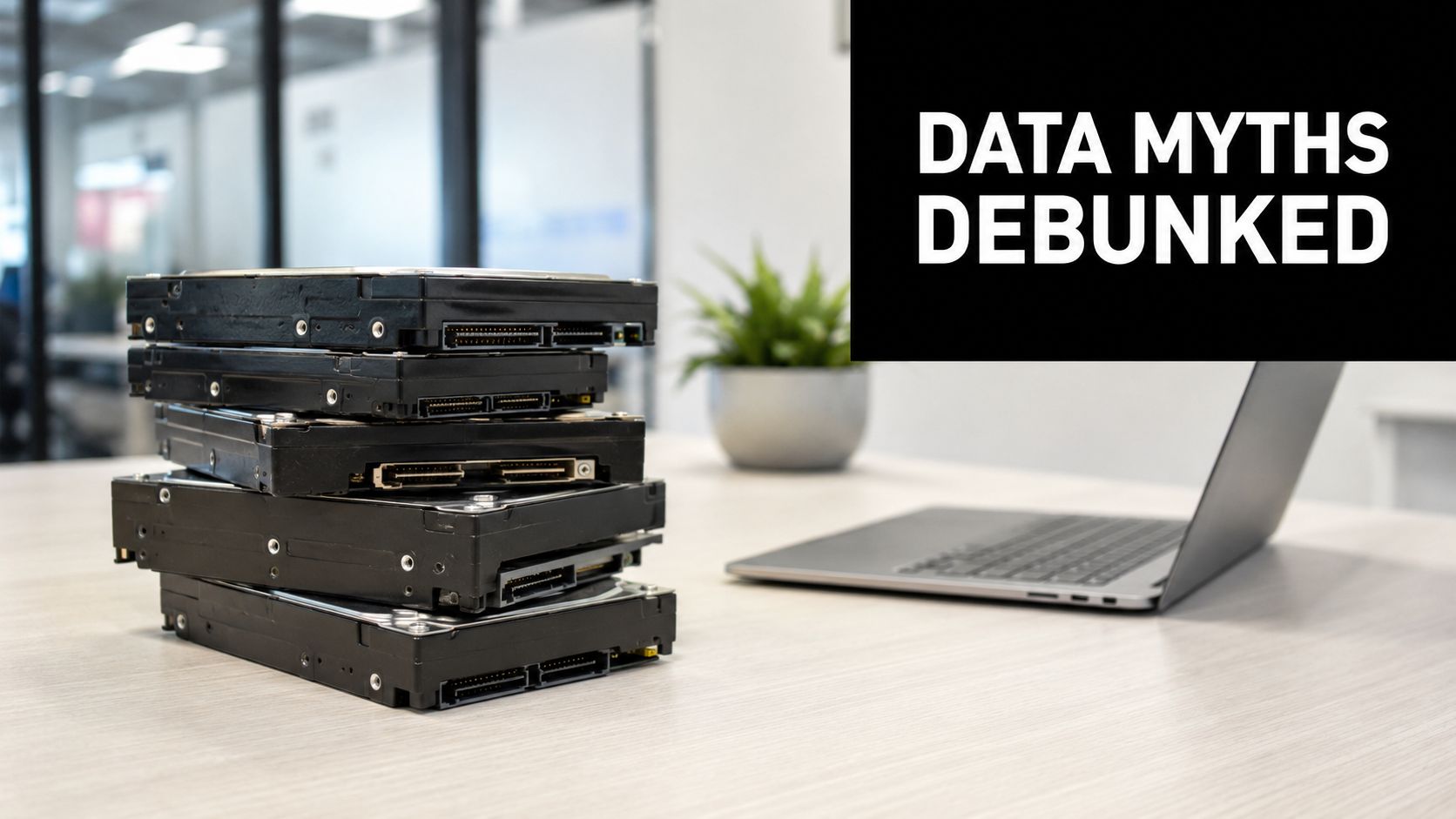
Why deleting a file doesn't solve the problem
The simplest analogy is a library book. Deleting a file is like tearing out the table of contents while leaving every page on the shelf. The directory entry changes, but the underlying content can still remain on the media.
Federal guidance puts it plainly. Simple file deletion is an ineffective disposal method because it only removes the reference to the file from the media's index, leaving the actual data on the disk. This data remains fully intact and can be easily recovered with standard forensic tools until it is properly overwritten or the media is destroyed, as outlined in these data destruction best practices from Student Privacy Policy Office guidance-508.pdf).
That's the gap between casual disposal and professional secure data destruction.
What secure destruction is actually trying to do
The goal isn't to make access inconvenient. The goal is to make recovery impractical or impossible.
That can involve logical sanitization, physical destruction, or both, depending on the device and the intended end state. If a laptop will be redeployed or donated through a corporate donation program, sanitization has to be verified. If a damaged drive is headed for end-of-life recycling, physical destruction is often the cleaner answer.
Here's the working standard organizations should follow:
- Identify the media. Hard drives, SSDs, backup tapes, phones, printers, copiers, and networking gear can all retain data.
- Choose the right outcome. Reuse requires validated erasure. End-of-life retirement may require shredding or pulverizing.
- Document the result. If you can't prove what happened, you haven't finished the job.
Deletion is a user action. Secure destruction is a controlled process.
Teams that need a practical benchmark for service scope usually start with providers offering secure data destruction services as part of a broader electronics recycling and IT equipment disposal workflow.
Where businesses get exposed
The most common failures aren't exotic. They're ordinary:
- Forgotten assets in storage from past office cleanouts
- Returned employee devices that were never processed through ITAD
- Broken hardware assumed to be harmless because it no longer powers on
- Peripheral equipment such as printers, copiers, and appliances with embedded storage
Secure data destruction works when organizations stop asking, “Can anyone use this device again?” and start asking, “Can anyone recover data from it?”
The Business Case for a Destruction Program
Leaders often approve secure data destruction only after a scare. That's the wrong timing. A formal destruction program works best when it's built before a rush move, hardware refresh, merger, or data center decommissioning event forces rushed decisions.
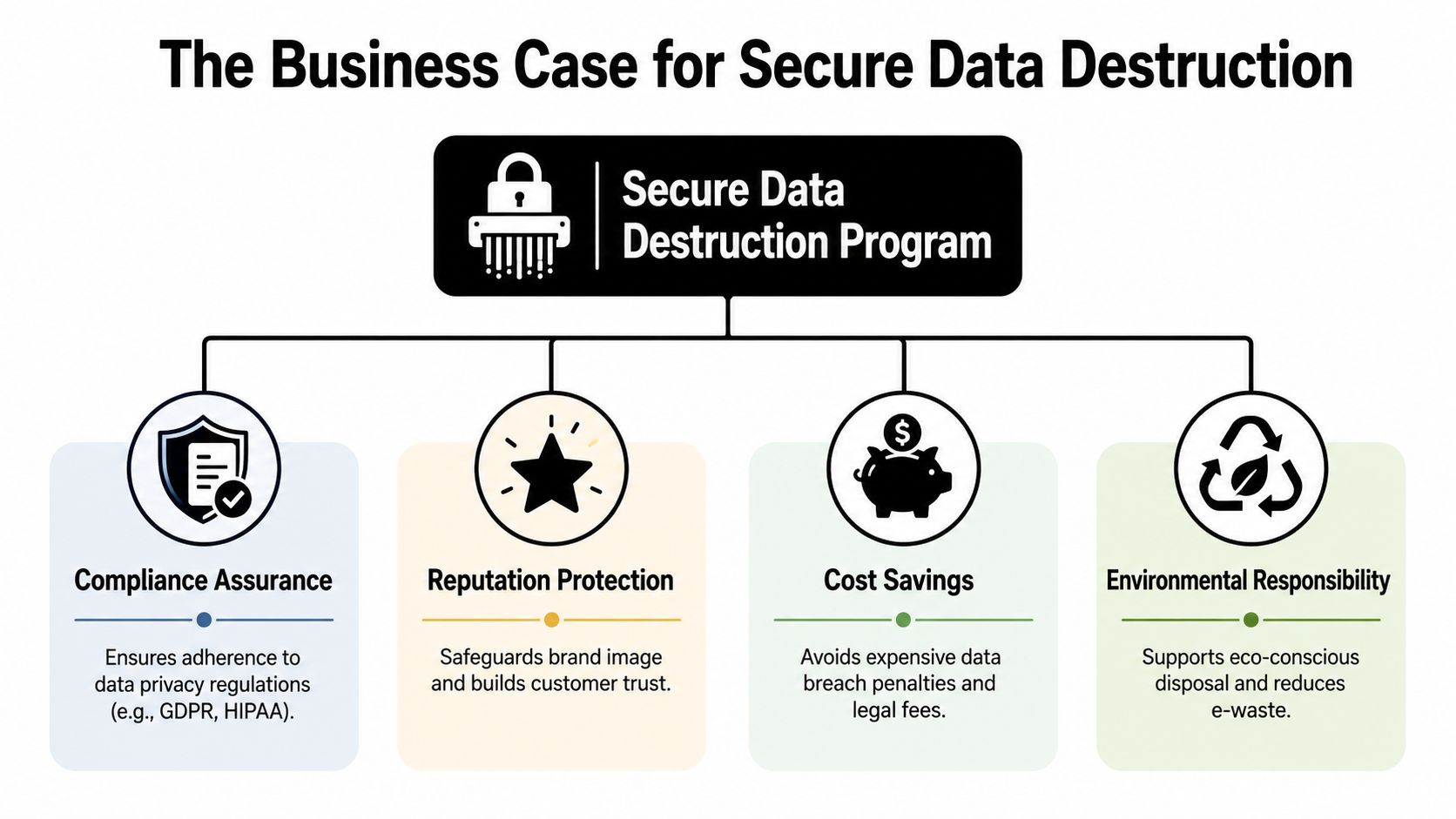
The business value is broader than security. A good program supports compliance, protects reputation, helps sustainability teams, and creates cleaner pathways for donation-based recycling or resale when equipment still has life left.
Risk mitigation comes first
The first return on investment is avoiding preventable exposure. A structured program separates data-bearing devices from general scrap, puts them into controlled handling, and removes the temptation to treat old equipment like surplus furniture.
That matters during laptop disposal, server retirement, and product destruction projects. It matters even more during office cleanout and facility cleanout work, where mixed material streams can blur the line between e-waste and sensitive assets.
Compliance gets easier when the process is repeatable
Regulatory requirements don't care whether your equipment was retired in a neat quarterly cycle or in a chaotic relocation. If your organization handles protected health information, financial records, customer data, student records, or confidential business files, you need a process that stands up to scrutiny.
A destruction program helps by creating consistency:
- Standard intake rules so every data-bearing asset enters the same workflow
- Clear decision paths for reuse, destruction, or recycling
- Auditable records that support legal, procurement, and internal audit teams
A useful way to think about this is that compliance can support expansion, not just defense. This case study on strategic growth through compliance shows why mature privacy operations often become an operational advantage.
Operational insight: The best destruction program is the one your facilities team, IT team, compliance lead, and sustainability manager can all follow without improvising.
Sustainability leadership is part of the opportunity
Secure data destruction and sustainable recycling are not competing goals. They should work together.
When organizations classify assets correctly, they can destroy what must be destroyed while channeling appropriate equipment into refurbishment, responsible computer recycling, or social enterprise recycling pathways. That improves internal ESG narratives and supports community-facing donation programs.
Value recovery improves when triage happens early
Not every asset should be shredded. Some should be remarketed, some donated, and some recycled for materials recovery. The key is sequencing.
A mature IT asset disposition program evaluates:
| Asset condition | Best path |
|---|---|
| Functional equipment with low residual risk | Reuse, refurbishment, or corporate donation programs |
| Equipment with failed storage but salvageable components | Part harvesting or responsible recycling |
| Sensitive media at end of life | Secure destruction |
| Mixed lots from decommissioning | Sorting, documented triage, and controlled disposition |
When businesses skip this triage, they usually make one of two mistakes. They destroy value they could have recovered, or they preserve media they should have eliminated.
Comparing Data Destruction Methods
The most useful framework for vendor conversations is NIST 800-88. It gives teams a common language for deciding how data-bearing media should be sanitized before reuse, transfer, or disposal.
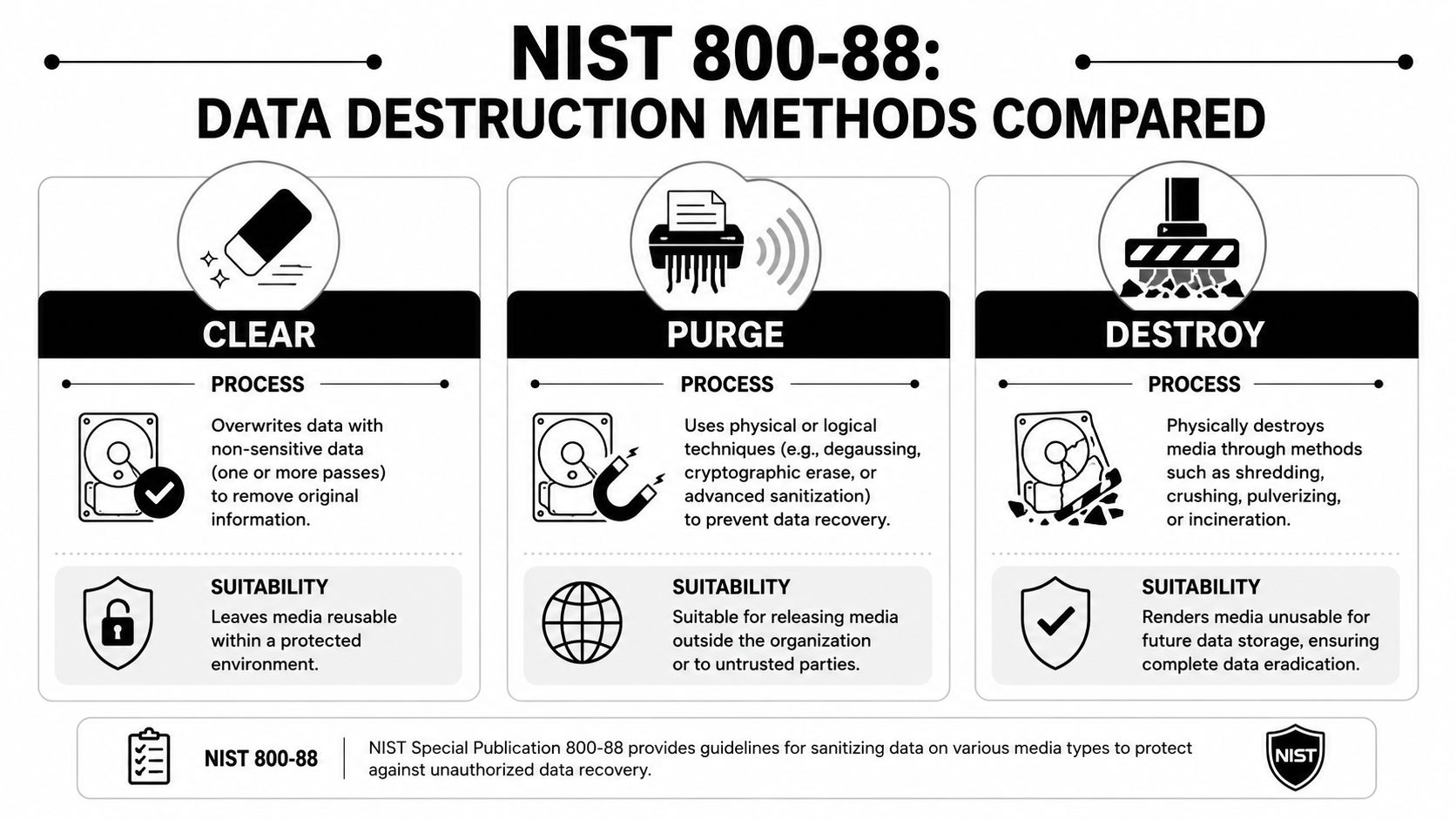
According to this explanation of current data destruction standards under NIST 800-88, the NIST Special Publication 800-88 defines three core sanitization types: Clearing (e.g., overwriting), Purging (e.g., degaussing to protect against lab attacks), and Destroying (e.g., shredding, pulverizing). Physical destruction is the only method that provides visual confirmation that the media is unusable.
Clear, purge, destroy in practical terms
Here's how these methods differ in real operations:
| Method | How it works | Best fit | Limitation |
|---|---|---|---|
| Clear | Software overwrites existing data | Reuse inside controlled environments | Requires process validation and media compatibility |
| Purge | Stronger sanitization, often including degaussing or secure erase | Assets leaving the organization but remaining intact | Media may still physically exist |
| Destroy | Shredding, crushing, or pulverizing | End-of-life media and high-risk data | No reuse of storage media |
Software wiping
Software-based overwriting is useful when equipment still has value and the organization wants resale, redeployment, or donation. That makes it relevant in laptop disposal programs, device refresh cycles, and some IT equipment disposal projects.
It only works when the process is verified. Running a quick format and calling it sanitized is not wiping. Proper clearing depends on the media type, the tool, and documentation of the result.
Degaussing
Degaussing disrupts magnetic media and can be effective in the right use case. It's more specialized than many teams expect, and it doesn't apply universally across all storage types.
For older magnetic media, it remains part of the conversation. For mixed asset streams, though, organizations often prefer methods that are easier to witness, document, and operationalize at scale.
Physical shredding
For drives that won't be reused, physical destruction is the most decisive option. It's especially strong in data center decommissioning, healthcare disposal workflows, and projects involving failed, unknown, or high-risk devices.
If the business has no intention of reusing the storage media, the cleanest answer is usually to destroy it and document the result.
That's why many teams standardize on secure destruction of hard drives for end-of-life storage media while reserving software erasure for equipment with a defined reuse path.
How to Select the Right Destruction Partner
Most vendor evaluations fail because buyers ask broad questions and get polished answers. “Are you secure?” and “Are you compliant?” don't tell you much. You need evidence, process detail, and documentation you can defend later.
The stakes justify the scrutiny. Historically, inadequate destruction practices led to major data breaches, prompting the creation of strict standards like NAID AAA. With the average U.S. data breach costing over $4.44 million, choosing a certified vendor who provides verifiable proof of destruction is a critical financial and security decision, as reflected in this summary on breach costs and certified destruction expectations.
The non-negotiables
Start with the basics. If a provider can't clearly answer these points, keep looking.
- Certification. Ask whether the vendor operates under NAID AAA requirements for the services you need.
- Insurance. Confirm liability coverage and ask what incidents are covered during pickup, transport, storage, and processing.
- Chain of custody. Require a step-by-step explanation from pickup to final destruction or recycling.
- Certificates. Ask for sample Certificates of Destruction and any related serialized reporting.
- Downstream transparency. Find out where material goes after destruction, especially for electronics recycling and sustainable recycling claims.
Questions worth putting into an RFP
An effective RFP should force specificity. Ask questions that reveal how the provider operates.
How are assets identified at pickup
Ask whether they log serial numbers, asset tags, quantities, or only broad weight totals.What happens to mixed loads
This matters during office cleanout, laboratory equipment disposal, and medical equipment disposal projects where not everything follows the same path.How is destruction verified
“We shred everything” isn't enough. You want to know how they document completion and what proof you receive.How are reusable assets separated from destruction candidates
This determines whether your organization can support donation-based recycling or value recovery without weakening security controls.
Vendor test: If the answer sounds easy, ask for the document that proves it.
A smart selection process also looks at operational fit. Can the provider handle recurring pickups, one-time purges, and larger decommissioning events? Can they support both business continuity and sustainability reporting? Can they work with procurement, legal, and facilities without creating bottlenecks?
For teams building a formal scorecard, these vendor selection criteria for ITAD and recycling programs help turn general concerns into practical buying requirements.
What good partners do differently
Strong destruction partners don't just remove equipment. They reduce ambiguity. They document exceptions, flag data-bearing devices that staff overlooked, and keep your organization from improvising under deadline pressure.
That's the difference between a haul-away vendor and a real ITAD partner.
Demystifying Chain of Custody and Certification
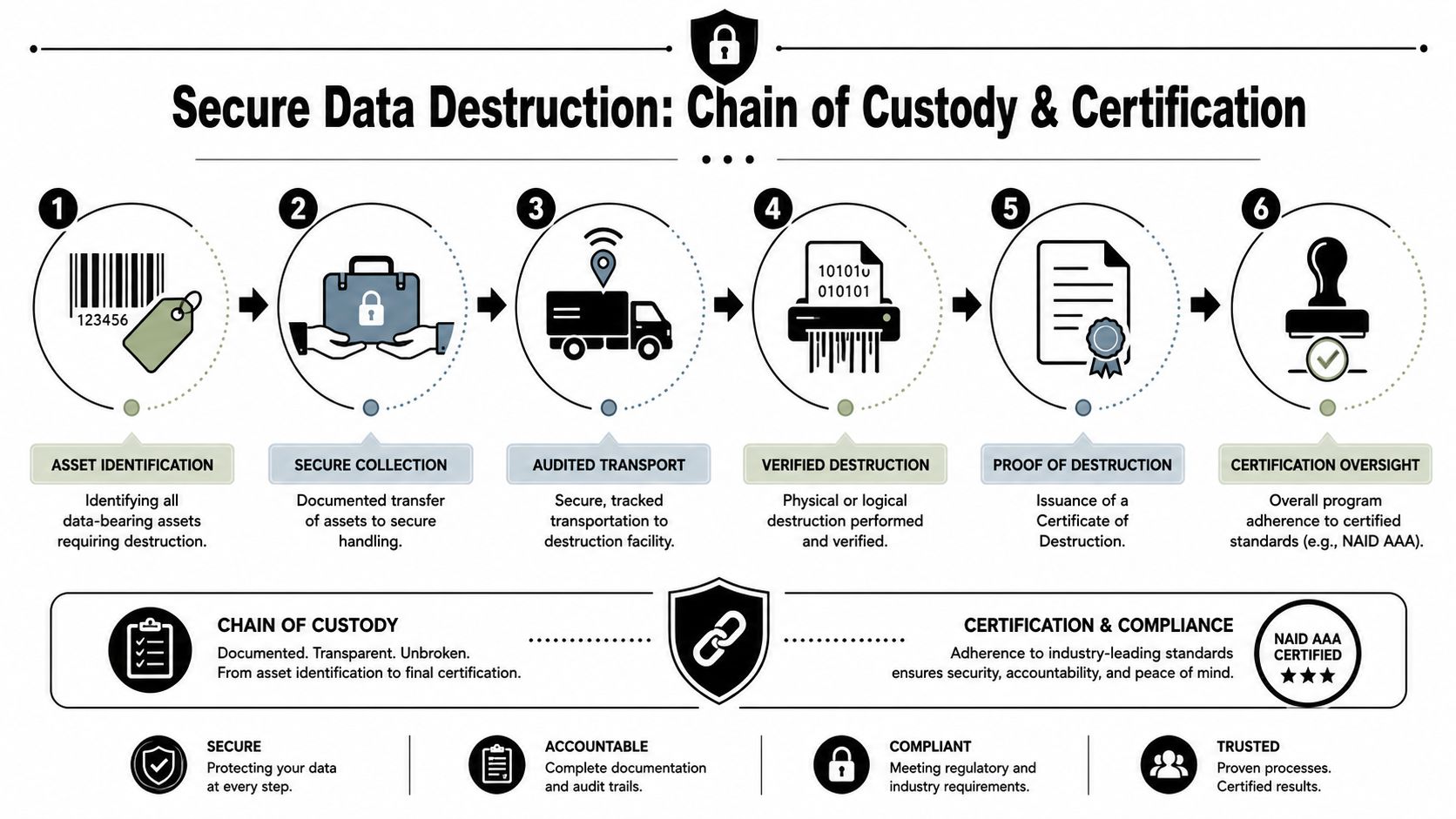
If secure data destruction is the control, chain of custody is the proof that the control held from beginning to end. That proof matters in audits, incident reviews, legal disputes, and internal compliance checks.
Without chain of custody, a destruction certificate has limited value. It tells you something happened. It doesn't prove that the specific assets you released were the assets destroyed.
What an unbroken chain looks like
A defensible process usually includes these stages:
- Asset identification with serial numbers, asset tags, or itemized counts
- Secure collection using locked containers, supervised handoff, or documented pickup
- Transport controls so custody doesn't disappear once the truck leaves your site
- Verified processing at an authorized facility or mobile destruction point
- Final certification tied back to the assets collected
A certificate should function as more than a receipt. It should support your records management, legal retention, and vendor governance obligations.
Why this matters operationally
Chain of custody protects against the two failures that cause the most trouble. First, assets can go missing between departments before pickup even occurs. Second, mixed loads can create confusion about what was recycled, what was destroyed, and what was still pending.
That's why mature organizations insist on discipline at handoff points.
A secure process isn't just about what happens in the shredder. It's about who touched the asset, when they touched it, and what record exists at each transfer.
What certification should tell you
The best documentation answers five questions clearly:
| Question | What the record should show |
|---|---|
| What assets were included | Itemized identifiers or documented counts |
| When custody changed | Pickup and processing dates |
| Who handled the material | Named vendor or authorized personnel |
| What happened to the media | Sanitized, destroyed, recycled, or remarketed |
| What proof exists | Certificate, logs, and related tracking records |
For internal stakeholders, that level of documentation reduces friction. Facilities gets a clear handoff. IT gets asset-level accountability. Compliance gets auditable records. Finance gets a basis for write-off and reporting.
Organizations that want to tighten their documentation workflows should review how chain of custody documentation supports ITAD governance, especially when pickups, secure data destruction, and sustainable recycling happen under the same program.
Implementing Your Secure ITAD Program with Reworx
The biggest mistake organizations make is waiting for a perfect internal cleanup before acting. You don't need a flawless inventory to begin. You need a controlled starting point and a partner that can help you turn loose hardware, scattered storage media, and aging electronics into a managed program.
A practical rollout is simple.
Start with a working inventory
Build a usable list, not a theoretical master file. Identify laptops, desktops, drives, servers, networking gear, phones, printers, medical equipment, lab devices, and anything else that may store data. Mark assets by likely outcome: reuse, donation, recycling, or destruction.
That first pass often reveals what the business has. It also surfaces the projects adjacent to data destruction, including computer recycling, office cleanout support, facility cleanout planning, data center decommissioning, and product destruction.
Match the workflow to the business
Not every asset needs the same treatment. Some devices belong in secure data destruction. Others fit donation-based recycling, value recovery, or sustainable recycling workflows. The right ITAD program sorts those paths early, then documents each decision so teams don't create risk by mixing reusable and end-of-life equipment.
For many organizations, that means creating one repeatable operating model for:
- Scheduled technology refreshes
- One-time purges and relocations
- Corporate donation programs
- Routine electronics recycling pickups
Make execution easy enough to repeat
The best program is one your staff will use. That usually means clear pickup procedures, documented chain of custody, straightforward certificates, and one point of coordination across IT equipment disposal, laptop disposal, hard drive shredding, and downstream recycling.
That's where a partner with both operational depth and a social enterprise mission stands out. Reworx Recycling helps organizations retire equipment responsibly while supporting environmental stewardship, technology donations, digital inclusion, and workforce development.
Businesses that want a secure, practical path for electronics recycling, IT equipment disposal, and donation-based recycling can explore Reworx Recycling to donate old equipment, schedule a pickup, or build a long-term partnership around secure data destruction and responsible ITAD.


















