If you're planning a server refresh, migrating line-of-business apps, tightening compliance, or cleaning up years of ad hoc software purchases, you're not alone. A lot of Atlanta business leaders are heading into 2026 with the same problem. Their technology stack still reflects decisions made under pressure, not a clear operating model.
That approach doesn't hold up anymore. In Metro Atlanta, IT decisions now affect growth, reporting, security, customer experience, and environmental responsibility at the same time. A solid plan for 2026 has to cover the full lifecycle, from procurement and implementation to retirement, secure data destruction, and sustainable electronics recycling.
Setting the Stage for Your 2026 Atlanta IT Strategy

Atlanta companies aren't planning in a vacuum. Metro Atlanta businesses preparing for 2026 are operating in a state that has ranked as #1 for Business for over a decade, which gives local firms broad access to vendors, logistics, and talent for cloud, cybersecurity, and managed services planning, as outlined by Georgia's business environment and enterprise planning priorities.
That matters because the old version of IT strategy was mostly reactive. Replace a firewall after an outage. Buy more laptops after a hiring push. Add storage when someone complains. In 2026, that style of management usually creates cost sprawl, weak governance, and avoidable disruption.
Why Atlanta businesses need a wider planning lens
The strongest Atlanta plans connect technology to operating reality. A manufacturer in the metro area may need tighter uptime and plant-floor connectivity. A healthcare practice may care more about data handling, device turnover, and vendor accountability. A multi-site professional services firm may be dealing with hybrid work, inconsistent internet reliability, and too many overlapping software subscriptions.
The common thread is that IT can't stay boxed inside the server room.
Practical rule: If a technology decision affects revenue, compliance, staffing, reporting, or customer delivery, it belongs in the business plan, not just the help desk queue.
Georgia's own enterprise IT posture is useful here because it frames technology around anticipating change, adopting emerging tools, and delivering modern digital services. Private-sector leaders should read that as a planning signal. The market is rewarding businesses that can modernize without losing control.
A smart local strategy also takes advantage of Atlanta's depth. The region gives businesses access to providers for managed security, cloud architecture, office relocations, data center decommissioning, secure data destruction, and IT asset disposition. But access alone doesn't create results. Leadership still has to choose what to standardize, what to retire, and what to phase in over time.
What changes in 2026 planning
For many companies, IT Strategy Planning for Atlanta Businesses in 2026 starts with one uncomfortable truth. You probably have more technical debt, more aging hardware, and more disconnected vendors than your budget model reflects.
That doesn't mean you need a giant transformation program. It means you need a disciplined one.
A useful local reference point is the broader discussion around Atlanta's digital economy growth and IT demand. The takeaway isn't that every business needs the latest platform. It's that Atlanta organizations increasingly need technology choices that support resilience, scale, and accountability.
A workable 2026 strategy should answer five basic questions:
- What must stay stable: Core systems that can't tolerate disruption.
- What must improve: Security, reporting, collaboration, or customer-facing workflows.
- What should be retired: Legacy hardware, duplicate software, and unsupported tools.
- What needs governance: Vendor access, data retention, endpoint control, and approvals.
- What needs an exit plan: Devices, storage media, and systems reaching end of life.
If those answers aren't written down, budget season usually turns into a negotiation between urgent requests and incomplete information.
Assess Your Current Technology Foundation
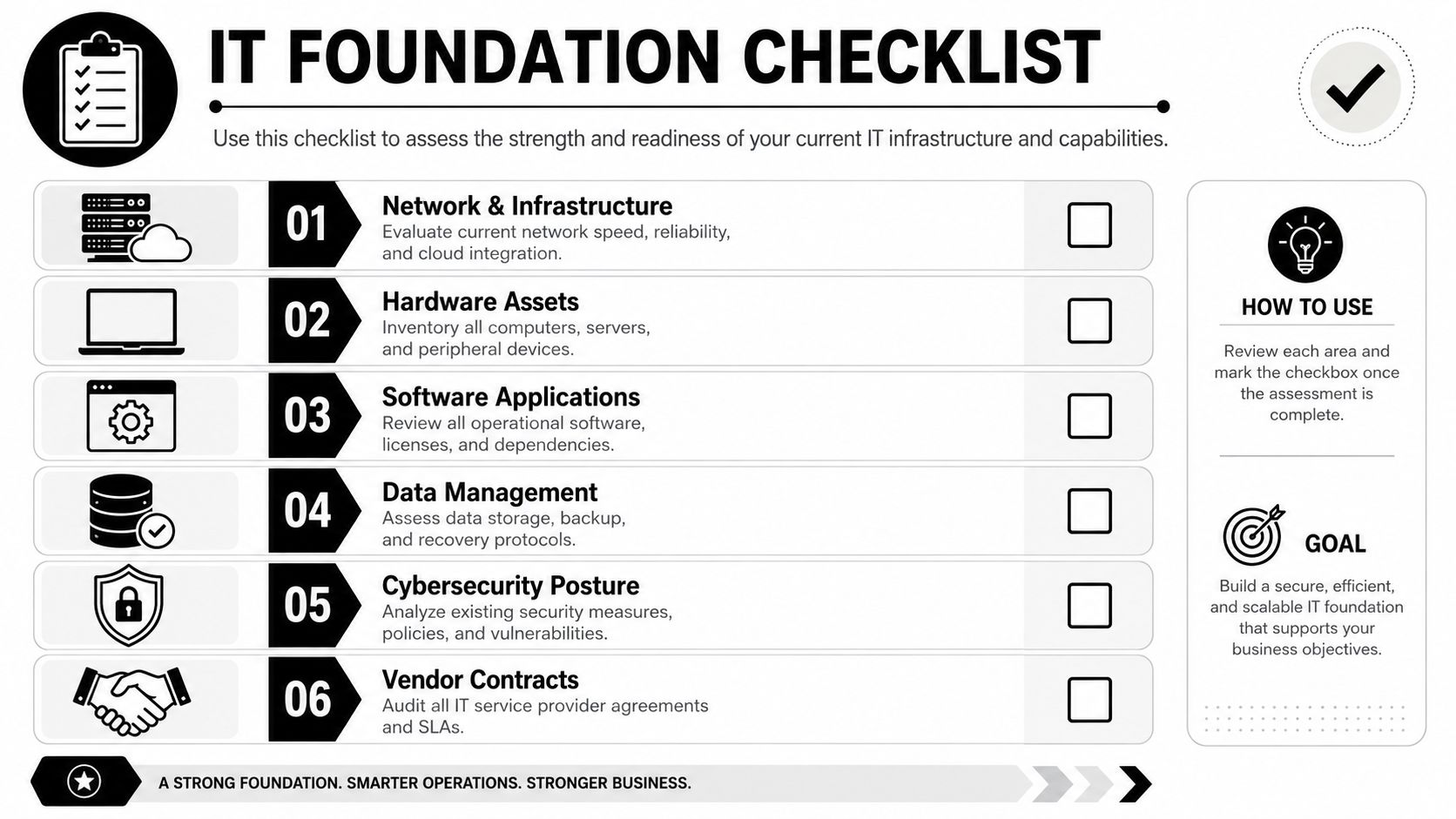
Most weak IT plans fail before budgeting starts. The problem isn't ambition. The problem is bad inventory, unclear ownership, and blind spots around dependency.
A proper assessment isn't just a spreadsheet of devices. It should tell you what you own, who uses it, what it costs to maintain, what breaks first, and what creates operational risk if it fails.
Build a baseline that leadership can trust
Start with a complete asset inventory. Include laptops, desktops, servers, networking gear, mobile devices, printers, backup appliances, and any specialty systems tied to operations. Then connect that hardware list to business use. Which systems support accounting, dispatch, patient records, scheduling, warehousing, customer service, or production?
Your software review should be just as strict. Many Atlanta companies are still paying for overlapping tools because one department bought Microsoft 365 add-ons, another adopted a niche SaaS platform, and a third kept the legacy application nobody wants to touch. You don't need perfect elegance. You do need clarity.
Use this audit structure:
Infrastructure review
Check network reliability, wireless coverage, internet redundancy, firewall health, remote access methods, and cloud dependencies.Application mapping
List business-critical applications, license owners, renewal dates, integrations, and unsupported versions.Device condition analysis
Separate stable devices from aging endpoints that are generating tickets, slowing staff, or creating security exposure.Data handling review
Document where sensitive data lives, how it's backed up, who can access it, and how long it stays in your environment.Vendor contract review
Pull managed service agreements, telecom contracts, copier agreements, support SLAs, and cloud billing terms into one file.
Look past the sticker price
A cheap device isn't cheap if it creates downtime, weakens security, or needs replacement earlier than expected. That's why your baseline needs total cost of ownership, not just purchase cost.
A short decision table helps:
| Area | Weak assessment habit | Better assessment habit |
|---|---|---|
| Hardware | Track only age | Track age, user impact, supportability, and replacement priority |
| Software | Count licenses | Map licenses to workflows, owners, and renewal risk |
| Security | Check tools installed | Check coverage, enforcement, exceptions, and exposure points |
| Vendors | Save invoices | Compare contract terms, support performance, and lock-in risk |
The best audit isn't the most detailed one. It's the one leadership can use to make a decision without guessing.
If you need a structure for capturing retirement status alongside active devices, this type of asset inventory management reference is useful because it forces teams to document custody, condition, and lifecycle stage instead of treating everything as though it were "in service."
What teams often miss
The biggest omissions are usually boring, which is why they get ignored.
- Shared devices: Conference room systems, spare laptops, and kiosk hardware often sit outside normal tracking.
- Department purchases: Tools bought on expense cards rarely make it into enterprise planning.
- Legacy dependencies: That one old workstation running a label printer or specialty application may be holding a process together.
- Retired-but-not-gone equipment: Closets full of old laptops and storage media still represent risk if they contain business data.
If your team can't identify what should be kept, upgraded, consolidated, or securely removed, every later planning decision becomes harder than it needs to be.
Align IT Objectives with Business Goals
Atlanta organizations are planning in a more measurable environment now. The city's broader planning culture has become increasingly data-driven, and Invest Atlanta's use of GIS is a clear example of how digital platforms support decision-making, reporting, and governance, as described in this overview of Atlanta GIS and community impact.
Business leaders should take the same lesson into 2026. Technology decisions shouldn't stop at "keep the systems running." They need to support visibility, accountability, and measurable business outcomes.
Translate company goals into IT targets
The mistake I see most often is a plan full of technical activity with no business translation. Leadership hears about endpoint management, identity controls, cloud migrations, and storage optimization. What they need to hear is what those projects change for the business.
A few practical translations make the difference:
- If the business goal is faster onboarding, IT's target may be standardized device setup, role-based access, and fewer manual approvals.
- If the goal is cleaner financial reporting, IT may need tighter system integration, better data governance, and fewer spreadsheet workarounds.
- If the goal is opening or supporting additional locations, IT may need repeatable network design, stronger remote support, and standardized procurement.
Use metrics leadership understands
Technical teams often over-report activity and under-report outcomes. Tickets closed isn't a strategic metric. Neither is the number of software updates applied. Those are operational signals.
Leadership usually cares about a narrower set of questions:
- Are systems available when staff and customers need them?
- Are response times improving or getting worse?
- Is security becoming more controlled?
- Are costs becoming more predictable?
- Are teams getting better information from the systems they use?
That framing changes planning conversations. It also helps when you're trying to justify investments in analytics, governance, workflow automation, or secure collaboration tools.
A business goal without an IT translation becomes wishful thinking. An IT project without a business goal becomes overhead.
Keep the governance layer visible
In 2026, alignment also means governance. If your company is collecting more data, integrating more systems, or using more cloud tools, someone needs clear ownership over permissions, data retention, vendor accountability, and reporting standards.
That's especially important in Atlanta companies that have grown through acquisition, rapid hiring, or location expansion. Those businesses often inherit fragmented permissions, duplicate tools, and reporting conflicts. The fix isn't more software by default. Sometimes the fix is fewer platforms, clearer policies, and tighter operational discipline.
The strongest plans tie every major initiative to one of three business outcomes:
| Business outcome | IT contribution |
|---|---|
| Growth | Scalable systems, standard rollout models, vendor capacity |
| Compliance | Stronger controls, better retention practices, auditable processes |
| Service delivery | More reliable systems, faster support, cleaner workflows |
When those links are explicit, budget discussions become easier and project prioritization becomes less political.
Develop a Strategic Budget and Procurement Plan
A budget reveals whether a strategy is real. If the plan covers cloud migration, endpoint refreshes, secure collaboration, managed support, and compliance work, but the budget only funds emergency replacements, the organization isn't planning. It's postponing.
The right budgeting model for 2026 is value-based, not price-based. Low upfront cost can still produce high long-term expense when devices fail early, software overlaps multiply, or support demands spike because tools were chosen without lifecycle thinking.
Budget the full operating model
Your budget should reflect the core categories that drive technology performance:
- Core hardware and refreshes: User devices, servers, networking, and peripherals.
- Software and cloud services: Subscriptions, renewals, identity platforms, backup tools, and collaboration suites.
- Security controls: Endpoint protection, monitoring, logging, and policy enforcement.
- Support and expertise: Managed services, specialist consulting, migration help, and user support.
- Project work: Site upgrades, system rollouts, line-of-business modernization, and decommissioning.
Many companies budget the first two items and underfund the rest. That's where projects stall. Staff end up using old devices longer than planned, vendors get selected on purchase price instead of support quality, and cleanup work gets ignored until a move, audit, or breach risk forces action.
Procurement should reduce future friction
Good procurement doesn't chase the cheapest quote. It reduces complexity later.
Ask tougher questions before you sign:
| Procurement question | Why it matters |
|---|---|
| Can this tool scale with our next phase of growth? | Prevents near-term replacement |
| Who owns implementation and support? | Avoids handoff confusion |
| What data does this system create or store? | Affects compliance and exit planning |
| How hard is it to migrate away later? | Limits lock-in |
| What happens at end of life? | Exposes hidden logistics and disposal costs |
Lifecycle discipline begins with these considerations. If you're buying laptops, servers, or network gear without considering residual value, take-back options, secure destruction requirements, or removal logistics, you're only budgeting half the decision.
One useful mindset is to treat end-of-life handling as part of procurement quality. A device that fits your environment, holds value reasonably well, and can be retired cleanly is often the better business choice than a cheaper model that creates disposal headaches later. Even examples from the refurbished market, such as business-ready desktop computer options, can help procurement teams think more clearly about reuse value, standardization, and practical lifespan.
Phase spending instead of creating budget shock
Not every investment needs to happen at once. A stronger pattern is to separate immediate risk reduction from longer modernization work.
For example, an Atlanta firm might prioritize identity controls, backup reliability, and the replacement of the oldest endpoints first. After that, it can address application rationalization, site upgrades, or broader infrastructure redesign. Phasing keeps the business moving while avoiding the common mistake of launching too many IT changes at the same time.
The test is simple. If a budget only covers acquisition but ignores deployment, support, and retirement, it isn't complete.
Fortify Your Strategy with Security and Sustainability
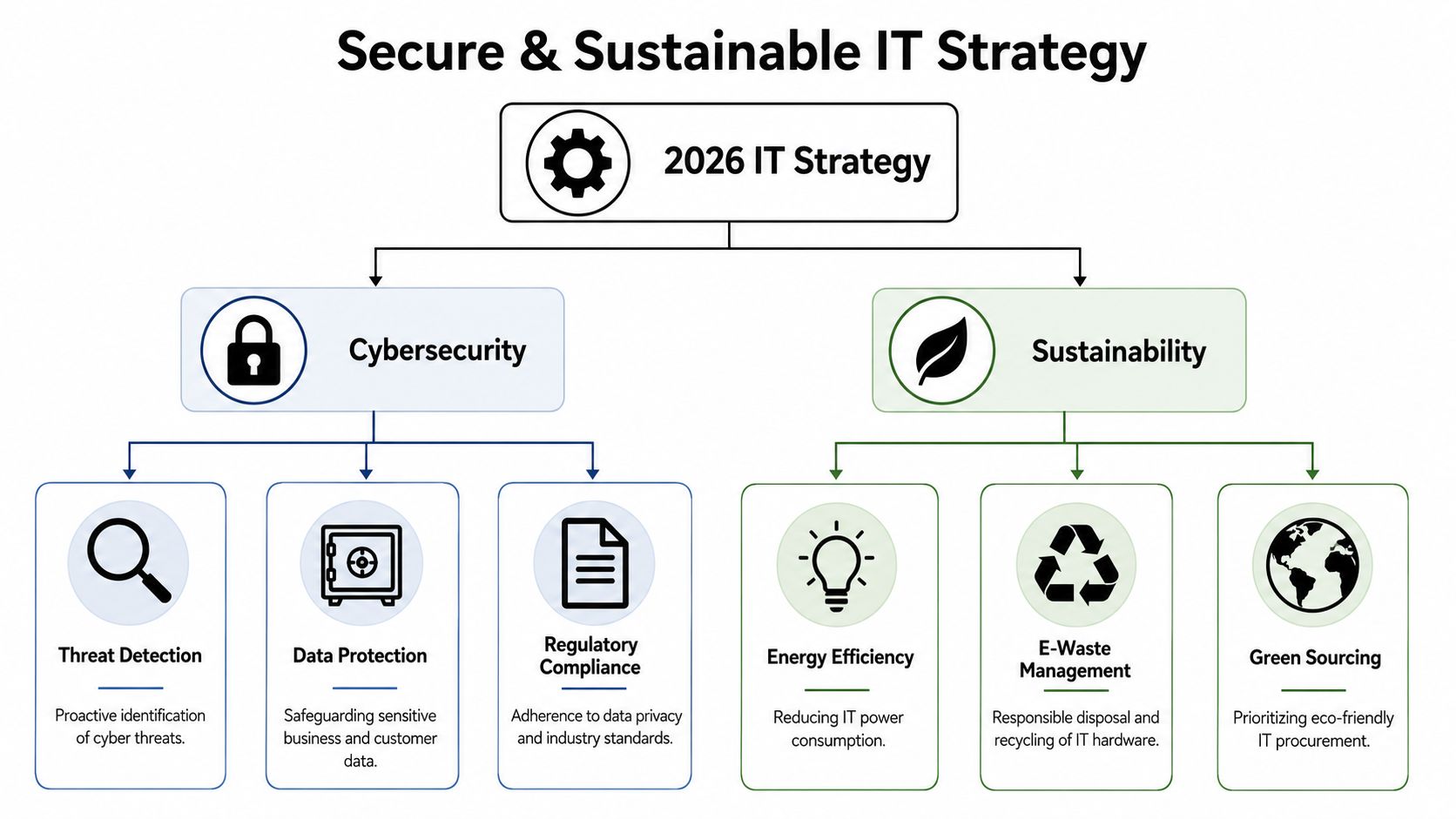
A lot of companies still treat cybersecurity and sustainability as separate conversations. One sits with the security team. The other sits with facilities, compliance, or CSR leadership. In practice, they overlap more than most plans admit.
An unmanaged retired laptop is both a data risk and an environmental problem. A rushed server room cleanup can create chain-of-custody issues, disposal mistakes, and poor documentation. If your 2026 strategy doesn't connect those dots, it leaves a gap in governance.
Security isn't just about active systems
Most security plans focus on live environments. That's necessary, but incomplete.
Sensitive business data doesn't stop mattering when a device leaves a desk. Storage media in a closet, failed drives in a cabinet, old laptops waiting for pickup, and decommissioned networking gear can all create risk if custody and destruction procedures aren't formalized.
Atlanta businesses should also expect tighter expectations around governance and continuity. A major planning gap in many 2026 strategies is end-of-life device planning. Existing guidance often covers audits and cloud changes but misses the operational and compliance risks of decommissioning hardware. A stronger approach includes reverse logistics and secure destruction from the start, as noted in Atlanta-focused 2026 IT planning guidance.
Operational warning: If you don't know how retired devices are stored, transported, wiped, destroyed, or documented, you don't have full control of your security program.
That same logic applies to higher-risk environments. Healthcare groups, finance teams, schools, legal offices, and distributed employers all need a documented path for laptop disposal, office cleanout activity, product destruction, and secure data destruction tied to policy, not improvisation.
Sustainability belongs in the risk model
Sustainability isn't a side benefit anymore. It's part of responsible IT management.
When companies include electronics recycling, computer recycling, IT equipment disposal, and broader IT asset disposition (ITAD) in strategic planning, they improve more than environmental outcomes. They also improve space planning, chain of custody, internal accountability, and readiness for moves, refresh cycles, and audits.
A practical sustainable IT model usually includes:
- Procurement discipline: Buy with longevity, repairability, and retirement options in mind.
- Lifecycle tracking: Know which assets are active, stored, pending refresh, or ready for disposition.
- Secure retirement procedures: Define who approves release, who handles media, and what documentation is retained.
- Donation and reuse pathways: Evaluate which systems can support internal redeployment or donation-based recycling instead of immediate destruction.
- Responsible downstream handling: Ensure e-waste management aligns with your environmental standards and reporting needs.
Security leaders also have to account for newer tooling pressures, especially where AI is expanding access patterns and increasing the need for governance clarity. For teams reviewing that side of the equation, solutions for CISO AI security challenges can be a useful reference because the issues are no longer just technical. They're operational and policy-driven.
Treat disposal partners like risk partners
Vendor selection for end-of-life services deserves the same scrutiny you give cloud or cybersecurity vendors. Ask about custody controls, reporting, pickup processes, media handling, and support for multi-site pickups or data center decommissioning. A checklist like this guide to vendor selection criteria is useful because it reframes disposal from an afterthought into a managed business process.
The bigger point is simple. A company can't claim strong governance if its retired equipment process is undefined. Secure and sustainable ITAD is part of the strategy, not cleanup after the strategy.
Execute and Measure Your 2026 Implementation Roadmap
Execution usually breaks down for one of two reasons. The plan is too vague to manage, or it's so overloaded that nobody can sustain momentum. In 2026, simpler plans tend to win because they force leadership to pick what matters most.
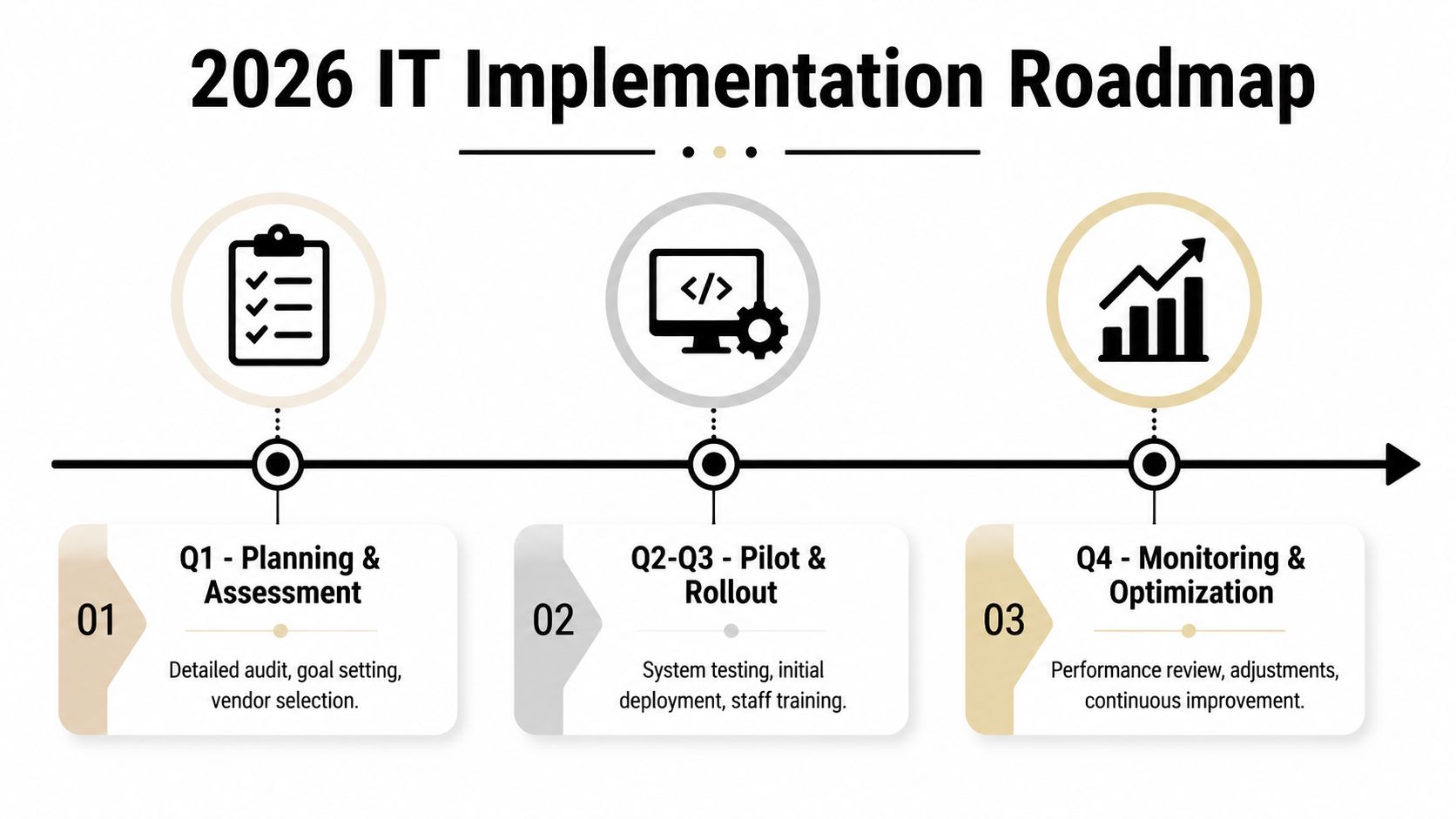
Expert guidance cited by Ntiva found that strategic IT plans with 20 to 40 elements had only a 22% completion rate, while simpler plans performed better, especially when teams used quantifiable KPIs and a weekly-to-quarterly execution cadence, according to this 2026 strategic IT planning guidance.
Keep the roadmap tight
The best implementation roadmaps usually focus on a small set of high-impact initiatives. For many Atlanta businesses, that means choosing from priorities like endpoint refresh, identity and access control, network reliability, backup improvement, software consolidation, cloud cleanup, or end-of-life asset removal.
A practical roadmap often looks like this:
Establish the baseline
Confirm asset inventory, system owners, support gaps, contract exposures, and known security weaknesses.Define success measures
Use KPIs leadership can understand, such as uptime, response times, security improvement, and cost predictability.Launch in phases
Pilot changes where possible. Don't roll every major system adjustment out at once.Review quarterly
Check what shipped, what stalled, what changed, and what no longer deserves funding.
Give every initiative an owner
Roadmaps fail when everyone supports the plan in theory and no one owns it in practice. Each initiative should have one accountable owner, one executive sponsor, and one review cadence. Shared ownership sounds collaborative, but it often creates delay.
A short execution table helps keep accountability visible:
| Initiative type | Primary owner | Review focus |
|---|---|---|
| Security control rollout | IT or security lead | Coverage, exceptions, user impact |
| Device refresh | IT operations or infrastructure lead | Deployment pace, retirement backlog |
| Software consolidation | IT plus department owner | Adoption, overlap removal, license control |
| ITAD and disposal program | IT, facilities, compliance, or operations | Custody, documentation, pickup timing |
Keep the plan short enough that your team can still talk about it from memory. If it requires constant translation, it probably includes too much.
Measure progress without creating reporting theater
The point of KPIs isn't to fill a dashboard. It's to support decisions. If a pilot rollout increases support load, leadership should know. If new controls reduce friction in one group and create bottlenecks in another, that should trigger adjustment.
Some of the most useful KPI categories are straightforward:
- Service reliability: Are key systems staying available?
- Security posture: Are controls becoming more consistent?
- User experience: Are response and support times improving?
- Financial discipline: Are technology costs becoming more predictable?
- Lifecycle closure: Are retired assets being removed, documented, and processed on time?
Documentation matters here too. If your company is retiring devices during a refresh, keep reporting aligned with compliance and internal audit needs. A resource on IT compliance reporting can help teams think more clearly about evidence, records, and disposition documentation as part of execution, not an afterthought.
As your business implements its 2026 roadmap, don't ignore the final stage of the lifecycle. Old endpoints, storage media, and surplus hardware need a secure, documented path out of the environment. That includes laptop disposal, facility cleanout, medical equipment disposal, laboratory equipment disposal, product destruction, and broader sustainable recycling practices where appropriate. For Atlanta organizations trying to build a mature plan, execution ends only when the asset is securely retired and responsibly handled.
If your organization is upgrading systems, clearing out stored hardware, or planning a broader IT refresh, Reworx Recycling can support the last mile of the lifecycle through donation-based recycling, secure data destruction, electronics recycling, and pickup coordination. For Atlanta businesses that want a practical partner for IT equipment disposal, office cleanout projects, corporate donation programs, and social enterprise recycling, this is a strong way to reduce risk while supporting community impact.